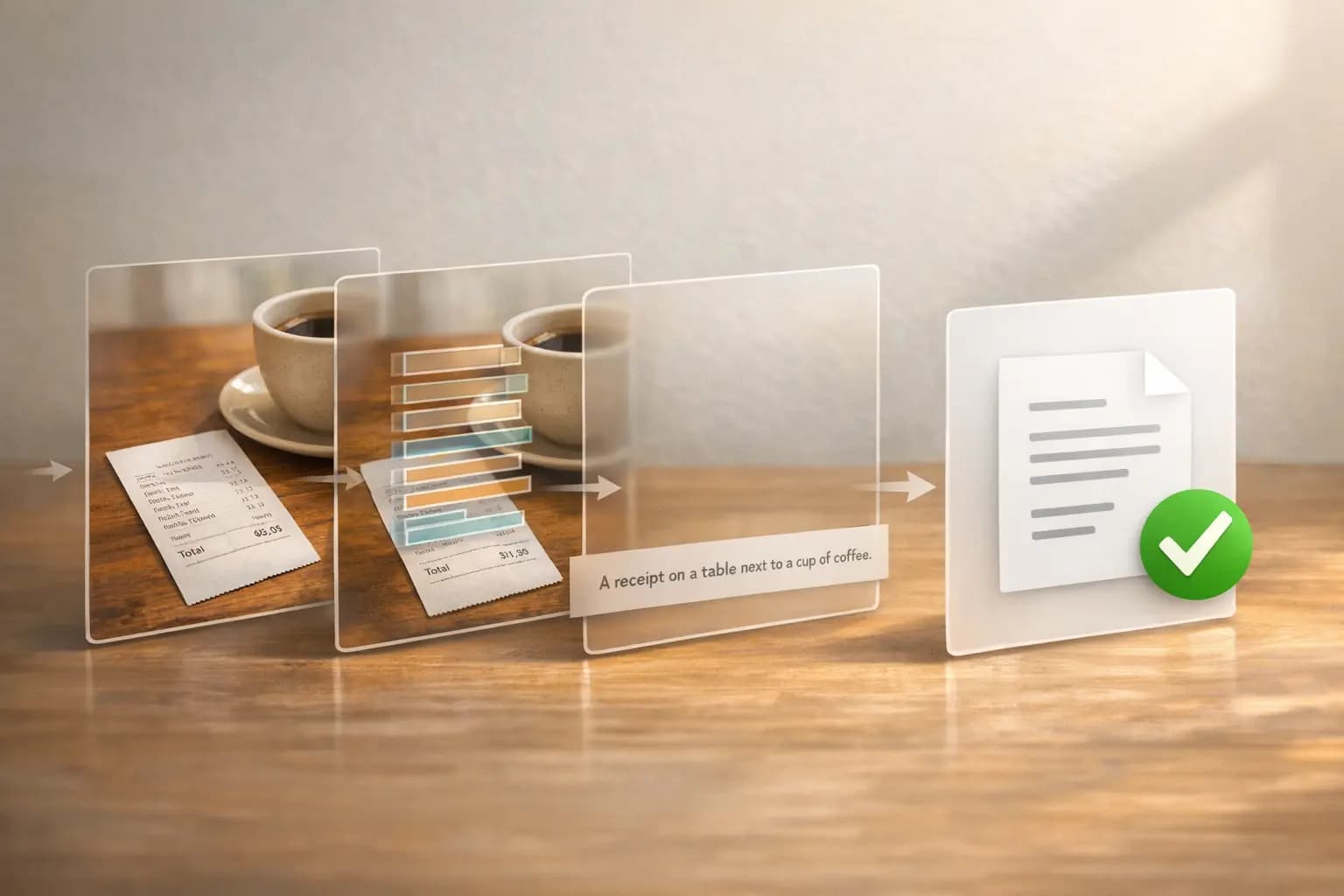
画像テキスト変換AIの仕組み:OCRとキャプション生成
画像テキスト変換AIの仕組みを解説します。OCRは正確なテキストを抽出し、キャプション生成はシーンを説明します。パイプライン・モデル・APIMartを使った統合のヒントを紹介します。
画像テキスト変換AIは、2つの主要技術を使って画像をテキストに変換します。正確なテキスト抽出を行うOCR(光学文字認識)と、視覚的要素を説明する画像キャプション生成です。これらのシステムはECサイト・文書デジタル化・アクセシビリティツールで広く活用されており、時間の節約とコスト削減に貢献しています。
主なポイント:
- OCR はレシートや標識などの画像から正確なテキストを抽出します。
- 画像キャプション生成 はシーンの自然言語による説明を生成します。
- MicrosoftのGITなどの最新モデルは、より高度なコンテキスト理解のためにこれら両方の機能を組み合わせています。
- 活用例として、商品タグ付けの自動化、文書の構造化フォーマットへの変換、視覚障がい者支援などがあります。
開発者向けには、APIMartのようなプラットフォームが500以上のAIモデルをサポートするAPIを通じて統合を簡素化しています。画像の前処理(傾き補正やノイズ除去など)は精度を大幅に向上させ、CER・WER・BLEUなどの指標はパフォーマンス評価に役立ちます。適切な検証とエラー処理により、大規模な運用でも信頼性の高い出力が得られます。
ローカルAIの始め方:画像テキスト変換ワークフロー
画像テキスト変換 vs. 画像キャプション生成
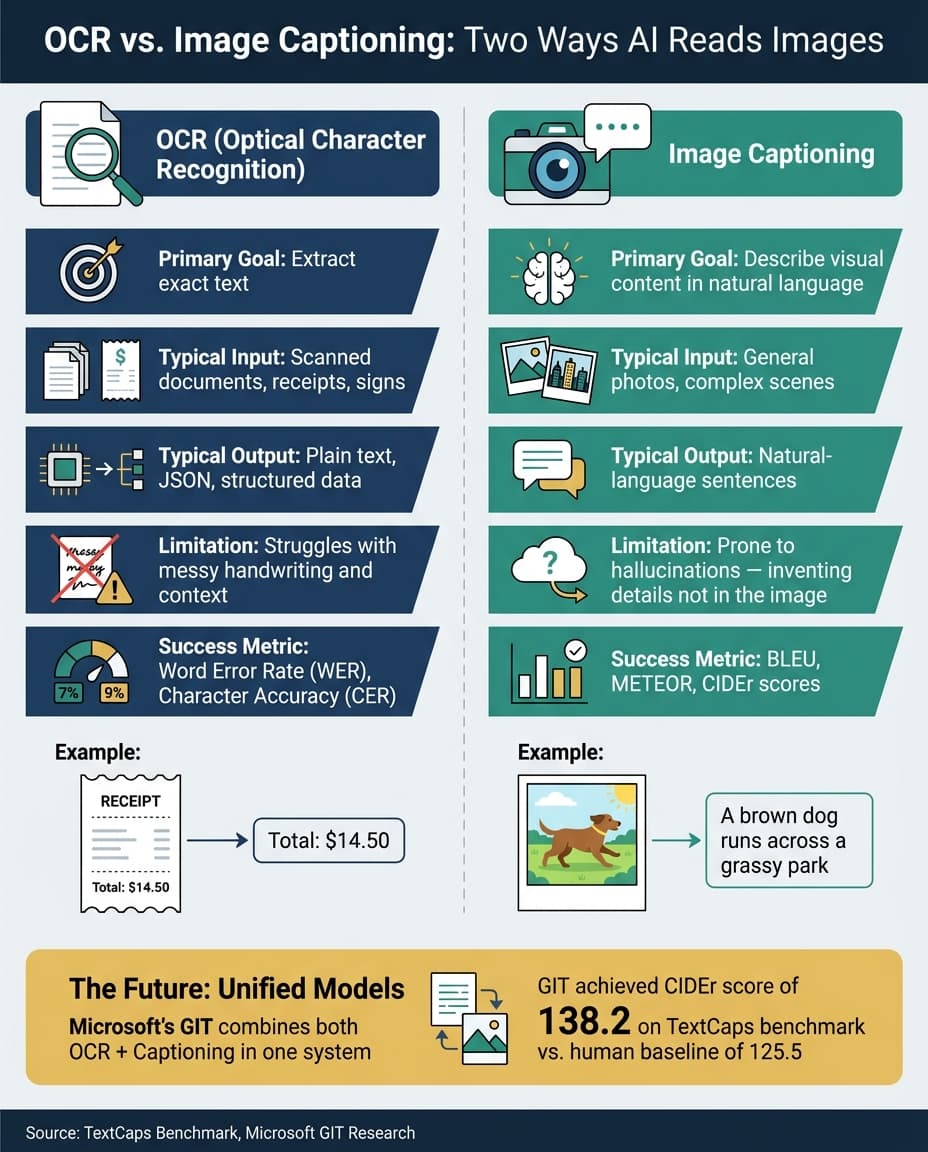
OCRと画像キャプション生成は一見似ているように思えますが、用途はまったく異なります。OCRは画像からテキストを文字通りに抽出することに焦点を当て、キャプション生成は視覚的なコンテキストを解釈して何が起きているかを説明します。それぞれの仕組みと違いを詳しく見ていきましょう。
OCRの仕組み
OCR(光学文字認識)は精度が命です。画像に写っている正確な文字を識別・抽出します。たとえばレシート・街の標識・手書きのメモをスキャンすると、OCRは検出したテキストをそのまま返します。「Total: $14.50」と表示されたレシートであれば、その文字列がそのまま出力されます。
OCRは複数ステップのパイプラインで動作します。まず画像内のテキストを含む領域を検出し、次に個々の文字を認識して構造化された確定的な出力を生成します。請求書の処理や印刷文書のデジタル化など、高い信頼性が求められるタスクに適しています。
画像キャプション生成の仕組み
一方、画像キャプション生成は単なる文字の読み取りを超えて「解釈」を行います。キャプションモデルは、画像内の物体・それらの関係・シーン全体を説明する自然言語の記述を生成します。Googleの研究者Oriol Vinyalsはこう説明しています:
「説明文は、画像に含まれる物体を捉えるだけでなく、それらの物体が互いにどう関係しているか、その属性や行動も表現しなければならない。」 [7]
これらのモデルは視覚情報を抽出し、説明的な出力を生成します。このプロセスはエンコーダ・デコーダアーキテクチャに基づいています。Vision Transformerのようなビジョンエンコーダが画像を解析して特徴表現に変換し、テキストデコーダがクロスアテンションを使って自然言語の説明をステップごとに生成します [6]。
OCR vs. キャプション生成:比較表
主な違いをわかりやすく比較します:
| 特徴 | OCR(テキスト抽出) | 画像キャプション生成 |
|---|---|---|
| 主な目的 | 正確なテキストを抽出 [5] | 視覚的コンテンツを説明 [6] |
| 典型的な入力 | スキャン文書・レシート・標識 [5] | 一般的な写真・複雑なシーン [6] |
| 典型的な出力 | プレーンテキスト・JSON・構造化データ [5] | 自然言語の文章 [7] |
| 弱点 | 乱雑な手書き文字やコンテキストが苦手 [9] | 幻覚(画像にない詳細を作り出す)が起きやすい [2] |
| 評価指標 | Word Error Rate (WER)・文字精度 [3] | BLEU・METEOR・CIDEr スコア [7] |
統合モデルの台頭
最新技術はこれら2つのタスクの境界を曖昧にしつつあります。たとえばMicrosoftのGIT(Generative Image-to-text Transformer)は、両方の機能を1つのシステムに統合しています。別々のモジュールを必要とせず、シーン内のテキストを読み取りながら全体的な視覚コンテキストを説明できます。TextCapsベンチマークでは、GITはCIDErスコア138.2を達成し、人間の評価者のベースライン125.5を上回りました [4]。この進歩は、これらのシステムがどこまで進化したか、そして次にどこへ向かうかを示しています。
OCRパイプラインの仕組み
OCRは単一ステップの操作ではありません。相互に連携した一連のステージで構成されており、すべてのステップが最終結果の精度に直接影響します。これらのステージを分解することで、生の画像がどのように使いやすい構造化データに変換されるかを理解できます。
画像の前処理
このステップは、テキストが認識される前に生の画像をクリーンアップすることに集中します。影・傾いたテキスト・ぼやけ・コントラスト不足といった一般的な問題に対処します。二値化(画像を白黒に変換)・傾き補正(傾いたテキストを水平に)・ノイズ除去(不要なノイズや圧縮アーティファクトを除去)・歪み補正(特にスマートフォンカメラによる遠近法の歪みを修正)などの技術が標準的に使われます。
なぜこれほど重要なのでしょうか?適切な前処理によりOCR精度が10〜15パーセントポイント向上することが研究で示されています [11][12]。実際、優れた前処理パイプラインはOCRモデル自体よりも重要な場合があります。
「凡庸な認識エンジンに高品質な前処理パイプラインを組み合わせると、未処理の画像を受け取る最先端の認識エンジンを上回ることが多い。」- Lido [12]
最良の結果を得るには、入力画像が少なくとも300 DPIであることを確認してください。画像品質の低さはOCR失敗の主な原因であり、本番環境の問題の半数はこれが原因です [13]。
画像のクリーンアップが完了したら、次のステップはテキストの識別と認識です。
テキストの検出と認識
このステージは2つの部分に分かれます:検出(テキストがどこにあるかを見つける)と認識(テキストが何と書いてあるかを判断する)。
現代のOCRシステムは、EASTやCRAFTなどの高度なディープラーニングモデルを使ってテキスト領域を検出します。これらのモデルは、きれいな横書きテキストから曲線状・回転したテキストまで対応できます。認識については、畳み込みニューラルネットワーク(CNN)と再帰モデルを組み合わせることで、多様なフォント・手書き文字・破損した文書にも対応できます [10][12][13]。単純なテンプレートマッチングからVision-Language ModelsへのOCR技術の進化が、精度と汎用性の向上に大きく貢献しています。
| OCRの世代 | アーキテクチャ | 主な利点 |
|---|---|---|
| 第1世代 | Tesseract(旧来型) | 高速・無料・CPU互換 |
| 第2世代 | ディープラーニング(CRAFT + CRNN) | 回転・曲線テキストに効果的 |
| 第3世代 | エンドツーエンドTransformer | レイアウトの整合性を維持 |
| 第4世代 | マルチモーダルVLM | テキスト理解と視覚コンテキストを統合 |
初期認識の後、結果はさらに改良してエラーを修正し、データを適切にフォーマットする必要があります。
後処理と出力
生のOCR結果は完璧ではなく、"0"と"O"のような文字を混同することがあります。これを修正するために言語モデルと辞書が適用されます。これらのツールはコンテキストを使って曖昧さを解消し、精度をさらに**3〜8%**向上させます [12]。
ドメイン固有のタスクでは、出力が期待されるフォーマットに合致しているかを確認するためにバリデーションルールを適用できます。これは特にVision-Language Models(VLM)を使用する際に重要で、VLMはコンテキスト的に妥当だが誤った変更を加えることがあります。たとえばVLMが合計を$42.50から$45.20に誤って変更することがあります——もっともらしいですが間違いです [14]。
最終的に、処理されたデータは機械可読フォーマットに構造化されます。一般的な選択肢には、バウンディングボックスの座標と信頼スコアを含むJSON、または認識されたテキストが元の画像に重ねられた検索可能なPDFがあります。エラー管理のために、信頼度の低い結果にフラグを立てて人間のレビューに回すことで、大規模な運用でも精度と信頼性を維持できます [12][14]。
画像キャプション生成モデルの仕組み
画像キャプション生成モデルはOCRとは異なるアプローチを取ります。OCRが画像から正確なテキストを抽出するのに対し、キャプション生成モデルは視覚的なコンテンツを解釈し、自然言語で説明的なナレーションを生成します。このプロセスはより複雑で、相互に連携した3つのステージに分けられます。
視覚特徴の抽出
最初のステップは、画像をテキスト処理のトークンのような役割を果たす固定サイズのパッチに分割することです。**Vision Transformer(ViT)**がこれらのパッチを処理し、高次元の埋め込みベクトルに変換します。次に各パッチの空間的な位置を示すための位置エンコーディングが追加されます。
「パッチは画像の『トークナイザー』です。テキストをトークンに分割するように、画像をパッチに分割します。これにより2次元の空間構造がTransformerで処理できるシーケンスに変換されます。」- Yi Wang、著者・開発者 [6]
このパッチレベルの処理により、手が物体とどのように相互作用するかなどの空間的な関係が保持されます。スクラッチからモデルを訓練する代わりにCLIP ViT-B/32のような事前訓練済みエンコーダを使用すると、キャプションタスクの検証損失を**33%**削減するなど、パフォーマンスを大幅に向上させることができます [6]。
ビジョンと言語の統合
このステージでは、モデルが視覚特徴と言語埋め込みを整合させます。これはクロスアテンションメカニズム、または線形射影やMLPなどの軽量アダプターを通じて実現されます。これらの手法により、言語モデルは画像パッチを「視覚プロンプト」として扱えるようになります。クロスアテンションを通じて、テキストデコーダが画像エンコーダの出力にクエリを発行し、生成する各単語に最も関連する視覚パッチに注目します [5][6]。
より新しいアーキテクチャはこのプロセスをさらに効率化しています。たとえばEmu3は、学習可能なコードブックを持つ離散コードに画像をトークン化することでアダプターを不要にしています。これにより画像トークンとテキストトークンを統一された次トークン予測フレームワークで一緒に処理できます [19]。
「マルチモーダル学習を統一トークン予測に還元することで、Emu3は大規模マルチモーダルモデリングの強固な基盤を確立する。」- Emu3研究チーム、Nature [19]
興味深いことに、InternVL2-76Bのような大規模Vision-Language Models(VLM)の研究では、モデルの中間層(全層の約25%)が視覚情報をテキスト領域に転送する上で重要な役割を果たすことが示されています [18]。
キャプション生成のプロセス
視覚特徴が統合されると、言語デコーダは自己回帰的デコーディング方式を使って1トークンずつキャプションを生成します。各トークンの予測は画像表現とこれまでに生成されたトークンに依存します。
ビームサーチは出力を改善するためによく使われており、ビームサイズ20では貪欲探索と比較してBLEUスコアが平均2ポイント向上することが多いです [7]。82,000枚以上の訓練画像を含むMS COCOベンチマークでは、トップパフォーマンスのTransformerベースモデルがBLEU-4スコア0.495・CIDErスコア1.32を達成しています [17]。
従来型と現代のキャプションアーキテクチャの主要ステージ別比較:
| ステージ | 従来型 CNN + RNN | 現代型 VLM(例:BLIP、GPT-4o) |
|---|---|---|
| ビジョンエンコーダ | CNN(ResNet、Inception) | Vision Transformer(ViT、SigLIP) |
| 特徴タイプ | 固定長グローバルベクトル | パッチレベル埋め込み |
| 統合方法 | 連結またはアテンション | クロスアテンション・MLPアダプター・統合トークン |
| 言語デコーダ | RNNまたはLSTM | TransformerまたはLLM |
| 対応タスク | キャプション生成のみ | キャプション・VQA・検索・推論 |
これらのステージが画像キャプション生成モデルの機能の骨格を形成し、次のセクションで探る実用的なアプリケーションへの統合への道を開きます。
画像テキスト変換AIをアプリに統合する方法
タスク要件の定義
まず、アプリが達成する必要があることを明確に特定します。テキストをそのまま抽出するOCRが必要なのか、説明的なナレーションを生成する画像キャプション生成が必要なのか、またはその両方なのかを確認します。たとえばECサイトのアプリは商品ラベルを読み取り_かつ_商品を視覚的に説明する必要があるかもしれません——この場合は両方の機能が必要です。
次に、入力の具体的な仕様を定義します。画像にはどの言語が含まれますか?期待される解像度は?ユーザーはきれいなスキャンをアップロードするのか、カジュアルで不完全なスマートフォン写真をアップロードするのか?これらの要素が、選択するモデルと必要な前処理ステップを決定します。
より良い結果のための画像準備
画像の品質は正確な出力を得る上で非常に重要です。最高のパフォーマンスを得るために、300 DPIなどの最低品質基準を満たした画像を使用してください。スマートフォン写真の場合、信頼性の高いテキスト抽出を確保するために、個々の文字が理想的には20〜30ピクセルの高さである必要があります [25]。
APIに送信する前の画像準備の方法:
- 品質の低い入力を早期にフィルタリングする。 いずれかの辺が200px未満の画像・破損したファイル・サポートされていないフォーマットを自動的に拒否します。これにより APIトークンを節約し、処理の失敗を回避できます [16][26]。
- 画像の向きを修正する。 処理前にEXIFデータを使用して配置の問題を修正します [15][26]。
- 適切なフォーマットを選択し、必要に応じてリサイズする。 PNGはスクリーンショットや図に最適で、JPEG(品質85〜90)は写真に適しています。WebP・GIF・HEIC形式の画像はPNGまたはJPEGに変換してからアップロードしてください。リサイズと再エンコードにより、テキストが多いコンテンツの精度を損なわずにAPIコストを40%〜70%削減できます [15][26]。
「この段階[正規化]で画像が失う情報は、より良いプロンプトによって復元することはできない。」- Claude Lab [15]
密にトリミングされたテキストには、モデルのセグメンテーションを改善するために小さな白枠(約10px)を追加することを検討してください。文書が歪んでいる場合は、OpenCVなどのツールで水平に補正できます。現代のOCRモデルは最大15°の傾きを補正できますが、それを超えると精度は急激に低下します [25]。
画像の準備が適切に整ったら、APIMartの統合APIを使ってワークフローに組み込む準備ができています。
APIMartを使った送受信
要件を定義して画像を準備したら、APIMartと統合できます。このプラットフォームは、GPT-5・Claude 4.5・Gemini 2.0を含む500以上のモデルへのアクセスを単一のエンドポイント https://api.apimart.ai/v1 で提供することで、プロセスを簡素化します [1]。これにより、コードを書き直さずにモデルを切り替えたり組み合わせたりすることができます。
まず、/v1/uploads/images に画像をアップロードします。これにより72時間有効な公開URLが生成され、再利用できます。ファイルサイズが33%膨張するBase64エンコードの代わりに、常に画像URLを使用してください [20][22]。
次に、画像URLとプロンプトを含むPOSTリクエストを /v1/chat/completions に送信します。モデルの理解を向上させるために、リクエスト内の画像URLの前にテキスト指示を含めてください [21]。APIキーを環境変数に安全に保存し、Authorizationヘッダーに含めてください: Authorization: Bearer YOUR_API_KEY。
レスポンスは、生成されたテキストを含む choices 配列・finish_reason・トークン消費を追跡するための usage オブジェクトを含むJSONオブジェクトになります [21][23]。エラー処理では、429 および 500 エラーには指数バックオフを使用してください。4xx エラーは通常入力に問題があることを示すため、リトライは避けてください [22]。
| ステータスコード | 意味 | 推奨アクション |
|---|---|---|
| 400 | パラメータが無効 | リクエスト形式と必須フィールドを確認 |
| 401 | 認証失敗 | APIキーとヘッダー形式を確認 |
| 402 | 残高不足 | アカウントにクレジットを追加 |
| 429 | レート制限超過 | 指数バックオフを使ってリトライ |
| 500 | サーバーエラー | リトライするかフォールバックモデルに切り替え |
画像ファイルは20MB未満に保ち、JPEG・PNG・WebP・GIFなどのサポートされているフォーマットを使用してください [20][21]。これらの手順に従うことで、スムーズな統合と正確な結果が得られます。
出力品質の評価と改善
OCRとキャプション生成の品質指標
システムを統合したら、パフォーマンスを測定する時間です。タスクによって指標が異なるため、適切な指標を選ぶことが重要です。
**OCR(光学文字認識)**では、**CER(Character Error Rate:文字誤り率)とWER(Word Error Rate:単語誤り率)**の2つが一般的です。CERは挿入・削除・置換などの文字レベルのミスに焦点を当て、WERは単語レベルでエラーを評価します。きれいな印刷テキストでは、CER 1〜2%が優秀とされています [14]。税IDや請求書の合計などの重要なフィールドを扱う場合は、**EMR(Exact Match Rate:完全一致率)**がより適しています。EMRは厳格な合否判定を提供し、部分的なエラーも許容できない場合に特に有用です [14]。
画像キャプション生成では、評価がより複雑になります。BLEUとROUGEが広く使われており、BLEUは予測された単語シーケンスが参照文と一致する度合いを確認し、ROUGEは再現率を重視します。ただし、どちらも同義語に弱く、モデルが「cat」の代わりに「feline」と表現した場合、BLEUは誤って減点します [27]。METEORはWordNetを使って同義語を考慮することでこれを改善しており、多様な語彙が期待されるタスクに適しています [27][28]。より深い意味論的評価には、CLIPScoreが参照キャプションを使わずに生成されたテキストとソース画像のアライメントを直接測定します [28]。
| 指標 | タスク | 主な強み | 主な弱点 |
|---|---|---|---|
| CER / WER | OCR | 計算が簡単・広く受け入れられている | エラーの深刻さを区別しない |
| EMR | フォーム・ID | 厳格な精度を確保 | 部分一致の評価なし |
| BLEU | キャプション | 高速・広く認知されている | 同義語を無視 [27] |
| METEOR | キャプション | 言い換えを考慮 | WordNetに依存 [27] |
| CLIPScore | キャプション | 画像テキストアライメントを直接評価 | 解釈が難しい [28] |
「評価は単なる測定作業ではない:成功の定義の仕方がビルドするモデルを形作り、設計の悪い評価は必然的に本当の理解よりも指標をゲームしようとするシステムにつながる。」- Michael Brenndoerfer [28]
適切な指標を選択したら、次のステップはよくあるエラーに対処してシステムのパフォーマンスを改善することです。
よくあるエラーの特定と修正
出力品質が低下する場合、問題は通常予測可能なカテゴリに分類されます:幾何学的歪み(傾いたテキストや回転など)・光学ノイズ(影やグレアなど)・部分的な遮蔽・低解像度画像・またはモデルが焦点を誤認識している場合などです [24]。エラーをカテゴリに分類することでトラブルシューティングがはるかに効率的になります。
OCRの大きな課題は自信ある幻覚です。文字を誤読する従来のOCRシステムとは異なり、Vision-Language Models(VLM)は完全に作り上げたが妥当に見えるテキストを生成することがあります。これに対処するには、プロセスにバリデーションステップを組み込みます。たとえば、行の合計が正しく合計されているか・日付が期待される範囲内にあるか・電話番号が有効なフォーマットに従っているかを確認してJSON出力を検証します [24]。フィールドを確信を持って読み取れない場合は、モデルが推測する代わりに null を返すよう促してください。これにより、サイレントエラーがデータに紛れ込むことを防ぎます [24][26]。
キャプション生成では、汎用的または繰り返しの出力は、モデルが画像の具体的な詳細を適切に処理していないことを示すことが多いです。プロンプトに商品名や業界用語などのドメイン固有の語彙を含めると、OCRへの依存が高いタスクで精度が**15〜20%**向上します [30]。キャプションが実際には存在しない物体や属性を説明する場合は、オープン語彙検出モデルのOwlv2などのツールを使って、言及された要素が画像に存在するかどうかを確認できます [29]。大規模なキャプション評価には、CAPTUREを検討してください。これはn-gramベースの指標と比較してスタイルの違いに敏感でなく、単語ベースの表現よりも核となる視覚要素(物体・属性・関係)に焦点を当てています [29]。
もう一つの重要な戦略は信頼度ゲートルーティングの実装です。モデルの平均信頼スコアが設定した閾値(例:0.70)を下回った場合、それらの結果を自動的に人間のレビューキューにルーティングします。これにより、システムがより大きなボリュームを処理しても、品質の低い出力が通過しないようになります [14][24]。
「ビジョンは10万枚の画像を処理するまで魔法のように見える……大規模になると、失敗モードが支配的になる。」- Developers Digest [26]
まとめ
画像テキスト変換AIは2つの異なるタスクに対処します:正確な文字認識のためのOCRと、コンテキストと意味を理解するための画像キャプション生成です。間違ったツールを使うと——例えば複雑なグラフにOCRを適用したり、正確な書き起こしにキャプション生成を頼ったりすると——微妙だが重大なエラーが生じることがあります [2][8]。
前処理からキャプション生成まで、技術的なワークフローのすべてのステップには潜在的な失敗ポイントがあります。OCRにはCER、キャプション生成にはCLIPScoreとMETEORなど、適切な評価指標を使用することで、問題が拡大する前に特定して対処できます。
統合を簡素化するために、APIMartは簡単なプロセスを提供しています。OpenAIのセットアップから移行する場合は、base_url を https://api.apimart.ai/v1 に更新してAPIキーを置き換えるだけです [1][31]。パフォーマンス向上のために、ペイロードサイズが33%増加するBase64エンコードを使わず、/v1/uploads/images エンドポイントを使って画像を直接アップロードしてください [20]。APIMartはJPEG・PNG・GIF・WebPを含む複数の画像フォーマットをサポートし、同期・非同期の両リクエストに対応しています。99.9%のアップタイムSLAにより、本番レベルの需要にも対応できます [1][21][22]。
重要なポイントは?AIによるテキスト抽出を出発点として扱ってください。重要なフィールドをプログラムで検証し、信頼度の低い結果を人間のレビューにフラグ立てしてください。これらの実践は、最も高度なモデルを選ぶことよりも重要な場合が多いです。
よくある質問
OCRと画像キャプション生成はどちらを使うべきか?
高品質なスキャンから正確なテキストや構造化データが必要な場合はOCRを選びましょう。印刷テキストや表などの情報を抽出するのに適しています。一方、アクセシビリティ用のaltテキスト作成やシーンの解釈など、より広い視覚コンテキストを説明する場合は画像キャプション生成を使います。
手書き文字の解読や歪んだレイアウトの処理など、より複雑なタスクには現代のVision-Language Modelsが最適です。APIMartなどのプラットフォームで利用できるこれらの高度なツールは、困難な画像でも構造とコンテンツの両方を把握するように設計されています。
なぜ画像の前処理は精度をそれほど向上させるのか?
画像の前処理は、分析前に視覚的な欠陥に対処することでAIの精度向上に重要な役割を果たします。傾き補正・ノイズ除去・コントラスト調整などの技術により、品質の低い画像がAIモデルで効果的に処理できるデータに変換されます。これらのステップをスキップすると、誤解釈やエラーが生じる可能性があります。
適切なアスペクト比を維持するためのトリミングや正規化などの手法により、ビジョンエンコーダが詳細な特徴を抽出できるようになります。これは特にAPIMartのような精度と信頼性が重要なプラットフォームで高度なVision-Language Modelsを使用する場合に重要です。
OCR結果の幻覚テキストを防ぐにはどうすれば良いか?
OCRで生成されたテキストのエラーを最小限に抑えるには、null優先戦略の採用を検討してください。このアプローチは、読み取れないまたは曖昧なデータに遭遇した際に「null」を返すようモデルを訓練し、作り上げられた結果の可能性を減らします。事前に定義されたデータ型やバリデーションルールなどの厳格なスキーマ制約を適用して、出力が期待されるフォーマットに合致するようにします。
画像の前処理も不可欠です。向きの修正・ノイズの除去・可読性を高めるための画像のリサイズによって入力品質を向上させてください。また、OCR出力に対して信頼スコアを要求することも重要です。これらのスコアは信頼度の低い結果を特定するのに役立ち、人間のレビューにフラグを立てたり、より高い精度のために再処理したりすることができます。
モデルマーケットで使いたいモデルを選ぶ
APIMart のモデルマーケットでチャット、画像、動画モデルを試し、統一 API でモデルの能力をすばやく体験できます。