
7 Ways to Reduce AI API Costs in 2026
Learn seven practical ways to reduce AI API costs in 2026 with budget models, routing, prompt caching, batch jobs, token limits, monitoring, and APIMart.
- Choose Budget-Friendly Models: Use cheaper models like GPT-4o-mini for simple tasks instead of expensive ones. For instance, Gemini Flash Lite costs $0.10 per million tokens compared to $8.79 for premium options.
- Model Routing: Automatically match tasks with the most cost-effective model using tools like APIMart's Unified API. This can slash costs by 60-80%.
- Prompt Caching: Save static parts of prompts to avoid reprocessing, reducing costs by 50-90%.
- Batch Processing: Handle non-urgent tasks like video analysis in bulk to get discounts of up to 50%.
- Limit Output Tokens: Set token caps to cut unnecessary output costs, which can be 8x higher than input tokens.
- Monitor and Adjust Usage: Use tools to track spending, set budgets, and catch inefficiencies like redundant prompts or failed retries.
- Consolidate APIs: Use platforms like APIMart to combine subscriptions and get bulk discounts of 20-50%.
Key takeaway: By optimizing your usage and leveraging tools like APIMart, you can save thousands on AI API costs without sacrificing performance.
How I cut token costs by 90%: AI cost optimization guide
1. Select Budget-Friendly Multi-Modal Models on APIMart
A smart way to cut costs is by picking the right AI model for the job. Not every task requires a high-end, expensive model. For straightforward tasks like classification, data extraction, or basic content creation, affordable options such as GPT-4o-mini or Gemini Flash Lite can do the trick. For instance, Gemini Flash Lite processes inputs at just $0.10 per million tokens - making it up to 58 times cheaper than Claude Opus 4.6. To put it in perspective, handling 1,000 images costs about $0.15 per day compared to $8.79 [7]. Starting with these budget-friendly models allows you to take full advantage of APIMart's cost-saving features.
Cost Savings Potential
APIMart lists over 500 AI models at prices 30%-70% lower than their official rates, potentially saving users over $1,200 annually by consolidating subscriptions [4][9]. As one satisfied user shared:
"The all-in-one subscription has revolutionized my workflow" [4].
Efficiency in Resource Usage
APIMart doesn’t just save money - it also enhances efficiency. Its multi-modal models, like Gemini 3.1 Pro, can handle text, images, audio, and video in a single call. This eliminates the need for separate services, streamlining your operations. For video-related tasks, MiniMax Hailuo 2.3 Fast costs $0.025 per second, which is five times cheaper than premium models that charge $0.12 per second. When working on multiple video drafts, these savings add up quickly [9].
Reduction in Unnecessary Expenditures
Using high-end models for simple tasks can lead to overpaying by 40%-85% [11]. APIMart’s unified interface simplifies the process by routing 60% of basic tasks to budget-friendly models while reserving premium options for only 12% of requests. This strategy results in blended savings of about 76% [1].
2. Use Model Routing with APIMart's Unified API
Model routing offers a smart way to trim down AI API expenses. Instead of defaulting every request to a high-cost flagship model, APIMart's Unified API automatically matches tasks with the most cost-effective model that still meets performance demands. This strategy can slash costs by 60% to 80% [12].
Cost Savings Potential
Many simpler tasks can be shifted from premium models to more economical options. For example, costs for tasks like classification, data extraction, or straightforward Q&A can drop from $3.00-$5.00 per million tokens to just $0.50-$1.50 [12]. By using a three-tier routing system, costs are broken down as follows:
- Tier 1: Handles basic tasks for $0.05-$0.10 per million tokens.
- Tier 2: Manages moderately complex tasks for $0.25-$0.30.
- Tier 3: Tackles high-complexity tasks for $1.25-$3.00.
For instance, a customer support chatbot running on Claude Sonnet 4.6 might cost about $3,300 per month. By switching to a three-tier routing system, this could drop to roughly $669 per month, an 80% reduction [12]. Similarly, in early 2026, TechStart Inc. cut their monthly AI costs from $750-$950 to approximately $190 by routing simple queries to GPT-3.5 Turbo (at $0.50 per million tokens) while reserving Claude Opus (at $15 per million tokens) for complex legal tasks [4].
This kind of structured routing not only saves money but also makes the overall request process more efficient.
Efficiency in Resource Usage
The Unified API from APIMart connects users to multiple leading providers through a single, easy-to-integrate endpoint [1]. This setup allows seamless switching between models with minimal adjustments to your code. You can start with a budget model and escalate to a premium one only if the initial model fails to meet the required confidence threshold.
"You don't need to sacrifice quality to save money. You need to stop over-provisioning intelligence for simple tasks." - AI Cost Check [12]
For quick savings, static routing can be implemented by assigning a specific endpoint (e.g., /api/classify) to a low-cost model. For more dynamic scenarios, a nano model - costing roughly $0.00002 per request - can act as a classifier to determine task complexity before routing it to the appropriate model [12].
Scalability for Multi-Modal Workloads
As workloads grow, scalable routing ensures that performance remains optimal without overspending. Typically, 70-80% of traffic can be directed to budget models, while premium models handle only the most complex 20-30% of requests. This prevents unnecessary use of expensive models for simple tasks like lookups or formatting. Considering the price difference between budget and flagship models can exceed 100×, routing tasks to the right tier can lead to significant savings at scale [8].
Dynamic routing is a key component of APIMart's cost-saving strategies designed for 2026. It ensures your system stays efficient, adaptable, and cost-effective as demands evolve.
3. Apply Prompt Caching for Repeated Multi-Modal Inputs
Prompt caching is a technique that saves the results of a prompt's attention layers, allowing providers to skip reprocessing identical content in future requests [13]. By storing key-value tensors from the model's computation, this method ensures that static elements - like system instructions, context documents, video metadata, and few-shot examples - are placed at the beginning of the input, ahead of the dynamic user message. Only the initial segment of the prompt can be cached [13][15]. This approach integrates smoothly into multi-modal workflows, cutting down on unnecessary processing steps.
Cost Savings Potential
Prompt caching offers a dramatic reduction in costs. Savings can range from 50% to 90%, while latency can improve by as much as 85% for longer prompts [13]. For instance, Anthropic provides a 90% discount on cached tokens, reducing costs from $3.00 per million tokens to just $0.30 per million for Claude Sonnet 4.6 [3]. Similarly, OpenAI and Google Gemini offer 50% discounts on cached tokens for prompts exceeding 1,024 tokens [13][1].
A real-world example from October 2025 highlights this potential: Developer Du'An Lightfoot slashed his monthly API expenses from $720 to $72 - a 90% reduction - by using prompt caching for a YouTube analytics bot. By reusing 81,262 constant tokens, the cost per subsequent request fell from $0.024 to $0.0024 [14]. Beyond the direct financial benefits, caching also reduces computational strain, as explained below.
Efficiency in Resource Usage
Prompt caching is especially effective for prompts with large, unchanging sections. Applications that rely on extensive knowledge bases or detailed instructions typically see cost savings of 60% to 80% [13]. However, exact input consistency is crucial - minor changes, such as extra spaces or updated timestamps, can disrupt the cache [13][15].
To optimize performance, monitor the cache_read_input_tokens in your API responses and aim for a cache hit rate of at least 70% [13]. Cache retention policies vary by provider: Anthropic’s cache resets every 5 minutes with each hit, while OpenAI’s GPT-5.1 offers retention for up to 24 hours [13].
Reduction in Unnecessary Expenditures
Studies show that roughly 31% of LLM queries are semantically similar, leading to inefficiencies when caching isn't utilized [13]. For multi-modal tasks involving large video files or extensive document libraries, caching the initial frames or context documents can significantly lower costs for iterative analysis [1][3]. A 2025 study revealed that 40% to 60% of LLM budgets are spent on operational inefficiencies rather than essential model use. Prompt caching directly addresses this issue by cutting redundant processing expenses [10]. This method not only reduces direct costs but also curbs operational waste, aligning with strategies for smarter AI API spending in 2026.
4. Process Non-Urgent Video Tasks in Batches
Batch processing is a practical way to cut costs for non-urgent AI tasks, complementing strategies like prompt caching. Many major providers, including OpenAI, Anthropic, and Google, offer a 50% discount when using their Batch APIs instead of real-time endpoints [5]. This makes it a great option for video-related tasks that don't need immediate results, such as nightly video summarization, bulk content moderation, or extracting metadata from archived videos.
Cost Savings Potential
The cost benefits of batch processing are both predictable and significant. For instance, processing 1 million customer reviews in real-time with GPT-5 costs about $1,250. Using the Batch API, that drops to $625 [3]. By shifting just 30% of your workload to batch processing, you can reduce your overall monthly AI API expenses by 15% [3]. The discount applies to both input and output tokens, which is especially helpful for video tasks that often involve large token counts [5].
| Model | Standard Input (per 1M) | Batch Input (per 1M) | Standard Output (per 1M) | Batch Output (per 1M) |
|---|---|---|---|---|
| GPT-5 | $1.25 | $0.625 | $10.00 | $5.00 |
| Claude Sonnet 4.5 | $3.00 | $1.50 | $15.00 | $7.50 |
| Claude Haiku 4.5 | $1.00 | $0.50 | $5.00 | $2.50 |
| GPT-4.1 | $2.00 | $1.00 | $8.00 | $4.00 |
Pricing reflects February 2026 rates [5].
In addition to cost savings, batch processing helps streamline operations by reducing network overhead and easing rate limit constraints.
Efficiency in Resource Usage
Batch processing bundles multiple inputs into a single asynchronous job, which reduces the per-request network overhead [11]. Submitting one JSONL file for processing not only simplifies the workflow but also helps manage rate limits more effectively [5]. While most batch jobs are completed within 2 to 6 hours, the maximum processing window is 24 hours [5].
This method is especially effective for video tasks, as processing just 10 seconds of video can equate to the computational cost of handling 50 to 100 images [16]. Running these resource-heavy tasks during off-peak hours allows for better GPU utilization while keeping costs in check [11]. The key is to identify tasks that can tolerate some delay without impacting overall operations.
Reduction in Unnecessary Expenditures
The success of batch processing lies in identifying tasks that don't require immediate results. Examples include:
- Bulk content moderation
- Data extraction and classification
- Dataset labeling
- Nightly analytics reports
- Model evaluations
For example, a video platform that generates daily performance summaries or scans uploads for policy violations can schedule these tasks for overnight batch processing [3]. A simple queue system can help collect non-urgent requests over a period (e.g., 5 minutes to several hours) and submit them as a single batch [3].
To avoid unexpected costs, set max_output_tokens for batch tasks, as output tokens are often 2 to 8 times more expensive than input tokens [3]. By processing urgent tasks in real time and deferring non-urgent ones for batch execution, you can strike a balance between cost efficiency and maintaining a smooth user experience [14]. This approach ensures computational resources are used effectively without unnecessary spending.
5. Limit Output Tokens and Video Lengths
Output tokens can drive up costs significantly - often costing 4 to 8 times more than input tokens. For example, with GPT-5.2, output tokens are priced at $14.00 per million, compared to $1.75 per million for input tokens. That’s an 8x difference! Cutting output tokens from 500 to 200 can lead to much bigger savings than making similar reductions on the input side [3].
Cost Savings Potential
One of the easiest ways to save costs is by setting a max_tokens limit. Without this, models might generate far more tokens than necessary - sometimes thousands when only a few hundred are needed. Tailored token limits for specific tasks can make a huge difference. For instance:
- Classification tasks: 10-50 tokens
- Entity extraction: Around 200 tokens
- Summaries: About 500 tokens
By capping tokens in this way, you could reduce output volume by 30% to 70%, cutting overall costs by 20% to 50% [1].
Another trick? Use structured formats like JSON instead of free-form responses. For example, in a sentiment analysis task, an unstructured response used 127 tokens, while a JSON version required just 42 tokens - a 67% reduction [5].
Efficiency in Resource Usage
Limiting tokens doesn’t just save money - it also optimizes how resources are used. Implementing token caps can reduce operational costs by 30% to 50% compared to unrestricted API usage [4]. Keep an eye on completion_tokens versus your max_tokens setting to identify areas for improvement.
For multi-modal tasks, like video processing or chat-based models, summarizing conversation history after a few exchanges can prevent unnecessary context buildup and help manage costs [3]. Response streaming offers another layer of control by allowing you to cancel requests mid-stream if outputs start going off track - saving you from paying for unwanted tokens [17].
Video Length Considerations
When it comes to video processing, setting limits on video length is just as important. Processing only the essential parts of a video reduces computational load and aligns with APIMart’s pricing model, which charges by the second. This targeted approach ensures you’re only paying for the output you truly need, keeping costs in check without sacrificing efficiency.
6. Track and Adjust Usage with APIMart Tools
APIMart's monitoring tools bring all your AI API usage into one easy-to-read dashboard. Forget juggling multiple billing portals - APIMart tracks costs at the model, team, and project levels. This means you’ll always know exactly which features or users are driving your expenses [18][20]. With this centralized view, managing costs and optimizing usage becomes a much smoother process.
Cost Savings Potential
This kind of visibility can lead to major savings. Without monitoring, 40% of teams overshoot their AI API budgets in the first quarter [19]. APIMart helps you avoid this with automated alerts when you hit 50%, 80%, and 100% of your budget, delivered straight to your email or Slack [18][19]. You can even set hard caps that stop API access once you reach your monthly limit, so there are no surprise bills waiting for you [19].
"AI API costs are uniquely dangerous because they scale with usage in ways that are invisible until the bill lands." - AI Cost Check [19]
Reduction in Unnecessary Expenditures
APIMart’s tools are designed to catch hidden expenses that often go unnoticed. These include reasoning tokens (which are billed at output rates but don’t show in responses), failed retry loops, and redundant system prompts [19][2]. Believe it or not, about 60% of AI API costs are wasted on tasks that don’t need high-tier models [2]. Weekly audits using APIMart’s logs can identify issues like "prompt drift", where token counts slowly increase over time, or endpoints using expensive models unnecessarily [19][3].
You can also set alerts for unusual spending patterns, like daily costs exceeding 150% of your trailing 7-day average. This helps catch bugs or misconfigurations before they spiral out of control [19][3]. For example, one team faced a $12,000 overnight bill because they didn’t have alerts in place - a problem that proper monitoring could have avoided [19].
Efficiency in Resource Usage
APIMart also allows you to log metadata for every API call [19][1]. This data makes it easier to set per-user quotas - like 50,000 tokens daily for free users versus 5,000,000 for enterprise users - so no one uses up your budget unexpectedly [19]. When combined with routing, caching, and output controls, this approach can reduce total spending by up to 62% [3]. By leveraging these insights alongside APIMart’s other tools, teams can maintain a balanced and cost-effective AI setup.
7. Combine APIs Through APIMart for Volume Discounts
When it comes to managing AI APIs, consolidation is key for cutting costs and simplifying operations. APIMart not only handles optimized model routing, caching, batching, and usage monitoring but also consolidates your API subscriptions into a single platform. This means no more juggling multiple invoices or paying full retail prices. Instead, APIMart offers bulk pricing discounts of 20-50% below official rates, with some users saving up to 91% on subscriptions [4][6].
Cost Savings Potential
Let’s break it down: If you're paying for individual plans like ChatGPT Plus, Claude Pro, and Gemini Advanced, your monthly cost might hover around $110 - or $1,320 annually. Businesses spending over $500 a month on AI APIs can save an additional 10-20% through volume discounts [2]. With AI application spending projected to rise - organizations in 2025 are expected to average $400,000 annually, a 75% increase year-over-year - managing costs wisely is more important than ever [4].
Here’s an example of the potential savings: flagship models like GPT-5 drop from $10.00 to $6.00 per million input tokens, and Claude Sonnet 4 goes from $3.00 to $1.80 per million tokens [6]. That’s a 40% discount, making it easier to scale your AI workloads without breaking the bank.
Scalability for Multi-Modal Workloads
APIMart's unified API isn’t just about saving money - it’s about scaling smarter. With a single API endpoint, you can handle tasks across text, image, and video without needing to switch platforms or rewrite code. For example, route simple customer service queries to a cost-effective model like GPT-5-mini, which costs just $0.36 per million tokens, while reserving premium models for complex tasks like video generation [6]. This kind of intelligent routing can slash mixed-complexity workload costs by 40-60% [2]. Plus, the OpenAI-compatible format ensures flexibility, so you’re not locked into one provider, making it easy to switch models with minimal adjustments [1][6].
Efficiency in Resource Usage
Managing multiple APIs often means wasting time and resources on administrative tasks like tracking invoices and juggling API keys. APIMart simplifies this with unified billing, giving you one consolidated statement that streamlines financial reconciliation [1][2]. It also reduces redundancy by maintaining unified threads across different models, avoiding unnecessary token consumption [4]. Combined with volume discounts, these operational efficiencies add up to significant cost and time savings, making your AI strategy leaner and more effective.
APIMart Model Pricing Comparison
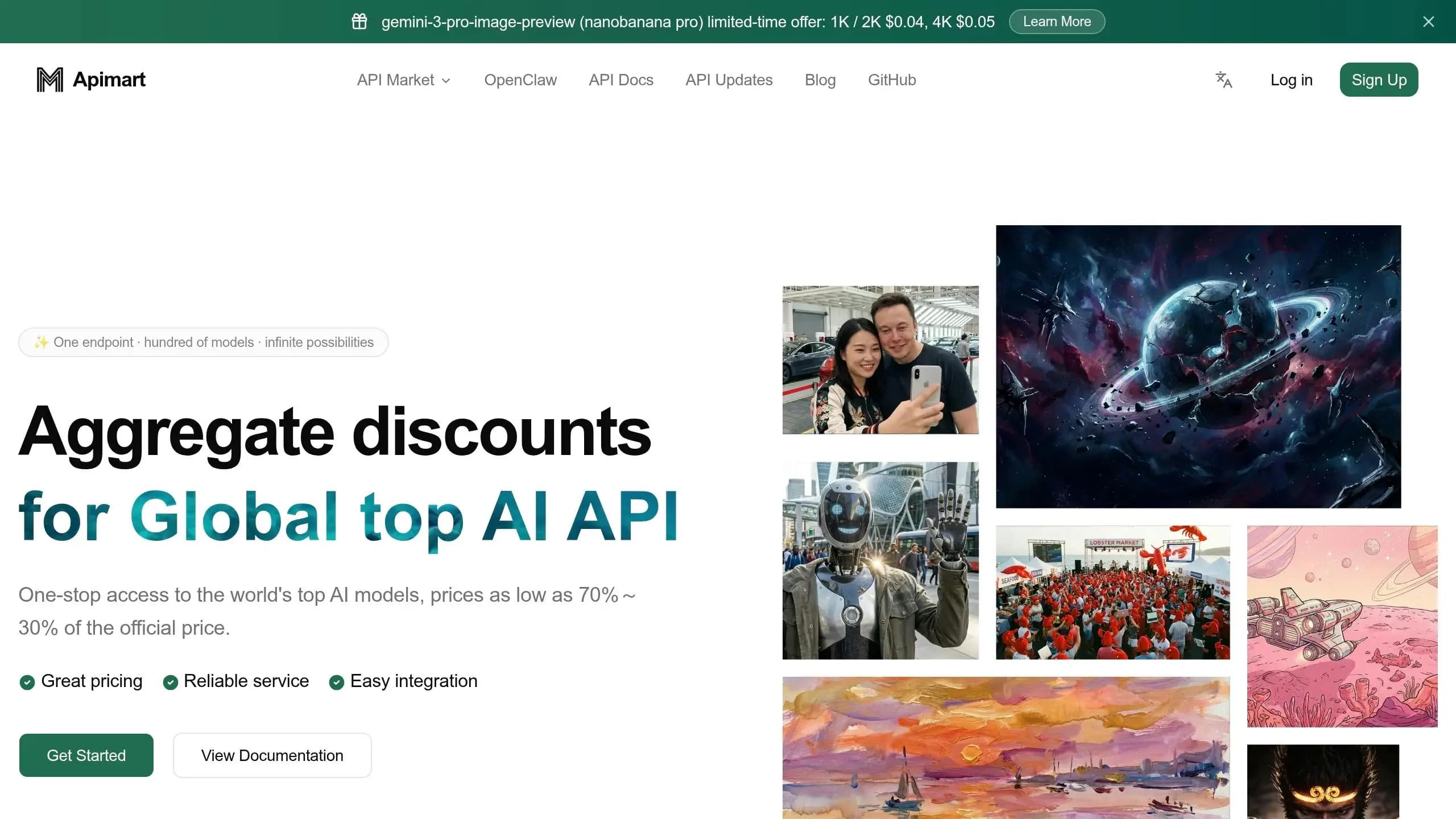
Selecting the right model can have a huge impact on your AI budget. APIMart provides over 500 AI models across three main tiers: Budget/Efficient for cost-friendly, high-volume tasks; Mid-Tier/Flagship for balanced performance; and Premium/Reasoning for advanced capabilities. The price range is massive - there’s a 3,360× difference between the most affordable option (GPT-5 Nano at $0.05 per million input tokens) and the premium choice (GPT-5.2 Pro at $168 per million output tokens) [21]. This makes strategic model selection critical to keeping API costs under control.
For text-heavy tasks, Mistral Small 3.2 offers the lowest combined costs: $0.06 per million input tokens and $0.18 per million output tokens. This makes it perfect for applications like customer support chatbots or content generation. If you need a larger context window, Gemini 2.0 Flash-Lite provides a 1-million-token context for just $0.07 per million input tokens and $0.30 per million output tokens. It’s an excellent choice for handling longer documents without relying on expensive retrieval setups.
When it comes to video generation, costs depend on resolution and processing speed. For instance, WAN 2.6-i2v-flash costs just $0.0168 per second for 720P output, while the standard WAN 2.6 at 1080P runs at $0.084 per second. For high-volume social media content, Hailuo 2.3 Fast offers an affordable $0.025 per second. On the other hand, models like Kling V3 Omni ($0.067 per second) or Sora 2 Preview ($0.08 per second) deliver cinematic quality for more demanding creative projects.
It’s also important to note that output tokens are generally 2-8× more expensive than input tokens. Some reasoning models, like OpenAI’s o-series, generate hidden "thinking tokens" billed as output, which can inflate costs by 5-14× if not carefully managed. To avoid surprises, always set appropriate max_tokens limits and consider symmetric pricing models such as Llama 3.1 8B, which charges $0.18 per million tokens for both input and output.
Using smart routing can further optimize costs. By directing 60-80% of simpler tasks to budget models like GPT-5 Nano or Mistral Small 3.2, and reserving flagship models for complex tasks, you could cut total API spending by 60-85%. This pricing breakdown reinforces earlier cost-saving strategies, helping you make informed decisions to stretch your AI budget effectively.
Conclusion
Cutting AI API costs in 2026 doesn’t mean you have to compromise on quality - it’s all about smarter usage. By applying the seven strategies outlined in this article, you could realistically reduce AI expenses by 40% to 70% when used together [2][6]. These methods work hand-in-hand to align your spending with actual needs.
"AI API costs aren't a 'usage' problem - they're a 'usage method' problem." - CloudInsight Technical Team [2]
Overspending often happens not because of high usage but due to relying on expensive flagship models for tasks that more affordable alternatives can handle. By redirecting up to 80% of routine queries to lower-cost models and reserving premium options for complex tasks, you can achieve substantial savings without sacrificing performance.
Platforms like APIMart make this process even easier. With access to over 500 AI models, built-in routing, caching, and monitoring, APIMart eliminates the hassle of managing multiple accounts and simplifies billing. This streamlined approach reduces administrative overhead while giving you the flexibility to adapt as pricing and performance change. As your usage grows, these optimizations help avoid unexpected costs and ensure AI remains an affordable, scalable part of your strategy. Whether you’re looking to offer AI-driven features at competitive prices or improve profit margins, these adjustments make it possible.
Ready to take control of your AI API spending? Check out APIMart’s unified platform and start implementing these cost-saving strategies today.
FAQs
How do I choose the cheapest model that still meets my quality needs?
Finding an AI model that balances cost and quality can feel tricky, but it doesn't have to be. Start by comparing models based on their performance and cost per million tokens. Smaller, fine-tuned models often offer excellent reasoning capabilities while keeping expenses low.
When evaluating options, pay attention to key factors like:
- Context size: How much information the model can process at once.
- Reasoning quality: The accuracy and depth of its responses.
- Inference speed: How quickly it delivers results.
Sometimes, spending a bit more upfront for a model that gets things right the first time can actually save money in the long run. Why? Because a cheaper model that requires multiple attempts to produce accurate results can quickly rack up costs. So, think of it as an investment in both efficiency and accuracy.
What’s the easiest way to add model routing without rewriting my app?
Optimizing costs can be as simple as adding a classification or evaluation step to your workflow. This step helps route each request to the most suitable model based on its complexity. For instance, you could assign simpler tasks to budget-friendly models and reserve advanced models for more demanding tasks. By integrating a lightweight classification layer into your system, you can significantly cut API expenses - sometimes by as much as 50-80% - without having to rewrite your entire application.
How can I prevent surprise AI API bills from spikes or retry loops?
To keep unexpected AI API bills in check, it's smart to set up real-time usage tracking with alerts at key budget thresholds - like 50%, 80%, and 100%. Pair this with automated tools such as rate limiting and retry management to prevent excessive requests from spiraling out of control. By combining these measures with usage dashboards, you’ll gain better visibility into your spending and be prepared to handle sudden usage spikes without breaking the bank.
Choose the model you want in the model marketplace
Try chat, image and video models in the APIMart model marketplace, and experience model capabilities quickly with one unified API.