
MiniMax Hailuo 2.3 Tutorial: AI Video Creation
A step-by-step guide to MiniMax Hailuo 2.3 on APIMart: set up your API key, run text-to-video and image-to-video workflows, and cut costs with Fast mode.
MiniMax Hailuo 2.3 is a powerful tool for creating AI-generated videos with realistic motion and cinematic effects. Available through APIMart, it supports multiple workflows like Text-to-Video, Image-to-Video, and Subject-Reference, making it suitable for developers, studios, and educators. Here's what you need to know:
- Key Features: Generate videos in 768p or 1080p resolution, with durations of 6 or 10 seconds. Modes include text-based prompts, image-based inputs, and facial consistency for brand-focused content.
- Pricing: Costs start at $0.025 per second of video. Using the Fast variant can reduce costs by up to 50%.
- Setup: Sign up on APIMart, generate an API key, and use a simple three-step process: submit a task, poll for status, and retrieve the video.
- Optimization Tips: Use the Fast model for drafts, switch to Standard for final renders, and write clear prompts using the CCR (Camera, Character, Reaction) framework.
This guide simplifies the video creation process, ensuring quality results while managing costs efficiently.
Setting Up MiniMax Hailuo 2.3 on APIMart
Creating and Configuring an APIMart Account
To get started, head over to apimart.ai and sign up for a free account. Once logged in, navigate to the "API Key Management" section on your dashboard. Generate a new API key, and make sure to copy and save it immediately since it will only be displayed once[5].
Next, search for MiniMax-Hailuo-2.3 or MiniMax-Hailuo-2.3-Fast in the model dashboard or API documentation. This lets you confirm its availability and review the endpoint details before crafting your first API request.
"As a developer, I value stability and speed. MiniMax Hailuo 2.3 on APIMart delivers great performance." - David Chen, Full-Stack Engineer[6]
APIMart boasts a 99.9% SLA for its API services and supports over 50,000 active users, ensuring dependable performance[6].
Once your account is ready and your API key secured, the next step is setting up your development environment.
Development Prerequisites
APIMart's API supports multiple languages, including Python (via requests), JavaScript/TypeScript (via axios), and cURL. Requests are formatted in JSON and require a Bearer token for authentication.
To keep your API key safe, store it in an environment variable like os.environ["APIMART_API_KEY"] instead of hardcoding it into your scripts.
If you prefer webhooks over polling, consider using frameworks like FastAPI with uvicorn to handle incoming POST callbacks effectively.
Video generation is an asynchronous process. Here’s how it works: you submit a task, receive a task_id, poll for its status, and then retrieve the video using a file_id. Standard video clips are typically ready in 30 to 90 seconds, though more complex tasks may take up to 5 minutes[6].
With your environment set up and a clear understanding of the workflow, you can focus on managing your budget and optimizing usage.
Tracking Budget and Setting Usage Limits
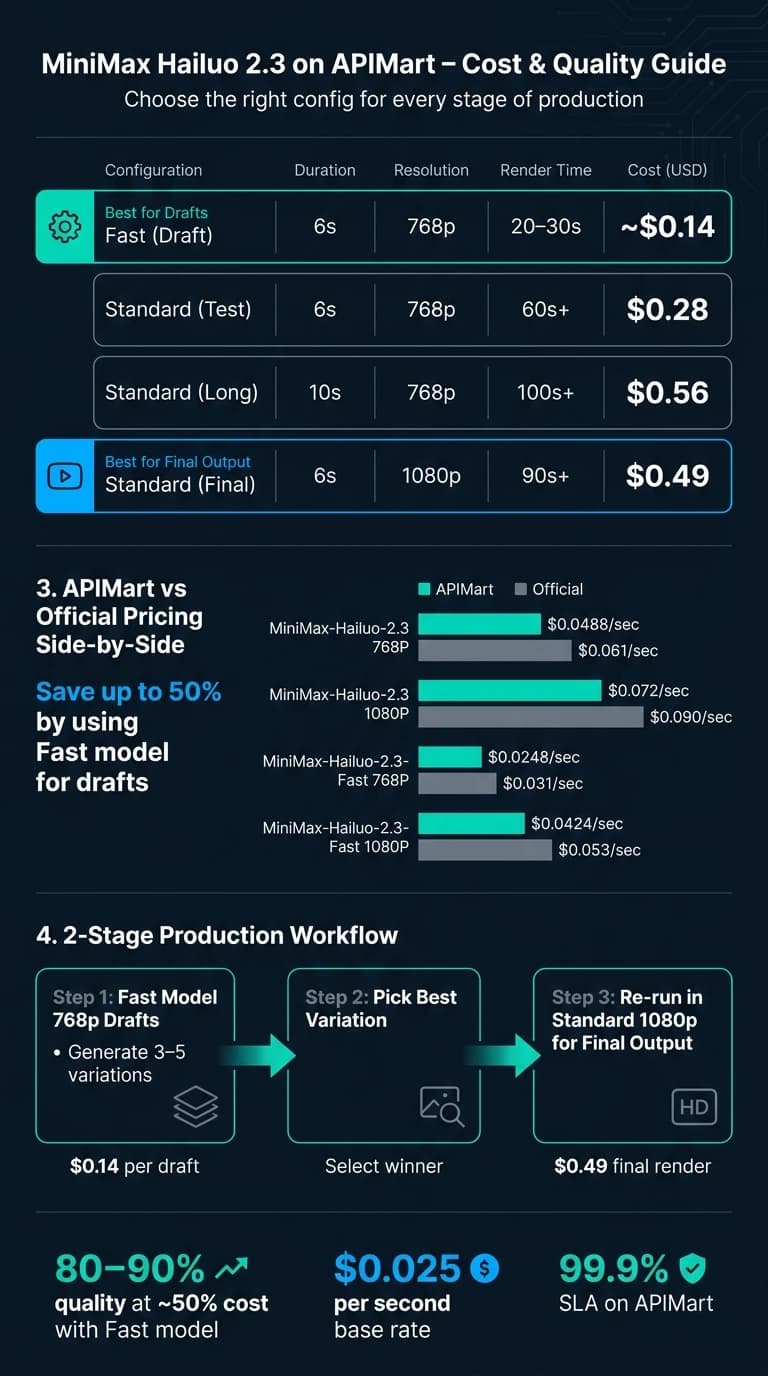
APIMart offers Hailuo 2.3 at rates that are 20% lower than MiniMax's official pricing across all variants[6].
| Variant | Resolution | APIMart Price | Official Price |
|---|---|---|---|
| MiniMax-Hailuo-2.3 | 768P | $0.0488/sec | $0.061/sec |
| MiniMax-Hailuo-2.3 | 1080P | $0.072/sec | $0.090/sec |
| MiniMax-Hailuo-2.3-Fast | 768P | $0.0248/sec | $0.031/sec |
| MiniMax-Hailuo-2.3-Fast | 1080P | $0.0424/sec | $0.053/sec |
For example, generating a 6-second 768P clip with the standard model costs around $0.29, while using the Fast variant reduces it to about $0.15. A practical approach is to prototype with MiniMax-Hailuo-2.3-Fast at 768P and then switch to the standard 1080P model for final renders. This strategy can cut iteration costs by up to 50%[8].
APIMart's Billing dashboard allows you to monitor your spending in real time, which is particularly handy when running batch jobs since costs are calculated per second of video generated.
Core Video Generation Workflows
Text-to-Video Workflow
Creating videos from text follows a straightforward three-step process: submit, poll, and retrieve.
- Create the task: Start by sending a POST request that includes details like
model,prompt,duration, andresolution. In return, you'll receive atask_id, which you'll need for the next steps. - Poll for status: Use the
task_idto query the status endpoint every 10 seconds. While the task is in progress, the response will show"processing". Once completed, the status changes to"Success", and you'll receive afile_id. Most videos are ready within 30 to 90 seconds [1]. - Retrieve the video: Use the
file_idto request a temporarydownload_url. Make sure to download and save the MP4 file before the link expires.
One important feature here is the prompt_optimizer parameter. By default, this is set to true, meaning the model will refine your prompt to improve the visual quality of the video. However, if you need exact control - for example, in branded content where precise wording is critical - you can set it to false [2].
For camera movements, Hailuo 2.3 offers 15 built-in commands, such as [Zoom in] or [Pan left, Pedestal up]. You can even combine up to three commands in a single set of brackets to create more intricate cinematic effects [2].
Building on this text-based approach, the image-to-video workflow offers even more control by anchoring your video to a specific starting image.
Image-to-Video Workflow
The image-to-video process uses the first_frame_image parameter, which can accept either a public URL or a Base64-encoded string. Supported file formats include JPG, JPEG, PNG, and WebP, with a maximum file size of 20MB, a minimum short edge of 300px, and an aspect ratio range between 2:5 and 5:2 [3].
This workflow follows the same three-step structure as text-to-video. The difference is that your provided image sets the initial frame, while your text prompt dictates how the scene evolves. This makes it ideal for scenarios like marketing or education, where you might want a product image or diagram to transition into an animated sequence.
A helpful trick for creating longer videos is to take a screenshot of the last frame of a completed clip and use it as the first_frame_image for the next task. This ensures character and scene consistency across multiple clips without requiring additional adjustments [9].
For even more advanced video creation, you can combine multiple input types.
Combining Multi-Modal Inputs
Once you're comfortable with the basics, you can take your video generation up a notch by combining different input modes. Hailuo 2.3 supports two additional options through APIMart's unified API:
- First-and-Last-Frame Video: Provide both a
first_frame_imageand alast_frame_image. The model will create a seamless transition between the two, guided by your text prompt. This is especially useful when you have a clear idea of how a scene should begin and end. - Subject-Reference Video: Include a face photo using the
subject_referenceparameter along with your text prompt. This ensures facial consistency throughout the clip, making it a great option for personalized content or character-focused storytelling [1].
All four workflows - text-to-video, image-to-video, first-and-last-frame, and subject-reference - share the same three-step asynchronous process and camera command syntax. Once you understand the core steps, switching between these modes is as simple as adjusting the parameters in your POST request.
Hailuo AI Video Masterclass: From Beginner to Pro (Full Guide 2.3)
Improving Video Quality and Cutting Costs
Writing Effective Prompts
Crafting a clear and precise prompt is essential for producing high-quality video output. A useful method to structure your prompts is the Camera, Character, Reaction (CCR) framework. This breaks down the scene into three components: what the camera is doing, who is in the shot, and what action is taking place. For example: "Camera: slow tracking shot; Character: a quarterback in a blue jersey; Reaction: throwing a deep pass during a snowy night game in Chicago, stadium lights creating a hazy glow, [Tracking shot]."
Adding specific details about the visual style and focus can make a big difference. Terms like "photorealistic", "cinematic lighting", or "anime style" guide the model toward your desired look. Including subtle character details, such as "a slight eyebrow raise" or "a thoughtful gaze", allows you to tap into Hailuo 2.3's ability to capture nuanced emotions. However, avoid cramming too many actions into a single prompt, as this can lead to awkward or glitchy motion. With a 2,000-character limit, aim for prompts that are detailed yet streamlined for clarity and purpose [2][7].
Choosing the Right Duration and Resolution
When deciding on video resolution and duration, it's important to weigh your options. Hailuo 2.3 offers two resolutions: 768p and 1080p. The key difference? 1080p clips are limited to 6 seconds, while 768p supports both 6-second and 10-second durations [2][10].
| Configuration | Duration | Resolution | Approx. Render Time | Cost (USD) |
|---|---|---|---|---|
| Fast (Draft) | 6s | 768p | 20–30s | ~$0.14 |
| Standard (Test) | 6s | 768p | 60s+ | $0.28 |
| Standard (Long) | 10s | 768p | 100s+ | $0.56 |
| Standard (Final) | 6s | 1080p | 90s+ | $0.49 |
For initial drafts, 6-second clips at 768p are a practical choice. They’re quick to render and affordable, allowing you to evaluate motion and composition without overcommitting resources. Once you’ve narrowed down your options, you can switch to higher-resolution settings for the final product.
Using an Iterative Workflow
An iterative workflow is key to balancing quality and cost. The most effective approach involves a two-stage process: start with the Fast model and finish with Standard.
"Generate 3–5 variations of the same prompt using Hailuo 2.3 Fast during concept phase. Pick your best, then re-run that exact prompt in 2.3 Standard or 02 at 1080p for final output. You'll burn fewer credits on failed experiments." - QWE AI Academy [8]
The Fast model provides about 80–90% of the visual quality of the Standard model [8], but at nearly half the cost - just $0.14 for a 6-second 768p clip compared to $0.28 for Standard [4][10]. By testing multiple drafts in Fast, you can identify the most promising version before investing in a higher-cost, high-resolution render. This approach ensures you maximize both your creative output and your budget.
Integrating MiniMax Hailuo 2.3 Videos into Production
Managing Asynchronous Tasks and Output Files
Using Hailuo 2.3 for video generation involves a three-step asynchronous process: first, submit a request and receive a task_id. Next, either poll or wait for a webhook to provide a file_id. Finally, use that file_id to download the video before the link expires.
If you're polling, stick to a 10-second interval to avoid hitting rate limits. For larger-scale tasks, it's better to set up a callback_url so the API can send status updates like "processing", "success", or "failed" directly to your server. Make sure your server responds to any challenge within 3 seconds to confirm the endpoint's validity [2].
Keep an eye on the status field for potential errors. If it shows "Fail", grab the error_message immediately for troubleshooting or logging. Download your files as soon as they're ready since the URLs expire after 1 hour [7]. Alternatively, you can use the uploadEndpoint feature to automatically push completed videos to your own storage [12]. To keep track of tasks across asynchronous responses, assign a taskUUID or use a custom metadata field to map requests back to your internal production IDs [12].
By setting up an efficient task management system, you’ll have a smoother experience controlling costs and scaling operations.
Budgeting and Scaling Your Usage
MiniMax Hailuo 2.3 charges $0.025 per second of generated video, making cost calculations straightforward. For instance, a 40-minute video (2,400 seconds) would cost around $60.00.
To keep costs manageable, consider using the Fast draft mode for initial renders. This mode can reduce generation costs by up to 50% [4]. Running your concept phase in Fast mode before switching to 1080p Standard renders can save a significant amount of money. You can also enable the includeCost parameter in your API requests to get real-time cost data for each task, helping you monitor expenses without waiting for monthly invoices [12].
"Hailuo 2.3 Fast model... generates videos faster at a lower price, reducing costs for batch creation by up to 50%." - MiniMax News [4]
When scaling production, choose the task management method that matches your workload:
| Feature | Polling (Manual) | Webhook (Event-Driven) |
|---|---|---|
| Efficiency | Lower (repeated requests) | Higher (event-driven) |
| Complexity | Simple to set up | Requires server-side endpoint |
| Scalability | Limited by rate limits | Handles concurrent tasks easily |
| Validation | Immediate response | Requires challenge echo within 3 seconds [2] |
If you're handling more than a few concurrent tasks, webhooks are the better option. Polling works fine for small-scale or one-off jobs, but it struggles to scale effectively under production-level demands.
Conclusion
The MiniMax Hailuo 2.3, available on APIMart at $0.025 per second, brings professional AI video production within reach for a fraction of the cost. For example, creating a 6-second 768p clip costs just $0.15, making it an economical solution for high-quality AI-generated videos.
To get started, set up your APIMart account and choose the modality that aligns with your creative goals. Fine-tune your results using the CCR (Camera, Character, Reaction) method[11]. For longer projects, ensure visual consistency by capturing the final frame of each clip and using it as the starting frame for the next segment[9].
The Fast model offers significant savings, reducing draft and batch run costs by about 50% compared to the Standard model. Meanwhile, the 1080p Standard model delivers the cinematic quality needed for polished final renders, balancing cost control with superior output quality[4].
This cost efficiency hasn’t gone unnoticed:
"Hailuo 2.3 once again sets a new global record for video model cost-effectiveness... offering 'more for the same price' to both business and consumer users." - MiniMax Official News[4]
For teams managing larger-scale video production, the integration strategies outlined above are invaluable. Features like webhook callbacks, the includeCost parameter, and the uploadEndpoint streamline the process, enabling a hands-free, scalable production pipeline for handling multiple clips weekly.
FAQs
What’s the best way to keep characters consistent across multiple clips?
To keep character consistency in MiniMax Hailuo 2.3, stick to reference images with uniform lighting and angles. Be precise in your prompts, detailing the subject, action, and style clearly. Begin with short, six-second clips to test and confirm consistency before moving on to longer or higher-resolution videos. Using clear and detailed descriptions at every step ensures the model preserves the character's identity throughout the video.
How do I choose between polling and webhooks for video jobs?
When deciding between polling and webhooks, it comes down to how your infrastructure is set up.
Polling works by sending regular GET requests to check the status of a job. It’s straightforward to implement but relies on constant monitoring, which can be resource-intensive.
On the other hand, webhooks let you include a callback_url in your POST request. Once the job is done, the system automatically sends a notification to your server. This makes webhooks a more efficient option for server-to-server communication, eliminating the need for continuous requests.
Why would I turn off prompt_optimizer?
When you want precise control over video generation, set the prompt_optimizer parameter to false. This stops the system from automatically tweaking your prompts, ensuring your exact wording and specifications directly guide the model's output.
Choose the model you want in the model marketplace
Try chat, image and video models in the APIMart model marketplace, and experience model capabilities quickly with one unified API.