
What Is Kling Video O1? Key Features Reviewed
Kling Video O1 reviewed - unified video generation and editing, reference-based modes, keyframe interpolation, pricing and APIMart API integration tips.
Kling Video O1, launched by Kuaishou Technology on December 1, 2025, is a multimodal AI video model designed to simplify and enhance video production. It processes text, images, video clips, and references through a single engine, allowing creators to generate, edit, and refine videos without switching tools.
Key Features:
- Unified Workflow: Combines video creation and editing in one system.
- Reference-Based Modes: Supports image-to-video, video-to-video generation, and editing with plain-language prompts.
- Keyframe Interpolation: Smooth transitions and precise edits without manual masking.
- 1080p/30fps Output: High-quality visuals with stable character and scene consistency.
- APIMart Integration: Access via API for seamless use in business workflows, with pricing starting at $0.0672 per second for 720p output.
Who Benefits:
- Marketers: Create branded content quickly.
- E-commerce: Turn product images into dynamic videos.
- Educators: Produce explainer videos efficiently.
- Studios: Use for pre-visualization and storyboarding.
While Kling Video O1 excels in quality and versatility, it’s best suited for workflows prioritizing precision over speed due to processing times of 60–180 seconds per clip. For U.S. businesses, APIMart offers discounted access and easy API integration.
Core Features and Capabilities
Unified Video Generation and Editing
Kling Video O1 streamlines the entire video production process into one cohesive engine. Whether you're starting from scratch, extending existing footage, restyling visuals, or tweaking specific elements, you can handle it all without switching tools or compromising the visual flow between steps.
One standout feature is its "Skill Combos" capability. This allows you to perform complex edits in a single pass - like adding a new subject to a scene while simultaneously altering the background or artistic style. Normally, such tasks would require multiple tools and manual effort. As Eachlabs puts it:
"Kling O1 is five tools that work like one. Image editing, image to video, video extension from a reference, reference-anchored multi-character animation, and natural-language video editing all sharing the same architecture." [2]
This integration ensures that characters, props, and environments maintain their visual stability, even during dynamic camera movements.
Additionally, Kling Video O1's reference-based modes offer tailored solutions for different production needs, making it a versatile tool for creators.
Reference-Based Video Generation
Kling Video O1 includes three reference-based modes, each designed for specific production scenarios:
- Image-to-Video: Bring static images to life with text-guided animation. For alternative high-consistency results, consider the WAN 2.6 API. For added precision, you can use dual-frame conditioning (start and end frames) to control the composition.
- Video-to-Video Reference: Generate new shots that mimic the cinematic style, motion, and framing of a 3–10 second reference clip.
- Video-to-Video Edit: Modify existing footage with plain-language commands like "change the red car to blue", all while preserving the original motion and timing.
These modes work seamlessly together, reinforcing the model's unified approach to video creation.
The Elements system ensures character consistency across all modes. By uploading up to four images of a subject from different angles, you create a reference package that anchors the subject's identity throughout the video. Use the <<<image_N>>> syntax in your prompt to activate this feature. Without explicit tagging, the model might interpret uploaded images as general style references rather than fixed identity anchors [3][2].
"kling-video-o1 understands complex prompts better than any other model we've tried. The visual coherence and motion quality are outstanding." - James Liu, Senior Developer [4]
For optimal results, upload high-resolution, well-lit frontal portraits as references. The quality of these images directly impacts how consistently the character's identity is maintained across frames.
Keyframe Interpolation and Inpainting
Kling Video O1 also excels at refining transitions and making precise edits through keyframe interpolation and inpainting.
Set a start and end frame, and the model will smoothly interpolate the motion between them. You can also make specific adjustments - like "remove the background crowd" or "swap the jacket for a suit" - without needing to manually mask elements. The model ensures that the camera angle, motion timing, and spatial relationships remain intact throughout the clip.
"I love changing scenes with simple text. It cuts hours off my editing work." - Sarah Bennett, Marketing Producer [6]
Keep in mind that these advanced modes require more processing time. For example, image-to-video tasks average around 100 seconds, while video editing can take up to 280 seconds [2]. To save time during iterations, it's a good idea to test new prompts on shorter clips (around 5 seconds) before committing to the maximum 10-second length.
Kling O1 Review - Game Changer or Overhyped?
Performance and Operational Considerations
Kling Video O1's performance and operational features provide a clear picture of its capabilities for practical use.
Visual Quality and Temporal Consistency
Kling Video O1 delivers impressive visual quality thanks to its MVL architecture, which processes text, images, and video simultaneously. This allows the model to grasp the scene's context right from the start [5][7]. The Cross-Attention Persistence feature ensures that subject identity remains stable even during scene transitions [5]. Paired with its Chain-of-Thought generation, the model creates videos where physical interactions look natural - fabric flows realistically, light behaves as expected, and objects display believable weight [7][8].
"The thinking-driven approach in kling-video-o1 really shows. The quality difference compared to standard models is immediately noticeable —even when compared to Kling V3— - it's our go-to choice for premium content." - Sarah Johnson, Creative Director [4]
Currently, the output resolution peaks at 1080p/30fps in Pro mode, with optional support for 2K resolution [7][8].
Clip Length Limits and Processing Time
Each generated clip is capped at 5 or 10 seconds, while reference-based modes require input videos between 3 and 10 seconds [3][4]. For longer projects, the Video Reference mode can be used to create sequential clips, allowing users to chain segments together while keeping motion and style consistent [1][8].
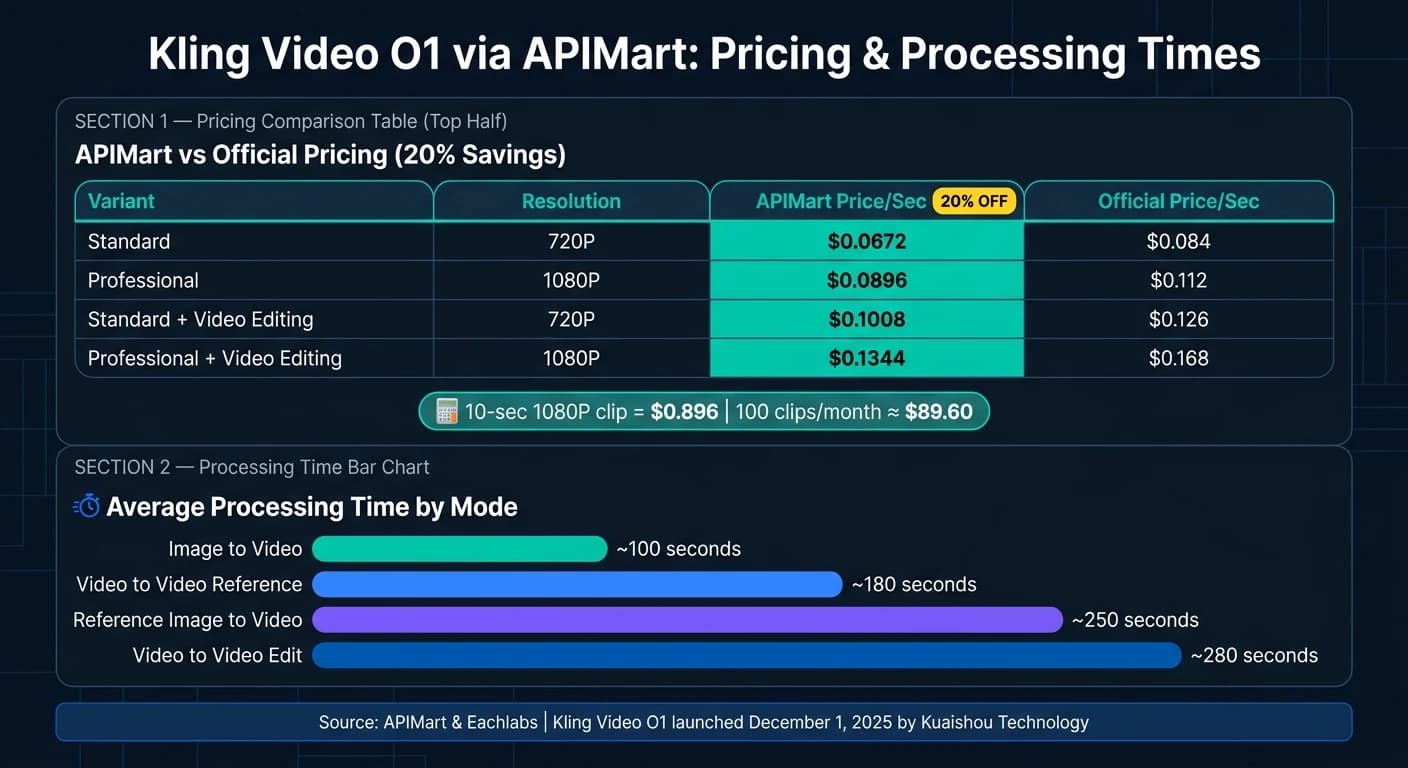
Here’s a breakdown of processing times by mode:
| Mode | Avg. Processing Time |
|---|---|
| Image to Video | ~100 seconds |
| Video to Video Reference | ~180 seconds |
| Reference Image to Video | ~250 seconds |
| Video to Video Edit | ~280 seconds |
(Source: Eachlabs [2])
Advanced modes naturally take more time. A good practice is to test new prompts or references with a 5-second clip first. This minimizes wasted time if adjustments are needed before committing to a full 10-second render [2].
How to Write Effective Prompts
The quality of your prompt has a direct impact on the output. Kling Video O1 works best with scene-brief–style prompts that are 50 to 150 words long and include details about the subject, action, environment, camera movement, and style [9]. Place critical details at the beginning, as the model prioritizes the earliest information [9]. Use specific, directorial language instead of vague descriptions. For instance, instead of saying "dramatic lighting", describe it as "golden side-light casting long shadows across the subject's face." Clearly separate camera movement from subject movement to add complexity [9].
For editing tasks, start by specifying what should remain unchanged. For example: "Keeping all camera movement and timing identical, change the subject's jacket from black to navy blue." This signals the model to focus on precise edits rather than regenerating the entire scene [9]. When using reference images, always include explicit reference tags (like <<<image_N>>>) to anchor identity and prevent the model from interpreting them as loose style suggestions [3][2].
"Kling O1's output quality depends on prompt structure more than computational power." - Brad Rose, Content Producer [9]
These performance guidelines and prompt tips align seamlessly with Kling Video O1's core features, making it a powerful tool for production workflows.
Integration with APIMart
Accessing Kling Video O1 Through APIMart
APIMart is a platform that provides access to over 500 AI models, including Kling Video O1, through a single endpoint: https://api.apimart.ai/v1/videos/generations. Once you authenticate using your APIMart API key via Bearer Token, you can start using the service immediately. This integration complements Kling Video O1’s features and improves its overall operational ease.
The API operates asynchronously. When you submit a generation request, you’ll receive a task_id. Use this ID to poll the "Get Task Status" endpoint to retrieve the final video URL. APIMart offers a 99.9% SLA and claims generation speeds that are twice as fast [4].
Pricing is based on the output duration, with a 20% discount compared to the official pricing across all Kling Video O1 tiers:
| Variant | Resolution | APIMart Price/Sec | Official Price/Sec |
|---|---|---|---|
| Standard | 720P | $0.0672 | $0.084 |
| Professional | 1080P | $0.0896 | $0.112 |
| Standard + Video Editing | 720P | $0.1008 | $0.126 |
| Professional + Video Editing | 1080P | $0.1344 | $0.168 |
Source: APIMart Pricing Details [4]
Mapping Kling Video O1 Features to APIMart API Parameters
Once you’ve integrated Kling Video O1 via APIMart, its features can be mapped directly to specific API parameters. To enable the reasoning engine, set the model field to kling-video-o1. The mode parameter determines resolution: use std for 720P or pro for 1080P. If you’re creating content for high-quality marketing or cinematic purposes, pro is the better choice. The duration parameter allows for either 5 or 10 seconds, and the aspect_ratio parameter supports formats like 16:9, 9:16, and 1:1, making it adaptable for various platforms.
For image-to-video workflows, include up to two public URLs in the image_urls array to define start and end frames. These can be referenced in your prompt using the <<<image_1>>> syntax. If no syntax tag is provided, APIMart will automatically append <<<image_1>>> [3].
For tasks involving video editing, the video_list parameter accepts a single reference video. Set refer_type to base for structural edits or use feature to extract motion style for a new video. The keep_original_sound field allows you to decide whether to retain the source audio (yes) or remove it (no). Source videos must be in MP4 or MOV format, have a resolution of at least 720px, and be between 3 and 10 seconds long, with a maximum file size of 200MB [3].
Use Cases for U.S. Businesses
The versatility of this API makes it an asset across multiple industries. Here are some examples:
- E-commerce brands: Transform static product photos into dynamic lifestyle videos using the image-to-video feature, ensuring visual consistency with reference images.
- Marketing agencies: Generate multiple ad variations in
promode for A/B testing on platforms like Instagram and TikTok, where the 9:16 aspect ratio works perfectly. - Education and training teams: Turn illustrated diagrams or slides into short explainer videos without needing a full production team.
- Film and animation studios: Use the API for pre-visualization and storyboard motion references, leveraging its high-quality visuals for early-stage client approvals.
For instance, at $0.0896 per second in pro mode, a 10-second 1080P video costs $0.896. A team producing 100 such clips per month would spend around $89.60 in generation costs [4]. This pricing and flexibility make Kling Video O1, combined with APIMart, a practical solution for streamlining video production workflows in various U.S. industries.
Conclusion
Key Takeaways
Kling Video O1 brings a refined approach to video generation by improving prompts before creating frames. This leads to better motion accuracy, consistency in subjects, and adherence to prompts compared to typical video models.
The model is versatile, handling tasks like text-to-video, image-to-video (using up to two reference images), and video editing with structural or motion-style references. It offers output options in 720P and 1080P, supports three aspect ratios (16:9, 9:16, 1:1), and produces clips lasting either 5 or 10 seconds. This flexibility makes it ideal for social media content, advertisements, training materials, and pre-visualization projects.
However, there’s a trade-off: video generation takes between 60 and 180 seconds. This makes it more suitable for quality-focused workflows rather than real-time production needs.
Getting Started with APIMart
Interested in using Kling Video O1? APIMart makes it easy to get started and offers some great perks.
APIMart provides access to Kling Video O1 through a single endpoint and API key, along with a 20% discount on official pricing. Costs start at $0.0672 per second for 720P output, and the platform operates on a pay-as-you-go model with a 99.9% SLA uptime guarantee [4].
Here’s how to begin:
- Register on APIMart: Sign up to receive your API key and test your prompts in the Playground.
- Integrate the model: Add the
kling-video-o1model parameter into your workflow, or explore the Kling V3 API for alternative cinematic options.
For smoother production, set up a callback_url instead of relying on polling. This approach efficiently manages the 60–180 second generation time without disrupting your pipeline [3].
FAQs
What reference images work best for consistent characters?
To keep your characters consistent in Kling Video O1, use the Elements system to upload multiple reference images showing different angles. Including up to four distinct views per character helps the model grasp their identity, proportions, and clothing details.
For the best results, pair these multi-angle references with style or environment images when generating videos. This approach ensures the visuals stay aligned with your creative vision while maintaining a cohesive look throughout the project.
How can I speed up iterations when renders take minutes?
To make your work faster with Kling Video O1, try using the asynchronous processing mode available through the APIMart API. This approach gives you a task ID right away, allowing you to check progress while focusing on other tasks.
For even better efficiency, consider breaking your workflow into stages. Begin with a base generation, then fine-tune it using tools like video in-painting or style re-rendering. Additionally, using structured prompt templates can help cut down on guesswork, leading to quicker and more accurate outcomes.
What does a typical APIMart API request include?
A typical APIMart API request for generating Kling videos involves sending a POST request to the /v1/videos/generations endpoint. You'll need to include an Authorization header with your Bearer token and a JSON body that outlines the following key details:
- Model: Specify the model to use (e.g., kling-video-o1).
- Text prompt: Provide the text input for the video generation.
- Generation mode: Choose between std (standard) or pro.
- Video duration: Define how long the video should be.
- Aspect ratio: Set the desired aspect ratio for the video.
You can also include optional fields based on the model's capabilities, such as reference URLs, negative prompts, or watermark settings. These allow for more customization and control over the final output.
Choose the model you want in the model marketplace
Try chat, image and video models in the APIMart model marketplace, and experience model capabilities quickly with one unified API.