Apimart
Log inSign Up
How Multi-Modal Inputs Improve Video Prompts

How Multi-Modal Inputs Improve Video Prompts

Compare text-only, text+image, text+visual+audio, and unified multi-modal pipelines for AI video generation - precision, speed, consistency and cost trade-offs.

Tutorial

When you rely solely on text to guide AI video tools, the results can often feel generic or inconsistent - especially when precision matters. Multi-modal inputs solve this by combining text with images, audio, or other references, giving you more control over details like character design, branding, and scene transitions. Here's how:

  • Text-only prompts are quick to use but lack precision, often leading to inconsistencies and generic outputs.
  • Adding images acts as a visual anchor, ensuring consistency for elements like logos or recurring characters.
  • Including audio allows for synchronized sound and visuals, improving the timing and depth of the final output.
  • Unified multi-modal pipelines streamline workflows by integrating text, images, and audio in one system, reducing guesswork and rework.

For example, platforms like APIMart simplify this process by coordinating inputs across multiple AI models, offering better results with less effort. The choice of approach depends on your goals, whether it's speed, consistency, or precision.

ApproachPrecisionSpeedConsistencyCost
Text-onlyLowHighLowHigh
Text + ImageHighMediumHighMedium
Text + Visual + AudioVery HighMediumHighMedium-Low
Unified Multi-Modal PipelinesHighestLowVery HighLowest

Multi-modal inputs are reshaping how we create videos, offering more control and accuracy while reducing the time spent on revisions.

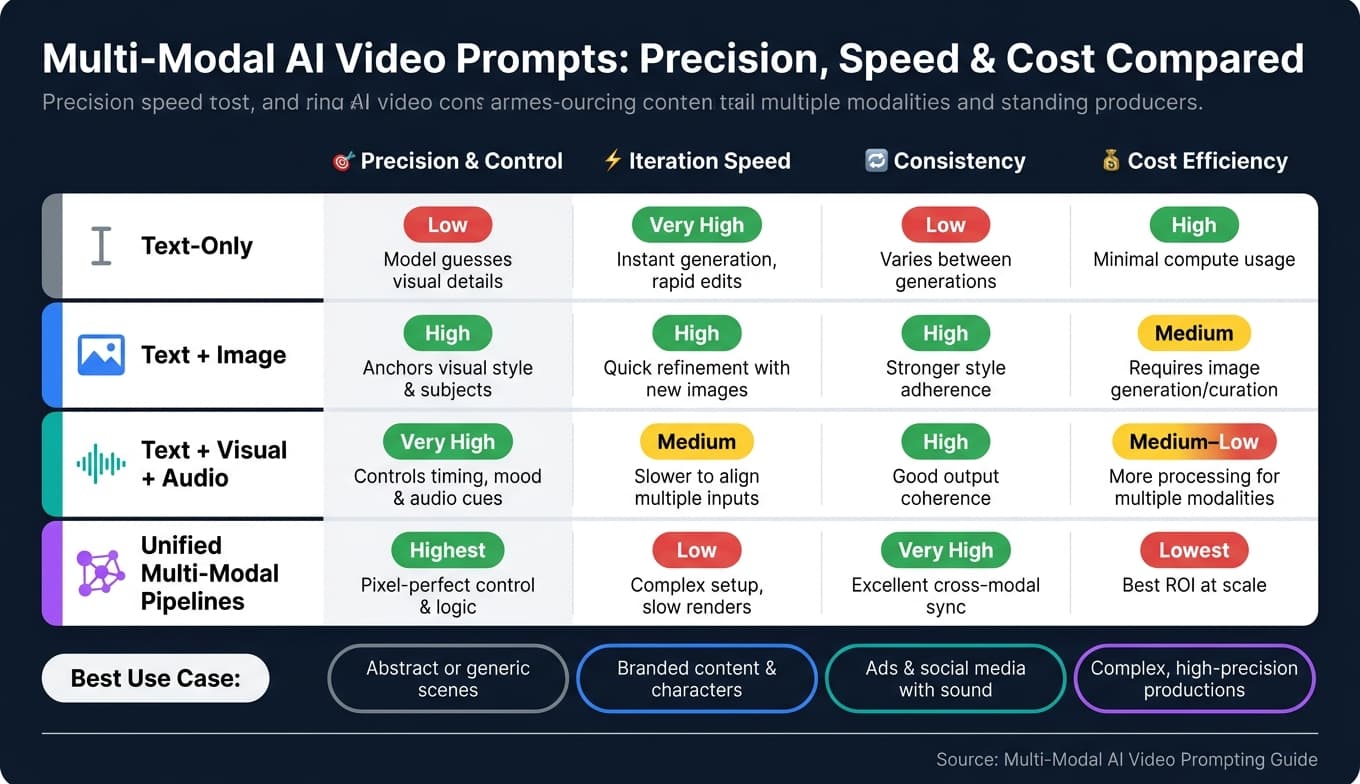
Multi-Modal AI Video Prompts: Precision, Speed & Cost Compared

Video Walkthrough

Multimodal prompting for beginners — visual walkthrough by Simplilearn

A quick primer on how multimodal prompting works in practice, courtesy of Simplilearn:

1. Text-Only Prompts

Text-only prompts are the most straightforward way to dive into AI video generation. They’re particularly effective for broad, abstract scenes like cityscapes, nature shots, or general product visuals - especially when the model's training data aligns closely with your description [2][1].

Where text-only prompts work well

However, things get tricky when precision is key. Without any visual references, the model has to imagine every detail - character appearances, brand colors, logo placement, and lighting setups. This often leads to outputs that feel generic or inconsistent, with characters that change between scenes and logos that appear blurry or off-brand [1].

Control gaps and default slots

Another challenge is control. By 2026, crafting a complete video prompt involves 10 distinct "slots." These include six inherited from image prompts, plus four video-specific slots - motion, camera, duration, and audio [2]. Text-only prompts often skip some of these, leaving the model to rely on default settings:

"Video adds four slots to the image-prompt anatomy - motion, camera, duration, audio. Forgetting any of them means the model picks a generic default, and the default is almost always 'static medium shot, no sound, whatever length the model felt like.'" - SurePrompts Team [2]

Iteration speed bottleneck

Iteration speed is another bottleneck. Refining a text-only prompt - tweaking adjectives, rephrasing descriptions, and testing again - requires generating a completely new video each time [4]. This process can be slow and frustrating, with users spending more time fixing issues than making creative decisions [1].

Here’s a quick breakdown of how text-only prompts perform across critical workflow dimensions:

DimensionText-Only Performance
PrecisionLow - model guesses visual details [1]
ControlLimited - prone to generic defaults [2]
Temporal consistencyPoor for specific assets across scenes [1]
Iteration speedFast to start, slow to refine at quality [4]
Complex choreographyUnreliable for multi-character or physics-heavy scenes [2]

When accuracy is essential - like maintaining consistent characters, using real logos, or showcasing specific product details - text-only prompts often fall short. These limitations highlight the need for multi-modal inputs, which combine visual references with text to boost precision and streamline the refinement process. Up next, we’ll explore how incorporating visual elements can address these challenges.

2. Text + Image Prompts

Adding an image to your prompt can completely change the game. While text-only prompts rely on the model to imagine what your product, character, or brand might look like, including an image provides immediate clarity. As Sara Abrams explains, text alone leaves room for interpretation, but an actual image gives the model a definitive guide [1].

Visual anchors for branded content

This approach is particularly crucial for branded content. Think about product packaging, logos, or recurring characters - elements that must remain consistent across every scene. Text-only prompts often lead to "composition drift," where subtle changes creep into a character's face or a logo transforms into something unrecognizable. By using a reference image, you create a visual anchor, ensuring those details stay consistent from start to finish [1][3]. This kind of locked visual reference also makes it easier to integrate dynamic motion elements without losing fidelity.

The benefits go beyond consistency. Starting with a high-quality visual reference - like a product shot generated in tools such as Midjourney or Flux - saves time by eliminating the need for endless rewording. As the SurePrompts Team explains:

"image-to-video beats text-to-video for fidelity most of the time. Start in the image pillar if you need a composition locked before motion." [2]

"World state" blocks for identity persistence

One practical way to enhance the effectiveness of these multi-modal video prompts is by incorporating a "world state" block. This involves pairing a reference image with a concise description that defines your subject's key attributes and constraints (e.g., "Main subject is a software engineer in a navy jacket... all scenes must preserve this identity"). This technique minimizes the need for corrective revisions, allowing teams to focus on creative decisions rather than fixing inconsistencies [1][3]. While iterative refinement using MLLM-based loops can improve quality, it often adds computational complexity and slows down the process [4]. For most teams, starting with a strong reference image upfront is far more efficient than relying on multiple rounds of automated adjustments.

Input MethodConsistencyIteration SpeedBest For
Text-OnlyLow - frequent drift [1]Slow to refine at quality [4]General or abstract scenes
Text + Image (I2V)High - visual anchors lock details [1][5]Fast - composition locked immediately [2]Branded content, character narratives
Iterative MLLM RefinementVery high - semantic alignment [4]Slow - high computational overhead [4]Final polish on complex sequences

3. Text + Visual + Audio Prompts

Once you've secured your visual reference, incorporating audio adds an extra layer of depth to your prompt. Instead of simply describing sounds (like "busy street, distant traffic, light rain"), you can provide an actual audio sample. The SurePrompts Team highlights the importance of this approach:

"Audio sent natively to GPT-4o or Gemini retains tone, pacing, and overlapping speech that a transcript destroys." [6]

Native audio vs added-later audio

Native audio integration plays a key role in achieving precise timing. Take Google Veo 3, for example. It's the first major model to treat audio as a generative component rather than as an afterthought, creating ambient sound, foley, and dialogue all in one step [2]. On the other hand, models like Sora 2 and Runway Gen-3 Alpha generate silent video first and add audio later, which introduces extra steps into the workflow. The advantage of native audio integration is its ability to maintain perfect synchronization. For instance, if your prompt specifies "footsteps on wet pavement as subject crosses frame at 3 seconds", the model can automatically align the sound with the visual action. This is particularly useful for short-form ads or social media content where sound is a critical element. However, Veo 3 has its limitations, with a maximum clip length of about 8 seconds. In comparison, Sora 2 can handle up to 25 seconds, and Runway Gen-3 Alpha supports around 10 seconds per clip [2]. This makes Veo 3 better suited for concise, high-impact projects rather than extended narratives.

Audio token cost trade-offs

Cost is another factor to consider. Processing audio tokens is significantly more expensive - about 13 times the cost of text tokens in real-time models like gpt-realtime-1.5 [7]. Additionally, native multimodal embedding models for video indexing are roughly 6 times more expensive and twice as slow as using a Vision LLM to convert visual data into text descriptions [8]. For teams working with limited budgets, a two-stage process - using detailed audio descriptions - can be a more affordable alternative.

Writing audio-heavy prompts

When crafting audio-heavy prompts, it's important to specify sound sources, their density (e.g., "sparse" or "steady"), and how they relate to on-screen actions. If certain audio segments are unclear, mark them as "[inaudible]" with approximate timestamps to avoid the model generating inaccurate details [6]. Research indicates that keeping prompts between 60 and 120 words is ideal for conveying clear audio details without overwhelming the model [2]. Just like with visual inputs, audio references are critical for ensuring precise and synchronized video outputs. Together, they form the backbone of a polished multi-modal workflow.

This unified approach to audio and visual integration is a step toward more streamlined multi-modal pipelines, as explored further in the APIMart section.

4. Unified Multi-Modal Pipelines with APIMart

GccAi unified multi-modal API gateway for video, image and audio models

Switching between tools for text, images, and audio can feel like a juggling act. Each transition risks losing context or creating sync issues. APIMart's single-API solution eliminates these headaches, streamlining the process and delivering more polished results.

Sora 2 vs Sora 2 Pro through one API

With APIMart, you get a unified pipeline that boosts both precision and control. Take upgrading to Sora 2 Pro via APIMart as an example. This upgrade unlocks extended cinematic controls, fully synchronized audio (covering dialogue, ambient sounds, and sound effects), and a jump in resolution from 720p to 1,792×1,024 - all watermark-free. Here's a quick comparison of the features between the standard and Pro tiers:

CapabilitySora 2Sora 2 Pro (via APIMart)
Max Resolution720p1,792×1,024 (1,024p)
Max Duration15 seconds25 seconds
AudioLimitedFull synchronized (dialogue, ambient, SFX)
Cinematic ControlsBasicExtended (camera, lighting, style)
WatermarkYesNo

Pick the cheapest model that fits the task

Another major advantage is cost efficiency. APIMart allows you to choose models based on the task at hand, rather than always defaulting to the most expensive option. For instance:

  • MiniMax Hailuo 2.3 handles simple motion tasks at $0.025/sec.
  • Sora 2 is ideal for complex, physics-heavy scenes at $0.10/generation.
  • Gemini Flash tackles bulk classification at $0.075 per 1M tokens.
  • Claude Sonnet excels in creative reasoning, priced at $3.00 per 1M tokens.

"Universal core" prompt + per-model tails

To maintain consistency across models, adopting a unified prompt strategy is essential. A practical approach is to use a "universal core" prompt that defines the subject and scene, then add model-specific "tails" for details like motion parameters and technical settings. This modular setup saves time by avoiding the need to rewrite prompts for each model and ensures visual coherence across iterations [9].

Pros and Cons

Different prompting methods bring varying levels of precision, speed, consistency, and cost. Text-only prompts are the fastest to implement, but they often leave the model to fill in the blanks. This can lead to generic or inconsistent results, especially when details like brand assets, specific characters, or lighting are key. To address these gaps, adding image-based prompts can make a big difference.

Including image references provides a clear starting point and anchors key visual details, reducing the need for guesswork. This approach improves consistency across scenes, making it ideal for projects involving branded content or recurring characters. While adding an image step may slightly slow the process, it ensures more reliable and precise results.

For projects that rely on dialogue or sound, combining text, visuals, and audio offers precise, synchronized outputs. Multi-modal strategies like these allow for better alignment between different elements, ensuring everything works together seamlessly. Building on this, unified pipelines integrate all components - text, image, and audio - into a cohesive workflow. These pipelines can self-correct during iterations, addressing issues like drift, generic outputs, and synchronization problems. While this method provides the highest level of precision and consistency, it does come with increased computational costs.

ApproachPrecision & ControlIteration SpeedConsistencyCost Efficiency
Text-OnlyLow – prone to generic resultsVery HighLow – character and logo driftHigh
Text + ImageHigh – locks visual detailsHighHigh – ensures visual consistencyMedium
Text + Visual + AudioVery High – controls sound/visualsMediumHigh – ensures audio-visual syncMedium–Low
Unified PipelinesHighest – iterative correctionsLowVery High – refined physics/semanticsLowest

Choosing the right approach depends on your goals. Text-only prompts are best for simple, generic scenes that need fast iteration. Image references are crucial for maintaining consistency in branding or character design. For projects where sound is critical, a multi-modal approach is the way to go. And while unified pipelines require a larger upfront investment, they can deliver unmatched precision and scalability over time.

Conclusion

Text-only prompts can be limiting - they make models rely on guesses to fill in visual details, which often results in inconsistent characters, shifting logos, or mismatched audio. Adding layers like images, audio, or structured workflows replaces those guesses with real references, giving creators more control and producing more accurate video outputs. This makes multi-modal inputs a key part of creating precise and reliable content.

The best approach depends on your goals. For cinematic storytelling, a step-by-step process (like storyboard → scene cards → shot prompts) combined with tools like Sora 2's physics engine and extended duration features ensures scenes stay consistent over time. For product videos, incorporating actual product images and logos ensures your visuals match the real-world assets. And for educational content, using reference stills to define characters before animating helps maintain consistency across lessons.

One practical tip? Treat the AI's initial output as a starting point, not the final product. A workflow like Generate → Critique → Revise can use a secondary model to check for brand alignment and visual errors, cutting down on costly rework and improving the final result.

FAQs

When should I use text-only vs multi-modal prompts?

Text-only prompts are great when you're aiming for general or standard outputs, especially in cases where the model doesn't support multi-modal inputs. On the other hand, multi-modal prompts excel when you need to include specific visual, audio, or motion elements. They’re perfect for more intricate scenarios where combining different input types helps improve accuracy and overall quality in video production.

What’s the best way to keep characters and logos consistent across scenes?

To keep characters and logos consistent in AI-generated videos, it's essential to provide detailed and explicit prompts. Reference specific elements like character design or logo features clearly. Using multimodal inputs, such as uploading images of the characters or logos, can help the AI better understand and replicate these assets. Reusing these visuals across prompts ensures continuity.

When describing attributes, focus on details like style, color schemes, and intricate features. This level of precision helps maintain uniformity in how characters and logos appear throughout the video. The more consistent your descriptions, the more reliably the AI will reproduce these features across different scenes.

How can I sync audio cues to specific on-screen actions?

To align audio cues with on-screen actions effectively, include detailed audio instructions in your prompt. Be specific about the timing and nature of the cues. For example, use descriptions like “when the character opens the door” or “as the explosion happens.”

Using multi-modal inputs - those that process both visual and audio data - can further refine synchronization. This approach ensures that the audio cues match the visual actions seamlessly. Always provide explicit details about the timing and type of audio cues to achieve the best results.