Seedance 2.1 vs 2.0: What's New + How to Use API
Compare Seedance 2.1 and 2.0 on quality, motion, pricing, and API setup. Learn when to use each version and how to migrate on APIMart safely.
If I had to sum it up in one line: Seedance 2.1 looks better for premium video work, but Seedance 2.0 is still the safer pick for production right now.
If you use Seedance on APIMart, here’s the short answer:
- Use Seedance 2.1 when you care most about motion stability, text inside video, and character consistency
- Use Seedance 2.0 when you want a verified baseline, known behavior, and clearer pricing
- The API switch is small: in most cases, I only need to change the
modelvalue - The main risk is not the request format. It’s that 2.1 may reject more prompts with
400errors - For testing, I’d keep duration, aspect ratio, and seed the same so I can compare output side by side
A few points stand out fast. Seedance 2.0 has a verified 86.4 VBench total score and 98.1 motion smoothness. Seedance 2.1 is reported to bring about a 20% quality gain, with better handling for fast motion, multi-shot identity, and on-screen text. But 2.1 pricing is still not confirmed, while 2.0 sits around $0.081 to $0.10 per second.
This article breaks down:
- Quality
- Motion
- Prompt following
- Speed tiers
- Pricing
- Inputs and outputs
- API changes
- Migration steps
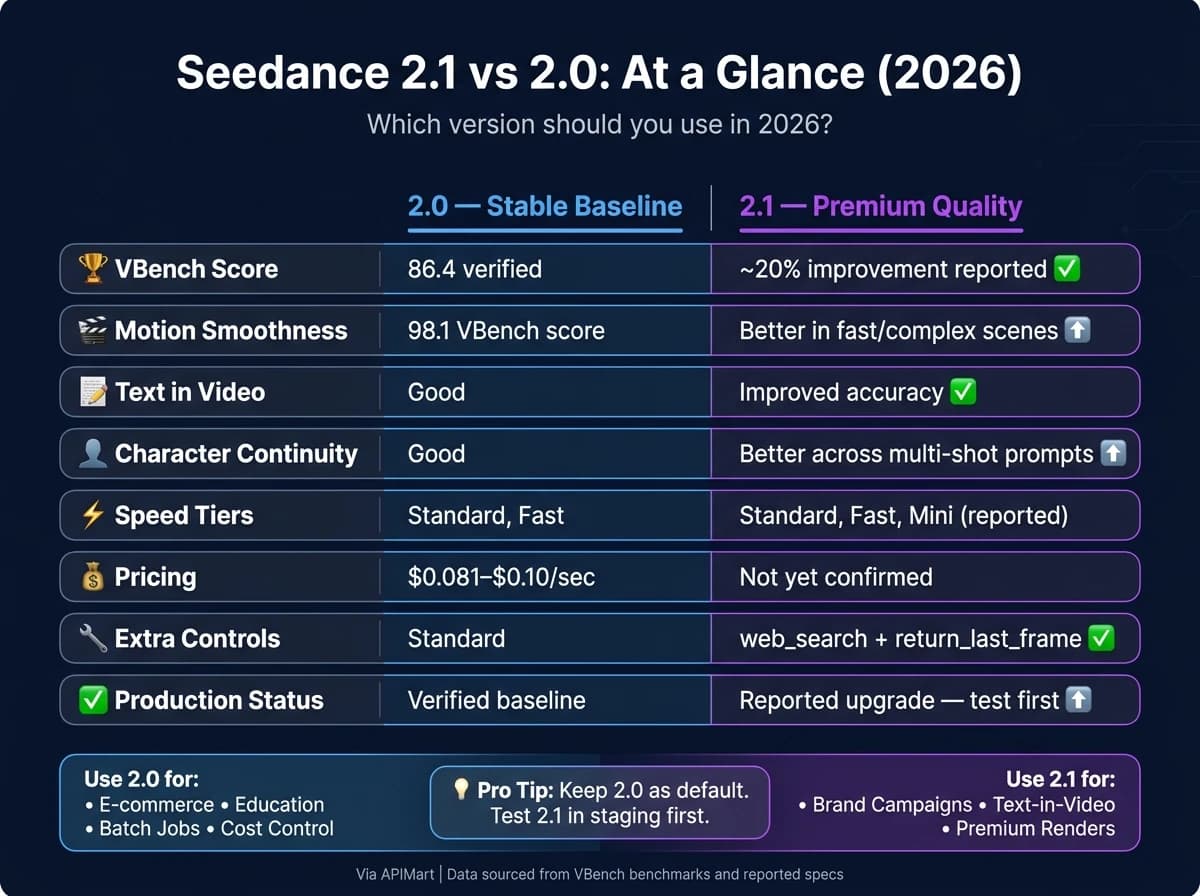
Quick Comparison
| Criteria | Seedance 2.0 | Seedance 2.1 |
|---|---|---|
| Release status | Documented production baseline | Newer reported upgrade |
| Video quality | Verified strong baseline | Reported ~20% better |
| Motion handling | Very strong | Better in hard-motion scenes |
| Text in video | Good | Better reported accuracy |
| Character continuity | Good | Better across multi-shot prompts |
| Max resolution | Up to 4K | Up to 4K reported |
| Max duration | Up to 15 seconds | Up to 15 seconds reported |
| Inputs | Text, image, video, audio | Text, image, video, audio |
| Extra controls | Standard controls | Reported web_search, return_last_frame |
| Speed tiers | Standard, Fast | Standard, Fast, Mini reported |
| Pricing | $0.081–$0.10/sec | Not confirmed |
| Migration effort | Current setup | Mostly a model swap, then retest |
So if you want the plain answer: I’d test 2.1 for high-end renders, but I’d keep 2.0 as the default until 2.1 passes my own prompt and cost checks.
Seedance 2.1 vs 2.0: Video Quality, Controls, and Cost
| Feature | Seedance 2.0 (Verified) | Seedance 2.1 (Reported) |
|---|---|---|
| Generation quality | 86.4 VBench Total Score [3] | ~20% improvement [1][7] |
| Motion consistency | 98.1 VBench motion smoothness [3] | More stable camera movement and fewer artifacts [1][7] |
| Prompt adherence | Strong prompt following | Enhanced, especially for text-in-video [7] |
| Max resolution | Up to 4K (3840×2160) [3][6] | Up to 4K (Reported) |
| Max duration | Up to 15 seconds [2] | Up to 15 seconds (Reported) |
| Inputs and controls | Text, image, video, audio [2][6] | Text, image, video, audio, plus web_search toggle [2] |
| Speed tiers | Standard, Fast [2] | Standard, Fast, Mini [7] |
| Pricing (USD) | $0.081–$0.10/sec [2] | Unconfirmed [7] |
Video Quality, Motion Consistency, and Prompt Following
The biggest gains show up in motion-heavy scenes and frames where text needs to look right.
Seedance 2.1 reports about a 20% quality gain over 2.0, with the main lift showing up in text rendering, character continuity, and fast, complex motion. At the same time, 2.0 is still the verified production baseline [1][7].
That matters because 2.1 appears to target the spots where 2.0 can slip a bit. Reports point to better text inside frames, steadier handling of multiple character identities across cuts, and smoother motion in tough cases like water, cloth, and crowds [7].
Inputs, Outputs, Speed, and Pricing
Beyond image quality, the main differences come down to controls, speed options, and cost.
Both versions support text, image, video, and audio inputs. They can also handle up to 12 reference files in one generation pass, including up to 3 reference videos with a combined duration of 15 seconds [2][6].
For 2.1, the reported API controls add a web_search toggle for real-world references and a return_last_frame option for chaining image-to-video workflows [2]. On pricing, 2.0 costs $0.10 per second on Standard and $0.081 per second on Fast, while 2.1 pricing has not been confirmed yet [7].
When to Use 2.1 and When 2.0 Still Works
| Use Case | Recommended Version | Reason |
|---|---|---|
| Branded marketing videos | Seedance 2.1 | Higher fidelity and better character consistency [7] |
| Product demo clips | Seedance 2.0 Standard | Verified baseline and 94.7 subject consistency [3] |
| Educational visuals with on-screen text | Seedance 2.1 | Improved text-in-video accuracy [7] |
| Social media content (TikTok, Reels) | Seedance 2.0 Mini (when available) | Lower cost and faster iteration [7] |
If your 2.0 setup already gets the job done, 2.1 makes the most sense as something to test first with your own prompts before you switch defaults [1]. The reported gains look most useful for complex scenes, motion-heavy sequences, and projects where on-screen text needs to stay accurate. Next, the API section shows how to call each version cleanly, or you can explore Sora 2 for alternative high-fidelity video generation.
API Differences on APIMart: Authentication, Requests, and Responses

Authentication, Base Endpoint, and Model Selection
If you're testing 2.1, the change is pretty small: swap the model ID and keep the same request flow.
Both versions use the same header-based authentication: Authorization: Bearer <API_KEY>[3][5]. To switch versions, change the model field to seedance-2.0 or seedance-2.1. Everything else in the request stays the same[1][8].
Request Examples for Seedance 2.0 and 2.1
You can also access the WAN 2.6 API for high-consistency video, similar to the MiniMax-Hailuo-02 workflow. Here’s a minimal text-to-video request for Seedance 2.0:
{
  "model": "seedance-2.0",
  "prompt": "A product shot of a white sneaker rotating on a clean studio surface, soft lighting",
  "duration": 5,
  "resolution": "1080p",
  "aspect_ratio": "16:9",
  "generate_audio": false
}
For Seedance 2.1, the structure is almost identical:
{
  "model": "seedance-2.1",
  "prompt": "A product shot of a white sneaker rotating on a clean studio surface, soft lighting",
  "duration": 5,
  "resolution": "1080p",
  "aspect_ratio": "adaptive",
  "generate_audio": false
}
For image-to-video, use adaptive so the output matches the source image and avoids cropping[5]. One request can include up to 9 images at up to 30 MB each, 3 video clips between 2 and 15 seconds each, and 3 MP3 audio files up to 15 MB each[5].
| Parameter | Seedance 2.0 | Seedance 2.1 (Reported) |
|---|---|---|
model | seedance-2.0 | seedance-2.1 |
| Input validation | Standard safety filters | Stricter validation; more rejections may occur[1] |
Async Jobs, Webhooks, and Error Handling
Once the request body is ready, the main differences show up in job handling and error recovery.
The async flow is the same for both versions: submit the job, then either poll for status or wait for a webhook[5][8][9]. When the task finishes successfully, the response includes a video_url for the generated MP4[5][9].
Download the file right away. Those video_url links expire within 24 hours[5]. If you're running a high-volume pipeline, it makes more sense to pass a callback_url in the original request instead of polling. The API will POST to your endpoint when the task hits a final status[5][8].
For polling, use exponential backoff. Start with a 10-second wait, double it on each attempt, and cap the delay at 60 seconds[5]. If you're updating parser logic, normalize status values so both older uppercase states and newer lowercase states work cleanly. Current responses may use succeeded, failed, expired, and cancelled[5][9].
The main production risk in 2.1 is stricter validation, not a different job lifecycle. Put plainly, 2.1 rejects weak prompts more often, so you should handle 400 errors directly[1]. Your error handler should catch 400 responses and show the rejection reason before retrying.
These are the main error codes worth handling:
| Status Code | Error | Action |
|---|---|---|
400 | INVALID_PROMPT | Refine the prompt and resubmit[9] |
402 | INSUFFICIENT_CREDITS | Top up credits via the dashboard[9] |
403 | FORBIDDEN | The URL expired; regenerate and download within 24 hours[5] |
429 | TOO_MANY_REQUESTS | Exponential backoff[5] |
500 | INTERNAL_ERROR | Retry after a short delay[9] |
Task records are only retrievable for 7 days, so log the task_id and full response payload on your side when you submit the job[5].
How to Migrate from Seedance 2.0 to 2.1 Without Breaking Production
The request flow barely changes. In most cases, this is just a model swap. The bigger risk sits in the output, not the integration.
That’s why migration problems usually come from one bad assumption: that Seedance 2.1 will respond the same way as 2.0 on the same prompts. It might do better. It might also behave differently in ways that affect production. So if quality improves, that’s not a reason to skip testing. It’s a reason to test more carefully.
Parameter and Prompt Migration Checklist
Before you touch production, look at what your current 2.0 setup is doing today. Write down your usual clip length, resolution, whether you use text-to-video or image-to-video, and which prompts have caused trouble before or needed odd workarounds. That list becomes your retest suite.
The main update is the model ID, but a few other fields deserve a close pass:
| Parameter/Field | What to Check for 2.1 |
|---|---|
model | Update to the 2.1 model ID [5] |
prompt | Retest text rendering and multi-character identity; 2.1 may need fewer descriptive workarounds [7] |
generate_audio | Review audio-video synchronization behavior [1][5] |
usage | Monitor token usage to track cost shifts [5] |
status | Verify your parser accepts current and legacy status values [1] |
Start small. Run 3–5 core prompts through 2.1 first: one simple scene, one motion-heavy scene using Grok Imagine Video, one reference-image scene, and one prompt that failed in 2.0 [1].
Then score the outputs on the things that matter in production:
- Motion coherence
- Character consistency
- Prompt adherence
Don’t judge the test on visuals alone [1]. A clip can look good at first glance and still miss the prompt, drift on identity, or fall apart in motion.
Once the prompt audit is done, test 2.1 in parallel before any cutover.
Rollout Strategy: Staging, A/B Tests, and Parallel Versions
Don’t move everything to 2.1 in one shot. Keep Seedance 2.0 as your production default and fallback while you run 2.1 as a parallel test lane through APIMart [1].
A good first step is to send only premium or quality-critical workloads to 2.1. That includes marketing videos, branded clips, and educational content with on-screen text [1][7]. Leave cost-sensitive batch jobs on 2.0 until 2.1 beats 2.0 in repeated tests [1].
| Rollout Phase | Action | Success Metric |
|---|---|---|
| Staging | Same-prompt tests with 3–5 core prompts | 2.1 meets or exceeds 2.0 on motion and consistency |
| A/B Testing | Parallel lanes through APIMart | Lower rejection rate and stable cost-per-clip |
| Canary | Route ~10% of premium traffic to 2.1 | No increase in failed or expired task statuses |
| Production | 2.1 as default; 2.0 as fallback | Consistent quality across high-volume batches |
There’s one detail that often trips people up: keep duration, aspect ratio, and random seed settings the same between both versions during testing [1]. If you swap the model and change settings at the same time, you won’t know what caused the quality shift.
So keep it clean. Isolate the model swap first. After 2.1 looks stable on your workloads, then tune parameters.
After that, pick the default version based on workload type and quality needs.
Conclusion: Which Seedance Version Should You Use in 2026?
The choice comes down to three things: output quality, budget, and rollout risk. So this is less about a feature showdown and more about matching the right version to the job.
Seedance 2.1 makes the most sense when motion stability and text accuracy are the top priorities. It fits premium renders where polish comes first. Since 2.1 is still reported, test it yourself before you make it the default [1].
Seedance 2.0 is still the safer default for stable, cost-controlled production. It works well for e-commerce, educational content, and any setup where predictable behavior matters more than using the newest release.
Final Recommendation by Use Case
Use this quick guide to match each workload with the best version.
| Use Case | Best Version | Reason |
|---|---|---|
| Marketing & brand campaigns | Seedance 2.1 | Best fit for premium renders and better motion/text handling [1] |
| E-commerce product clips | Seedance 2.0 Standard | Verified baseline for product shots |
| Educational visuals | Seedance 2.0 Standard | Reliable output for explainers and training clips |
| Social media at scale | Seedance 2.0 Mini | Lower-cost option for high-volume posts |
| Rapid iteration | Seedance 2.0 Fast | Faster turnaround for concept testing [4][3] |
| Developers building video features | Seedance 2.0 first, then staged 2.1 rollout | Start with 2.0, test 2.1 in staging, then switch after it passes your checks [1] |
Use 2.1 for premium final renders, and keep 2.0 for stable, cost-controlled workflows until 2.1 passes your own tests.
FAQs
How much testing should I do before switching to Seedance 2.1?
Don’t treat Seedance 2.1 as an automatic production upgrade.
For now, keep Seedance 2.0 as your stable fallback until 2.1 is confirmed in an official, stable API route.
Then retest your current production prompts, reference assets, and target formats. Compare repeated outputs so you can tell the difference between actual motion or consistency gains and a few lucky samples.
Also, don’t migrate until you’ve confirmed:
- the model ID
- the cost per clip
- quota behavior
What kinds of prompts are more likely to fail in Seedance 2.1?
Because Seedance 2.1 is still in preview and doesn't have official docs or public system cards yet, there isn't a confirmed list of prompts that fail.
That said, we can make some educated guesses based on the trouble spots people saw with Seedance 2.0. The usual weak points are:
- text rendering inside videos
- keeping multiple character identities consistent across cuts
- physics-heavy motion with lots happening at once
- prompts that are vague, stuffed with too many ideas, or missing clear motion details
In plain English: if a prompt asks the model to do a lot of hard things at the same time, that's often where things start to wobble.
Should I keep both Seedance 2.0 and 2.1 in production?
Yes. Keep Seedance 2.0 as your production baseline.
As of May 2026, Seedance 2.1 is better viewed as an upgrade signal, not a proven production replacement.
Here’s the plain-English reason: Seedance 2.0 is the only version with verified owner documentation, confirmed API contracts, and established pricing. That gives you a clear footing for production use. Seedance 2.1 may turn out to be the better option, but right now it hasn’t cleared the same bar.
So the safer move is simple: stay on 2.0 for now, and shift to 2.1 only after you run same-prompt retests for your use case once official documentation is available.
Choose the model you want in the model marketplace
Try chat, image and video models in the APIMart model marketplace, and experience model capabilities quickly with one unified API.