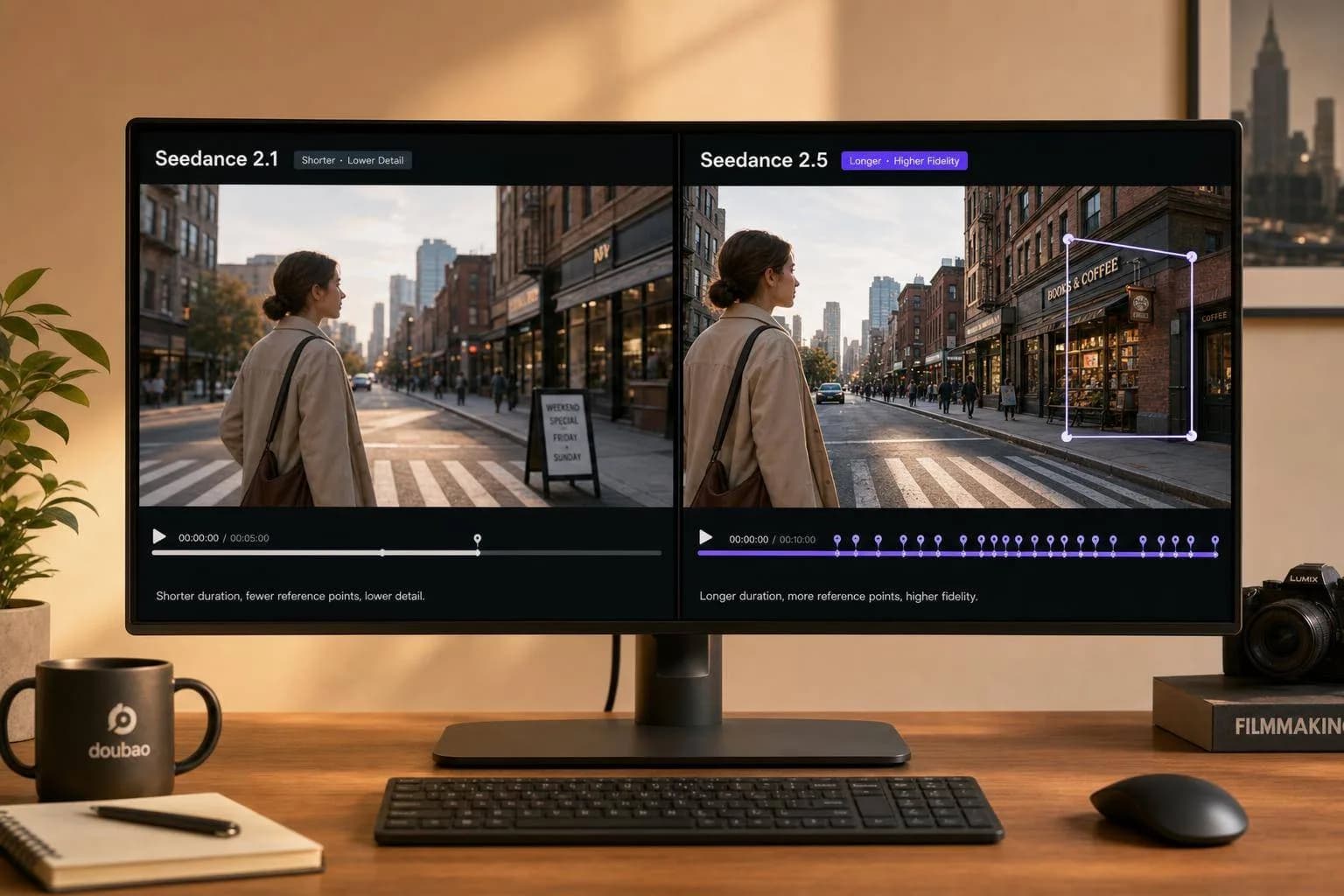
Seedance 2.5 vs 2.1: What's New in Doubao AI
Seedance 2.5 upgrades Doubao video AI with 30-second clips, native 4K, 50 reference inputs, and region-level edits—here is what changed versus Seedance 2.1.
If I had to sum it up in one line: Seedance 2.5 is the better pick for longer videos, tighter edits, and higher output quality, while Seedance 2.1 still fits short, fast jobs.
Here’s the short version:
- Clip length: 2.1 goes up to 15 seconds; 2.5 goes up to 30 seconds in one pass
- Output: 2.1 tops out at 1080p/2K in the main positioning here; 2.5 adds native 4K and 10-bit color
- References: 2.1 supports about 12 inputs; 2.5 supports up to 50
- Editing: 2.5 adds region-level edits, so I can change one part of a frame without redoing the full shot
- Prompt follow-through: ByteDance says 2.5 improves prompt adherence by about 20%
- Audio/video: both handle audio with video, but 2.5 puts more focus on tighter sync
- Best fit: 2.1 for short social, promo, and test clips; 2.5 for longer brand, catalog, and multi-scene work
In other words, 2.5 cuts down on stitching, reruns, and scene drift. If you care about 30-second single-pass output, 4K, more references, and finer edit control, that’s the main reason to move up.
Seedance 2.5 Is Insane - 30 Seconds In ONE Shot?
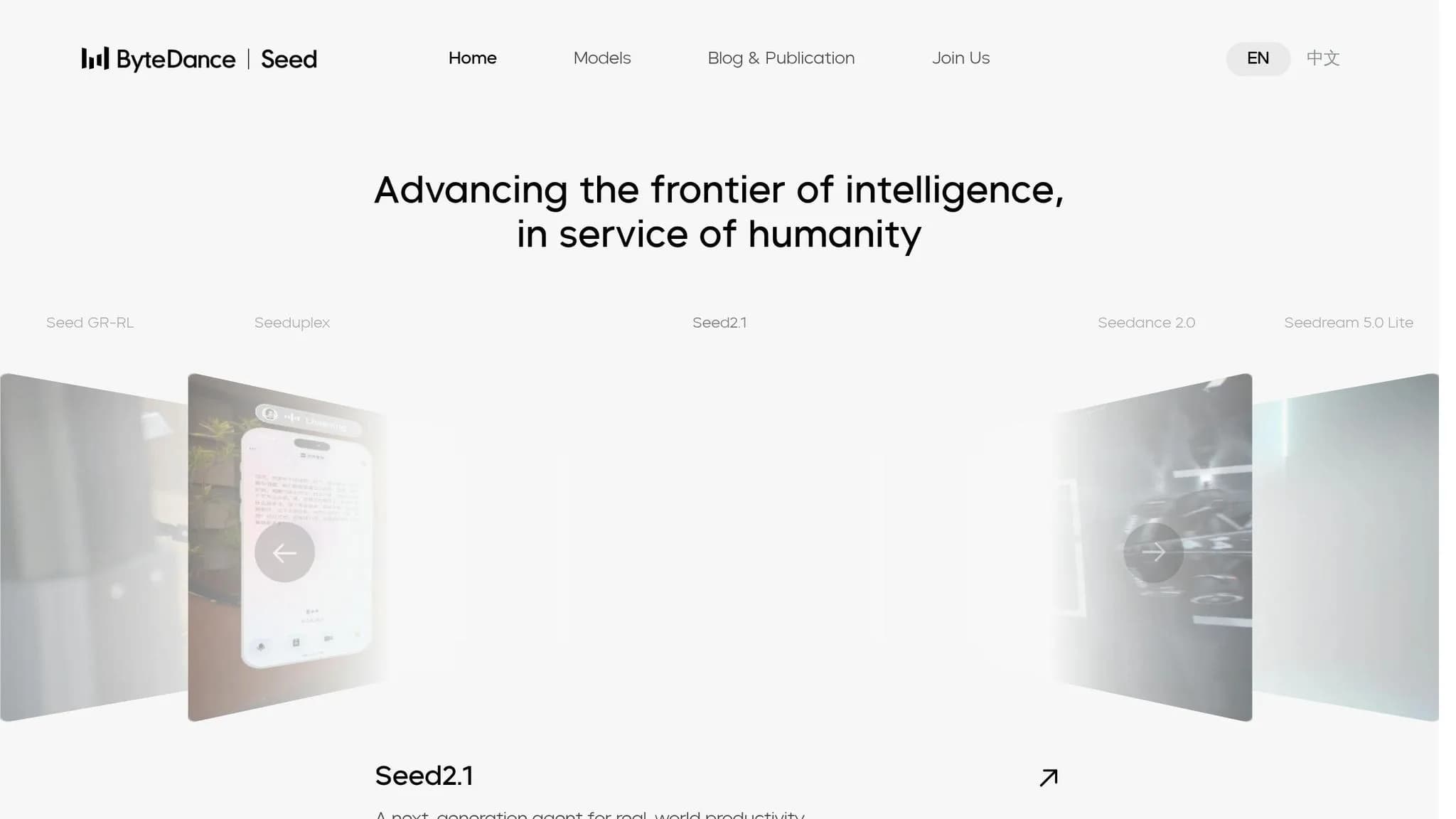
Quick Comparison
| Criteria | Seedance 2.1 | Seedance 2.5 |
|---|---|---|
| Max clip length | 15 seconds | 30 seconds |
| Resolution | 1080p / 2K baseline | Native 4K |
| Color depth | Standard | 10-bit |
| Reference inputs | ~12 files | Up to 50 files |
| Edit control | Broad clip/story edits | Region-level edits |
| Pre-vis tools | None listed | 3D white-model blockout |
| Prompt adherence | Baseline | ~20% better |
| Audio/video workflow | Joint generation | Single-pass with tighter sync |
| Best use | Short, high-volume clips | Longer, more controlled productions |
So if you’re choosing between them, I’d frame it like this: Seedance 2.1 is for shorter output with less setup, and Seedance 2.5 is for more control, more consistency, and better finishing quality.
Seedance 2.1: What the Baseline Version Does Well
Seedance 2.1 is the baseline model for short-form generation. It handles synchronized audio and keeps multi-shot output consistent, with a clear focus on fast turnaround for high-volume production queues. That’s the starting point Seedance 2.5 builds on.
Video, Audio, and Prompt Capabilities in Seedance 2.1
Seedance 2.1 generates audio in the same pass as video, so there’s no need for a separate dubbing step. It also supports multi-shot sequences from a single prompt, while keeping character appearance, style, and environment steady across different camera angles [8].
On the visual side, Seedance 2.1 produces cleaner textures and more stable rendering. Prompt length goes up to about 2,000 characters, which gives teams enough space to describe complex scenes or multi-beat narratives in one pass [8]. It’s also fast enough for high-volume queues. Reported cost is about $9 per minute for 1080p video [9]. For short, repeatable generation work, that makes 2.1 a solid fit.
Where Seedance 2.1 Works Best in Production Workflows
Seedance 2.1 works best when speed and volume matter more than deep scene control. It’s a natural fit for:
- ad variation testing
- product promo clips
- social content
It accepts text prompts or reference images on an AI canvas, which helps teams lock in a product or character look [8].
Seedance 2.1 handles short-form, audio-synced production well. For those needing alternative high-end results, Kling V3 also offers cinematic-quality video generation. That gives you a clear baseline for judging what 2.5 adds.
What Is New in Seedance 2.5
Seedance 2.5 pushes Seedance toward longer shots and tighter control. Compared with Seedance 2.1’s short-form baseline, the biggest shifts come down to three areas: length, references, and control.
Longer Clips, More References, and Better Scene Continuity
The most obvious update is clip length. Seedance 2.5 can generate 30-second video in a single pass, which doubles the 15-second limit in Seedance 2.1 [4][10][1]. That one-pass 30-second output cuts down on stitching, drift, and jump cuts. It also helps scene transitions and full story arcs stay more consistent [4][2].
Reference handling gets a big jump too. Seedance 2.1 supported up to 12 input files. Seedance 2.5 supports up to 50 references in one generation, including images, videos, audio, 3D models, and CAD sketches [2][10][11]. In plain English, that gives teams a lot more room to keep characters, products, and brand elements aligned across a longer campaign.
This matters most when a team needs to tweak one product detail or brand element without redoing the whole shot. That’s the kind of change that can save a lot of time.
Seedance 2.5 also outputs native 4K video with 10-bit color depth, without upscaling [10][11]. For post-production teams, that means more image detail and more room for color work.
New Editing and Control Features in Seedance 2.5
Seedance 2.5 adds region editing. Teams can isolate one part of a frame - like a product label, a background object, or a hand position - and change only that area while keeping the rest of the shot’s motion, lighting, and composition in place [10][1][11]. For localization work, that can make it much easier to swap on-screen text or product versions without regenerating a full ad.
Two other additions round out the control upgrades. First, a 3D white-model blockout feature lets directors map camera movement and character placement with 3D blockouts before committing to a full 4K render [10][11][5]. Second, audio and video are generated together for tighter sync, so sound effects and dialogue line up natively with on-screen action [3][6]. ByteDance says Seedance 2.5 delivers 20% better prompt adherence than Seedance 2.1 [1][3].
Seedance 2.5 vs Seedance 2.1: Direct Feature Comparison
Video Length, Motion Quality, Prompt Adherence, and Visual Consistency
The biggest gap between Seedance 2.1 and Seedance 2.5 comes down to clip length, control, and consistency.
Seedance 2.5 doubles the clip limit from 15 seconds to 30 seconds [2][7]. That matters more than it may seem at first glance. With 2.1, teams often have to stitch together multiple 15-second clips. With 2.5, a longer scene can run in a single pass, which helps keep scene transitions smoother and the narrative flow more intact. It also cuts down on motion drift and character changes within the same shot.
ByteDance also reports a 20% improvement in prompt adherence for Seedance 2.5 [1][5]. In plain English, that means the model is more likely to follow complex, multi-step prompts the first time, so teams spend less time rerunning generations.
Editing Flexibility, Output Quality, and API Workflow Differences
Seedance 2.5 also adds more room to work after generation starts. It supports region-level editing and native 4K output, while 2.1 stays with broader edit scopes and lower native output [1][2]. Seedance 2.5 also moves to native 4K with 10-bit output; 2.1 does not [2][7].
On the API side, the shift is pretty simple:
- Set the
modelparameter toseedance-2.5 - Increase the reference limit to 50 multimodal assets
- Remove stitching logic that was built around 15-second clips [1][2]
The table below narrows those changes to the production details that matter most.
| Feature | Seedance 2.1 | Seedance 2.5 |
|---|---|---|
| Max clip length | 15 seconds | 30 seconds (single pass) [2][7] |
| Reference inputs | ~12 files | Up to 50 multimodal files [1][2][7] |
| Editing scope | Clip-, character-, or story-level edits [1] | Region-level, consistency-preserving [1][2] |
| Pre-visualization | None | 3D "white model" blockout [5][7] |
| Resolution | Up to 4K | Native 4K, 10-bit color [2][7] |
| Prompt adherence | Baseline | ~20% improvement over 2.1 [1][5] |
| Audio generation | Joint audio-visual | Single-pass audio-video generation with tighter sync [7] |
Which Version Fits Marketing, Education, E-Commerce, and Creative Production
The choice mostly comes down to the kind of work you're doing.
Seedance 2.1 still works well when speed matters more than clip length or fine control. If you're making short instructional content or quick tests, the lighter setup can be a better match.
Seedance 2.5 makes more sense when the output has to stay consistent across a longer story, a large product catalog, or many localized versions. That's where the added control starts to pay off.
| Use Case | Preferred Version | Why It Fits |
|---|---|---|
| Marketing | Seedance 2.5 | Region-level editing lets teams swap products or signage without re-rendering the entire clip [1][2] |
| Education | Seedance 2.1 | Short instructional clips can be produced quickly with less setup overhead |
| E-commerce | Seedance 2.5 | The 50-reference limit keeps brand elements consistent across larger catalogs [2][7] |
| Creative production | Seedance 2.5 | 3D "white model" pre-visualization helps plan staging and camera movement before the final render [5][7] |
Conclusion: Key Tradeoffs Between Seedance 2.5 and Seedance 2.1
After looking at each feature side by side, the choice is pretty simple: speed versus control. Seedance 2.1 works best for short, low-complexity clips.
The main step forward isn't only clip length. It's also the fact that Seedance 2.5 gives you fewer broken transitions and less rerendering. It's made for longer, more consistent single-pass generations, and the move from 12 to 50 references, paired with native 30-second output, cuts down on stitching and reruns.[1][3]
If your team already uses 2.1, switching over is straightforward. The upside shows up in cleaner reference handling and faster final renders.
Use 2.1 for short, fast clips when speed matters most. Use 2.5 for longer sequences, premium brand work, or complex production work that depends on stronger character and scene continuity. That's where the 20% improvement in prompt adherence[1][5] and region-level editing can save the most time on product swaps and logo updates.
FAQs
::: faq
Should I upgrade from Seedance 2.1 to 2.5?
Upgrade if you need longer clips, native 4K, tighter multimodal reference control, or region-level editing to make revisions less of a chore.
If not, stick with Seedance 2.1 as your baseline for now, at least until Seedance 2.5’s pricing, stability, and output are proven in your setup. The safest move is to test first: swap the model ID, run a few checks, and only then shift your full workflow. :::
::: faq
When is Seedance 2.1 still the better choice?
Seedance 2.1 is still the better choice for workflows that prioritize stability, proven performance, and predictable costs.
Stick with it if you need output quality you can count on for client deliverables, have a strict budget, or rely on existing API setups with moderation and retry behavior already dialed in for your needs. :::
::: faq
What API changes are needed to use Seedance 2.5?
Update your API request to use the new model ID when it ships. If your setup already treats the model ID, max duration, reference count, and output resolution as settings you can change, moving to Seedance 2.5 may be as simple as a routing swap.
It’s also smart to check for any hardcoded limits, especially the 12-reference cap. If region-level editing shows up in the API, add the needed mask or region fields. And if you plan to generate native 30-second clips, budget for longer run times. :::
Choose the model you want in the model marketplace
Try chat, image and video models in the APIMart model marketplace, and experience model capabilities quickly with one unified API.