Apimart
Log inSign Up
ViduQ 3 vs Kling - Which AI Video Tool Wins?

ViduQ 3 vs Kling - Which AI Video Tool Wins?

ViduQ 3 vs Kling compared on resolution, speed, audio, pricing and API workflow - see which AI video tool fits social media, e-commerce or cinematic work.

Model Insights

When deciding between ViduQ 3 and Kling, it all boils down to your priorities: speed or quality. ViduQ 3 excels at producing videos quickly, making it ideal for social media, e-learning, and bulk content. Meanwhile, Kling focuses on delivering cinematic visuals with 4K resolution and advanced controls, perfect for high-end marketing or filmmaking. Both tools connect seamlessly via APIMart's API, allowing users to switch between them for different stages of production.

Quick Comparison:

FeatureViduQ 3Kling
ResolutionUp to 1080pNative 4K
Frame Rate24fpsUp to 60fps
Primary StrengthSpeed and volumeVisual quality and precision
AudioIntegrated (dialogue, music)Multilingual with lip-sync
Pricing (1080p)$0.056–$0.128 per second$0.0896–$0.1344 per second

Key Takeaway: Use ViduQ 3 for fast, cost-effective projects and Kling for polished, premium-quality outputs.

Overview of ViduQ 3 and Kling

Kling 3.0 cinematic AI video model

What is ViduQ 3?

ViduQ 3, created by Shengshu Technology, is tailored for teams that prioritize both speed and quality. It can produce up to 16 seconds of continuous 1080p video at 24fps in a single pass, complete with integrated audio features like lip-sync, sound effects, and background music [2]. Its advanced physics simulation has earned it a global #2 ranking on the Artificial Analysis Video Arena, achieving an ELO score between 1,220 and 1,244 [2].

ViduQ 3 is available in two versions:

  • Pro: Focused on delivering higher visual quality.
  • Turbo: Optimized for speed and bulk production workflows.

Now, let’s shift focus to Kling, which is all about cinematic precision. Other high-end models like Sora 2 offer similar professional-grade capabilities.

What is Kling?

Kling, developed by Kuaishou, is designed for creators aiming for cinematic excellence. It supports 4K resolution at 60fps and provides manual controls like the Motion Brush and an AI Director for multi-shot sequencing [1]. Its Omni variant allows the extraction of a character's appearance from a brief 3–8 second reference video, ensuring consistent identity across multiple scenes [2].

Kling 3.0 Omni leads the way in text-to-video benchmarks with an ELO score of 1,248 [1]. It has also gained significant traction, reaching over 60 million creators worldwide and generating around $240 million in annualized revenue [10].

"Kling 3.0 Model Series utilize a deeply integrated unified model training framework, achieving more native multimodal input and output." - Kling AI [8]

How APIMart Connects Both Tools

GccAi unified AI API platform

Although ViduQ 3 and Kling cater to different needs, APIMart bridges the gap by integrating both tools through a unified API. With APIMart's single integration point, users can seamlessly switch between ViduQ 3 and Kling without juggling multiple accounts or dashboards. The API is compatible with OpenAI, allowing you to easily toggle between models by adjusting a single parameter in your code [7].

APIMart also offers a pay-as-you-go pricing model:

  • ViduQ 3 Pro: Starts at $0.12 per second.
  • Kling V3 (720p): Available at $0.0672 per second.

This unified solution simplifies workflows, enabling teams to use ViduQ 3 for rapid drafts and Kling for polished, high-quality outputs using models like Veo 3.1. With a 99.9% SLA and a combined billing dashboard, APIMart ensures efficiency and convenience [7]. These integrations pave the way for deeper feature comparisons in the upcoming sections.

ViduQ 3: Features, Performance, and Use Cases

Core Features of ViduQ 3

ViduQ 3 stands out with its flexible input options, allowing users to start with a text prompt, a single image, or two images using the "First-Last Frame" mode. This mode is particularly handy for creating smooth in-between motion, making it ideal for tasks like product demos or storyboarding [9].

Another standout feature is its native audio pipeline, which handles synchronized dialogue, lip-sync, sound effects, and background music all in one go. This eliminates the need for separate post-production steps [10][2]. For creators looking for stylized visuals, the Anime Mode delivers a unique aesthetic, while Smart Cuts automatically determines shot transitions based on your prompt, saving time on manual edits [1][2]. These features collectively elevate the tool's overall performance, which is explored further below.

Performance Breakdown

ViduQ 3 is capable of producing 1080p resolution at 24fps in a single 16-second processing pass [2]. Its ELO score of 1,220–1,244 on the Artificial Analysis Video Arena ranks it as the second-best model globally as of early 2026 [2].

What truly sets it apart is its ability to render realistic physics. In independent tests, it was the only model that accurately depicted water without making it appear overly thick or unnatural [2]:

"Vidu Q3 was the only one that didn't make water look like jelly." - Atlas Cloud Blog [2]

For those prioritizing speed, the Turbo variant offers performance up to 2x faster than standard models, making it perfect for batch production. On the other hand, the Pro variant delivers cinematic visuals with polished lighting, ideal for high-quality projects [7].

"Pro's cinematic quality is outstanding! And Turbo lets me quickly validate creative directions - using both models together doubles my efficiency." Other high-performance options like Grok Imagine Video also offer competitive text-to-video capabilities. - Sarah Johnson, Content Creator [7]

These performance capabilities translate directly into practical advantages for a wide range of creative industries.

Where ViduQ 3 Works Best

Thanks to its flexible input options and audio synchronization, ViduQ 3 shines in projects that require both precision and efficiency. For e-commerce brands, it’s particularly effective for showcasing products involving liquids, textures, or material interactions - imagine a whiskey pour or a skincare serum in motion [2][3]. Its integrated audio pipeline also makes it a valuable tool for producing educational and corporate training videos, where narrated content needs to be created quickly and at scale [2][7].

For short-form social media content like Instagram Reels, TikTok, or YouTube Shorts, the ability to produce seamless 16-second clips with synced sound and Smart Cuts significantly reduces editing time [10][3]. Additionally, for teams working on film pre-visualization, its frame-level camera controls - including pan, zoom, and tracking shots - mimic real-world lens behavior closely enough to serve as a reliable reference , much like the professional-grade output found in MiniMax Hailuo 2.3 [2][7].

Kling: Features, Performance, and Use Cases

Core Features of Kling

Kling 3.0 stands out with its precise directorial control and focus on delivering exceptional visual quality. One of its standout tools, the AI Director (Multi-Shot), allows users to define up to six distinct camera angles - such as wide, medium, close-up, and POV - within a single 15-second video. Transitions and choreography are handled automatically, making it possible to create complete narrative sequences effortlessly [12]. These capabilities highlight Kling 3.0's potential for crafting dynamic and visually engaging content.

The Element Binding feature is another game-changer, ensuring a consistent visual identity across multiple video generations. By uploading reference images or videos, users can lock in details like a character's face, outfit, or a product's appearance. This eliminates the common "face drift" issue seen in many AI video tools, which is particularly valuable for serialized brand content [13][8]. Additionally, Kling supports native audio in five languages - English, Chinese, Spanish, Japanese, and Korean - with options for dialect-level control and integrated lip-sync functionality [12].

Performance Breakdown

Kling 3.0 is the first AI video model to offer native 4K resolution at 60fps without relying on upscaling. In tests involving 50 prompts, it received impressive scores: 9.4/10 for photorealism and 9.6/10 for audio quality [14]. On the Artificial Analysis leaderboard in early 2026, Kling achieved an ELO score of 1,243, surpassing Google Veo 3.1, which scored 1,226 [15].

However, this level of quality comes with a trade-off in speed. While standard clips take several minutes to generate, more complex 4K multi-shot sequences require significantly more time [14][12]. Lip-sync accuracy is another area that occasionally needs refinement, with about one in three clips requiring retakes [12]. As noted by the Vuela.ai content team:

"Kling 3.0 is, in May 2026, the best AI video model for cinematic single shots that need length and resolution." [11]

These performance characteristics make Kling a strong contender for high-end production tasks, though its speed limitations may affect its use in time-sensitive projects.

Where Kling Works Best

Kling shines in high-end marketing and narrative filmmaking. Its ability to render text clearly ensures that logos, price tags, and signage remain legible in generated videos. For filmmakers, the AI Director feature enables the creation of synchronized sequences, significantly reducing the need for manual editing [15][16][18].

"The AI Director feature is the first time an AI video model has felt truly useful for narrative filmmaking, not just for creating atmospheric b-roll." - Elena Marchetti, Senior AI Editor, Awesome Agents [12]

Kling's widespread adoption is evident in its 60 million registered users and $500 million in annualized revenue by early 2026 [17]. Its applications span industries, from e-commerce product loops to architectural walkthroughs, showcasing its versatility and impact on content creation.

Is Kling 3.0 Actually the Best? Full Breakdown vs Competition

ViduQ 3 vs Kling: Side-by-Side Comparison

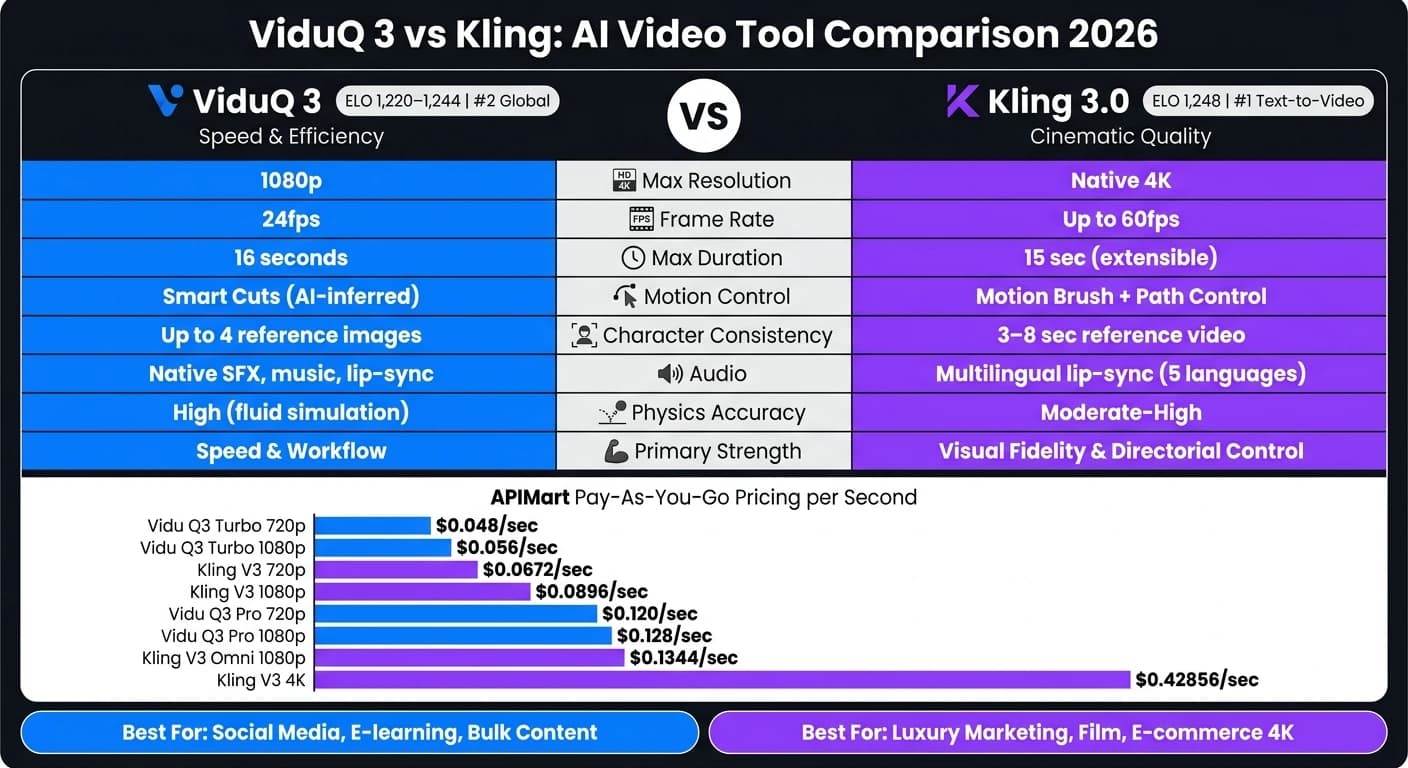
ViduQ 3 vs Kling: AI Video Tool Comparison 2026

Feature-by-Feature Breakdown

Here's a detailed comparison of the standout features in ViduQ 3 and Kling 3.0, showcasing where each tool performs best:

FeatureVidu Q3Kling 3.0
Max Resolution1080pNative 4K
Max Duration16 seconds15 seconds (extensible)
Frame Rate24fpsUp to 60fps
Motion ControlAI-inferred / Smart CutsInteractive Brush + Path Control
ConsistencyUp to 4 reference images3–8 second reference video or images
AudioNative co-generation (SFX, music, lip-sync)Multilingual lip-sync & speaker control
PhysicsHigh accuracy, especially with fluidsModerate-high accuracy
Primary StrengthSpeed & workflow efficiencyVisual fidelity & directorial control

ViduQ 3 is optimized for speed and workflow, using up to four reference images to maintain character identity. Kling, on the other hand, employs a 3–8 second video clip for more robust consistency, making it ideal for serialized content creation [2].

Next, let’s dive into the pricing differences to see how these features translate into cost.

Pricing Comparison

Both tools are available through a pay-as-you-go plan at a 20% discount off list prices. Here's the cost per second of generated video:

Model VariantResolutionAPIMart Price (USD/sec)
Vidu Q3 Turbo1080p$0.056
Vidu Q3 Turbo720p$0.048
Vidu Q3 Pro1080p$0.128
Vidu Q3 Pro720p$0.120
Kling V3720p$0.0672
Kling V31080p$0.0896
Kling V3 Omni1080p + Video$0.1344
Kling V34K$0.42856

For social media campaigns that require cost efficiency, Vidu Q3 Turbo stands out at just $0.056/sec for 1080p resolution. For example, a 16-second clip costs less than $0.90 [7]. Meanwhile, Kling's 4K tier is the go-to option for premium projects like luxury product demos or content designed for large displays, offering true native 4K resolution [5].

These pricing models are seamlessly integrated within APIMart's unified API, which simplifies workflow management.

Workflow and API Integration

Both ViduQ 3 and Kling connect through APIMart's unified, OpenAI-compatible API endpoint. Switching between models is as simple as updating the model name parameter (e.g., viduq3-pro to kling-v3). Developers have praised the ease of integration:

"As a developer, I love the unified design of the Vidu Q3 API. Pro and Turbo share the same interface - just switch the model parameter. Integration was a breeze." - Alex Kim, Full-Stack Engineer [7]

"As a developer, the unified API for kling-v3-omni makes integration a breeze. One kling-v3 series model handles all our multi-modal generation needs." - James Liu, Senior Developer [5]

A common workflow involves using Vidu Q3 Turbo for initial drafts to test concepts at a lower cost, followed by Kling V3 for polished, cinematic-quality shots. For projects requiring synchronized audio, Veo 3.1 API offers another high-fidelity alternative. Both tools benefit from APIMart's 99.9% SLA uptime and pay-as-you-go billing, ensuring smooth enterprise-level operations.

Conclusion: Which Tool Should You Choose?

Key Factors to Consider

When choosing between Vidu Q3 and Kling 3.0, it's essential to think about your budget, desired output quality, and production speed. Vidu Q3 stands out for high-volume workflows, thanks to its faster generation speeds [4] and a cost as low as $0.056 per second at 1080p. On the other hand, Kling 3.0 prioritizes visual quality, offering native 4K resolution at 60fps, along with advanced control over motion and lighting.

For global projects, Kling's precise multilingual lip-sync [6] is a standout feature. Meanwhile, if your content is English-focused and includes ambient sounds or music, Vidu Q3 strikes a good balance between quality and efficiency.

These considerations naturally align each tool with specific industry needs.

Recommendations by Industry

IndustryBest PickWhy
Social Media / UGCVidu Q3Quick output, cost-effective, and consistent character performance.
E-commerceKling 3.0Excels in rendering materials like glass and metal for 4K demos.
EducationVidu Q3Supports narrated lessons with a 16-second native audio window.
Entertainment / FilmKling 3.0Cinematic controls and extended clip lengths enhance storytelling.
Luxury MarketingKling 3.0Offers unmatched visual fidelity for high-end campaigns.

Final Verdict

Ultimately, your choice depends on the priorities of your project. If speed and cost are your main concerns, Vidu Q3 is the better option. For projects that demand cinematic and premium-quality visuals, Kling 3.0 is the way to go.

Interestingly, many teams find value in using both tools together. For example, you can draft with Vidu Q3 Turbo for quick iterations and refine key visuals with Kling 3.0 through APIMart's API. This hybrid approach combines Vidu's speed with Kling's polished output, streamlining workflows without the hassle of managing separate integrations.

FAQs

When should I use Turbo vs Pro in ViduQ 3?

Use ViduQ 3 Pro for projects that demand cinematic visuals and exceptional detail. It's the go-to choice for professional work where precision and high-quality finishing are non-negotiable.

Opt for ViduQ 3 Turbo when speed and efficiency take center stage. This model offers a blend of quality and performance, making it ideal for fast-paced workflows, bulk tasks, and quick idea testing.

How do I keep the same character or product consistent across scenes?

To keep things consistent, both tools rely on reference inputs, but they shine in distinct workflows:

  • ViduQ 3: Works with reference images to ensure a character's look - like their face, outfit, and expressions - stays consistent throughout scenes. This makes it perfect for maintaining a spokesperson's or product's identity.
  • Kling: The O3 model uses short reference videos (3–8 seconds) or up to two reference images through an API to preserve character accuracy across scenes.

What’s the best workflow to draft in ViduQ 3 and finish in Kling?

The best workflow takes advantage of what each tool does best. Begin with ViduQ 3 to handle drafting, maintain character consistency, and plan out the narrative. Its quick previews and built-in audio features help you save valuable time during this phase. Once you've nailed down the motion and character elements, move over to Kling for the finishing touches. Kling’s AI Director and lifelike environments are perfect for fine-tuning cinematic details like lighting and composition, ensuring a professional and polished final product.