AI Video APIs vs. Desktop Editing Software
Compare AI video APIs and desktop editors on speed, scale, cost, workflow, and control, APIs win on volume, editors win on polish, and hybrid setups do both.
If you need lots of videos fast, AI APIs usually win. If you need frame-by-frame control, desktop editors still win.
I’d sum it up like this: AI APIs are built for automation, batch output, and app integrations. Desktop tools are built for hands-on editing, timing, color, audio, and final polish. That split shows up in speed, scale, cost, workflow, and control.
Right away, here’s what matters most:
- AI APIs fit teams making high-volume clips, ad versions, product videos, and training content
- Desktop editors fit teams making brand films, documentaries, and polished final cuts
- APIs can turn rough cuts into output in 10–60 seconds, while manual editing can take 30–90 minutes
- At higher volume, API-based work can cost far less than editor-led production
- A hybrid setup often works best: automate rough work, then finish in an NLE
AI Video Editing API Explained | Rask & Best Tools 2025
Quick Comparison
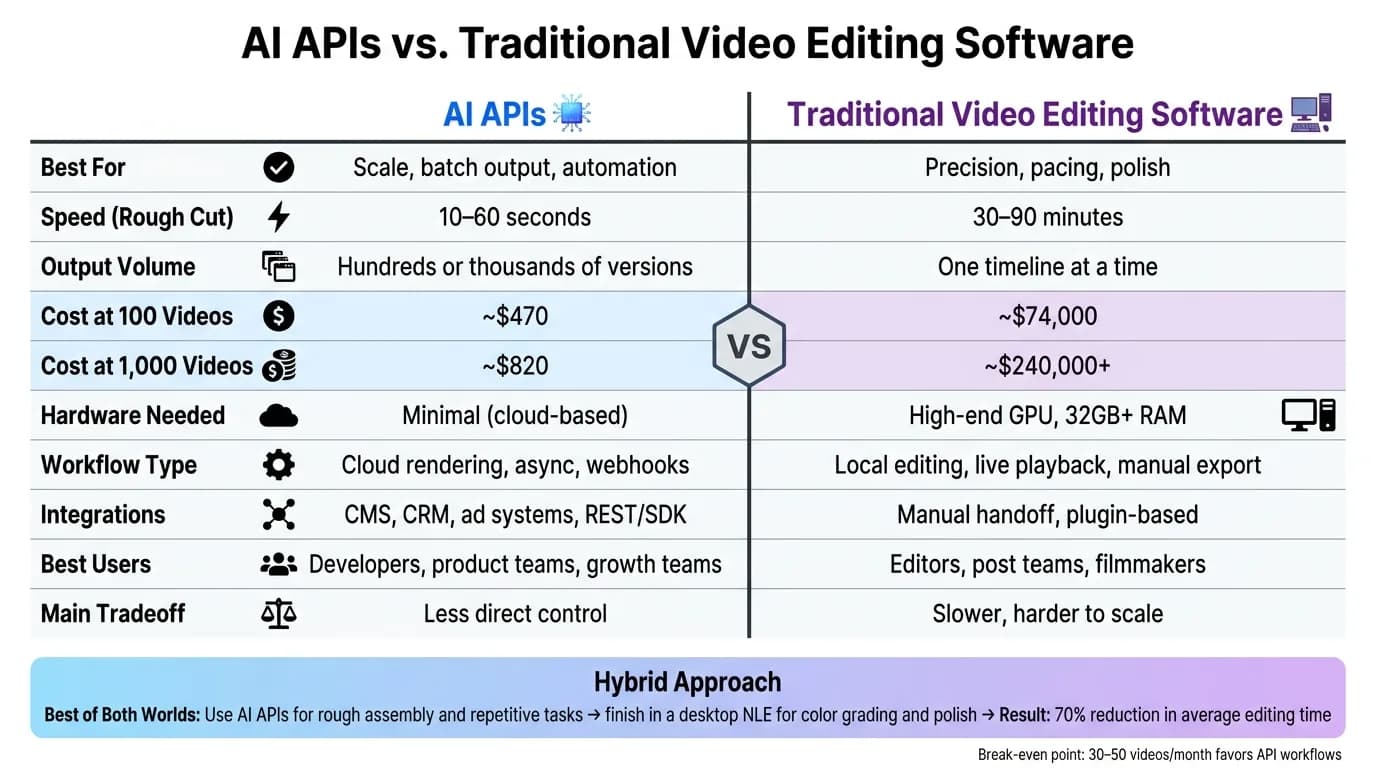
| Criteria | AI APIs | Traditional Video Editing Software |
|---|---|---|
| Main use | Code-based video generation and editing | Manual timeline editing |
| Best for | Scale, repeat tasks, batch output | Precision, pacing, polish |
| Speed | 10–60 seconds for rough cuts | 30–90 minutes for rough cuts |
| Workflow | Cloud rendering, async jobs, webhooks | Local editing, live playback, manual export |
| Output volume | High; hundreds or thousands of versions | Lower; one timeline at a time |
| Integrations | Apps, CMS, CRM, ad systems, SDKs | Mostly manual handoff or plugin flow |
| Hardware | Low local needs | High-end workstation, GPU, 32GB+ RAM |
| Cost pattern | Usage-based | License + labor + review time |
| Best users | Developers, product teams, growth teams | Editors, post teams, filmmakers |
| Main tradeoff | Less direct control | Slower and harder to scale |
So if you’re choosing between the two, I’d keep it simple: pick APIs for volume and automation, such as Veo 3.1 for high-quality generation, pick desktop software for control, and use both when you need output plus polish.
How Each Approach Works Before You Compare Results
How AI Video Editing APIs Work
With AI video editing APIs, you send a file, URL, or prompt through code, and the API does the editing or generation in the cloud.
The workflow usually moves through five steps: ingest the source video from a file upload or URL, analyze it with scene detection, transcription, or highlight scoring, instruct the system with structured JSON instructions or a prompt, wait for asynchronous cloud rendering, and then receive a webhook with the finished MP4 link.
Nothing runs on your machine, and you don’t need a local GPU.
That setup makes it easy to automate rough cuts, auto-captioning, and multiple versions for different platforms. If you’re building a multi-step pipeline, APIMart can handle transcription, image creation, and video generation through one API. That automation-first setup is what changes speed and scale.
How Desktop Editing Software Works
Desktop editing works very differently. It stays manual from beginning to end.
Desktop editors run locally on your workstation. You drag clips onto a timeline, cut them by hand, and adjust audio, color, and timing frame by frame. Every edit is manual.
That local processing can matter a lot for sensitive client work. And that hands-on control gives editors tight precision for nuanced storytelling. AI features can speed up parts of the job, but the editor still makes each call.
Where Built-In AI Features in Desktop Tools Fit
Modern desktop editors now include AI-assisted features like automatic transcription, object tracking, generative extend, and smart masking.
These tools help. But they’re still features inside a manual workflow, not automation infrastructure.
That’s the key difference. If an editor uses AI transcription to move through a rough cut faster, they’re still inside a timeline making one decision at a time. These features speed up single tasks inside the editor. They don’t automate the workflow.
API-based workflows work outside the interface entirely. The automation starts with code or prompts, not a manual action on a timeline. That difference shapes the speed, scale, and control tradeoffs in the next sections.
Speed, Automation, and Ease of Use
Where AI APIs Save Time
AI APIs save the most time on repetitive, high-volume work. Think silence removal, auto-captioning, and turning long videos into short clips for social. Those are perfect jobs for automation.
A rough cut can take 30–90 minutes by hand and 10–60 seconds through an API [1]. That doesn't just make editing faster. It changes how the whole production process works.
For teams pushing out social media content at scale, those time savings stack up in a hurry. In early 2026, a mid-sized e-commerce brand increased social clip output from 8 to 72 clips per month, while reporting a 55% drop in per-clip production time and a 12% lift in engagement on Instagram Reels [4].
That hits hardest when volume matters.
Where Desktop Tools Are Slower but More Precise
When the job calls for judgment instead of repetition, manual control still comes out on top.
Manual editing is slower on purpose. It can take hours or even days, but that tradeoff makes sense when the final piece needs emotional punch or has to represent the brand at a high level. A simple rule works well here: use manual editing for brand assets, and automate content that doesn't need that level of care.
Desktop editors also give you instant timeline playback. That's a big deal when you're making frame-by-frame calls. Most cloud APIs work asynchronously, so you send the job off and wait for a webhook response instead of scrubbing through a live timeline.
Ease of Use: Developers vs. Editors
Here’s a direct side-by-side look at the jobs that matter most:
| Task | AI API | Desktop Editor |
|---|---|---|
| Rough cut creation | 10–60 seconds [1] | 30–90 minutes [1] |
| Silence/filler removal | Automated | Manual timeline trimming |
| Captioning | Automated | Manual or plugin-assisted |
| Batch output | High - render hundreds of versions | Low - one timeline at a time |
| Manual effort | Low - prompt or code-driven | High - frame-by-frame precision |
| Playback speed | Asynchronous; results return by webhook | Real-time scrubbing |
Platforms like APIMart let developers use video generation and editing models, including Sora and Kling V3, through one unified API. That makes it easier to build automated pipelines without juggling multiple vendor integrations.
Desktop editors are easier for non-developers to pick up. There’s no code involved. You just open the timeline and start editing. The downside is scale. If you need more output, you usually need more editors or longer hours, because each new version still takes direct time to make.
Code-first teams tend to move faster with APIs. Visual-first teams tend to move faster in desktop editors.
Speed is only one piece of the puzzle; the next test is how well the workflow scales.
Scalability, Integration, and Cost
Why AI APIs Handle High-Volume Output Better
Once production jumps from a few clips to hundreds, speed is no longer the main issue. Scale is. And that’s where the gap between APIs and desktop tools gets much bigger.
A 1,000-video batch can wrap in 1–2 hours, while manual workflows may still be stuck in setup and prep [5]. That changes how teams work day to day. Instead of pushing files from one person to the next, APIs can plug straight into CMS, CRM, and ad pipelines using a unified LLM API. When a new product, campaign, or page goes live, video output can start on its own.
Why Desktop Software Is Harder to Scale
Desktop editing gets harder to scale because it usually comes down to people. More videos means more editors, more machines, and more back-and-forth.
A solid editing setup still calls for a high-end GPU and 32GB+ of RAM [2]. That cost grows every time you add another editor. And hardware is only part of it.
There’s also the coordination drag. Internal reviews, stakeholder approvals, and brand compliance checks can add an estimated $2,800 per video in fully loaded labor costs, based on a U.S. marketing salary of about $80/hour [5]. For a small number of hero brand films, that may be worth it. For hundreds of product clips or social cuts, it can clog the whole process.
That pricing gap stands out pretty clearly in the model below.
How U.S. Teams Should Think About Pricing
Those differences show up fast when you look at cost structure.
| Factor | AI APIs | Desktop Editing Software |
|---|---|---|
| Scalability | High; handles 10,000+ renders via queue management [5] | Low; limited by human headcount and hardware |
| Integration | Programmatic; REST/SDK, Zapier, CMS/CRM [5][6] | Manual; file exports and plugin-based workflows [2] |
| Hardware Needs | Minimal; cloud-based compute [5] | High; workstations, GPU clusters, VRAM [2] |
| Pricing Model | Usage-based [5] | Subscription or license fee [2] |
| HR Requirements | Developers, prompt engineers | Professional editors, motion designers |
Desktop software like Adobe Premiere Pro costs $23–$60/month just for the license [2]. But that’s not the full story. The bigger expense is labor and coordination.
At scale, APIs come out cheaper by a wide margin. Producing 100 videos through a standard agency-style workflow costs an estimated $74,000, including labor and revisions. The same volume through an API workflow comes to about $470. At 1,000 videos, the gap gets even larger: $240,000+ versus about $820 [5].
A simple rule of thumb helps here: if your team makes more than 30–50 videos per month, the break-even point leans hard toward an API-driven workflow [7]. Below that level - especially for brand films or more complex story-led work - desktop editing can still make financial sense.
Creative Control, Best-Fit Use Cases, and Final Takeaway
When AI APIs Are the Better Choice
The tradeoff is pretty simple: pick AI APIs when speed and output matter more than frame-by-frame control.
They work well for content that needs to ship fast and at scale, like social clips, ad variants, and localized versions. One example says a mid-sized U.S. e-commerce brand increased output from 8 to 72 clips per month while cutting per-clip production time by 55% [4]. That’s a big shift if your team is trying to feed paid social, email, product launches, and marketplace listings at the same time.
Training content is another strong fit. Avatar-based AI can produce steady, repeatable video in 140+ languages [2]. If updates happen often, that can save a lot of back-and-forth compared with reshoots.
When Desktop Editors Are the Better Choice
Desktop tools still win when precision and judgment are non-negotiable.
That matters most for documentaries and flagship brand films, where frame timing, story flow, and manual color grading shape the final piece. In those cases, the human touch still carries a lot of weight. Notably, 82% of professional colorists still prefer manual grading over AI presets for final cinematic delivery [1].
If the goal is a polished, emotionally tuned final cut, desktop editing remains the safer bet.
Conclusion: Choose Based on Volume, Workflow, and Control
A useful rule is to treat high-volume content and high-touch content differently.
| Use Case | Recommended Approach | Why |
|---|---|---|
| Social Clips | AI API | Speed, templates, and vertical-first workflows |
| Personalized Ads | AI API | High-volume variation testing |
| Product Videos | Hybrid | AI for explainers; desktop for high-end lighting and texture |
| Training Content | AI API (avatar-based) | Consistency and multilingual updates without reshoots |
| Documentaries | Desktop Editor | Emotional pacing and complex narrative structure |
| Brand Films | Desktop Editor | Flagship quality, bespoke color, and emotional depth |
For teams that need scale and polish, a hybrid setup often makes the most sense. Use an AI API - such as APIMart - for rough assembly, transcript cuts, and repetitive tasks. Then move the output into a non-linear editor (NLE) for final color grading and polish. Hybrid workflows have recorded a 70% reduction in average editing time [3].
FAQs
::: faq
Which option is better for small teams?
For small teams, AI-powered solutions are usually the better fit. They’re faster, cost less, and are easier to use than old-school software. That makes them a strong option for batch production, rapid prototyping, and steady social media content.
Tools like APIMart can make the workflow a lot simpler by giving teams access to many AI models through a single API. That means less tool switching and less friction day to day.
At the same time, old-school editing still has its place, especially for high-end narrative work that needs frame-level precision. :::
::: faq
When does an API workflow become cost-effective?
An API workflow starts to make financial sense when your team moves from slow, hands-on production to high-volume work you can repeat again and again. Instead of paying mostly for human effort, you shift more of the cost to compute-based pricing, which is often cheaper on a per-video basis.
This matters most when you're scaling marketing campaigns, updating product catalogs, or turning out social content at volume. After a one-time template setup, the cost per video usually drops. APIMart can also help trim spend by using faster models for prototypes and higher-quality tiers for final renders. :::
::: faq
How does a hybrid video workflow work?
A hybrid video workflow mixes AI-powered automation with standard non-linear editing software. In plain English: creators use AI to make raw footage, rough cuts, or first drafts, then fine-tune everything in tools like Adobe Premiere Pro or DaVinci Resolve.
The big win is speed. AI can take care of repetitive work, while the editor keeps creative control over the final polish, color grading, and more complex audio mixing. :::
Choose the model you want in the model marketplace
Try chat, image and video models in the APIMart model marketplace, and experience model capabilities quickly with one unified API.