Best Seedance 1.0 Pro Quality Alternatives 2026
Compare the top Seedance 1.0 Pro Quality alternatives on quality, inputs and pricing - Kling V3 Omni, Kling V3, MiniMax Hailuo 2.3, Sora 2 and Vidu Q3 Pro.
Looking for high-quality alternatives to Seedance 1.0 Pro? Here’s what you need to know:
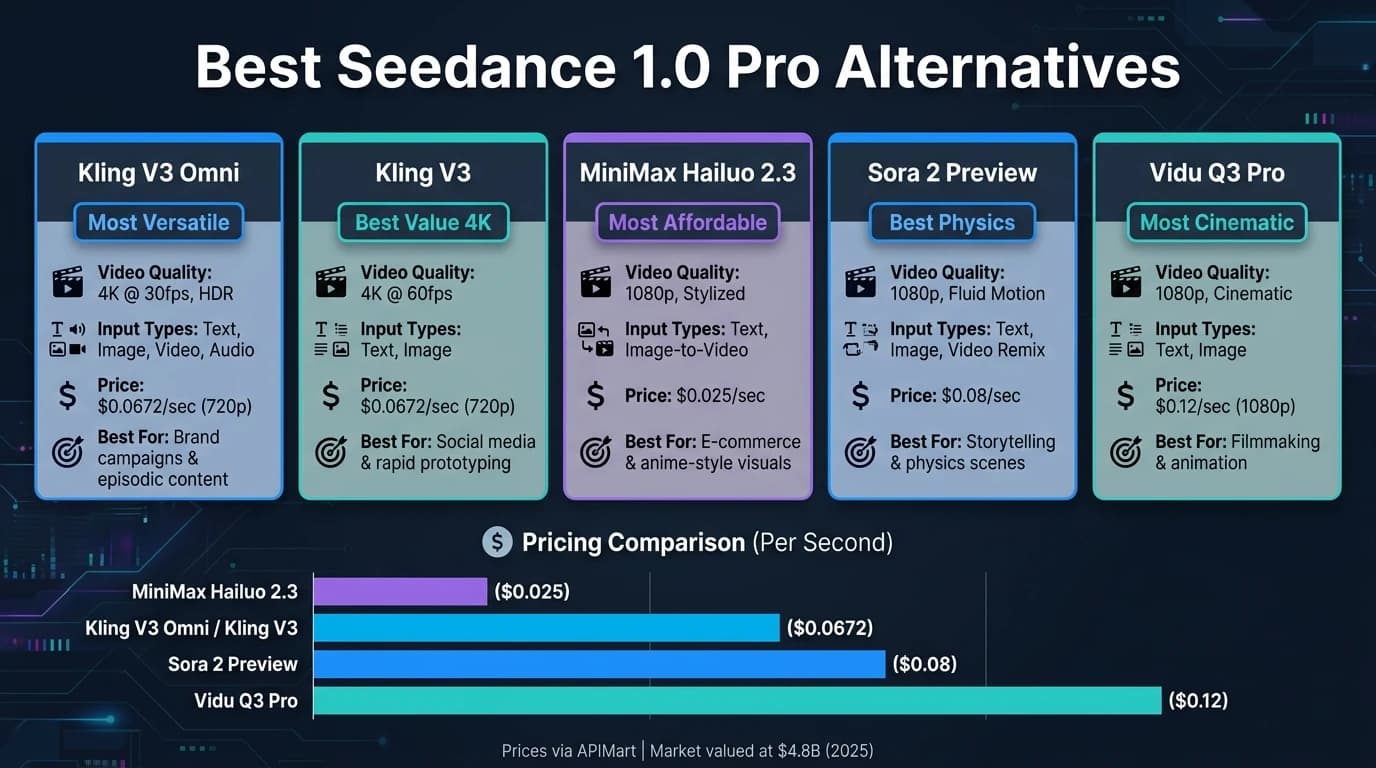
Seedance 1.0 Pro, launched in 2025, set the bar for AI video generation with its cinematic features and speed. However, with the market now valued at $4.8 billion and new tools emerging, there are several options that rival or surpass Seedance. Below are five standout alternatives, tailored for industries like marketing, education, e-commerce, and entertainment:
- Kling V3 Omni: Offers 4K video, advanced multi-modal input, and seamless character consistency. Best for multi-scene projects like brand campaigns.
- Kling V3: Delivers 4K at 60fps with smooth motion and multilingual audio. Ideal for social media content and rapid prototyping.
- MiniMax Hailuo 2.3: Focuses on physics-driven motion with stylized visuals. Great for e-commerce visuals and anime-style projects.
- Sora 2 Preview: Excels in realistic physics and fluid movement. Perfect for storytelling and physical interactions but will sunset in March 2026.
- Vidu Q3 Pro: Combines cinematic visuals with native audio generation. Best for professional filmmaking and animation workflows.
Quick Comparison:
| Alternative | Video Quality | Input Types | Pricing (APIMart) | Best Use Case |
|---|---|---|---|---|
| Kling V3 Omni | 4K @ 30fps, HDR | Text, image, video, audio | $0.0672/sec (720p) | Brand campaigns, episodic content |
| Kling V3 | 4K @ 60fps | Text, image | $0.0672/sec (720p) | Social media, prototyping |
| MiniMax Hailuo 2.3 | 1080p, stylized | Text, image-to-video | $0.025/sec | E-commerce, stylized visuals |
| Sora 2 Preview | 1080p, fluid motion | Text, image, video remix | $0.08/sec | Storytelling, complex physics scenes |
| Vidu Q3 Pro | 1080p, cinematic | Text, image | $0.12/sec (1080p) | Filmmaking, animation design |
Each tool has unique strengths, so your choice depends on your project’s needs, budget, and desired output quality.
Ranking EVERY AI VIDEO Tool: These Are The BEST!
1. Kling V3 Omni
Kling V3 Omni stands out as a top-tier alternative to Seedance 1.0 Pro, showcasing the advanced functionality of unified multi-modal AI systems.
This model is the most advanced option in the Kling 3.0 lineup, capable of processing text, images, video, and audio in a unified pipeline. It generates synchronized dialogue, ambient sound, and visual effects seamlessly [2].
Video Quality
Omni delivers native 1080p and 4K video at 30fps with 16-bit HDR. Its AI Director can manage up to six camera cuts - like shot-reverse-shot, cross-cutting, dolly, and zoom - within a single generation, eliminating the need for manual editing. Each clip can run up to 15 seconds [5]. The 3D Spacetime Joint Attention feature ensures realistic simulations of gravity, collision, and inertia throughout the video [5].
Multi-modal Input Support
The platform supports various input types, including:
- Text prompts: Up to 2,500 characters
- Images: JPEG or PNG files up to 10MB
- Reference videos: MP4 or MOV files, 3–10 seconds long
- Audio recordings: 5–30 seconds for voice binding [6]
Its Character Identity 3.0 system ensures a 93% consistency in maintaining a character's appearance and voice, a significant improvement over the 65% achieved by the Classic model [7]. The Omni Edit feature even allows users to replace characters or environments in an existing video without altering the original motion or timing [3]. These capabilities make Omni a strong choice for complex, multi-scene projects.
Pricing
Omni is available on the Pro and Ultra subscription tiers. Pricing details include:
- APIMart: $0.0672 per second at 720p
- Direct subscriptions:
- Pro tier: $29.99/month (3,000 credits)
- Ultra tier: $59.99/month (8,000 credits)
- API access: $0.126–$0.168 per second, plus a $0.05 fee per asset [7]
Use Case Suitability
Omni excels in projects requiring consistent character appearances across multiple scenes. For example, in May 2026, a SaaS demo-video team used Omni to create a 20-second dialogue scene with consistent character identities, avoiding a traditional shoot that would have cost $7,000 [7]. Similarly, online course creators have used it to generate explainer segments featuring a persistent avatar, saving $4,000 weekly on a 16-chapter course.
For simpler tasks like single-shot product loops or clips without audio, the Kling 3.0 Classic model may be more credit-efficient. However, Omni shines in episodic or multi-scene content.
"Omni is the first AI video tool that thinks in sequences instead of single shots." - ThePlanetTools.ai [7]
2. Kling V3

Released on February 5, 2026, Kling V3 quickly gained traction as a practical alternative to Seedance 1.0 Pro, which paused global availability later that same month [11]. While Seedance capped output at 8 seconds and 1080p resolution, Kling V3 takes a leap forward with the ability to generate up to 15 seconds of native 4K video at 60fps in one go [8].
Building on the foundation of Kling V3 Omni, this version offers enhanced visuals and advanced cinematic tools.
Video Quality
Kling V3 is powered by a Diffusion Transformer (DiT) architecture, enabling it to produce native 4K videos without introducing upscaling artifacts [8]. Its physics-driven rendering handles intricate details like cloth movement, hair dynamics, and fluid behavior with precision, significantly reducing common AI issues like flickering and texture instability. In text-to-video benchmarks, Kling 3.0 Pro earned an impressive 1,243 ELO rating on the Artificial Analysis leaderboard [10]. Generating a 15-second 4K clip typically takes 3–5 minutes [10]. This combination of speed, resolution, and reliability positions Kling V3 as a strong contender against Seedance.
"Kling 3.0 proves ideal for production-grade cinematic content requiring native 4K, multi-shot storytelling, and integrated multilingual audio." - Vidofy.ai [8]
Multi-modal Input Support
Kling V3 doesn't just deliver on video quality - it also shines in its support for multi-modal inputs. Users can choose from text-to-video, image-to-video, or video-to-video workflows. Its Elements system allows for uploading 2–4 reference images or a 3–8 second video to maintain consistent character identity and voice across multiple shots [4]. The AI Director feature can plan up to six camera cuts while maintaining an audio-visual sync rate of 96%, far above the industry average of 68% [12]. Additionally, Kling V3 supports dialogue in five languages - Chinese, English, Japanese, Korean, and Spanish - with regional accents like Cantonese, British, and Indian [4].
"The AI Director feature is the first time an AI video model has felt truly useful for narrative filmmaking, not just for creating atmospheric b-roll." - Elena Marchetti, Senior AI Editor, AwesomeAgents.ai [10]
Pricing
Kling V3 is accessible through both a consumer web app and a developer API. On APIMart, pricing starts at $0.0672 per second for 720p output, with API rates varying based on the output type:
| Output Type | API Rate (USD/sec) |
|---|---|
| Standard video (no audio) | $0.084 |
| Pro mode / native audio | $0.112–$0.168 |
| 4K resolution | $0.42 |
For subscription users, the Ultra plan costs $180/month and includes 4K renders, 15-second clips, and Storyboard mode with 26,000 monthly credits [10]. Generating a single 15-second 4K video via the API costs approximately $6.30 [9]. These pricing tiers cater to professionals seeking premium features at competitive rates.
Use Case Suitability
Kling V3 is particularly well-suited for short-form ads, narrative previsualization, and character-driven social media content - situations where high resolution and precise editorial control are critical. The combination of the AI Director and Elements systems makes it especially effective for projects requiring consistent character representation across multiple scenes.
3. MiniMax Hailuo 2.3
The MiniMax Hailuo 2.3 is designed to excel in physics simulation and stylized video generation. While some models aim for cinematic realism, Hailuo 2.3 stands out by focusing on precision in physics-based motion and delivering stylized visuals. Let’s dive into what makes this model shine, starting with its video quality.
Video Quality
Hailuo 2.3 ranks #1 on WorldModelBench for physics simulation accuracy [14]. This precision translates into smoother, more realistic motion on screen, especially in areas like dance choreography, fluid dynamics, and body mechanics. For instance, during testing, it showed an 8% reject rate for dance choreography prompts, significantly lower than Seedance 2.0's 14% [14].
The model also excels in creating stylized visuals, including anime, ink-wash painting, and game-CG renderings. As Anthony M., a verified builder from ThePlanetTools.ai, observed:
"Hailuo produced the cleanest limb continuity at speed - fewer phantom limbs, less of the 'elbow snap' artifact that plagues most current models." - Anthony M., Verified Builder, ThePlanetTools.ai [14]
Hailuo 2.3 minimizes common issues like phantom limbs and abrupt elbow movements, ensuring smoother animations. It supports native 1080p resolution for clips up to six seconds and 768p for clips up to ten seconds [13][14]. However, 1080p sequences are limited to shorter durations.
Multi-Modal Input Support
Hailuo 2.3 handles both T2V (text-to-video) and I2V (image-to-video) workflows with ease. Its Media Agent layer intelligently routes prompts to the most suitable model variant and can incorporate initial images to guide the composition. Audio can then be added in a separate step [13][15].
The model natively supports English and Chinese, with automatic translation available for other languages, though with slightly reduced accuracy [14]. Its responsiveness to detailed commands, such as "the bottle slowly rotates 360 degrees", makes it especially useful for e-commerce visuals [14].
"The 2.3 model responds noticeably better to object-motion directives like 'the bottle slowly rotates 360 degrees'... MiniMax calls this out as an e-commerce optimization." - ThePlanetTools.ai [14]
This adaptability makes Hailuo 2.3 a strong choice for creating dynamic and visually engaging content across various applications.
Pricing
Hailuo 2.3 offers flexible pricing tailored to different needs. The Standard model delivers full physics fidelity in both resolutions, while the Fast variant, available only for I2V, cuts costs by up to 50%, making it ideal for rapid prototyping [13][15].
Here’s a breakdown of the APIMart pricing:
| Variant | Resolution | APIMart Rate |
|---|---|---|
| Standard | 768p | $0.0488/sec |
| Standard | 1080p | $0.072/sec |
| Fast | 768p | $0.0248/sec |
For direct subscriptions via hailuoai.video, plans range from $9.99/month for casual users to $199.99/month for the Max plan, which includes access to around 800 videos and the full suite of Hailuo 2.3 features [14][16].
Use Case Suitability
Hailuo 2.3 is particularly well-suited for creating anime-style trailers, product rotation visuals, and physics-intensive scenes involving elements like liquids or fire. The Fast variant offers a cost-effective option for quick e-commerce prototyping, allowing teams to test ideas at half the cost before finalizing with the Standard model.
However, one downside to note is its Trustpilot rating of 1.4 out of 5, based on 89 reviews. Most complaints stem from billing and cancellation issues [14]. Users opting for direct subscriptions should document cancellation attempts with screenshots to avoid potential disputes.
4. Sora 2 Preview
Sora 2 Preview shifts the focus from rigid controls to a more fluid and realistic physics simulation, emphasizing natural movement and an organic feel. Here’s a closer look at what makes this model stand out.
Video Quality
At the heart of Sora 2 is its Diffusion Transformer (DiT) architecture, which processes video as "spacetime patches." This ensures smooth temporal consistency, preventing objects from distorting or morphing mid-clip [17]. The result? Videos where gravity, fluid dynamics, cloth behavior, and object collisions feel authentic - without the need for manual tweaking. While the resolution is capped at 1080p, the output is clean and scales up well for higher resolutions.
"The output does not just look realistic - it looks directed. Camera movements feel intentional, compositions feel considered, and there is an artistic sensibility that distinguishes it." - AdCreate Team [18]
Multi-Modal Input Support
Sora 2 Preview supports multiple input types, including text-to-video, image-to-video, and video-to-video remixing. Image inputs (JPEG, PNG, or WebP up to 10MB) act as visual anchors, while the Character ID system ensures consistent character appearances across videos. This feature also synthesizes audio based on your text prompts. For those requiring even more advanced audio integration, Veo 3.1 offers professional-grade synchronized sound. The remix endpoint allows users to alter or extend existing footage while maintaining its motion and structure.
"Other models want you to describe a picture. Sora 2 wants you to describe a shot." - FluxNote [19]
Pricing
Sora 2 Preview is available exclusively on APIMart, priced at $0.08 per second. This straightforward pricing model makes it an appealing choice for creatives looking to incorporate advanced video generation into their projects without breaking the bank.
Use Case Suitability
Sora 2 Preview is particularly well-suited for cinematic short-form content, brand storytelling, and projects that demand natural motion and realistic audio. The Character ID system is a standout feature for serialized content or campaigns requiring consistent on-screen personas. However, for workflows needing intricate multi-shot sequences or highly detailed reference inputs, a more control-heavy model might be a better fit.
5. Vidu Q3 Pro
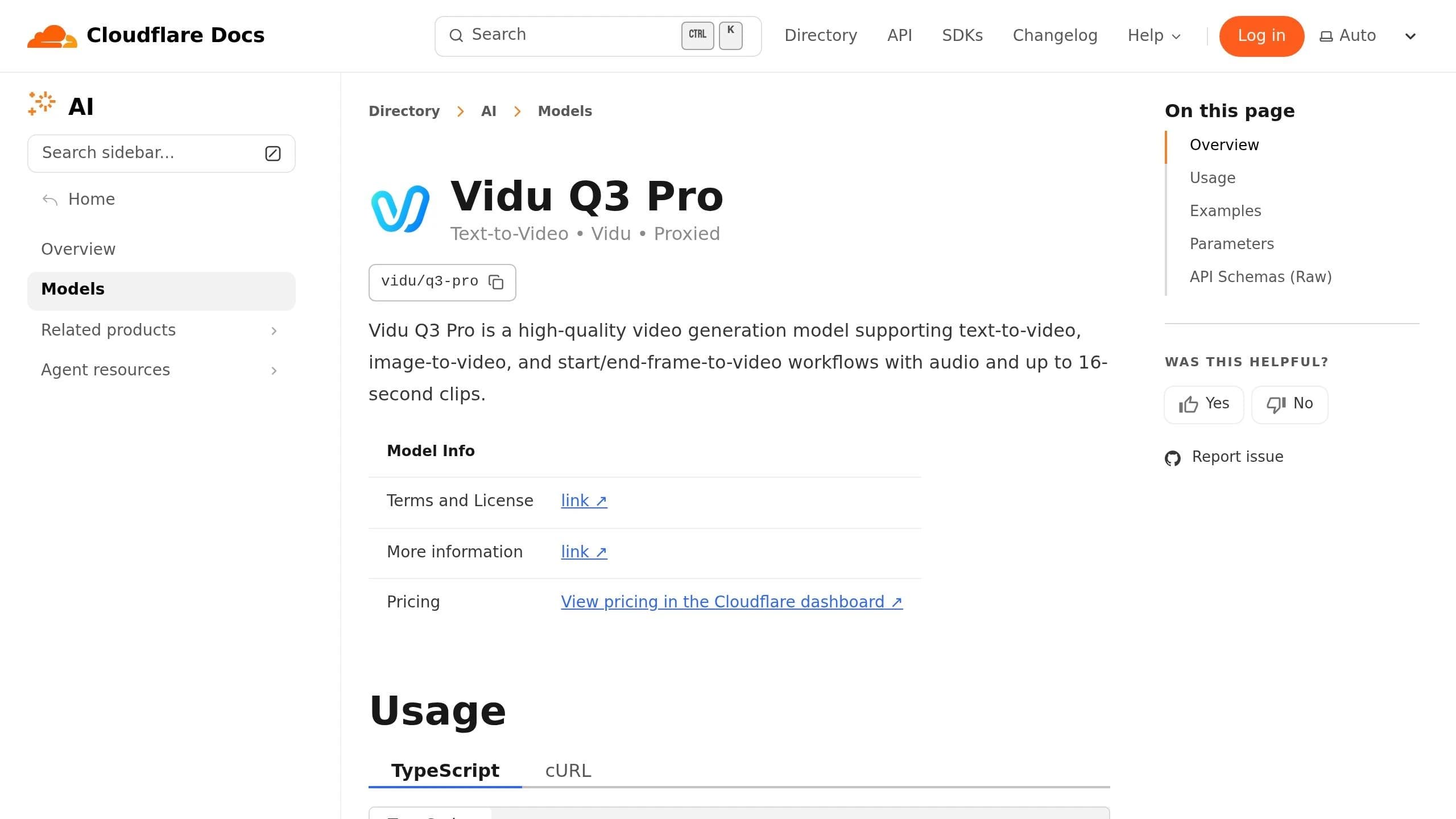
Vidu Q3 Pro stands out by combining native audio generation with Smart Cuts, which helps reduce the need for extensive post-production work. Like other Seedance alternatives, it enhances multi-modal capabilities by integrating essential production features. This makes it a great choice for teams looking to streamline their workflow.
Video Quality
The video output is polished and professional, featuring smooth motion, cinematic depth of field, and dynamic camera movements like pans and dollies. Videos are created at 24fps with resolutions of up to 1080p, and users can choose from multiple aspect ratio options to suit various platforms. With a maximum clip length of 16 seconds, it offers one of the longer durations available in its category.
"Pro's cinematic quality is outstanding! And Turbo lets me quickly validate creative directions - using both models together doubles my efficiency." - Sarah Johnson, Content Creator [20]
The combination of high-quality visuals and efficient workflows makes Vidu Q3 Pro a powerful tool for creators.
Multi-Modal Input Support
Vidu Q3 Pro supports three input modes: text-to-video, image-to-video (using a single image as the starting frame), and start-end-to-video (using two images to define the first and last frames). The model automatically selects the appropriate mode based on the number of images provided. Text prompts can be up to 5,000 characters, giving users ample space for detailed descriptions. Plus, synchronized audio is seamlessly integrated into the video output, removing the need for separate audio processing.
"Native audio means the model produces synchronized sound alongside the visual output in one pass -- no separate audio pipeline, no post-production syncing." - Atlas Cloud [21]
This built-in audio feature simplifies production and saves time, making it a standout feature.
Pricing
On APIMart, Vidu Q3 Pro is available at $0.056/sec for 540p, $0.12/sec for 720p, and $0.128/sec for 1080p. While these rates are on the higher side compared to some competitors, the inclusion of features like native audio and Smart Cuts metadata can help offset costs by reducing the need for additional editing and audio sourcing. These pricing tiers provide flexibility for a wide range of production needs.
Use Case Suitability
Vidu Q3 Pro is particularly well-suited for social media content (especially vertical 9:16 formats), e-commerce (bringing static product photos to life with environmental audio), and automated content pipelines. The Smart Cuts metadata integrates seamlessly into broader workflows, replacing the need for manual clip segmentation. Meanwhile, the native audio eliminates the hassle of sourcing and syncing sound. The start-end frame mode is a great tool for storyboard-driven projects, offering precise control over how scenes begin and end, making it a valuable asset for creators with detailed production requirements.
Pros and Cons
Here's a quick comparison of the key features for each option:
| Alternative | Video Quality | Input Flexibility | Pricing (APIMart) | Best Use Case |
|---|---|---|---|---|
| Kling V3 Omni | 4K @ 60fps; high fidelity and subject consistency | Multi-modal: text, image, and voice cloning | $0.0672/sec (720p) | Professional brand content and global marketing |
| Kling V3 | 4K @ 60fps; smooth motion and dynamic lighting | Text and image | $0.0672/sec (720p) | High-volume social content and rapid prototyping |
| MiniMax Hailuo 2.3 | 1080p; distinctive motion quality | Text-to-video focused | $0.025/sec | Lifestyle, atmospheric, and mood-driven content |
| Sora 2 Preview | 1080p; excellent physics realism | Storyboard mode with multi-scene support | $0.08/sec | Narrative storytelling and complex physical interactions |
| Vidu Q3 Pro | 1080p; cinematic visuals with dynamic camera work | Text and image | $0.12/sec (1080p) | Animation design and professional filmmaking |
These comparisons highlight each model's strengths, helping you align your choice with your specific needs.
The Kling V3 Omni and Kling V3 both deliver premium 4K visuals, but they cater to slightly different priorities. The Omni version adds voice cloning and enhanced subject consistency, making it perfect for brand-focused content. Meanwhile, Kling V3 offers excellent value for teams aiming to produce large volumes of content efficiently.
For creators on a tight budget, MiniMax Hailuo 2.3 is a practical choice. Its lower cost and focus on text-to-video capabilities make it ideal for producing lifestyle or mood-driven pieces quickly.
Sora 2 Preview stands out for its advanced physics simulation, which is especially useful for scenes involving water, fire, or other complex visual effects. If your project requires realistic environmental interactions, this tool is a dependable option.
"Sora 2 remains the gold standard for physics simulation and temporal consistency." - CreativeToolsAI Editorial
Finally, Vidu Q3 Pro is the priciest option but justifies its cost with cinematic visuals and built-in audio generation. For teams with structured workflows, this can reduce post-production time, making it a smart investment for professional filmmaking or animation design.
Each of these tools has clear advantages, so your decision will depend on your specific production goals, budget, and creative requirements.
Conclusion
When picking an AI video generation tool, it’s all about balancing your budget, desired output quality, and the specific needs of your project. Each tool shines in different scenarios, so choosing the right one depends on what you’re aiming to achieve.
For most teams, Kling V3 and Kling V3 Omni are solid all-around options. At $0.0672 per second (720p) on APIMart, these tools are well-suited for creating social media content, brand campaigns, or managing high-volume production demands.
If you’re operating on a tighter budget, MiniMax Hailuo 2.3 is a cost-effective alternative. Priced at $0.025 per second, it’s a reliable pick for shorter text-to-video projects where affordability is key.
For projects requiring realistic physics, Sora 2 Preview delivers impressive results. That said, its upcoming discontinuation - announced for March 2026 - makes it better suited for short-term use rather than as a long-term solution.
"OpenAI announced in March 2026 that the Sora app and API are sunsetting... No point benchmarking what you can't ship on." - Dora, WaveSpeed Blog [1]
Looking for high-resolution and cinematic refinement? Vidu Q3 Pro is the premium choice. At $0.12 per second (1080p), it’s ideal for animation studios or filmmaking teams wanting that extra polish.
With APIMart’s diverse offerings, there’s a solution for nearly every production need. Use this guide to align your project requirements with the best tool for the job.
FAQs
Which alternative is best for consistent characters across multiple scenes?
For maintaining consistent characters across multiple scenes, Kling V3 and Sora 2 Pro stand out as strong choices.
- Kling V3 relies on a Subject Library and Omni variant, ensuring visual traits remain consistent by using 3–5 reference images.
- Sora 2 Pro takes a different approach with its character ID system. This allows you to create and reuse character identities across scenes, supporting up to two consistent characters.
Both tools are designed to tackle the challenge of character drift in multi-shot projects effectively.
How do I estimate total cost per finished video on APIMart?
To figure out the total cost, simply multiply the per-second rate of the model you’ve chosen by the video’s duration in seconds. APIMart operates on a usage-based billing system, where charges depend on both the video resolution and its length. Be sure to review the pricing table for the latest rates, which offer a 20% discount compared to typical market rates. Keep in mind that the model tier you select - whether it’s faster processing or optimized for quality - will also influence the per-second rate.
What should I choose if I need native audio in the same generation?
For creating native audio synchronized during generation, a single-pass model is the way to go. These systems generate video and audio at the same time, ensuring flawless synchronization without any drift.
- SkyReels V4: Combines synchronized audio, lip-sync, and ambient effects in a single render.
- HappyHorse 1.0: Specializes in multilingual dialogue and precise lip-sync.
- Seedance 2.0: Delivers exceptional audio-visual alignment for seamless results.
All these tools are accessible through APIMart, making it easier to streamline your workflow.
Choose the model you want in the model marketplace
Try chat, image and video models in the APIMart model marketplace, and experience model capabilities quickly with one unified API.