
Best Seedance 2.0 Alternatives for AI Video
Compare the top Seedance 2.0 alternatives for AI video creation in 2026, including APIMart, Sora 2, Veo 3, Runway, and PixVerse on pricing and features.
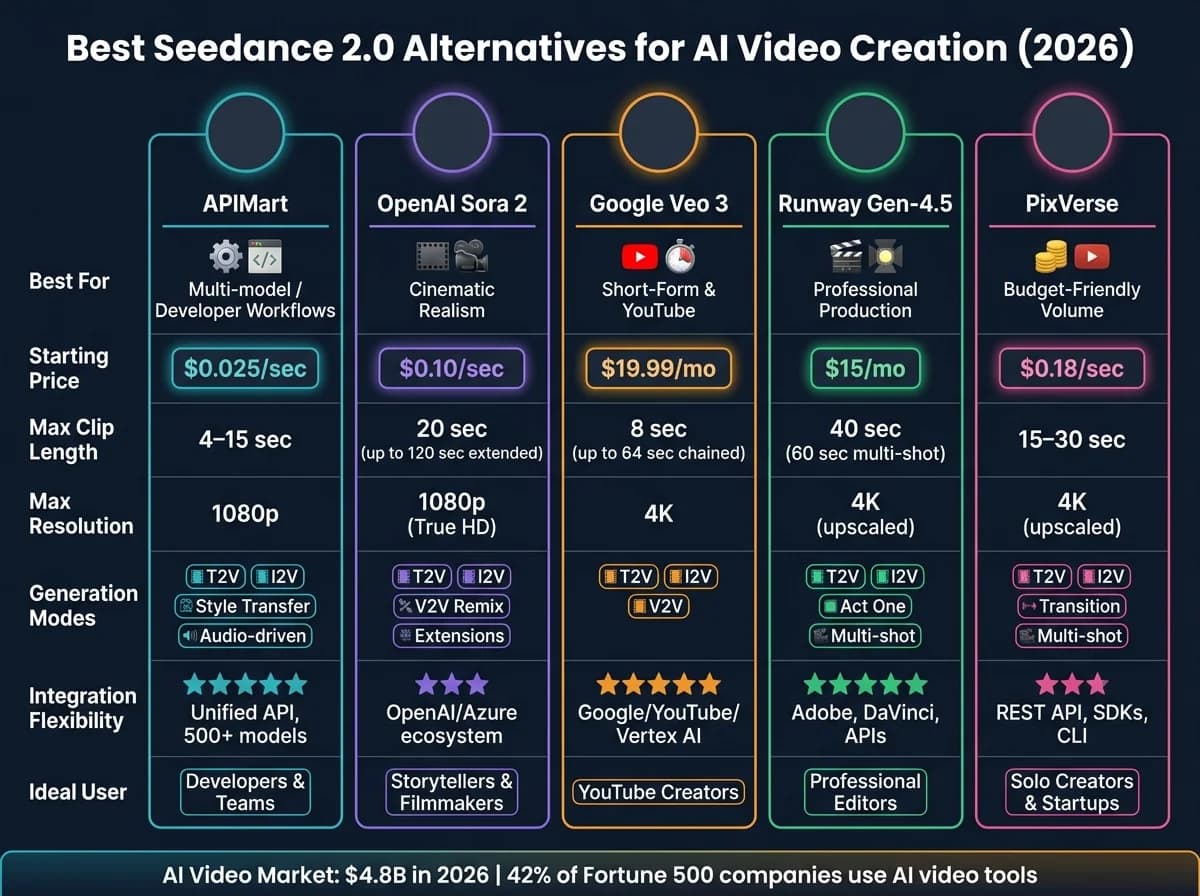
Seedance 2.0 is a solid AI video creation tool, but it’s not perfect for every user. If you’re looking for alternatives with faster generation times, better pricing, or unique features, here are the top options in 2026:
- APIMart: Offers access to 500+ AI models via a single API, with pricing starting at $0.025 per second. Ideal for developers and teams needing flexibility across workflows like text-to-video and image-to-video workflows.
- OpenAI Sora 2: Focuses on realism with cinematic-quality outputs. Clip lengths max at 20 seconds, with costs ranging from $0.10 to $0.70 per second.
- Google Veo 3: Best for short-form videos (8 seconds max), with plans starting at $19.99/month. Integrates well with Google tools like YouTube.
- Runway Gen-4.5: A professional-grade tool for editing and production workflows, supporting advanced features like motion control and character consistency.
- PixVerse: Budget-friendly, with pricing as low as $0.18 per second. Supports features like multi-shot narratives and motion control.
Quick Comparison
| Tool | Best For | Pricing (USD) | Max Clip Length | Resolution | Integration Options |
|---|---|---|---|---|---|
| APIMart | Multi-model workflows | $0.025–$0.12/sec | 4–15 seconds | 720p–1080p | Unified API, 500+ models |
| OpenAI Sora 2 | Realism & cinematic quality | $0.10–$0.70/sec | 20 seconds | 720p–1080p | OpenAI/ChatGPT ecosystem |
| Google Veo 3 | Short-form content | $19.99–$249.99/month | 8 seconds | 1080p–4K | Google/YouTube integration |
| Runway Gen-4.5 | Professional workflows | $15–$95/month (credits) | 10–40 seconds | 1080p–4K | Adobe, APIs, Pro tools |
| PixVerse | Affordable, multi-shot videos | $0.18–$0.23/sec | 15–30 seconds | 1080p–4K | REST API, SDKs, CLI |
Each tool has strengths suited for different needs - whether you’re a solo creator, a developer, or part of a production team. Read on for detailed insights into their features, pricing, and use cases.
Watch: AI Video Generators Compared
1. APIMart

APIMart takes a different approach from single-purpose video generators by offering a unified AI API platform. With access to over 500 AI models through a single integration and API key, developers and teams can explore diverse creative workflows. These include text-to-video, image-to-video, video style transfer, and audio-driven generation, all without needing to integrate each model individually. This streamlined setup makes it easier for creators to tackle multi-format video creation challenges efficiently.
Generation Modes
APIMart covers a broad spectrum of video generation workflows. Users can seamlessly switch between text-to-video, image-to-video (with keyframe control), video-to-video style transfer, and audio-driven generation with lip-sync. This versatility ensures creators have the tools they need for various projects.
Input Modalities
The platform supports multiple input types, including:
- Text (up to 5,000 characters)
- Images (via public URLs or Base64 encoding)
- Videos
- Audio
APIMart’s backend automatically selects the appropriate generation mode based on the input provided. For example, a U.S.-based e-commerce team could combine product descriptions, photos, and voiceover scripts to create polished product videos tailored for platforms like Instagram Reels or YouTube Shorts - all through one seamless workflow.
Pricing (USD)
APIMart operates on a pay-as-you-go model, charging based on the seconds of video generated. Here's a breakdown of pricing for different models:
| Model | Price | Description |
|---|---|---|
| Kling V3 Omni | $0.0672/sec (720p) | All-in-one cinematic generation with advanced features |
| Kling V3 | $0.0672/sec (720p) | High-quality cinematic visuals |
| MiniMax Hailuo 2.3 | $0.025/sec | Fast and efficient for rapid video creation |
| Sora 2 Preview | $0.08/sec | Balanced model for general creative needs |
| Vidu Q3 Pro | $0.12/sec | Suited for complex, high-performance production requirements |
Higher resolutions or additional creative features may come with extra costs. Teams can also manage budgets by setting usage caps for API keys.
Clip Length and Resolution
APIMart’s models are designed for short-form content, typically generating clips between 4 and 15 seconds. These durations are perfect for social media ads, pre-roll videos, and other bite-sized formats. Standard output resolutions include 720p and 1080p, with options for higher resolutions available at additional costs.
Integration Flexibility
Integration with APIMart is straightforward thanks to its REST API with Bearer Token authentication. Video generation tasks run asynchronously, providing a task ID for polling or webhook notifications. This setup allows startups and teams to quickly prototype and scale, easily switching between models to meet evolving production needs.
2. OpenAI Sora
OpenAI Sora is an AI video generator known for producing cinematic-quality videos, prioritizing realism and detail over speed. It offers two versions: sora-2 for quicker iterations and sora-2-pro for high-quality, production-ready results. These options make Sora a strong contender in the AI video generation space.
Generation Modes
Sora 2 supports four distinct modes of video creation:
- Text-to-Video: Generate videos directly from text prompts.
- Image-to-Video: Start with a single image as the opening frame.
- Video Extensions: Extend existing clips incrementally, up to a total of 120 seconds, with 20-second extensions.
- Video Edits: Make precise changes to existing footage.
Additionally, its Character ID system allows for consistent representation of up to two characters, using a brief 2–4 second MP4 video as a reference [3].
Input Modalities
Sora 2 provides flexible input options, including text prompts, single reference images (JPEG, PNG, or WEBP), existing video clips for remixing or extending, and character video assets. However, the model restricts uploads of real individuals, public figures, or highly realistic human characters, which might limit its use for certain marketing or documentary projects [3].
Pricing (USD)
Pricing for Sora's API depends on the resolution and model tier. For instance, creating a 20-second clip at 720p with sora-2 costs $2.00, while the same clip at 1080p using sora-2-pro costs $14.00 [5].
| Model | Resolution | Price per Second |
|---|---|---|
sora-2 | 720p | $0.10 |
sora-2-pro | 720p | $0.30 |
sora-2-pro | 1024p | $0.50 |
sora-2-pro | 1080p (True HD) | $0.70 |
For individual users, Sora is available through ChatGPT Plus ($20/month with limited generations) or ChatGPT Pro ($200/month with higher generation limits and priority access) [1].
Clip Length and Resolution
Single renders are capped at 20 seconds, but the Storyboard feature on ChatGPT Pro extends this to 25 seconds [1][6]. By using the Video Extensions feature, clips can be extended up to 120 seconds total [3]. In terms of resolution, the standard sora-2 supports up to 720p, while sora-2-pro can deliver true 1080p (1920×1080) output [3][4]. This flexibility makes it suitable for both short-form social content and longer storytelling projects.
Integration Flexibility
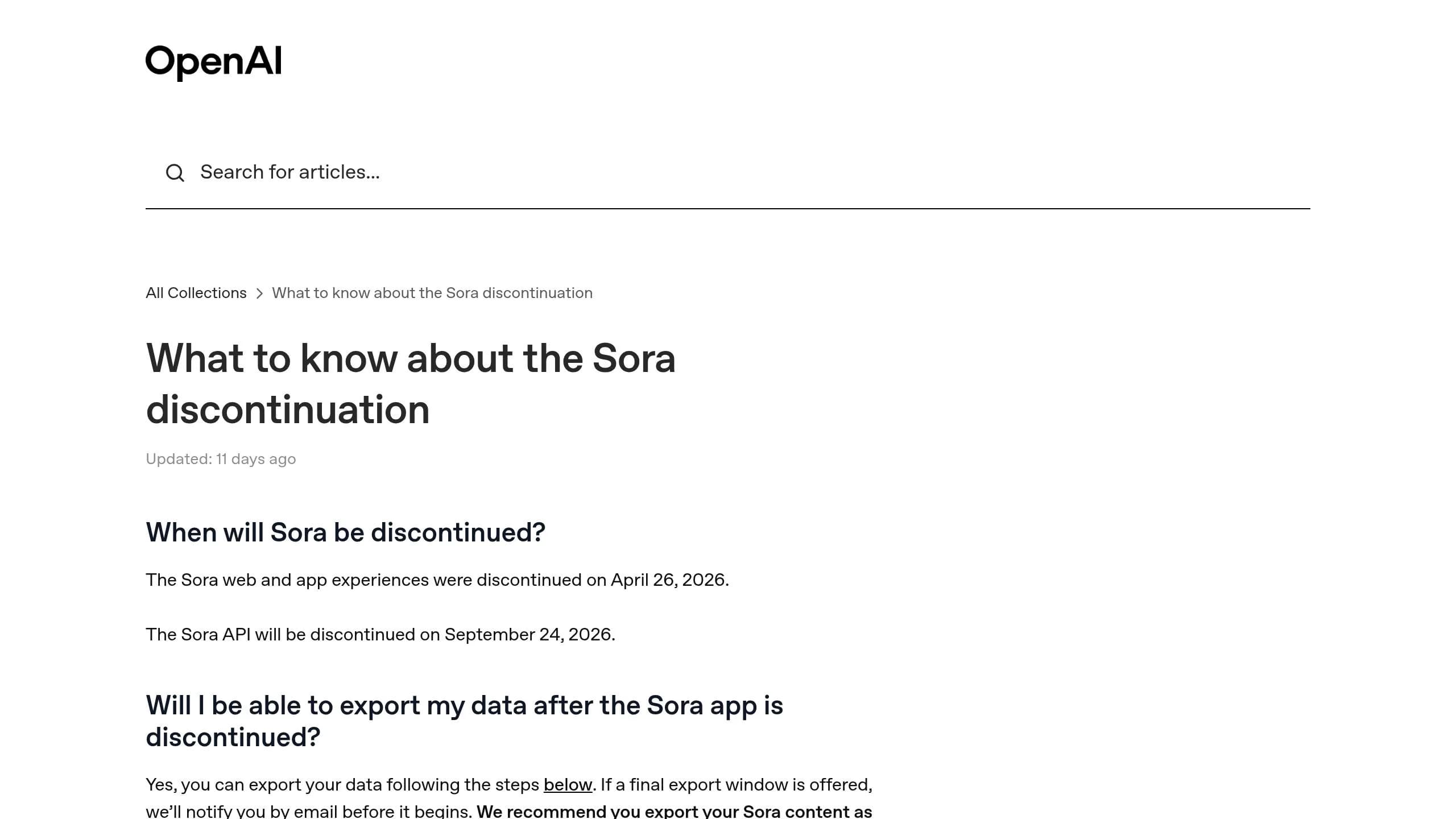
Sora also stands out for its integration options. It can be accessed via the OpenAI Videos API or through the Azure OpenAI Service [3]. The API operates asynchronously, returning a job ID that users can track through polling or webhooks (with events like video.completed or video.failed) [3]. For larger projects, the Batch API supports offline render queues, making it ideal for handling high-volume workloads. However, note that the Sora API will be discontinued after September 24, 2026, so teams should plan ahead for migration [3].
3. Google Veo
Google Veo simplifies production by delivering synchronized dialogue, effects, and ambient noise in a single pass, reducing the need for extensive post-production work. It combines advanced capabilities with flexible pricing options, making it a versatile tool for a variety of production needs.
Generation Modes
Veo offers multiple generation modes: Text-to-Video, Image-to-Video, and Video-to-Video (similar to the Grok Imagine Video API) (introduced in Veo 3.1) [8][10]. Its scene extension feature allows users to link multiple 8-second clips, creating cohesive sequences up to 64 seconds long. This ensures visual and narrative consistency. Additionally, the platform supports natural language prompts for cinematic camera movements like dolly, pan, tilt, and zoom, making it ideal for dynamic storytelling [7].
Input Modalities
Veo supports a range of input types, including text prompts, single images, first and last frame references for scene guidance, and visual style references. Veo 3.1 and 3.1 Fast extend these capabilities to include video inputs, while Veo 3.1 Lite is limited to text and image inputs [8][9][10].
Pricing (USD)
Google Veo offers subscription plans tailored to different users:
- Google AI Pro: $19.99/month, designed for individual creators, includes approximately 50 Veo 3.1 Fast generations through Google Flow.
- Google AI Ultra: $249.99/month, aimed at studios, provides around 2,500 generations per month [7].
For API access via Gemini API or Vertex AI, pricing is as follows [11]:
| Model | Price per Second | Best For |
|---|---|---|
| Veo 3.1 | $0.40 | Hero clips, production-quality output |
| Veo 3.1 Fast | $0.15 | Standard production applications |
| Veo 3.1 Lite | ~$0.06–$0.08 | High-volume B-roll, prototyping |
These rates represent a significant drop from earlier pricing - previously, Veo 3 cost $0.75 per second before reductions in late 2025 [11]. This makes Veo an attractive option for both independent creators and larger studios.
Clip Length and Resolution
Each Veo render is limited to 8 seconds, but the scene extension feature allows for sequences of up to 64 seconds or more [7][13]. Veo 3.1 clips can be rendered in resolutions up to 4K, with 1080p available across all tiers. The standard frame rate is 24 FPS. Veo 3.1 Fast operates at nearly double the speed of the standard Veo 3.1 while maintaining comparable visual quality [8][10][13].
Integration Flexibility
Google Veo integrates seamlessly with other Google tools and platforms. It is accessible through the Gemini app for consumers, Google AI Studio for prototyping, the Gemini API for programmatic access, Vertex AI for enterprise solutions, and Flow for creator-focused editing [7][12]. All videos generated with Veo include a SynthID watermark [7][11]. This tight integration makes it an excellent choice for teams already working within the Google Cloud ecosystem.
4. Runway Gen Models

Runway's Gen-4.5 is a standout option for professional video production, offering advanced capabilities that have earned it the top spot on the Artificial Analysis Video Arena leaderboard as of April 2026. With an Elo rating of 1,247 [14], its hallmark feature is character consistency - ensuring the same character retains their visual identity across multiple, separately generated shots.
Generation Modes
Gen-4.5 supports Text-to-Video, Image-to-Video, and Video-to-Video generation. It also includes two specialized modes:
- Act One: Transfers human performances from video footage to AI-generated characters.
- Multi-shot Editing: Chains scenes together to create cohesive narratives.
The model allows for single-clip lengths of up to 40 seconds, a significant upgrade from the previous 16-second cap [16].
Input Modalities
Runway provides a range of input options, including text and image prompts. It also offers advanced motion control tools like the Motion Brush, which lets users specify motion directly on the frame [14]. The Multi-Motion Brush takes this further by assigning distinct motion behaviors to different regions of the frame. For performance-driven projects, Act Two enables motion and expression transfer from a webcam or video file to any character [17]. Additionally, reference images can be used to ensure consistent character appearances, product designs, or lighting across scenes.
Pricing (USD)
Runway operates on a credit-based system, with Gen-4.5 requiring more credits compared to the faster Gen-4 Turbo variant. Here's a breakdown of the available plans:
| Plan | Monthly Price | Annual Price (per mo.) | Credits/Month | Key Features |
|---|---|---|---|---|
| Free | $0 | $0 | 125 (one-time) | 720p, ~3–4 generations |
| Standard | $15 | $12 | 625 | Gen-4.5, 4K upscaling, no watermarks |
| Pro | $35 | $28 | 2,250 | Custom voices, 500GB storage, commercial license |
| Unlimited | $95 | $76 | 2,250 + Relaxed Credits | Unlimited generations in Explore Mode |
| Enterprise | Custom | Custom | Custom | SSO, priority support, internal tool integration |
Credits do not roll over on Standard or Pro plans. For users generating more than 50 clips monthly, the Unlimited plan's Explore Mode offers better value [14].
Clip Length and Resolution
Standard clip lengths are either 5 or 10 seconds, extendable to 40 seconds for single clips or up to 60 seconds using multi-shot sequences [14]. The native resolution is 1080p, with 4K upscaling available on Pro and higher tiers. Export options include MP4, ProRes (Pro+), and PNG sequences (Pro+).
Integration Flexibility
Runway integrates seamlessly with tools like Adobe Premiere Pro, After Effects, DaVinci Resolve, and Nuke. Its API supports multiple model endpoints, including gen4.5, gen4_turbo, gen4_aleph (video editing), and act_two (performance capture) [14][15]. In 2026, the platform expanded its offerings with GWM-1, a General World Model family that supports real-time avatars and interactive world simulations [14].
"Runway is the right tool when video generation is one step in a larger production workflow." - AI Tool Analysis [14]
While the interface has a 4–6 hour learning curve, this reflects the tool's professional-grade capabilities [14]. It’s designed for serious creators looking to integrate video generation into broader production workflows.
Next, we'll dive into another alternative with distinct integration options.
5. PixVerse
PixVerse has positioned itself as a strong alternative to Seedance 2.0, offering a combination of high video output and affordability. With over 2.1 billion videos generated across 177+ countries and a user base that includes more than 10,000 teams and enterprises, its reach is impressive [18]. The platform’s V6 model currently holds the #4 spot on the global Elo leaderboard with a score of 1,239 [21].
Generation Modes
PixVerse provides several creative tools for video generation. Users can choose from Text-to-Video, Image-to-Video, and a Transition mode, which uses starting and ending images to guide the video's progression. The Multi-Shot Narrative mode takes things further, allowing prompts to be written as a sequence of shots, such as "Shot 1: Wide shot of a city street... Shot 2: Close-up of a face...", generating a continuous cinematic story in one go [19].
For post-generation tweaks, the platform includes editing tools like Restyle, Swap, Mimic, and Modify. The C1 model is tailored for cinematic-quality output and action scenes, while the V6 model is more suited for general production and multi-clip sequences. A standout feature is U-Canvas, which ensures character consistency across different shots - a common hurdle in AI video generation.
"PixVerse stands out for delivering genuine character consistency across multiple video generations, solving the visual coherence problem that has limited serious AI video work until now." - Tooliverse Editorial [18]
Input Modalities
PixVerse accepts a variety of input types, including text, images, video files for restyling or motion reference, and audio files for lip-syncing. The Magic Brush (Motion Brush) allows users to control motion in specific areas of a frame, such as animating a subject while keeping the background static. Additional features include over 20 cinematic camera controls - like pan, tilt, and zoom - and support for multiple languages to ensure clear text on screen [19].
Pricing (USD)
PixVerse offers flexible pricing options, starting with a free tier that includes 60 daily credits [20]. Paid plans cater to individuals and teams:
| Plan | Monthly Price | Annual Price (per mo.) | Credits/Month |
|---|---|---|---|
| Standard | $10 | $8 | 1,200 |
| Pro | $30 | $24 | 6,000 |
| Premium | $60 | $48 | 15,000 |
API users are charged per output second, with rates of $0.18/second for 1080p clips without audio and $0.23/second with audio. This translates to about $4.80 per minute of video, making PixVerse a cost-effective option compared to many competitors [24]. For added flexibility, pay-as-you-go credit bundles start at $10 for 1,000 credits.
Clip Length and Resolution
PixVerse supports standard clip lengths of 5–10 seconds, with the V6 model extending clips to 15 seconds and multi-transition sequences up to 30 seconds [18][19]. Resolution options range from 360p to 1080p, with 4K upscaling available. The platform also supports eight aspect ratios, including 16:9, 9:16, 1:1, and 21:9. All videos are delivered in MP4 format.
Integration Flexibility
PixVerse offers a REST API with Python and Node.js SDKs, as well as a CLI (v1.1.9) that supports structured JSON output. This makes it compatible with AI coding agents like Claude Code and Cursor for automated workflows [22]. The platform integrates natively with Freepik, Fal, and Genspark [18]. Enterprise API plans range from $100/month (15,000 credits) to $6,000/month (1,069,500 credits), catering to high-volume production needs [23].
"For social content volume, PixVerse. For professional production with editing requirements, Runway." - AIVario Editor [20]
Pros and Cons
Here’s a breakdown of the strengths and weaknesses for each tool, followed by a table that highlights their features side by side for easy comparison.
APIMart simplifies integration for developers by offering a single API to access over 500 AI models, including Sora 2 Preview, Kling V3, and MiniMax Hailuo 2.3. However, its developer-centric design makes it less approachable for users without technical expertise.
OpenAI Sora 2 excels in generating 20-second clips with highly realistic physics, making it ideal for narrative content. That said, its API is set to be discontinued in late 2026 [25], posing a challenge for those planning long-term projects.
Google Veo 3 is tailored for YouTube creators, seamlessly integrating with YouTube Shorts and YouTube Create to streamline the production process [2]. Its major drawback is the 8-second clip limit, which restricts its utility for projects requiring longer content.
Runway Gen-4.5 stands out as the most advanced option for professional editors, featuring tools like Motion Brush, multi-shot workflows, and stable API access. However, these professional-grade features come with a steep learning curve, making it less beginner-friendly.
"Runway Gen-4.5 has a significant advantage in ecosystem maturity... for a production-ready editing ecosystem with developer access, Runway is still the stronger choice." - NivaaLabs Research Team [25]
PixVerse is a budget-friendly option, offering API rates as low as $0.18 per second and a free tier with 60 daily credits. On the downside, it isn’t as robust for complex editorial work compared to Runway.
The table below provides a direct comparison of these tools based on key criteria:
| Tool | Generation Modes | Input Modalities | Pricing (USD) | Clip Length / Resolution | Integration Flexibility |
|---|---|---|---|---|---|
| APIMart | T2V, I2V, Multi-model access | Text, Image, Video | From $0.025/sec (Hailuo 2.3) to $0.12/sec (Vidu Q3 Pro) | Varies by model | Very High (Unified API, 500+ models) |
| OpenAI Sora 2 | T2V, I2V, V2V (Remix) | Text, Image, Video | $0.10–$0.70/sec | Up to 20s / 1080p | Moderate (OpenAI ecosystem only) |
| Google Veo 3 | T2V, I2V, Conversational Edit | Text, Image, Video | $19.99–$249/mo | Up to 8s / 1080p | High (YouTube/Google Flow) |
| Runway Gen-4.5 | T2V, I2V, Director Mode | Text, Image | Credit-based | Up to 10s / 1080p | Very High (Professional APIs) |
| PixVerse | T2V, I2V | Text, Image | Subscription-based; API rates as low as $0.18/sec | ~10s / 1080p | Moderate (Web/Discord) |
Conclusion
In the fast-changing world of AI-driven video creation, having tools that adapt and integrate effortlessly is more important than ever. To stay ahead, you need a solution that’s flexible, scalable, and cost-effective.
APIMart delivers exactly that, offering access to over 500 AI models through a single, streamlined API. Whether you’re working with budget-friendly models at $0.025/sec or opting for high-performance options at $0.12/sec, APIMart simplifies the process by eliminating the need for multiple integrations. This setup allows teams to seamlessly switch between models as project demands shift, saving time and effort.
"The era of asking 'which AI video generator is best?' is over. In March 2026, the question is: which model is right for THIS shot?" - CreativeToolsAI [26]
With the AI video market reaching $4.8 billion in 2026 [26] and 42% of Fortune 500 companies now incorporating AI video tools into their workflows [26], the pressure to adopt the right technology has never been greater. APIMart empowers creators with a unified, efficient workflow that evolves alongside their needs, ensuring every project stays on track in an ever-expanding market.
FAQs
Which tool is best for my use case?
When choosing the right tool, it really comes down to your creative goals and how you like to work.
For marketing materials or short-form content, Seedance 2.0 is a great pick - it’s quick, efficient, and easy on the budget. If you’re aiming for cinematic-level quality or need highly realistic visuals, Sora 2 is your go-to.
Here are some other options to consider:
- Gemini Omni: Perfect for conversational edits.
- Veo 3.1: Specializes in turning text into video.
- Wan 2.7: Offers strong narrative control.
- Ozor: Designed for animated marketing assets.
- Frameloop: Shines when it comes to cinematic shorts.
Each tool has its strengths, so match them to your project’s needs!
How do I estimate total video generation cost?
To figure out video generation costs, begin by taking the cost per second of the model you're planning to use and multiplying it by your expected pass rate. Keep in mind that achieving professional-quality results often requires several attempts - anywhere from 3 to 20 iterations per shot.
Don’t forget to factor in extra expenses, such as audio production, upscaling for lower-resolution models, and manual post-processing. These additional steps can significantly impact the final cost, so including them ensures a more accurate estimate of the total investment.
Can I make longer videos than the per-clip limit?
Yes, you can create longer videos by stitching together several shorter clips. Seedance 2.0 allows you to generate clips ranging from 4 to 15 seconds. To achieve smoother transitions, consider working with clips that are 5 to 8 seconds long, as shorter durations tend to maintain better motion consistency. Additionally, some platforms provide multi-shot storyboard editors, which can help you organize and sequence your clips into a cohesive video.
Choose the model you want in the model marketplace
Try chat, image and video models in the APIMart model marketplace, and experience model capabilities quickly with one unified API.