
What Is Doubao Seedance 4.5? ByteDance Video AI
Doubao Seedance 4.5 is ByteDance's newest multimodal video AI that generates synced video and audio from text, images, clips and reference audio in one call.
Doubao Seedance 4.5 is ByteDance's latest AI-powered video generation tool that combines text, images, video clips, and audio into seamless, high-quality videos. It simplifies video production by allowing users to create synchronized visuals and audio in a single step. With features like multi-shot sequences, phoneme-level lip-syncing in multiple languages, and precise motion rendering, it’s designed for professionals in media, marketing, e-commerce, and training.
Key Features
- Multi-Modal Input: Accepts text, images, video clips, and audio files simultaneously.
- Advanced Synchronization: Generates audio and video together for perfect timing.
- Editing Flexibility: Enables targeted edits without redoing entire clips.
- API Integration: Works with tools like CapCut, Adobe Premiere Pro, and Final Cut Pro.
- Cost Efficiency: Pay-as-you-go pricing starting at ~$0.10 per second for 1080p clips.
- Provenance Watermarking: Ensures transparency with embedded AI-generated content markers.
This tool is ideal for creating ads, product demos, training simulations, and more, while saving time and maintaining professional quality.
Core Features and Technical Capabilities
Multi-Modal Architecture and Design
Seedance 4.5 brings a unified diffusion transformer to the table, capable of handling text, images, audio, and video all at once. The system is divided into two specialized branches: one for visual tasks like spatial composition, character consistency, and motion, and another for audio tasks, including stereo sound generation for music, dialogue, and ambient effects. By processing these elements together, the model ensures a smooth blend of visuals and sound.
"The headline story is not a higher resolution number. It is a single architectural rebuild that lets a director hand the model up to 9 reference images, 3 video clips, 3 audio clips, and a natural-language brief in one call." - Cuty.ai [1]
Because audio and video are generated simultaneously, the model achieves near-perfect synchronization. This means footsteps align with beats, lips match spoken words, and ambient sounds correspond to the action on screen. On top of that, the sparse architecture keeps processing efficient while maintaining high adaptability across various scenes. This advanced framework also enables users to exercise detailed control over their creations.
Input and Control Options
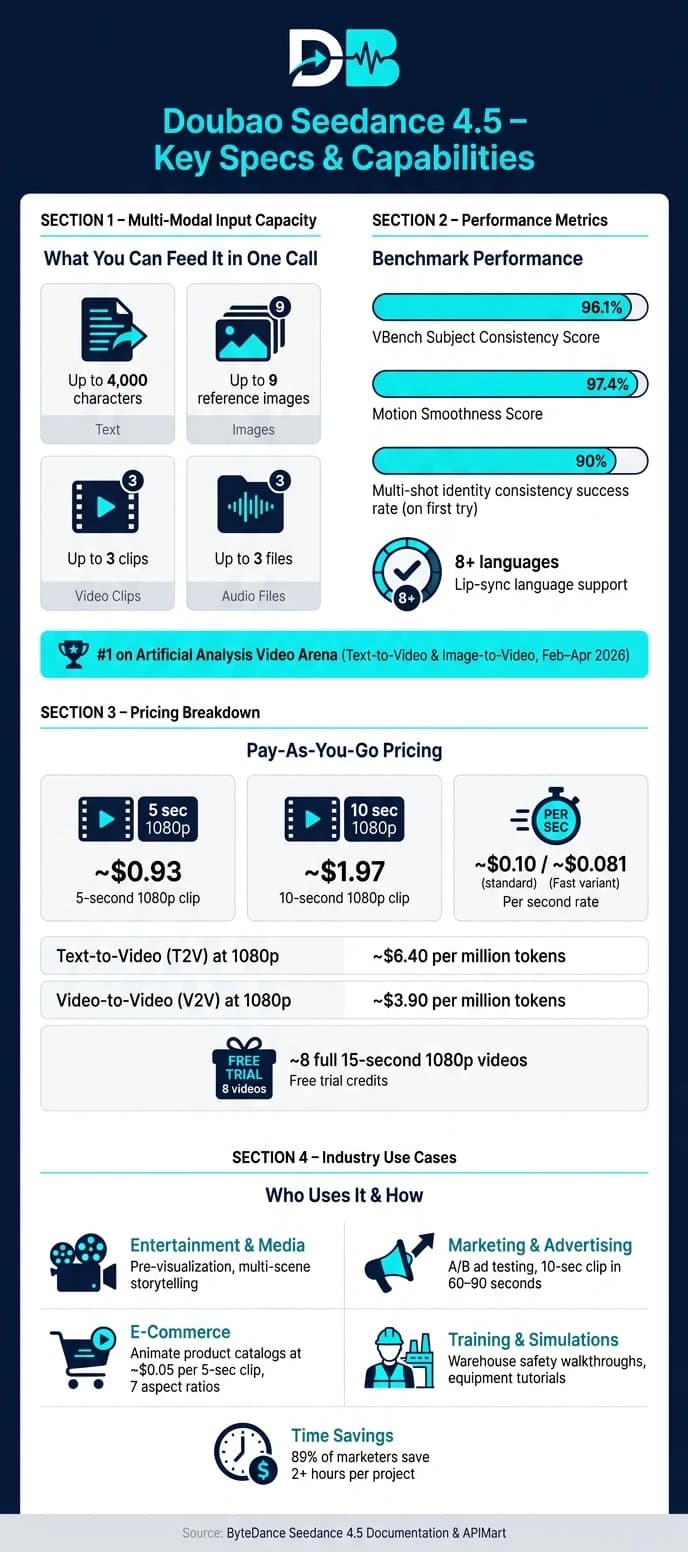
Thanks to its cutting-edge design, Seedance 4.5 offers users a wide range of input controls. In a single generation call, it can handle up to 4,000 characters of text, 9 reference images, 3 video clips, and 3 audio files. This is all part of ByteDance's Omni-Reference System, which uses an intuitive @mention syntax (e.g., @Image1 for character identity or @Video1 for motion guidance). This eliminates the need for extra setup and makes the process more user-friendly.
The model also understands professional cinematography terms like "dolly-in", "rack focus", and "whip pan", and can automatically execute these camera movements. Features like intelligent duration adjustments and adaptive aspect ratios further ensure that the output is optimized to match the input format, creating seamless results.
Performance Improvements in Version 4.5
Seedance 4.5 builds on its predecessor, Seedance 2.0 [2], with upgrades designed for professional workflows. Multi-subject identification is now more accurate, even in crowded scenes. Reference image details are preserved with higher precision, and text rendering has been improved, making it ideal for applications like product labeling or on-screen graphics. These improvements align with the scaling methods used in ByteDance's Seedream image model.
Additionally, every output from Seedance 4.5 includes an embedded C2PA provenance watermark in its metadata. This watermark clearly identifies the content as AI-generated, ensuring transparency and accountability.
Video Generation Workflows
Text-to-Video and Image-to-Video Pipelines
Seedance 4.5 offers a flexible approach to video creation, handling text, images, video clips, and audio files simultaneously. Its @ Reference System makes asset tagging a breeze, ensuring consistency throughout the project. For instance, assigning @character1 to a headshot or @theme to a music clip guarantees that visuals and audio stay aligned across all shots.
Another standout feature is its ability to convert storyboards into video drafts. By uploading pre-production sketches, the model translates panel layouts, shot scales, and camera directions into a preliminary video. This process not only simplifies the workflow but also allows for precise and targeted edits.
Editing and Refining Outputs
Unlike earlier versions that required redoing an entire clip for small changes, Seedance 4.5 introduces targeted editing. Now, you can tweak specific elements - swap characters, adjust actions, or fix backgrounds - without starting over. The Video Extension feature is another game-changer, letting you extend scenes naturally, whether forward or backward, to fit your vision perfectly.
For multi-shot sequences, the @ tagging system solves the common issue of identity drift, where characters' appearances or outfits shift between cuts. By linking @character1 to a reference image from the start, the model ensures visual consistency across clips, achieving a 90% success rate on the first try [6].
"The @ reference system is genuinely unlike anything else available... it gives creative control that no other model comes close to." - NivaaLabs Research Team [6]
These tools are designed to fit smoothly into existing production workflows, making the editing process more efficient.
Connecting to Existing Production Tools
Seedance 4.5 integrates directly with CapCut (via Media > AI Media > AI Video), streamlining the editing process for U.S. teams by enabling adjustments right on the timeline. For those using Adobe Premiere Pro or Final Cut Pro, the model supports API-based asset management, exporting standard MP4 files at 24fps or 30fps with cinematic aspect ratios like 21:9. This ensures compatibility with professional editing software.
One of its standout time-saving features is the co-generation of audio and video. Dialogue, ambient sounds, and music are automatically synced with the visuals, eliminating the need for manual adjustments during post-production. This efficiency is a big deal for teams under tight deadlines. In fact, 89% of marketers using AI video tools report saving time, with many cutting project durations by over two hours [4].
Unified API Access Through APIMart

What APIMart Offers for Seedance 4.5 Users
Integrating Seedance 4.5 into production just got a lot easier. No more juggling multiple accounts, dealing with regional billing headaches, or sifting through inconsistent documentation. APIMart simplifies the entire process into one platform. For U.S.-based developers and teams, it provides USD billing, a single API key, and clear documentation to keep things straightforward [7].
The platform comes with a Playground feature where you can tweak parameters, test prompts, and fine-tune visual styles interactively - before you even start coding. This hands-on tool can save hours of trial-and-error [7]. Plus, APIMart promises 99.9% uptime under its SLA, which is critical for tasks like time-sensitive video campaigns or client projects [7].
| Feature | Benefit for Seedance 4.5 Users |
|---|---|
| USD Billing | Avoids currency conversion issues, simplifying budgeting for U.S.-based businesses [9] |
| Async Task Pattern | Handles long-running video tasks (30–120 seconds) without tying up application threads [8] |
| Callback Support | Optional webhooks notify you when a video is ready, so you don’t have to keep checking manually [10] |
On top of simplifying access, APIMart allows you to merge multiple AI models seamlessly into your workflows.
Running Multi-Model Pipelines on APIMart
APIMart takes Seedance 4.5 to the next level by enabling the integration of various AI models into a single pipeline.
While Seedance 4.5 excels at video generation, real-world workflows often require more. For instance, developers might also explore Grok Imagine Video for different stylistic outputs. With access to over 500 AI models, APIMart lets you combine Seedance 4.5 with models like MiniMax Hailuo 2.3 for scripting, storyboarding, and even voiceovers - all using the same API key [7].
Here’s how it works: Imagine a marketing team creating a 30-second ad. They could use a language model to write the script, an image model to generate storyboard visuals, and then feed both into Seedance 4.5 for the final video. The return_last_frame parameter makes sequential clip chaining smooth - the last frame of one clip automatically becomes the first frame of the next, ensuring visual consistency across the entire video [8][11].
"As a developer, I appreciate the clean API and fast response times. Doubao Seedance 2.0 integrates seamlessly into our pipeline." - Alex Wang, Full-Stack Engineer [7]
Cost Planning and Usage Optimization
APIMart operates on a pay-as-you-go pricing model - no monthly seat fees, just pay for what you use [7]. For Seedance 4.5, generating a 5-second 1080p clip costs around $0.93, while a 10-second clip is approximately $1.97 [8]. Text-to-video (T2V) generation at 1080p runs about $6.40 per million tokens, but if you add a video reference clip (V2V), the rate drops to roughly $3.90 per million tokens [8].
To keep costs in check, prototype at lower resolutions like 480p or 720p first. Once your prompt and timing are finalized, render the final version in 1080p or 2K [10]. New developer accounts also come with free trial credits, enough to cover about 8 full 15-second 1080p videos [8]. Just remember: video URLs expire within 24 hours, so make sure to automate downloads to your storage as soon as tasks are completed [8].
Industry Use Cases in the U.S.
Entertainment and Media
Seedance 4.5's multi-modal integration brings practical tools to independent filmmakers and solo creators. With its ability to handle pre-visualization tasks, it reduces the need for large production teams. The @ reference system ensures characters and environments stay visually consistent across multiple scenes, eliminating the hassle of expensive reshoots or manual editing.
"The @ reference system finally solves AI video's biggest pain point: characters and environments now remain stable across multiple shots, enabling true multi-scene storytelling." - Daniel Carter, Designkit [12]
Another standout feature is its native audio-visual co-generation, which synchronizes ambient sounds, dialogue, and music in one go. This system achieves phoneme-level lip-sync accuracy in over eight languages [5], cutting down post-production time and costs for solo creators working on short-form content.
These tools aren't just for filmmaking - they also offer game-changing solutions for marketing teams.
Marketing and Advertising
Seedance 4.5's multi-modal setup is a perfect fit for marketing's fast-paced demands. It can render a 10-second video clip in just 60–90 seconds, making it possible to conduct A/B testing for ad variations within a single workday [12][5]. For example, a team could create a polished product demo in the morning, test a user-generated content (UGC)-style unboxing clip by noon, and analyze performance data by the evening.
The design-then-animate workflow is especially useful here. Teams can first create a static brand-consistent product image using a generation model, then animate it with Seedance 4.5. This approach maintains the product’s exact colors, textures, and proportions across all ad variations [13]. Additionally, every video output includes an invisible C2PA provenance watermark, ensuring transparency for U.S. advertisers when using AI-generated content [4].
E-Commerce and Training
Seedance 4.5 is a game-changer for e-commerce teams looking to bring static product images to life. At roughly $0.05 per 5-second clip, animating an entire product catalog becomes affordable - far more so than traditional videography [5]. Plus, with support for 7 aspect ratios, the same product can be formatted for platforms like Pinterest (3:4), TikTok (9:16), and YouTube (16:9) in a single batch [3].
For training purposes, Seedance 4.5 excels at creating accurate motion renderings for process simulations, such as warehouse safety walkthroughs or equipment operation tutorials. Teams can even add camera directions like "slow dolly in" or "macro shot" to highlight specific steps or details [4][3]. By integrating the Doubao Seedance API, companies can automate video generation whenever new SKUs or training modules are added, making it easy to scale up without manual effort [5].
Conclusion and Key Takeaways
Doubao Seedance 4.5 stands out as the top multimodal video AI system of 2026, combining video generation, audio syncing, and lip-syncing in a single API call [1]. With its quad-modal input system - accepting text, images, audio, and reference videos - it delivers phoneme-level lip-syncing in over 8 languages and produces synchronized audio and video simultaneously. These features mark a leap forward in AI-driven video production.
The system boasts impressive performance metrics, including a VBench subject consistency score of 96.1% and motion smoothness of 97.4%. It dominated the Artificial Analysis Video Arena leaderboard for Text-to-Video and Image-to-Video from February to April 2026 [1]. For creators, this means fewer retakes and reduced manual editing. For those seeking alternatives with similar motion coherence, the WAN 2.7 API offers professional-grade video editing and generation. Cost efficiency is another highlight: standard API access is priced at approximately $0.10 per second, with a slightly lower rate of ~$0.081 for the Fast variant [4]. The asynchronous task pattern (submit, poll, download) makes it easy to integrate into automated workflows, such as bulk ad production or overnight content creation [14].
With its balance of affordability, advanced multimodal features, and high accuracy, Seedance 4.5 has cemented its place as a leader in professional video production.
"AI video becomes infrastructure when humans stop babysitting every generation and start directing systems instead." - ByteDance/BytePlus Context [14]
FAQs
How do I use the @ reference tags?
To incorporate @ reference tags, simply add the @ symbol followed by the asset name or identifier in your prompt. For example, use @image1 to reference an image from your reference_images array. This approach helps maintain visual consistency for elements like characters, products, or set designs across your video creation process.
What inputs can I send in one request?
Doubao Seedance 4.5 allows multiple input types depending on the workflow you're using. For text-to-video, you can start with a simple text prompt. If you're working on image-to-video, you can use images as your input. For more complex reference-to-video tasks, you can combine text prompts with up to 12 additional files, including images, video clips, or audio. While the main input for text-based generation is a prompt, adding references can help refine and improve the output.
How do I keep characters consistent across shots?
To keep character consistency in Doubao Seedance, take advantage of its multi-reference conditioning and tagging tools. Start by uploading clear, front-facing reference images, then use tags like @image1 in your prompt to lock in specific visual traits. For multi-shot sequences, plan your video carefully by scripting it with precise timestamps and detailed camera directions. This organized approach ensures your character stays visually consistent, even when viewed from different angles or across various scenes.
Choose the model you want in the model marketplace
Try chat, image and video models in the APIMart model marketplace, and experience model capabilities quickly with one unified API.