The Future of AI Lighting in Virtual Production
AI speeds virtual-production lighting through LED volume sync, AI DMX control, and Gaussian splatting, but human artists still guide the final creative look.
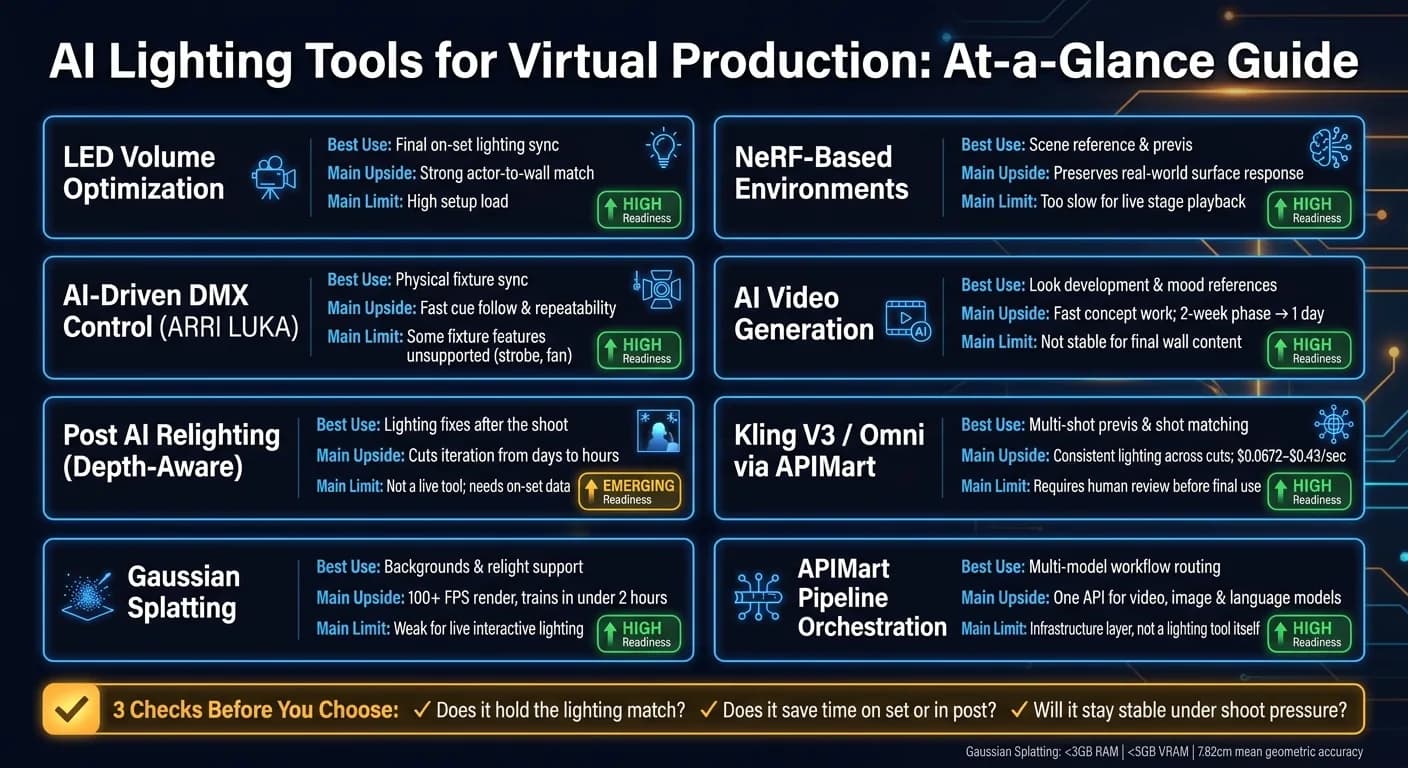
If I had to cut through the noise, I’d say this: the tools you can use now are LED volume lighting sync, AI-driven DMX control, and Gaussian splatting for fast background work. The rest fits best in previs or post. That includes AI video generation, NeRF-based scene work, post relighting, and the API layer used to connect models across the pipeline.
Here’s the short version:
- LED volume optimization gives the strongest on-set image match, but setup is heavy and timing still matters.
- AI-driven DMX control helps physical fixtures follow virtual cues with less manual board work, but some fixture functions still need hand programming.
- Post relighting can cut lighting fixes from days to hours, but it depends on good on-set data.
- Gaussian splatting can train in under 2 hours and render at 100+ FPS, which makes it useful for background plates and relight workflows.
- NeRF is better for scene reference and previs than live stage playback.
- AI video generation is best for look development, mood, and client review, not final wall content.
- Kling V3 and Kling V3 Omni via APIMart fit early look testing, multi-shot lighting reference, and shot matching at low per-second cost, from $0.0672/sec to $0.42856/sec.
- APIMart’s pipeline layer matters because one API can route video, image, and language models through the same flow from previs to post.
If you’re deciding what to use, I’d frame it around three checks:
- Does it hold the lighting match?
- Does it save time on set or in post?
- Will it stay stable under shoot pressure?
How to use AI in Virtual Production
Quick Comparison
| Approach | Best Use | Main Upside | Main Limit |
|---|---|---|---|
| LED Volume Optimization | Final on-set lighting sync | Strong actor-to-wall match | High setup load |
| AI-Driven DMX Control | Physical fixture sync | Fast cue follow and repeatability | Some fixture features missing |
| Post AI Relighting | Fixes after the shoot | Lighting changes without rebuild | Not live |
| Gaussian Splatting | Backgrounds and relight support | 100+ FPS, low hardware load | Weak for live interactive light |
| NeRF | Scene reference and previs | Good surface response from source views | Too slow for stage use |
| AI Video Generation | Look references | Fast concept work | Not stable enough for final wall playback |
| Kling V3 / Omni via APIMart | Multi-shot previs | Good shot-to-shot lighting consistency | Needs human review |
| APIMart Orchestration | Multi-model workflow routing | Fewer tool jumps | It’s infrastructure, not lighting by itself |
My takeaway is simple: use AI where speed helps, keep humans in charge where lighting calls affect the shoot. That’s the line running through the whole article.
1. Real-Time AI Lighting Optimization on LED Volumes
On an LED volume stage, the big challenge is simple to describe but hard to nail: the light on an actor’s face needs to match what’s showing up on the wall behind them. Real-time AI optimization tackles that by turning equirectangular panoramas from the virtual scene into DMX fixture cues for lights like ARRI SkyPanels.
That handoff only works if the image-processing chain is dialed in. Range Remap sets intensity. Key Color Mask reduces blue spill. Threshold controls falloff. And Dilate expands small light sources [6].
Lighting Realism
RGB LED panels can shift skin tones because their spectrum is narrow-band. A three-matrix calibration method fixes that across off-camera lighting, the recorded image, and the on-camera background [7].
LUKA lines fixture output up with photometric data, so previs matches how the rig behaves on set [1]. Right now, the tool includes 21 different ARRI Light Actors, grouped by source type:
- HMI
- tungsten
- LED
It also supports multi-zone rendering for fixtures like the SkyPanel S360-C [1]. In long, heavy rehearsals, single-source versions help keep rendering load under control. For final capture, multi-zone versions can step in [1].
Creative Control and Latency
Once the wall lines up with the camera, speed becomes the next limit. Older LED volume setups often add a 3–5 frame delay between camera movement and background rendering [9]. Panels with NPUs can bring camera-to-wall latency down to sub-millisecond levels [9].
That loop matters most when the same control layer is also driving physical fixtures. If the wall updates almost at once, the lighting system can stay in step instead of lagging behind.
Pipeline Integration
AI-driven workflows can sync virtual and physical cameras in real time through LiveLink. At the same time, panel-mounted processors push computation into the wall itself, which cuts the need for external server racks and fiber cabling [9].
2. AI-Assisted DMX and Physical Fixture Control
The next step is getting the room fixtures to follow the same cue data. Instead of asking a lighting board operator to match cues by hand, the system pulls tracking and scene data from the engine and sends DMX cues over ArtNet or sACN. In plain English, the job moves from syncing the wall to syncing the whole room.
Lighting Realism
Plugins like ARRI LUKA build virtual fixtures from real photometric data. That means the digital twin can mirror the color, intensity, and light spread of the physical unit. GDTF files help confirm the right fixture modes and configurations before call time, which cuts down on nasty surprises once the crew is on stage.
Creative Control
This is where the tradeoff shows up. AI-assisted DMX is good at broad moves, like placing lights, tracking performers, and switching between environments in seconds.
But it does hit a wall. Features like strobe, fan control, gel selection, and complex effect sequences are often unsupported in current AI plugins. When you need tight control over strobe, fan, gels, or effect timing, manual programming still does the better job.
Latency
Predictive tracking helps keep physical fixtures lined up with the scene. So even during fast pans or odd camera angles, fixture timing stays in step instead of drifting off.
Pipeline Integration
Lighting programs built in a virtual sandbox can be saved and pushed straight to physical gear on set. So the look worked out in previs can carry through to the stage without rebuilding everything from scratch. That kind of consistency matters even more once lighting work moves into post. This continuity is vital when integrating AI video generation into the final composite.
3. Depth-Aware AI Relighting in Post-Production
Once the shoot wraps, depth-aware AI relighting takes over where on-set tools stop. Newer systems use Gaussian Splatting (GS) to split a scene’s fixed look from the parts shaped by light. That means relighting becomes a targeted pass, not a full rebuild. The biggest limit is still how LED walls behave, because they change the way these systems deal with depth and reflections.
Lighting Realism
At the core, the method samples scene texture and incoming light from Gaussian primitives in pixel space [13]. That works best when light sources are far away. In virtual production, though, LED walls sit much closer and behave like near-field sources, so that assumption starts to fall apart.
That’s where things can get messy. Reflections and transparency may still create floating artifacts, especially in harder shots. Even so, GS reaches a mean geometric accuracy of about 7.82 cm, which is usually enough for background environments in virtual production [2][15].
Creative Control
In day-to-day work, GS relighting goes past simple color grading. Manual grading is still a 2D move: you shift color and contrast across the frame. Depth-aware relighting works in space, so it can toggle lights and change intensity based on where things sit in the scene [14].
Some pipelines push this further. GR3EN, for example, feeds relighting results back into 3D reconstruction. That helps the lighting stay in sync even when the camera moves to new angles [14].
Latency and Pipeline Integration
Speed is one reason this is getting traction. Training a GS relighting model can take under 2 hours on a standard workstation [13]. After that, scenes can render at over 100 FPS in Unreal Engine, which is much faster than old-school NeRF workflows [15].
The hardware load is fairly light too:
- Some workflows need less than 3 GB of RAM
- VRAM use can stay under 5 GB [13]
Handoff is fairly clean. These tools can export depth maps, XYZ data, and unlit renders [13]. Support for ACES, OCIO, and LogC4 also keeps AI-made lighting lined up with the color pipeline [1]. In practice, that can shrink iteration time from days to hours [5].
The next step is using generated environments before the shot, not just relighting after it.
4. NeRF-Based Virtual Environments
After relighting tools clean up finished shots, NeRFs move the job earlier in the pipeline by recording the environments that drive lighting choices. Instead of building scenes with manual geometry and textures, NeRFs learn them from multi-view images. That makes them a strong fit for environment capture and previs.
But there’s a catch: they’re not built for live lighting control.
Lighting Realism
NeRFs can preserve view-dependent highlights, reflections, and refractions from real footage. In plain English, shiny and complex surfaces tend to look more natural because the scene keeps some of the optical behavior from the source material.
Still, near-field LED volume setups are a weak spot. When the wall sits close to the subject, the usual far-field environment map assumptions stop working well [13].
Creative Control
Some frameworks split out albedo, roughness, metallic, and normal data. And even simple 3D blockouts can hold onto scale, falloff, and shadow direction [2].
Why does that matter? Because lighting teams need surfaces to react in the right way after the stage lighting changes. If that response falls apart, the whole setup starts to feel off.
Latency and Pipeline Integration
NeRF is too slow for on-set use. So teams usually treat it as a reference-capture tool inside hybrid workflows, while Gaussian Splatting handles real-time playback.
For handoff, OpenUSD and glTF 2.0 exports help keep NeRF-based environments usable across previs and other tools [15].
These captures work best as lighting previs and environment reference, not as live wall content.
5. AI Video Generation for Lighting Previs
Where NeRF captures real spaces, AI video generation lets crews sketch the lighting look before the set even exists. A DP or gaffer can describe a look in plain language and get a usable reference image or short clip within hours [8][2].
Lighting Realism
The results can look photorealistic. Modern text-to-video models can produce convincing imagery faster than game-engine workflows [2]. That said, they still hallucinate, shift perspective, and have trouble with interactivity [2].
Creative Control
This changes lighting control from exact fixture placement to mood and intent. LED-volume tools shape real light in real time, and NeRF records real locations. AI video generation does something different: it creates lighting references from text.
In practice, teams often combine a simple 3D blockout with AI-made texture, weather, and atmosphere. That mix gives them a rough spatial base without giving up speed.
Latency and Pipeline Integration
A 2-week concept phase can drop to 1 day. That can compress a 9-week previs pipeline to 2–3 weeks and cut environment creation costs by 50% to 70% [8].
Use this stage to lock lighting direction early, before shot design and production lighting are set. Once the look is clear, the next move is bringing those references into a model-access and pipeline workflow.
6. Kling V3 and Kling V3 Omni via APIMart

Kling V3 and Kling V3 Omni are a strong fit for lighting previs and reference footage that needs to stay steady from shot to shot. Both are available through APIMart, which makes them useful for previs, shot matching, and reference clips before the lighting pipeline moves into orchestration.
Lighting Realism
Both models use the "Omni One" system to process motion, lighting, and physics together. In plain English, that means shadows stay tied to moving subjects, and reflections are less likely to drift or shimmer between frames [17].
Kling V3 supports native 4K synthesis and 16-bit HDR color, which helps with day-for-night work and mixed-color practicals [18][19]. It also handles volumetric lighting through fog, dust, or smoke, and supports prompts like 5600K daylight or 3200K tungsten [18][20]. Kling V3 Omni adds a multimodal transformer that can take multi-image, video, and audio references, which helps keep subjects more consistent across shots [19].
The big draw here isn't only image quality. It's the ability to keep lighting and subject treatment lined up across cuts.
Creative Control
You can spell out the light source, angle, and intensity with plain prompt language. For example:
warm window key at 45 degrees, camera leftsingle bare bulb overhead, hard contrast, deep shadows
It also helps to name 3 to 5 specific colors as palette anchors, such as "amber, slate, cream", to keep the color grade lined up across shots [21].
For multi-shot sequences, Kling V3 Omni's Multi-Shot AI Director mode can reuse one seed across up to six shots. That helps lighting and shadow treatment stay matched across cuts [18][22].
Latency and Pipeline Integration
Kling V3 Omni runs with 35% lower inference latency than the base V3 model [18]. It's priced for fast previs iterations, which matters when you're testing looks and don't want costs to pile up.
| Resolution / Mode | APIMart Price (per sec) | Est. 10s Clip Cost |
|---|---|---|
| 720p Standard | $0.0672 | $0.67 |
| 1080p Professional | $0.0896 | $0.90 |
| 1080p + Native Audio | $0.1120 | $1.12 |
| 4K Ultra HD | $0.42856 | $4.29 |
At that stage, the issue shifts from pure model choice to pipeline design: how to route one model, one prompt, and one output format through a single production workflow.
7. Multi-Model AI Pipeline Orchestration via APIMart
The next challenge is connecting lighting tools without breaking continuity. That makes workflow orchestration the layer that holds previs, capture, and final lighting together.
Lighting Realism
Orchestration keeps lighting cues in sync as work moves from previs to capture to relight. The Lighting-Guided Generative Workflow (LGGW), for example, uses on-set DMX lighting as an anchor so generated footage matches the live scene [5]. The same issue shows up when teams move between physical fixtures and post relighting. If that handoff slips, the scene can start to feel off fast.
Creative Control
Human teams still shape the scene. AI fills in the detail.
Simple geometry sets scale, occlusion, and horizon lines before AI models add textures and atmosphere [2]. That split matters. It lets artists lock the structure first, then use AI to build on top of it instead of letting the model make core scene decisions. Orchestration keeps that control split in place across each stage of the pipeline.
Latency and Pipeline Integration
Unified model access cuts handoffs and keeps previs, generation, and relighting moving through one pipeline. APIMart supports this kind of multi-stage workflow by offering one API for video, image, and language models. For virtual production teams, that means fewer tool jumps and less friction between steps.
That leads to the next test: which lighting workflows still hold up under production constraints.
The next section tests these workflows against real production decisions.
How These Technologies Hold Up in Real Production Decisions
When a team decides what to book, build, or automate, the issue isn't just image quality. It's production fit.
That means asking a more grounded question: Which option gives you the right mix of realism, control, speed, and day-to-day reliability?
The table below shows how each approach stacks up.
| Technology | Lighting Realism | Creative Control | Speed | Pipeline Integration |
|---|---|---|---|---|
| LED Volume | Very High | High | Medium (High Prep) | Complex |
| AI-Assisted DMX | High | Very High | High | Seamless (via ArtNet/sACN) |
| Gaussian Splatting | High (Photorealistic) | Low (Static) | Very High | Emerging (Hybrid) |
| ARRI LUKA (Previs) | High | High (Manual) | High (Planning Stage) | High (DMX/ArtNet/sACN) |
| AI Post-Production Relighting | High | Moderate | Asynchronous | High (DMX-Anchored) |
The real test comes when speed, control, and reliability pull in different directions.
LED volumes still lead on realism, but they ask for the most prep and the most complex setup[24][25]. So yes, they can deliver stunning results. But they also rely on a tightly managed control stack, which can add pressure fast.
AI-assisted DMX is strong when teams need repeatable cues and remote control, both of which can cut on-set time[10]. It's the best match when physical fixtures need to track virtual cues with precision[1].
Gaussian splatting stands out for speed and cost when you're building background plates[2]. The tradeoff is simple: it's not the right pick for interactive lighting.
AI previs tools like ARRI LUKA push more lighting decisions into prep, before the stage rental clock starts ticking[1][3]. That's a big deal when the goal is to lock exposure, color, and lens choices early, instead of sorting them out under time pressure later.
AI post-production relighting works asynchronously, so it doesn't fight for on-set speed. It steps in later as a safety net for fixing lighting mismatches, shifting the mood of a scene after the set is struck, and reducing reshoots[23].
The next section breaks these tradeoffs into pros and cons.
Pros and Cons of Each Approach
No single tool wins in every production setup. The best pick comes down to three things: budget, timeline, and how much risk your team can handle on set. Put simply, each option shines in a different area, whether that's realism, control, speed, or how ready it is for day-to-day use.
| Technology | Main Advantages | Main Limitations | Best Fit | Readiness |
|---|---|---|---|---|
| Real-Time LED Volume Optimization | Final-pixel in-camera; instant feedback [4] | High hardware and compute costs; complex setup; high prep time [4] | On set - high-end commercials; narrative features | High |
| AI-Assisted DMX (ARRI LUKA) | Accurate photometric data; virtual-to-physical sync; reduces rigging time [1] | Some fixture attributes unsupported, including strobe and fan control [1] | On set - episodic TV; complex rigs needing repeatability | High |
| Depth-Aware AI Relighting (Post) | Compresses VFX work from days to hours; high lighting coherence [5] | Requires lighting-guided capture on set; not a live tool [5] | In post - high-risk VFX shots; hybrid productions | Emerging |
| Environment Capture (NeRF / Gaussian Splatting) | Up to 10x cheaper than full 3D pipelines; fast background generation [2] | Prone to hallucinations; limited interactivity; copyright concerns [2] | In previs - indie shoots; rapid background plates for ads and music videos | High |
| AI Video Previs | Fast mood board and storyboard generation; useful for client pitches [12] | Lacks frame-by-frame control; insufficient resolution for live LED volumes [12] | In previs - pre-production planning only | High |
| AI Previs and Orchestration (Kling V3 / APIMart) | Multi-model access via single API; fast iteration across previs, generation, and relighting; competitive per-second pricing | Generative output requires human review before use in final pipeline | Pipeline layer - previs through post; multi-stage virtual production workflows | High |
The bigger call isn't which tool looks strongest on paper. It's which one keeps human control in the places where that control matters most.
That point still holds across the board: a person needs to approve the result. As Lanz Short, Global Director of Solution Design at Disguise, put it:
"You really wouldn't want to lose control of your lights to AI totally – if you accidentally strobed a room too much, people couldn't see." [11]
Cost can tip the scales, especially when one option is far cheaper than another. But lower cost doesn't remove the need for review. Environment capture tools, for example, still need a human sign-off before anything is final, and they can't react to actors the way a fully interactive stage can.
Those tradeoffs feed straight into the final production decision framework.
Conclusion
Put side by side, three tools stand out right now: real-time LED volume optimization, AI-assisted DMX control, and Gaussian splatting for background plates. These can shrink environment work from weeks to days and cut costs hard [8].
The next wave goes past what teams use on set today. A lot of the upside will come from faster post relighting and hybrid pipelines. That means depth-aware AI relighting, plus workflows that mix real sets, standard 3D, and AI-generated backgrounds. Nvidia's 2026 relighting system, which runs in under 40 ms per frame, gives a clear sign of where this is headed: crews may be able to revisit lighting choices in post while still keeping physical coherence [16].
Cost is now a major part of the decision. APIMart isn't an on-set lighting tool. It's pipeline infrastructure. Studios can use it to access and combine video, image, and language models, including Kling V3, through one API during pre-production and previs. In plain English, that makes it easier to test environment ideas and lighting references before cameras roll.
In virtual production, there isn't one perfect tool for every job. The best choice depends on the stage, the pace, and how much control the team wants. The teams that come out ahead will be the ones that pick the right tool for the right moment and keep human approval in the loop.
FAQs
Which AI lighting tools are production-ready now?
Several AI-driven and virtual lighting tools are ready for use right now. ARRI LUKA works for previs and on-set DMX control inside Unreal Engine’s real-time Lumen setups.
For post-production and more flexible workflows, Beeble offers SwitchLight and the SwitchX API for AI-powered relighting and physically based rendering pass generation. APIMart can also help teams bring advanced video and image models into production pipelines.
When should I use Gaussian splatting instead of NeRF?
Use Gaussian splatting when your virtual production workflow needs real-time rendering.
It can run at 100+ frames per second, while NeRF often needs multiple seconds for a single frame. That gap matters on a busy stage. If you're working in a live LED volume setup, slow renders can throw a wrench into the whole process.
For most teams, Gaussian splatting is the better choice when you need photorealistic results at a speed and cost that make sense for production, especially in dynamic, real-time LED volume environments.
How much human control do AI lighting workflows still need?
AI lighting workflows in virtual production still need close human oversight and skilled manual input. AI can tune setups and handle technical jobs like real-time tracking or generating lighting cues, but people are still the ones who shape the creative vision.
Teams also deal with networking, IP, and multiple data streams, so these workflows are still collaborative rather than fully autonomous.
Choose the model you want in the model marketplace
Try chat, image and video models in the APIMart model marketplace, and experience model capabilities quickly with one unified API.