
Hailuo 02 vs Hailuo 2.3: What's the Difference?
Hailuo 02 vs Hailuo 2.3 compared: physics and last-frame control versus micro-expressions, art styles and cheaper Fast mode. See which MiniMax model fits.
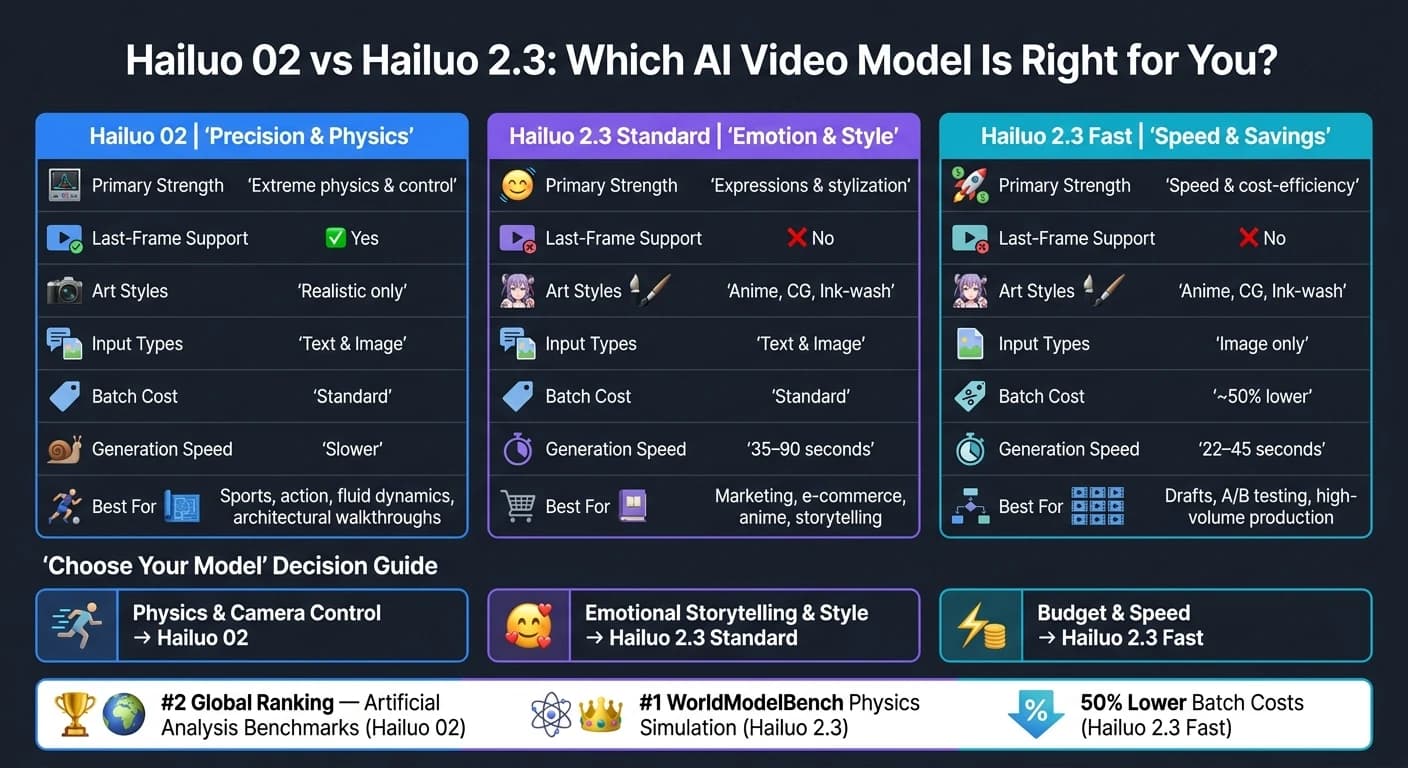
Hailuo 02 and Hailuo 2.3 are AI video models from MiniMax, each designed for different needs. Hailuo 02 excels in physics simulation and precise control, while Hailuo 2.3 focuses on emotional depth, artistic styles, and cost-efficiency. Here's a quick breakdown:
Key Differences:
- Hailuo 02: Best for complex physical motion (e.g., gymnastics, parkour) and detailed control, including last-frame conditioning.
- Hailuo 2.3: Ideal for emotional storytelling, anime, and stylized content, with improved micro-expressions and faster batch production.
- Hailuo 2.3 Fast: A budget-friendly option for drafts, offering speed and lower costs.
Quick Comparison:
| Feature | Hailuo 02 | Hailuo 2.3 (Standard) | Hailuo 2.3 (Fast) |
|---|---|---|---|
| Strength | Physics & control | Expressions & styles | Speed & cost |
| Last-Frame Support | Yes | No | No |
| Art Styles | Realistic only | Anime, CG, Ink-wash | Anime, CG, Ink-wash |
| Input Types | Text & Image | Text & Image | Image only |
| Batch Cost | Standard | Standard | ~50% lower |
Choose Hailuo 02 for precision-heavy projects like sports or technical visuals. Opt for Hailuo 2.3 for emotionally engaging content, marketing, or stylized art. For testing or high-volume production, Hailuo 2.3 Fast is the most cost-effective choice. For those seeking alternative high-end results, Kling V3 offers comparable cinematic quality.
Hailuo 02: Features and Limitations

What Hailuo 02 Does Well
Hailuo 02 shines in its advanced physics simulation, handling complex movements like gymnastics, parkour, fluid dynamics, and gravity-defying stunts with impressive accuracy. In June 2025, it ranked #2 globally on Artificial Analysis video benchmarks, even surpassing Google's Veo 3 in physical scene simulation [5].
"Hailuo-02, released in June this year, that version could well be called a 'sports prodigy' - its ability to reproduce complex physical actions like backflips and high-dive jumps was nothing short of impressive." - 302.AI [4]
Another noteworthy strength is its prompt adherence. It interprets detailed instructions with precision, whether it's about camera angles, character movements, or scene composition. Hailuo 02 supports native 1080p resolution at 24–30 FPS and offers a standout feature: last-frame conditioning. This lets creators dictate exactly how a video sequence concludes, providing a level of control that Hailuo 2.3 lacks [1][6].
"The consistency of MiniMax Hailuo 02 is amazing! Character images remain stable across multiple clips." - Wei Zhang, Independent Animator [7]
While its expertise in physical simulations and adherence to prompts make it a powerful tool, Hailuo 02 does face some limitations.
Where Hailuo 02 Falls Short
One of its key shortcomings is its inability to handle micro-expressions - those tiny facial movements that bring emotional depth to characters [8][2]. Additionally, its stylization options are limited, leaning heavily toward realistic visuals. For projects requiring anime, ink wash painting, or game CG aesthetics, Hailuo 2.3 is a better choice [2][1].
There are also practical constraints to consider. At 1080p resolution, clips are capped at 6 seconds. Extending to 10 seconds requires dropping the resolution to 768p. On top of that, the API rate limit is restricted to 5 RPM, and its generation speed is slower compared to Hailuo 2.3's Fast variant, which also reduces batch creation costs by up to 50% [2][6].
Hailuo 2.3: What's New and What It Can Do
Key Upgrades in Hailuo 2.3
Hailuo 2.3 takes a big step forward, addressing the limitations of its previous version: static facial expressions, limited artistic styles, and sluggish generation times.
The standout improvement is micro-expression modeling. Instead of relying on static keyframe interpolation, this version simulates facial muscles to capture nuanced details like eyebrow movements and subtle shifts in eye focus. This enhancement significantly reduces the "uncanny valley" effect.
"The era of lifeless AI-generated faces is coming to an end. MiniMax Hailuo AI 2.3 is redefining what 'real' means in AI video generation." - AnimateAI [10]
Another major leap is in physics simulation. Hailuo 2.3 now ranks #1 on WorldModelBench for physics simulation [9]. In choreography tests, it achieved an 8% reject rate - a clear improvement over Seedance 2.0's 14% and Veo 3.1 Lite's 22% [9]. Other high-performance models like WAN 2.6 also offer competitive consistency and motion quality. It also fixes issues like flickering and inconsistent lighting during fast camera movements, delivering stable reflections and smooth shadow transitions.
Stylization has seen a boost as well. The model now supports anime, ink-wash painting, and game CG aesthetics as distinct rendering options. These modes offer painterly, artistic strokes that were missing in the previous version [2].
For faster production, the Hailuo 2.3 Fast variant generates clips in just 22–45 seconds, compared to the standard model's 35–90 seconds. This also slashes batch creation costs by up to 50% [1][9]. However, the Fast variant is limited to Image-to-Video (I2V), while the standard model supports both Text-to-Video and I2V [1].
These speed and technical improvements make Hailuo 2.3 a well-rounded upgrade over its predecessor.
"Hailuo 2.3 achieves significant improvements in the portrayal of physical actions, stylization, and character micro-expressions, while further optimizing its response to motion commands." - MiniMax Official [2]
These advancements not only refine performance but also open doors for broader applications.
Use Cases for Marketing, E-Commerce, and Storytelling
The upgrades in Hailuo 2.3 translate into real-world benefits across various industries.
In e-commerce, the improved motion responsiveness delivers clean 360° product rotations. For example, prompts like "slowly rotates 360°" now yield consistent, high-quality results, addressing the flaws seen in Hailuo 02. MiniMax has already showcased its success during major shopping events like "Double 11" [2]. Advertisers have also reported a 47% increase in audience retention, thanks to the model's ability to create emotionally relatable characters [10].
For marketing and storytelling, the enhanced micro-expression system is a game-changer for close-up shots. When subtle emotions like hesitation or relief are needed, prompts such as "a sorrowful side-eye" produce much more realistic results with Hailuo 2.3 [1].
In film previsualization and animation, the new stylization options and improved physics accuracy make this version incredibly versatile. Studios have used it to cut previsualization timelines by up to 80% [10]. The anime and game CG modes also allow for the creation of stylized content without the effort of manual illustration.
"Hailuo 2.3 is a specialist in a market dominated by generalists." - Atlas Cloud [11]
Additionally, the Media Agent integration layer simplifies workflows by automatically routing prompts to the appropriate model variant. It also matches text, image, and audio assets within a single pipeline, making production smoother and more efficient [2].
Hailuo 02 vs Hailuo 2.3: Side-by-Side Breakdown
Performance Areas Compared
This breakdown highlights how each model's features align with different creative needs, helping users determine the best fit for their projects.
When it comes to motion physics, Hailuo 02 takes the lead, excelling in handling complex sequences like gymnastics or parkour with optimized simulations. On the other hand, Hailuo 2.3 prioritizes natural movements and intricate micro-expressions, making it a strong choice for projects requiring emotional depth.
In terms of facial expression quality, Hailuo 2.3 stands out. Its micro-expression engine captures subtle details, such as slight brow movements, adding emotional nuance to close-up shots. This builds on its advanced muscle-simulation technology.
Style adherence is another area of distinction. Hailuo 02 focuses on cinematic photorealism, while Hailuo 2.3 offers a broader range of artistic styles, including anime, ink-wash painting, and game-CG , similar to the versatility found in WAN 2.7, giving creators more flexibility for unique visual projects.
One exclusive feature of Hailuo 02 is last-frame conditioning, which allows precise control over how sequences end. This feature isn’t available in Hailuo 2.3.
Comparison Table
| Feature | Hailuo 02 | Hailuo 2.3 (Quality) | Hailuo 2.3 (Fast) |
|---|---|---|---|
| Primary Strength | Extreme physics & control | Expressions & stylization | Speed & cost-efficiency |
| Max Resolution | 1080p | 1080p | 1080p |
| Max Duration | 10 seconds | 10 seconds | 10 seconds |
| Last-Frame Support | Yes | No | No |
| Input Types | Text & Image | Text & Image | Image only |
| Art Styles | Realistic | Anime, CG, Ink-wash | Anime, CG, Ink-wash |
| Batch Cost | Standard | Standard | ~50% lower [1][2] |
| Multi-modal Integration | Standard API | Media Agent (fusion support) | Media Agent (fusion support) |
These features make it easier to select the right model based on specific project requirements.
Which Model Fits Which Industry
Choosing between these models depends on your industry and project goals.
For marketing and e-commerce, Hailuo 2.3 shines with its smooth motion tracking and natural lighting, making it a solid choice for product ads. Entertainment and animation studios, especially those working on anime or game-CG styles, will benefit from Hailuo 2.3's diverse artistic capabilities.
If your project involves action cinematics or sports content requiring detailed physical movement, Hailuo 02 is the better option. Meanwhile, for high-volume social media production, the Hailuo 2.3 Fast variant offers a cost-effective solution, reducing batch creation expenses by up to 50% [1][2].
In education, the choice depends on the content type. Hailuo 2.3’s advanced expression modeling works well for explainer videos featuring realistic presenters. However, if the focus is on demonstrations involving detailed motion, Hailuo 02’s physics capabilities are more suitable.
Using Both Models Through APIMart

How to Access Hailuo Models via APIMart
You can access both models through a single endpoint: https://api.apimart.ai/v1/videos/generations. With just one API key and integration, you only need to adjust the model parameter in your JSON payload to switch between models. Authentication is handled using a standard Bearer Token, and the request structure remains the same for both options. This unified approach is particularly convenient for U.S.-based teams juggling multiple projects, as everything operates under one APIMart account. Plus, APIMart guarantees a 99.9% uptime SLA [3], and video clips are generated in just 30 to 90 seconds [3]. This setup makes switching between models seamless.
"As a developer, I value stability and speed. MiniMax Hailuo 2.3 on APIMart delivers great performance." - David Chen, Full-Stack Engineer [3]
Moving from Hailuo 02 to Hailuo 2.3
Switching from Hailuo 02 to Hailuo 2.3 is a breeze. Simply update the model value in your API request payload from MiniMax-Hailuo-02 to MiniMax-Hailuo-2.3 (or MiniMax-Hailuo-2.3-Fast for the faster version). This small change highlights APIMart's focus on simplicity and efficiency.
Keep in mind that Hailuo 2.3 supports clips between 6 and 10 seconds, so if you're using 5-second clips, you'll need to adjust accordingly. Video generation is asynchronous; when you submit a request, the API returns a task_id. You can use this ID to poll the status endpoint and retrieve the final video URL, allowing your application to continue other tasks while the video is being rendered.
For testing, start with the MiniMax-Hailuo-2.3-Fast variant. It offers 80–90% of the standard quality at half the price, making it a cost-effective choice for rapid iterations before committing to full 1080p renders [3].
Pricing and Cost Planning
Once you've updated your API requests, it's worth exploring the cost advantages of each model. APIMart offers Hailuo 2.3 at a 20% discount compared to official rates. Here's a breakdown:
| Model Variant | Resolution | APIMart Price (USD) | Official Price (USD) |
|---|---|---|---|
| MiniMax-Hailuo-2.3 | 768P | $0.0488/sec | $0.061/sec |
| MiniMax-Hailuo-2.3 | 1080P | $0.072/sec | $0.09/sec |
| MiniMax-Hailuo-2.3-Fast | 768P | $0.0248/sec | $0.031/sec |
| MiniMax-Hailuo-2.3-Fast | 1080P | $0.0424/sec | $0.053/sec |
For example, creating a 10-second clip in 1080p costs $0.72 through APIMart [3]. If you're producing high volumes - such as social media posts or e-commerce ads - the Fast model at 768P reduces costs to around $0.15 for a 6-second clip [3]. This makes it practical to use 768P for drafts and testing, upgrading to 1080P only for final versions to maintain cost efficiency.
"Hailuo 2.3 once again sets a new global record for video model cost-effectiveness... offering 'more for the same price' to both business and consumer users." - MiniMax News [2]
Hailuo ai 2.3 vs Hailuo ai 2.0 vs Hailuo ai 1.0 | Side by Side Analysis
Conclusion: Picking the Right Model for Your Work
When deciding between Hailuo 02 and Hailuo 2.3, it all comes down to the specific demands of your project. If precision is your top priority, Hailuo 02 is the go-to choice. It excels in areas like gymnastics sequences, fluid dynamics, architectural walkthroughs, or any scenario requiring pinpoint camera movement. Its last-frame conditioning feature ensures you have precise control over how sequences conclude, making it perfect for technical and highly detailed workflows.
For projects that lean on emotional resonance, Hailuo 2.3 is the better fit. It’s ideal for close-ups, e-commerce ads, and stylized content like anime or illustrations. This model captures subtle facial expressions and supports a broader range of artistic styles.
"The 2.3 release delivers more natural micro-expressions and emotional nuances, making close-up shots and narrative scenes feel lifelike." [1]
To optimize costs, you can start with Hailuo 2.3 Fast at 768p for drafts, cutting expenses by up to 50% [1]. For the final touches, switch to Hailuo 02 or full-quality Hailuo 2.3 for 1080p renders. This hybrid approach balances budget management with high-quality results where it counts.
Here’s a quick breakdown to help you pair the right model with your project goals:
| Your Priority | Best Model |
|---|---|
| Physics accuracy, fluid dynamics, complex action | Hailuo 02 |
| Camera control, last-frame precision | Hailuo 02 |
| Facial expressions, emotional storytelling | Hailuo 2.3 |
| E-commerce ads, marketing content | Hailuo 2.3 |
| Anime, illustration, stylized art | Hailuo 2.3 |
| High-volume drafts, rapid A/B testing | Hailuo 2.3 Fast |
Each model serves a distinct purpose, so the key is aligning your choice with the unique needs of your project. By doing so, you can make the most of APIMart's AI tools , such as sora-2-preview for synchronized audio, and achieve outstanding results.
FAQs
When should I choose Hailuo 02 instead of Hailuo 2.3?
Hailuo 02 is the go-to choice for projects where precise physics accuracy is key. This makes it perfect for activities like gymnastics, parkour, or intricate motion sequences. It's also an excellent option for cinematic shots or scenes where motion physics take precedence over detailed facial features.
One standout feature of Hailuo 02 is its support for last-frame conditioning, a capability not available in version 2.3. For those working on quick, budget-friendly drafts - such as storyboarding or concept testing - the Fast variant offers a speedy and cost-effective solution.
What is last-frame conditioning, and why does it matter?
Last-frame conditioning allows you to dictate the final image of a video, giving you greater control over how a scene wraps up. This ensures the generated motion aligns seamlessly with a specific ending, making transitions smoother and delivering a clear narrative finish. This functionality is available in the Hailuo 02 model but is not supported in Hailuo 2.3.
Which Hailuo 2.3 variant should I use: Standard or Fast?
Choose the Standard variant if you're aiming for top-tier visual quality and need access to both text-to-video and image-to-video features. This option works best when creating final production assets. On the other hand, go with the Fast variant if speed, batch processing, or cost savings are your priorities. Keep in mind that the Fast variant only supports image inputs and does not accommodate text prompts.
Choose the model you want in the model marketplace
Try chat, image and video models in the APIMart model marketplace, and experience model capabilities quickly with one unified API.