
Hailuo 2.3 vs Kling: Best AI Video Generator
Hailuo 2.3 vs Kling for AI video in 2026: compare text rendering, character consistency, native audio, speed and pricing to pick the right model for you.
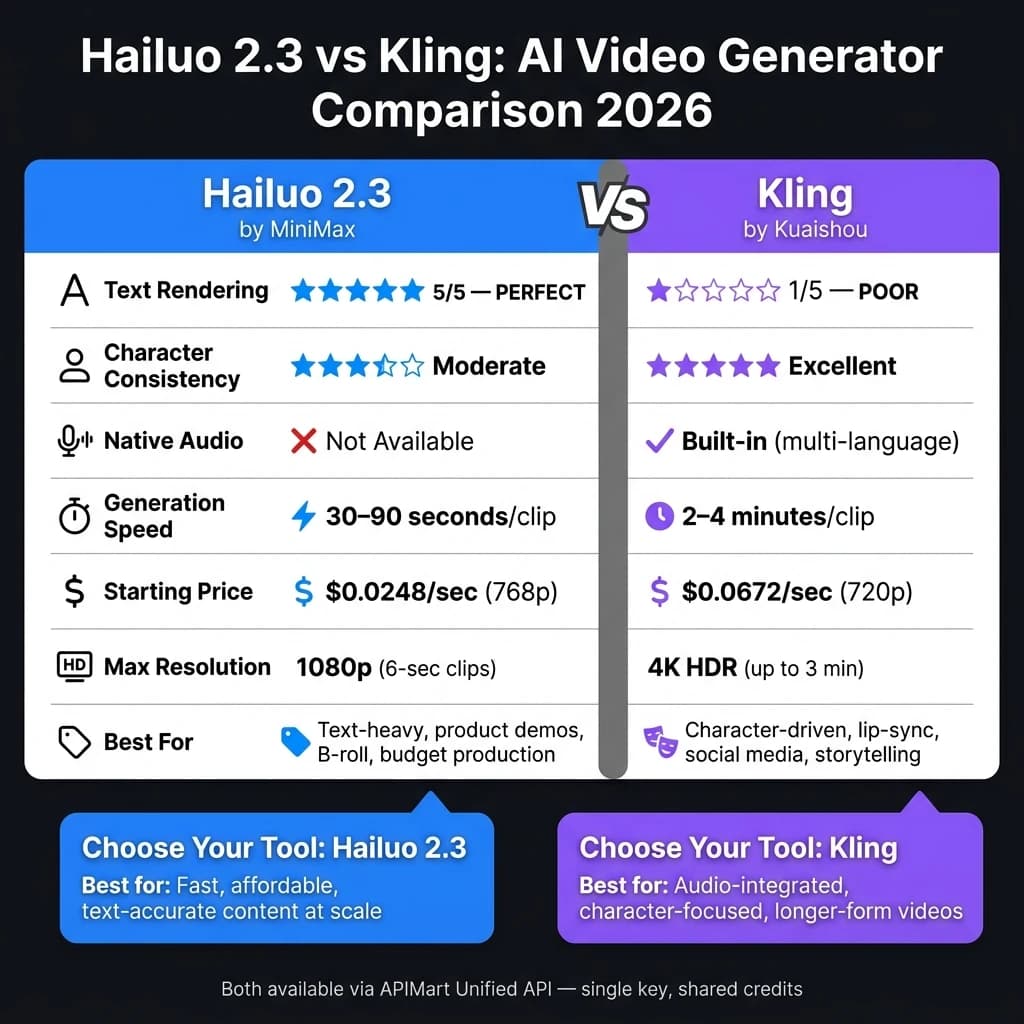
Which AI video generator is better in 2026: Hailuo 2.3 or Kling? It depends on your needs.
- Choose Hailuo 2.3 if you need clear text rendering, realistic motion effects, or affordable, fast content creation. It's ideal for product demos, educational visuals, and short-form cinematic clips. Pricing starts at $0.0248/second for 768p resolution, making it budget-friendly.
- Choose Kling if your focus is on character-driven videos, native audio, or longer clips, similar to Sora 2. It excels in lip-syncing, expressive animations, and storytelling for social media and e-learning. Prices start at $0.0672/second for 720p, with audio and 4K options available.
Quick Comparison:
| Feature | Hailuo 2.3 | Kling |
|---|---|---|
| Text Rendering | Perfect (5/5) | Poor (1/5) |
| Character Consistency | Moderate | Excellent |
| Native Audio | No | Yes |
| Speed | 30–90 seconds per clip | 2–4 minutes per clip |
| Pricing (USD) | Starts at $0.0248/second | Starts at $0.0672/second |
| Best For | Text-heavy, short clips | Character-driven, longer clips |
Both tools are available via APIMart's unified API, so you can mix and match their strengths. For text clarity and affordable speed, Hailuo 2.3 is unbeatable. For audio-integrated, character-focused projects, Kling is the better fit.
Hailuo 2.3: Features, Pricing, and Limitations
What Hailuo 2.3 Can Do
Hailuo 2.3, developed by MiniMax, operates on a 456-billion parameter Mixture of Experts (MoE) architecture, with 45.9 billion parameters active per token[6]. This setup allows the model to deliver precise results, particularly in physics simulations and natural motion. It’s no wonder Hailuo 2.3 holds the top spot on WorldModelBench for its ability to model fluid dynamics, mass conservation, and material behavior. Think of water rippling across a surface or fabric flowing naturally with the wind - Hailuo 2.3 makes these scenarios look incredibly realistic[6].
The model’s capabilities extend to capturing subtle facial expressions, such as slight brow motions or faint smirks, which bring characters to life[7]. Not limited to photorealism, it also supports diverse visual styles, including anime, ink-wash art, and game CG, all while avoiding the eerie "uncanny valley" effect. Its new Media Agent feature simplifies video creation by automatically optimizing settings for any given prompt, enabling one-click video generation[4].
"The 2.3 release is built on top of the 02 architecture but tuned heavily for human motion, micro-expressions, and stylized art." - Anthony M., ThePlanetTools[7]
Hailuo 2.3 Pricing for U.S. Users
Hailuo 2.3 offers an affordable pricing model. Through APIMart, the Fast variant (768p resolution) costs about $0.0248 per second, while the Standard 1080p version is priced at $0.072 per second[8]. For instance, creating a 6-second 1080p clip would cost around $0.43.
For users who prefer a subscription model, there are three tiers available:
| Plan | Monthly Price | Credits | Best For |
|---|---|---|---|
| Standard | $9.99 | ~1,000 credits | Casual creators |
| Pro | $34.99 | ~4,500 credits | Daily content production |
| Max | $199.99 | 12,000+ credits | Production-scale workflows |
A smart way to save costs during early-stage testing is to use the Fast variant. The quality difference after platform compression (e.g., TikTok or Instagram Reels) is often minimal, and this approach can cut batch creation costs by up to 50%[4].
Best Uses and Known Drawbacks
Hailuo 2.3 shines in areas like product marketing visuals, educational simulations, and cinematic B-roll. Its crisp text rendering makes it especially useful for product demos requiring clear on-screen labels, UI elements, or branded signage. E-commerce teams can also benefit from its ability to create high-quality silent showcases where motion detail is critical.
However, there are some limitations to keep in mind. The model doesn’t generate native audio, so users need to add sound separately using tools like ElevenLabs or Adobe Premiere. Additionally, while 1080p output is capped at 6-second clips, opting for 768p resolution allows for slightly longer 10-second videos. Neither option, however, is suitable for long-form content[1].
Other challenges include credit consumption even for failed video generations and occasional inconsistencies in content filtering[9]. English API documentation tends to lag behind the Chinese version, which can be frustrating for non-Chinese speakers. Lastly, users aiming to create vertical (9:16) videos for platforms like TikTok or Instagram Reels will need to crop the default 16:9 cinematic output[3].
Kling: Features, Pricing, and Limitations
What Kling Can Do
Kling, created by Kuaishou, has become a major player in the AI video platform space, boasting over 60 million users and producing 600 million AI videos as of 2026 [12]. The Kling 3.0 series features two standout models: kling-v3 for cinematic-quality videos and kling-v3-omni, which supports multi-modal inputs like text and images.
This platform stands out for its native audio integration, consistent character portrayal, and multi-shot storytelling. In contrast to Hailuo 2.3, which requires external tools for audio, Kling 3.0 handles synchronized audio, ambient sounds, and music in a single process. It supports multiple languages, including English, Chinese, Japanese, Korean, and Spanish [13][14]. The Elements system allows users to lock a character's appearance and voice using a reference image or video, while the AI Director automates shot transitions and camera angles from a single prompt, creating up to six unique shots in a 15-second clip [17].
"kling-v3's cinematic quality is incredible! The 15-second duration option in kling-v3 gives us so much more creative freedom for storytelling." - Sarah Johnson, Creative Director [11]
Kling offers up to 4K HDR resolution with 16-bit color depth and precise camera controls, such as pan, tilt, zoom, and orbit, via the Motion Brush tool [14][15]. For longer projects, the Extend feature can chain segments into 2–3 minute videos, though users report a noticeable decline in quality after the 30–40 second mark [10].
Kling Pricing for U.S. Users
Kling's pricing is accessible through APIMart, with rates starting at $0.0672 per second for 720p and $0.0896 per second for 1080p [11]. Adding native audio increases the 1080p rate to $0.1344 per second, while 4K output costs $0.4286 per second. For a 10-second 720p clip, the cost is approximately $0.67.
| Model Variant | Resolution | Price per Second |
|---|---|---|
| Kling v3 / Omni | 720p | $0.0672/sec |
| Kling v3 / Omni | 1080p | $0.0896/sec |
| Kling v3 + Audio | 1080p | $0.1344/sec |
| Kling v3 | 4K | $0.4286/sec |
| Kling v2.6 | 720p | $0.0368/sec |
Subscription plans offer additional value. The Standard plan, priced around $6.99/month, is an affordable entry point into the AI video space [15]. The Pro plan, at approximately $25.99/month, includes priority queue access and the ability to create 60-second clips. High-tier users can choose the Premier plan (ranging from $64.99 to $179/month) for up to 2-minute single-take videos [15]. For those on a tighter budget, the older kling-v2.6 model offers a cost-effective option at $0.0368 per second for 720p clips [16].
"Kling is the AI video tool that earned its place in serious creators' toolkits in 2026 - not by leading on raw cinematic quality, but by leading on the math." - Andre Logos, Pick Right [15]
Best Uses and Known Drawbacks
Kling shines in character-focused projects like talking-head videos, avatar-based e-learning, and serialized brand storytelling. Its native 9:16 aspect ratio also makes it perfect for social media platforms such as TikTok and Instagram Reels [18].
However, there are some trade-offs. Generating 4K videos can take up to 30 minutes, which might not suit fast-paced workflows [10]. Prompt adherence can be inconsistent, requiring multiple attempts to achieve the desired outcome [15]. Additionally, Kling's compliance with Chinese regulatory standards means prompts involving political figures, certain Western pop culture elements, or adult themes may be restricted [10][15]. For industries like healthcare or legal services, data privacy is a concern because content is processed on servers in Singapore and China [17].
Kling holds an 8.4/10 rating on ThePlanetTools and 4.3/5 on Pick Right (as of April 2026), earning praise for its affordability while facing criticism for content restrictions and privacy concerns [10][15]. These features and limitations set the stage for a detailed comparison with Hailuo 2.3 in the following section.
Hailuo 2.3 vs Kling: Side-by-Side Comparison
Video Quality and Realism
The two models take distinct paths when it comes to visual quality. A January 2026 blind benchmark by Vidguru AI Lab highlighted Hailuo 2.3's strength in environmental effects like fog, water, and fire, delivering cinematic smoothness and scoring a perfect 5/5 on a text rendering test featuring a neon sign reading "FUTURE IS NOW." Kling, on the other hand, struggled with text rendering, scoring just 1/5 due to garbled, unreadable results. However, Kling shined in rendering human characters, achieving a 5/5 in character consistency tests involving intense facial expressions, while Hailuo 2.3 fell short with identity drift issues, earning only 2/5 [1].
"If your project centers on a specific character or requires intense emotional facial expressions, do not compromise - use Kling." - Vidguru AI Lab [1]
In summary, Hailuo 2.3 excels in environmental effects and text clarity, while Kling dominates in character realism and emotional expressions.
Generation Speed and Reliability
When it comes to speed, Hailuo 2.3 takes the lead. It can generate a 6-second clip in 60–90 seconds in standard mode, with its Fast variant cutting that down to 30–60 seconds [9][5]. Kling, by comparison, takes 2–4 minutes per clip, though its Turbo mode can match Hailuo's speed for shorter outputs [9][19]. This makes Hailuo 2.3 a better choice for high-volume pipelines, such as those used by social media agencies.
"If you need the fastest generation pipeline and you're building short-form content tools, Hailuo AI (MiniMax) wins on throughput and speed." - AI API Playbook [9]
However, Kling proves more reliable for tasks requiring physical accuracy, such as handling liquids, cloth simulations, and complex interactions involving multiple subjects [9][1].
Pricing in USD
For cost-conscious, high-volume production, Hailuo 2.3 offers an appealing pricing structure. Its Fast variant costs about $0.025 per second, making it roughly 25% cheaper than Kling's $0.0672 per second rate for 720p content. For example, a 5-second clip with Hailuo 2.3 Fast costs around $0.12, compared to $0.34 with Kling v3.
| Model | Resolution | Price/Second | 5-Second Clip Cost |
|---|---|---|---|
| Hailuo 2.3 Fast | 768p | $0.0248 | ~$0.12 |
| Hailuo 2.3 Standard | 1080p | $0.072 | ~$0.36 |
| Kling v3 | 720p | $0.0672 | ~$0.34 |
| Kling v3 + Audio | 1080p | $0.1344 | ~$0.67 |
Kling's built-in audio feature, though more expensive, simplifies editing workflows [20]. Beyond pricing, its ease of integration can further enhance production efficiency.
API Access and Workflow Integration
Both models are accessible via APIMart's unified API, enabling developers to integrate Hailuo 2.3 and Kling using a single account. This setup eliminates the hassle of switching platforms and is particularly advantageous for projects that combine the strengths of both models - such as using Hailuo 2.3 for atmospheric B-roll or WAN 2.7 for high-consistency landscapes and Kling for character-driven scenes [1][8].
"Kling is the production workhorse with a mature ecosystem. Hailuo is a promising specialist with genuinely strong environmental motion." - Paul Grisel, Founder of VIDEOAI.ME [20]
APIMart's pay-as-you-go pricing structure allows users to experiment with both models without committing to long-term contracts, offering flexibility and convenience for diverse production needs.
New AI Video King? Kling 2.5 Turbo vs Hailuo 2.3 (Real Comparison)
Which AI Video Generator Should You Use?
When deciding between these tools, your choice largely depends on the type of content you’re creating. Both have their strengths, but they shine in different areas.
Marketing and Advertising
For product showcases or text-heavy ads, Hailuo 2.3 is the better option. Its text clarity is a game-changer for high-volume campaigns, especially since Kling struggles with text rendering - once described as "catastrophic" [1]. Agencies working on tight budgets will also appreciate Hailuo 2.3's affordability, costing about $0.12 per 5-second clip, along with its faster production times.
On the other hand, if your ads focus on real people - like TikTok or Reels content - Kling is the go-to choice. Its built-in audio generation, precise lip-syncing, and ability to maintain facial consistency make it ideal for spokesperson-led or character-driven ads. This saves significant time in post-production, especially for visually dynamic campaigns.
"If your scene requires legible text... or you are running a high-volume production on a budget, Hailuo 2.3 is the superior choice." - Vidguru AI Lab [1]
Education and Training
For narrated instructional videos or avatar-led lectures, Kling leads the way. Its advanced lip-syncing and ability to handle longer clips make it perfect for comprehensive training modules [9]. However, Hailuo 2.3 shines when it comes to technical visualizations, such as physics simulations, fluid dynamics, or UI walkthroughs. A smart strategy? Use Hailuo 2.3 to create technical B-roll and Kling for narrated sections, then merge them during post-production.
Entertainment and Social Content
If you’re working on cinematic storytelling, atmospheric trailers, or visually rich B-roll, Hailuo 2.3 offers a polished, cinematic feel with its ability to simulate natural elements [2].
For vertical content like 9:16 videos, character-driven shorts, or quick social media clips, Kling is the better fit. Its support for multiple aspect ratios and built-in audio features means you can publish faster without needing extra editing.
Both tools are available through APIMart's unified API, making it easy to combine their strengths in a single workflow - no need to juggle separate accounts or contracts.
Conclusion: Hailuo 2.3 vs Kling - Key Takeaways
When it comes to performance, Hailuo 2.3 stands out for its speed, text accuracy, and cost-effectiveness, while Kling shines with its audio capabilities, character consistency, and support for longer clips. Hailuo 2.3 delivers clips in just 60–90 seconds, achieves a flawless 5/5 in text rendering (compared to Kling’s 1/5), and costs around $0.12 per 5-second clip - about 25% less than Kling’s $0.34 [1]. On the other hand, Kling’s strengths lie in its ability to synchronize audio, maintain consistent character details, and handle video lengths of up to 3 minutes with its v3 model [9].
Choosing the right tool depends on your project’s focus:
- If your video relies on clear, accurate on-screen text or you need to produce content at scale within a tight budget, Hailuo 2.3 is the way to go.
- If your project involves speaking characters, recurring facial details, or integrated audio, Kling is the better fit.
| Decision Factor | Choose Hailuo 2.3 | Choose Kling |
|---|---|---|
| On-screen text (signs, UI, branding) | ✓ | - |
| Native audio / lip-sync | - | ✓ |
| High-volume, budget-conscious production | ✓ | - |
| Clips longer than 10 seconds | - | ✓ |
| Fast turnaround (under 90 seconds) | ✓ | - |
| Character consistency across scenes | - | ✓ |
Both models integrate seamlessly into workflows via APIMart’s unified API, which uses a single API key and shared credit balance. Additionally, Hailuo 2.3 is offered at a 20% discount compared to its official pricing, backed by a 99.9% uptime SLA [8].
"Access to top AI models: choose the perfect model per task; switch and compare side-by-side." - APIMart [8]
FAQs
Can I use Hailuo 2.3 for vertical (9:16) videos?
Yes, Hailuo 2.3 supports vertical video generation with a 9:16 aspect ratio. It also works with other commonly used formats like 16:9 and 1:1, giving you flexibility for different content needs.
What’s the best workflow to combine Hailuo 2.3 visuals with Kling audio?
To merge Hailuo 2.3 visuals with Kling audio, you'll need to rely on an external post-production process. Start by creating your visuals using Hailuo 2.3, which excels at delivering cinematic-quality visuals with precise prompts. Next, produce your audio - whether it's dialogue, sound effects, or music - using Kling.
Once you have both components, use a third-party video editing tool to bring them together. Pay close attention to syncing the audio and visuals, as neither tool provides a built-in option for synchronized exporting. This step ensures your final product has seamless timing.
How do I reduce costs when testing prompts and iterations?
To keep expenses in check during prompt testing, consider using a unified API platform such as APIMart. This platform allows you to route tasks based on their complexity. For simpler tests, you can opt for more affordable models like Hailuo 2.3, which starts at just $0.025 per second, while reserving higher-end models for more complex tasks.
APIMart also provides a dashboard that helps monitor spending and pinpoint inefficiencies. Additionally, models with high adherence, like Hailuo, help minimize retries, offering another way to save on costs.
Choose the model you want in the model marketplace
Try chat, image and video models in the APIMart model marketplace, and experience model capabilities quickly with one unified API.