
Hidden Fees in AI API Pricing Explained
AI API bills often run 2–3x higher than list price. Learn where hidden fees hide — retries, reasoning tokens, tool overhead, tiers — and how to control them.
Your AI API bill can end up 2–3x higher than the pricing page suggests. That usually comes from retries, long context windows, reasoning-token charges, tool-call overhead, threshold repricing, and extra fees for storage, logging, support, or multimodal inputs.
If I had to sum up the article in plain English, it’s this: the list price is just the starting point. A model that looks cheap at $5.00 per 1 million input tokens or $30.00 per 1 million output tokens can cost a lot more once production traffic kicks in. And this isn’t rare - 78% of IT leaders say they’ve seen surprise AI usage charges.
Here’s what I’d check before launch:
- Retries and failed requests: even blocked or timed-out calls may still bill input tokens and partial output
- Long chat history: sending the full conversation each turn can add 4,000–6,000 tokens per message
- Reasoning models: visible output may look small, but billed output can be 3.2x to 6.1x higher
- Tool and function overhead: each schema can add 300 to 1,500+ tokens per call
- Threshold pricing: crossing a token limit can reprice the entire request at a higher rate
- Tokenizer changes: some models can use up to 35% more tokens for the same text
- Image and video iteration: every variant, edit, or rerender adds another paid pass
- Add-ons: storage, cache fees, logging, premium support, and region-based surcharges can stack up
A few simple controls can cut a lot of waste:
- Set alerts at 50% and 80% of budget
- Put a hard stop at 100%
- Limit retries to 2–3 failed attempts
- Track cost per successful response, not just token totals
- Estimate spend using your actual prompts, outputs, tools, and traffic patterns
If you use more than one provider, billing gets harder to track. The article’s point there is simple too: a unified LLM API guide for cost control makes it easier to spot drift early, especially for mixed text, image, and video usage.
That’s the full story in short: budget from real usage, not headline rates.
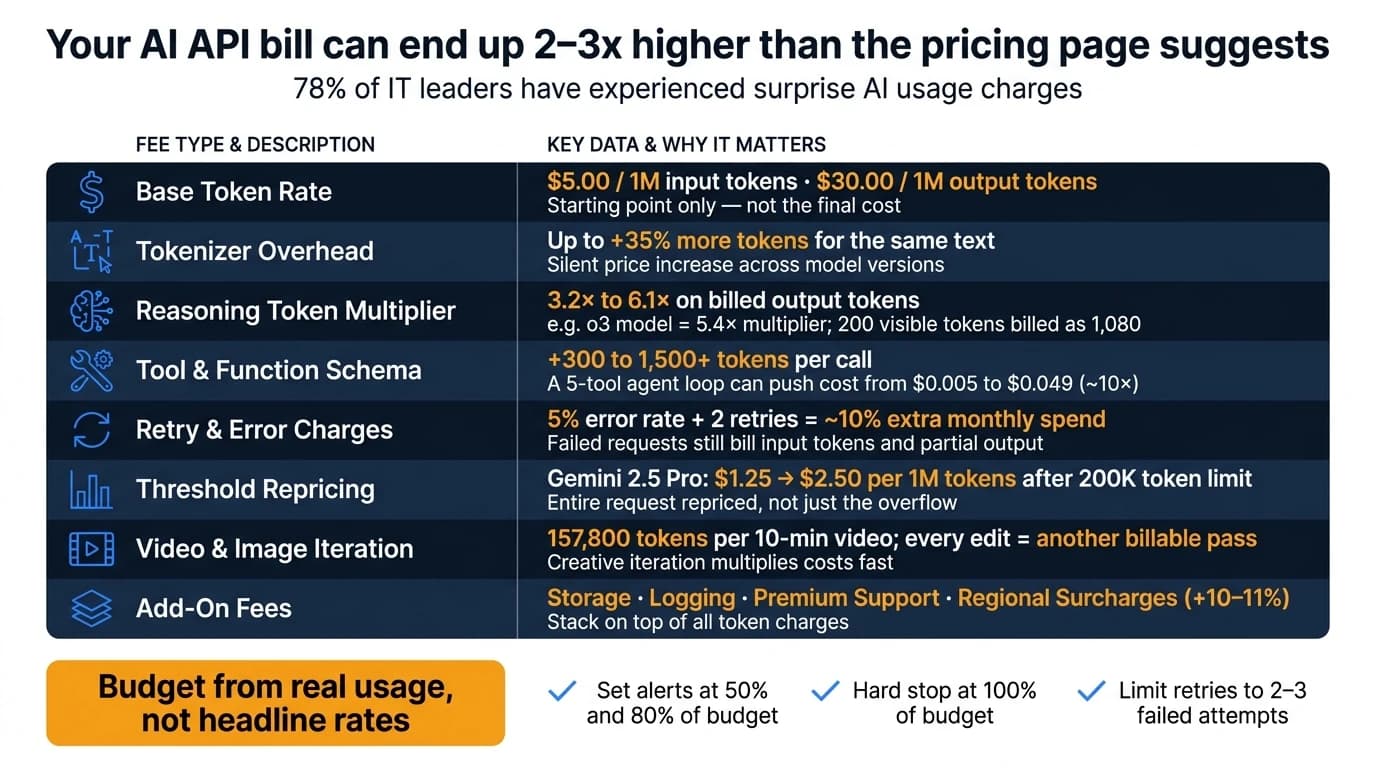
The most common hidden fees in AI API pricing
Overage charges, soft caps, and automatic plan upgrades
Many AI API plans look cheap at first. Then usage climbs, and the bill starts growing in places most teams didn’t expect. In practice, the extra cost often comes from overages and retries, not the headline rate. Soft caps and auto-upgrades can also move an account into a higher tier before usage even seems that high.
There’s another catch: timeouts or content-filter blocks may still bill the full input tokens, plus any partial output. If automatic retries are turned on, those charges can pile up fast [1][4]. A 5% error rate with two retries can add about 10% to monthly spend [1][4]. Some providers also shift pricing after a usage threshold, which can make a normal month suddenly look a lot more expensive.
Tiered pricing thresholds that raise the effective cost per unit
Threshold pricing is where things get sneaky. Some providers don’t just charge the higher rate on the overflow. They apply the new rate to the full request once you cross the line.
Take Gemini 2.5 Pro. Prompts up to 200,000 tokens cost $1.25 per 1 million input tokens. Go above that threshold, and the input rate jumps to $2.50 per 1 million for the entire request [3].
That jump matters more than it may seem. A 10-minute video processed through Gemini uses about 157,800 tokens by itself [3]. Add extra context, instructions, or supporting text, and a single multimodal request can get close to the limit in a hurry. So even if the per-token rate looks fine on paper, the per-request bill can still climb once threshold rules kick in.
Tokenization overhead adds another layer. Some tokenizers can use up to 35% more tokens for the same text than earlier versions, which pushes up the effective cost per request even when the sticker price doesn’t change [3][4].
Even when the base rate looks flat, add-ons can still make the total bill drift upward.
Add-on fees for storage, logging, support, and multi-modal processing
Token pricing is only part of the story. Providers may also charge extra for:
- Storage
- Logging
- Premium support
- Multimodal processing steps
That means the line item you notice first isn’t always the one that does the most damage. A plan can look low-cost on the surface, then grow once these extra services start stacking on top of token charges.
AI Is Getting Expensive - The New Pricing Models Nobody Asked For
Where hidden fees show up in real AI workloads
These hidden fees show up most clearly in live workloads, not pricing pages.
Text generation costs that grow through retries, long outputs, and high traffic
Hidden fees tend to appear the moment a prototype turns into a production app. Retries, long chats, and tool calls can change the bill fast.
In SaaS chat and customer support apps, sending full conversation history on every request is one of the biggest cost drivers. A 20-turn conversation can send 4,000–6,000 tokens of history on every new message [6]. That input cost grows in a straight line as the conversation gets longer. Reasoning models push the bill even higher. For example, o3 has a 5.4× reasoning multiplier, so a 200-token visible response may actually bill for 1,080 tokens [4].
Agent workflows run into a similar problem through tool overhead. Each tool schema can add 300 to 1,500+ tokens per call [4]. A five-tool agent loop can push a request from about $0.005 to $0.049 - nearly 10× [1].
Failed requests also cost money. If a request times out or gets blocked by content filters, you can still be billed for input tokens and any partial output generated before the failure [1].
Video and image workflows where iteration multiplies the bill
Video and image costs climb fast because every edit, re-render, or variant is another billable pass. For marketing teams testing lots of creative versions, that back-and-forth can push monthly spend well past the first estimate.
What to include in a cost comparison before launch
A pricing page headline rate usually isn't enough to estimate real monthly spend. Before you move to production, your cost comparison should include the charges that don't show up in the top-line number.
| Cost Factor | What to Include | Why It Matters |
|---|---|---|
| Base rate | Input and output price per 1M tokens | Starting point only, not the final cost |
| Tokenizer overhead | Up to 35% more tokens on some models [3] | Increases effective cost without changing the sticker price |
| Reasoning multiplier | 3.2× to 6.1× on billed output tokens [4] | Charged at the output rate, hidden from the UI |
| Tool/function schema | +300 to 1,500+ tokens per call [4] | Adds up fast in multi-step workflows |
| Retry/error buffer | 5% error rate with two retries [1] | Failed requests still bill for input and partial output |
| Context threshold repricing | Full request repriced once a token limit is crossed [3] | One long request can trigger a higher rate for the whole prompt |
| Multimodal inputs | Video and image billing per token [3] | Creative iteration multiplies these costs fast |
| Estimated monthly cost | Model at low, medium, and high request volumes | Shows how costs scale before you're locked into a plan |
Use this breakdown to set budgets, alerts, and model assumptions before launch.
How to avoid unexpected AI API charges
Knowing where the hidden fees show up is only part of the job. The next part is simpler to say, harder to do: put guardrails in place before your first live request goes out.
Set hard budgets, usage quotas, and spend alerts before going to production
Set your controls before production traffic starts. Use budget alerts as an early warning system, and add a hard spending cap that blocks new spend once you hit the limit. A simple setup works well:
- Alert at 50% and 80% of your planned monthly budget
- Stop new requests at 100% of budget
With a $10,000/month AI budget, that means alerts at $5,000 and $8,000, and a hard cap at $10,000.
After budgets, focus on retries. This is where costs can quietly spiral. Put circuit breakers in place so automated retries stop after 2–3 consecutive failures. Most of the time, error rates stay low. But during an incident, blind retries can burn cash fast.
You should also track cost per successful response, not just raw token spend. That metric is total spend divided by completed requests. It matters because failed requests can still bill for input tokens and any partial output produced before the failure [1]. At a 5% failure rate, $500 of a $10,000 budget disappears into failed requests.
Model total cost using real workload assumptions, not headline rates
Controls help stop overspend. Good modeling helps you avoid underbudgeting in the first place.
Model cost per session, feature, or campaign using real production traffic, not the price shown on a product page. Test the exact model version you plan to ship. Run your real prompts through that model’s tokenizer instead of comparing sticker prices alone.
Why does that matter? Because a 20%–35% token-count swing can change which model ends up costing less [3]. And output tokens often cost 2–8x more than input tokens [1], so output length needs to be part of your estimate before you commit.
Use a checklist before launch so each hidden fee has a matching control.
A risk-and-mitigation table to guide cost controls
| Hidden Fee Type | Business Risk | Mitigation Method |
|---|---|---|
| Retry inflation | 5%–10% budget waste; cascading costs during outages | Exponential backoff with a hard retry cap; circuit breakers; idempotency keys [4][1] |
| Reasoning tokens | 4x–10x higher output costs than estimated | Budget using full usage objects, not visible word counts [4] |
| Context bloat | Linear cost growth per conversation turn | Sliding window history; summarize older turns; aggressive prompt compression [6][1] |
| Tool/schema overhead | 600–8,000 extra input tokens per call | Cache tool definitions; only include tools relevant to the current turn [4][1] |
| Token inflation | Up to 35% silent price increase across model versions | Pin specific model versions; test cost per request before upgrading [3] |
| Cache storage fees | Unexpected hourly storage fees for idle cached data | Set TTL for caches; monitor cache hit vs. creation rates [6][3] |
| Regional pricing surcharge | 10%–11% flat tax on all tokens | Use global endpoints unless compliance strictly requires regional pinning [3] |
For non-urgent workloads, batch processing can cut eligible token costs by 50% [5][3]. If you're handling report generation, content pipelines, or overnight data processing, that one move can trim a large chunk of monthly spend.
When workloads span text, image, and video, unified billing makes these controls easier to enforce.
Using APIMart to improve pricing visibility across AI models

Why unified billing helps reduce fragmented and hard-to-track costs
Unified billing pulls scattered charges into one spend view.
When AI spend is split across several providers, tracking gets messy fast. Teams are stuck checking different dashboards and sorting through separate invoices. That’s usually where charges slip by unnoticed. Shadow AI spending - team purchases on personal or departmental cards - rose 267% year over year in 2026 [2].
APIMart brings access to 500+ models - language, image, and video - into one API and one billing view. That makes project-level spend tracking much easier. It also helps teams spot charges like cache storage fees or regional surcharges before they turn into a bigger problem.
Here’s what changes when billing is unified instead of split across providers:
| Feature | Fragmented Provider Billing | APIMart Unified Billing |
|---|---|---|
| Visibility | Spread across multiple dashboards and invoices | Single consolidated view for 500+ models |
| Cost Tracking | Difficult to attribute spend to specific projects | Native project-based spend assignment |
| Fee Visibility | Vulnerable to cache storage and regional surcharges | Transparent cache, regional, and usage charges |
| Video Budgeting | Complex token-per-second conversions | Clear per-second pricing |
How clear per-second pricing supports better video budget planning
Video budgets tend to go off course fastest, mostly because video pricing is harder to predict.
APIMart shows video model prices as simple per-second rates. Kling V3 costs $0.0672/sec, MiniMax Hailuo 2.3 costs $0.025/sec, and Sora 2 Preview costs $0.08/sec. So if you’re pricing a 10-second clip, the math is simple. That clip would cost $0.67, $0.25, or $0.80, depending on the model - no token math needed.
Conclusion: The hidden fees to check before you commit
The pattern behind these fees is pretty simple: the pricing page shows the starting point, not the final bill. In practice, bills often end up 2–3x higher once retries, reasoning tokens, tool overhead, and tier repricing are added in [1][4][3]. So a model that looks cheaper at first glance can wind up costing more per request when those extra layers pile on.
Reasoning-heavy models can charge well beyond what the visible output length suggests. On top of that, tokenizer changes can quietly push token counts up. Put those together, and your per-request cost can climb past what visible usage seems to show. That’s why headline rates alone won’t give you a clear read before launch.
The safer move is to budget around actual usage, not list price. Set spend alerts, put a hard cap in place before launch, and track cost per successful completion instead of raw token spend. Unified billing makes that a lot easier to manage. APIMart's unified billing helps surface total spend across 500+ models in one view, so anomalies are easier to catch before they snowball.
The main hidden charges are much easier to control when you model total cost first - before you commit.
FAQs
Why is my AI API bill higher than the listed price?
Your AI API bill can end up higher than the listed price because many providers charge for more than input and output text.
Some of the extra costs are easy to miss: reasoning tokens, cached input writes, repeated conversation history, automated retries, sloppy context window use, and tokenizer differences. Put together, those charges can make your bill 2 to 3 times higher than your first estimate.
How can I estimate real AI API costs before launch?
Look past the sticker price and figure out the total cost per task, not just the cost per token.
That means counting the entire request payload:
- system prompts
- retrieved context
- tool definitions
- attachments
- output tokens
That last part matters a lot. Output tokens often cost 3 to 8 times more than input tokens, so they can change the math fast.
You should also add operational overhead. A 5% to 10% buffer is a smart way to account for retries, development and testing passes, and setups like RAG or caching.
After that, multiply the full per-task cost by your expected monthly volume, including automated system calls.
What controls help prevent surprise AI charges?
Use strict request management and monitoring. Log full usage for every API response, track cache and reasoning usage, and set spend alerts plus daily caps.
Also, limit retries with exponential backoff and circuit breakers. Trim or summarize context to avoid token bloat, tune RAG retrieval, and send simple tasks to lower-cost models while saving premium models for harder work.
Choose the model you want in the model marketplace
Try chat, image and video models in the APIMart model marketplace, and experience model capabilities quickly with one unified API.