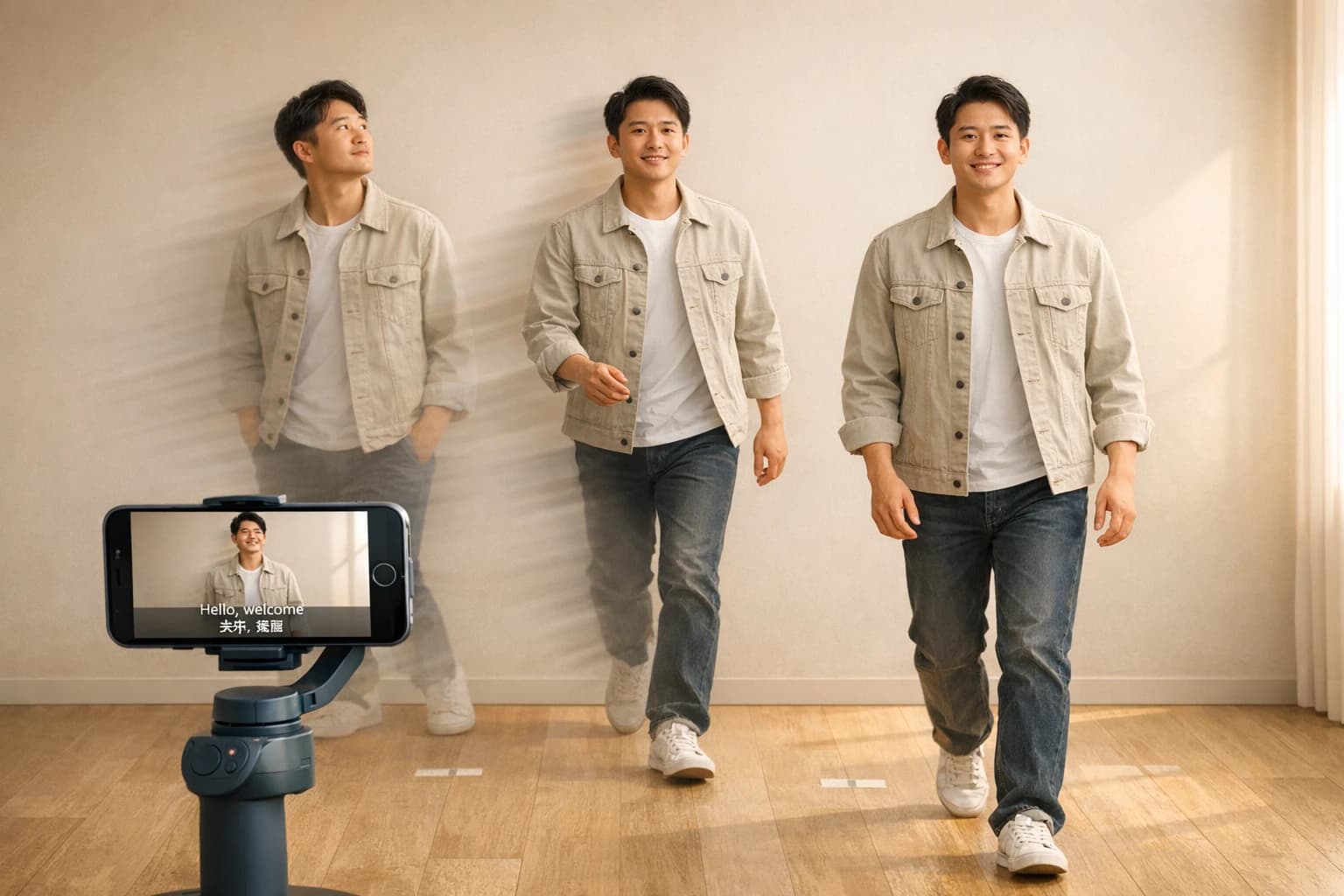
Kling V3 Omni - Kuaishou's Flagship Video AI
Kling V3 Omni is Kuaishou's flagship video AI with 4K multi-shot generation, AI Director, multilingual audio and reference inputs - features and pricing.
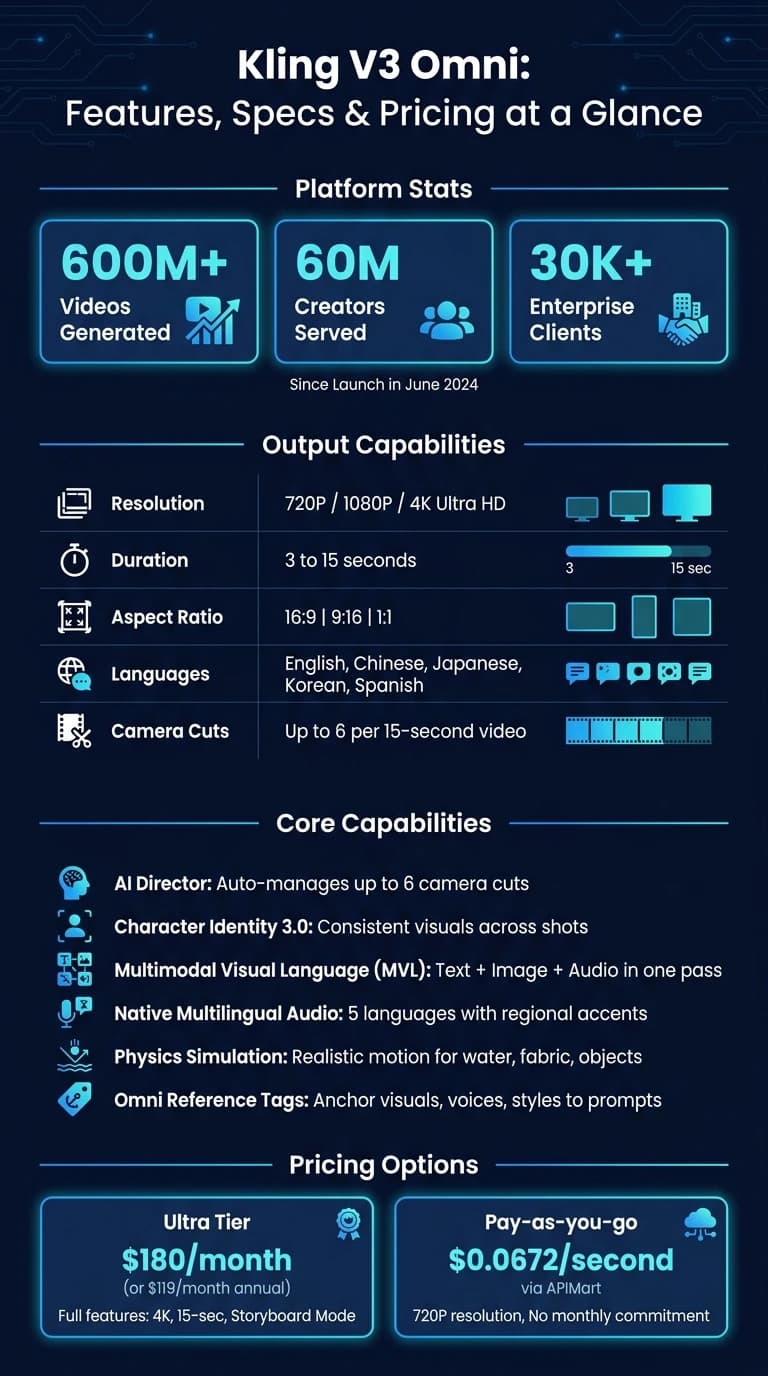
Kling V3 Omni is Kuaishou's advanced video AI platform designed to streamline video production. It supports 4K video creation, multimodal inputs (text, images, video, audio), and intelligent tools like AI Director for managing camera cuts, motion, and audio. Since its launch in June 2024, it has powered 600M+ videos, serving 60M creators and 30K businesses globally.
Key Features:
- Video Length & Quality: Produces 3–15 second videos in 720P, 1080P, or 4K resolution.
- Multimodal Visual Language (MVL): Processes text, images, and audio simultaneously for synchronized output.
- Advanced Tools: AI Director manages up to 6 camera cuts; Character Identity 3.0 ensures consistent visuals.
- Audio Support: Multilingual audio generation (English, Chinese, Japanese, Korean, Spanish) with regional accents.
- Reference Inputs: Lock details like motion, voice, and appearance using images and clips.
Applications:
- Marketing: Create branded ads and social media content.
- E-commerce: Turn static images into product videos.
- Film & Education: Previsualize scenes or visualize concepts like fluid dynamics.
Though powerful, it has some limits, like a 15-second duration cap and subscription costs starting at $180/month for full features or $0.0672/second via API.
Core Capabilities of Kling V3 Omni
Supported Input and Output Modes
Kling V3 Omni offers a variety of ways to input data, including text prompts, reference images, and video clips. For precise scene control, the image-to-video mode allows you to define start and end frames. Meanwhile, the reference-to-video mode lets you upload a 3–8 second video clip, enabling the system to extract key details like character traits, body movements, and voice characteristics to ensure consistency across the generated video [1] [3].
The Omni Reference Tag system simplifies the process of linking media assets to your text prompts. Using tags like <<<element_1>>>, <<<image_1>>>, or <<<voice_1>>>, you can describe scenes naturally while anchoring specific visuals, voices, or styles to the output [5].
On the output side, Kling V3 Omni supports three resolution levels - Standard (720P), Professional (1080P), and Ultra HD (4K). Video durations can range from 3 to 15 seconds, and you can choose between three aspect ratios: 16:9, 9:16, and 1:1 [4] [6].
These flexible input and output options set the stage for Kling V3 Omni's advanced video production features. For comparison, other high-end models like MiniMax Hailuo 2.3 offer similar professional-grade consistency.
Advanced Video Generation Features
The AI Director feature takes video production to the next level by automatically managing up to six camera cuts in a single 15-second video. It uses techniques like shot-reverse-shot and cross-cutting to create dynamic visuals [1] [3].
Audio is seamlessly integrated, with native support for synchronized dialogue and ambient sound. The system can handle five languages - English, Chinese, Japanese, Korean, and Spanish - and offers regional accents, including American, British, and Indian English. For scenes with multiple speakers, it ensures accurate lip-syncing by mapping each line of dialogue to the correct character.
Other standout features include Character Identity 3.0, which locks a character's appearance across shots to avoid inconsistencies, and native text rendering, which keeps logos, signage, and other branded elements sharp, even during camera movement [1] [3] [5].
These tools make Kling V3 Omni a robust platform for creating high-quality, polished videos.
Output Quality and Performance Controls
Kling V3 Omni gives users detailed control over output settings. You can adjust resolution, duration, and choose between std (Standard) and pro (Professional) generation modes. Shot sequencing can be automated or manually customized, and camera movements - such as pan, tilt, roll, and zoom - can be fine-tuned on a scale from –10 to 10. Additionally, negative prompts (up to 2,500 characters) allow you to exclude specific elements from the final video.
For developers using the API, Kling V3 Omni - available via APIMart starting at $0.0672/second for 720P - offers automatic image prepending when reference assets are included without explicit tags [4] [6].
This combination of precision and creative flexibility ensures that every adjustment enhances the final output, delivering both technical control and artistic refinement.
| Performance Control | Available Options |
|---|---|
| Resolution | 720P, 1080P, 4K Ultra HD |
| Duration | 3 to 15 seconds |
| Aspect Ratio | 16:9, 9:16, 1:1 |
| Shot Type | Intelligence (automated) or Customize (manual) |
| Camera Movement | Pan, Tilt, Roll, Zoom (–10 to 10) |
How Kling V3 Omni Works
How the System Parses Multimodal Instructions
Kling V3 Omni processes text, images, and audio all at once, building on the capabilities of kling-v2-6, rather than treating them as separate tasks. This approach is part of what Kuaishou refers to as the Multimodal Visual Language (MVL) framework. The result? The model can interpret the spatial arrangement of objects, the motion within a scene, and the accompanying audio in one seamless process.
"The shift toward a unified framework allows for more sophisticated reasoning within the generation process... the model simultaneously understands the spatial relationships between objects, the temporal flow of motion, and the corresponding acoustic environment." - Kling AI [1]
To make motion appear realistic, the system incorporates physics simulation. By using depth estimation models, it calculates a Z-axis for every object. This allows the system to predict how elements like water, falling objects, or sliding surfaces should behave. This simulation happens automatically, so there's no need for manual adjustments. Combined with the MVL framework, this feature enhances the model's ability to create scenes that feel natural and cohesive.
Reference inputs further strengthen the system's ability to generate consistent and anchored content.
How Reference Inputs Shape the Output
Reference inputs serve as visual and vocal anchors for the generation process. By uploading a short video clip (3–8 seconds) and up to four images, you can lock in details like facial features, motion, and overall visual appearance. Adding a 5–30 second audio sample ensures a consistent vocal tone throughout the sequence. These inputs remain stable across all frames, even when the environment or camera angles change.
Here’s a quick breakdown of what each reference type contributes:
| Reference Type | Input Requirements | What It Locks In |
|---|---|---|
| Multi-Image | Up to 4 images | Full 360-degree visual consistency [10] |
| Video Reference | 3–8 second clip | Motion, facial dynamics, and voice [10] |
| Voice Reference | 5–30 second audio | Unique vocal tone for a subject [10] |
"The ability to lock features across frames turns an idea into a cinematic reality." - Kling AI [10]
Once these anchors are set, the system follows a structured workflow to create the final video.
Step-by-Step Workflow Overview
The process starts by uploading reference assets. This defines the key character elements before you even begin writing prompts, ensuring the model has a stable foundation for your @tags and avoids making unnecessary assumptions mid-generation [8].
Next, you’ll write your prompt using cinematic language and Omni Reference Tags. Descriptive terms like "handheld tracking shot" or "orbital pan" guide the AI Director toward specific visual styles, while tags such as <<<element_1>>> and <<<voice_1>>> link your uploaded assets directly to the scene [5][9].
Finally, begin with a 720p draft to confirm motion and composition before moving to the final resolution. If one part of a multi-shot sequence doesn’t meet your expectations, the Shot Refine feature lets you redo that specific clip without regenerating the entire 15-second video [8].
Applications and Benefits of Kling V3 Omni
Use Cases Across Key Industries
Kling V3 Omni's multimodal design makes it a versatile tool for various industries, especially in production workflows.
In marketing and advertising, it helps teams create 15-second social media ads featuring consistent brand logos and localized dialogue. Its ability to produce sharp text during dynamic shots ensures product labels and branded signage remain clear throughout the video.
For e-commerce, it transforms static product images into stunning 4K lifestyle videos. Using a single reference image, the product's appearance is maintained across an entire sequence. The physics simulation layer enhances realism, making actions like liquid pouring or fabric movement appear natural rather than staged.
In entertainment and film production, directors rely on it for storyboard previsualization. Complex camera moves - such as orbital pans, tracking shots, or shot-reverse-shot sequences - can be generated in a single pass, saving time and effort.
The tool is also a game-changer in education, where its physics simulation layer brings abstract concepts like fluid dynamics, gravity, or cellular processes to life, making them easier to understand and visualize.
These varied applications highlight its potential to streamline workflows in professional video production.
What Kling V3 Omni Offers Video Production Teams
Production teams gain efficiency with Kling V3 Omni's unified workflow. Its ability to handle text, image, audio, and video in one architecture eliminates the need for separate lip-syncing, external audio dubbing, or combining outputs from multiple systems.
One standout feature is the AI Director's multi-shot storyboarding, which saves significant time. By generating up to six distinct camera cuts in a single 15-second pass, teams can quickly create short sequences with professional cinematography built-in, removing the need for manual editing.
"Kling 3.0 redefines what a single AI video model can do in one pass - and the implications for advertising, content production, and creative workflows are significant." - AdCreate Team [11]
Other features, like Character Identity 3.0 and native multilingual audio support, further reduce production overhead. For global campaigns, the multilingual audio feature - covering languages like English, Chinese, Japanese, Korean, and Spanish with regional accents - transforms a process that typically takes weeks into something achievable in minutes.
Despite its strengths, there are some limitations users should be aware of.
Current Limitations to Know
While Kling V3 Omni excels in efficiency and creative flexibility, it does have a few constraints. The 15-second duration limit restricts its use for long-form content. For longer narratives, users need to manually stitch multiple segments together, reintroducing some of the editing work the tool aims to minimize.
There are also technical restrictions that could affect workflows. For instance, native audio generation cannot be used simultaneously with reference video inputs [12]. Additionally, reference videos for style or character extraction must be between 3 and 10 seconds in length [12]. Complex physical interactions, like two characters making contact, may still produce visual glitches, with users reporting a 30–40% retry rate for highly demanding multi-shot sequences [7].
Finally, access to the most advanced features - such as native 4K output, 15-second duration, and storyboard mode - is tied to the Ultra subscription tier, priced at $180/month (or $119/month with an annual plan) [11]. For teams seeking API access, Kling V3 Omni is available through APIMart at a rate of $0.0672 per second for 720p output, offering a more flexible, pay-as-you-go option without a monthly commitment.
Conclusion: What Kling V3 Omni Means for Video Creation
Key Takeaways
Kling V3 Omni simplifies the video creation process by handling text, images, audio, and video in a single pass through its unified architecture. The AI Director seamlessly manages multi-shot sequencing, while Character Identity 3.0 ensures visual consistency across scenes. With native multilingual audio and integrated multimodal processing, there's no need for extra tools or post-production steps. This evolution from generating simple clips to offering complete direction tools represents a major leap in how videos are produced.
The platform’s adoption speaks volumes: since its launch in June 2024, Kling AI has supported over 60 million creators and 30,000 enterprise clients [1][2]. These numbers highlight its role as a foundational tool for production, far beyond just an experimental technology.
"The debut of Kling 3.0 signals a fundamental shift in AI's role - from a mere generation tool to an intelligent creative partner capable of grasping artistic intent and turning ideas into reality - ushering in an era where anyone can turn their ideas into films." - Kuaishou Technology [2]
The Growing Role of AI in Video Production
The industry is shifting from simply generating content to enabling direction. Early AI tools were limited to producing standalone clips. Kling V3 Omni changes the game by empowering users to act as digital directors - organizing shot sequences, maintaining character continuity, and controlling camera movements - all in one streamlined process [13]. This transition aligns perfectly with Kling V3 Omni's integrated and multimodal design.
"Kling 3.0 is one of the clearest signs that AI video is moving from clip generation to directed production." - WaveSpeed Blog [13]
Silent AI video tools are quickly becoming outdated. Today, native audio generation is a must for professional results. Kling V3 Omni incorporates sound design directly into the initial creation process, eliminating the need for expensive and time-consuming post-production fixes. For businesses and creators, this means one thing: the gap between small teams and large studios is shrinking, and Kling V3 Omni demonstrates how this transformation is unfolding in real time.
First Look at Kling 3.0 & Omni (This is Getting WILD)
FAQs
What do I need to upload to keep the same character and voice in every shot?
To keep the character and voice consistent in Kling V3 Omni, upload a 3–8 second reference video showcasing visual traits, movements, and voice features. For more precise voice adjustments, include a 5–30 second voice recording to fine-tune aspects like pitch, tone, and emotion. These references ensure the character stays true to its identity across different shots, angles, and environments.
How can I control camera moves and shot cuts without video-editing skills?
Kling V3 Omni's Multi-Shot feature lets you manage camera moves, framing, and cuts automatically - no editing skills required. This tool uses script-based prompts to handle cinematic techniques such as shot-reverse-shot and dolly pushes. Just activate multi-shot mode, input up to six prompts specifying details like duration and camera movements, and the model will generate a smoothly edited video tailored to your instructions.
What’s the best way to make videos longer than 15 seconds?
To make videos longer than 15 seconds, try the multi-shot storyboarding feature. This tool allows you to plan up to six camera cuts, giving you control over the timing, framing, and overall flow of your video. By customizing each segment of the storyboard, you can create longer content with smooth transitions that look polished and professional.
If you're working with the API, set the multi_shot parameter to true and include the sequence details in the multi_prompt array to get started.
Choose the model you want in the model marketplace
Try chat, image and video models in the APIMart model marketplace, and experience model capabilities quickly with one unified API.