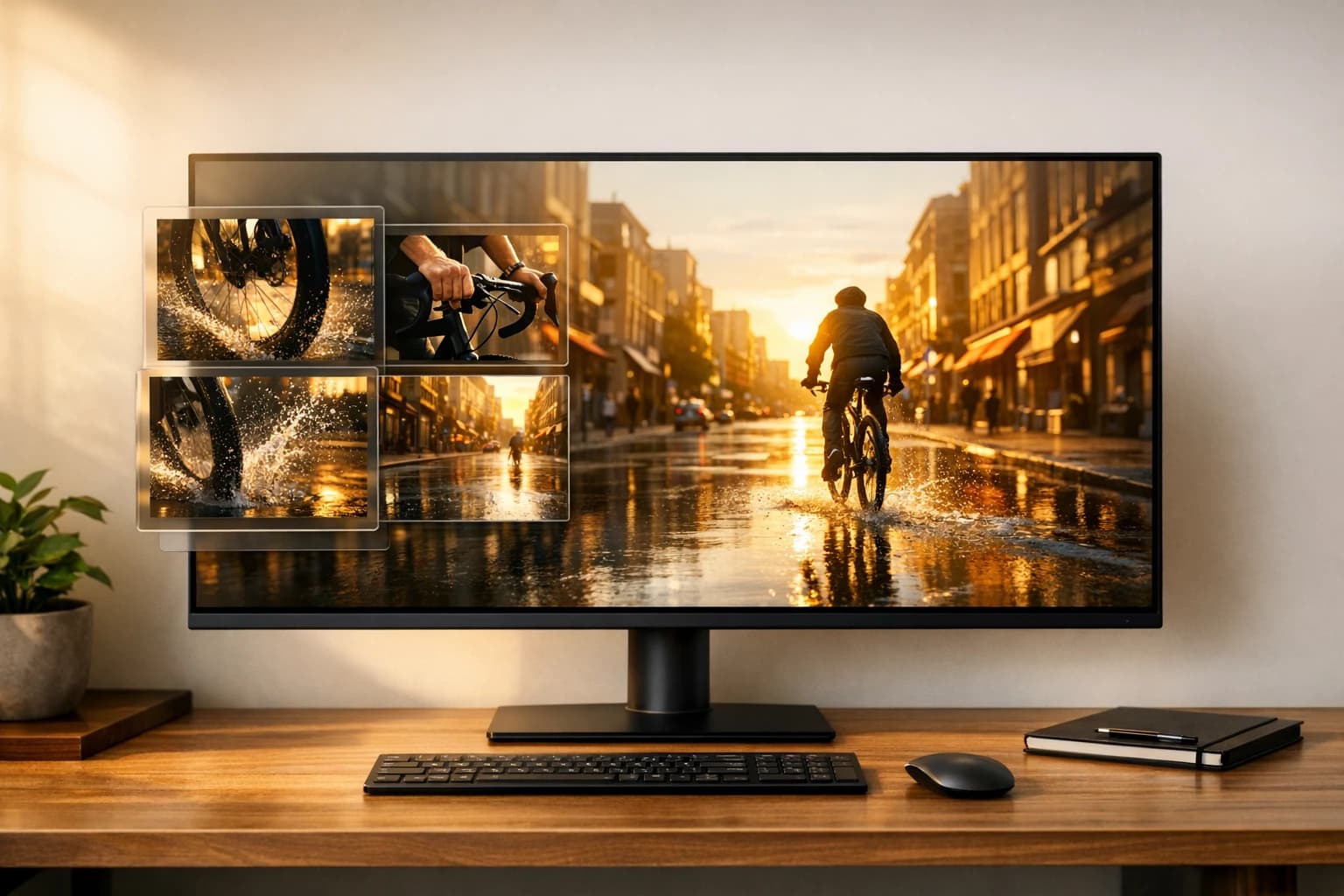
Kling V3 Omni vs Sora 2 - AI Video Comparison
Kling V3 Omni vs Sora 2 compared on resolution, physics, audio, speed and price - find out which AI video model fits your production workflow and budget.
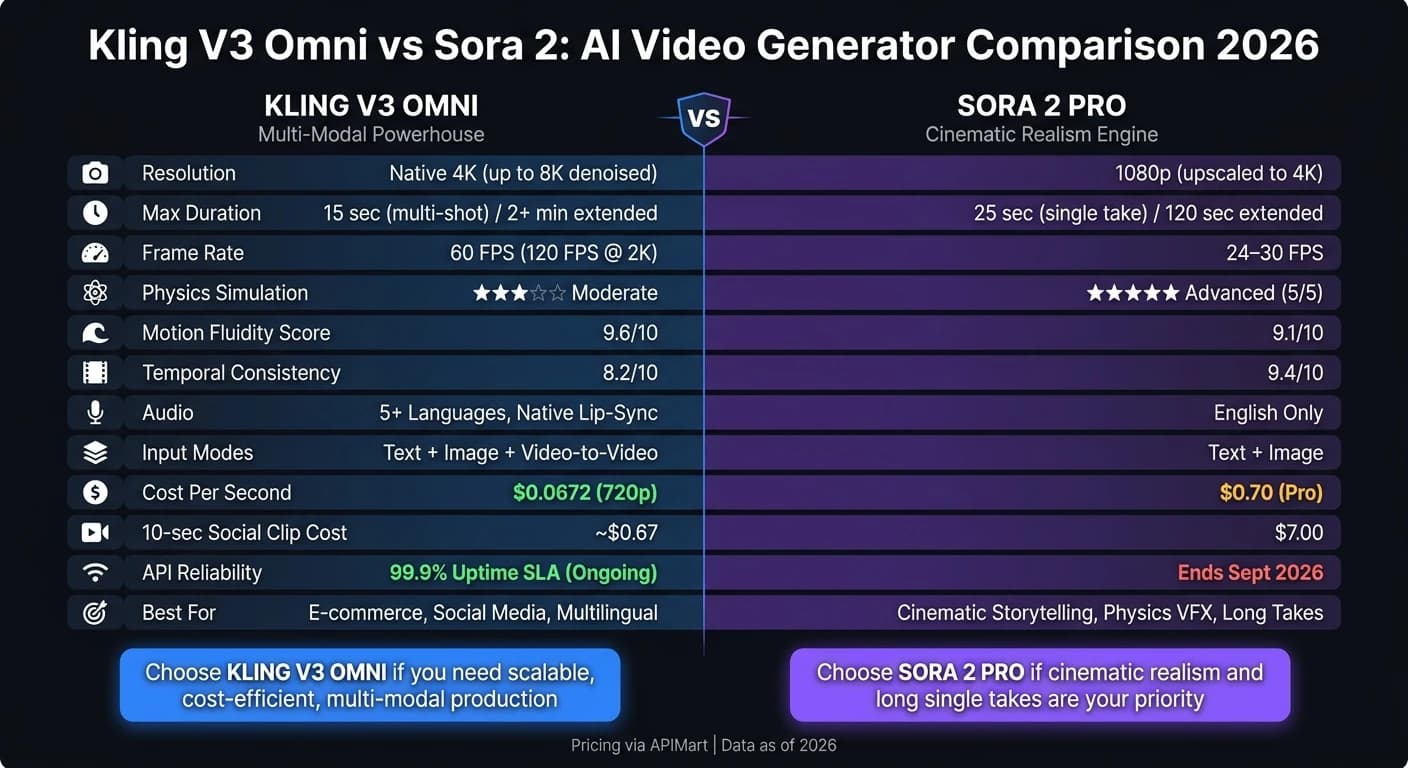
Kling V3 Omni and Sora 2 are two leading AI video generation tools, each excelling in different areas. Kling V3 Omni focuses on multi-modal input, directorial control, and cost-effective production, making it ideal for e-commerce, social media, and multilingual projects. Sora 2, with its advanced physics simulation and cinematic realism, is better suited for storytelling, long takes, and high-detail visuals. However, Sora 2's API support ends in September 2026, while Kling V3 Omni offers long-term reliability and scalability.
Key Differences:
- Kling V3 Omni: Native 4K, multi-shot, 60 FPS, multilingual audio, lower cost ($0.0672/sec for 720p).
- Sora 2: Advanced physics, 25-second takes, cinematic realism, premium price ($0.70/sec for Pro).
Quick Comparison:
| Feature | Kling V3 Omni | Sora 2 Pro |
|---|---|---|
| Max Resolution | 4K (native) | 1080p (upscaled to 4K) |
| Max Duration | 15 seconds (multi-shot) | 25 seconds (single take) |
| Physics Simulation | Moderate | Advanced |
| Audio | Multilingual | English only |
| Cost (per second) | $0.0672 (720p) | $0.70 |
| API Support | Ongoing | Ends Sept 2026 |
Choosing the Right Tool:
- Go with Kling V3 Omni for scalable, cost-efficient projects with diverse inputs.
- Opt for Sora 2 if realism and long, cinematic takes are your priority.
Kling 3.0 vs Sora 2 vs VEO 3.1: AI Video Generator Battle (Clear Winner)
Overview of Kling V3 Omni
Kling V3 Omni is an all-in-one video generation model that seamlessly integrates text, image, and audio inputs into a single workflow. Unlike other tools that rely on separate processes for video and sound, this model handles everything simultaneously. This streamlined approach is the backbone of its advanced features.
"Kling VIDEO 3.0 Omni represents a shift toward unified multimodal video generation. This update integrates text, image, and audio into a single workflow." - Kling AI [6]
Currently, the platform supports over 60 million creators and 30,000 enterprise clients worldwide [6].
Key Features and Capabilities
One of the standout elements of Kling V3 Omni is its AI Director. This feature automates camera blocking and transitions, supporting up to 6 distinct camera cuts in a single request. Whether you need a shot-reverse-shot for a dialogue or a dynamic action sequence, it eliminates the need for manual editing [6].
The Character Identity 3.0 feature is another game-changer. By uploading a short 3–8 second reference video, the model ensures consistent visual traits, movements, and voice tone across scenes, preventing identity drift [6][8].
Additionally, the Omni Edit (Video Source Swap) feature allows users to replace characters or environments in an existing video while maintaining the original timing, motion, and camera work [7]. The platform also offers native audio generation with synchronized dialogue, ambient sounds, and sound effects, including lip-sync support across multiple languages and accents [6].
These features collectively highlight the model's ability to deliver a cohesive multimodal video creation experience.
| Feature | Capability |
|---|---|
| Max Duration | 15 seconds |
| Resolution | 720p, 1080p, 4K |
| Input Types | Text-to-Video, Image-to-Video, Video-to-Video |
| Audio | Native synchronized audio, multilingual, dialect support |
| Multi-Shot | Up to 6 shots with automated or custom transitions |
| Character Consistency | Identity 3.0 (visual + voice locking) |
Note: Kling V3 Omni is optimized for scenes with 1–2 subjects. For projects involving three or more subjects, Kling V3 Standard is recommended to avoid duplicate elements.
Use Cases
Kling V3 Omni is ideal for projects where visual and audio consistency are critical. For example, e-commerce teams can turn product stills into high-quality promotional videos, ensuring logos and labels remain sharp even during complex camera movements [6]. Independent filmmakers can use it for rapid storyboard previews or motion references, while social media creators enjoy its multi-shot capabilities for crafting polished content tailored for platforms like TikTok and YouTube.
"Kling-v3's cinematic quality is incredible! The 15-second duration option gives us so much more creative freedom for storytelling." - Sarah Johnson, Creative Director [9]
The Character Identity 3.0 system is particularly useful for serialized content featuring recurring characters. It also excels in projects requiring precise lip-sync, such as multilingual training videos or localized product demonstrations.
Pricing on APIMart

Kling V3 Omni is available on APIMart with a 20% discount off the official rates. It’s billed on a pay-as-you-go basis, so there’s no need for a subscription [9]. Pricing depends on resolution and whether native audio is included:
| Variant | Resolution / Feature | APIMart Price (USD/sec) |
|---|---|---|
kling-v3-omni | 720p | $0.0672 |
kling-v3-omni | 1080p | $0.0896 |
kling-v3-omni | 720p + Sound | $0.0896 |
kling-v3-omni | 1080p + Sound | $0.112 |
kling-v3-omni | 1080p + Video (Edit) | $0.1344 |
kling-v3-omni | 4K / 4K + Sound | $0.42856 |
Tip: If audio isn’t necessary, opting for video-only tiers (720p or 1080p) can reduce costs. This pricing structure ensures that Kling V3 Omni’s high-quality video generation remains accessible to a wide range of users.
Overview of Sora 2
Sora 2 takes a focused approach by specializing in physical simulation, unlike the multimodal workflow of Kling V3 Omni. Its primary goal is to replicate real-world physical phenomena like light, liquid, gravity, and motion with exceptional accuracy.
Key Features and Capabilities
Sora 2 is built to simulate interactions and cause-and-effect relationships with precision, earning a 5/5 physics accuracy rating, compared to a 3/5 for other platforms [12].
There are two versions of Sora 2: Standard and Pro. The Standard version supports up to 720p resolution and 15-second clips, while the Pro version steps up to 1080p resolution, extends clip length to 25 seconds, and includes full audio features such as dialogue, sound effects, and ambient sound [11]. Pro also eliminates watermarks, making it ideal for professional, client-facing projects. A standout feature is its video extension capability, which allows users to extend an existing clip up to 120 seconds while maintaining the original context [11].
"Sora 2 Pro... results in better texture detail, more realistic lighting, and smoother motion." - SeaVid Team [13]
In blind tests with professional videographers, Sora 2 Pro achieved an 8.2/10 realism score [13].
| Feature | Sora 2 Standard | Sora 2 Pro |
|---|---|---|
| Max Resolution | 720p | 1080p (1920×1080) |
| Max Duration | 15 seconds | 25 seconds |
| Audio | Limited | Full (Dialogue, SFX, Ambient) |
| Physics Engine | Strong | Advanced (World Simulator) |
| Watermark | Yes | No |
| APIMart Price | $0.08/sec | $0.70/sec |
However, Sora 2 is designed for single continuous takes and lacks built-in multi-shot editing. If your project requires automated camera cuts or scene transitions, you'll need to handle those separately [12][1].
These features make Sora 2 a strong choice for industries where realistic physical simulation is non-negotiable.
Use Cases
Sora 2's ability to simulate physical realism makes it a go-to tool for applications where authenticity is key. For example:
- Medical and Safety Training: It generates highly realistic procedure simulations, providing a safer and more cost-effective alternative to filming potentially hazardous scenarios [13].
- Architecture and Interior Design: Sora 2 helps create virtual walkthroughs, offering accurate depictions of lighting, textures, and spatial depth [13].
"Sora 2 is the better pick when the goal is cinematic realism, stronger audio, polished motion, and film-style prompting." - Erick, Founder, QuestStudio [1]
Pricing on APIMart
Sora 2 operates on a pay-as-you-go model through APIMart, with no subscription required. The Standard version costs $0.08 per second, while the Pro version is priced at $0.70 per second [13]. This per-second pricing structure provides precise cost control, making it especially appealing for high-volume production workflows.
Kling V3 Omni vs. Sora 2: Side-by-Side Comparison
Now that we’ve covered what each model can do individually, let’s see how they compare when placed head-to-head.
Architecture and Capabilities
Kling V3 Omni and Sora 2 operate on different design principles. Sora 2 features a physics-based simulation engine optimized for replicating physical reality, earning it the title of a "World Simulator." On the other hand, Kling V3 Omni uses a 3D Spacetime Joint Attention framework, prioritizing multi-modal inputs and precise directorial control over strict physics simulation.
| Feature | Sora 2 Pro | Kling V3 Omni |
|---|---|---|
| Core Tech | Physics-based simulation engine | 3D Spacetime Joint Attention |
| Input Modes | Text, Image | Text, Image, Video-to-Video |
| Audio | English only (Native) | 5+ Languages (Native Lip-sync) |
| Motion Control | Directorial Prompts (e.g., "85mm lens") | Motion Brush, Camera Path JSON |
| Character Sync | Persistent IDs (character_id) | Subject Library (@Element tags) |
| API Reliability | Ending Sept 2026 | 99.9% Uptime SLA (via APIMart) |
Kling V3 Omni stands out as the only model supporting video-to-video input, thanks to its Omni Edit feature.
"The defining shift in 2026 is 'Directorial Intent.' You no longer 'gamble' on a prompt; you use Kling's Smart Storyboard to specify exactly when the camera should cut." - Max Anh, AI Fire [3]
Next, let’s break down how these differences affect video quality and realism.
Video Quality and Realism
Both models deliver high-quality visuals but excel in different areas. Sora 2 shines when it comes to environmental physics, while Kling V3 Omni is unmatched in texture detail, especially for elements like hair, skin, and fabric.
| Metric | Sora 2 Pro | Kling V3 Omni |
|---|---|---|
| Max Resolution | 1080p (upscaled to 4K) | Native 4K, denoised up to 8K |
| Frame Rate | 24–30 FPS | 60 FPS (up to 120 FPS at 2K) |
| Temporal Consistency | 9.4/10 | 8.2/10 |
| Motion Fluidity | 9.1/10 | 9.6/10 |
| Realism Focus | Environmental Physics | Texture Detail |
Sora 2 scores higher in temporal consistency (9.4 vs. 8.2), maintaining scene coherence over time. However, Kling V3 Omni edges ahead in motion fluidity (9.6 vs. 9.1), making it a better choice for fast-paced or action-heavy sequences.
Speed, Duration, and Reliability
Performance metrics reveal more differences. Kling V3 Omni is faster, generating 4K clips in just 1–2 minutes, compared to Sora 2 Pro’s 2–5 minutes for physics-intensive scenes. While Sora 2 Pro supports longer single takes (up to 25 seconds), Kling V3 Omni can extend videos to over 2 minutes through its extension system.
| Metric | Sora 2 Pro | Kling V3 Omni |
|---|---|---|
| Generation Speed | 2–5 minutes | 1–2 minutes |
| Max Duration (Single Call) | 25 seconds | 15 seconds |
| Maximum Extended Duration | Up to 120 seconds | 2+ minutes |
| API Reliability | Ending Sept 2026 | 99.9% Uptime SLA |
Kling V3 Omni also boasts a higher reliability rate, with a 99.9% uptime SLA, while Sora 2’s API support is set to end in September 2026 [4].
Cost Comparison
When it comes to pricing, Kling V3 Omni offers a noticeable advantage, especially for high-volume production. It’s consistently 2–4 times cheaper than Sora 2 for comparable tasks.
| Use Case | Sora 2 Standard | Sora 2 Pro | Kling V3 Omni |
|---|---|---|---|
| Short social clip (10 sec) | $0.80 | $7.00 | ~$0.67 |
| Product demo (25 sec) | $2.00 | $17.50 | ~$1.68 |
| Extended scene (60 sec via extensions) | N/A | N/A | ~$4.03 |
| Price per second | $0.08 | $0.70 | $0.0672 |
For teams working on projects like e-commerce videos or social media content, Kling V3 Omni’s pricing structure provides a clear edge without compromising quality.
APIMart Integration and Workflow Scenarios
Unified Multi-Model Access via APIMart
APIMart simplifies the process of accessing and managing both Kling V3 Omni and Sora 2 models. With just one API key, you can switch between models by specifying the desired name in your request: kling-v3-omni, sora-2, or sora-2-pro. This unified approach consolidates accounts, billing, and documentation, making it easier for developers to integrate these tools into their workflows.
Authentication is handled through standard Bearer Token headers, and requests follow a consistent JSON structure. For instance, Kling V3 Omni supports the <<<image_N>>> syntax, allowing you to reference multiple images directly within a prompt. This makes workflows like image-to-video generation straightforward and reliable [10]. Billing is transparent, operating on a pay-as-you-go model in USD with no hidden fees or subscriptions, all managed under a single account [9][13].
"As a developer, the unified API for kling-v3-omni makes integration a breeze. One kling-v3 series model handles all our multi-modal generation needs." - James Liu, Senior Developer [9]
APIMart also eliminates the waitlist for Sora 2, granting immediate access to its tiers [13]. With over 50,000 active users as of mid-2026 [9][13] and up to 20% cost savings on Kling V3 models through exclusive APIMart discounts [9], it’s an efficient solution for teams looking to streamline operations and reduce overhead.
"Instant access with no waitlist was a game-changer for our agency. We can now prototype Sora 2 video concepts for clients in hours instead of days." - Marcus Chen, Creative Director [13]
This integration paves the way for creating workflows tailored to specific industry needs. It also supports other leading models like WAN 2.6 for high-consistency video generation.
Industry-Specific Applications
APIMart’s unified API allows teams to assign tasks to the model that best suits their production requirements. For example, Sora 2 excels at physics-heavy “hero shots” like water or fire effects, while Kling V3 Omni is ideal for character-driven scenes, product close-ups, and multilingual dialogue [2][14]. Post-production teams can then combine outputs from both models to maximize quality.
| Industry | Best Model | Primary Use Case |
|---|---|---|
| Marketing | Kling V3 Omni | Quick-turnaround social ads, vertical content, viral clips |
| Marketing | Sora 2 | Premium brand films with cinematic effects and lighting |
| Education | Kling V3 Omni | Multilingual training videos with accurate lip-sync in 8+ languages |
| Education | Sora 2 | Simulations for safety or medical training requiring object permanence |
| E-commerce | Kling V3 Omni | 4K product close-ups with stable text rendering for labels |
| E-commerce | Sora 2 | Eye-catching “hero” product shots in dynamic environments |
| Entertainment | Kling V3 Omni | Consistent character-driven storyboards across multiple shots |
| Entertainment | Sora 2 | Long, detailed single takes with complex VFX assets |
For e-commerce teams, a practical workflow involves using Kling V3 Omni's Subject Library to lock a product’s appearance across different shots with just 3–5 reference images. Then, Sora 2 can create a dynamic background, such as a product placed near ocean waves or by a crackling fire. These clips can be composited together, delivering high-quality results without the need for a full studio setup.
Conclusion and Decision Framework
After reviewing the detailed feature and performance comparisons, the ultimate choice depends on aligning your production requirements with the strengths of each model.
Key Takeaways
Both models bring solid capabilities to the table, but they cater to different production priorities. Kling V3 Omni stands out as a reliable option for high-volume production, offering features like multi-shot storyboarding, multilingual lip-sync in over five languages, and a budget-friendly cost starting at $0.0672 per second. It's a practical choice for teams focusing on efficiency and scalability. On the other hand, Sora 2 shines in delivering cinematic realism, with advanced physics, seamless long takes, and persistent character IDs. While its pricing ranges from $0.56 to $0.70 per second, it’s a strong contender for projects where visual realism and storytelling depth take precedence.
As John Ozuysal, Founder of House of Growth, aptly put it, Kling V3 Omni is the more adaptable and cost-effective option, whereas Sora 2 Pro justifies its premium for teams requiring extended single takes and consistent character management [5].
For teams focused on budget and directorial control, Kling V3 Omni is the natural choice. Meanwhile, those aiming for cinematic-grade effects and uninterrupted takes will find Sora 2 to be the better fit.
Decision Matrix
| Criteria | Choose Kling V3 Omni | Choose Sora 2 |
|---|---|---|
| Resolution | Up to native 4K | 1080p output |
| Video Length | Up to 15 seconds (multi-shot) | 20–25 seconds (single take) |
| Physics Complexity | Standard motion (e.g., walking, product movement) | Advanced physics (e.g., fluids, fire, shattering) |
| Budget | Lower cost (~$0.0672/sec) | Premium pricing (~$0.56–$0.70/sec) |
| Global Audience | Multilingual lip-sync (5+ languages) | English-centric |
| Text in Frame | High accuracy (e.g., labels, signs) | Moderate |
| Character Consistency | Subject Library - ideal for scene-by-scene building | Persistent Character IDs - ideal for continuous takes |
| APIMart Benefit | Up to 20% discount [9] | No-waitlist instant access [13] |
For most teams, the most effective strategy isn't about picking just one model but knowing when to use each. Use Kling V3 Omni for product demos, social media ads, and multilingual projects. Turn to Sora 2 for campaigns requiring standout cinematic moments that grab attention. This framework highlights how APIMart equips creators with the flexibility to choose the right tool for the job, enabling smooth production and top-tier video results.
FAQs
Which model is better for my use case?
When choosing the right model, it all comes down to what you need. Kling V3 shines when it comes to multi-shot projects, narrative-driven storytelling, and offering precise control. It includes handy features like advanced storyboarding and multilingual lip-sync, making it a go-to for complex productions. On the other hand, Sora 2 is your pick for single-shot cinematic realism and delivering top-tier visuals, making it a strong choice for brand storytelling.
Interestingly, many users mix and match the two. They use Sora 2 to create stunning hero shots and rely on Kling V3 for crafting modular scenes. This combination can provide the best of both worlds.
How do I keep the same character consistent across scenes?
To keep your characters consistent in Kling V3 Omni, the Element Library is your go-to tool. Start by uploading 3–5 reference images or a 3–8 second reference video of your character. Once uploaded, tag the asset as @character in your prompt. This ensures the model locks in essential traits like facial structure, clothing details, and proportions.
For projects involving multiple shots, Kling V3 Omni’s sequential architecture ensures consistency across up to 6 different cuts. If you need to maintain these traits across future generations, simply reference the same assets in your prompts. This approach ensures your character remains visually cohesive throughout your project.
What should I do if I need longer videos than one generation allows?
If you're working on a project that calls for longer videos, Kling V3’s multi-shot storyboard system has you covered. This feature supports up to six camera cuts in a single generation, enabling the creation of videos that exceed two minutes in length.
You can opt for Smart Storyboard mode, which automatically sequences shots based on a narrative prompt, perfect for quick and cohesive storytelling. Alternatively, choose Custom Storyboard mode if you want full control. This option lets you manually adjust shot durations, movements, and transitions, giving you the precision to shape the final video exactly as you envision it.
Choose the model you want in the model marketplace
Try chat, image and video models in the APIMart model marketplace, and experience model capabilities quickly with one unified API.