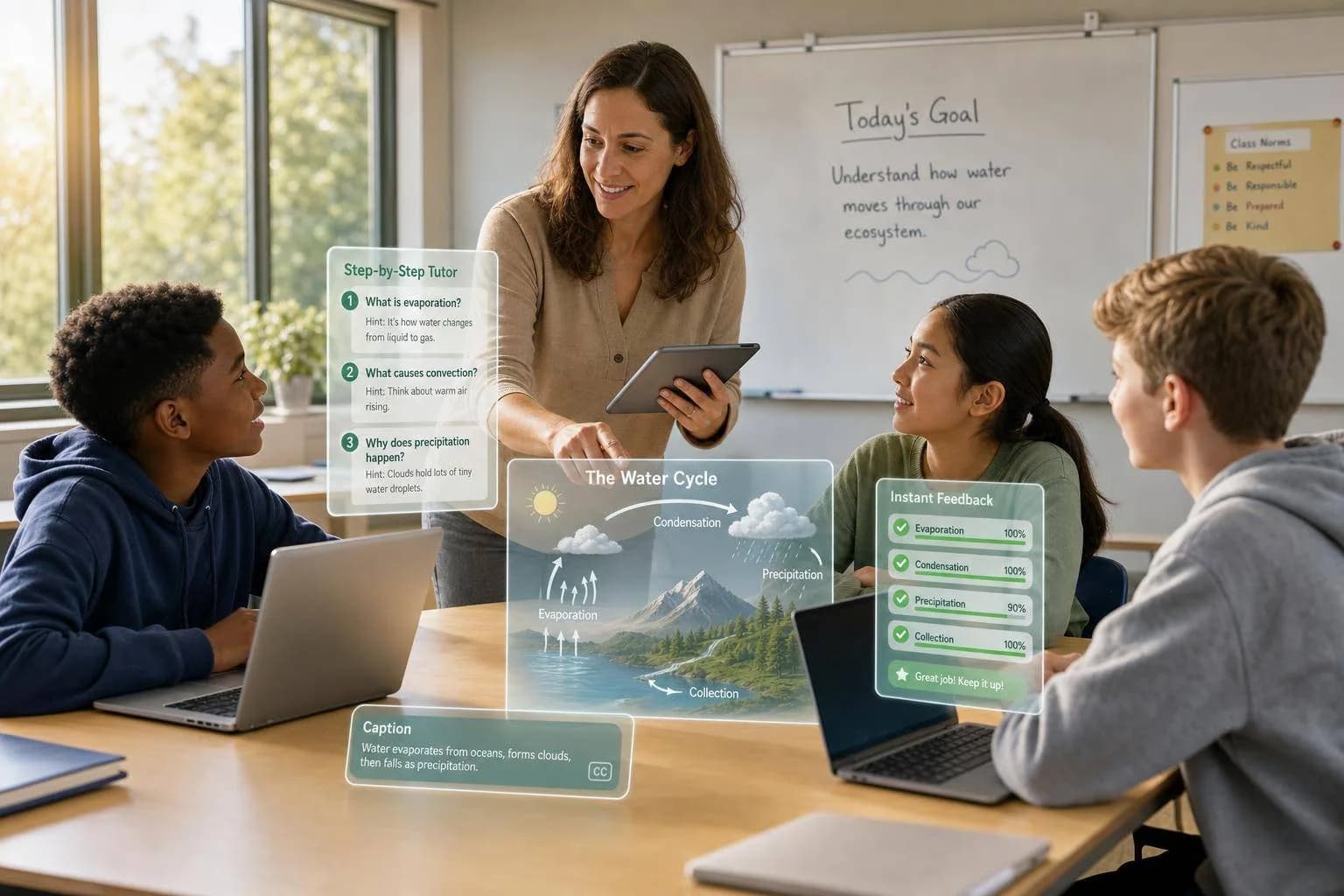
Multi-Modal AI in Classrooms: 5 Use Cases
Multi-modal AI in classrooms across five use cases: tutoring, lesson visuals, student media, real-time feedback, and accessibility, teachers keep control.
Multi-modal AI is already changing class time by giving students help through text, images, audio, and video. In the examples here, schools used it for five main jobs: tutoring, lesson visuals, student projects, feedback, and access support. The pattern is simple: students get help during class, teachers save time on prep, and schools keep guardrails in place.
Here’s the short version:
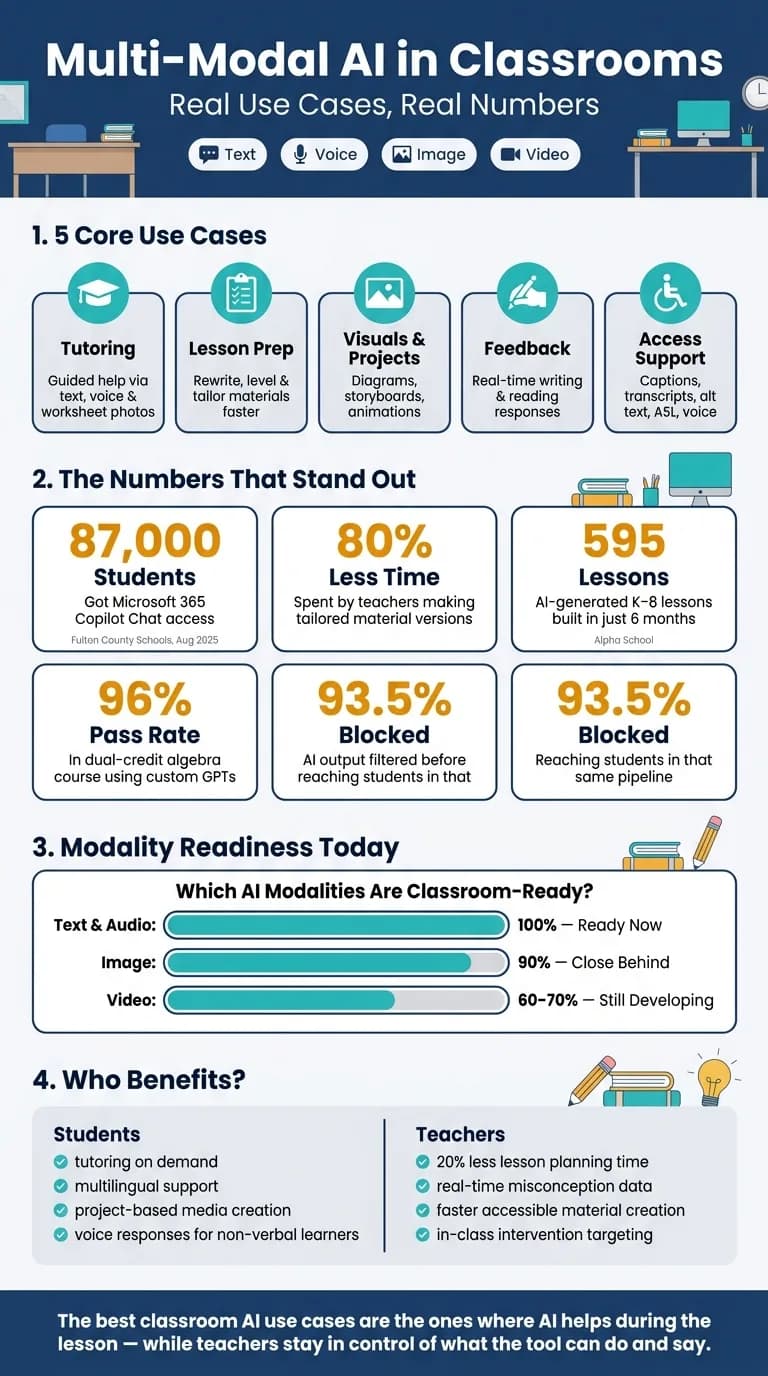
- Tutoring: Students can type a question, speak it, or upload a worksheet photo and get guided help instead of direct answers.
- Teacher support: Teachers use AI to rewrite materials, adjust reading level, and prep lessons with less manual work.
- Visuals and video: Teachers make diagrams and history scenes using AI video generation. Students turn research into images, animations, and short media projects.
- Feedback: Tools can respond to student writing during class, so teachers can spot mistakes and step in sooner.
- Access support: AI can make captions, transcripts, image descriptions, ASL-linked lessons, and voice-based responses.
- School systems: Districts and edtech teams often run these tools through one setup so they can review output, log use, and set content rules.
A few numbers stand out:
- 87,000 students in Fulton County Schools got access to Microsoft 365 Copilot Chat in August 2025
- One teacher reported about 80% less time spent making tailored versions of materials
- A dual-credit algebra course using custom GPTs ended with a 96% pass rate
- Alpha School built 595 AI-generated K–8 lessons in 6 months
- In that same pipeline, 93.5% of AI output was blocked before students saw it
Enhancing Education with Multimodal AI : Practical Tools for the Teachers
Quick Comparison
| Use case | What students or teachers do | Main input types | Main watchout |
|---|---|---|---|
| Tutoring | Ask for help with questions or worksheet photos using multimodal AI chat using a unified LLM API | Text, voice, images | Keep bots from giving away answers |
| Lesson prep | Rewrite, level, and tailor class materials | Text, files | Check fit with class goals |
| Visuals and projects | Make diagrams, storyboards, images, and short videos | Text, images, audio | Check facts and prompt quality |
| Feedback | Get responses on writing and reading during class | Text, student work | Teacher review still matters |
| Access support | Create transcripts, captions, alt text, ASL-linked help, and voice responses | Text, images, audio, video | Review for accuracy and student needs |
If you want the main takeaway in one line, it’s this: the best classroom use cases are the ones where AI helps during the lesson, while teachers stay in control of what the tool can do and say.
Multi-Modal AI Tutors and Classroom Assistants
Student Support Through Text, Voice, and Worksheet Images
Students can now get help through text, voice, or even a photo of a worksheet. The setup matters, though. Teachers often configure these tools so they don't hand over the answer. Instead, they respond with follow-up questions that push students to think through the problem [3][5].
That approach showed up at Broomfield High School in May 2026. Anatomy and physiology teacher Stephen Kelly used MagicSchool to build chatbot tutors that held back answers and kept students working with prompts and follow-up questions. Students used the bots to make practice exam questions and work through them. Those students scored better on tests than classmates who used AI more passively [3].
A similar pattern appeared at KIPP Northern California in February 2026. There, 6th-grade teacher Annie Chen piloted Course Mojo in her ELA classroom to support multilingual students. The tool flags misconceptions in real time, which lets Chen pull small groups for targeted intervention right when students need it [4].
Teachers also use those same student inputs to prepare lessons and adjust support as class is happening.
Teacher-Facing Assistants for Lesson Prep and In-Class Help
Teachers are using AI copilots to cut prep time and make differentiation less of a grind. One high school English teacher said Gemini can produce tailored versions for parents, students, and Google Classroom, saving about 80% of the usual time [7]. Lesson and unit planning time drops by about 20% as well [7].
In practice, this can be simple. Instead of rewriting a math problem from scratch, a teacher can ask an AI to swap the setting while keeping the math the same. A plain word problem can turn into one about Taylor Swift tickets or fantasy football, which can make the work feel less flat for students [5][6].
Dr. Doreen Mayrell, an adjunct professor at Collin College, took that idea further. She used custom GPTs trained on her own textbook and guided notes for a dual-credit algebra course. Students could get Socratic tutoring at any hour. The course ended with a 96% pass rate and a median final exam score of 86 [5][6].
Dr. Doreen Mayrell said the goal is to move routine instruction outside class so in-person time stays more interactive.
Tutor Capabilities and Oversight: A Comparison
These examples show the main patterns. The table below compares how each tool handles tutoring and teacher oversight.
| Tool | Primary Input Modalities | Key Classroom Use Case | Teacher Oversight Mechanism |
|---|---|---|---|
| Course Mojo | Text, student writing | ELA: inference and evidence-based reasoning | Real-time data dashboard for small-group targeting [4] |
| MagicSchool | Text, prompts | Custom chatbot tutors for science/anatomy | Teacher-created "student rooms" and prompt monitoring [1][3] |
| Microsoft Copilot | Text, voice, file/image upload | Lesson prep, coding, and multimedia projects | Enterprise data protection and IT controls [2] |
| Brisk Boost | Text, reading material | Real-time reading comprehension questions | Teacher-set learning objectives and interaction tracking [1] |
| Custom GPTs | Text, guided notes | Flipped classroom math tutoring | Review of attached chat transcripts [5][6] |
| Optio (Realbotix) | Voice, text, district data | Curriculum-aligned tutoring and lesson prep | District-controlled content and privacy safeguards [8] |
The key pattern isn't just the input mode. It's the teacher's control over what the system can reveal, delay, or adjust.
These tutor workflows lead straight into the next classroom use case: generating visuals and video for instruction and student projects.
AI Visuals and Video for Science, History, and Project-Based Learning
Beyond tutoring, multi-modal AI helps classrooms make the visuals and media students need to grasp hard topics. After a student starts to get an idea through chat or voice, the next step is often to show it, build it, or explain it with images and short videos.
Teacher-Created Diagrams, Reconstructions, and Lesson Visuals
Teachers can now make lesson visuals that fit the lesson at hand. Instead of digging through stock image sites for a picture of a tectonic plate boundary, a teacher can generate a labeled cross-section or magma chamber diagram that matches the lesson’s terms. Christine Anne Royce, EdD, Professor at Shippensburg University, put it plainly:
"AI image generation allows us to take the complex, often invisible world of science and make it visible, personal, and interactive." [9]
History teachers are doing something similar. They’re turning primary sources into visuals that students can study and question. In September 2025, Ned Courtemanche, History Department Chair at McDonogh School in Maryland, used a "Visualizing History" curriculum with sophomore Modern World History students. Students used the C.S.S.R. framework to build a visual storyboard of Gandhi's Salt March, then checked the results against the source text. Courtemanche said:
"The act of selecting passages, translating them to visual prompts, and evaluating results forces close reading in ways traditional comprehension questions rarely achieve." [11]
That task did more than make class look different. It pushed students to read with care, turn evidence into visuals, and check whether the image stayed faithful to the source.
Student-Created Images and Short Videos for Class Projects
The same tools that help teachers make visuals also let students turn research into media they can talk through and defend.
In early 2026, Ilka Stoessel, a 6th-grade social studies teacher at NYC Public Schools, led a six-day "Stone Age Time Capsule" project using Adobe Express and MagicSchool. Students picked six major artifacts from the Paleolithic, Mesolithic, and Neolithic eras, used descriptive prompts to generate visuals, and made voiced animations of time travelers. The project led to higher engagement and stronger storytelling among general education students and multilingual learners [10].
This kind of work asks students to get specific. A word like "tool" won’t get them very far. They have to describe what the object looked like, what it was made of, and then revise the prompt until the result fits. That’s where a lot of the learning happens: naming details, making changes, and testing ideas. In Courtemanche's history unit, 50% of students said "being specific" was the most critical factor for successful AI interaction, and 30% said iteration and trial-and-error were needed to get accurate historical visuals [11].
Teacher-Generated vs. Student-Generated Media: A Comparison
These two workflows do different jobs. One helps teachers move faster during instruction. The other gives students a way to show what they know.
| Feature | Teacher-Generated Media | Student-Generated Media |
|---|---|---|
| Preparation Time | Low to medium; faster than searching stock galleries | Medium to high; requires iteration and prompt refining |
| Assessment | Supports direct instruction as a visual aid | Prompts show vocabulary use and content understanding [9] |
| Common Risks | Scientific hallucinations or aesthetic bias in generated models | Overreliance on the tool; frustration with image-generation errors [11] |
Assessment, Feedback, and Accessibility Support
After visuals and video, the next big classroom gain is faster feedback and better access. The same multi-modal workflow helps teachers respond sooner, and it also helps more students use the material in ways that work for them.
Multi-Modal Feedback on Writing, Speaking, and Visual Work
Course Mojo shortens the gap between student work and teacher feedback. Students get immediate responses on evidence-based writing, while teachers can spot misunderstandings early. Sixth-grade teacher Annie Chen used that information to pull small groups for targeted help while the AI handled the first round of feedback for the rest of the class [4]:
"I can look at the data and see how well students are understanding the standards... It frees up thinking time and allows me to focus on more targeted supports." - Annie Chen, 6th Grade ELA Teacher, KIPP SF Bay Academy [4]
Teachers still stay in control. They can set exemplars and override AI scores, which keeps grading tied to class standards [4].
That speed also matters when students need captions, descriptions, translation, or voice support. In many classrooms, access isn't a separate task after teaching. It's part of the workflow.
Captions, Image Descriptions, Translation, and Voice Support
For students with disabilities or language barriers, multi-modal AI can turn course materials into accessible formats much faster.
In Spring 2026, David Melone at the USC Marshall School of Business showed Accesso-Bot, a custom GPT that created transcripts and detailed image descriptions for lecture slides. It cut turnaround time for accessible materials from several days to just a few hours [12]:
"Accesso-Bot... helps rapidly remediate course materials into accessible formats for students... cutting turnaround time from days to hours while preserving instructional intent." - David Melone, USC Marshall School of Business [12]
At Rochester Institute of Technology's National Technical Institute for the Deaf (NTID), Erin Finton launched Grammar Laboratory with Google in February 2026. The tool combines AI-generated grammar questions with ASL instructional videos. It also includes a chat box where students can ask for context on unfamiliar terms. That helps bridge vocabulary gaps for Deaf and hard-of-hearing students [13].
Voice-based tools are helping in special education too. During the 2024–2025 school year, Dr. Adam Maitland used Seesaw in a 5th-grade special education classroom in Knox County, Tennessee. One non-verbal student moved from using an AAC device to record responses to using their own voice by the end of the year. Maitland also used Seesaw's progress fields to document IEP progress in real time during lessons [14].
Accessibility-Oriented Multi-Modal Tools: A Comparison
| Tool | Supported Modalities | Primary Classroom Use | Accessibility Benefit | Teacher/IT Setup |
|---|---|---|---|---|
| Course Mojo | Text, writing feedback | ELA / evidence-based reasoning | Surfaces misconceptions for IEP and multilingual students | Teacher-set exemplars for scoring; manual score overrides |
| Accesso-Bot | Text, images | Course material remediation | Rapid alt-text and screen-reader-ready docs | Custom GPT; requires preserving instructional intent |
| Grammar Laboratory | ASL video, text, chat | English grammar for Deaf and hard-of-hearing students | Bridges ASL and English conventions; fills missing background knowledge | Open-source; requires ASL-expert content |
| Seesaw | Voice, video, drawing, text | Elementary / special education | Digital portfolios for non-verbal students; real-time IEP tracking | Progress fields for support-level documentation |
These classroom workflows rely on unified AI model marketplaces behind the scenes.
How Schools and Edtech Teams Build These Experiences
Unified API Patterns for Tutoring, Media, and Accessibility
These classroom use cases only work at scale when schools build on shared infrastructure. In plain terms, many teams run tutoring, image analysis, and voice support through one orchestration layer instead of stitching together separate systems for each task. That single setup gives them one integration point and helps keep logging and governance in place across different model types [17].
In June 2025, AE Studio helped Alpha School build 595 AI-generated K–8 lessons in six months. They used a 14-stage validation pipeline that checked grade-level vocabulary, factual accuracy, and instructional structure. The filter was strict: 93.5% of output was rejected before reaching students [16].
Where APIMart Fits for Education-Focused Builders
For teams testing ideas across tutoring, media, and accessibility, a unified API can make the stack much easier to manage. APIMart offers one API for 500+ text, image, and video models, including GPT-5, Claude, Sora, and Kling V3, which can make prototyping tutoring, content, and accessibility tools a lot simpler [17].
That said, the API is only one part of the setup. District teams still need clear policies around approved data, content rules, and human review before anything goes live.
"For English language learners and students with disabilities, multi-modal platforms aren't just a nice-to-have - they're essential." - Dr. Alicia Gomez, Director of Learning Innovation, Boston Public Schools [17]
The Most Practical Classroom Use Cases to Watch
Right now, not every modality is at the same stage. Text and audio are ready now. Image is close behind. Video still trails, with 60% to 70% usability [15].
That makes the most practical classroom builds pretty clear today:
- Tutoring assistants
- STEAM and history visuals
- Real-time feedback
- Accessibility tools
FAQs
::: faq
How can schools keep AI tutors from giving away answers?
Schools can set up AI tutors to lead with questions instead of answers. So rather than handing students the solution, the tutor can ask follow-up questions, give feedback, and walk them through the problem step by step.
Teachers can also review those conversations through admin controls. That helps make sure the AI remains a classroom support tool, not a shortcut for finished answers. When these tools are built into the curriculum, they can help strengthen critical thinking and keep students actively involved in the learning process. :::
::: faq
Which classroom AI use cases are most practical right now?
The most practical classroom AI uses right now focus on personalized instruction and simpler teacher workflows.
In day-to-day use, that can look like one-on-one tutoring that guides students with questions instead of just handing over answers. It can also mean adjusting reading levels, creating tailored comprehension questions, and rewriting curriculum context so it connects with what students already care about.
AI can also help with real-time classroom analytics. For example, it can track engagement and participation during group discussions, which gives teachers a clearer picture of who’s involved and who may need more support.
Through APIMart, educators can combine language, image, and video models to build interactive learning experiences. :::
::: faq
How much teacher review is still needed with multi-modal AI?
Quite a lot. Multi-modal AI can take care of routine work and give students real-time feedback, but teachers still matter for oversight, mentoring, and guiding how these tools get used in class.
Teachers also pick up on facial cues, notice when a student is stuck, and handle the messy social dynamics that come with any classroom. AI just can't do that in the same way. :::
Choose the model you want in the model marketplace
Try chat, image and video models in the APIMart model marketplace, and experience model capabilities quickly with one unified API.