
Practical Guide to Integrating AI APIs
Integrate AI APIs into apps with secure backend flows, async jobs, cost controls, retries, logging, and multimodal workflows that can scale in production.
Most AI app problems start after the first API call works. If I were shipping an AI feature today, I’d keep the plan simple: pick one user task, run all requests through my backend, use sync calls for chat, use jobs for image/video, log every request, set spend caps, and add retries plus fallback before traffic grows.
Here’s the short version:
- Start with the user flow, not the model.
- Match the runtime pattern to the feature: chat can return fast or stream; image and video often run as jobs.
- Keep API keys off the client and store them in server-side secrets.
- Validate inputs early for file type, size, text length, safety, and PII.
- Track cost before launch with token, image, or per-second estimates.
- Retry only the right failures: back off on
429and5xx, but fix400,401, and402first. - Store task IDs for long jobs so I don’t start duplicates.
- Measure feature health with p95 latency, error rate, cache hits, and rate-limit hits.
- Chain models by step: lower-cost drafts, mid-tier processing, premium final output.
- Test prompts like code with a fixed test set in CI/CD.
A few numbers from the piece show why planning matters: APIMart supports 500+ models, polling is suggested every 2 seconds, some video URLs expire in about 24 hours, and a healthy text p95 target is under 3 seconds. On pricing, examples range from $0.15 per 1M input tokens for GPT-4o-mini to $0.025 per second for MiniMax Hailuo 2.3 video generation.
If I had to sum up the article in one line, it would be this: an AI feature is not just a model call; it’s a product flow with security, cost controls, error handling, and UX built around it.
From Zero to AI: Building Smarter Apps with AI API Integrations
Quick comparison
| Area | What I’d do first | What to watch |
|---|---|---|
| Chat & summaries | Use sync or streaming | Token cost, p95 latency, user-visible delay |
| Document extraction | Pick sync or job based on file size | Validation, timeout handling |
| Image generation | Run as a job if needed | Duplicate requests, output storage |
| Text-to-video | Use async jobs only | Polling, task state, URL expiry |
| Image-to-video | Pass image + prompt through backend | Job tracking, file handling, spend |
So instead of treating AI like a single endpoint, I’d treat it like a full feature with clear inputs, clean backend control, and limits on cost and failure from day one.
Plan the Integration Around Product Requirements
After you pick the first feature, map the product flow before you pick the model. That order matters. If you choose a model too early, it’s easy to shape the product around the model instead of the user.
Start with the user flow, inputs, outputs, and success criteria. Spell out the exact input, output, and completion rule for each step.
Map User Flows, Inputs, and Outputs
Here’s a concrete example. A seller on an e-commerce platform uploads a product photo, writes a short description, and expects a share-ready marketing video. That one action spans image input, text input, and video output - three modalities in a single flow. When you map that flow, you can see what the API must receive and how long the user is willing to wait.
For each step, define:
- Input format: file type, size limit, and text length
- Expected output: file URL, JSON payload, or streamed text
- Failure state: what the user sees if the request fails or times out
This is also the right place to add content-safety and PII checks. If users upload photos or enter free-form text, your backend needs input validation and content filters to block prompt injection and handle PII before any data reaches the model [1].
Choose Models in APIMart by Modality, Speed, Quality, and Price

Once the workflow is clear, compare models based on the factors that shape launch quality: speed, quality, and cost.
For video generation, the tradeoffs look different across models:
| Model | Price/sec (USD) | Best Use Case | Key Limit |
|---|---|---|---|
| Kling V3 Omni | $0.0672 | All-in-one cinematic video with multi-modal inputs and multilingual support | Limited to 15-second videos |
| MiniMax Hailuo 2.3 | $0.025 | High-speed, cost-sensitive workflows with rapid turnaround | Limited to short videos |
| Vidu Q3 Pro | $0.12 | Complex scenes that need intelligent optimization | Higher cost compared to other models |
For text and chat features, the same rule applies: when traffic is high, optimize for latency and budget.
Pick the Right Integration Pattern Early
Choose the integration pattern early because it shapes your backend, retry logic, and UX. Chat, image, and video features don’t run the same way, and treating them the same usually leads to friction.
Use synchronous calls for short text and image tasks. Use streaming for chat so tokens appear as they generate [1]. Video generation should run as an async job [4].
One rule applies across every pattern: API keys must never appear in client-side code. Route each request through a backend or serverless function. Never expose API keys in the client [1].
With the pattern in place, the next step is authentication, request structure, and response handling.
Implement Requests, Authentication, and Response Handling
Once you’ve picked the flow and the model, the next step is wiring the backend so it can handle authentication, request structure, and job state without making a mess of things.
Secure API Access and Backend Architecture
Keep the APIMart key in a server-side secret manager and inject it at runtime. Do not ship it in client code, source control, or container images.
Access should stay tight. Give read access only to the service account that makes calls to APIMart. On top of that, turn on audit logging for every outbound AI request. Log these fields:
timestampuser_idfeature(for example,"chat_assistant")model(for example,"apimart:gpt-4o")request_idstatus_codelatency_ms- token counts or media-use counts
That log gives you a clean trail for debugging and cost tracking. It helps with incident triage, usage attribution, and production cost review.
Build Requests for Chat, Images, and Video Jobs
Use the same auth header on every request:
Authorization: Bearer $APIMART_API_KEY
Chat uses a synchronous POST /v1/chat/completions request. Send the model, a messages array with role/content pairs, and generation controls such as max_tokens and temperature. Lower temperatures, around 0.0–0.3, work well for steady support flows. Higher values, around 0.7–1.0, fit more open-ended writing tasks [5].
Image generation uses POST /v1/images/generations with model, prompt, and options such as resolution and num_images. Some models also take an image field for image-to-image flows [6]. The API responds with JSON that contains either a URL or base64 data.
Video jobs work differently. Rendering takes time, so the API returns a job object right away instead of the finished file [3][6]. That object includes a task_id and an initial status, such as pending or queued. Your backend should store the task_id, then poll GET /v1/tasks/{task_id} until the status becomes completed. At that point, the response includes the video URL. Copy that result URL into your own storage or CDN before it expires, which is usually within 24 hours [3][6].
Handle Responses, Job Status, and Common Errors
For chat, pull the generated text from choices[0].message.content. The response also includes a usage object with prompt_tokens, completion_tokens, and total_tokens, which you can use to track cost by user or feature [5].
For video, track the full status lifecycle as your backend polls [7]:
| Status | Meaning |
|---|---|
pending | Queued for processing |
processing | Actively rendering |
completed | Finished; the result URL is available |
failed | Check the error object for details |
cancelled | Stopped by user action |
Error handling should stay simple: don’t retry requests that are broken from the start. A 400 means the request parameters are invalid. A 401 means authentication failed. A 402 means the account balance is insufficient [3]. Those need a fix before you send anything again.
Do retry 429 and 5xx responses with exponential backoff and any Retry-After header. For image and video jobs, use an idempotency key or store the task_id before retrying, so you don’t kick off duplicate jobs by accident.
Always return a plain-English message to the user. If a request gets rate-limited, queue it and show progress instead of failing immediately.
These patterns tee up the next step: managing cost, latency, and reliability when traffic starts to climb.
Control Cost, Latency, and Reliability in Production
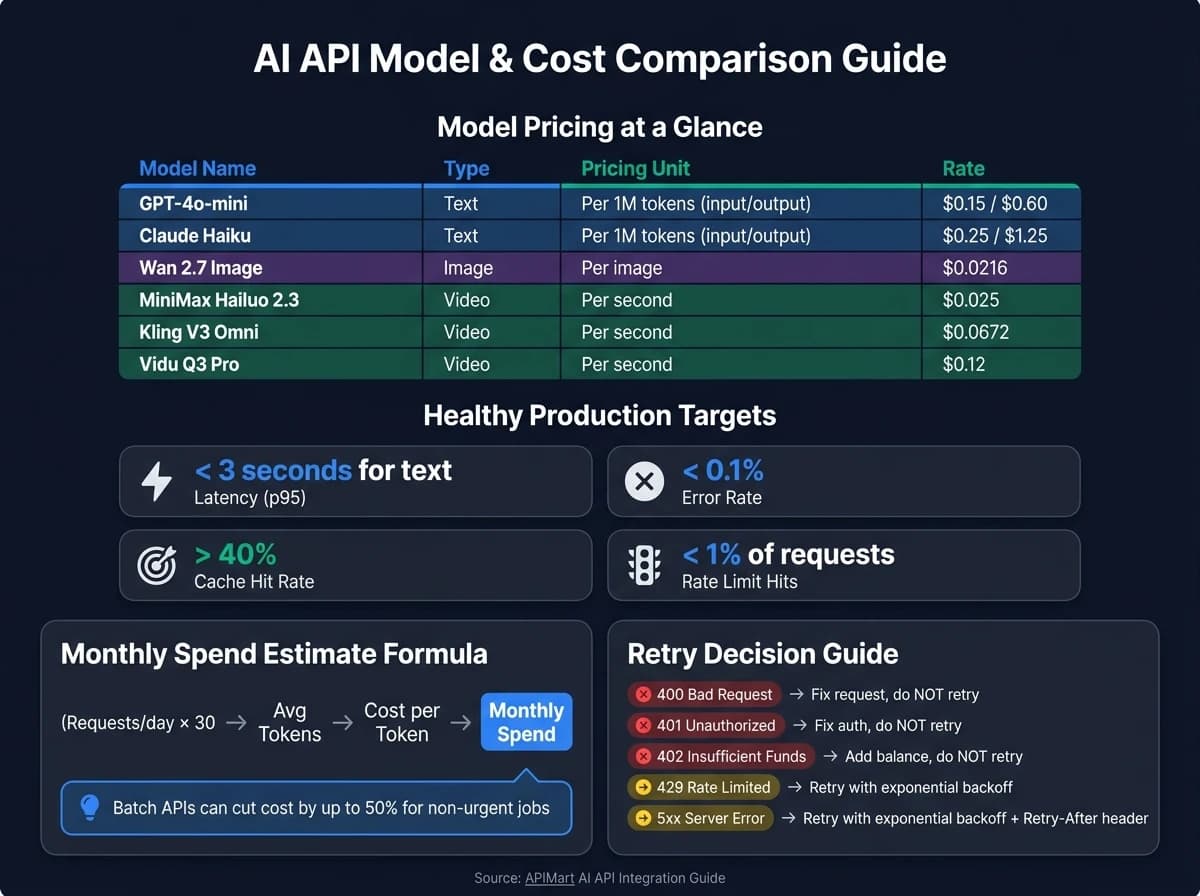
Getting one API call to work is the easy part. The harder job is keeping things under control in production - especially cost, speed, and failure handling.
Estimate Spend Before You Launch
Text models charge by token for both input and output. A simple way to project monthly spend is:
(requests/day × 30) × avg_tokens × cost_per_token [8]
Media models work differently. They usually charge per image, per generation, or per second of output.
Use this pricing table as a starting point:
| Model | Type | Pricing Unit | Rate |
|---|---|---|---|
| GPT-4o-mini | Text | Per 1M tokens (input / output) | $0.15 / $0.60 |
| Claude Haiku | Text | Per 1M tokens (input / output) | $0.25 / $1.25 |
| Wan 2.7 Image | Image | Per image | $0.0216 |
| MiniMax Hailuo 2.3 | Video | Per second | $0.025 |
Before launch, set daily spend alerts and a hard monthly cap. That sounds boring until a loop bug starts firing requests nonstop and burns through hundreds of dollars before anyone sees it [8].
For jobs that don't need instant output - like overnight reports or batch summaries - Batch APIs can cut cost by 50% [1][8][10].
Reduce Wait Time and Improve Perceived Performance
Users don't just care about total response time. They care about when something starts happening on screen.
Instead of making people wait 3 to 5 seconds for a full response, stream tokens as they are generated. That can bring perceived latency down to under 500 ms, even though total generation time stays the same [8].
For video jobs and long transcription tasks, don't trap users in one long request. Show progress with polling or webhooks so they can see the system is working.
It also helps to define latency SLOs for each workflow. For example:
- A partial transcript in under 5 seconds
- A completed image render in under 20 seconds
Those targets give you something concrete to track [9].
Model routing can help a lot too [8][10]. Simple requests don't need your most expensive model. Sending them to smaller, faster options like GPT-4o-mini or Claude Haiku can cut both latency and cost by a large margin [8][10].
Once response time looks good, put fallback paths in place before traffic starts climbing.
Add Reliability Patterns Before Traffic Grows
A few reliability patterns go a long way [8][10].
Use exponential backoff for 429 and 5xx errors. Watch x-ratelimit-remaining so you can slow down before you hit the wall.
Set up multi-provider fallback so traffic can shift if one service goes down.
Then add graceful degradation as the last line of defense. If a model call fails, serve a cached response or a plain static fallback instead of leaving users with a broken UI.
Circuit breakers help too. If an endpoint is failing, stop sending traffic there for a bit instead of hammering it and making things worse.
As traffic grows, track these patterns at the feature level. These are good baseline metrics to watch:
| Metric | Healthy Target |
|---|---|
| Latency (p95) | < 3 seconds for text |
| Error rate | < 0.1% |
| Cache hit rate | > 40% |
| Rate limit hits | < 1% of requests |
p95 and p99 matter more than median. A provider can post a fast p50 and still hurt UX if a small slice of requests slows to a crawl [1][9][10].
Build a feature-level usage dashboard early. That makes it much easier to spot which endpoints are driving cost, which ones are getting slow, and where failures are starting to pile up.
Build Multi-Modal Workflows and Ship with Confidence
Once single requests are working, the next step is turning them into a workflow.
Design End-to-End Multi-Modal Features
Most AI features aren't just one API call. They're a chain of steps. One model writes copy, another makes an image, and a third renders the final video. That means the big design choice isn't only which model to use. It's also how inputs, outputs, and task IDs move from one step to the next.
For video, pass the task_id through the pipeline and move forward only after the job is done.
When you chain different modalities, combining text and image inputs usually leads to better scene consistency than text-only prompts. The catch is cost. You'll pay more, but if visual consistency matters to your users, that tradeoff is often worth making.
A simple rule works well when picking models for each workflow stage:
- Use a fast, lower-cost model for drafting
- Use a balanced model for middle steps
- Use a premium model only for the final render, where users will actually notice the quality
Test, Govern, and Maintain the Integration
Once the workflow is mapped out, put guardrails around quality and upkeep.
Build a golden test set: a fixed group of inputs with known acceptable outputs. Then run programmatic checks before release. Hook those checks into your CI/CD pipeline so a build fails on its own if quality drops or regression tests show a cost spike [2].
On the ops side, think about storage early. Generated video files pile up fast, and storage bills can get out of hand before you see it coming. Set a retention policy before launch so old files don't linger forever.
It's also smart to route every model call through one internal service. That way, if you switch providers later, you only need to change one code path instead of chasing updates across your whole app.
Conclusion: A Checklist for Shipping AI Features That Hold Up
Before you ship, run through these calls one more time:
- Start narrow. Pick one clear user need and solve it well before you expand.
- Match the model to the job. Choose by modality first, then compare speed, quality, and USD cost.
- Keep credentials on the backend. Always. No exceptions.
- Design async for anything slow. Video and other long-running jobs should never block the UI.
- Add retries and observability early. It's much easier to spot issues before traffic grows.
- Treat prompts like code. Version them, test them, and tune them as models and user needs change.
FAQs
How do I choose between sync, streaming, and async jobs?
Choose based on user experience, latency, and task size.
- Streaming works best for real-time features like chat or inline suggestions. Users can see output as it arrives, which makes the app feel fast even when the full response takes a bit longer.
- Async jobs are the right fit for long-running tasks like document analysis, video generation, or large transcriptions. Instead of making someone sit and wait, you can process the task in the background and return the result when it’s done.
- Sync is best for small, fast tasks. But for longer jobs, it’s smart to avoid it because timeouts and server load can turn into a headache fast.
What should I log for AI API requests?
Log the key details for every request:
- Request ID and timestamp
- User ID and model used
- Sanitized prompt and response
- Token count, latency, and cost
- Errors and cache status
This makes debugging a lot easier. It also helps with audits, spend tracking, and compliance, especially when sensitive data is part of the request.
How can I prevent AI API costs from growing too fast?
Use the lowest-cost models that still do the job well, set spending caps, and keep prompts short so you don't burn tokens you don't need.
That same mindset applies across the rest of your stack. Cache repeat responses, batch work that doesn't need an instant reply, and send simple requests to lower-cost models. On top of that, track usage closely and set alerts so costs don't sneak up on you.
Strong error handling matters too. Exponential backoff and circuit breakers can stop runaway retries before they turn into surprise charges.