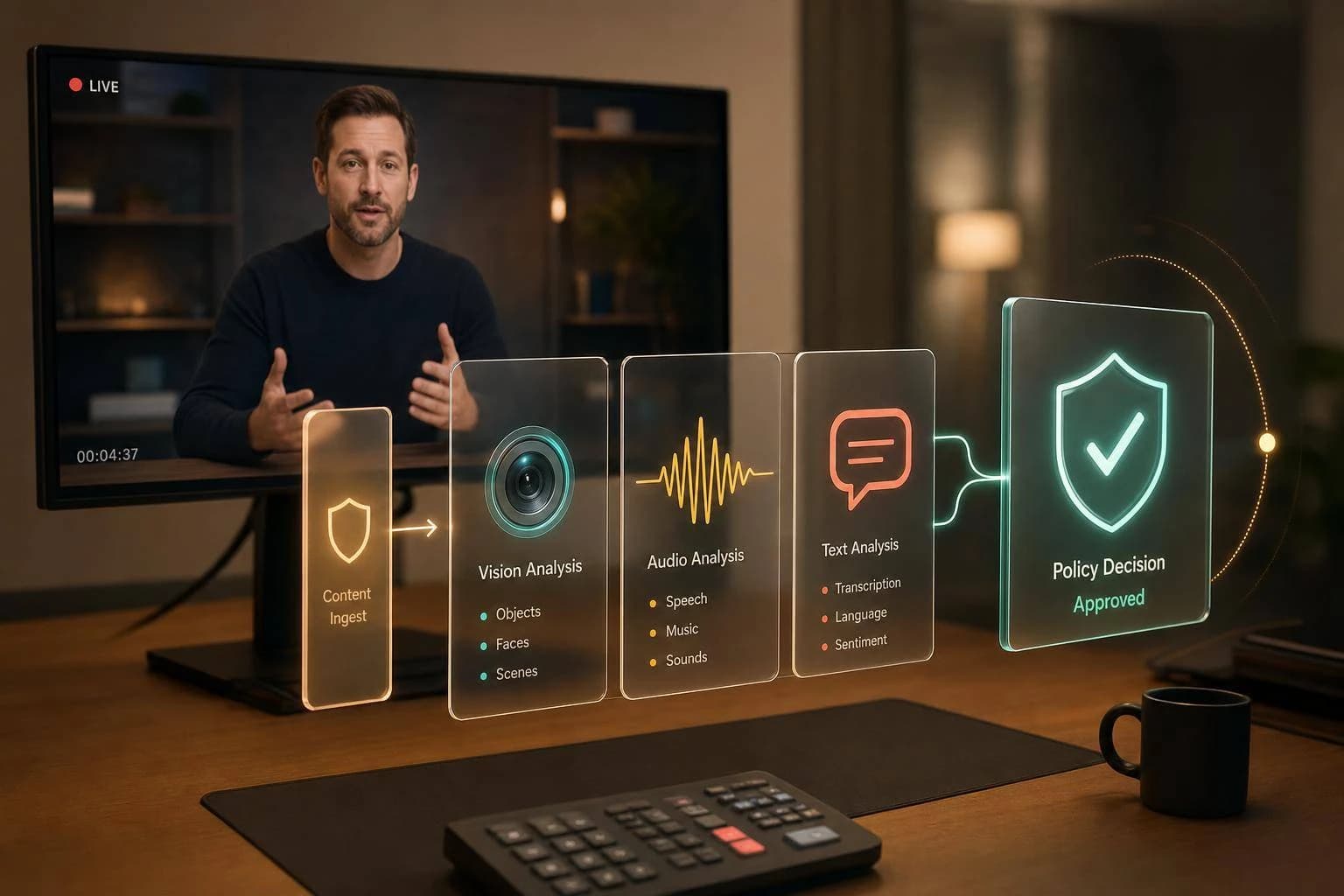
Real-Time Video Moderation with AI
Design real-time video moderation with multimodal AI by combining vision, speech, OCR, policy rules, latency budgets, human review, and APIMart workflows.
If you want video moderation to work in live and upload flows, you need to combine frames, speech, on-screen text, and policy rules in one pipeline.
I’d boil the article down like this: frame-only checks miss too much context, live systems need decisions in about 300 ms to 1 second, and most teams keep costs under control by sampling at 2–5 fps, running first-pass checks in parallel, and sending only risky segments to a deeper reasoning model or human review.
Here’s the plain-English version of what matters most:
- Single-signal moderation is not enough. Vision alone can miss the difference between porn vs. medical content, or a threat spoken in audio vs. harmless visuals.
- Live and VOD need different designs. Live systems need instant actions like blur, mute, pause, or warn. Recorded video can wait for age-gating, removal, or demonetization.
- The best pipeline is layered. Start with rule-based checks like metadata, hashes, and uploader history. Then run multimodal vision analysis, ASR, and OCR at the same time.
- Sampling matters. Using 2–5 fps can cut compute by 5–15x while still catching many risky moments.
- Policy matters as much as models. Scores must map to clear actions: allow, restrict, block, or human review.
- LLMs fit best as a reasoning layer. They help judge context after first-pass models flag a clip.
- Latency decides placement. For sub-200 ms needs, I’d keep first-pass checks at the edge. For deeper review, flagged clips can go to the cloud.
- Fallback rules must be set in advance. If a moderation endpoint slows down or fails, you need a defined path: fail-closed, degraded checks, or fail-open.
- Human review still matters. Borderline cases, coded hate, and unclear context should not be left to auto-enforcement alone.
A short comparison helps show the split:
| Area | Live streams | Recorded video |
|---|---|---|
| Decision window | 300 ms–1 s | Seconds to hours |
| Main actions | Blur, mute, pause, warn | Remove, age-gate, demonetize |
| Sampling | Usually 2–5 fps | More flexible |
| Review flow | Near-real-time escalation | Batch review |
What I like about the article is that it stays focused on the system design: ingest → decode → sample → analyze → decide → act. It also makes the main tradeoff clear: you are always balancing latency, coverage, cost, and review quality.
If I were summarizing the article in one line, it would be this: real-time video moderation works best when you use cheap first-pass filters, parallel multi-modal signals, and a policy layer that turns model output into fast, auditable actions.
How to moderate live videos with AI
Core Building Blocks of Real-Time Multi-Modal Video Moderation
A production moderation stack usually works in layers. Rules handle the obvious cases first, and models score what's left. That first layer relies on deterministic checks like file metadata, file size, and uploader reputation to catch clear violations in under 500ms [3]. Only content that clears that gate moves to the multi-modal analysis layer, where vision, audio, and text signals run in parallel, not one after another [1][2]. That split has a direct effect on latency, cost, and how deep the review can go.
Live Streams vs. Recorded Video: Latency and Review Differences
The biggest design split in video moderation comes down to one thing: live stream or recorded file. The rules of the game change fast, especially when using advanced models like Grok Imagine Video for high-quality generation and analysis.
Live moderation needs decisions in about 300ms to 1,000ms to matter [7][2]. So teams usually rely on lighter models and sample frames at 2–5 fps [2]. It also needs instant actions like blurring the screen, muting audio, pausing a stream, or showing a warning [7][6]. Running every frame at full resolution sounds nice in theory, but it doesn't make sense in practice. Sampling at 2–5 fps cuts compute demand by 5–15x and still catches many meaningful violations [2].
VOD pipelines have more room to work. Analysis can take anywhere from seconds to hours, which makes batch processing and heavier models a fit. That setup also supports asynchronous review, with actions like age-gating, demonetization, or removal applied after the system finishes its checks. Those limits shape how teams think about sampling, enforcement, and escalation.
| Feature | Live Stream | Recorded Video (VOD) |
|---|---|---|
| Latency goal | 300ms–1s | Seconds to hours |
| Primary actions | Blur, mute, pause, warn | Remove, age-gate, demonetize |
| Frame sampling | 2–5 fps | Variable, higher quality |
| Human review | Real-time escalation queues | Asynchronous review batches |
Policy Taxonomy and Decision Outcomes
A score by itself doesn't do much. You need a policy mapping layer that turns model confidence into an action: allow, warn, blur, mute, age-gate, block, or send it to human review. That's where moderation moves from detection to an actual decision.
Here's how thresholds often map to common risk categories:
| Risk Category | High Confidence (>95%) | Medium Confidence (70–95%) | Low Confidence (<70%) |
|---|---|---|---|
| CSAM / Illegal | Immediate block + report | Block + priority review | Hold + urgent review |
| Graphic Violence | Restrict / age-gate | Contextual review | Warn / blur |
| Hate Speech | Remove + warning | Human review | Monitor |
| Suggestive Content | Age-gate / blur | Age-gate / blur | Allow and log |
| Copyright | Monetization claim | Hold + notify | Allow and log |
Compliance and Data Handling in U.S. Deployments
In U.S. deployments, data storage and model placement aren't just engineering choices. They carry legal weight. Systems need to deal with child-safety, privacy, and transparency rules [1].
Where the models run matters a lot. Edge deployment keeps raw video local, which cuts privacy exposure and round-trip latency. That's a big deal when decisions need to land in under 200ms [2]. Cloud deployment makes room for larger models, but it can also mean raw frames or audio cross network boundaries. That adds friction for privacy and data residency planning.
A common middle path is simple: use edge classifiers for the first pass, then send flagged segments to cloud reasoning models. That way, the system can act fast without shipping every second of raw content upstream. No matter which setup you use, the platform still needs enough metadata for audits and appeals while keeping raw-content retention as limited as possible. Those limits shape sampling, retention, and escalation in the next layer.
How to Design a Real-Time Multi-Modal Moderation Pipeline
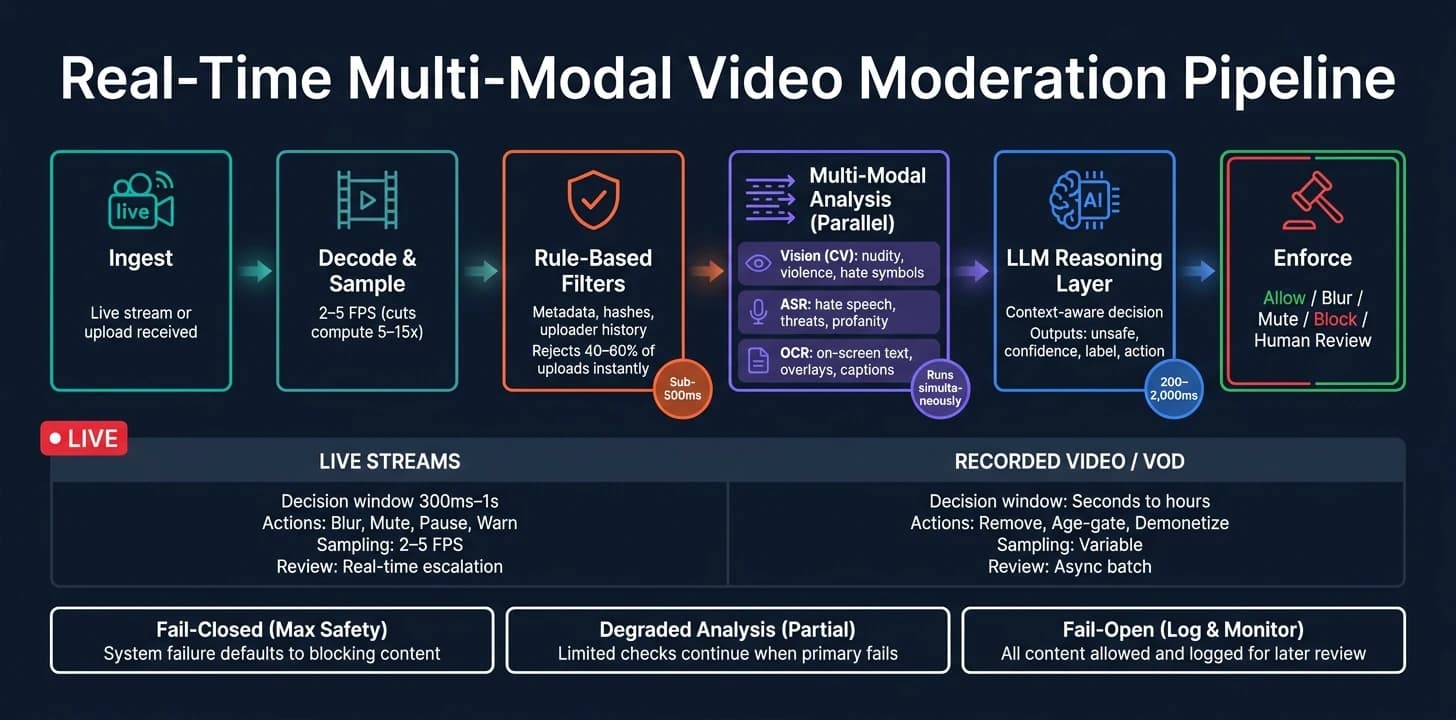
Once the policy is set, the next job is turning live media into a decision fast enough to act. The aim is simple: keep enough context for enforcement without slowing the response.
Pipeline Components From Ingest to Enforcement
A clean setup uses a one-pass flow: ingest → decode → sample → analyze → decide → act.
Start with deterministic checks before any model inference. That means checking metadata, codec details, uploader reputation, and known-bad hashes. These filters can reject or accept 40–60% of uploads right away, which cuts GPU and LLM load by a lot [3]. Only content that passes this gate moves on.
From there, the system samples frames and processes audio. For standard UGC, 1–2 FPS is enough for 15–60 second clips [3]. Audio and video should run in rolling windows so the system keeps recent context instead of looking at each signal in isolation. Vision, ASR, and OCR pipelines can run in parallel to keep end-to-end latency low [2]. Then normalize all outputs into timestamped labels, scores, and clip references.
Those signals go into a multi-modal reasoning layer, which returns a contextual safety decision plus a confidence score [3]. After that, the policy layer maps the result to an action such as blur, mute, warn, block, or human review. That buffering decision shapes how the system samples, windows, and decides what work stays at the edge.
Sampling, Windowing, and Edge vs. Cloud Placement
For many moderation jobs, sampling at 2–5 FPS is enough. It cuts compute by 5–15x while still keeping most meaningful scene changes [2]. For tasks with heavier interaction - like gesture detection or instant blurring - local inference can run at up to 15 FPS [10].
Audio windowing works the same way. Rolling windows of up to 30 seconds give models recent context instead of disconnected snippets [2].
Edge and cloud each have a clear role. Edge classifiers handle immediate enforcement that needs sub-100ms decisions. Cloud models take flagged segments that need deeper review [2][3]. On live streams, a 2-second processing buffer gives cloud models enough time to analyze content while keeping audio and video aligned [9]. That only works, though, if the transport layer gives the system enough room to act.
Streaming Protocols and Latency Budgets
The streaming protocol sets the upper limit for moderation response time. WebRTC runs at sub-second latency, so moderation windows are tight and edge placement makes sense. RTMP ingest gives a 2–5 second buffer, which works for a cloud-based first pass. HTTP delivery such as HLS or DASH adds 10–30 seconds of latency, which is better suited to pre-delivery segment scans [2].
| Protocol | Latency Band | Moderation Insertion Point | Best-Fit Use Case |
|---|---|---|---|
| WebRTC | Sub-second | Edge, inline with stream | Interactive 1-to-1 chat, real-time gaming |
| RTMP Ingest | 2–5 seconds | Cloud proxy with 2-second buffer | Live events, social streaming |
| HTTP-based (HLS/DASH) | 10–30 seconds | Cloud, pre-delivery segment scan | Broadcast-style delivery, VOD |
In practice, an unoptimized pipeline often lands in the 500 ms to 3 second range end to end. With hardware decoders, GPU-based frame resizing, quantized models, and parallel pipelines, that can drop to roughly 150–800 ms [2].
Combining Vision, Speech, and Text Models in a Moderation System
Once the pipeline is in place, the next job is to merge frame, audio, and text signals into a single policy decision. Vision, speech, and text models each catch different kinds of risk, and the way you combine them shapes both accuracy and latency. Put simply, these signals only help if the system can turn them into one decision fast enough to act.
Vision, ASR, and OCR as First-Pass Safety Signals
The first pass works like a triage layer. It should be fast and cheap, so it can filter obvious violations before more expensive systems step in.
Computer vision handles frame-level detection, including nudity, weapons, graphic violence, and known hate symbols. Automatic Speech Recognition (ASR) turns audio into text in near real time, making it possible to flag hate speech, threats, and profanity [3][1]. OCR reads on-screen text, such as overlays, captions, and contact details, which visual models can miss [1][5].
Each modality covers a different blind spot:
- Vision catches visual threats
- ASR catches speech
- OCR catches on-screen text
One rule matters here: don’t trigger enforcement from a single-frame hit. Use a rolling vote across consecutive frames so lighting glitches and motion blur don’t create false positives [3][4].
Those signals then move into the policy layer, which decides whether the stream should be allowed, restricted, or escalated.
Multi-Modal LLMs as the Policy Reasoning Layer
First-pass models can return labels and scores, but they can’t sort out context. A frame with a firearm might show a news clip, a harmless prop, or a real threat. That’s where a multi-modal LLM helps.
The LLM serves as the policy layer, combining structured vision, ASR, and OCR outputs into one context-aware decision [3][1]. It can separate cases that simple classifiers often miss, like medical content versus self-harm, or news reporting versus graphic violence. It can also compare a transcript with a frame sequence and decide whether the surrounding language makes a scene dangerous [1][4]. Every explanation should tie back to an action: block, blur, age-gate, or review.
To make this work in production, the LLM should return structured JSON so downstream systems can act on it in a stable way. A practical schema includes unsafe (boolean), confidence (float 0–1), label (policy category), rationale (plain-language explanation), and action (for example, block, blur, or age_gate) [3][4][5]. The rationale field matters for auditing, human review, and appeals.
The next piece is turning that score into a clear enforcement path.
Setting Thresholds, Escalation Rules, and Human Review Queues
Thresholds are where policy becomes concrete. Set them badly, and you either annoy creators with false positives or let harmful content pass through.
Use the final confidence score to route content based on risk level. High-confidence cases above 95% can be handled automatically [1][4]. Medium-confidence content in the 70%–95% range should go to a human review queue or a second-pass reasoning LLM [1]. Low-confidence content below 70% should move to monitoring or standard review [1].
A few rules help keep this sane:
- Never auto-ban based on a single low-severity flag alone [4]
- Borderline language and unclear gestures should go to a high-priority human queue
- Store the triggering frame or transcript snippet for every automated action so the appeals process has concrete evidence to review [4]
For live streams, give extra attention to the first minute of the session. Bad actors often show their intent early, and this helps control costs without cutting coverage [4].
Latency, Accuracy, and Reliability in Production
Once policy routes content, success in production comes down to one thing: can the system keep up when traffic spikes?
Measuring End-to-End Latency and Detection Quality
End-to-end latency is the total time across the whole pipeline. Teams should measure it from input capture all the way to the final enforcement action, like an alert or stream shutdown [2].
| Component | Typical Latency | Optimization Strategy |
|---|---|---|
| Video Capture | 10–50 ms | Hardware decoders |
| Frame Preprocessing | 5–20 ms | GPU-based resizing |
| Vision Model Inference | 50–200 ms | Quantized models |
| ASR (Speech Recognition) | 100–500 ms | Streaming ASR |
| LLM Policy Reasoning | 200–2,000 ms | Smaller models |
| Network Round-Trip | 20–100 ms | Regional endpoints |
Track latency at each stage, then set a hard budget for the final enforcement step. If one stage goes over budget, shift the fastest checks to the edge and save LLM calls for clips that were already flagged.
For interactive moderation, a 500 ms to 2-second response budget is realistic with cloud APIs. If you need responses below 200 ms, edge inference is the practical route [2].
Accuracy needs a different lens. Instead of raw accuracy, track recall at a fixed precision level. That gives you a clearer read on how many violations you catch without letting false positives get out of hand. In a June 2026 production deployment, TikTok researchers reported 67% recall at 80% precision with a classification pipeline and 76% recall at the same precision with a similarity-matching pipeline. The combined system cut unwanted livestream views by 6% to 8% in large-scale A/B testing [8].
Scaling Across Many Concurrent Streams Without Losing Coverage
Adaptive sampling at 2–5 fps cuts compute by 5–15x and helps stop overload from snowballing as stream counts climb [2].
It also works well with model cascading. A lightweight classifier handles the first pass, and the heavier multi-modal LLM only runs when that fast model flags a possible violation [2]. That keeps GPU usage - and API spend - from getting out of control as concurrency grows.
For session management, key moderation checks by userId:roomId, not just by user. That way, each new session starts its own check schedule, and a bad actor can't just rejoin a room to reset the moderation clock [4].
Fallback Modes, Monitoring, and Ongoing Evaluation
No moderation service runs at 100% uptime. What matters is not whether an endpoint will slow down or fail, but what the system does next.
| Fallback Strategy | Pros | Cons | Risk Implication |
|---|---|---|---|
| Hard-Block (Fail-Closed) | Maximum safety; no coverage gaps | High user friction; stream appears broken | Low safety risk; high business risk |
| Degraded Analysis | Maintains partial coverage with lighter filters | Lower accuracy; may miss nuanced violations | Medium safety risk |
| Pass-Through (Fail-Open) | Zero impact on user experience and uptime | Creates temporary safety gaps | High safety risk; requires robust logging and user reporting |
A general UGC platform may accept pass-through during short outages, as long as user reporting stays on and every unmoderated session is logged for later review [4].
For evaluation over time, use active learning. Pull hard edge cases from production traffic and send them to human annotators. Feed edge cases and missed violations back into annotation so queue tuning, false-positive review, and missed-violation recovery stay tied to moderation policy [8]. It also helps to add a similarity-matching pipeline next to your classifiers. That can catch new violations that were not in the training data. In one production deployment, reference matching added 22% more detection coverage beyond standard classifiers [8].
These operating limits shape the integration pattern in the next section.
Implementing Real-Time Moderation With APIMart

How a Unified API Helps Moderation Teams Move Faster
Once your pipeline, latency budget, and fallback rules are set, the next move is simple: put every moderation call behind one API layer.
Running separate SDKs, billing setups, and auth flows for vision, ASR, and LLM calls adds both latency and operational drag. APIMart cuts that down to one endpoint, api.apimart.ai/v1, and one Bearer Token. That gives moderation teams access to 500+ models through a single integration.
Why does that matter? Because moderation work often comes down to fast iteration. You may need to test score thresholds, swap routing logic, or change fallback behavior on short notice. One API path makes that much easier.
Choosing APIMart Models for Frame Analysis and Policy Reasoning
A good moderation setup starts with a fast first pass. Then, only when a clip looks risky, you send it to a deeper reasoning model for policy judgment.
Use each model for the job it handles best:
| Model | Input Type | Latency Profile | Best-Fit Moderation Task |
|---|---|---|---|
omni-moderation-latest | Text, Image | Low | General content screening |
gemini-flash-lite | Text, Image, Audio | Very Low | Fast frame screening |
| Gemini Flash | Text, Image, Audio | Low | Rapid first-pass safety signals |
| Claude Sonnet | Text | Medium | Context-aware policy review |
Send sampled frames to the fastest first-pass model. Keep that step narrow and focused on the signals that matter most. If the first-pass score crosses your policy threshold, escalate to Claude Sonnet for more context-aware review.
A Practical APIMart Integration Pattern and Key Takeaways
The ingest-to-enforcement pipeline stays the same. The main change is that APIMart replaces separate inference calls with one shared path.
Here’s the pattern:
- Ingest the stream and sample frames at 1–5 fps. This alone cuts compute by 5–15x compared with processing every frame [2].
- First pass: Send sampled frames plus ASR transcript windows to
gemini-flash-liteoromni-moderation-latestthrough APIMart. - Policy reasoning: When the first-pass score crosses your threshold, forward the relevant signals to Claude Sonnet for context-aware policy judgment.
- Enforcement: Auto-block explicit content when confidence is high, and route borderline safety cases to a human review queue. Never auto-ban on ambiguous signals [4].
- Fallback: Wrap every APIMart call in a circuit breaker. If the endpoint becomes unreachable, fall back to the fail-open path defined in policy [4].
Also, key your moderation schedule by userId:roomId so a user who rejoins a room doesn’t reset the clock [4].
Put together, APIMart gives teams one API surface for the same moderation pipeline: sample, score, reason, enforce.
FAQs
How accurate is 2–5 fps sampling for live moderation?
Sampling at 2–5 fps for live moderation is usually enough to spot violations that stay on screen for more than a moment. In most cases, issues like nudity or violence appear across several frames instead of flashing by in just one.
Because of that, detection at these sampling rates is generally reliable.
When should flagged content go to human review?
Send flagged content to human review when the case is borderline, includes explicit material, may involve minors, or points to policy issues that need context and judgment.
This rule applies no matter how confident the model is.
What should happen if the moderation pipeline fails?
If the moderation pipeline fails, the system should switch to a fail-safe mode.
That can mean one of two things:
- Failing open, where content is allowed through during an outage
- Using circuit breakers to pause moderation for a short time and keep the system from overloading
These are standard best practices for error handling and reliability.