
Seedance 1.0 Pro Quality: Full Capabilities Guide
Seedance 1.0 Pro Quality delivers cinematic 1080p AI video at 24 FPS. Explore its features, pricing, and how to use it via the APIMart unified API.
Seedance 1.0 Pro Quality is ByteDance's AI-powered model for creating cinematic videos with 1080p resolution at 24 FPS, designed for professional-grade content. It uses advanced AI architecture to transform text and image inputs into polished video clips, reducing the need for post-production work. Key features include:
- Dual Input Support: Combines text-to-video (T2V) and image-to-video (I2V) for precise outputs.
- Cinematic Controls: Offers dolly, zoom, pan, and tracking shot options.
- Temporal Consistency: Ensures stable visuals across frames and scenes.
- Pre-Graded Videos: Outputs come with balanced highlights and rich shadows, ready for use.
- Flexible Resolutions and Formats: Supports multiple aspect ratios (16:9, 9:16, 21:9, etc.) and formats like MP4, MOV, and WEBM.
Integrated into APIMart, it offers two versions: Pro Quality for final renders and Pro Fast for rapid iterations. Pricing starts at $0.104/sec for 1080p Quality Mode, with discounts available through APIMart. It's an ideal tool for industries like marketing, e-commerce, and entertainment, enabling faster workflows and high-quality results.
For longer projects, videos can be generated in segments and stitched together in editing software. While Seedance 1.0 Pro doesn't generate audio, teams can add soundtracks during post-production. This tool is a reliable solution for producing short, cinematic videos efficiently without sacrificing quality.
Core Features and Capabilities of Seedance 1.0 Pro
Technical Foundations
Seedance 1.0 Pro is powered by a Diffusion Transformer (DiT) architecture, which uses separate spatial and temporal layers to ensure smooth, seamless video output [3].
Its video generation process unfolds in four distinct stages: analyzing structure, isolating local and global movements to condition motion, simulating camera paths, and maintaining temporal consistency [6]. This structured approach sets it apart from simpler models that treat videos as mere frame sequences.
The platform supports two primary workflows: Text-to-Video (T2V) and Image-to-Video (I2V). These workflows go beyond basic encoding, capturing nuanced details like emotional undertones, lighting, and atmospheric elements [1][9].
"Seedance 1.0 Pro is the full-quality production model suited for professional narrative content, brand films, and storyboards." - ImagineArt [1]
Let’s see how these technical foundations translate into top-tier video output.
Output Quality Parameters
Seedance 1.0 Pro delivers Full HD quality at 24 FPS, ideal for professional production. Videos are initially generated at 480p and then upscaled to 720p or 1080p using a diffusion-based refinement process that sharpens textures and enhances detail [3].
Here’s a quick breakdown of the resolution options and their best-fit applications:
| Configuration | Dimensions | Best Use Case |
|---|---|---|
| 1080p (16:9) | 1920 × 1088 px | YouTube, presentations, film |
| 1080p (9:16) | 1088 × 1920 px | TikTok, Instagram Reels, Shorts |
| 1080p (21:9) | 2176 × 928 px | Cinematic widescreen, brand films |
| 1080p (1:1) | 1440 × 1440 px | Social media posts |
| 1080p (4:3) | 1664 × 1248 px | Classic TV, retro-style content |
Videos are delivered in MP4 (H.264) by default, a standard format in U.S. production workflows. It also supports MOV and WEBM for Apple-based and web delivery needs [5]. Clip lengths range from 3 to 12 seconds, and the platform achieves a generation speed of 41.4 seconds for a 5-second 1080p clip on an NVIDIA L20 GPU [3].
"Seedance 1.0 can generate a 5-second video at 1080p resolution only with 41.4 seconds (NVIDIA-L20)." - ByteDance Seed [3]
These resolution and format options set a strong foundation for the model’s advanced motion capabilities.
Cinematic Motion and Temporal Consistency
Seedance 1.0 Pro is designed to meet the high standards of professional video production, offering advanced motion handling that enhances storytelling. It separates motion into two layers: Local Motion (like fabric ripples or hair movement) and Global Motion (such as camera pans and tilts). By keeping these layers distinct, the model avoids the jittering and drifting issues often seen in earlier AI video models [6]. This stability is a significant leap over WAN 2.6 and other previous generation architectures.
The virtual camera simulation is another standout feature. It analyzes the geometry of the input image to stabilize perspective and depth, minimizing distortion on moving subjects [6]. For multi-shot sequences, the model ensures consistent subject appearance and style across different cuts, making it suitable for narrative projects rather than just standalone clips [1][7]. Temporal consistency is maintained by regulating textures, shadows, and colors across frames, reducing flickering or abrupt changes that were common in older models [6].
Watch: Building Ultra-Realistic AI Videos with Seedance 1.0 Pro
Using Seedance 1.0 Pro with APIMart

APIMart's Unified API Integration
With APIMart, you can tap into Seedance 1.0 Pro using a single REST API endpoint: https://api.apimart.ai/v1/videos/generations. This streamlined approach supports both the Fast and Quality variants, eliminating the hassle of managing separate integrations [12].
The API offers flexibility for both text-to-video and image-to-video inputs. For image-to-video, you can specify image URLs using the image_with_roles parameter, assigning roles like first_frame or last_frame to control how scenes transition. This feature is perfect for projects that require seamless visual flow [12].
When you make asynchronous requests, the API immediately returns a task_id, which you can use to check the status of your video in stages: submitted, processing, and completed. Once finished, the API provides a URL for the video, valid for 24 hours. For enterprise users, there's also the webhookURL parameter, which sends automatic notifications to your system when tasks are done [4][5].
"The API documentation is very detailed, and integration with Doubao Seedance 1.0 Pro Fast went smoothly. We integrated it into our internal CMS, allowing the editorial team to generate accompanying videos directly." - David Kim, Lead Developer [4]
These features make it easier to integrate Seedance 1.0 Pro while keeping pricing competitive and performance reliable. For those exploring alternatives, the Kling V3 API also provides cinematic-quality video generation.
Pricing and Performance
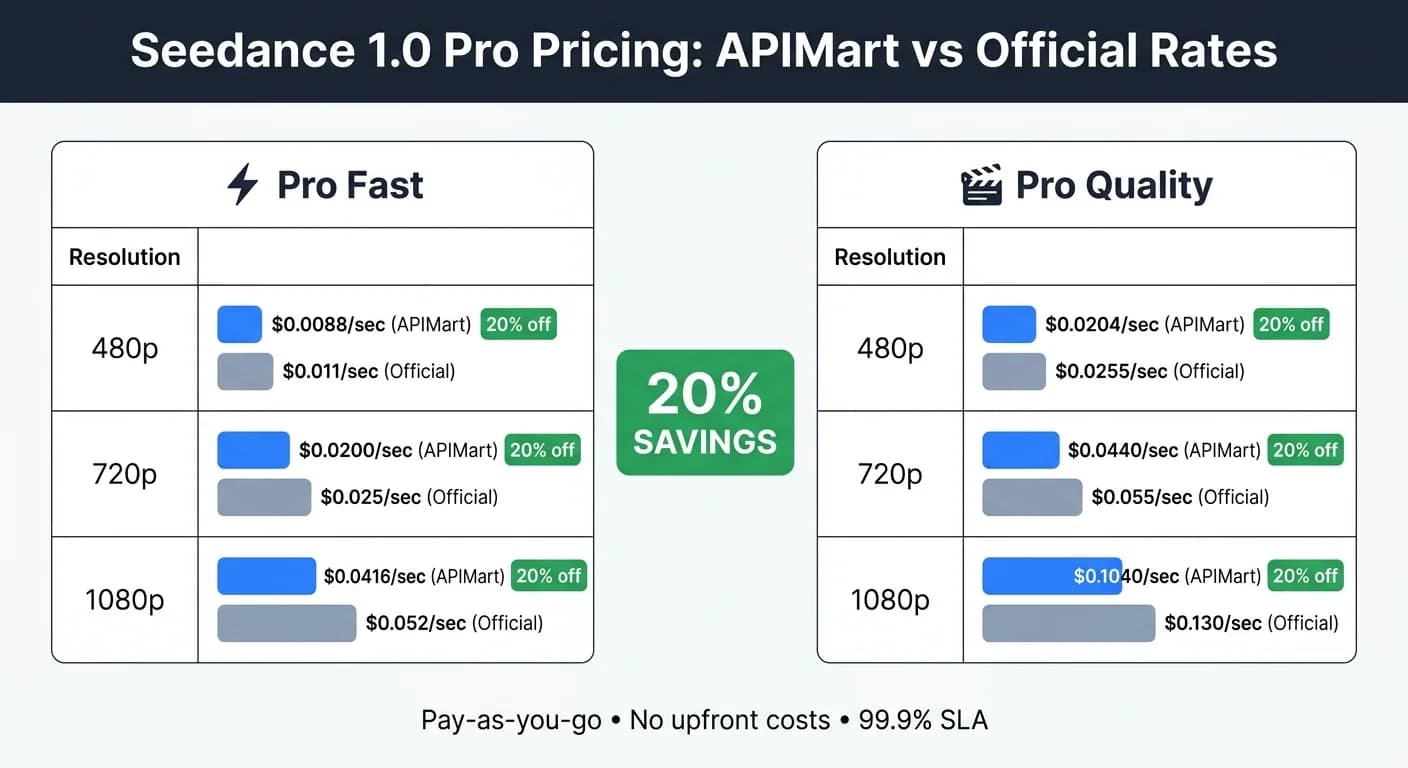
APIMart uses a per-second pricing model in USD, so you only pay for the actual video duration you generate. Here's the pricing breakdown [4]:
| Model Variant | Resolution | APIMart Price (per sec) | Official Price (per sec) |
|---|---|---|---|
| Seedance 1.0 Pro Fast | 480p | $0.0088 | $0.011 |
| Seedance 1.0 Pro Fast | 720p | $0.0200 | $0.025 |
| Seedance 1.0 Pro Fast | 1080p | $0.0416 | $0.052 |
| Seedance 1.0 Pro Quality | 480p | $0.0204 | $0.0255 |
| Seedance 1.0 Pro Quality | 720p | $0.0440 | $0.055 |
| Seedance 1.0 Pro Quality | 1080p | $0.1040 | $0.130 |
For quick prototyping, the doubao-seedance-1-0-pro-fast model is ideal, delivering results in seconds to under a minute. When you're ready for final renders, switch to the doubao-seedance-1-0-pro-quality model, which typically completes in 1–3 minutes [4].
"The dual-mode switching is fantastic. We can use Doubao Seedance 1.0 Pro Turbo Mode to test ideas in seconds, then use Quality Mode to generate final marketing videos. Huge efficiency boost." - Marcus Chen, Creative Director [4]
This pricing structure, combined with the flexibility of switching modes, makes Seedance 1.0 Pro a practical choice for various projects. Similarly, MiniMax Hailuo 2.3 offers high-quality video outputs for professional workflows.
Scalability and Enterprise Support
APIMart operates on a pay-as-you-go basis, so there are no upfront infrastructure costs. It scales effortlessly to handle high-frequency video generation and offers volume discounts for larger deployments [4]. The platform supports over 50,000 active users while maintaining high operational standards [4].
Access to the API is secured with Bearer Token authentication, managed through the APIMart dashboard. Additionally, users retain full commercial rights to all videos generated, giving agencies and brands complete control over their content [4].
Practical Applications of Seedance 1.0 Pro
Use Cases Across Industries
Seedance 1.0 Pro offers tools that help different industries create high-quality video content without the need for extensive production resources. In marketing and advertising, agencies rely on it to craft cinematic social media ads and compelling brand storytelling. Its ability to maintain visual consistency across multiple camera angles makes it an excellent choice for campaigns where brand identity must remain intact throughout.
For e-commerce teams, the image-to-video feature is a game-changer. Instead of investing in costly product video shoots, brands can transform static product images into dynamic visuals, such as slow-motion rotations or 360-degree reveals. This approach retains product accuracy while adding motion that grabs attention on platforms like Instagram and TikTok.
In entertainment and film production, Seedance 1.0 Pro shines when speed is critical. Directors and game developers use it to prototype scenes, create storyboard animatics, and design game cinematics with advanced camera movements like pans, zooms, and dollies. Over 12,000 creators worldwide trust Seedance 1.0 Pro to speed up their creative process and improve iteration cycles [8][13].
"Seedance pro AI has completely transformed our video production workflow. What used to take days now takes hours, and the quality is absolutely stunning." - Sarah Chen, Content Creator [16]
These versatile applications make Seedance 1.0 Pro a valuable tool across many workflows.
Workflow Integration Tips
To get the most out of Seedance 1.0 Pro, professional teams should focus on crafting precise prompts. Think of prompts as detailed film directions rather than vague mood boards. Use specific camera actions like Push, Orbit, Zoom, Pan, and Dolly to guide the model in creating the desired motion. Vague instructions often result in less refined outputs.
For multi-shot sequences, adopting a three-shot structure can enhance coherence. Start with an establishing shot to set the scene, move to a close-up of the action, and finish with a context-revealing shot [10].
A practical tip to save time and resources is to test your ideas with a 5-second preview at 480p. Once you’re satisfied with the motion and framing, lock the seed parameter and scale up to a 10-second, 1080p render. Locking the seed ensures consistency in framing and motion across iterations, eliminating the need to start over with each new version [11].
Working Around Operational Constraints
Seedance 1.0 Pro limits clip lengths to 5 or 10 seconds. For longer videos, like a 60-second brand story or a 2-minute explainer, plan your project in segments from the beginning. Treat each clip as an individual scene, such as an opening shot, main action, or closing sequence. These clips can then be stitched together in editing software like DaVinci Resolve or Adobe Premiere Pro, following the multi-shot structure to maintain a consistent visual style [15].
One key limitation is that Seedance 1.0 Pro doesn’t generate audio. Teams typically use the video output as a foundation, adding voiceovers, music, and sound effects during post-production. This approach aligns with standard practices for producing broadcast-quality videos. However, for projects that require synchronized audio, the newer Seedance 1.5 Pro offers audio-video generation in up to eight languages [14][15].
Conclusion
Key Takeaways
Seedance 1.0 Pro delivers video output that meets professional production standards. With its 1080p resolution, 24 FPS cinematic quality, and versatile camera options like dolly, zoom, pan, and tracking shots, it’s a comprehensive tool for video creators. Its ELO score of 1,351 highlights its benchmark-level performance [2]. The dual input system - accepting both text and images - supports streamlined workflows, ensuring smooth and coherent visuals across scenes [1][17].
One standout feature is its ability to maintain consistency in both subject and style across shots. This ensures a polished final product, avoiding the disjointed feel of mismatched clips. These attributes make it a reliable choice for scalable and adaptable production workflows.
Future Opportunities with APIMart
Beyond the tool itself, APIMart’s unified API ecosystem elevates the experience by enabling seamless integration of Seedance 1.0 Pro into existing production pipelines. Features like a single API key, pay-as-you-go pricing at 20% below official rates, and a 99.9% SLA provide teams with the flexibility to scale operations without infrastructure concerns [4].
As APIMart expands its library of over 500 AI models, the same integration powering Seedance 1.0 Pro can connect users to future advancements, such as models with built-in audio generation, without requiring new setups. For professionals seeking top-tier AI video creation today with a forward-looking foundation, this ecosystem offers a practical, scalable advantage.
FAQs
How do I choose Pro Quality vs Pro Fast?
Choose Pro Fast for tasks that prioritize speed and cost-effectiveness, such as rapid prototyping, A/B testing, or batch content creation. It offers comparable motion consistency and prompt accuracy to Pro Quality but operates with reduced latency and lower compute expenses.
Go with Pro Quality when your project demands top-tier textural detail and cinematic precision, making it ideal for final, high-profile deliverables.
What inputs work best for image-to-video?
For the best experience with Seedance 1.0 Pro, make sure to use high-quality images where the subject is clearly centered. Steer clear of visuals that are cluttered or have low contrast, as these can cause motion drift during processing. The tool supports JPEG, PNG, and WebP formats, with image dimensions ranging from 300 to 6000 pixels.
When crafting your prompts, keep them short and focused, emphasizing the desired action and mood. Additionally, starting with a consistent first frame ensures the subject remains stable throughout the video.
How can I make longer videos than 10 seconds?
Seedance 1.0 Pro allows you to generate video clips of up to 10 seconds per request. If you need longer videos, you can produce multiple clips and merge them during post-production. To maximize the length of a single clip, set the duration parameter to 10 seconds.
Choose the model you want in the model marketplace
Try chat, image and video models in the APIMart model marketplace, and experience model capabilities quickly with one unified API.