Seedance 1.0 Pro Quality vs 4.5 - Worth It?
Seedance 1.0 Pro Quality vs Seedance 4.5 compared on input modes, native audio, resolution, editing workflow and cost - find out if the upgrade is worth it.
If you're deciding between Seedance 1.0 Pro Quality and Seedance 4.5, here's the quick takeaway:
- Stick with Seedance 1.0 Pro Quality if you create silent videos like product demos or B-rolls. It’s reliable, cost-effective, and works well for simple workflows.
- Choose Seedance 4.5 if you need synchronized audio, multi-input video creation, or advanced editing tools. It’s ideal for polished, professional content like marketing videos, storytelling, or multilingual projects.
Key Differences:
- Input Options
- 1.0: Single image and text prompt.
- 4.5: Up to 9 images, 3 video clips, and 3 audio files.
- Audio Support
- 1.0: No native audio.
- 4.5: Generates synchronized audio with phoneme-level lip-sync.
- Resolution
- 1.0: Upscaled 1080p.
- 4.5: Native 2K resolution.
- Workflow
- 1.0: Requires full regeneration for edits.
- 4.5: Director Mode allows precise edits without starting over.
- Cost
- 1.0: Lower cost ($0.62 for 1080p 5s video).
- 4.5: Higher cost but combines audio and video generation ($0.76 for 720p 5s video).
Quick Comparison:
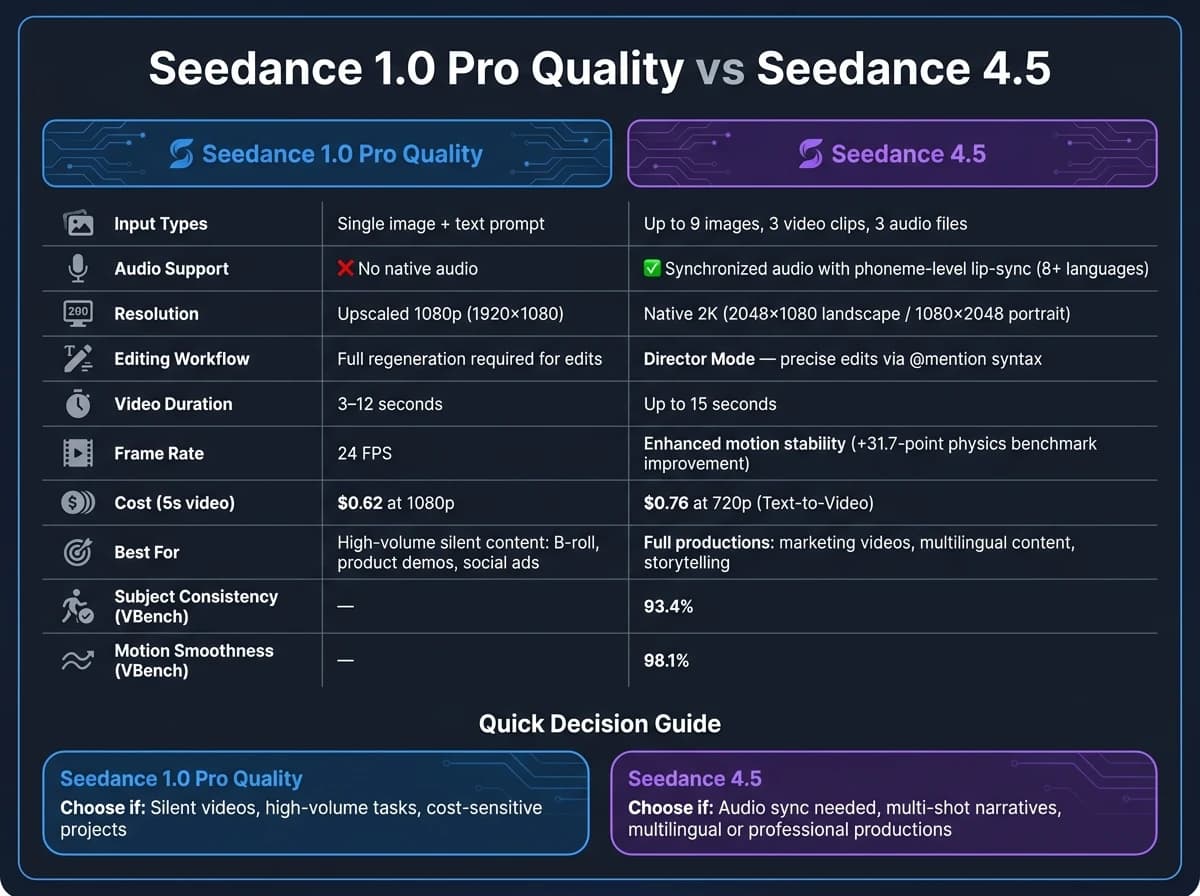
| Feature | Seedance 1.0 Pro Quality | Seedance 4.5 |
|---|---|---|
| Input Types | Single image + text | 9 images, 3 videos, 3 audio clips |
| Audio | None | Synchronized audio |
| Resolution | Upscaled 1080p | Native 2K |
| Editing Workflow | Full regeneration needed | Director Mode for edits |
| Cost (5s video) | $0.62 | $0.76 |
Both models integrate seamlessly with APIMart, making the transition simple. If your projects demand advanced features and higher quality, Seedance 4.5 is worth the upgrade. For simpler, high-volume tasks, Seedance 1.0 Pro Quality remains a solid choice.
Seedance 1.0 Pro Quality: Features and Limitations
Core Technical Features
Seedance 1.0 Pro Quality is powered by a Diffusion Transformer (DiT) architecture, which separates spatial and temporal processing. Spatial layers handle the intricacies within individual frames, while temporal layers ensure smooth transitions across frames, enabling consistent multi-shot sequences.
For compression, it employs a MAGVIT-based VAE that balances computational efficiency with visual clarity by combining spatial and temporal data. The model also uses a Cascaded Diffusion Framework to upscale its base 480p output to 720p or 1080p. This is achieved with a learned diffusion refiner, which sharpens the frames for better quality.
| Feature | Specification |
|---|---|
| Max Resolution | 1080p (1920×1080) |
| Frame Rate | 24 FPS |
| Video Duration | 3–12 seconds |
| Input Modes | Text-to-Video, Image-to-Video |
| Camera Controls | Dolly (in/out), Zoom, Pan, Track, Fixed |
| Audio | No native support |
| Output Formats | MP4 (H.264), WEBM, MOV |
These technical elements shape the overall user experience, which is further explored in the usability and workflow discussion below.
Usability and Workflow Traits
While the technical foundation of Seedance 1.0 Pro Quality is strong, its workflow introduces some challenges.
One notable issue is the complexity of crafting effective input prompts. The model delivers its best results when provided with keyword-rich captions. Many users find themselves turning to external large language models to refine their prompts for optimal compatibility with the DiT system [1][6].
Another limitation lies in its single-reference input design. Each API call allows only one image URL and a text prompt. This means that scene changes require restarting the generation process entirely. As highlighted by the AI/ML API Blog:
"1.5 Pro [and 1.0 Pro] had a ceiling. It operated primarily as a single-shot generation system... If you needed to iterate, you regenerated from scratch." [4]
Additionally, the average latency of 62.63 seconds per generation [7] can slow down workflows that demand frequent iterations.
Which Use Cases It Fits
Seedance 1.0 Pro Quality is particularly effective for creating silent video outputs like b-roll footage, product showcases, and social media ads, which can later be paired with music or voiceovers. Its ability to maintain consistent frames makes it ideal for e-commerce visuals and conceptual presentations [2]. The model's cinematic camera controls, such as "slow dolly forward" or "tracking shot", are especially useful for branded content and educational videos [3]. While these features are impressive, they also highlight the appeal of the more advanced capabilities found in Seedance 4.5.
Seedance 4.5: Video Quality and Multi-Modal Upgrades
Architecture and Input Mode Changes
Seedance 4.5 shifts from a single-reference system to a unified multimodal setup, allowing it to handle multiple inputs in one go. Instead of being limited to just one image URL and a text prompt, you can now provide up to 9 images, 3 video clips, and 3 audio clips at the same time [4][13].
This change is brought to life through the "Director Mode" workflow. By using @mention syntax (e.g., "@Image1 as first frame, @Video1 for motion style"), you can assign specific roles to your assets. This transforms a basic prompt into a detailed production guide. For instance, you can tweak a character's action or replace a scene element without having to regenerate the entire clip [4][13]. These updates make editing more precise while setting the stage for better visual results.
Visual Quality and Frame Stability
Seedance 4.5 now delivers native 2K resolution (2048×1080 for landscape and 1080×2048 for portrait), a step up from the upscaled 1080p offered by Seedance 1.0 Pro Quality [11][12]. This native resolution provides sharper textures, cleaner edges, and more detail that looks great even on larger screens.
The model also improves frame-to-frame stability. With a +31.7-point improvement in physics reasoning benchmarks over version 1.5 Pro, motion elements like flowing fabric or splashing water appear more realistic and natural [4].
Audio Support and Extended Controls
Seedance 4.5 generates audio alongside video in a single pass, ensuring the sound aligns perfectly with the visuals [11][13]. The model can differentiate subtle sound cues - for example, the soft rustle of silk versus the coarser sound of denim [4].
Director Mode now includes enhanced camera features like dolly zoom, rack focus, and orbital tracking [4][14]. Additionally, the model offers phoneme-level lip-sync accuracy in over eight languages, including regional dialects such as Cantonese and Sichuanese [4][14]. These upgrades make Seedance 4.5 a powerful tool for creating polished, professional-quality content.
Seedance 1.0 Pro Quality vs Seedance 4.5: Side-by-Side Comparison
Feature Comparison Table
Here’s a breakdown of the key features:
| Feature | Seedance 1.0 Pro Quality | Seedance 4.5 |
|---|---|---|
| Input Types | Text with a single image | Text with up to 9 images and 3 video clips |
| Audio | No audio generation | Native, synchronized audio generation |
| Editing Workflow | Requires full regeneration | Director Mode workflow |
| Primary Use Case | High-volume silent production (e.g., B-roll, product shots) | Full productions with integrated multi-modal assets |
Seedance 1.0 Pro Quality focuses on producing silent videos, while Seedance 4.5 expands its capabilities to include multi-modal content creation with audio and advanced editing tools [7].
Speed, Reliability, and Resource Use
Seedance 1.0 Pro Quality is designed for high-volume, silent video tasks like product shots or B-roll for social ads. It emphasizes efficiency, making it ideal for quick, repetitive production needs [7].
In contrast, Seedance 4.5 supports more complex projects with multimodal inputs, synchronized audio, and the Director Mode workflow. These features enhance motion stability and overall output quality, making it an excellent choice for teams working on polished, client-facing productions. While it requires more processing power, the trade-off is high-quality, versatile content. For those seeking alternative cinematic AI video generation tools, other high-end models are also available.
These differences affect how each model fits into your production workflow, depending on your project needs.
How Both Models Work with APIMart

Both models integrate seamlessly with APIMart's unified API, allowing you to switch between Seedance 1.0 Pro Quality and Seedance 4.5 by simply updating the model identifier. This means you can test Seedance 4.5’s advanced features without overhauling your existing workflow [7].
This API compatibility ensures a smooth transition for teams looking to explore the expanded capabilities of Seedance 4.5 while maintaining their current production setup.
Is Upgrading to Seedance 4.5 Worth It?
Key Factors to Consider Before Upgrading
Whether upgrading to Seedance 4.5 is the right move depends on your project requirements. While it offers some impressive advancements, it may not be necessary for every team or budget.
The biggest reason to upgrade is if your projects demand features like native audio, multi-shot sequencing, or the ability to handle longer clips. Seedance 4.5 supports videos up to 15 seconds and can process up to 9 images, 3 video clips, and 3 audio files simultaneously. That’s a major improvement over the single-image input limitation of Seedance 1.0 Pro Quality [4][7]. Additionally, if your current workflow involves juggling separate tools for video creation, text-to-speech, and lip-sync, Seedance 4.5 simplifies things by combining everything into a single prompt [5].
However, for teams focused on producing high-volume silent content - like product shots or abstract motion graphics - Seedance 1.0 Pro Quality remains a cost-effective choice [7]. These technical differences make it clear that the decision to upgrade largely depends on how you’re using Seedance in your work.
Industry-Specific Use Cases
Different industries can benefit from Seedance 4.5 in unique ways, particularly in marketing, film pre-production, and education.
Marketing teams creating short-form videos for platforms like TikTok or Instagram Reels will likely see the most immediate benefits. With support for 9:16 aspect ratios, integrated audio, and multi-shot scripting, Seedance 4.5 eliminates the need for manual assembly or adding voiceovers separately [7].
Film and animation pre-production studios gain a significant edge with Director Mode. This feature allows up to 12 reference inputs to control motion, style, and pacing, making it easier to maintain visual consistency across storyboards and previs sequences. Teams no longer need to regenerate scenes from scratch, saving time and effort [4][10].
Education content creators producing multilingual explainer videos will appreciate the phoneme-level lip-sync capabilities across 8+ languages, paired with emotional vocal performance. Previously, this type of work required an entirely separate dubbing process [4].
As Segmind Editorial explains:
"Seedance 1.0 Pro is ideal for silent video production with predictable costs... Seedance 2.0 excels when you need synchronized audio, multi-shot sequencing, and advanced flexibility." - Segmind Editorial [7]
Cost and Migration Steps
Cost and migration strategy are also important considerations. Seedance 4.5 is about 2.8 times more expensive than Seedance 1.0 Pro Quality for similar video outputs [7]. Here’s how the costs break down:
| Model | Resolution / Duration | Estimated Cost |
|---|---|---|
| Seedance 1.0 Pro Quality | 1080p · 5s | $0.62 |
| Seedance 4.5 (Text-to-Video) | 720p · 5s | $0.76 |
| Seedance 4.5 (Text-to-Video) | 720p · 10s | $1.51 |
| Seedance 4.5 (Video-to-Video) | 720p · 5s | $0.46 |
The higher price of Seedance 4.5 is offset by its ability to generate native audio, eliminating the need for separate text-to-speech and lip-sync tools [7].
Migrating to Seedance 4.5 is straightforward if you’re using APIMart. Both models share the same API, so switching involves nothing more than updating the model identifier in your API call. For a cost-efficient workflow, consider using Seedance 4.5's faster variant during the concept and iteration stages, then switch to full-quality settings for final renders. This approach helps manage credit usage while ensuring high-quality output for delivery [5][9].
Conclusion: Should You Upgrade?
Final Assessment
If you're working on silent projects like product demos or social media ads, Seedance 1.0 Pro Quality is a solid choice. But if your focus is on synchronized dialogue, multi-shot narratives, or multilingual content, Seedance 4.5 is the clear winner. Its unified audio-video architecture and Director Mode simplify production by reducing the number of steps needed. Each version serves distinct production needs, so the right choice depends on your specific goals.
"Seedance 2.0 is a real workflow change, not just a version bump." - AIVidPipeline Editorial Team [8]
The numbers speak for themselves: Seedance 4.5 delivers a 93.4% subject consistency score on VBench and a 98.1% motion smoothness score [15]. These metrics are crucial for maintaining character continuity across multiple shots and ensuring polished, professional results.
How APIMart Makes the Upgrade Easier
Upgrading doesn't have to be complicated. APIMart simplifies the process by offering unified access to both models via a single API. All it takes to switch models is updating the API identifier - no need to rewrite code. This streamlined approach also works for other high-end models like kling-v2-6 if your project requires advanced camera control.
Even better, you can run both versions side by side during the transition. APIMart's flexible pricing structure also helps you manage costs effectively, whether you're working on drafts or final renders.
FAQs
Will Seedance 4.5 reduce my total production cost if I currently use separate audio tools?
Upgrading to Seedance 4.5 can cut down your production costs, especially if you're juggling multiple audio tools. Its unified multimodal architecture allows you to create synchronized audio and video in a single step. This eliminates the hassle of external sound design or post-production audio work. By streamlining the process, you save both time and money, as there's no need to manage multiple workflows or production pipelines.
How hard is it to migrate from Seedance 1.0 Pro Quality to Seedance 4.5 in APIMart?
Migrating from Seedance 1.0 Pro Quality to Seedance 4.5 in APIMart involves carefully reviewing and updating your implementation. Start by verifying API endpoints, payload structures, and how credentials are handled. You'll find all the necessary details in the official documentation available in your APIMart dashboard.
Make sure to also re-test your prompts and automation logic, as the new version now leverages natural-language syntax for prompt engineering. Lastly, double-check your billing settings, quota limits, and API access paths in your APIMart account to ensure everything aligns with Seedance 4.5's requirements.
When is native 2K worth it versus upscaled 1080p for real deliverables?
With Seedance, native 2K resolution isn't typically necessary for deliverables. The platform mainly supports 1080p, with 4K available only for Enterprise plans. For professional projects, native 1080p delivers superior detail, consistency, and a polished, cinematic look. On the other hand, upscaling 720p to 1080p often results in problems like flickering, edge distortion, and texture degradation. These issues make it a poor choice for larger screens or critical projects where quality is under close examination.
Choose the model you want in the model marketplace
Try chat, image and video models in the APIMart model marketplace, and experience model capabilities quickly with one unified API.