
Seedance 1.5 Pro Alternatives: Top Video AI Picks
Looking beyond Seedance 1.5 Pro? Compare Kling V3, Sora 2, MiniMax Hailuo 2.3, and Vidu Q3 Pro on resolution, clip length, audio sync, and pricing.
Seedance 1.5 Pro was once a strong choice for AI video generation, but newer tools in 2026 outperform it in key areas like resolution, editing flexibility, and audio-video synchronization. Four standout alternatives are Kling V3, Sora 2 Preview, MiniMax Hailuo 2.3, and Vidu Q3 Pro. Each tool offers unique strengths:
- Kling V3: Delivers native 4K resolution, supports 15-second clips, and includes advanced features like multi-camera angles and consistent character rendering.
- Sora 2 Preview: Focuses on storytelling with physics-accurate visuals, multilingual lip-sync, and extended clip durations up to 120 seconds.
- MiniMax Hailuo 2.3: Prioritizes affordability and smooth motion, making it ideal for bulk video production or stylized visuals.
- Vidu Q3 Pro: Excels in high-volume workflows with built-in audio-video sync, metadata for scene cuts, and professional-grade 1080p output.
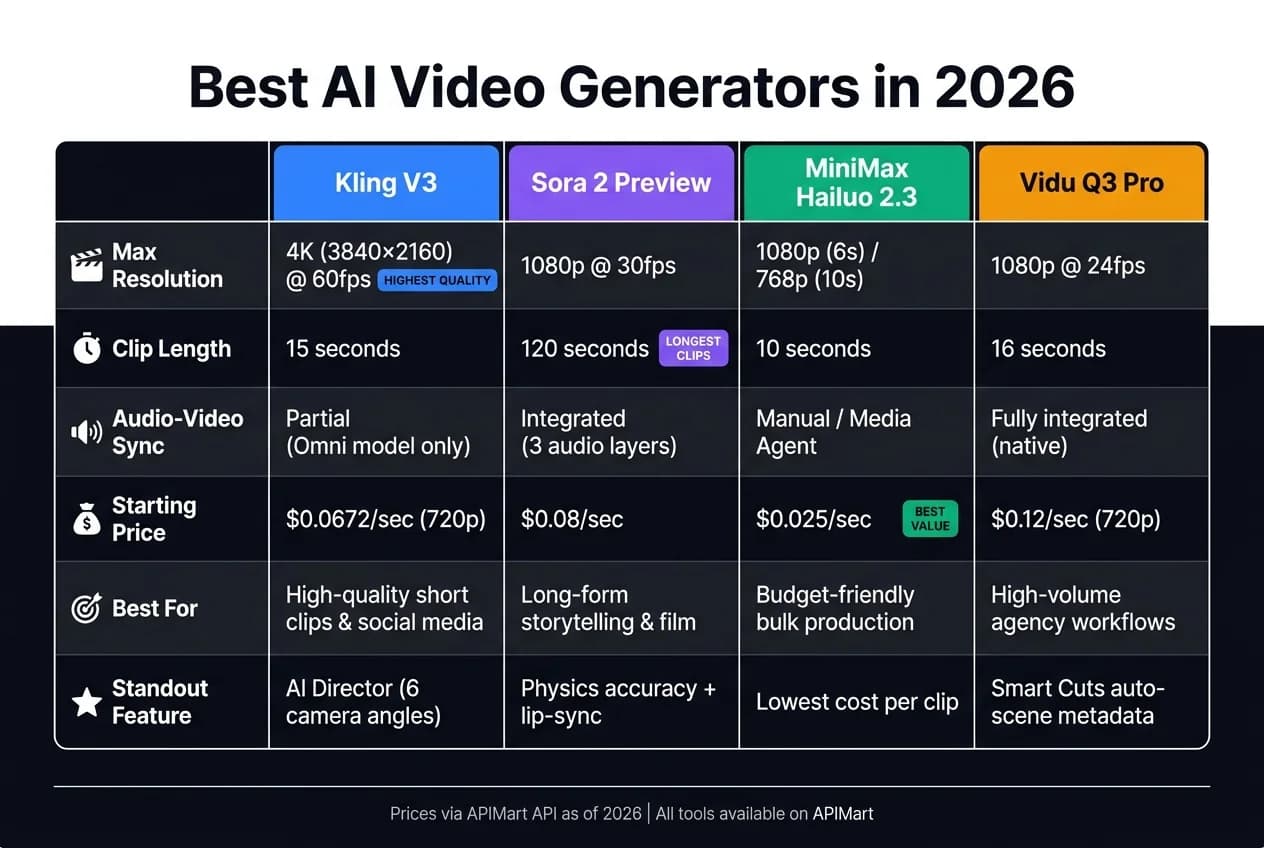
Quick Comparison:
| Tool | Max Resolution | Clip Length | Audio-Video Sync | Starting Cost (per sec) | Best For |
|---|---|---|---|---|---|
| Kling V3 | 4K (60fps) | 15 seconds | Partial (Omni model) | $0.0672 (720p) | High-quality, short clips |
| Sora 2 Preview | 1080p | 120 seconds | Integrated | $0.08 | Long-form, physics-based videos |
| MiniMax Hailuo | 1080p | 10 seconds | Manual integration | $0.025 | Budget-friendly, fast projects |
| Vidu Q3 Pro | 1080p (24fps) | 16 seconds | Fully integrated | $0.12 | High-volume, streamlined output |
Each tool suits different needs, from social media content to cinematic storytelling. Below, we break down their features, pricing, and integration options to help you choose the best fit for your projects.
Watch: The Best AI Video Generators of 2026
1. Kling V3
Kling V3 takes a clear lead over Seedance 1.5 Pro in several critical aspects. Built on a Diffusion Transformer (DiT) architecture and paired with a Multi-modal Visual Language (MVL) framework, it effectively overcomes many of Seedance 1.5 Pro's limitations, especially in resolution, clip duration, and maintaining character consistency. Since its launch in June 2024, Kling V3 has been embraced by over 60 million creators, generating more than 600 million videos as of 2026 [5]. Let’s dive into how Kling V3 excels in video generation.
Video Quality
Kling V3 delivers native 4K (3840×2160) resolution, a significant leap from Seedance 1.5 Pro's 720p cap. It supports clips up to 15 seconds long at 60fps, compared to Seedance’s 5-second limit. This makes Kling V3 ideal for creators who need high-quality, detailed output.
One of its standout features is the AI Director mode, which allows users to define up to six distinct camera angles - wide, medium, POV, and more - within a single 15-second clip. Even with multiple perspectives, characters and environments remain spatially consistent. This feature, combined with the Elements 3.0 system, lets creators lock a character’s appearance using a short reference video or image set (3–8 seconds). These capabilities make Kling V3 a powerful tool for storytelling, not just background visuals.
"The AI Director feature is the first time an AI video model has felt truly useful for narrative filmmaking, not just for creating atmospheric b-roll." - Awesome Agents [8]
Audio-Video Sync
The Omni variant of Kling V3 takes audio and video synchronization to another level by generating speech, ambient sounds, and lip-sync in a single pass. It supports five languages - Chinese, English, Japanese, Korean, and Spanish - including regional accents like American, British, and Indian-accented English, as well as Cantonese and Sichuanese. The Character & Voice Binding feature ensures that a character’s voice and appearance remain consistent across scenes. Additionally, the engine can handle scenes with three or more characters, ensuring dialogue aligns with the correct speaker [6][7].
Pricing
Kling V3 offers flexible pricing through a per-second billing model for API access and a credit-based system for its web app. Here’s the API pricing breakdown:
| Resolution | Without Audio | With Audio |
|---|---|---|
| 720p | $0.0672/sec | $0.0896/sec |
| 1080p | $0.0896/sec | $0.112/sec |
| 4K | $0.42856/sec | $0.42856/sec |
Subscription plans start at $6.99/month (660 credits) and go up to $180/month for the Ultra plan, which includes native 4K and 15-second clip capabilities. For reference, generating a 15-second 4K clip typically costs 120 credits on the Ultra plan. However, creating 4K content takes 3–5 minutes per clip, which may limit rapid iterations [3].
Integration Options
Kling V3 also shines in its integration capabilities. It’s accessible via a REST API using an asynchronous task-and-poll workflow, with webhook support for seamless production pipelines. The API guarantees a 99.9% uptime SLA and supports parameters like negative_prompt, aspect_ratio (16:9, 9:16, 1:1), image_urls for first/last frame control, and a multi_shot flag for scene transitions [9][10].
The Omni model simplifies development by consolidating text, image, and audio inputs into a single endpoint, eliminating the need for separate models for video and audio generation.
"As a developer, the unified API for kling-v3-omni makes integration a breeze. One kling-v3 series model handles all our multi-modal generation needs." - James Liu, Senior Developer [9]
All data is stored in Singapore under Kling AI Pte. Ltd., and the platform’s privacy policy ensures that personal data is not used for model training [4]. This is a critical feature for enterprises managing branded or sensitive content.
2. Sora 2 Preview
Sora 2 Preview focuses on delivering realistic visuals, integrated audio, and adaptable editing features, making it an appealing choice for creators aiming for cinematic authenticity.
Video Quality
The Standard model supports a maximum resolution of 720p, while the Pro tier allows for 1080p output. However, native 4K support isn’t included, so creators seeking broadcast-quality content will need third-party upscaling tools like Topaz Video AI [11]. Clips are capped at 25 seconds with a frame rate of 30fps but can be extended up to six times, reaching a maximum duration of 120 seconds [16][18].
Sora 2 stands out for its impressive physics accuracy and lifelike human rendering. It scores 8.4/10 for human fidelity (outperforming Seedance 1.5 Pro’s 7.4/10) and 7.8/10 for physics realism [19]. The Cameo feature allows users to embed a consistent digital likeness - captured from a 30-second video - into scenes, while the Pro tier includes a character ID system for maintaining visual consistency across up to two characters [1]. These features cater to practical needs in marketing, entertainment, and e-commerce workflows. Sora 2 also excels in audio integration, complementing its visual strengths.
Audio-Video Sync
Sora 2 generates three synchronized audio layers: Foley (physical sounds), Ambient (background cues), and Speech (lip-synced dialogue). This eliminates the need for separate audio modeling or manual syncing during post-production [11].
"Sora 2 is a 'production studio in a prompt.' While competitors... are racing on resolution and duration, OpenAI has correctly identified that audio is 50% of the movie." - Greg, AI Tools Review [11]
Pricing
The pricing structure is simple but scales with resolution. Through the OpenAI API, Standard tier costs $0.10 per second, while Pro tier costs $0.30 per second [12]. On APIMart, Standard tier costs $0.08 per second, with Pro tier options priced at $0.24/sec for 720p, $0.40/sec for 1024p, and $0.56/sec for 1080p [22]. ChatGPT Pro subscribers ($200/month) gain direct access through the ChatGPT interface [17].
Integration Options
Sora 2 Preview is built for smooth integration into existing workflows. It can be accessed via the OpenAI API (v1/videos), Microsoft Azure AI Foundry (using Microsoft Entra ID for keyless authentication), a standalone iOS app, and the ChatGPT web interface [11][12][13][15]. The API includes endpoints for Remix, Extensions, and Edits, allowing teams to refine footage without starting from scratch [14][20].
One key consideration: video URLs generated by Sora 2 expire quickly - often within an hour. This means production teams need to download and store outputs promptly in private cloud storage solutions like S3 or R2 [20][21]. OpenAI has also announced that the Sora 2 API will be discontinued on September 24, 2026, which should be factored into long-term planning [20][21].
"The async API design is perfect for our platform. Users submit requests, we handle the task IDs behind the scenes, and deliver watermark-free 1024p videos via webhook." - David Kim, Lead Developer [22]
3. MiniMax Hailuo 2.3
MiniMax Hailuo 2.3 emphasizes smooth character motion and a stylized look over extended clip durations. With $300 million in funding in 2024 and a valuation of $2.5 billion [24], it’s designed for high-output, stylized video content.
Video Quality
Hailuo 2.3 stands out for its character motion and physics simulation, earning the top spot on WorldModelBench with just an 8% rejection rate for dance choreography prompts [24].
"MiniMax Hailuo 2.3 is the strongest motion and physics video model we tested for stylized content... it beat Veo 3.1 Lite and Seedance 2.0 on character body fluidity." - Anthony M., ThePlanetTools.ai [24]
It also excels in capturing detailed facial expressions, such as subtle eyebrow movements and smirks, which enhance close-up narrative shots. The model supports native 1080p resolution for 6-second clips, though this drops to 768p for 10-second clips [23][25]. This attention to motion precision and visual details makes it a go-to choice for creators focused on dynamic and stylized visuals.
Audio-Video Sync
By default, Hailuo 2.3 produces silent videos. However, its Media Agent feature allows creators to synchronize custom audio by uploading corresponding sound or video files [26]. This setup gives users complete control over sound design, though teams can still refine lip-sync and layering during post-production using dedicated tools.
Pricing
MiniMax Hailuo 2.3 offers affordable pricing options. On its consumer platform (hailuoai.video), subscriptions start at $9.99/month for the Standard plan and go up to $199.99/month for the Max plan. For API users, APIMart provides flexible pay-as-you-go rates:
| Access Point | Rate |
|---|---|
| APIMart Standard | $0.025/sec |
| APIMart Fast Variant | ~$0.0125/sec |
The Fast variant reduces API costs by about 50% while retaining high motion fidelity. This makes it a smart choice for projects requiring quick iterations or bulk testing, such as social media campaigns and ad creation workflows [27].
"For social media content and ad creative where you're running 20+ variations, Hailuo's cost-per-clip advantage compounds quickly." - Dora, Production Workflow Specialist [27]
Integration Options
The model’s competitive pricing is further enhanced by its flexible integration capabilities. Developers can connect to MiniMax Hailuo 2.3 through its official Open Platform API (platform.minimax.io) or APIMart’s unified API for streamlined workflows. It supports both Text-to-Video (T2V) and Image-to-Video (I2V) inputs, although the Fast variant is limited to I2V. Video generation typically takes 30–90 seconds, with APIMart offering a 99.9% uptime SLA. Paid tiers include commercial usage rights, while the free tier is restricted to non-commercial projects [25][27].
4. Vidu Q3 Pro
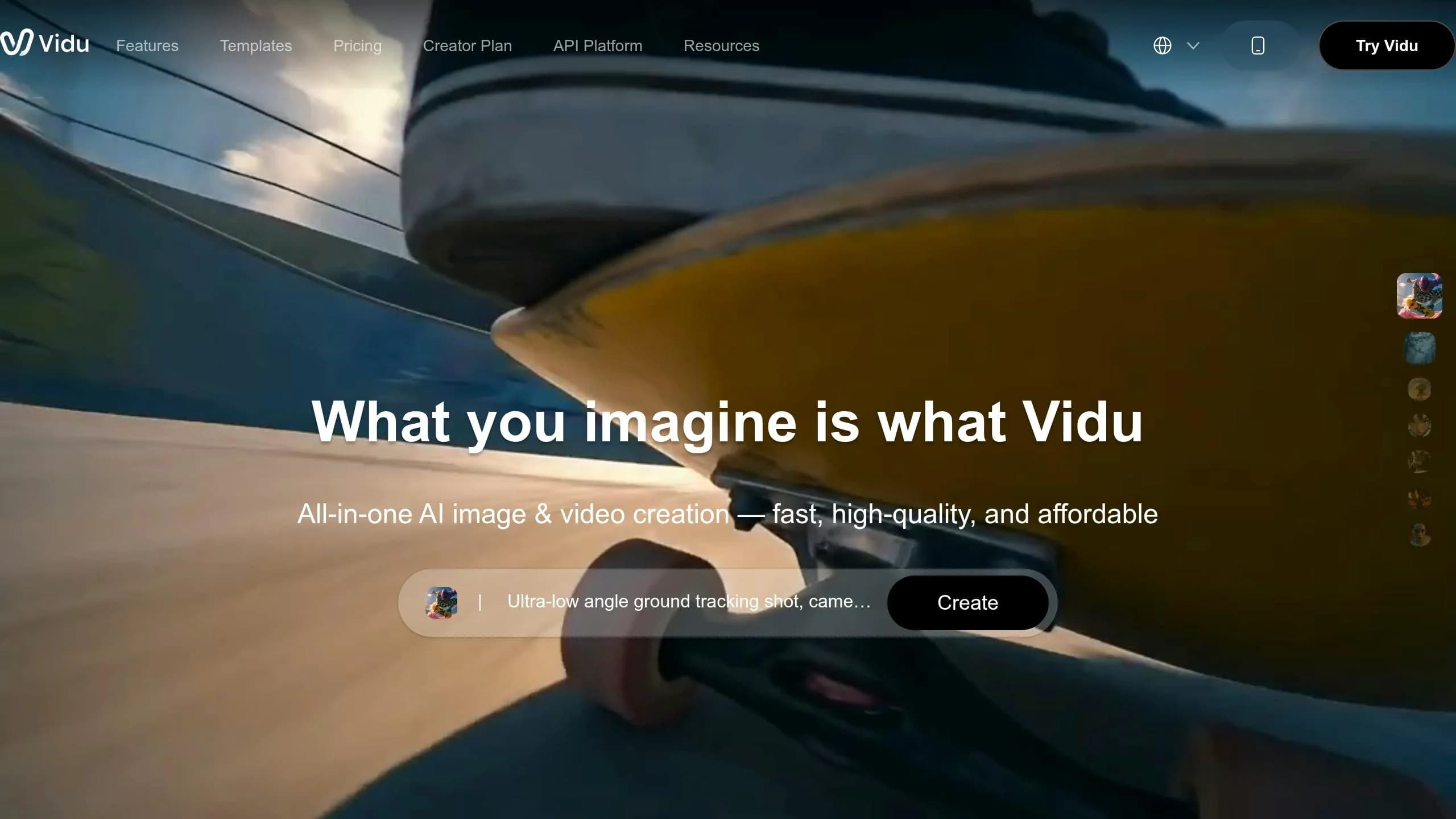
The Vidu Q3 Pro is designed to generate video and audio simultaneously, delivering pre-segmented clips that are ready for immediate assembly. This streamlined process is perfect for teams handling high-volume content pipelines, where reducing manual editing is a top priority. Let’s dive into how the Vidu Q3 Pro simplifies video production.
Video Quality
The Vidu Q3 Pro produces 1080p Full HD at 24 fps, offering professional-grade visuals with excellent lighting, depth of field, and smooth motion achieved through advanced temporal modeling [31]. It supports clips up to 16 seconds, providing more usable footage per generation compared to some competitors [28]. The model’s camera control is impressive, seamlessly handling dolly, tracking, and orbit shots [29][30].
"Pro's cinematic quality is outstanding! And Turbo lets me quickly validate creative directions - using both models together doubles my efficiency." - Sarah Johnson, Content Creator [30]
A standout feature is Smart Cuts, which automatically identifies logical scene boundaries and generates metadata for each edit point. This allows automation tools to splice clips without requiring manual review, a capability unmatched by other models in this space [28][33].
Audio-Video Sync
The Vidu Q3 Pro excels at synchronizing dialogue, ambient sound, and music in a single generation pass [28][32]. Its audio is contextually aware, ensuring that visual elements, like heavy rain, are accompanied by matching sound effects. This built-in integration eliminates the need for a separate audio pipeline, saving time and effort.
When paired with its API integration, these features make the Vidu Q3 Pro a game-changer for speeding up content production.
Pricing
The Vidu Q3 Pro is positioned as a premium option, with pricing determined on a per-second basis through APIMart. Rates vary based on resolution, giving teams the flexibility to balance costs with quality:
| Resolution | APIMart Rate |
|---|---|
| 540p | $0.056/sec |
| 720p | $0.12/sec |
| 1080p | $0.128/sec |
For example, a 12-second 1080p clip costs about $1.54. The inclusion of integrated audio and Smart Cuts metadata can significantly reduce post-production labor costs [30].
Integration Options
To complement its production capabilities, the Vidu Q3 Pro is available through platforms like APIMart, Atlas Cloud, and Replicate via standard REST APIs. It supports Python, Node.js, and cURL for flexibility [28][30][35]. Additionally, it integrates with ComfyUI and N8N, enabling users to create automated workflows [35]. Switching between the Pro and Turbo variants is as simple as changing a single model parameter, making it easy to test both options within the same setup [30][34].
"As a developer, I love the unified design of the Vidu Q3 API. Pro and Turbo share the same interface - just switch the model parameter. Integration was a breeze." - Alex Kim, Full-Stack Engineer [30]
The platform also boasts a 99.9% SLA for uptime, and all videos generated via official API providers are cleared for commercial use in marketing, social media, and corporate communications [31][28].
Pros and Cons
Here's a quick overview of how each model stands out and where they fall short, helping you decide which tool fits your production needs. The table below provides a side-by-side comparison for easy reference.
Kling V3 stands out with native 4K at 60fps [2], making it perfect for action-packed scenes or product demos that require smooth motion. It's supported by a simple prompt-to-video workflow and a well-developed API, ideal for handling high-volume social media content. However, its 15-second clip length limit makes it less suitable for longer narratives.
Sora 2 Preview shines in storytelling and physics-based realism, featuring a persistent character ID system and the ability to create clips up to 25 seconds [2]. This makes it a strong choice for entertainment and film projects that demand continuity. On the downside, it comes at a mid-to-premium cost of $0.08/sec via APIMart and offers fewer resolution options than Kling V3.
MiniMax Hailuo 2.3 focuses on speed and affordability, priced at just $0.025/sec, making it ideal for quick-turnaround projects or bulk production. However, it's not designed for complex or extended scenes.
Vidu Q3 Pro is tailored for high-volume production, offering robust performance for agencies and studios managing demanding workflows. Its main drawback? Premium pricing at $0.12/sec.
| Tool | Video Quality | Audio‑Video Sync | Starting Price (APIMart) | Integration Ease |
|---|---|---|---|---|
| Kling V3 | Native 4K at 60fps, cinematic | Audio‑video sync not natively integrated | $0.0672/sec (720p) | High - Simple API with mature coverage |
| Sora 2 Preview | High, physics-accurate | Audio‑video sync not natively integrated | $0.08/sec | Moderate - Limited resolution options |
| MiniMax Hailuo 2.3 | Good for short, fast-turnaround clips | Audio‑video sync not natively integrated | $0.025/sec | High - Fast, low-friction setup |
| Vidu Q3 Pro | High-performance, optimized for production | Natively integrated | $0.12/sec | High - ComfyUI, N8N, 99.9% SLA |
This breakdown helps pinpoint the right tool based on the specific demands of your project, from quick social media clips to detailed storytelling or large-scale production needs.
Conclusion
By March 2026, 42% of Fortune 500 companies had integrated AI video tools into their production workflows, highlighting just how essential these tools have become in the industry [36]. Each of the models discussed here caters to distinct production needs, making it crucial to choose the right one for your specific goals.
For teams focused on high-volume social media content or quick prototypes, Kling V3 delivers excellent cost efficiency. If your project demands physics-accurate storytelling or longer, more intricate scenes, Sora 2 Preview is the go-to option, even with its higher price tag. On the other hand, MiniMax Hailuo 2.3 is a great choice for those working with tight budgets and fast deadlines. For agencies or studios managing large-scale production, Vidu Q3 Pro is designed to handle high-volume demands with ease.
As CreativeToolsAI aptly put it:
"The era of asking 'which AI video generator is best?' is over. In March 2026, the question is: which model is right for THIS shot?" [36]
Many professional teams now run two or even three models simultaneously, tailoring each tool to the specific needs of individual shots. This approach not only enhances flexibility but also ensures the best possible outcome for every scene. Since all four models are conveniently available on APIMart, testing and integrating them into your workflow has never been easier. Selecting the right tool doesn’t just streamline production - it opens up new creative possibilities.
FAQs
Which alternative is best for my use case (marketing, education, e-commerce, or entertainment)?
The right tool for your needs will depend on your goals and how you work:
- Marketing or e-commerce: Seedance 2.0 is a standout choice. Its multimodal system ensures brand consistency and creates cost-effective multi-shot sequences - perfect for ads and social media content.
- Entertainment: Sora 2 shines when it comes to cinematic storytelling. It supports longer takes and delivers physics-based realism. However, note that its API will no longer be available after September 2026.
- General workflows: Veo 3.1 offers a simple solution for text-to-video or frames-to-video tasks, making it a versatile option for various projects.
How do I choose between 4K quality, longer clip length, and better audio sync?
Selecting the right AI video model comes down to what matters most to you, as no single tool dominates across all features.
- 4K quality: For ultra-smooth motion, go with Kling 3.0 (60fps). If you're after a cinematic vibe, Veo 3.1 (24fps) is your pick.
- Longer clips: Need extended video lengths? Sora 2 handles clips up to 25 seconds.
- Audio sync: Want to save time on syncing? Both Seedance 2.0 and Veo 3.1 deliver precise lip-syncing paired with high-quality sound.
Each model shines in its own way, so your priorities will guide the best choice.
What should I know about API integration, output storage, and commercial rights?
To incorporate video generation into your workflow, you'll need to authenticate your requests by including a Bearer Token in the header. Format it as: Authorization: Bearer YOUR_API_KEY.
Since video generation works asynchronously, follow a submit-poll-download process:
- Submit your request: Send the necessary data to initiate video creation.
- Poll for updates: Use the task ID you receive to check the status until the process is complete.
- Download the video: Once ready, retrieve the video link.
Keep in mind, these generated video links are temporary - they expire after 24 hours. Make sure to download and securely store the videos within that timeframe. Additionally, consider any copyright concerns or watermarking rules associated with the models you're using.
Choose the model you want in the model marketplace
Try chat, image and video models in the APIMart model marketplace, and experience model capabilities quickly with one unified API.