
What Is Seedance 2.0? Doubao AI Video Model
A clear breakdown of Seedance 2.0, ByteDance Doubao multimodal AI video model: its architecture, audio sync, omni-reference system, pricing, and APIMart API.
Seedance 2.0 is ByteDance's advanced AI video model, launched on February 12, 2026. It processes text, images, audio, and video simultaneously, offering faster, polished video production without the need for manual editing. Key features include synchronized stereo audio and video generation, multi-shot scripting for precise control, and an Omni-Reference system to maintain visual consistency across clips. Businesses can save time and resources by creating cross-platform content in various aspect ratios (9:16, 16:9, 21:9) from a single input.
Highlights:
- Unified multimodal architecture: Handles multiple input types in one step.
- Omni-Reference system: Ensures consistent visuals using tagged reference assets.
- Advanced scripting: Allows detailed control over shots, camera movements, and transitions.
- 2K resolution video: Supports up to 24 fps and seven aspect ratios. For alternative cinematic results, developers often use the Kling V3 API for high-fidelity text-to-video generation.
- Audio integration: Generates synchronized sound and native lip-syncing in 8+ languages. Similar capabilities are available via Google's Veo 3.1 API, which also supports high-quality video with synced audio.
- Integration via APIMart: Offers cost-effective, scalable access to Seedance 2.0 with pay-as-you-go pricing.
This tool is transforming video production for marketing, education, and entertainment by simplifying workflows and reducing costs.
Core Features and Technical Capabilities
Multimodal Architecture and Input Support
Seedance 2.0 is powered by a Diffusion Transformer (DiT) backbone, a major leap forward from the U-Net structures found in earlier models. This cutting-edge architecture excels at handling long-range relationships across both space and time, which is why the model can maintain visual consistency in longer video clips [6].
The model processes multiple input types - text, images, audio, and video - all at once. A single request can include up to 9 images, 3 video clips, and 3 audio files [1]. It generates video at 24 fps with resolutions reaching up to 2K, and supports seven aspect ratios, including 16:9, 9:16, 21:9, and an "adaptive" mode that aligns with the dimensions of the input assets [3].
Audio integration is another standout feature. Unlike traditional methods that add sound during post-production, Seedance 2.0 generates synchronized two-channel stereo audio - covering dialogue, sound effects, and music - alongside the visuals in a single pass. The model also supports native lip-syncing in over 8 languages [3]. These capabilities set the stage for the advanced scripting and stability features explored below.
Advanced Technical Features
Seedance 2.0 offers a range of tools for precise creative direction. Its multi-shot scripting feature allows users to define structured sequences directly within their prompts. Users can specify shot types, camera movements like rack focus or tracking shots, and scene timing. The model interprets these instructions and brings them to life [2][3].
"The creative workflow becomes more intuitive, allowing users to direct and realize their imagination... breaking the material boundaries of conventional video generation." - ByteDance Seed Team [1]
The model also employs physics-aware training objectives, which penalize unrealistic motion during video generation. As a result, elements like fabric movement, water flow, and interactions between multiple subjects appear natural and free of visual glitches [1][6]. These advancements ensure smooth motion and consistent visual identity, as detailed in the next section.
Motion Stability and Identity Consistency
To tackle challenges like subject drift or flickering, Seedance 2.0 integrates temporal attention layers into its DiT architecture. This ensures stability in clips lasting up to 15 seconds [6]. For maintaining identity consistency, the Omni-Reference tagging system allows users to anchor reference assets with tags (e.g., @image1), ensuring that features like facial details and clothing remain consistent throughout the video [1][2].
For even greater control, users can define both a starting and ending image using first_frame_url and last_frame_url parameters, effectively locking the visual state at both ends of a clip. Additionally, the return_last_frame function outputs the final frame as a high-quality image, which can be used as the starting point for subsequent clips. This makes it possible to create continuous, visually consistent sequences across multiple requests [3][5].
| Feature | Technical Implementation | Benefit |
|---|---|---|
| Motion Stability | Physics-aware training & DiT architecture | Realistic gravity, fluid dynamics, and interactions |
| Identity Consistency | Omni-reference tagging (@image1) | Maintains facial features and clothing across shots |
| Temporal Coherence | Long-range temporal attention layers | Prevents subject drifting or flickering in clips up to 15 seconds |
| Scene Control | Multi-shot scripting & frame anchoring | Enables precise camera moves and transitions |
Practical Workflows and Usage
Reference Clustering and Identity Locking
The Omni-Reference system in Seedance 2.0 sets it apart from earlier video models. You can upload a cluster of up to 12 reference files, which can include 9 images, 3 video clips, and 3 audio files. Each asset can be tagged (e.g., @image1, @video1) to define its role in the generation process[7][8].
Clusters are organized based on role assignment. For example, one image might define a character's face, another might represent a specific outfit or product, and a third could serve as the background environment[2][8]. To ensure consistent character representation, stick to a single face reference image; using multiple faces in one cluster can lead to unpredictable results[2].
"The omni-reference system... lets you tag [images] explicitly in your prompt and control exactly where and how they appear. That's a fundamentally different model for creative control." - Segmind[2]
Motion Transfer and Camera Control
After setting up reference clusters, the next step is mastering motion and camera control. Reference videos dictate the video's timing and camera movements, while text prompts handle spatial elements like subject placement, environment, and visual style[9]. Keeping these functions separate ensures cleaner, more polished results.
"Text is best for spatial decisions. Reference video is best for temporal decisions." - Invideo[9]
For best results, use reference clips that are 3–8 seconds long. These clips should feature a single shot with clear action, stable lighting, and minimal background distractions. Once uploaded, tag the clip (e.g., @video1) and write prompts like: "Apply camera movement from @video1 to scene with @image1."
When specifying camera movements, use precise, cinematic terms such as "slow dolly forward", "rack focus", "orbital pan," or "handheld tracking shot." Here’s a quick guide to common camera moves:
| Camera Move | Effect |
|---|---|
| Tracking Shot | Keeps focus on a moving subject |
| Pull-back | Reveals the surrounding environment and scale |
| Orbit | Circles the subject for a 360-degree view |
| Rack Focus | Shifts focus between foreground and background |
| POV | Shows the scene from the subject's perspective |
Blending accurate camera instructions with clear prompts creates seamless video narratives.
How to Write Effective Prompts
Once you’ve nailed camera moves and reference clustering, the final step is crafting effective prompts. For multi-shot videos, structure your prompt like a shot list with timestamps. For example:
Shot 1 | 0s–3s | Wide establishing shot of a city street at golden hourShot 2 | 3s–6s | Medium close-up on @image1 turning toward the camera
This approach provides the model with a clear sequence to follow, ensuring distinct actions don’t blur into one continuous shot[2].
To maintain visual consistency, include details like dialogue in double quotes, lighting conditions (e.g., "overcast midday"), and specific instructions such as "hold on the final pose briefly" to avoid abrupt endings. When testing a concept, render short prototypes at 480p for 4–5 seconds to confirm motion and composition before committing to higher resolutions like 720p or 1080p[10].
Watch: How to Use Seedance 2.0 for AI Video Generation
Integration Through APIMart

Accessing Seedance 2.0 via APIMart
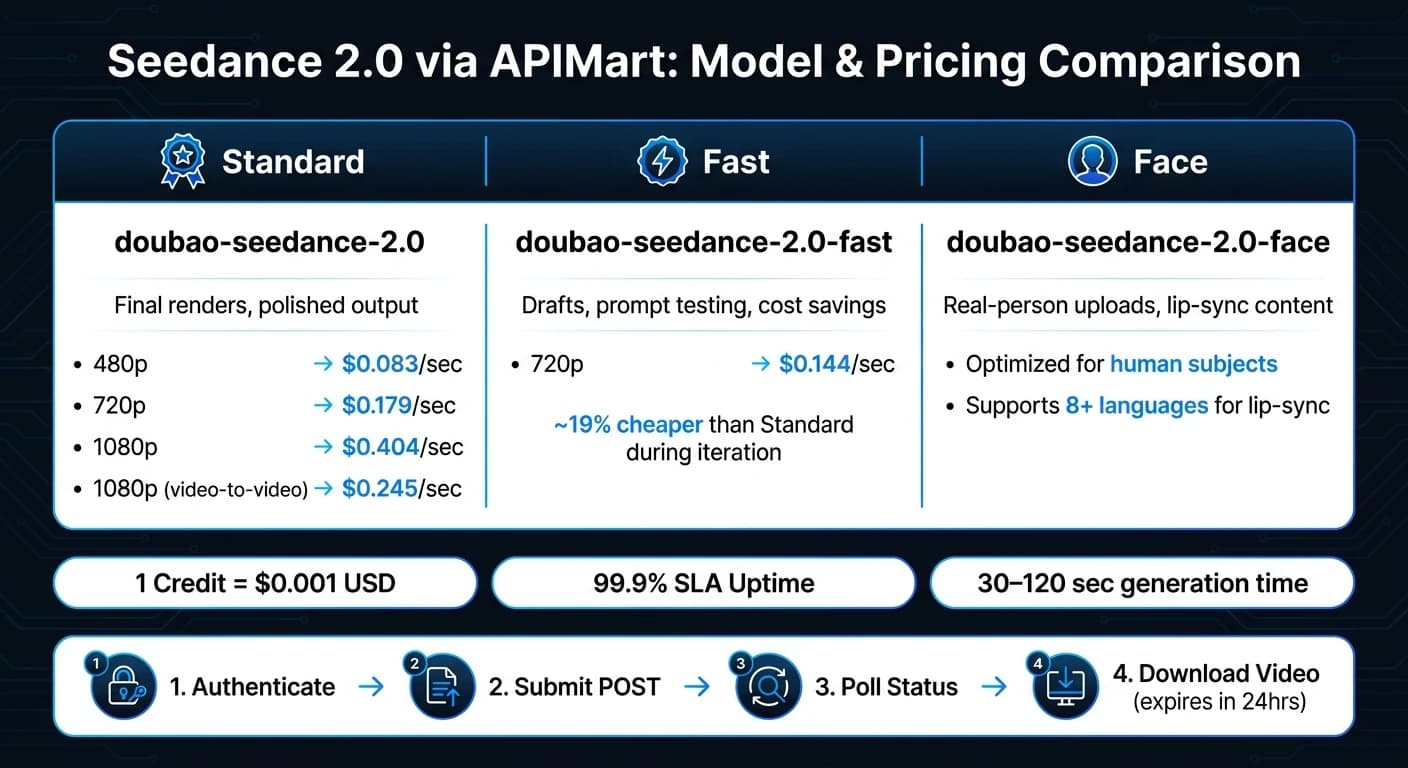
APIMart offers U.S. developers and businesses a straightforward way to access the full lineup of Seedance 2.0 models. These include doubao-seedance-2.0 (standard), doubao-seedance-2.0-fast (optimized for speed), and doubao-seedance-2.0-face (designed for real-person uploads) [5][12]. With APIMart, you don’t need separate vendor accounts or billing systems - everything operates through a single API with USD pay-as-you-go pricing, where 1 credit equals $0.001 [12].
The pricing varies based on resolution and model type. For example:
- The standard model costs $0.083/sec at 480p, $0.179/sec at 720p, and $0.404/sec at 1080p.
- In video-to-video reference mode, the 1080p rate drops to $0.245/sec [12].
- For testing or drafts, the
doubao-seedance-2.0-fastmodel at 720p is available for $0.144/sec [12].
APIMart also boasts a 99.9% SLA and typical generation times ranging from 30 to 120 seconds per request [4].
"As a developer, I appreciate the clean API and fast response times. Doubao Seedance 2.0 integrates seamlessly into our pipeline." - Alex Wang, Full-Stack Engineer [4]
Step-by-Step Integration Workflow
To get started, obtain an API key from the APIMart Key Management page and include it in your request headers as Authorization: Bearer YOUR_API_KEY. The integration follows an asynchronous workflow: submit a generation task, get a task_id, and poll a separate endpoint until the status is marked "completed" [5][3].
| Step | Action | What Happens |
|---|---|---|
| 1. Authenticate | Add API key to request header | Grants access to all APIMart models |
| 2. Submit | POST payload to /v1/videos/generations | Returns a task_id with status "submitted" |
| 3. Poll | GET request with task_id | Status updates until "completed" |
| 4. Download | Retrieve video from returned URL | Link expires after 24 hours - download promptly [4][3] |
For cost efficiency, try doubao-seedance-2.0-fast during initial prompt iterations, then switch to the standard model for final renders [5][3]. When polling for task updates, use exponential backoff - start with a 10-second interval and double it each time to avoid hitting rate or concurrency limits [3]. For image-to-video tasks, set the size parameter to "adaptive" so the output matches your source image dimensions [5].
This integration process allows you to focus on the creative aspects while APIMart manages the technical details.
Using Other APIMart Models Alongside Seedance 2.0
Seedance 2.0's design works seamlessly with other APIMart models, supporting workflows that involve multiple creative assets. Since all models share the same authentication and billing environment, you can build multi-model pipelines without dealing with multiple API keys or invoices [4].
A common approach is to generate a base image with one model, then animate it using Seedance 2.0 or Veo 3.1 by referencing it in the image_urls parameter. To maintain visual consistency across projects, use the return_last_frame parameter. This feature lets you take the final frame of one video and use it as the starting frame for the next, creating smooth, multi-segment narratives [5]. For assets you frequently use, such as branded avatars, APIMart's Asset URL system (e.g., asset://asset_a) allows you to reference approved files across requests without re-uploading or re-reviewing them [5].
This unified multi-model integration simplifies video production workflows, making it easier to create engaging content for marketing, education, and entertainment.
Industry Use Cases
Marketing and Advertising
Marketing teams are tapping into Seedance 2.0 to streamline the creation of consistent, branded content across a wide range of products. A standout feature is the Omni-Reference system, which ensures a brand spokesperson's appearance remains uniform across more than 40 product SKUs - completely eliminating the need for re-shoots. By tagging reference images (like @image1 for the talent and @image2 for the product), teams can maintain a cohesive visual identity across all video clips.
Another game-changer is the model's ability to handle multiple aspect ratios. This means a single creative brief can generate content tailored for platforms like YouTube, TikTok, and Instagram simultaneously. Static images can be transformed into short animated clips (4–15 seconds) using the Image-to-Video feature. Meanwhile, audio-driven generation adds synchronized voiceovers and sound effects - like the crisp pop of a soda can opening - without needing extra editing. According to Wyzowl, 89% of marketers using AI video tools report saving time, with many shaving off over two hours per project [13]. And with costs under $1 for an 8–10 second HD clip, this tool makes live client iterations much more feasible.
These benefits aren't limited to marketing - they also shine in education and entertainment.
Education and Training
E-learning teams are finding major advantages with Seedance 2.0's phoneme-level lip-sync across more than eight languages, including English, Spanish, French, German, Japanese, Korean, Chinese, and Portuguese. With this feature, a single script can be recorded and then localized by swapping out the audio track. The model automatically adjusts lip movements to match the new language.
"The lip-sync feature makes it possible to generate instructor-led content in multiple languages from a single script." - CCAPI Team [11]
Consistency is another critical factor for serialized courses. The Omni-Reference system ensures characters maintain their appearance throughout an entire series of videos. For technical or science-based training, the tool's physics-aware motion engine provides realistic simulations, such as accurate fluid dynamics, tool handling, and object interactions - tasks that would otherwise require costly live-action shoots.
These features also empower creators to elevate their storytelling.
Entertainment and Creator Content
Independent creators and filmmakers are using Seedance 2.0's multi-shot scripting to bring intricate narratives to life from just a single prompt. For example, you can outline a sequence like a wide establishing shot, followed by a rack focus, and then a hard cut, and the model delivers a seamless clip. With support for up to 20 seconds of continuous video - significantly more than the previous 5–8 second limit [6] - creators now have more room to develop their ideas.
"The visual quality of Doubao Seedance 2.0 is incredible! The motion is so smooth and natural, it really elevates my content." - Sarah Kim, Content Creator [4]
For longer projects, creators can chain clips together by using the return_last_frame feature, which ensures the final frame of one clip transitions smoothly into the next. Additionally, the model's native support for 21:9 ultrawide resolution at 1080p (2520 × 1080) makes it an excellent choice for cinematic productions that go beyond standard social media formats [13].
Conclusion
Seedance 2.0 pushes the boundaries of AI video generation with its unified multimodal architecture, capable of processing text, images, audio, and video in a single step. This allows U.S. businesses to seamlessly integrate existing brand assets into the model, ensuring consistent outputs without needing multiple tools.
By May 2026, Seedance 2.0 achieved an ELO score of 1,272, securing the #2 spot on the Artificial Analysis Video Arena leaderboard [13]. Additionally, 89% of marketers using AI video tools report saving over two hours per project [13]. At approximately $0.93 for a 5-second 1080p clip and $1.97 for a 15-second render [3], it delivers an impressive balance of cost and quality - perfect for teams managing large-scale content production.
Its performance is further enhanced through integration with APIMart, which offers scalable production capabilities. APIMart provides access to over 500 models and a 99.9% SLA [4], enabling businesses to pair Seedance 2.0 with tools like language models for scriptwriting or image models for asset creation.
"As a developer, I appreciate the clean API and fast response times. Doubao Seedance 2.0 integrates seamlessly into our pipeline." - Alex Wang, Full-Stack Engineer [4]
For cost-effective workflows, teams can start with the doubao-seedance-2.0-fast variant, which reduces costs by 19% during early drafts [13][3], and then switch to the Standard model for polished final renders. This approach keeps iterations efficient and budgets manageable.
FAQs
What’s the best way to keep a character consistent across multiple clips?
To keep character consistency in Seedance 2.0, rely on the reference-driven control system. Begin by uploading reference images of the character’s face and wardrobe. Then, tag these images in your prompt using identifiers like @image1. For better composition and consistent color palettes, always start sequences with a still frame. To avoid confusion with character identities, stick to generating one or two characters at a time for best results.
How do I structure a prompt for multi-shot videos with camera moves?
To craft prompts for multi-shot, camera-guided videos, make use of the @ mention system to connect your uploaded assets to the intended sequence. For instance, you can reference assets like @Video1 for specific camera movements or @Image1 for setting up the initial frame.
Be precise when describing temporal details, such as how the camera should behave or what actions the subject should take. For example, you might write: "Apply @Video1's camera movement; start with a slow orbit, then transition into a close-up as the door opens."
Also, make sure to clearly distinguish between motion (like camera movements or subject dynamics) and style (like visual tone or artistic effects) to ensure accurate interpretation.
Which Seedance 2.0 model should I use for drafts versus final renders?
When working on drafts, opt for the doubao-seedance-2.0-fast model. It's designed to prioritize speed, making it ideal for quick prototyping and testing. For your final renders, switch to the standard doubao-seedance-2.0 model. This version delivers 1080p resolution and cinematic-level quality. If your project involves real-person uploads, make sure to use the corresponding -face variant.
To streamline your workflow, begin with short clips - around 5 seconds long - while drafting. This approach allows you to fine-tune your style and make adjustments before diving into longer sequences.
Choose the model you want in the model marketplace
Try chat, image and video models in the APIMart model marketplace, and experience model capabilities quickly with one unified API.