Seedream 5.0 Lite vs Qwen Image 2.0 Compared
Seedream 5.0 Lite vs Qwen Image 2.0 compared on resolution, text rendering, speed, content policy and price to help you pick the right AI image model.
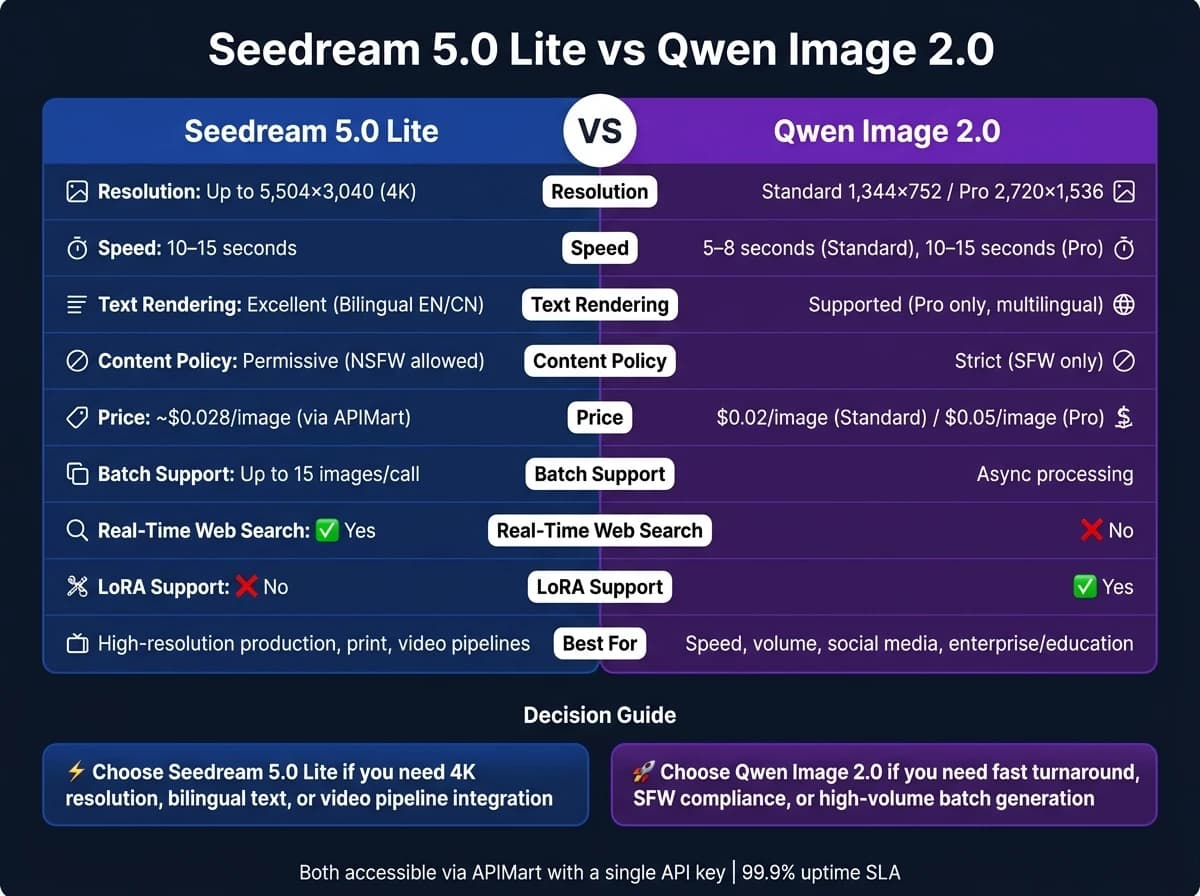
Looking for the right AI image generator? Seedream 5.0 Lite and Qwen Image 2.0 cater to different needs. Seedream offers high-resolution outputs, advanced text rendering, and reasoning capabilities - ideal for detailed projects like technical diagrams or bilingual marketing. Qwen Image focuses on speed and photorealism, making it perfect for high-volume tasks like social media graphics or product visuals. Here's a quick breakdown:
- Seedream 5.0 Lite: 4K resolution, bilingual text support, reasoning-based image generation, permissive content policies, $0.028/image.
- Qwen Image 2.0: Faster generation (5–8 seconds), SFW-only, two tiers (Standard: $0.02/image, Pro: $0.05/image), photorealistic visuals.
Quick Comparison
| Feature | Seedream 5.0 Lite | Qwen Image 2.0 Standard | Qwen Image 2.0 Pro |
|---|---|---|---|
| Resolution | Up to 5,504×3,040 (4K) | 1,344×752 | 2,720×1,536 |
| Speed | 10–15 seconds | 5–8 seconds | 10–15 seconds |
| Text Rendering | Excellent (bilingual) | Not supported | Supported |
| Content Policy | Permissive (NSFW allowed) | Strict (SFW only) | Strict (SFW only) |
| Price | ~$0.028/image | $0.02/image | $0.05/image |
Need speed and affordability? Go with Qwen Image 2.0.
Need high-resolution and logical reasoning? Seedream 5.0 Lite is your pick. For even higher fidelity, you might also consider GPT Image 2 for native 4K output.
Both are available via APIMart with flexible pricing and a single API key.
Seedream 5.0 Lite: Features and Use Cases
Core Features and Technical Capabilities
Seedream 5.0 Lite is powered by a multimodal transformer and diffusion decoder, paired with a chain-of-thought (CoT) engine. This setup enables the model to analyze spatial and physical relationships before producing its visual outputs [3]. It also offers real-time web search capabilities, allowing it to pull live data - like stock prices, weather updates, and trending topics - when needed. This ensures that its visual outputs are grounded in the latest information [2][7].
The model supports multi-image fusion, where up to 14 reference images can be used in a single API call. This feature helps lock in details like brand colors, character designs, or layout styles, ensuring uniformity across different outputs [3]. Additionally, the unified editing feature allows users to create and modify visuals within the same model. For example, you can give instructions like "change the background to a sunset" without switching tools, making workflows more efficient [2].
"The text rendering in Seedream 5.0 Lite is remarkable. We generate promotional banners with accurate headlines and CTAs - something we couldn't achieve reliably with other models." - Alex Thompson, Marketing Tech Lead [5]
For U.S. businesses, the model's bilingual English/Chinese typography support is a standout feature, especially for brands targeting both domestic and international audiences. With support for 4K resolution (5,504×3,040 pixels at 16:9) and nine aspect ratios, it offers flexibility for various marketing and design needs [4].
Pricing and Performance
Seedream 5.0 Lite is competitively priced at $0.035 per image (based on BytePlus's official rate). Through APIMart, the cost drops to about $0.028 per image - a 20% savings. Starter packages are also available, with options like $6.99 for 400 images, $24.99 for 1,028 images, and $49.99 for 2,000 images [6][5].
The model delivers results quickly, averaging 2–4 seconds per image, making it a good fit for most production pipelines [8]. For large-scale projects, the cost remains reasonable - generating 100,000 images would cost around $3,200. This makes it particularly appealing for industries like e-commerce or educational publishing, where high volumes of content are needed [8].
"Batch generation of 15 images per call transformed our workflow. We create entire product catalog variations in minutes instead of hours." - Jessica Park, E-commerce Developer [5]
The ability to generate up to 15 images per API call streamlines batch production, allowing users to create multiple variations at once [4]. These speed and cost benefits make it a practical choice for integrating into workflows that involve multi-modal video production.
Using Seedream 5.0 Lite in Multi-Modal and Video Pipelines
Seedream 5.0 Lite is a natural fit for text-to-image-to-video workflows, especially when accessed through APIMart. A common approach involves using the model’s sequential image generation mode to create a set of consistent keyframes. These frames can then be passed to a video model to produce smooth, animated content [4]. This approach works effectively when paired with high-consistency models like WAN 2.6. Thanks to its ability to maintain consistent details - like facial features and subjects - across frames, the resulting videos feel coherent and polished.
For projects like storyboarding or character-driven content, the "sequential_image_generation" parameter (set to "auto") ensures visual consistency across batches. This is particularly useful for educational tutorials or multi-frame ad campaigns. Additionally, since February 2026, the model has been compatible as a ComfyUI node, making it easier to integrate with other AI tools in local workflows [3].
Qwen Image 2.0: Features and Use Cases
Core Features and Technical Capabilities
Qwen Image 2.0 stands out for its ability to generate text-rich visual content quickly and seamlessly. By combining text-to-image generation and image editing into one platform, it eliminates the need for switching between tools, streamlining workflows.
One of its standout features is its advanced typography capabilities. With support for prompts up to 1,000 tokens, Qwen Image 2.0 can accurately create complex layouts, including infographics and presentation slides, without requiring manual adjustments. As Sawyer Ruhl from ComputerTech noted:
"Qwen Image 2.0 earns a clear recommendation for anyone whose image generation workflows involve text... it generates full-layout infographics, multilingual posters, and presentation slides with the kind of fidelity you'd otherwise have to fake in Photoshop."
The model delivers images at a native resolution of 2,048×2,048 pixels, ensuring sharp detail in elements like skin textures, architectural designs, and product surfaces. Its dual-encoding system separates semantic understanding from visual rendering, maintaining consistency when making edits. These features make it a reliable option for demanding creative tasks.
Performance and Workflow Applications
Powered by a ~7B parameter diffusion decoder, Qwen Image 2.0 offers faster processing and reduced memory requirements. It operates efficiently on systems with as little as 4GB VRAM, though 8GB is recommended for optimal performance. Benchmark results highlight its capabilities, scoring 88.32 on DPG-Bench and 0.91 on GenEval, outperforming several larger closed-source models.
For businesses in the U.S., the model is particularly effective for creating text-heavy visuals such as marketing banners, branded infographics, OKR charts, annotated product images, and social media graphics. Its ability to realistically integrate text into various surfaces makes it invaluable for these applications. Pricing through APIMart is straightforward:
- The standard
qwen-image-2.0variant, ideal for quick iterations and prototyping, costs $0.02 per image. - The
qwen-image-2.0-provariant, designed for high-detail production work and supporting features like negative prompts, is priced at $0.05 per image.
| Model Variant | Best Use Case | Price (APIMart) |
|---|---|---|
qwen-image-2.0 | Fast iteration and prototyping | $0.02/image |
qwen-image-2.0-pro | Final production with high detail | $0.05/image |
Using Qwen Image 2.0 in Multi-Modal and Video Pipelines
Qwen Image 2.0 is a natural fit for multi-modal and video production workflows, thanks to its high-resolution 2K outputs. These visuals are perfect for video techniques like zooming, panning, and cropping, making it an excellent tool for creating explainer videos or motion graphics. For example, users can generate branded slides, annotated charts, or infographic panels and then animate them using video editing tools.
The model integrates smoothly with frameworks like ComfyUI, Hugging Face Diffusers, vLLM-Omni, and SGLang-Diffusion. Its OpenAI-compatible API allows for easy incorporation into existing pipelines. Additionally, APIMart offers asynchronous task processing, enabling users to handle batch image generation requests without interrupting their workflow. With a 99.9% uptime SLA, Qwen Image 2.0 ensures dependable performance for professional production environments.
Seedream 5.0 Lite vs Qwen Image 2.0: Direct Comparison
Image Quality and Feature Comparison
Seedream 5.0 Lite delivers images at an impressive resolution of approximately 2,672×1,504 (16:9), which is four times higher than Qwen Image 2.0's 1,344×752 resolution. This makes Seedream a better option for projects requiring large-format visuals or assets for video production. Additionally, Seedream 5.0 Lite excels in English text rendering and offers real-time web search for creating trend-sensitive visuals. On the other hand, Qwen Image 2.0 stands out with its bilingual text support (Chinese and English) and unique outputs like layered RGBA and multi-angle generation, making it highly versatile for specific creative needs.
"Qwen Image 2 prioritizes rapid turnaround with clean photorealistic results, while Seedream V5 Lite offers significantly higher pixel output and unique in-image text rendering." - Imagine Studio [1]
| Feature | Seedream 5.0 Lite | Qwen Image 2.0 |
|---|---|---|
| Max Resolution | 2K (≈2,672×1,504 at 16:9) | ~1.3K (≈1,344×752 at 16:9) |
| Text Rendering | Good (English) | Excellent (Bilingual CN/EN) |
| Real-Time Web Search | Yes | No |
| Special Outputs | Visual reasoning, high-res output | Layered RGBA, multi-angle generation |
| Content Policy | Permissive (supports NSFW) | Restricted (SFW only) |
Cost and Performance for U.S. Businesses
When it comes to cost and speed, Qwen Image 2.0 offers a clear advantage. It costs $0.02 per image, compared to Seedream 5.0 Lite's $0.035. Qwen also generates images faster, taking only 5–8 seconds versus Seedream's 10–15 seconds [1][10]. For businesses needing high-volume, rapid-turnaround content - like daily social media posts or quick A/B testing - this speed and affordability are game-changers.
However, Seedream 5.0 Lite justifies its higher cost with unparalleled resolution included in its base price, without extra fees for premium quality. This makes it a go-to choice for projects where high-resolution output is essential, such as large-scale prints or visuals integrated into video workflows.
| Factor | Seedream 5.0 Lite | Qwen Image 2.0 |
|---|---|---|
| Price per Image | $0.035 | $0.02 (standard) / $0.05 (Pro) |
| Generation Speed | 10–15 seconds | 5–8 seconds |
| Batch Support | Up to 15 images per request | Async processing via APIMart |
| LoRA Support | Not available | Yes |
| Best For | High-resolution production | Quick ideation and prototyping |
Multi-Modal Workflow Integration
Both Seedream 5.0 Lite and Qwen Image 2.0 integrate seamlessly into multi-modal workflows via APIMart's unified API. This API uses OpenAI-compatible formatting and guarantees a 99.9% uptime SLA [5][9]. This setup allows users to operate both tools side by side or in sequence, creating a cohesive workflow for diverse creative needs.
The models differ in their downstream applications. Seedream 5.0 Lite connects directly with Seedance 2.0, enabling smooth transitions from images to video, making it ideal for motion graphics or explainer videos [11]. In contrast, Qwen Image 2.0's asynchronous task model is better suited for batch-heavy workflows, allowing jobs to process in the background without interrupting other tasks [9].
"The unified edit and generate capability means one service for everything. Simplified our entire image pipeline by removing three other tools." - Emma Liu, Backend Engineer [5]
For a balanced approach, businesses can use Qwen Image 2.0 for quick ideation and concept development, then rely on Seedream 5.0 Lite for final high-resolution rendering or video integration. With APIMart's single API key, switching between the two models is effortless, requiring no extra configuration [5][9].
How to Choose Between Seedream 5.0 Lite and Qwen Image 2.0
When to Use Seedream 5.0 Lite
If your project demands high-resolution output or precise text overlays, Seedream 5.0 Lite is the go-to option. Its 4K output capability makes it perfect for print materials, large-scale advertising, and video backgrounds where any upscaling artifacts are unacceptable.
"4K output quality exceeded our expectations. We're using Seedream 5.0 Lite for print materials that require high resolution without any upscaling artifacts." - Maria Santos, Design Studio Owner [5]
This model also shines in bilingual campaigns and leverages advanced reasoning with real-time data, ensuring accuracy and consistency in production workflows.
When to Use Qwen Image 2.0
While Seedream 5.0 Lite has its strengths, Qwen Image 2.0 might be a better fit when speed and volume are top priorities. With a processing time of just 5–8 seconds per image, it’s nearly twice as fast as Seedream, making it ideal for tasks like storyboarding, social media concepting, and high-volume A/B testing where quick turnarounds matter most.
Its strict safe-for-work policy makes it suitable for enterprise and educational settings. Additionally, if your project involves languages beyond English and Chinese - such as Arabic, Japanese, or Korean - Qwen Image 2.0's broader language rendering support gives it a distinct advantage [12].
Using APIMart to Access Both Models
For many teams, combining the strengths of both models can streamline workflows. A smart approach is to use Qwen Image 2.0 for quick concept generation and Seedream 5.0 Lite for final high-resolution outputs. This blend ensures a smooth transition from brainstorming to polished production, meeting diverse project needs.
"The unified edit and generate capability means one service for everything. Simplified our entire image pipeline by removing three other tools." - Emma Liu, Backend Engineer [5]
APIMart makes accessing both models straightforward with a single API key, unified USD billing, and savings of up to 20%. For instance, Seedream 5.0 Lite costs as little as $0.028 per 4K image, and there’s no subscription commitment - just pay for what you use. Plus, a 99.9% uptime SLA ensures reliable performance, even in demanding production environments.
Qwen 2509 vs Nano Banana vs Seedream 4.0 | The Best AI Image Generator Showdown 2025
FAQs
Which model is best for print-ready images?
Seedream 5.0 Lite stands out as the top pick for print-ready images thanks to its exceptional resolution. With double the vertical and horizontal pixel count compared to Qwen Image 2.0, it delivers four times the total pixels. This level of detail ensures stunning results for large-format prints, intricate digital artwork, and crisp text. It's perfect for creating professional marketing materials, product packaging, and any commercial project demanding sharp, publication-quality visuals.
How do I keep characters consistent across multiple images?
To maintain character consistency with Seedream 5.0 Lite, you can include up to 14 reference images in a single API request. These reference images are crucial for helping the model preserve important details like facial features, skin tones, and overall style. Thanks to its unified multimodal architecture, the system thoroughly analyzes these references to ensure consistent style, composition, and lighting in the outputs, all while staying faithful to the original subject's appearance.
Can I use these models for NSFW content?
Seedream 5.0 Lite offers more flexibility by permitting creative outputs that include mature or sensitive content. On the other hand, Qwen Image 2.0 limits its outputs strictly to safe-for-work material. If your project requires the ability to handle adult content, Seedream 5.0 Lite is the better choice. However, for applications that demand strictly safe-for-work results, Qwen Image 2.0 is the more appropriate option.
Related Blog Posts
Choose the model you want in the model marketplace
Try chat, image and video models in the APIMart model marketplace, and experience model capabilities quickly with one unified API.