
What's New in Suno v5.5: Voices & Pro Editing
What's new in Suno v5.5: reusable personalized voices, cleaner vocal output with less hiss, and section-level editing tools like Replace Section and Extend.
If I had to sum up Suno v5.5 in one line: it cuts rework. I can keep one voice across songs, get cleaner vocal output, and fix parts of a track instead of remaking the whole thing.
Here’s the short version:
-
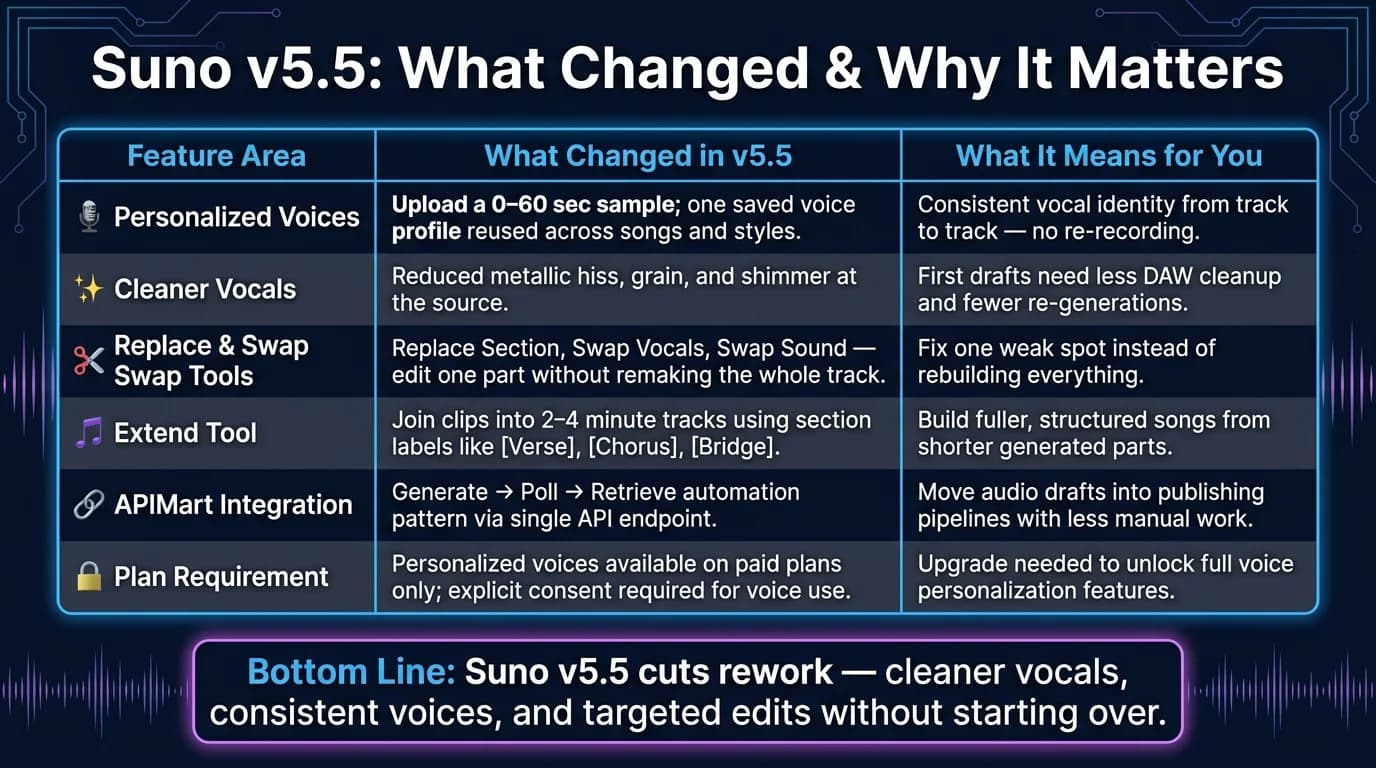
Personalized voices: I can upload or record a 0- to 60-second sample and reuse that voice across songs.
-
Cleaner vocals: v5.5 reduces issues like hiss, grain, and shimmer, so first drafts need less cleanup.
-
Editing tools: I can use Replace Section, Extend, Swap Vocals, Swap Sound, and Vocal Overdubbing to fix parts without starting over.
-
Team use: This fits creators, marketers, media teams, and developers who need the same voice and a shorter edit cycle.
-
Access and rules: Personalized voices are on paid plans, and voice use requires explicit consent and the right to use that voice.
-
Pipeline fit: Teams can connect Suno output to larger workflows with a generate → poll → retrieve setup through APIMart.
A few facts stand out. The voice sample can be as short as 60 seconds. Custom mode lets me set lyrics, style, BPM, and vocal gender. And for longer songs, Extend helps build tracks in the 2- to 4-minute range.
Suno v5.5 is Here: Make Music With YOUR Voice & Custom Models!
While Suno revolutionizes audio, you can also create high-end visuals using professional AI video generation tools.
Quick Comparison
| Area | What changed in v5.5 | What it means for me |
|---|---|---|
| Voice reuse | One saved voice profile across songs and styles | I can keep the same vocal identity from track to track |
| Vocal quality | Less metallic hiss, grain, and shimmer | Drafts sound cleaner with less DAW cleanup |
| Section editing | Replace or swap only part of a song | I fix one weak spot instead of remaking everything |
| Song length | Extend joins clips into longer tracks | I can build fuller songs from shorter parts |
| Workflow | APIMart supports generate, poll, retrieve | I can move tracks into publishing flows with less manual work |
| Access | Paid plans only | I need a paid account for personalized voices |
Bottom line: if my main problem is inconsistent voices, messy vocals, or having to regenerate full songs for small fixes, Suno v5.5 is a clear step up.
Personalized Voices in Suno v5.5
Suno v5.5 lets creators reuse one voice profile across songs, styles, and campaign assets. So if you want to switch from one genre to another, change the arrangement, or tweak the delivery, you can still keep the same voice identity from track to track. That kind of consistency matters when you're building a series instead of making one-off songs.
How Voice Capture and Verification Work
You can upload or record a 0- to 60-second sample [7]. Short and simple. That sample becomes the voice profile tied to your account.
Clean audio tends to work better than noisy recordings. Once the profile is saved, Suno can use it to generate songs, harmonies, or vocal layers, or even generate AI videos with synchronized audio while keeping the same voice identity in place. If you want more control, Custom mode lets you set lyrics, style, tempo (BPM), and vocal gender along with your personalized voice.
Where Consistent Voice Identity Helps Most
This is especially useful when the voice needs to stay the same across many pieces of content. A product team, for example, can use one vocal identity across a launch series and social posts, even if each asset uses a different music style.
It also fits educational content well. A narrator-style voice can stay the same across a course series or training library, which helps the listening experience feel steady from one lesson to the next.
Limits, Privacy, and Account Access
Personalized voices are available on paid plans. And there’s a clear rule here: any voice used in production must be uploaded with explicit consent and the proper rights.
The next piece is output quality. Cleaner vocals make these personalized voices sound more polished and easier to use in finished tracks.
Cleaner Vocals and Better Output Quality in v5.5
Earlier versions could leave tracks with metallic hiss, grain, or shimmer that made them sound artificial [8]. In many cases, fixing those issues meant adding extra DAW plugins or using artifact-repair tools [1][8].
v5.5 cuts down those problems at the source. The result is cleaner vocals, less muddiness, and steadier phrasing, which makes draft tracks more usable with less post-production [8]. That means fewer re-generations and a faster review cycle. For teams making repeated versions, that kind of polish matters a lot.
How v5.5 Improves Output for Different Teams
The upside changes a bit depending on the job. Creators can prototype and iterate faster because the first output usually needs less fixing before it's ready to share [3]. Marketers making jingles or background music for social ads can get from generation to final cut with fewer cleanup steps [2][3]. Media teams working on podcasts or video content can use tracks that sound more polished and less obviously AI-generated [3][5].
A simple way to guide the model is to use specific vocal prompts and vocal descriptors. Terms like ethereal, breathy, raspy, or soft vocals can push the model toward cleaner delivery and help reduce muddiness before generation even starts [4][6]. That keeps revision time low and gets the output closer to final on the first draft.
Cleaner vocals also make the next step easier: tighter control over structure, timing, and vocal sections.
Editing Tools and Workflow Control
Cleaner output helps, but v5.5’s editing tools matter just as much when a track still needs work. If the first pass is close but not there yet, these tools make the next round a lot less painful.
Refining Song Structure and Timing
The Replace Section tool lets you redo one part of a song with new lyrics or a different vocal idea, without remaking the entire track [2][3].
For longer songs, Extend helps you build 2- to 4-minute tracks by linking clips together while keeping the same style [4]. You can also use section labels like [Verse], [Chorus], [Bridge], and [Outro] to steer the song into a standard structure during edits and extensions [4][6].
Improving Vocal Sections Without Losing the Core Idea
Sometimes the melody is right, but one line just doesn’t land. In that case, Swap Vocals and Swap Sound let you fix that section without touching the rest of the song [3].
Vocal Overdubbing adds vocals or instruments to an existing track programmatically [5].
Using APIMart to Connect Suno Output to Larger Content Pipelines
For teams doing more than one-off generation, Suno’s output can plug into a larger production pipeline. APIMart can route finished Suno tracks into broader content workflows through a single API endpoint, which helps teams move from audio draft to a publishable asset faster [3].
For repeatable workflows, a generate → poll → retrieve automation pattern through APIMart handles the handoff programmatically [3].
Conclusion: Should You Adopt Suno v5.5 Now?
Suno v5.5 matters most when output quality and revision speed have a direct effect on delivery. It gives you more consistent voices, cleaner vocals, and editing tools that shrink the gap between a rough AI-made draft and something that feels ready to publish. If rework is the main thing slowing you down, the upgrade makes sense.
Adopt v5.5 if your workflow needs cleaner vocals, steadier voice output, or faster edits. If you're dealing with inconsistent voices, vocal artifacts, or having to regenerate full tracks just to fix a small issue, v5.5 tackles all three head-on.
Key Takeaways for Creators and Technical Teams
Editing tools save the most time during refinement. Replace Section and Swap Vocals let you fix weak spots without rebuilding the whole track. That's the clearest workflow win in v5.5.
For teams automating content production, APIMart can route Suno output into larger content pipelines through automated polling and retrieval.
If those issues are slowing your workflow, v5.5 is the version to adopt.
FAQs
How much voice sample do I need?
There’s no exact minimum listed. In general, more recordings and a broader mix of your own voice help the model better reflect your pitch, tone, and accent.
For the best results, upload a solid range of vocal samples so the training process can reflect the full range of how you sound.
Can I fix one part without remaking the song?
Yes. Suno v5.5 lets you refine specific parts of a song without remaking the whole track.
Its editing tools let you swap out selected sections, so you can tweak lyrics, structure, or timing without starting from scratch.
Who can use personalized voices in v5.5?
Personalized voices in Suno v5.5 are open to all users. The platform is easy to use, whether you're just messing around with ideas or working at a pro level.
Creators, marketers, and musicians can use these features to try different vocal styles and build tracks with a steady voice identity - no formal music training needed.
Choose the model you want in the model marketplace
Try chat, image and video models in the APIMart model marketplace, and experience model capabilities quickly with one unified API.