
Text-to-Video API Error Codes Explained
A guide to text-to-video API error codes — 400/401/403/429 and 5xx, safety blocks, async job failures, retries, and a step-by-step debugging workflow.
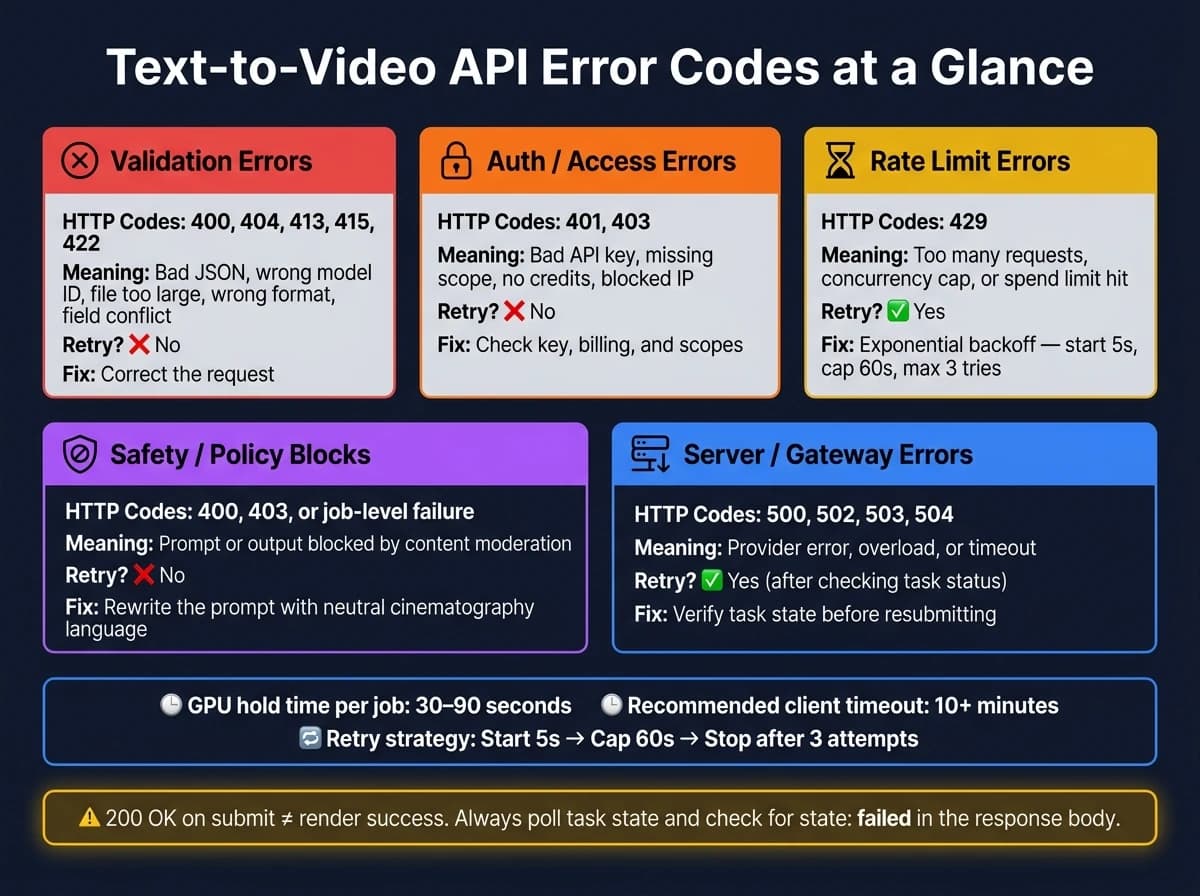
Most text-to-video API failures come down to 5 buckets: bad requests, auth issues, rate limits, safety blocks, or server problems. If I check the HTTP status, the full error body, the request or task ID, and the time of the failure, I can usually find the cause fast.
Here’s the short version:
- 400-series errors usually mean I need to fix the request.
- 401/403 usually point to API key, access, billing, or IP rules.
- 429 means I hit a request, job, or spend cap.
- 200 OK on submit does not mean the video finished. I still need to poll the job and check for
failed. - 500-series errors often need a retry, but only after I check whether the job is still running.
- Safety blocks can happen before, during, or after generation, and some APIs may return fewer clips instead of failing the whole job.
A few numbers stand out. Video jobs, like those using Sora 2, can hold a GPU for 30–90 seconds, client timeouts may need to be 10+ minutes, and a common retry plan is start at 5 seconds, cap at 60 seconds, stop after 3 tries.
If I want fewer failed jobs and fewer duplicate charges, I keep the workflow simple:
- Log the error body and task ID
- Separate API-layer errors from job-level failures
- Retry only 429 and 5xx cases
- Check task state before I submit the same job again
- Pin exact model versions instead of using aliases like
latest
API Error Messages for a GOOD Developer Experience
Quick Comparison
| Error Group | Common Codes | What it usually means | Retry? | First move |
|---|---|---|---|---|
| Validation | 400, 404, 413, 415, 422 | Bad JSON, wrong model ID, file too large, wrong format, field conflict | No | Fix the request |
| High-Quality Video | Veo 3.1 | Professional cinematic output | Yes | Check prompt parameters |
| Auth / Access | 401, 403 | Bad key, missing scope, no credits, blocked IP | No | Check key, billing, scopes |
| Rate Limits | 429 | Too many requests, too many running jobs, spend cap hit | Yes | Backoff and review limits |
| Safety / Policy | 400, 403, or job-level failure | Prompt or output blocked | No | Rewrite the prompt |
| Server / Gateway | 500, 502, 503, 504 | Provider error, overload, timeout | Yes | Check job status, then retry |
Put simply: submission success is not render success. I’d treat polling results as the source of truth and use the error payload - not just the status code - to decide what to do next.
Client-side request errors: 400-series codes you can fix
After you log the error details, the next move is to figure out what went wrong on the request side. Start with the error body, then map the HTTP code to the fix.
400, 404, 413, and 415: what each code means for video requests
Each code points to a different kind of request mistake. A 400 usually means malformed JSON, missing required fields, or invalid parameter types. For example, passing duration as a string ("6") instead of an integer (6) will fail validation [4]. A 404 means the model ID or endpoint path is wrong, often because of a small typo like wan2.7 instead of [wan-2.7](https://apimart.ai/ja/model/wan-2-7) or [wan-2.6](https://apimart.ai/model/wan-2-6) [7]. A 413 shows up when a reference image or video is larger than the upload size limit [4][7]. A 415 means the Content-Type header is wrong, or the file format isn't supported by the model [5].
| HTTP Code | Common Text-to-Video Cause | Direct Fix |
|---|---|---|
| 400 | Malformed JSON; duration passed as a string; missing required field | Remove quotes from numeric values; validate JSON syntax; add missing fields |
| 404 | Misspelled or deprecated model ID | Check the exact model string in the docs (e.g., kling-3.0-turbo) |
| 413 | Reference image or video exceeds upload size limit | Compress assets or switch from Base64 to a URL reference |
| 415 | Incorrect Content-Type header or unsupported file format | Set Content-Type: application/json; convert assets to supported formats |
Model and parameter mismatches that cause validation failures
Even when your JSON is clean, requests can still fail validation because models don't all follow the same rules. Resolution, duration, aspect ratio, and asset limits can change from one model to another.
Take MiniMax-Hailuo-2.3. It supports 10 seconds at 768p, but if you request 1080p, the maximum duration drops to 6 seconds [6]. Asset rules can be just as strict. Kling 3.0 requires input images to be at least 300 px in both dimensions, with an aspect ratio between 1:2.5 and 2.5:1. Wan 2.7 requires reference videos to be 2–10 seconds long and no larger than 100 MB [4][7].
A 422 usually means your parameters clash with each other. For example, SkyReels V4 returns 422 when you combine Image-to-Video and Omni fields in the same request [8].
One small habit can save a lot of time: use pinned version strings instead of generic aliases. Parameter rules can shift between model versions [3]. If validation still fails, check the model's exact limits before you retry.
If the request validates but still fails, move next to authentication, rate limits, and safety checks.
Authentication, permissions, and rate limits
Once validation passes, most of the remaining failures come down to three things: auth, permissions, or rate limits.
401 and 403: API key and access errors
A 401 Unauthorized error means the request did not include valid authentication credentials. The usual causes are a missing API key, an invalid key, a key that was disabled or deleted, or a broken Authorization header [9][1][2].
Many APIs expect:
Authorization: Bearer YOUR_API_KEY
Some platforms use x-api-key instead. So if the header name or format is off, that alone can trigger a 401 [1][10].
Start with the basics. Check the environment variable, make sure the key is still active, and confirm your CI/CD setup injects secrets correctly in each environment [3]. It also helps to read the response body instead of stopping at the HTTP status code. Errors like invalid_api_key, token_expired, or account_banned usually tell you what broke much faster [9][3].
A 403 Forbidden means the server recognized you, but still blocked the request. That usually points to an access problem. Your key may not have the right model scope, your account plan may not include that endpoint, your credits may be used up, or your request IP may not be on the allowlist [3][9].
The response body matters here too. If you see insufficient_credits, look at billing. If you see permission_error, check scopes, model access, or plan limits. And if access looks fine but traffic is too high, the next stop is usually 429.
429: rate limit and quota exceeded errors
If auth succeeds, request volume is often the next choke point. A 429 Too Many Requests error means you hit a throttle, concurrency cap, or spend limit [3][9][10]. In plain English: you sent too many requests in a short window, ran too many jobs at once, or crossed a billing cap [3][9].
Again, the response body gives you the best clue. rate_limit_exceeded usually means you should use exponential backoff. spend_limit_exceeded means it is time to check billing settings [3][9].
Queue batch jobs locally when you can, and keep an eye on these headers [2]:
X-RateLimit-LimitX-RateLimit-RemainingX-RateLimit-Reset
| Status Code | Usual Cause | Typical Response Pattern | Recommended Fix |
|---|---|---|---|
| 401 Unauthorized | Missing or invalid API key; malformed Authorization header | invalid_api_key, Missing Authorization header | Verify environment variables; check the Bearer prefix; confirm the key hasn't been revoked |
| 403 Forbidden | Insufficient permissions; key lacks model scope; IP not allowlisted | permission_error, insufficient_credits, ip_not_allowed | Check billing, model access scopes, account plan, or IP allowlist |
| 429 Too Many Requests | Rate limit, concurrency limit, or spend cap reached | rate_limit_exceeded, spend_limit_exceeded, too many running jobs | Use exponential backoff; add request queuing; review quota or billing caps |
If you're using APIMart, one key across models can reduce auth drift [3]. Even then, the debugging flow stays about the same: read the response body, verify your environment variables, and make sure the account can access the model you're calling.
Safety blocks, timeouts, and server-side failures
After request validation and auth pass, the failures that are left usually fall into two buckets: moderation blocks and server-side issues. So once auth, quota, and validation are cleared, split the rest of your debugging into those two paths.
Moderation and content policy errors in video generation
Safety blocks can happen at three different points: before generation starts (the request is rejected right away), during rendering (the job is stopped partway through), or after the video is produced (the output is filtered before delivery) [11]. That last case trips people up. A job can finish and still deliver nothing if the result gets filtered.
With polling-based APIs, the HTTP status can be misleading. You might get 200 OK from the status check, while the JSON body says state: "failed" and includes an error like SensitiveContentDetected or NSFW [12]. In practice, the polling body is the source of truth, not the HTTP status code.
If a moderation block fires, don't retry the exact same prompt. Rewrite it. Plain, technical cinematography wording can help reduce false positives from strict safety filters [11]. For example:
gimbal shotmedium tracking shotgolden hour lighting
There's another wrinkle here. Some models, including Google Veo, may return fewer clips than you asked for when some outputs are blocked by safety filters, instead of failing the whole job [3]. So don't just check whether the request completed. Check that the number of returned assets matches the number you requested.
If the prompt looks clean and the job still fails, move to the next layer: server stability.
500, 502, 503, and timeout errors for async video jobs
Server-side failures sit in a different part of the debugging flow. Text-to-video jobs often hold a GPU slot for 30–90 seconds [3], which makes them more sensitive to overload and timeouts.
For 500 and 504 errors, check job status before you retry. Blind retries can create duplicate renders and double your costs [3]. Log every taskId or prediction_id so you can query the status endpoint directly before submitting a new job [3][13].
When retries are safe, use exponential backoff with jitter. A practical setup is:
| Error Code | Likely Cause | Retry Guidance |
|---|---|---|
| 500 Internal Server Error | Unexpected server-side failure | Check task status first; retry up to 3 times with backoff [3][12] |
| 502 Bad Gateway | Upstream provider error | Retry with exponential backoff [12] |
| 503 Service Unavailable | Platform overload or maintenance | Wait 30–120 minutes and check the status dashboard [3][12] |
| 504 Gateway Timeout | Provider didn't respond in time | Verify the render isn't still processing before resubmitting [3] |
Set client timeouts to 10 minutes or more [3], and alert on rising predict_time values [3].
A step-by-step debugging workflow for text-to-video APIs
Classify the error, then apply the right fix
Use this workflow to go from symptom to fix in one pass. First, read the full response body. Then sort the failure by HTTP status code and what the error body says. Some providers also send internal error ranges, but your main guide should be the HTTP status code and the error body [3][1].
Start with the response body, then place the result into one of these groups:
| Error Category | HTTP Codes | Retry? | First Action |
|---|---|---|---|
| Authentication | 401, 403 | No | Verify the API key in environment variables; check billing/quota |
| Validation | 400 | No | Fix the request - JSON syntax, resolution, file format, or duration |
| Rate Limits | 429 | Yes | Use exponential backoff; check concurrency caps |
| Safety/Policy | 400, 403 | No | Rewrite the prompt; do not retry unchanged |
| Server/Gateway | 500, 502, 503, 504 | Yes, after checking task status | Verify task status before resubmitting |
Once a job has been submitted, stop thinking only in terms of HTTP responses and look at the task state too. For async jobs, check the polling response for failed or expired before you send the same job again. That one step can save you from extra cost and a lot of confusion.
Before you touch the code, check the provider status page. If the service is degraded, local debugging won't tell you much. After that, inspect x-deny-reason response headers. Proxy-level denials can look like model errors if you skip that check [3].
Also, pin exact model version strings like kling-v3.0-std instead of latest. A silent model update can introduce new validation failures into a pipeline that worked fine the day before [3].
Key takeaways for more reliable integrations
Most text-to-video API failures follow a few repeatable patterns. If you get a 4xx error, you need to change the request, credentials, or setup. Sending the same call again usually won't fix anything.
- Log request inputs: model ID, prompt hash, and parameters (see our AI API tutorials for logging best practices).
- Log task ID, final status,
predict_time, and the full error message. - Retry only
429and5xxafter checking task state to avoid duplicate renders and doubled costs [3]. - Watch
predict_timefor spikes - they can signal infrastructure degradation early [3].
FAQs
How do I know if a video job actually failed?
Poll the task status endpoint with the task ID you got when you submitted the job. If the status field comes back as failed, the job didn’t go through.
Next, look at the error field in the response. That tells you why it failed, so you can decide what to do next:
- adjust your prompt
- check your account balance
- wait if there’s an infrastructure issue
You can also use webhooks to get automatic notifications when a job enters a failed state.
When should I retry a text-to-video API request?
Retry transient errors like 429 rate limits and 500 server-side issues with exponential backoff. That slows repeat attempts and helps you avoid hammering the system.
For a 504 Gateway Timeout or a task failure, check the task status before you try again. A blind retry can trigger duplicate renders and add extra cost.
Don’t retry 400 or 401 errors. Those usually mean the request itself needs to be fixed first.
Why would a prompt be blocked after submission?
A prompt usually gets blocked because it runs into a provider’s safety or moderation rules. That can happen right when you submit it, or later during generation if the system detects banned visual or audio content.
Common triggers include sensitive topics, violence, minors, or copyrighted material. And because moderation systems tend to play it safe, even harmless prompts can get flagged.
If that happens, rewrite the request in more neutral, descriptive language.
Choose the model you want in the model marketplace
Try chat, image and video models in the APIMart model marketplace, and experience model capabilities quickly with one unified API.