
Ultimate Guide to Token-Based AI Pricing Models
Understand token-based AI pricing—input vs output token costs, caching discounts, model choice, and simple steps to estimate and control your API spend.
AI API costs usually come down to one thing: how many tokens go in, how many come out, and which model you use. A small prompt change, a longer chat thread, or a longer reply can turn a low-cost setup into a much bigger monthly bill.
Here’s the short version:
- I pay for input tokens and output tokens
- Output tokens often cost 3x to 8x more than input
- Cached prompts can cut repeated input costs by 50% to 90%
- Long chats can keep adding input cost because history is often sent again
- Model prices can vary by hundreds of times
- As of early 2026, token rates can range from $0.06 to $168.00 per 1 million tokens
The math is simple:
Total cost = (input tokens × input rate) + (output tokens × output rate)
That sounds easy. But the bill changes fast when I add chat history, retries, few-shot examples, retrieval context, or a model that uses hidden reasoning tokens.
A basic example makes the point fast. If a request uses 2,500 input tokens at $2.50 per 1 million and 750 output tokens at $15.00 per 1 million, the cost is $0.0175 per request. At 100,000 requests per month, that becomes $1,750.00.
What matters most is not just token count, but workload shape. In plain terms, the main cost drivers are:
- prompt size
- reply length
- conversation growth
- caching
- retries
- model tier
- input type, such as text or image
If I want to keep spend under control, the main moves are simple:
- cap replies with
max_tokens - ask for shorter answers
- trim or summarize old chat history
- keep repeated prompt text stable for caching
- send simple tasks to lower-cost models
- track token use, retry rate, and cost per feature
This guide explains token pricing in plain English, shows how usage turns into dollars, and gives a simple way to estimate monthly spend without getting surprised later.
AI Tokens: The Secret to AI Pricing, Speed, and Cost Optimization
How Token Costs Are Calculated
Use the formula from the previous section to turn token counts into dollars. The breakdown below shows which tokens count toward billing and how those counts turn into charges.
Input Tokens, Output Tokens, and Cached Tokens
Input tokens are the tokens sent in your request, billed at the input rate. In a chat app, earlier messages are often sent again on each turn, so they get billed again too [1][6][7].
Output tokens are the tokens the model generates, billed at the output rate. Hidden reasoning tokens also count as output and are billed at the output rate, even if they don't appear in the final reply [1][5][6].
Cached tokens are repeated input tokens billed at a lower rate. If you reuse the same prompt prefix, the provider may apply a cache discount that is often 50% to 90% lower than the standard input price [1][5]. Put static content near the start of the prompt to improve cache hits.
Once those billing units are clear, the next step is simple: convert token counts into dollar amounts using a unified LLM API guide for cost control.
How Token Counts Become Dollar Charges
Most providers list prices per 1M tokens, so you calculate input and output costs separately [1][3].
Cost = (Input Tokens ÷ 1,000,000 × Input Rate) + (Output Tokens ÷ 1,000,000 × Output Rate)
A Simple Hypothetical Cost Example
Say you're using a mid-tier model priced at $2.50 per 1M input tokens and $15.00 per 1M output tokens, with a request that includes 2,500 input tokens and 750 output tokens [3]:
| Component | Token Count | Rate (per 1M) | Calculation | Cost |
|---|---|---|---|---|
| Input Tokens | 2,500 | $2.50 | (2,500 ÷ 1,000,000) × $2.50 | $0.00625 |
| Output Tokens | 750 | $15.00 | (750 ÷ 1,000,000) × $15.00 | $0.01125 |
| Total Charge | 3,250 | - | - | $0.01750 |
This is why two requests that look similar can end up with very different costs. At 100,000 requests per month, that total becomes $1,750.00. And notice the split: output costs are nearly 2x the input cost, even though output makes up less than a quarter of the tokens. That's the key point here. The shape of the workload can matter as much as the model you pick.
Why Your Bill Changes Between Workloads
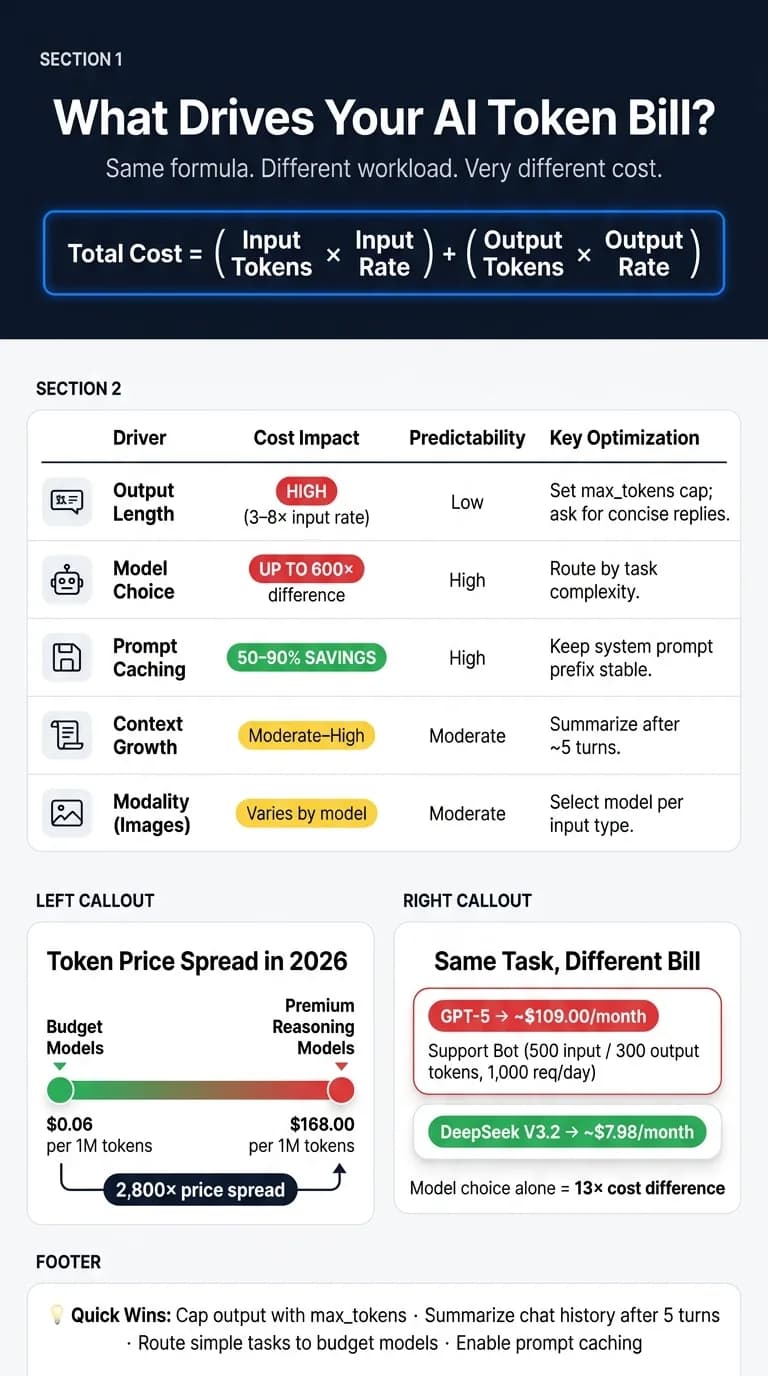
Same pricing formula, different workload shape, different bill.
The formula doesn't change. How your app uses the model does. So two apps can make the same number of API calls and still end up with very different monthly costs, simply because those calls are built differently.
| Driver | Cost Impact | Predictability | Optimization Options |
|---|---|---|---|
| Input Size & Context Growth | Moderate–High | Moderate | Trimming, summarization, message limits |
| Output Length | High (3–8× rate) [7][3] | Low | max_tokens, conciseness instructions |
| Caching | 50–90% saving [1][3] | High | Stable system prompt prefixes |
| Model Choice | As much as 600× [1][7] | High | Model routing, tiered architecture |
| Modality | Varies by model | Moderate | Model selection per input type |
Why Output Tokens Usually Cost More Than Input Tokens
Input is cheaper because the model can read your prompt in parallel. It can process those tokens at the same time.
Output works differently. The model has to generate the reply one token at a time, step by step. That takes more compute. That's why output tokens often cost 3–8× more than input tokens [7][3], and sometimes even more.
This is why output length can hit your bill so fast. Two simple controls help a lot [7]:
- Set a
max_tokenscap - Tell the model to answer concisely
If you want a fast way to cut spend, start there.
Hidden Cost Drivers: Context Growth, Retries, and Long Conversations
Chat apps have a sneaky cost pattern: each new message usually sends the full conversation history back to the model, and you pay for that input again.
Here's the part that adds up. A 10-turn conversation with 200 tokens per turn builds to 2,000 extra input tokens by the final turn [7]. So even if each message feels small, the total keeps stacking.
A few other things push input costs up too:
- Verbose prompts
- Few-shot examples
- Retrieved documents
All of them count toward billed input on every request [2][7].
Rolling summarization and trimming older messages can keep that growth under control [7][3]. Without that, long chats and repeated context become quiet cost multipliers.
Model Choice and Modality
In practice, model choice is often the biggest pricing variable. The gap between a budget model and a premium reasoning model can be as much as 600× per token [1][7]. That's not a small swing. It's the kind of gap that can change your whole budget.
Reasoning models can also use far more tokens than what you see in the final answer because of hidden reasoning tokens [4]. So a short reply doesn't always mean a cheap request.
Modality matters too. Image inputs can tokenize very differently across models, which means the same image may cost very different amounts depending on which model handles it [4].
Once you know which of these drivers matters most in your workload, monthly spend gets a lot easier to estimate, and limits become much easier to set.
How to Estimate and Control AI Token Spend
Now that the pricing drivers are clear, turn them into a budget and control plan.
Build a Monthly Cost Estimate from Average Request Size
Here’s the basic formula:
Monthly cost = [(avg input tokens × input rate) + (avg output tokens × output rate)] × requests per day × 30
That gives you a simple starting point. From there, model choice can change your total in a big way, even when the workload stays the same.
Using 1,000 requests per day as the baseline [3]:
| Use Case | Avg. Input | Avg. Output | Model | Monthly Cost |
|---|---|---|---|---|
| Support Bot | 500 | 300 | GPT-5 | ~$109.00 |
| Support Bot | 500 | 300 | DeepSeek V3.2 | ~$7.98 |
Same use case. Same token load. Very different bill.
It also helps to add a 30%–50% buffer for retries, failures, and growth. If you skip that cushion, your forecast can look fine on paper and still miss the mark in practice.
Use this baseline to spot the biggest cost drivers first.
Cut Waste Without Cutting Quality
The biggest hidden cost is often the system prompt. A 500-token system prompt sent with every request across 10,000 daily calls adds up to 5 million input tokens per day before a single user message is counted [3]. That’s a lot of spend tied up in text many teams stop looking at after launch.
Audit that prompt on a regular basis and cut anything that isn’t doing real work.
A few moves usually save the most money with the least downside:
- Enable prompt caching. Keep system instructions and tool definitions at the top of your prompt so they stay stable [9][4].
- Summarize chat history. After about 5 turns, swap the full transcript for a short context block [3].
- Use batch processing for non-urgent work. Bulk summarization, nightly data enrichment, and similar jobs don’t need real-time replies [9][4].
- Route by complexity. Send simple classification or extraction work to a lower-cost model. Save premium models for harder reasoning tasks [4][10].
Once you trim the main sources of waste, the next step is making sure usage stays inside plan.
Track Usage with Alerts, Logs, and Per-Feature Budgets
Estimating spend upfront is only half the job. You also need to watch the numbers that shape day-to-day cost.
Track these four metrics:
- tokens per request
- cache hit rate
- cost per interaction
- retry rate
Then put guardrails around them. Set automated alerts at 80% and 100% of your daily budget. Flag any spike that jumps above 3× your daily average. Log retry costs separately so failed calls don’t get buried in total usage. And give each feature its own token budget, so one pricey feature doesn’t quietly eat the budget meant for everything else.
Conclusion: How to Think About Token Pricing
Token pricing looks simple on paper, but day-to-day costs can move around a lot. Prompt length, chat history, model choice, and retries all affect what you pay. That’s why model selection and workload shape matter just as much as raw token count.
As of early 2026, per-million-token pricing ranges from $0.06 to $168.00 - a 2,800× spread [3]. That gap explains why the exact same workload can fall into very different budget ranges. If you understand where those cost swings come from, you’re far less likely to get hit with a nasty surprise halfway through the month.
Key Takeaways for Budgeting and Scaling
For budgeting, start with the formula above, then look at your actual request patterns before picking a model [1][2][11]. Word counts are a rough shortcut at best. Tokenizers differ by provider, and code can use 1.5–2× as many tokens as plain English. Non-Latin scripts often use more tokens too [1][3].
Output length needs close attention. Output tokens often cost more than input tokens, so a model that tends to produce long answers can push your bill up fast. A short prompt doesn’t always mean low spend if the reply runs long. Use the max_tokens parameter to set a ceiling and stop runaway outputs before they get expensive [3][4]. For conversational features, keep an eye on context growth too. Without summarization or sliding windows, chat history can drive input costs up over time [11][8].
To keep spend steady, treat cost monitoring like a core operating number, not an afterthought. Match model depth to task difficulty, check your usage in USD on a regular basis, and make changes early before small overruns turn into painful ones. Teams that scale well keep a close watch on cost and tune the model, prompt design, and monitoring setup to fit the job.
FAQs
How do I estimate my monthly AI token costs?
Calculate the cost per request first. Then multiply that number by your expected monthly volume.
Use this formula:
((input tokens × input price per 1M) / 1,000,000) + ((output tokens × output price per 1M) / 1,000,000)
A small detail can throw off your estimate: input tokens don't just mean the user's message. You also need to count:
- system prompts
- conversation history
- tool definitions
That part trips people up all the time.
You should also factor in pricing adjustments that can change the final total, such as:
- cached inputs
- batch discounts
- reasoning-heavy models that may bill hidden internal tokens as output
If you're budgeting for monthly spend, the safest move is to base your math on the full request footprint, not just the visible prompt and reply.
Why can short AI replies still be expensive?
Even short AI replies can cost more than you'd think.
Here's why: output tokens often cost more than input tokens. So even if your prompt is short, the reply can push the bill up. On top of that, some models produce hidden thinking tokens that are also billed.
Costs can climb from text you never see, too. That includes system prompts, chat history, and retrieved documents sent along with the request.
How can I reduce token costs without hurting quality?
Use APIMart’s Unified API for model routing so each task goes to the lowest-cost model that can handle it well.
That means you save premium models for harder reasoning tasks and send high-volume work - like classification or summarization - to lower-cost models. It’s one of the simplest ways to cut spend without hurting output where it matters.
You can also trim costs with a few practical moves:
- Use prompt caching to avoid paying again for repeat prompt content
- Keep prompts concise so you’re not burning tokens on extra wording
- Set a max completion token limit to keep responses from running long
- Use batch processing for async tasks to lower token usage and cost at scale
Small changes like these can make a big dent in usage costs, especially when volume starts to climb.
Choose the model you want in the model marketplace
Try chat, image and video models in the APIMart model marketplace, and experience model capabilities quickly with one unified API.