
What Is ViduQ 3? Vidu's AI Video Generator
ViduQ 3 explained - Shengshu's AI video generator with native audio, Smart Cuts, Pro and Turbo variants, input modes, pricing and APIMart API integration.
ViduQ 3 is an advanced AI video generation model launched on January 30, 2026, by Shengshu Technology. It simplifies video creation by turning text, images, or both into high-quality video clips using a single API call. Key features include synchronized audio (similar to Sora 2), smooth frame transitions, and multiple input modes like text-to-video and image-to-video. The model is available in two variants - Pro for cinematic visuals and Turbo for faster production - making it suitable for industries like marketing, education, and entertainment. For those seeking alternatives with high consistency, MiniMax Hailuo 2.3 also provides professional-grade video generation. Pricing starts at $0.032 per second for Turbo at 540p resolution, making it accessible for both small-scale and large-scale projects.
Highlights:
- Launch Date: January 30, 2026
- Input Modes: Text, single image, two images, or up to seven reference images
- Output Quality: Up to 1080p resolution, 24fps, 16-second max duration
- Variants: Pro (high-quality visuals) and Turbo (faster, cost-efficient production)
- Pricing: Pay-as-you-go starting at $0.032/sec for Turbo at 540p
- Key Features: Native audio generation, Smart Cuts for logical edits, smooth motion handling
Whether you're creating social media videos, educational content, or pre-visualizing film scenes, ViduQ 3 offers a streamlined and efficient solution for generating professional-quality videos.
I Tested The #1 Ranked AI Video Generator... Here’s What Happened
ViduQ 3 Defined
ViduQ 3 is a multi-modal AI video generation model created by Shengshu Technology. It transforms text prompts, images, or a combination of the two into video clips, simplifying the entire video creation process into a single API call.
What sets it apart as a multi-modal model is its Auto Routing system. This system determines the mode of video generation based on the input provided. For example:
- Text-to-video mode kicks in if no image is supplied.
- Image-to-video mode activates with one image.
- First-Last Frame mode uses two images to define the start and end of the video.
Additionally, the Subject Reference mode allows up to seven reference images, ensuring visual consistency for characters or objects across scenes. This adaptability, combined with a series of technical advancements, allows ViduQ 3 to deliver highly realistic video outputs. Other high-performance models like Grok Imagine Video offer similar text-to-video capabilities for creators.
Key Features of ViduQ 3
ViduQ 3 goes beyond flexible input handling by incorporating advanced technologies that enhance the quality of its outputs. One standout feature is its advanced temporal modeling, which ensures smooth transitions between frames - a critical challenge in AI-generated videos. The model also excels at simulating fluid dynamics and particle effects, bringing a new level of realism to complex scenes.
Another defining feature is native audio generation, which eliminates the need for separate audio processing. As Atlas Cloud explains:
"Native audio means the model produces synchronized sound alongside the visual output in one pass - no separate audio pipeline, no post-production syncing." [8]
On top of this, ViduQ 3 supports specific camera techniques like pans, dollies, and tracking shots, making its output feel like a professionally directed video. Together, these features establish ViduQ 3 as a key component of the broader Vidu platform.
Where ViduQ 3 Fits in Vidu's Platform
ViduQ 3 serves as the flagship video generation model within Shengshu Technology's Vidu platform. It comes in two variants - Pro and Turbo - designed for different production needs.
- Pro focuses on delivering cinematic-quality visuals, with features like professional-grade lighting, depth of field, and composition.
- Turbo prioritizes speed and efficiency, making it ideal for quick iterations and large-scale batch production. This puts it in direct competition with other cinematic tools such as the Kling V3 API, which also focuses on high-fidelity motion.
Here’s a quick comparison of the two variants:
| Feature | ViduQ 3 Pro | ViduQ 3 Turbo |
|---|---|---|
| Primary Focus | Cinematic quality & visual fidelity | Speed & rapid iteration |
| Motion Handling | Advanced temporal modeling | Lightweight architecture |
| Audio Support | Native synchronized audio | Native synchronized audio |
| Best Use Case | Brand stories, high-end creative | Social media ads, batch production |
Both versions share the same API interface and support resolutions up to 1080p at 24fps, with a maximum clip duration of 16 seconds. [1]
What ViduQ 3 Can Do
Supported Input Types
ViduQ 3 offers four ways to input content:
- Plain text prompts: Accepts up to 5,000 characters.
- Single image: Used for animation.
- Two images: Define the start and end points.
- Up to seven reference images: Ensure visual consistency [4][9].
Text prompts can be written in both English and Chinese. The model also understands "director-style" cues embedded directly within the text, such as instructions like "slow dolly forward" or "rack focus from foreground to background" [6][8]. For audio, users can choose between full output (dialogue and sound effects), speech only, or sound effects only - allowing for precise customization without additional tools [9].
Once the inputs are processed, ViduQ 3 produces a variety of video outputs tailored to different production requirements.
Video Output Quality and Format
ViduQ 3 generates videos at 24fps and offers three resolution options: 540p, 720p, and 1080p. Clip durations range from 1 to 16 seconds [2]. It supports five aspect ratios: 16:9, 9:16, 4:3, 3:4, and 1:1, making it suitable for everything from cinematic widescreen shots to vertical social media content [1].
For clips in the 12–16 second range, the Smart Cuts feature identifies logical edit points within the video. These timestamps are returned as metadata, making it easier to programmatically segment longer clips [8].
Speed and Scene Accuracy
The Turbo variant can generate content in as little as a few seconds to two minutes, making it ideal for quick creative testing [3]. On the other hand, the Pro variant uses a hybrid U-ViT architecture - a mix of diffusion models and transformers - to ensure smooth frame transitions and minimize flickering throughout the clip [7].
ViduQ 3 processes text, images, camera instructions, and audio cues simultaneously. This eliminates the need for separate steps like syncing audio, manually stitching shots, or correcting subject drift. Sarah Johnson, a content creator, shared her experience:
"Pro's cinematic quality is outstanding! And Turbo lets me quickly validate creative directions - using both models together doubles my efficiency." [3]
However, one limitation is that the model may struggle with very dense multi-subject scenes, such as large crowds or intricate physical interactions where fine motion details are crucial [7]. Despite this, for most creative and commercial projects, the scene consistency holds up well within the 16-second duration.
This combination of speed, quality, and flexibility makes ViduQ 3 an excellent choice for seamless API integration and adaptable pricing options.
ViduQ 3 Pricing and API Integration via APIMart
How ViduQ 3 Is Priced
ViduQ 3 operates on a pay-as-you-go model, meaning you only pay for the seconds of video you generate. There are no subscriptions or minimum commitments [3]. Pricing is determined by the model variant and resolution you choose.
| Model Variant | 540p | 720p | 1080p |
|---|---|---|---|
| Vidu Q3 Pro | $0.056/sec | $0.12/sec | $0.128/sec |
| Vidu Q3 Turbo | $0.032/sec | $0.048/sec | $0.056/sec |
| Vidu Q3 Mix | N/A | $0.10/sec | $0.12/sec |
For example, at 720p resolution, Vidu Q3 Pro costs $0.12 per second. A 5-second video clip would cost $0.60, a 10-second clip $1.20, and a 16-second clip $1.92. On the other hand, Vidu Q3 Turbo is about 60% cheaper at $0.048 per second [3].
How to Integrate ViduQ 3 Using APIMart
Integrating ViduQ 3 via APIMart is simple and efficient. Once you’ve signed up and funded your account, which works across all ViduQ 3 models, you can generate an API key from your dashboard. This key is included as a Bearer Token in your request headers [3].
All requests are sent to the following endpoint:
https://api.apimart.ai/v1/videos/generations
Here’s an example of a basic JSON payload:
{
  "model": "viduq3-pro",
  "prompt": "A cinematic shot of a futuristic city",
  "duration": 5,
  "resolution": "720p",
  "aspect_ratio": "16:9",
  "audio": true
}
Since video generation is asynchronous, the API immediately returns a task_id. You can then use this ID to poll the "Get Task Status" endpoint until your video is ready. Once processing is complete, the endpoint provides the final video URL [1]. You can use any standard HTTP library to handle this integration.
One key advantage is that all videos generated through APIMart are cleared for commercial use. This includes applications like marketing campaigns, social media content, and corporate communications [3]. Once integration is set up, selecting the right model for your needs is the next step.
Choosing the Right Model on APIMart
Selecting the appropriate model depends on your specific needs and budget.
- Use Vidu Q3 Pro for projects requiring high-quality motion coherence and cinematic rendering. It’s well-suited for premium content like brand films, product showcases, or high-end advertisements.
- Choose Vidu Q3 Turbo when speed and cost-efficiency are priorities - perfect for generating large volumes of social media ads or testing creative concepts quickly.
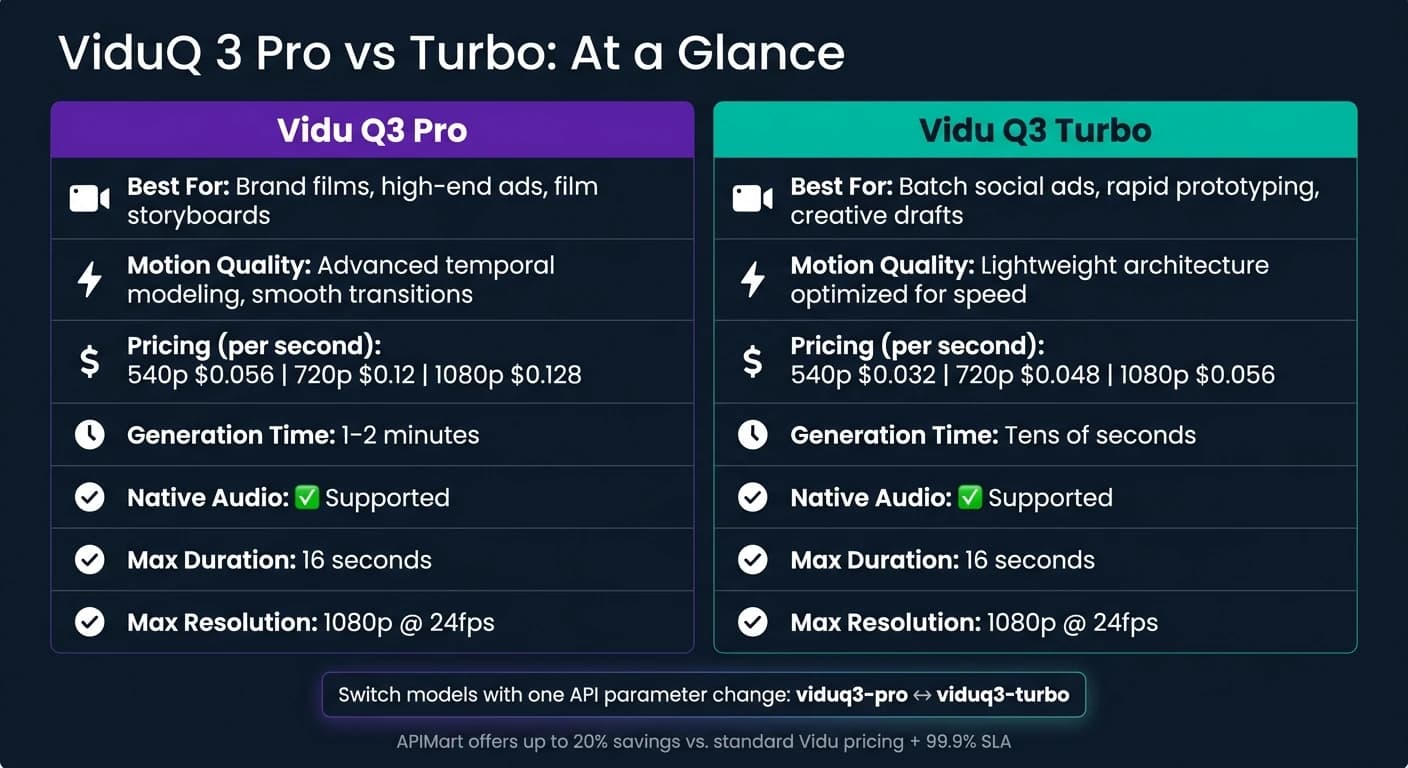
| Feature | Vidu Q3 Pro | Vidu Q3 Turbo |
|---|---|---|
| Best For | Brand stories, high-end ads, film storyboards | Batch social ads, rapid prototyping, drafts |
| Motion Quality | Advanced temporal modeling, smooth transitions | Lightweight architecture optimized for speed |
| Cost (720p) | $0.12/sec | $0.048/sec |
| Generation Time | 1–2 minutes | Tens of seconds |
| Native Audio | Supported | Supported |
| Max Duration | 16 seconds | 16 seconds |
Both models share the same API parameters. Switching between them is as simple as changing the model value in your payload from viduq3-pro to viduq3-turbo. APIMart offers up to 20% savings compared to standard Vidu pricing and ensures a 99.9% SLA for reliable production use [3]. For larger-scale projects, enterprise-level pricing can be arranged by contacting Vidu directly at [email protected] [10].
How ViduQ 3 Is Used Across Industries
Marketing Use Cases
ViduQ 3 is a game-changer for marketing teams, allowing them to produce video content faster and more efficiently. With its Image-to-Video feature, e-commerce brands can transform static photos into engaging, animated scenes complete with synced audio. This has led to impressive results, such as a 75% reduction in video production time and a 32% increase in product page conversion rates [5].
For social media, the Smart Cuts feature is a standout. It automatically segments video clips for platforms like TikTok, YouTube Shorts, and Instagram Reels, slashing post-production time by up to 90% [5]. But the platform’s versatility doesn’t stop with marketing - it’s also making waves in education.
Educational Use Cases
In education, creating high-quality audio and video content can be a tedious process. Typically, narration, sound effects, and background music require separate recording sessions and time-consuming post-production work. ViduQ 3 simplifies this by generating synchronized sound and visuals in a single step.
This streamlined process is ideal for creating micro-learning videos and visualizing complex ideas, such as fluid dynamics or cellular processes. Similar capabilities are available through the Grok Imagine Video API for high-quality generation. For example, instructors can describe a concept and request a specific soundscape - like "a lab environment with subtle ambient noise" - to instantly generate a polished explainer video. SaaS platforms that have integrated the ViduQ 3 API into their tools have reported a 45% boost in user retention [5].
Entertainment Use Cases
ViduQ 3 has also found a strong foothold in entertainment, reshaping workflows for film, gaming, and animation. For filmmakers and game developers, the multi-shot narrative control feature is invaluable. It allows directors to block scenes, experiment with camera angles, and pre-visualize shots, saving time and reducing costs during production.
Gaming projects benefit greatly from the multi-reference consistency feature, which ensures that character designs and props remain consistent across various camera angles. Similarly, animation studios use ViduQ 3 to create motion references for 2D and anime-style work, feeding in reference images to maintain a cohesive visual style throughout sequences.
These examples highlight how ViduQ 3’s integration of text, image, and audio inputs supports a wide range of industry needs.
| Industry | Use Case | Key ViduQ 3 Feature |
|---|---|---|
| Marketing | Social media ads, product showcases | Smart Cuts, Image-to-Video |
| Education | Micro-learning, concept explainers | Native audio, multi-shot storyboarding |
| Entertainment | Film pre-visualization, game trailers, animation references | Multi-shot narrative control, character consistency |
Conclusion: The Case for ViduQ 3
ViduQ 3 introduces a streamlined way to handle video creation, addressing challenges like visuals, synced audio, pacing, and consistency in a single, efficient process. The results speak for themselves: e-commerce teams have slashed production time by 75%, VFX teams have cut pre-visualization timelines by 80%, and educational platforms have reduced localized content costs by 70% [5].
The platform’s flexibility shines through its dual-model approach. By utilizing the cost-effective viduq3-turbo model for early-stage testing at $0.056/sec, teams can experiment freely. For polished, final renders, switching to the viduq3-pro model at $0.128/sec ensures top-tier quality. The transition is seamless - just a single API parameter adjustment keeps both speed and costs manageable.
With 99.9% uptime, sub-8-second latency for 1080p outputs, and full commercial usage rights for all videos generated via APIMart, ViduQ 3 is built for serious production needs - not just casual experimentation [3] [5].
Whether you're creating ads, educational content, or creative projects, ViduQ 3, available through APIMart, offers an efficient, cost-conscious, and production-ready solution to elevate your video production process. For those seeking alternative high-consistency models, MiniMax-Hailuo-02 also offers professional-grade output.
FAQs
How do I pick Pro vs Turbo?
Choose ViduQ3 Turbo when you need quick turnarounds, bulk content creation, or rapid previews - it’s built for speed and is budget-friendly. On the other hand, go with ViduQ3 Pro if you’re aiming for top-tier cinematic visuals, precise audio-video synchronization, or advanced tools like storyboard generation. Both models can produce videos in up to 1080p resolution with a maximum duration of 16 seconds, and you can easily switch between them within the same integration.
How do I keep the same character across clips?
To keep your characters consistent across multiple clips in ViduQ 3, you can rely on the Character Anchor system. This feature leverages the platform's Contextual Memory architecture to preserve character identity and maintain the integrity of your story's world. With the Multi-Scene Story Generation tool, you can generate a series of clips where characters not only stay true to their original design but also retain their appearance across different prompts and settings. This ensures your characters look the same in every shot, creating a seamless visual experience.
What do I need to use the API in my app?
To integrate the ViduQ 3 API into your app, you’ll first need an API key from your dashboard. Every request must include Bearer Token authentication in the request header to ensure proper authorization.
The API operates asynchronously. Here’s how it works:
- Send a POST request with parameters such as
model,prompt,resolution, andduration. - In return, you’ll receive a
task_id. Use this ID to poll the task status endpoint and retrieve the generated video once it’s ready.
Choose the model you want in the model marketplace
Try chat, image and video models in the APIMart model marketplace, and experience model capabilities quickly with one unified API.