
AI Dynamic Pricing for E-commerce Platforms
Learn how AI dynamic pricing lifts e-commerce revenue and margin while protecting customer trust with margin floors, price caps, rate limits, and a kill switch.
AI pricing can lift revenue, protect margin, and move slow stock - but only if I keep tight limits on how prices change.
If I had to sum up the article in plain English, it comes down to this:
- Static pricing is too slow for fast-moving e-commerce.
- AI pricing uses live signals like demand, stock, competitor prices, and seasonality to update prices.
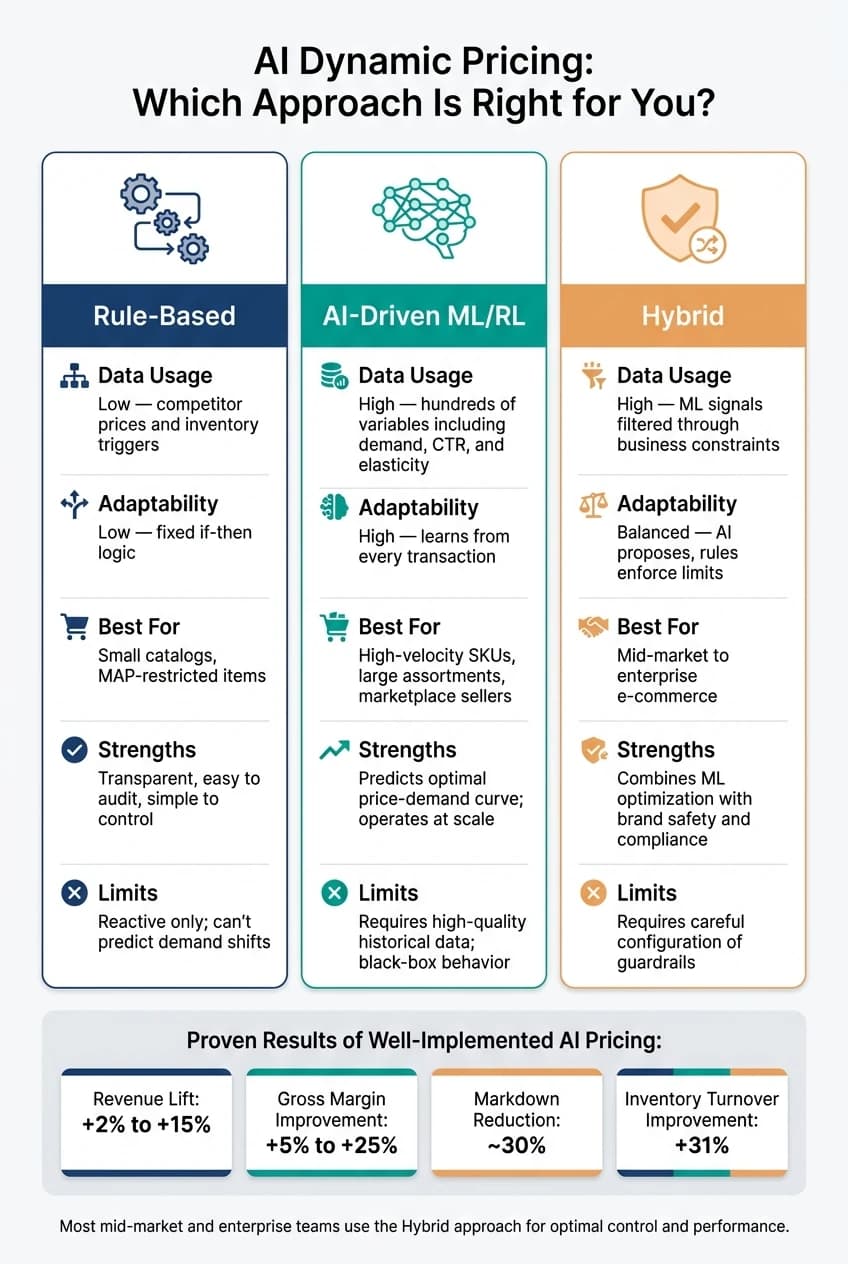
- The gains can be strong: revenue may improve by 2% to 15%, gross margin by 5% to 25%, markdowns may drop by about 30%, and inventory turnover may improve by 31%.
- The risk is trust. About 68% of U.S. shoppers say dynamic pricing makes them feel taken advantage of, and 80% trust stable pricing more.
- Good setup matters more than the model. I need clean data, margin floors, price caps, rate limits, cart price locks, and a kill switch.
- Most teams should not hand everything to AI. A hybrid setup usually works best: the model suggests prices, and business rules block bad moves.
- Personal-data-based pricing is the danger zone. Many teams avoid it and keep one public price for everyone.
Here’s the short version: AI pricing is not just about changing prices more often. It is about changing them for the right reason, inside clear rules, and without hurting customer trust.
A simple way to think about it:
| Approach | How it works | Best for | Main issue |
|---|---|---|---|
| Rule-based | Fixed if-then rules | Small catalogs or MAP limits | Too reactive |
| AI-driven | Model picks prices from many signals | Large catalogs and high-volume SKUs | Harder to control |
| Hybrid | AI suggests, rules limit | Most mid-market and enterprise teams | Needs setup work |
If I were putting this into practice, I would start with the top 10% of SKUs by revenue, test 100 to 500 items for 4 to 8 weeks, keep price changes within 5% to 10% per cycle, and make sure every price still clears margin targets.
That’s the whole idea of the article: use AI to price faster and better, but never let automation outrun policy.
AI Dynamic Pricing Software Explained: The New Necessity for Retail Success
Core AI Models and Pricing Strategies
Demand Forecasting and Price Elasticity
Once your demand, inventory, and competitor data is clean, the next job is simple to say but hard to do: turn those signals into a price.
Before a pricing engine can suggest any change, it has to answer two basic questions: How many units will sell at this price? And how much will buyers react if the price changes? That’s where demand forecasting and price elasticity estimation come in.
Demand forecasting predicts unit sales at a given price under current conditions. It uses signals like seasonality, inventory, and live demand data. Price elasticity shows how much demand changes when price moves. The formula is (% Change in Quantity / % Change in Price).[4]
That estimate shapes the pricing move:
| Elasticity Value | Pricing Signal | Pricing Action |
|---|---|---|
| < -1 | Elastic - buyers are price-sensitive | Avoid price increases; focus on competitive matching |
| = -1 | Unit elastic - revenue stays flat | Focus on margin |
| > -1 | Inelastic - buyers absorb price increases | Raise prices; small increases add revenue |
In practice, teams estimate elasticity at the individual SKU level and update it often, in many cases every 7 days, so the system can keep up with changing market conditions.[4]
Machine Learning and Reinforcement Learning for Pricing
Most production pricing engines rely on gradient-boosted tree models because they work well with mixed e-commerce data.[8][1] For products with long sales histories over time, neural networks help pick up patterns across those sequences.[8]
These supervised learning models are strong at predicting the best price from historical patterns. But there’s a catch: they don’t test prices live in the moment. That’s where reinforcement learning (RL) and multi-armed bandits (MAB) enter the picture.
RL treats pricing like a sequence of decisions. The system tries a price, watches what happens, and updates its policy to improve the next move.[7] Multi-armed bandits do something similar for live price testing, shifting traffic toward prices that perform better.
There’s also a common problem that shows up fast in e-commerce: new products have no sales history. That “cold start” issue is usually handled by borrowing patterns from similar items through transfer learning, or by falling back to rule-based pricing until enough data comes in.[8]
Rule-Based, AI-Driven, and Hybrid Pricing Systems Compared
No single setup works for every team. The best fit depends on catalog size, data quality, and how much pricing risk a business wants to hand over to automation. Here’s how the three main approaches compare:
| Approach | Data Usage | Adaptability | Typical Use Case | Strengths | Limits |
|---|---|---|---|---|---|
| Rule-Based | Low - competitor prices and inventory triggers | Low - fixed "if-then" logic | Small catalogs, MAP-restricted items | Transparent, easy to audit, simple to control | Reactive only; can't predict demand shifts |
| AI-Driven (ML/RL) | High - hundreds of variables including demand, CTR, and elasticity | High - learns from every transaction | High-velocity SKUs, large assortments, marketplace sellers | Predicts optimal price-demand curve; operates at scale | Requires high-quality historical data; can behave like a black box |
| Hybrid | High - ML signals filtered through business constraints | Balanced - AI proposes, rules enforce limits | Mid-market to enterprise e-commerce | Combines ML optimization with brand safety and legal compliance | Requires careful configuration of guardrails |
Most e-commerce teams land on a hybrid model. ML recommends prices, while rules stop moves that break margin, MAP, or rate-of-change limits. That rules layer makes constraints visible, keeps the process auditable, and helps teams trust what the system is doing.[3][5][8]
Those gains matter only when the model stays within margin, fairness, and compliance limits.
Benefits, Risks, and U.S. Market Constraints
Once pricing is automated, the next issue is simple: do the gains outweigh the trust and compliance costs?
Revenue Growth, Margin Control, and Inventory Efficiency
The business case for AI dynamic pricing is strong. When it's set up well, AI pricing can lift revenue by 2% to 15%, improve gross margin by 5% to 25%, cut markdowns by about 30%, and speed inventory turnover by 31%.[6][1][4][9] Even a 1% improvement in price optimization can increase operating profit by 8% to 11%.[9]
That matters because pricing doesn't just move top-line sales. It also shapes margin, sell-through, and how fast inventory clears. The model's job isn't only to change prices. It's to change them without breaking margin or inventory targets.
Customer Trust, Fairness, and Privacy Concerns
The upside comes with a real trust cost. Sixty-eight percent of U.S. consumers report feeling "taken advantage of" by dynamic pricing,[6] and 80% say they trust brands that keep prices steady more than brands that don't.[6]
The line that matters most is the one between market-responsive pricing and surveillance pricing.
Market-responsive pricing means one public price for everyone based on signals like demand, inventory, and competitor moves. Most people can live with that. Surveillance pricing is different. It charges different people different amounts based on personal data such as browsing history or location, and it's drawing regulatory scrutiny.[6]
Customers push back when pricing feels opportunistic. That's why many teams keep personal data out of pricing systems altogether. Doing that helps cut disclosure and antitrust risk as state rules keep expanding.[6][1]
Operational Risks: Bad Data, Model Drift, and System Complexity
These risks can be handled, but only if guardrails are built into the pricing workflow from the start. Here's how the main risk areas connect to root causes and day-to-day controls:
| Risk Category | Technical/Operational Cause | Mitigation Strategy |
|---|---|---|
| Profitability | Competitive spirals; bad competitor data | Set hard margin floors (e.g., Cost + 30%)[4] |
| Inventory | Training customers to wait for discounts | Disable discounts below 14 days of supply[4] |
| Customer Trust | Price volatility | Use dynamic discounting; limit change frequency |
| Compliance | Personalized pricing; state disclosure laws | Exclude personal data from the pricing engine[6][1] |
| Technical | Model drift or bad data feeds | Weekly data audits; human-in-the-loop for major changes |
One risk that often slips under the radar is teaching customers to wait. If shoppers see prices drop again and again near a buying window, they learn the pattern and hold off. Over time, that can chip away at revenue.[8]
Rule: Lock cart prices until checkout ends.[4]
The next step is to turn these limits into pricing rules, data checks, and rollout controls.
How to Implement AI Dynamic Pricing on an E-commerce Platform
Implement AI dynamic pricing in stages: define the goal, lock the rules, connect the data, test on a small part of the catalog, then scale. The aim is simple: move from policy to production without losing control.
Set Objectives, Price Constraints, and Governance Rules
Start with the main KPIs. That could be revenue per session, gross margin, or inventory turnover.[5][3]
Then set the guardrails that the system can't cross:
- Minimum margin floors based on COGS plus target margin
- Price caps to avoid gouging
- Rate-of-change limits, often 5% to 10% per pricing cycle[8][7]
MAP-protected SKUs should stay out of automation.[5] You should also add a kill switch, so prices can snap back to the last approved state if the model spits out outlier prices.[8]
A strong model won't save a weak pricing policy. If the constraints are off, the output will be off too.
Build the Data Pipeline and Deployment Workflow
A pricing system in production needs clean, dependable data. Connect transaction, inventory, competitor, and external data feeds to the pricing service.[8][10]
Before anything goes live, backtest the model on past transaction data. After that, run A/B tests on a limited slice of the catalog, like 100 to 500 price-sensitive SKUs, for 4 to 8 weeks.[1][7] That gives the team room to spot problems before they spread across the store.
Price updates also need to hit the storefront fast. A common target is sub-200ms latency for price API calls.[8]
Use Unified AI APIs for Multi-Modal Pricing Signals
Once the pricing engine is live, multimodal signals can sharpen price decisions beyond sales data alone. Images, reviews, and listing copy can all help the model estimate perceived value.[1]
Here’s where it gets interesting. If reviews for a competitor's product start pointing to quality issues, your model may flag a chance to hold a premium price instead of chasing the next markdown.[1] That's the kind of signal basic sales data often misses.
APIMart can provide multimodal models through one API, which makes review, image, and listing analysis easier to manage.
A simple rollout path helps teams move forward without going all in too early:
| Phase | Key Activities | Stakeholders |
|---|---|---|
| Plan | Define KPIs, audit data, select SKU cohorts | Operations, Finance |
| Connect Data | Build pipelines for PIM (catalog), ERP (inventory), and competitor feeds | Data Engineering |
| Train Models | Train demand forecasting models; integrate multimodal AI signals | Data Science |
| Deploy | Connect the pricing engine to the storefront API and APIMart | Engineering, Product |
| Test | Run A/B tests on 10–20% of traffic; backtest against historical data | Data, Marketing |
| Roll Out | Expand to the full catalog; automate retraining; add anomaly detection and human review alerts | Operations, DevOps |
A practical place to start is the top 10% of SKUs by revenue.[5] That usually gives the team enough sales volume to test the business case before expanding across the full catalog.
Future Trends and Conclusion
Personalized Pricing, Omnichannel Coordination, and Multi-Modal AI
Once a pricing system is live, the next move is simple: feed it more signals and make sure every channel stays in sync. The next wave of AI pricing will pull from sales, inventory, text, image, and video data to price products with more precision. Teams are also starting to use natural-language pricing analysis, which means they can ask a model why a price seems high or how a trend is shifting.[2] It’s the same pricing control system as before, just with more inputs and the same guardrails.
That only works if pricing stays aligned across every touchpoint. Omnichannel price coordination is becoming standard practice. Prices need to match across the website, mobile app, and in-store shelf labels. If shoppers see one price in one place and another somewhere else, trust can slip fast.
Rules are tightening too. New state disclosure rules are aimed at pricing tied to personal data.[6] That’s why many teams are taking the safer route: keep the base price the same, then use segmented offers like loyalty discounts or personalized coupons. APIMart can bring together language, image, and video signals in one workflow.
Key Takeaways for E-commerce Teams
AI dynamic pricing works best when the basics are locked down first. That means clean data and firm guardrails, including:
- margin floors
- rate-of-change limits
- a working kill switch
- at least 12–24 months of clean historical sales data before expecting strong elasticity models[1][4]
The bigger long-term issue isn’t just margin. It’s trust. About 68% of U.S. consumers say they feel "taken advantage of" by dynamic pricing,[6] which is a loud warning sign. The strongest systems respond by working inside guardrails customers can see: stable list prices, dynamic discounting, clear policies, and checkout pricing that stays consistent.
The pattern is pretty clear here: more inputs, tighter controls, and the same customer-facing price across channels. When teams get that balance right, they protect margin and manage inventory. When they don’t, trust starts to wear out.
FAQs
How often should AI prices update?
AI-powered pricing works best when it updates on a steady basis to reflect what’s happening in the market right now. But there isn’t one perfect schedule for every business. The right timing depends on your business model and how fast your products move.
For high-velocity goods, hourly updates can make sense. For lower-turnover items, updates every 4 to 6 hours - or even once a day - are often a better fit.
The main goal is simple: react fast enough to market changes without pushing prices around so often that you hurt customer trust or run into limits on how many price changes you can make in a day.
Which products should I automate first?
Start with the top 20% of your SKUs by revenue. In most catalogs, that slice accounts for about 80% of margin risk, so it’s the smartest place to begin.
Next, focus on high-turnover products in competitive markets. Those items usually give pricing models the cleanest signal because there’s more market data to work with.
Before you roll anything out at scale, run a controlled pilot on a small, non-critical product group in shadow mode. That lets you compare the algorithm’s pricing against manual pricing without putting live revenue at risk.
How do I prevent customer backlash?
Focus on strategic dynamic pricing, not one-to-one pricing at the individual level.
That means adjusting prices based on business factors like demand, inventory, seasonality, or competitor movement, not showing different prices based on personal data. Once pricing starts to feel personal, legal and brand risk can show up fast. And from a customer point of view, it can feel unfair.
Set clear guardrails from day one. A good setup usually includes:
- Price floors and ceilings
- Limits on how much prices can move
- Limits on how often prices can change
- Stable pricing for hero products
This matters because pricing needs room to move, but not so much that it feels erratic. If a top product jumps around all the time, shoppers notice. And not in a good way.
Before a full rollout, test the system on a small group of products in shadow mode. In plain English, that means the pricing engine runs in the background and makes recommendations, but those prices don't go live yet. You get to see how the logic behaves without putting the customer experience at risk.
Just as important, keep the pricing logic clear and consistent. People may not know the exact formula, but they do notice when prices seem random.
Choose the model you want in the model marketplace
Try chat, image and video models in the APIMart model marketplace, and experience model capabilities quickly with one unified API.