Best Kling V3 Motion Control Alternatives
Compare the top Kling V3 Motion Control alternatives for creators in 2026 — APIMart, Runway Gen-4.5, Google Veo 3.1, OpenAI Sora 2, and MiniMax Hailuo 2.3.
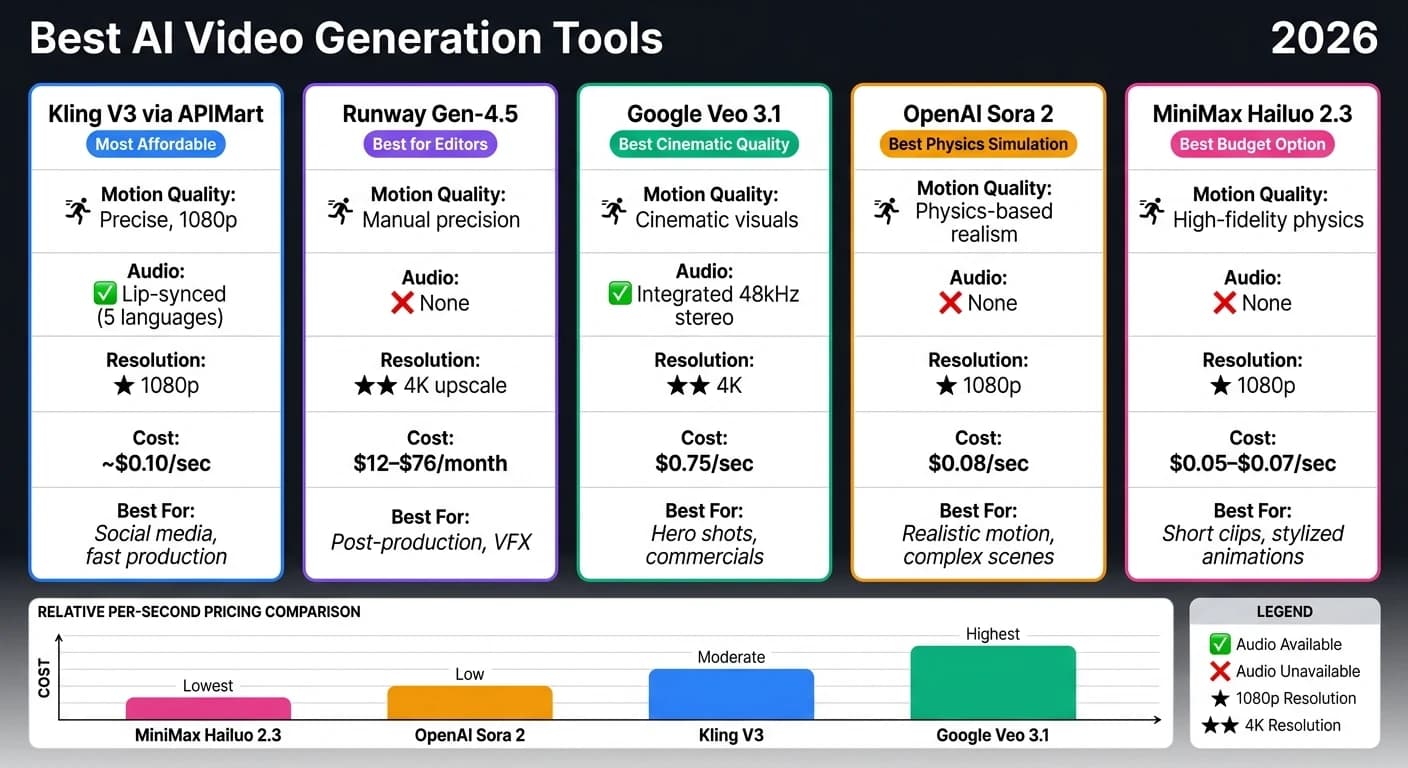
Kling V3 Motion Control debuted in February 2026, offering advanced AI video generation with precise motion tracking and cinematic quality. However, its high costs, content restrictions, and setup challenges have led users to explore alternatives. Here's a quick breakdown of five top options:
- Kling V3 via APIMart: Access Kling V3 features through an API with a 20% discount on pricing. Offers 1080p outputs, lip-synced audio, and seamless integration into workflows.
- Runway Gen-4.5: A full production suite with precise manual motion tools, 4K upscaling, and professional editing capabilities.
- Google Veo 3.1: Known for cinematic visuals and integrated audio, ideal for high-end production but comes at a higher cost.
- OpenAI Sora 2: Excels in physics-based simulations for realistic motion but lacks a public API and has limited resolution.
- MiniMax Hailuo 2.3: Budget-friendly option for short, high-fidelity clips with excellent physics simulation and stylized outputs.
Quick Comparison
| Tool | Motion Quality | Audio | Resolution | Cost | Best For |
|---|---|---|---|---|---|
| Kling V3 via APIMart | Precise, 1080p | Lip-synced (5 languages) | 1080p | ~$0.10/sec | Social media, fast production |
| Runway Gen-4.5 | Manual precision | None | 4K upscale | $12–$76/month | Post-production, VFX |
| Google Veo 3.1 | Cinematic visuals | Integrated | 4K | $0.75/sec | Hero shots, commercials |
| OpenAI Sora 2 | Physics-based realism | None | 1080p | $0.08/sec | Realistic motion, complex scenes |
| MiniMax Hailuo 2.3 | High-fidelity physics | None | 1080p | $0.05–$0.07/sec | Short clips, stylized animations |
Each tool has its strengths, catering to different needs like budget constraints, professional editing, or cinematic quality. Choose based on your project's focus - whether it's cost efficiency, realism, or high-end production.
Kling 3.0 vs Sora 2 vs VEO 3.1: AI Video Generator Battle (Clear Winner)
1. Kling V3 via APIMart

For those looking to tap into Kling V3's advanced motion control features without navigating the complexities of its official platform, APIMart provides a seamless alternative. By offering Kling V3 through a unified REST API, APIMart ensures easier access, dependable performance, and transparent pricing.
Motion Quality and Control
Kling V3 on APIMart employs a dual-input system - a combination of a reference image and a reference video - to precisely map body movements, gestures, and timing onto a target subject. The Element Binding feature locks facial identity to motion data, ensuring that characters maintain their distinct appearance even during challenging movements like 180-degree head turns, hand occlusions, or extreme camera angles. This results in identity consistency for 90–95% of outputs [1].
Moreover, the system incorporates real-world physics - accounting for gravity, inertia, and contact dynamics - to eliminate the "floaty" effect often seen in AI-generated videos. Outputs are available in 1080p resolution and include cinematic lighting and production-level composition.
Creative Flexibility
Once motion capture is fine-tuned, creators can enhance their content further with additional tools. APIMart provides two orientation modes to dictate how the output aligns with the references:
- Image orientation: Retains the original pose and framing of the reference image, ideal for short clips (3–10 seconds).
- Video orientation: Adapts the body direction and camera angles from the reference video, supporting clips up to 30 seconds.
Experimenting with both modes can help identify the best fit for your project.
Beyond motion, Kling V3 also offers lip-synced audio in five languages - English, Chinese, Japanese, Korean, and Spanish [1]. This feature allows for multilingual content creation without the need for additional voiceovers. For creators needing high-resolution alternatives, Sora 2 also offers synchronized audio generation. For further customization, the optional prompt field lets you include details about lighting and style, adding another layer of creative control.
"kling-motion-control is exactly what we needed for fast iteration. A reference image locks the subject, while a reference video gives us reliable motion timing." - Sarah Johnson, Creative Director [3]
Integration and Workflow
Integrating Kling V3 into your workflow is straightforward, thanks to the API's async task model. Simply submit a POST request with the reference URLs, receive a task ID, and retrieve the final MP4 via status polling or webhook callbacks. Webhooks are particularly effective, as they reduce server load and handle failures more efficiently than long-polling.
APIMart also supports Python and JavaScript SDKs, alongside a full OpenAPI specification. As of March 6, 2026, official ComfyUI nodes [1] are available, enabling Kling V3 Motion Control to be incorporated into automated batch pipelines with other AI tools. Rendering a 5-second 1080p clip typically takes 60–90 seconds, while motion-control tasks are completed in about 90–120 seconds [4].
"We dropped kling-motion-control into our pipeline and immediately cut integration time. The minimal API surface makes it a joy to scale." - James Liu, Senior Developer [3]
Pricing and Value
To complement its features, APIMart offers Kling V3 Motion Control at a flat 20% discount compared to the official Kling rates, with no monthly minimums or hidden fees.
| Tier | APIMart Price | Official Price | Savings |
|---|---|---|---|
| Base | $0.10288/sec | $0.1286/sec | 20% |
| Pro | $0.13712/sec | $0.1714/sec | 20% |
Billing is based on the length of the reference video. For drafts and testing, Standard (std) mode is ideal, while Pro mode is better suited for polished, cinematic renders. All generated clips come with a commercial license, making them ready for both marketing and client-facing projects [3].
2. Runway Motion-Controlled Video
Runway combines its motion tools with a comprehensive production suite, offering creators precise frame-by-frame control.
Motion Quality and Control
Runway Gen-4.5 leads the independent Video Arena leaderboard (April 2026) [10], boasting an ELO score of 1,247 for its visual fidelity and temporal consistency [5][6]. Its Motion Brush tool lets users draw motion vectors directly onto specific subjects, while Camera Path controls enable smooth dolly, pan, and rack focus movements. In tests, camera movement prompts achieved the desired results 85% of the time [7]. The model also maintains temporal consistency throughout its generation window, avoiding the drift issues seen in earlier AI video models. These features address creators' need for precision and reliability in motion control.
Creative Flexibility
Runway ensures character consistency by locking features like a character's face, clothing, and body type using up to three reference images, keeping them uniform across multiple shots [5]. Its Act-One feature allows users to transfer facial expressions and emotional nuances from a webcam recording directly onto a generated character [11][12]. For 3D artists, Runway can export virtual camera tracking data in JSON or FBX formats, allowing seamless integration with tools like Blender, Cinema 4D, or After Effects [12]. These capabilities provide the precision and control needed for high-end production work.
"Runway is building tools for the director, the VFX artist, and the 3D generalist. It's a platform built on the principle of creative control, aiming to give the human operator a steering wheel, not just a suggestion box." - Chase Jarvis, Creative Professional [12]
These tools, combined with effective integration, make production workflows smoother and more efficient.
Integration and Workflow
Runway integrates seamlessly with industry-standard tools like Adobe Premiere Pro, DaVinci Resolve, and After Effects, making it a natural fit for professional post-production workflows [10][12]. Its API is recognized as a reliable choice for studio automation [5]. The platform also supports multi-shot editing with its Scene Consistency Mode, ensuring characters and environments remain consistent across a sequence - ideal for narrative projects. However, one limitation is its inability to generate native alpha channels, meaning background removal for compositing must be done manually [12].
Pricing and Value
Runway's pricing reflects its advanced capabilities, but it comes with some considerations.
| Plan | Monthly Cost (Annual) | Credits | Notable Features |
|---|---|---|---|
| Standard | $12 | 625 | 1080p exports, Motion Brush |
| Pro | $28 | 2,250 | 4K upscale, commercial license, Scene Consistency |
| Unlimited | $76 | 2,250 + Relaxed Mode | Near-unlimited generation, priority rendering |
The platform uses a credit-based model, which can feel costly for high-volume users. The average cost per usable clip is approximately $0.48 - higher than Kling's $0.22 - but Runway's higher price reflects its ability to deliver professional-grade results with fewer re-generations [7]. It's worth noting that credits on the Standard and Pro plans don’t roll over, which may impact users with inconsistent output needs [10].
"Runway is where we go for hero content. The 4K output, camera control system, and character consistency make it the right choice when a client is paying for cinematic quality." - Apostle [8]
While its features are robust, pricing and functionality considerations are important for professionals. One notable limitation is that Runway produces silent video, with no native audio output, unlike tools like Veo 3.1 which include high-quality sound. For workflows requiring multilingual voiceovers or lip-synced audio, this can add 30–50% to post-production costs compared to tools that include audio generation [5].
3. Google Veo with Motion and Style Constraints
Google Veo 3.1 focuses on delivering highly realistic visuals, simulating elements like water, fabric movement, and light scattering. It's designed for product demos, brand content, and atmospheric B-roll, with an emphasis on physics-driven authenticity.
Motion Quality and Control
One of Veo 3.1's standout features is its ability to interpret complex prompts with impressive accuracy. It successfully translates prompts 70–80% of the time [15], outperforming Kling 3.0, which lands between 50–60%. The model understands cinematography terms like "dolly zoom", "rack focus", and "crane shot", converting them into precise camera movements [13]. It relies exclusively on text and image prompts, without the capability to transfer motion directly from reference videos [14].
"Where Veo pulls ahead is raw visual quality... This is the model you choose when every frame needs to look like it came off a cinema camera." - Adam Morgan, Stensyl [13]
In addition to its motion accuracy, Veo 3.1 enhances creative possibilities with its styling features.
Creative Flexibility
Veo 3.1 builds on its motion precision with tools that expand creative control. Its "Ingredients to Video" system allows creators to upload up to four reference images, locking in consistent character appearances, object designs, or visual styles across clips [14][15]. The "First and Last Frame" feature provides control over sequence transitions [16].
Another highlight is the built-in audio generation. Veo 3.1 can create synchronized dialogue, sound effects, and ambient audio in 48kHz stereo, with spatial characteristics that align with on-screen action [18]. This integrated audio capability reduces the need for separate post-production workflows.
"At Pocket FM, we've always believed that great storytelling deserves great visuals. With Veo 3.1, our creators finally have a gen AI tool that matches that ambition." - Umesh Bude, CTO, Pocket Entertainment [16]
Integration and Workflow
Veo 3.1 integrates seamlessly with other Google tools, including Gemini for consumers, Google AI Studio for prototyping, Google Flow for multi-shot filmmaking, and Vertex AI for enterprise API access [19][20][21]. Google Flow enables creators to sequence 8-second clips into longer, visually consistent videos up to 60 seconds [19][21]. Outputs also feature SynthID watermarking for provenance tracking [19][17].
However, there is a limitation: the default API rate on Vertex AI is capped at 10 requests per minute [18], which could slow down workflows for high-volume projects.
Pricing and Value
Google Veo 3.1 offers flexible pricing tiers to accommodate different needs, from casual users to professional productions.
| Tier | Resolution | Cost | Best For |
|---|---|---|---|
| Veo 3.1 Lite | 720p / 1080p | $0.06–$0.08/sec | Bulk B-roll, prototyping |
| Veo 3.1 Fast | Up to 1080p | $0.15/sec | Social media, iteration |
| Veo 3.1 Standard | Up to 4K | $0.40/sec | Hero shots, commercials |
| Veo 3.1 + Audio | 4K | $0.75/sec | Full production with native sound |
The consumer plan starts at $19.99/month (Google AI Pro) and includes approximately 90 Fast-tier generations. The free tier offers 10 watermarked 720p videos per month [19][20]. For high-end productions, the Veo 3.1 + Audio tier costs $0.75 per second. While this pricing might seem steep for large-scale projects, the combination of cinematic visuals and integrated audio can make it a worthwhile investment for productions where quality is paramount.
4. OpenAI Sora for Complex Motion Scenarios
OpenAI Sora 2 uses a Diffusion Transformer (DiT) to process video footage as unified 3D spacetime patches. This ensures both spatial and temporal consistency throughout the output, creating results that closely mimic the behavior of a physics engine[24].
Motion Quality and Control
One standout feature of Sora is its World State Memory, which tracks objects, lighting, and spatial relationships across an entire clip[23]. This tracking eliminates common continuity errors. For instance, a character's jacket retains its color even when briefly obscured, and broken objects stay visibly damaged throughout the scene. On top of that, Sora simulates complex physical behaviors like gravity, fluid dynamics, and material interactions, as well as realistic lighting effects[22][23].
"Sora treats the environment more like a game engine simulation than a frame generator." - AinexisLab Editorial[23]
Although Sora's native resolution maxes out at 1080p, creators can upscale the footage to 4K using external tools like Topaz Video AI[24][25].
Creative Flexibility
Sora can generate clips up to 20 seconds long, with the option to extend this to 120 seconds[26]. Its Character API lets users upload a 2–4 second reference clip to create a Character ID, ensuring consistent character appearances across scenes. Additionally, the Cameo feature enables the insertion of a real person's digital likeness into scenes, achieving over 95% accuracy in facial details and lighting consistency[27].
For longer projects, Sora offers a last-frame stitching method. This technique uses the final frame of one clip as a starting point for the next, maintaining seamless visual continuity across multiple outputs[27].
"Sora remains the reference on physical fidelity: reflections, shadows, organic motion." - Comparateur-IA[28]
However, integrating Sora into existing workflows requires careful planning to maximize its potential.
Integration and Workflow
It’s important to note that the Sora web app was discontinued on April 26, 2026, and its API will no longer be available after September 24, 2026. Users should export any remaining content through sora.chatgpt.com/sunset as soon as possible[29].
Pricing and Value
Sora 2 Preview is available on APIMart for $0.08 per second, making it an accessible option for creators who need advanced, physics-based video generation. This pricing makes Sora a practical choice for projects that prioritize physical realism and consistent character portrayal.
With its physics-driven simulations and budget-friendly pricing, Sora 2 opens up new creative opportunities for video production through APIMart.
5. MiniMax Hailuo 2.3

MiniMax Hailuo 2.3 stands out as a leader in physics simulation for AI-generated videos. It currently holds the top spot on WorldModelBench for physics simulation accuracy [31], making it a go-to option for creators aiming for convincing environmental effects and fluid human motion.
Motion Quality and Control
Hailuo 2.3 is exceptional at simulating real-world physics. Whether it’s water splashing, fire flickering, wind blowing, fabric moving naturally, or objects responding to gravity, the results feel lifelike. In dance choreography benchmarks, it recorded an 8% reject rate for artifacts, ensuring smooth and believable outputs [31].
"If you need a 6-second clip of waves crashing on rocks, Hailuo might produce the most realistic version available from any AI video model." - Paul Grisel, Founder of VIDEOAI.ME [30]
There’s a catch, though: clip length. Hailuo 2.3 limits outputs to 6 seconds at 1080p or 10 seconds at 768p. While this might not suit longer narratives, the high fidelity in simulation makes it ideal for short, impactful sequences.
Creative Flexibility
This model shines when it comes to stylized content. It handles anime, ink-wash painting, and game CG with finesse, preserving the essence of the style instead of just slapping on a filter. Plus, it manages complex camera movements - like dolly zooms, 360-degree orbits, and tracking shots - with impressive spatial accuracy.
"Hailuo 2.3 is the strongest motion and physics video model we tested for stylized content (anime, ink-wash, game CG) at the price point." - Anthony M., Verified Builder, ThePlanetTools.ai [31]
However, Hailuo 2.3 only produces silent videos. Adding sound or dialogue requires post-production work using tools like ElevenLabs.
Integration and Workflow
Hailuo 2.3 integrates easily into video generation pipelines, thanks to its availability via APIMart's API, which offers a 99.9% SLA [32]. For quick iterations, the Hailuo 2.3 Fast variant generates 768p clips in about 55 seconds at a significantly lower cost. Once satisfied, creators can switch to the Quality model for final renders.
"The consistency of MiniMax Hailuo 2.3 is amazing! Character images remain stable across multiple clips." - Wei Zhang, Independent Animator [32]
The model also supports prompts in both English and Chinese, making it a versatile choice for international teams [32].
Pricing and Value
Hailuo 2.3 is priced competitively through APIMart. The Quality variant costs $0.0488 per second for 768p and $0.072 per second for 1080p. The Fast variant offers a more budget-friendly option at $0.0248 per second for 768p and $0.0424 per second for 1080p.
| Variant | Resolution | APIMart Price |
|---|---|---|
| Hailuo 2.3 (Quality) | 768p | $0.0488/sec |
| Hailuo 2.3 (Quality) | 1080p | $0.072/sec |
| Hailuo 2.3 Fast | 768p | $0.0248/sec |
| Hailuo 2.3 Fast | 1080p | $0.0424/sec |
For creators working on atmospheric b-roll, product demonstrations involving liquids or fabrics, or stylized animations, Hailuo 2.3 offers high-quality results at a reasonable cost - especially when using the Fast variant for prototyping.
Pros and Cons
Here’s a breakdown of the main advantages and disadvantages of each tool, based on the features outlined earlier. The table below offers a quick comparison of key metrics, helping you decide which option best suits your project requirements.
| Tool | Motion Quality | Compatibility | Cost | Best For |
|---|---|---|---|---|
| Kling V3 via APIMart | 4K/60fps, precise camera path control [22] | High - unified API, Artlist, ModelsLab [22] | ~$0.029/sec [2] | Volume production, social content |
| Runway Gen-4 | Cinematic style with manual Motion Brush control [9] | High - full professional editing suite [9] | $12–$76/mo subscription [9] | Professional editors, post-production |
| Google Veo 3.1 | High cinematic polish, natural lighting [2] | High - Vertex AI, Gemini, Flow editor [2] | $0.75/sec API [2] | Broadcast-ready, agency work |
| OpenAI Sora 2 | Advanced physics simulation [22][2] | Low - ChatGPT Plus/Pro only, no public API [22][2] | $20–$200/mo, no free tier [2] | High-end brand visuals, physics-heavy scenes |
| MiniMax Hailuo 2.3 | High-speed generation with rapid output | Moderate - API via APIMart | From $0.025/sec [2] | Short atmospheric clips, stylized animation |
Kling V3 via APIMart is the go-to for cost-conscious users. At $0.029 per second, it’s about three times cheaper than Sora 2 and ten times cheaper than Veo 3.1 for every second of video generated [2]. Its 4K/60fps output is impressive, though the audio quality is slightly less refined.
Runway Gen-4 caters to professionals working within an editing timeline. Its advanced tools, like inpainting and Motion Brush, make it a comprehensive production solution. However, the subscription model means you’ll pay monthly, regardless of how much you produce.
Google Veo 3.1 shines with its cinematic polish and natural lighting effects, but the $0.75 per second API cost makes it better suited for high-impact, final sequences rather than routine production [2].
OpenAI Sora 2 excels in physics-heavy scenes, delivering unparalleled simulation quality. However, its character rendering falls short, and API access is limited to ChatGPT Plus/Pro users, which restricts its appeal for developers [33][2].
"Sora 2's API access remains limited in 2026 - if you need reliable programmatic access at scale, Kling 3.0 and Seedance 2.0 are the two serious developer options." - Adhik Joshi [22]
MiniMax Hailuo 2.3 is a budget-friendly option tailored for short, stylized animations. Its rapid generation capabilities make it an excellent choice for quick, atmospheric clips at an affordable price point.
Conclusion
Choosing the right tool hinges on your creative goals and how often you produce content. There's no universal "best" option - it's all about finding what fits your workflow.
| Creator Type | Best Pick | Why |
|---|---|---|
| Short-form / Social Media | Kling V3 via APIMart | Native 9:16 output, 4K quality, simple prompting, ~$0.029/sec [2] |
| Filmmakers & Agencies | Google Veo 3.1 | Cinematic polish and broadcast-ready 24fps [2] |
| Visual Effects & Realism | OpenAI Sora 2 | Superior physics simulation for complex, high-stakes scenes [2] |
| Professional Editors | Runway Gen-4 | Full editing suite with Motion Brush and Adobe-compatible pipeline [9] |
| Budget Stylized Clips | MiniMax Hailuo 2.3 | Fast output, low cost, ideal for atmospheric short content |
These recommendations cater to a range of production needs, making it easier to identify the right tool for your next project. For example, filmmakers and agency professionals might gravitate toward Google Veo 3.1 for its cinematic quality, while editors looking for a comprehensive editing suite will appreciate Runway Gen-4. On the other hand, creators on a budget can rely on Kling V3 via APIMart or Hailuo 2.3 for efficient and cost-effective results.
"The era of asking 'which AI video generator is best?' is over. In March 2026, the question is: which model is right for THIS shot?" - CreativeToolsAI [2]
FAQs
Which option is best for my workflow: social clips, VFX, or ads?
Choosing the right model comes down to what you need for your project. If you're focusing on social media clips, Kling 3.0 stands out with its speed, cost-effectiveness, and ability to handle high-volume tasks. For VFX or cinematic projects, Google Veo 3.1 is the go-to option, thanks to its advanced 3D depth features and precise camera control. When it comes to ad production, Kling 3.0 shines with its photorealistic motion capabilities, while Seedance 2.0 works best for template-based sequences and multi-shot storytelling.
How do I control motion using reference images and videos?
Motion transfer tools let you take movements from a source video and apply them to a target character image. Here's how it works: you upload a clear reference video showing actions like dancing, walking, or specific gestures, along with the character image you want to animate. The AI then maps the movements from the video onto your character, creating a seamless motion effect.
Some tools take it a step further by offering interactive features. For instance, you can use brushing or dragging techniques to manually adjust object or camera motion in real time. This gives you more control and precision over the final animation.
What extra costs should I expect for audio and post-production?
Using built-in audio features can simplify your workflow by cutting down on the need for extra tools or manual syncing. But keep in mind, adding audio can significantly increase costs - sometimes doubling the per-second rate compared to creating silent videos. If you're looking to keep initial expenses down, it’s better to focus on video-only production and take care of sound design, music, or voiceovers separately during post-production.
Choose the model you want in the model marketplace
Try chat, image and video models in the APIMart model marketplace, and experience model capabilities quickly with one unified API.