What Is Kling V2.6? Kuaishou's Video AI Guide
A guide to Kling V2.6, Kuaishou's AI video model — native audio-visual generation, camera controls, 1080p output, and pricing on APIMart from $0.0368/sec.
Kling V2.6, launched on December 3, 2025, by Kuaishou, is an advanced AI tool for creating 10-second video clips with synchronized audio directly from text or image prompts. It combines visuals, voiceovers, sound effects, and ambient audio in one seamless process, eliminating the need for separate editing steps. With features like camera motion control, lip-sync capabilities, and support for 1080p resolution, Kling V2.6 is designed for content creators, developers, and businesses looking to produce high-quality videos efficiently, similar to MiniMax-Hailuo-02.
Key Features:
- Two Modes: Text-to-Audio-Visual and Image-to-Audio-Visual generation.
- Camera Controls: Specify pan, tilt, zoom, and other movements in prompts.
- Audio Integration: Generates synchronized dialogue, sound effects, and ambient audio.
- Output Options: 720p (Standard) and 1080p (Professional) resolutions.
- Languages: Native support for Chinese and English.
Use Cases:
- Marketing: Create ads with synchronized visuals and sound in social media-friendly formats.
- Education: Produce training videos or animated lessons with multi-character dialogue.
- Social Media: Generate short, engaging clips with professional cinematic effects.
Kling V2.6 integrates with APIMart for easy deployment, offering pay-as-you-go pricing starting at $0.0368 per second for 720p and $0.15 per second for 1080p. It’s a cost-effective solution for scaling video production while maintaining quality.
KLING 2.6 - NATIVE AUDIO & AI VIDEO (Tutorial)
Core Features and Functions
Text-to-Video, Image-to-Video, and Motion Control
While Kling V3 offers advanced cinematic capabilities, Kling V2.6 provides two primary modes for video creation: Text-to-Audio-Visual and Image-to-Audio-Visual. In the first mode, you can generate a complete video clip - complete with visuals, dialogue, and effects - simply by inputting a text prompt. The second mode lets you animate a static image into a dynamic video, complete with synchronized audio. If you want even more control, you can input two images to define both the starting and ending frames of your video sequence.
Camera movements are also dictated through prompts. For example, you can specify actions like "slow dolly-in", "pan left", or "rack focus" directly in your text input - there's no need for a separate motion editor. A practical formula for crafting prompts is: Scene + Subject + Movement + Audio + Style/Camera [4]. This approach ensures smooth integration of motion and media, resulting in perfectly synchronized audio-visual output.
Synchronized Audio-Visual Generation
One standout feature of Kling V2.6 is its ability to generate audio and visuals simultaneously. This means the audio - whether it's dialogue, ambient sounds, or effects - isn't added later but is created in sync with the visuals.
"With audio-visual coordination at its core, the Kling Video 2.6 Model achieves tight coordination between voice rhythm, ambient sound, and visual motion." - Kuaishou Technology [1]
The system supports a variety of audio types, including voice narration, multi-character dialogue, singing, rap, ambient sounds like wind or traffic, and specific sound effects such as footsteps or glass breaking [4]. For lip-synced speech, you can simply include dialogue in quotation marks, and the model will automatically match lip movements to the speech [7].
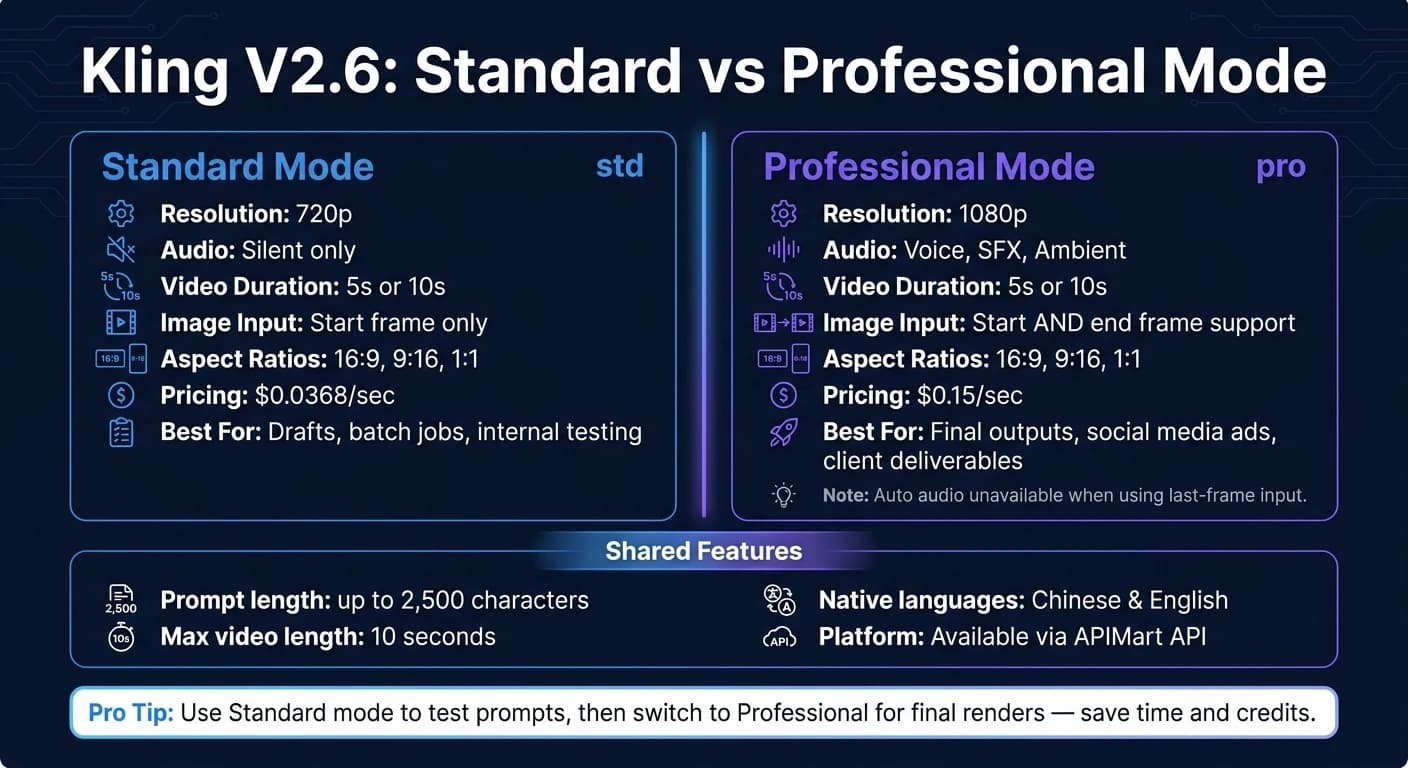
However, it's worth noting that automatic audio generation is only available in Professional mode. Standard mode produces silent videos. Additionally, if you're using the "last frame" image input in Professional mode, you can't enable automatic audio simultaneously - these two features cannot be used together [5].
Output Specs and Quality
The table below highlights the key differences between Standard and Professional modes:
| Feature | Standard Mode (std) | Professional Mode (pro) |
|---|---|---|
| Resolution | 720p | 1080p |
| Audio | Silent only | Voice, SFX, Ambient |
| Duration | 5s or 10s | 5s or 10s |
| Image-to-Video | Start frame only | Start and end frame support |
| Aspect Ratios | 16:9, 9:16, 1:1 | 16:9, 9:16, 1:1 |
Videos are capped at 10 seconds in duration. For more intricate scenes - like those involving multiple characters, singing, or layered audio effects - the 10-second setting delivers better stability and completeness compared to the 5-second option [4].
Prompts can be up to 2,500 characters, giving you plenty of space to include detailed instructions for scenes, audio, and camera movements in one go [5]. Currently, native voice generation supports Chinese and English, while other languages are automatically translated into English for voice output [1][4].
Use Cases and Applications
Marketing and Advertising
Video has become a cornerstone for U.S. brands, with 91% now incorporating it into their marketing strategies [13]. As consumer demand for video content grows, Kling V2.6 steps in to simplify the production process, eliminating the need for a dedicated film crew.
Its built-in support for popular aspect ratios like 9:16, 16:9, and 1:1 ensures effortless deployment across platforms. Plus, its native lip-sync feature allows for the creation of spokesperson-style ads with synchronized mouth movements - no need for separate text-to-speech tools [7].
For campaigns centered on products, the Image-to-Video mode is a game-changer. By uploading a detailed product image, the model animates it with dynamic cinematic motion while preserving the product's visual integrity. This ensures that key branding elements like colors, shapes, and logos stay consistent [11][13].
"Kling 2.6 Pro is the workhorse for high-volume single-shot UGC and product work. Reliable, cheap, and battle-tested." - Paul Grisel, Founder, VIDEOAI.ME [13]
These features also make Kling V2.6 a valuable tool for creating educational content, as outlined below.
Education and Training
For educators and corporate trainers, Kling V2.6 simplifies post-production tasks like voiceover, syncing, and editing by generating visuals, narration, and ambient sound all in one go [4][6].
Its multi-character dialogue feature opens up creative possibilities for content that was once expensive to produce. Think interview simulations, historical reenactments, or role-play scenarios for soft-skills training. Educators can even transform static images into dynamic visuals [4][11]. With bilingual support for English and Chinese, it’s also ideal for ESL courses or content aimed at Chinese-speaking learners [4][9].
The Solo Monologue mode is another standout feature, delivering natural lip-sync and emotional tone for direct-to-camera instruction - no need for an on-screen presenter [4]. These streamlined capabilities make Kling V2.6 a versatile tool for diverse educational needs.
Entertainment and Social Media
Kling V2.6 shines in entertainment and social media content creation, making it a favorite among creators and social media teams. Its affordability and performance earned it a 4.3/5 rating as a "Strong Pick" from Pick Right in April 2026. As Andre Logos from Pick Right put it, "Kling is the AI video tool that earned its place in serious creators' toolkits in 2026 - not by leading on raw cinematic quality, but by leading on the math" [12].
The platform’s audio-visual and motion control features enhance creative storytelling. For instance, creators can upload a reference image to maintain character consistency across multiple clips - perfect for serialized storytelling or branded social media content. Prompt-based camera commands like "dolly-in" or "crane shot" add a professional touch. Starting with short 5-second renders helps test prompts and refine motion before committing to longer outputs, saving both time and credits [7].
Technical Overview and Integration
Model Architecture and Performance
Kling V2.6 is powered by a Diffusion Transformer (DiT) architecture combined with a 3D spatiotemporal joint attention mechanism [14]. This design allows the model to process space and time simultaneously, leading to smoother motion, consistent character behavior across frames, and fewer continuity issues, such as props disappearing mid-clip. Compared to earlier versions, it has improved complex instruction execution by 15% and achieved a 285% winning rate over Seedance 1.0 in blind test comparisons. Additionally, it now ranks #1 for moving camera shots on AI video leaderboards as of early 2026 [10][14].
"Kling 2.6 adopts a deeply integrated architecture of diffusion transformers and 3D spatiotemporal joint attention mechanism, leading to three qualitative leaps in core indicators." - Atlas Cloud [14]
A standout upgrade in V2.6 is its ability to generate Native Audio. This means it can produce visuals, voiceovers, sound effects, and ambient audio in one go, eliminating the older two-step process of creating silent videos first and then adding audio separately [14]. This advancement solidifies Kling V2.6 as a leader in unified audio-visual video generation.
Integration via APIMart
Kling V2.6 integrates seamlessly through APIMart, simplifying deployment. The API supports text prompts up to 1,000 characters, reference images up to 10MB, and reference videos up to 100MB [15][3]. Users can switch between std mode for faster, balanced outputs and pro mode for higher-quality results, depending on their needs. Authentication relies on a standard Bearer Token, ensuring compatibility with most development environments.
For audio-driven projects, dialogue enclosed in quotation marks within the prompt triggers lip-synced speech generation [7].
"The camera control feature in kling-v2-6 gives us precise cinematic movements. Combined with the great cost-performance ratio, it's our go-to for production work." - James Liu, Senior Developer [2]
Infrastructure and Resource Requirements
Since rendering is handled asynchronously, it’s important to account for processing times when planning production workflows. A 5-second clip typically takes 50–70 seconds to render, while a 10-second clip requires 80–100 seconds [8]. Teams should design processes to handle these render times efficiently.
One key consideration: generated video links expire after 24 hours [2]. To avoid losing assets and incurring additional costs, teams should automate the transfer of MP4 files to permanent storage solutions, such as an S3 bucket or a database-linked file system, immediately after retrieval.
The API enforces a rate limit of 100 requests per minute via APIMart’s gateway [16]. To manage high-volume workloads, monitor the X-RateLimit-Remaining and X-RateLimit-Reset headers to avoid hitting limits during peak usage. For cost management, use Standard (720p) mode for internal drafts or batch jobs and reserve Pro (1080p) mode for final outputs that require higher quality.
Conclusion and Key Takeaways
Key Benefits of Kling V2.6
Kling V2.6 simplifies the production process by combining multiple steps into a single, streamlined generation pass. With its Native Audio feature, it delivers synchronized visuals, voiceovers, sound effects, and ambient audio all at once - removing the need for separate text-to-speech services or manual syncing. Add to that its support for 1080p resolution, multi-modal capabilities (text-to-video and image-to-video), and precise cinematic camera tools, and you’ve got a production-ready model tailored for diverse content needs.
"Kling V2.6's audio generation is a game-changer. We use it for all our social media video ads now - the synchronized sound effects really boost engagement." - Sarah Johnson, Creative Director [2] For those exploring alternatives, MiniMax Hailuo 2.3 offers similar high-consistency video generation.
Best Scenarios for Using Kling V2.6
With its advanced architecture, Kling V2.6 shines in scenarios where perfectly synchronized audio and visuals are essential. Social media ads, e-commerce product videos, and educational explainers are some of its strongest use cases - formats where timing and sound directly influence audience engagement. Its ability to handle culturally specific elements, especially for Asian markets, makes it particularly effective. Trained on Kuaishou's video corpus, it excels at rendering Asian faces, text, and environmental details [7].
For teams working on tight timelines or budgets, creating short 5-second clips at 720p to test prompts before committing to full 10-second 1080p outputs is a smart way to manage costs while ensuring top-quality results.
Accessing Kling V2.6 Through APIMart
Kling V2.6 is available through APIMart, making it easy to integrate into your workflow with just a single API key. There’s no need for upfront subscriptions, thanks to its pay-as-you-go billing model. Pricing starts at $0.0368/sec for 720p Standard and goes up to $0.15/sec for 1080p with Native Audio - 20% below official rates across all tiers [2]. With a 99.9% SLA and generation speeds up to twice as fast as standard routes, it’s a cost-effective option for teams looking to scale video production without incurring heavy infrastructure expenses.
FAQs
What’s the best way to write prompts for camera moves and audio?
To craft effective prompts for camera movements and audio in Kling V2.6, make sure your scene descriptions are clear and detailed.
For camera movements, use terms like dolly-in, pan, tilt, or orbit. If the software offers presets, make use of those for consistency.
When it comes to audio, be specific about the character, their actions, and any dialogue. If sound effects are needed, describe both the action and the type of sound. To ensure everything aligns correctly, layer voiceovers and ambient sounds carefully for proper synchronization.
When should I use Standard vs Professional mode?
When aiming for efficiency with simpler scenes, go with Standard mode to produce 720p HD output. For more demanding projects, Professional mode is the better choice, offering 1080p Full HD resolution, improved prompt accuracy, and greater visual detail. While Professional mode might take a bit more time, it delivers superior quality and precision for complex visuals.
How do I keep my generated videos from expiring after 24 hours?
Videos created with the Kling V2.6 system on APIMart are provided as links that expire after 24 hours. To ensure continued access, make sure to download the video file to your local device or a secure server within this time limit. At this time, there’s no option to extend the expiration period for these links.
Related Blog Posts
Choose the model you want in the model marketplace
Try chat, image and video models in the APIMart model marketplace, and experience model capabilities quickly with one unified API.