
Building Smarter Products with AI APIs
Learn how AI APIs help teams build smarter products with text, vision, audio, and video models, unified workflows, async generation, cost control, and launches.
AI APIs simplify adding advanced features like chatbots, image recognition, and video creation to products without needing specialized expertise. They connect developers to AI capabilities via simple HTTP requests, eliminating the need to build or manage complex models. Multi-modal AI, which processes text, images, audio, and video together, accelerates development and creates more integrated user experiences.
Key points:
- What they do: AI APIs enable tasks like summarization, speech-to-text, and text-to-video.
- Why it matters: Multi-modal AI combines data types for better workflows, like turning product descriptions and images into video ads.
- Example solution: APIMart offers a single API to access 500+ models for text, vision, audio, and video, simplifying integration and management.
- Industries impacted: E-commerce, education, and customer support benefit from faster, more efficient content creation and automation.
Whether you're creating marketing videos, automating customer support, or building educational tools, unified AI APIs reduce complexity and improve outcomes. APIMart's platform makes switching between models or scaling projects easy, with clear pricing and centralized management. By 2026, 80% of enterprises are expected to integrate generative AI APIs into their operations.
Core Capabilities of AI APIs for Smarter Products
Key Modalities and Tasks Supported by AI APIs
AI APIs operate across four primary modalities: text, vision, audio, and video. These modalities align directly with product features that might otherwise require months of development. APIMart's unified platform integrates these modalities to accelerate product creation and enhance functionality.
- Text APIs handle tasks like chat, summarization, and code generation, using models such as GPT-5 and Claude 4.5.
- Vision APIs focus on image recognition, object detection, OCR, and image generation.
- Audio APIs manage speech-to-text, text-to-speech (TTS), and speaker detection.
- Video APIs, the newest category, support text-to-video creation, image-to-video transformation, and video editing.
Often, these modalities work together in a single workflow. For instance, a pipeline might combine text, vision, audio, and video models to streamline development. Previously, creating such workflows required a dedicated AI team, but now these tasks are simplified and more accessible.
| Modality | Key Tasks | APIMart Models |
|---|---|---|
| Text | Chat, summarization, code generation | GPT-5, Claude 4.5, DeepSeek-V3 |
| Vision | Image generation, recognition | Flux Pro |
| Audio | Speech-to-text, TTS, lip-sync | Gemini Live |
| Video | Text-to-video, image-to-video, editing | Kling V3 Omni, MiniMax Hailuo 2.3, Sora 2 |
This modular approach allows for flexible, industry-specific applications.
How Multi-Modal AI Is Used Across Industries
The versatility of these APIs means they can be tailored to different industries. For example:
- E-commerce and marketing: Text, vision, and video models work together to automate product descriptions, tag images, and create advertisements, significantly reducing production times.
- Customer support: Text and audio models combine to streamline ticket routing and resolution, improving response times.
- Education: Instructors can transform written lesson plans into narrated training videos, eliminating the need for a professional production team.
The process is straightforward: direct each type of data to the appropriate model, chain the outputs, and produce results that surpass what single-modality systems can achieve.
APIMart's Video Generation Models
Video generation has emerged as a game-changer in content creation, particularly in marketing. According to Wyzowl's 2024 State of Video Marketing report, 91% of businesses leverage video as a marketing tool, but cost and production time remain significant challenges. AI-powered video APIs are bridging this gap. New models like WAN 2.6 provide high-consistency video generation for professional workflows.
APIMart offers video generation models tailored to specific needs:
- Kling V3 Omni: Designed for cinematic-quality output at $0.0672 per second (720p). Its standout feature, Element Consistency Control, ensures characters or brand assets remain visually consistent across multiple clips. This is essential for campaigns involving multiple scenes.
- MiniMax Hailuo 2.3: Focused on speed, it costs $0.025 per second and is ideal for creating short-form content quickly. It’s perfect for drafts, internal previews, and high-volume social media posts.
For best results, use MiniMax Hailuo 2.3 during the drafting and iteration phases, then switch to Kling V3 Omni for polished, brand-consistent deliverables. Both models are accessible through APIMart's single endpoint, making it easy to alternate between them with just a one-line configuration change - no need for new SDKs or credentials.
Designing a Unified Multi-Modal AI Architecture
A Reference Architecture for Unified AI APIs
A multi-modal AI architecture is built around three main layers: client apps, a backend orchestration layer, and a unified AI API. Here's how it all fits together:
- Client apps handle input from users and display the results.
- The backend orchestration layer takes care of logic, such as routing data and managing workflows.
- The unified AI API serves as the central access point for all models.
This structure ensures client apps remain unaffected by changes to the underlying models. For instance, if APIMart adds or replaces a model, only the orchestration layer's routing rules need updating - no modifications to the client-side code. Other key features include secure storage of API keys in a secrets manager, metadata tagging for requests (e.g., campaign IDs or user tiers for cost tracking), and standardized responses. For example, video URLs, file sizes in MB, durations in seconds, and prices formatted in USD are normalized before reaching the front end.
According to a 2024 Forrester report, 60–70% of enterprises plan to use multiple LLM providers. This highlights the advantage of a unified API layer, which simplifies A/B testing, fallback routing, and governance. Such a setup also supports diverse workflows, including video-focused use cases like the ones below.
Multi-Modal Video Workflow Examples
APIMart's unified architecture enables seamless execution of workflows like text-to-video and image-to-video. Here's how these processes unfold:
- Text-to-video: A marketer inputs a product brief with details like description, target audience, call-to-action, video length, and orientation. The backend validates the request and enforces user-specific rate limits. Based on routing rules, the orchestration layer selects the right APIMart model, calls the unified video endpoint, and receives a job ID for asynchronous processing. Once the video is ready, it’s saved as an MP4, enhanced with features like subtitles or price overlays, and logged for cost tracking. The final asset URL is then sent to the front end.
- Image-to-video: This starts with an e-commerce team uploading a product photo. The backend forwards the image to APIMart, specifying parameters like a duration of 8 seconds and a 1:1 aspect ratio for Instagram. APIMart generates motion synthesis, creating a looped video clip ready for publishing. Video processing is significantly more resource-intensive - 10 to 100 times costlier than text models - so asynchronous workflows with polling or webhooks are used to avoid timeouts.
How to Choose the Right APIMart Video Model
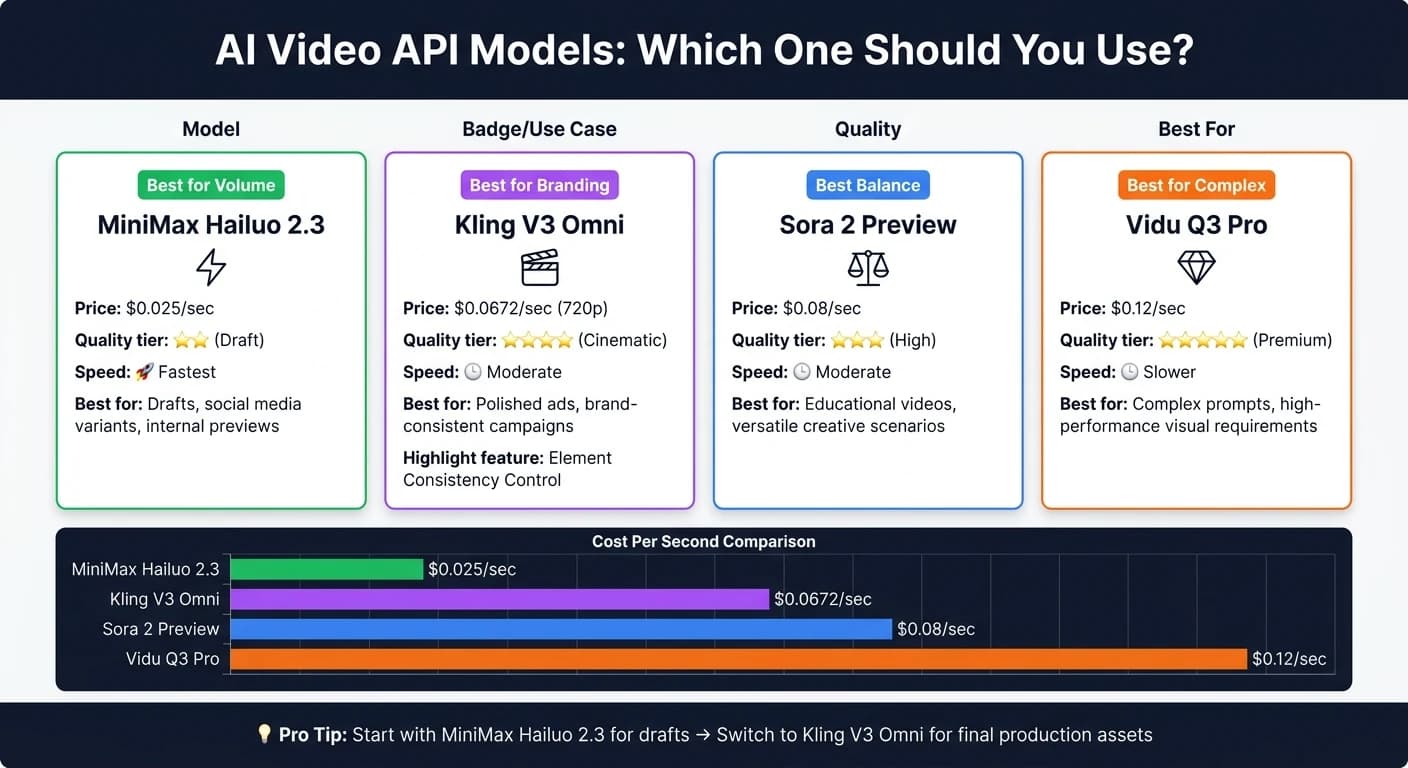
Selecting the right video model depends on three main factors: cost per second, output quality, and control over the final look. Here's a breakdown of options:
| Use Case | Recommended Model | Price | Why |
|---|---|---|---|
| Drafts, social media variants, internal previews | MiniMax Hailuo 2.3 | $0.025/sec | Ideal for high-volume drafts due to its speed and affordability. |
| Polished ads, brand-consistent campaigns | Kling V3 Omni | $0.0672/sec (720p) | Delivers cinematic quality for professional, brand-aligned visuals. |
| Balanced quality for most creative scenarios | Sora 2 Preview | $0.08/sec | Strikes a balance between speed and quality for versatile use cases. |
| Complex, high-performance scenarios | Vidu Q3 Pro | $0.12/sec | Handles advanced prompts and demanding visual requirements. |
For initial drafts or social media content, start with MiniMax Hailuo 2.3. Once the draft is finalized, switch to Kling V3 Omni for polished production assets. Because all models are accessible through APIMart's unified endpoint, switching between them is as simple as updating a configuration in the orchestration layer - no need for new credentials or SDK changes.
Any-to-Any: Building Native Multimodal Agents - Patrick Löber, Google DeepMind

Implementing Multi-Modal Video Generation Workflows
Building off the unified architecture discussed earlier, here’s a clear guide to implementing multi-modal video generation in production. These workflows use multi-modal AI to streamline processes, cut costs, and maintain consistency.
Creating Marketing and Advertising Videos
The foundation of an effective marketing video is a well-crafted prompt. Start by translating your campaign brief into a prompt that outlines the product, target audience, visual style, tone, motion type, and call-to-action. For example: "Slow cinematic zoom into a fitness smartwatch on a wrist, modern studio lighting, energetic pacing, 15 seconds, 9:16 vertical, end-card CTA: 'Shop Now.'" This level of detail reduces the need for revisions.
Kling V3 Omni is an excellent tool for this purpose. At $0.0672 per second for 720p resolution, it supports multi-modal inputs, allowing you to combine your prompt with a brand asset, like a logo or product image, using the <<<image_N>>> syntax. This ensures visual consistency across different versions. For A/B testing, you can generate multiple clips by tweaking a single descriptor - changing "cinematic" to "UGC-style handheld" can significantly impact performance on platforms like TikTok versus YouTube. Always specify the aspect ratio in your API parameters: use 9:16 for Reels and Shorts, and 16:9 for YouTube pre-roll ads. Include an internal review process to ensure brand alignment before publishing. According to a 2024 Wyzowl report, 88% of businesses report positive ROI from video, so investing in a reliable workflow pays off quickly.
This same structured approach works well for creating educational content and engaging e-commerce visuals.
Building Educational and Training Videos
Educational videos benefit from a scene-by-scene approach. Start by breaking your lesson plan into segments, with each scene aligned to a specific learning objective. Include narration text, visual descriptions, and any on-screen text in your outline. Sora 2 Preview, priced at $0.08 per second, is a great option for this, offering a balance of quality and cost for longer instructional videos.
Generate each segment individually and then compile them into a complete, captioned module. Use the first_frame_image and last_frame_image parameters to ensure seamless transitions between segments, maintaining a logical flow. Keep each clip between 3–7 minutes to make reviews quicker and re-generation cheaper if revisions are needed. Pair each video with an auto-generated transcript for accessibility, and follow up with a human review to confirm factual accuracy. This is especially important for compliance training or technical tutorials, where even minor errors can undermine trust. Research shows that videos combining motion, narration, and on-screen text significantly improve retention compared to static slides - particularly for step-by-step or process-based learning.
Producing E-Commerce Product Videos
For e-commerce, automated image-to-video workflows are a game-changer for scaling content production. Instead of filming every product, you can use a clean product photo to generate short motion clips that showcase angles, textures, and key features. Start by uploading a product image to /v1/uploads/images to get a 72-hour public URL. Then, send a POST request to /v1/videos/generations with a prompt like: "slow 360-degree orbit around a ceramic coffee mug, neutral white background, soft natural lighting, 10 seconds, 1:1 aspect ratio."
The quality of your source image directly affects the video output, so ensure photos have consistent lighting, clean backgrounds, and accurate colors. For large catalogs, standardize image naming and metadata so the pipeline can process new products automatically as they’re added. Once video URLs are generated, integrate them directly into your product detail pages to avoid manual uploads. With MiniMax Hailuo 2.3’s rate of $0.025 per second, a 15-second highlight reel costs less than $0.38 - making it feasible to create videos for thousands of products. According to an NRF/IBM study, over 40% of retailers are already exploring AI-driven content creation at this scale.
Running AI APIs in Production
Once you've integrated unified AI APIs, the next challenge is managing cost, security, and quality to ensure your product performs effectively and efficiently.
Controlling Costs and Maintaining Performance
Costs for running AI APIs are driven by factors like model usage, request volume, and video output size. Since billing typically applies per video second, plus storage and delivery, it's important to forecast your monthly expenses accurately. A good method is to estimate three usage tiers - low, expected, and peak - and calculate your daily requests multiplied by the average cost per call. Here's an example: at MiniMax Hailuo 2.3's rate of $0.025 per second, generating 500 daily 10-second videos would cost about $125 per day, or $3,750 per month at peak usage.
To keep costs predictable, opt for smaller or task-specific models for high-volume tasks and save premium models like Vidu Q3 Pro ($0.12 per second) for more complex, infrequent jobs. Other cost-saving strategies include caching repeated results, batching bulk jobs asynchronously, and setting quotas to avoid runaway expenses. AWS reports that without active monitoring and optimization, up to 70% of AI spending can go to waste [1]. This is especially true for video generation jobs that lack oversight.
Performance is just as critical as cost. Wrap your APIMart calls in a service layer that includes retries with exponential backoff, circuit breakers for handling degraded responses, and separate queues for intensive video renders versus quick, synchronous requests. While APIMart offers a 99.9% uptime SLA and multi-provider routing to reduce failure risks, robust retry mechanisms are still essential for smooth operations.
Once you've addressed costs and performance, it's time to focus on securing your API integrations.
Security and Compliance Considerations
Never embed API keys in client-side code or public repositories. Instead, store them securely using tools like AWS Secrets Manager, GCP Secret Manager, or Azure Key Vault, and inject them into backend services at runtime. Use separate keys for development, staging, and production environments, and rotate them regularly - immediately if there's any suspicion of exposure. For added security, scope keys to specific models or usage limits to minimize risk if a key is compromised [3].
For teams operating in the U.S., data handling requires extra diligence. Before sending data to an AI API, anonymize any personally identifiable information (PII), such as names, email addresses, or Social Security numbers. If your product operates in regulated industries, map out your data flows carefully. For example:
- Healthcare apps must comply with HIPAA regulations.
- Fintech products need to meet GLBA requirements.
- Platforms for users under 13 must align with COPPA standards.
APIMart provides regional processing options to help ensure data stays within compliance boundaries [3].
Quality Control and Governance
After managing costs and securing your setup, it's vital to maintain high-quality output and establish governance processes.
Automated filters, such as toxicity detection, NSFW classifiers, and copyright checks, should run on every output. However, these tools aren't enough for sensitive or high-stakes content. Human review is essential for materials like marketing videos, compliance training, or customer-facing clips. A practical workflow involves AI generating a draft, a reviewer approving or requesting edits through an internal tool, and only then triggering the final high-quality render via APIMart's API. Logging every step ensures auditability [3].
Treat prompts like code: version control them, document changes, and tag updates. When switching models or updating prompts, run A/B tests to monitor both quality and cost before fully committing to the change. According to IBM's research on AI governance, companies with formal governance frameworks are three times more likely to see substantial business benefits from AI [2]. Building these processes early can save you from costly retrofitting down the line.
Conclusion and Key Takeaways
Creating smarter products depends on leveraging multi-modal AI to simplify and speed up development. The focus is on addressing real-world challenges quickly and effectively. APIMart's unified API offers seamless access to over 500 models through a single endpoint (https://api.apimart.ai/v1) and one API key. Switching between models is as simple as updating a configuration.
Here are some key points for U.S. product teams to consider:
- Intelligent, Data-Driven Features: AI APIs allow products to adapt intelligently across text, images, audio, and video. This not only shortens time to market but also enhances personalization.
- Streamlined Workflows: From automated marketing videos for direct-to-consumer brands to narrated onboarding for SaaS platforms and catalog-based videos for e-commerce, a unified API simplifies end-to-end processes without needing multiple integrations.
- Simplified Cost Management: Unified billing in USD, along with tiered budget controls and centralized security, makes managing costs and compliance much easier.
- Quick Model Updates: Switching from draft models to production-ready options is effortless with just a configuration change.
- Actionable Steps Forward: Use proven multi-modal workflows to pinpoint high-impact opportunities, run a focused 2–4 week pilot, and measure outcomes like production time, cost per asset, and user engagement.
These takeaways align perfectly with the multi-modal workflows and cost-efficient production methods discussed earlier.
According to Gartner, by 2026, 80% of enterprises will incorporate generative AI APIs into their operations. This trend underscores the importance of adopting a unified platform. The real decision isn't whether to use AI - it's whether to rely on a fragmented stack or embrace a scalable, unified solution.
FAQs
What is a unified AI API?
A unified AI API serves as a single gateway to access various AI models - covering text, image, video, and audio - all through one endpoint and a single API key. This approach removes the hassle of handling multiple SDKs or managing separate authentication for each provider. Thanks to its standardized interface, you can easily switch between models or providers by tweaking a configuration, saving you from the need to rewrite your code.
How do I pick the right video model for my budget?
Selecting a video model that fits your budget means balancing the model's capabilities with the demands of your project. For simpler tasks or prototyping, consider cost-effective options like MiniMax Hailuo 2.3, which runs at $0.025 per second. If your project requires top-notch rendering, premium options like Vidu Q3 Pro, priced at $0.12 per second, are better suited.
To keep expenses under control, you can draft your videos in lower resolutions and finalize them in higher quality when needed. Platforms like APIMart make this process easier by allowing you to switch between models seamlessly - no code adjustments required.
How can I run video generation without timeouts?
To avoid timeouts while generating videos, it's best to use an asynchronous request pattern. Here's how it works: when you submit your request, the API gives you a task_id. You can then periodically check the task status - every 5 to 10 seconds is a good interval - until it's marked as completed.
For a smoother experience, you can add a callback_url to your request. This way, you'll get automatic notifications when the video is ready, eliminating the need for manual status checks.
Choose the model you want in the model marketplace
Try chat, image and video models in the APIMart model marketplace, and experience model capabilities quickly with one unified API.