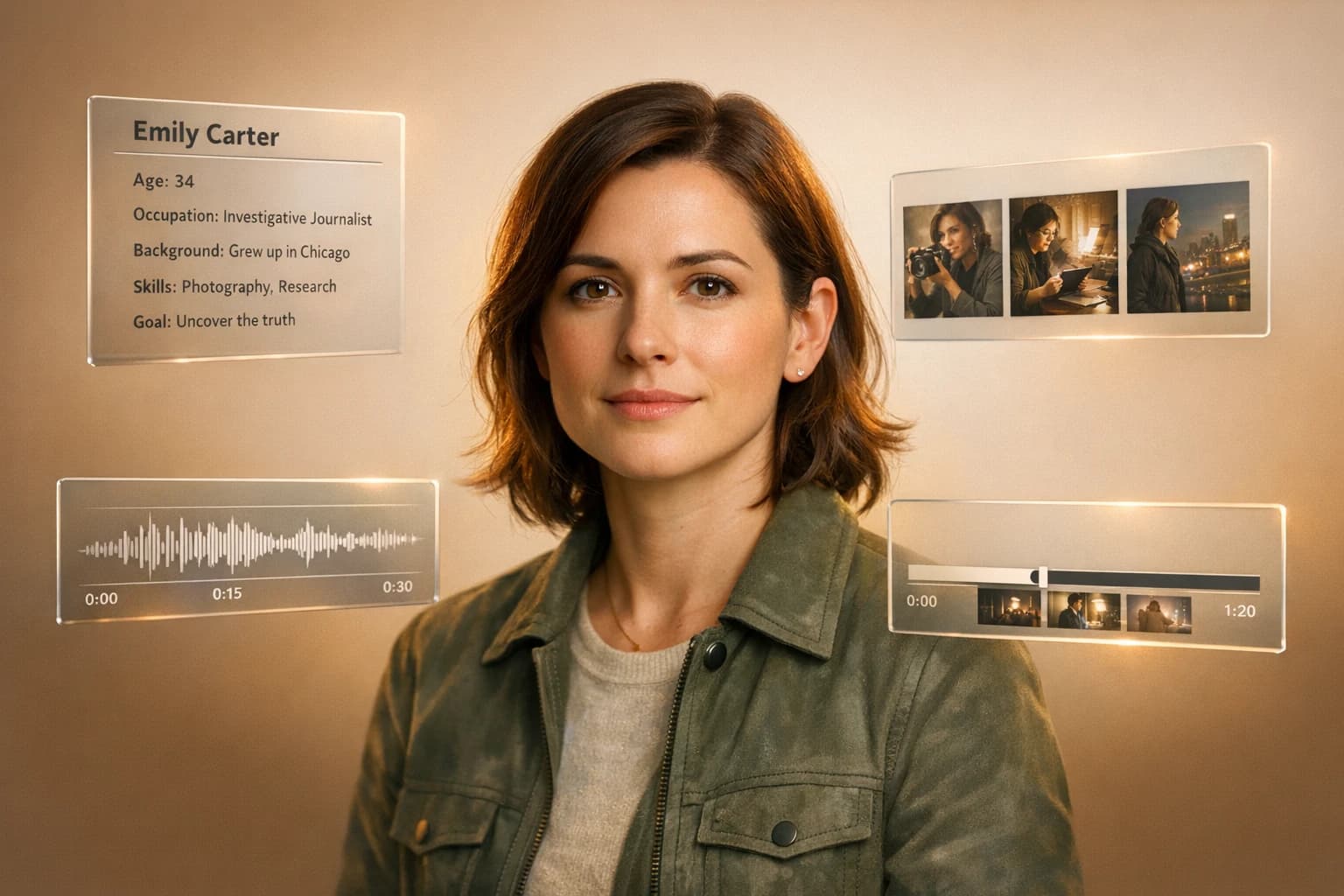
Multi-Modal AI for Character Story Workflows
Learn how multimodal AI combines text, image, and video models to build consistent characters, plan scene cards, and produce personalized story content.
Multi-modal AI is transforming storytelling by combining text, visuals, audio, and video to create lifelike characters and cohesive narratives. It simplifies content creation, reduces costs, and ensures consistency across formats. Here's what you need to know:
- What It Does: Multi-modal AI handles multiple content types, like text-to-video, to develop characters with consistent visuals, voice, and behavior.
- Why It Matters: It cuts production costs (as low as $5 per story) and time (under an hour) compared to traditional methods, which can cost up to $500,000 per episode.
- How It Works: Tools like APIMart unify 500+ AI models, enabling seamless workflows for creating and managing character stories.
- Key Techniques: Use "Character DNA Documents" for detailed character profiles, anchor visuals for consistency, and advanced tools like LoRAs and IP-Adapters to maintain accuracy.
This guide explains how to use multi-modal AI effectively - from writing narratives to producing videos - while keeping characters consistent and engaging for various audiences.
Core Concepts for AI-Driven Character Development
Building Consistent Character Profiles
When using multi-modal AI for storytelling, creating a solid foundation for your characters is essential. Before generating visuals or dialogue, start with a "Character DNA Document" - a detailed reference that defines everything about your character. This document should include physical details (e.g., "almond-shaped emerald green eyes with a slight upturn" rather than just "green eyes"), personality traits, behavioral limits, and narrative rules that the AI must consistently follow across all outputs [3].
The level of detail you include in this document is critical. Vague descriptions can lead to inconsistent results, making your character less recognizable. A precise profile gives the AI clear boundaries, ensuring your character remains consistent in appearance, tone, and behavior throughout the story.
"Character consistency in AI content means the character remains the same across every output. Their personality, tone, behavior, appearance, and backstory do not change or contradict earlier details." - Aisha Imtiaz, Editor, AllAboutAI [3]
One effective method to maintain visual consistency is saving the seed number from successful character generations. Reusing this seed in future scenes ensures the character's visual identity stays anchored, avoiding subtle changes over time [3].
How Multi-Modal Models Work Together
AI models specializing in text, image, and video each tackle different aspects of character creation. When used together, these models bring characters to life in a cohesive way. For example:
- A language model like GPT-5 crafts the character's voice, backstory, and emotional depth.
- An image model like Flux Kontext translates written descriptions into a consistent visual design.
- A video model like Kling V3 animates the character, preserving their look across dynamic scenes.
Advanced tools like LoRAs fine-tune specific model layers to lock in key details - such as facial structure, clothing textures, or skin tone - achieving an 85–92% accuracy rate compared to relying on prompts alone [3]. Meanwhile, IP-Adapters allow for "zero-shot" identity injection. This means you can upload a reference portrait, and the model extracts facial features without requiring extra training [6]. Using these methods, modern AI video APIs can achieve up to 95% visual continuity, keeping character drift below a 5% variance across scenes [6].
The shift from the older "prompting and praying" approach to structured production workflows has revolutionized the industry. As the Atlas Cloud Blog explains:
"The industry has transitioned from 'prompting and praying' to structured production." [6]
This structured approach ensures that characters remain consistent, even when moving between different AI tools.
APIMart's Role in Character Storytelling
Managing multiple AI models used to require complicated setups, but platforms like APIMart simplify the process. APIMart connects over 500 AI models - including GPT-5, Claude, Flux Kontext, Kling V3, and Sora - through a single OpenAI-compatible API, streamlining the entire character creation pipeline.
For character development, APIMart includes features like the <<<image_N>>> reference syntax for models like Kling V3 Omni. This syntax explicitly tells the model which reference image to follow, ensuring visual consistency [4]. Additionally, its create-character endpoint allows you to extract a character's identity from a specific timestamp in an existing video and reuse that identity in new scenes [5]. These tools provide precise control, ensuring your characters remain visually and narratively consistent throughout the storytelling process.
Creating Consistent Multi-Character AI Stories
Planning a Multi-Modal Character Story Workflow
Defining Story Scope and Choosing Modalities
Before diving into AI tools, it's crucial to map out your project's structure and runtime. For instance, a short 30-second emotional arc might break into 6–8 micro-clips, each lasting about 5 seconds, while a 2-minute explainer could feature longer segments with title cards in between. Laying this groundwork upfront helps avoid extra rework later.
Break your script into scene cards that detail the subject, action, environment, camera movement, and tone. Think of these cards as your storyboard, whether you write them in plain text or use a JSON format. This planning stage ensures consistency with the character identity you’ve already established.
For abstract or atmospheric moments where precise visuals aren’t essential, text-only scenes work well. However, when introducing a recurring character, combining text with images helps lock in their visual identity and prevents inconsistencies between scenes. For moments requiring tight synchronization - like dialogue paired with sound effects - a mix of text, visuals, and audio is the best approach.
Once your scenes are outlined, the next step is selecting the right models for each modality.
Choosing the Right Models with APIMart
Each scene card’s modality should align with the most suitable AI model. APIMart simplifies this process by offering access to over 500 AI models through a single API, eliminating the hassle of juggling multiple accounts or integrations.
For text generation, GPT-5 is a solid choice for creating character depth and context. On APIMart, GPT-5 comes with tools like Web Search and File Search to ground characters in real-world details [7].
For image generation, APIMart provides advanced models that can turn written character descriptions into consistent visuals.
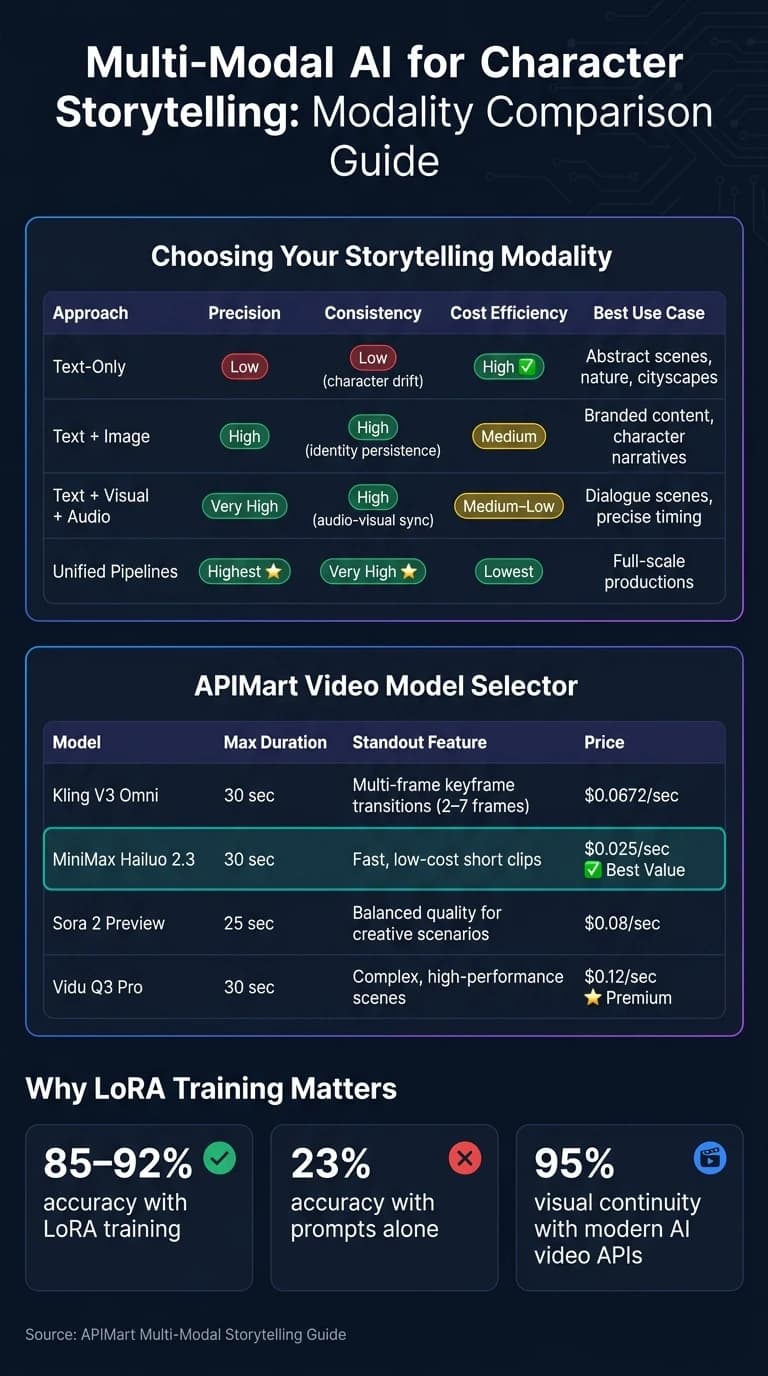
When it comes to video, your choice will depend on your budget and quality needs. Here’s a quick breakdown of some options:
| Model | Best For | APIMart Price |
|---|---|---|
| Kling V3 Omni | Cinematic character scenes with multi-modal inputs | $0.0672/sec (720p) |
| MiniMax Hailuo 2.3 | Fast, low-cost short clips | $0.025/sec |
| Sora 2 Preview | Balanced quality for most creative scenarios | $0.08/sec |
| Vidu Q3 Pro | Complex, high-performance scenes | $0.12/sec |
Here’s a tip: Use an initial pass with a language model like GPT-5 to extract your character’s physical traits into a structured JSON format (e.g., name, age, hair color, outfit, voice description). Attaching this identity sheet to every scene prompt ensures your character stays consistent across all model outputs [1].
Thanks to APIMart’s unified API, the process of selecting and managing models becomes much more straightforward.
Modality Comparison for Storytelling
Each modality approach has its strengths and trade-offs. Here’s a quick comparison to help you decide which one fits your needs:
| Approach | Precision | Consistency | Cost Efficiency | Best Use Case |
|---|---|---|---|---|
| Text-Only | Low | Low (character drift) | High | Abstract scenes, nature, cityscapes |
| Text + Image | High | High (identity persistence) | Medium | Branded content, character narratives |
| Text + Visual + Audio | Very High | High (audio-visual sync) | Medium–Low | Dialogue scenes, precise timing |
| Unified Pipelines | Highest | Very High | Lowest | Full-scale productions |
Investing in higher precision early on can save you time and effort down the line. While text-only workflows might seem cheaper upfront, character drift across scenes can lead to additional revisions, negating those initial savings.
Creating and Refining Multi-Modal Character Stories
Writing Text-Based Narratives
At the heart of multi-modal storytelling lies a solid narrative framework. To achieve this, leverage GPT-5 in two distinct steps. First, extract the character's visual identity as a structured JSON file, detailing features like hair color, facial structure, outfit, and voice. Second, break the story into scene cards, each focusing on a single primary verb (e.g., runs, hides, laughs) [1]. This approach ensures the narrative aligns cohesively with the visual and video elements described later, allowing the character's JSON identity sheet to remain consistent across all modalities.
When creating scene cards, stick to one primary verb per card. Overloading prompts with multiple actions can confuse models, often leading to inconsistent or chaotic outputs [8].
Turning Character Descriptions into Visuals
Once your character's narrative foundation is set, the next step is to bring them to life visually. Start by converting the JSON identity sheet into a set of reference images. Aim for at least three anchor views: front-facing, profile, and three-quarter angle. These anchor images act as your character's visual guide, ensuring their appearance remains consistent throughout the story [9].
To avoid "identity drift", maintain a character bible that includes key details like face shape, color palette, wardrobe, lighting preferences, and default expressions. Every image prompt should incorporate this identity block, with only the scene-specific action or environment changing [9]. Tools such as Grok Imagine's Subject feature on APIMart allow you to upload a reference image directly, ensuring your character's look stays consistent even in varied settings [10].
Producing Character-Focused Video Scenes
With your anchor visuals ready, you can move on to generating videos. Use these reference images as a foundation rather than relying solely on text prompts to ensure polished results.
Different models available on APIMart cater to unique video production needs. Here's a quick comparison:
| Model | Max Duration | Standout Feature |
|---|---|---|
| Sora 2 Pro | 25 seconds | Extended cinematic controls & synced audio |
| Hailuo 03 | 30 seconds | Director Mode & Global Identity VAE |
| Kling V3 | 30 seconds | Multi-frame keyframe transitions (2–7 frames) |
| Google Veo 3 | 8 seconds | Native ambient, foley, and dialogue audio |
To ensure smooth transitions between clips, use the "last-frame" method: take the final frame of one video and use it as the opening image for the next scene [10]. This method preserves continuity in your character's position, lighting, and expression without needing to start from scratch. Kling V3 Omni simplifies this process with its <<<image_N>>> syntax, allowing you to directly reference specific frames within the prompt array [4].
Keeping Characters Consistent and Stories Personalized
Methods for Maintaining Character Consistency
One of the biggest challenges in multi-modal storytelling is avoiding "character drift." This happens when small, unintentional changes across scenes make a character feel inconsistent or unrecognizable. The key to preventing this is to establish a solid foundation for your character before generating any content.
Start by creating a Character Bible. This should include essential details like face shape, eye color, hair texture, skin tone, distinguishing marks, and default outfit. Think of it as an external memory tool for your AI models, which lack the ability to retain context across sessions [3][11]. Alongside this, compile a reference pack of 8–10 anchor images showing the character from multiple angles (front, profile, three-quarter, and full-body) under neutral lighting conditions [9][11].
On the technical side, LoRA training can embed specific elements - like facial structure or clothing patterns - directly into the model’s parameters, achieving character accuracy rates of 85–92%, compared to just 23% when relying on prompts alone [3]. For finer details, tools like IP-Adapters ensure precise facial feature control, while ControlNet helps maintain consistent poses and spatial positioning [6][13]. LoRA training is also affordable, typically costing between $5 and $15 per character model [13]. Platforms like APIMart simplify this process further with tools like Hailuo 03’s Global Identity VAE and Sora 2’s character_url parameter, which eliminate the need for custom training.
Two workflow habits can make a big difference in maintaining consistency:
- Place character descriptors at the start of every prompt. AI models prioritize tokens based on their order, so burying identity details later in the prompt weakens their impact [11].
- Review continuity every 5–8 scenes. This helps catch and correct drift early before it becomes a larger issue [12].
"The gap between 'AI-generated content' and 'AI film' is consistency. Close that gap, and you're not just generating images - you're telling stories." - Sofia Chen, Growth & Marketing Lead, CinemaDrop [11]
By following these steps, you can ensure both visual and narrative consistency, setting your characters up for seamless adaptation across different audiences.
Adapting Stories for Different Audiences
Once your character's identity is locked in, you can adapt their narrative for various audiences while keeping their core traits intact. Consistency doesn’t mean rigidity - your character can remain relatable in multiple contexts, whether addressing a classroom or presenting to a boardroom. The secret lies in preserving the character’s visual and behavioral core while tailoring elements like language, tone, setting, and cultural references.
Platforms like APIMart make this process scalable. Centralized character embeddings allow a virtual spokesperson to maintain the same appearance across markets while adapting to different languages or localized environments [6]. This is similar to how virtual influencers operate. By early 2026, these influencers captured a 4.2% market share and achieved engagement rates of 5.67% - nearly three times higher than their human counterparts [6].
| Approach | Consistency | Audience Flexibility | Best For |
|---|---|---|---|
| Text-Only | Low | High | Abstract or general scenes |
| Text + Image | High | Medium | Branded content, character narratives |
| Unified Pipelines | Very High | High | Episodic series, multi-market campaigns |
For educational content, adjust the tone to be more approachable, simplify the vocabulary, and adapt the setting to match the subject matter - all while keeping the core character identity intact. For entertainment, the same character can take on high-stakes, cinematic roles by simply changing the scene’s context. The Character Bible remains the same; only the surrounding elements shift.
Conclusion and Key Takeaways
Key Benefits of Multi-Modal AI for Storytelling
Multi-modal AI has redefined what creators can achieve. Tasks that once required large teams, hefty budgets, and months of effort can now be completed in under an hour - and at a fraction of the cost [2]. This shift is a game-changer for character-driven storytelling, dramatically reducing production time while maintaining narrative flow.
But it's not just about speed and cost. Multi-modal AI brings a new level of depth and coherence to storytelling. It seamlessly manages elements like character arcs, cause-and-effect dynamics, and thematic consistency - tasks that disconnected tools often struggle with. For example, a 2026 survey revealed that 63% of writers spent more time editing AI-generated content than crafting original material when relying on fragmented tools [14]. A unified, multi-modal approach eliminates much of this inefficiency.
"Simple chatbots are fine for emails, but they fail when you need a cohesive narrative." - SidekickWriter [14]
By streamlining the creative process, multi-modal AI not only makes storytelling more convenient but also raises the bar for quality and consistency. These tools empower creators to craft richer, more engaging narratives with less friction.
Next Steps with APIMart
If you're ready to put these advancements into action, APIMart offers a straightforward solution. It provides access to over 500 AI models - spanning text, image, and video - through a single OpenAI-compatible API endpoint (api.apimart.ai/v1). This unified system eliminates the hassle of managing multiple API keys, billing accounts, or switching between providers.
To get started, consider using a cost-effective model for drafting and internal reviews. Once you've refined your narrative, switch to a premium model for the final polished output. For consistent character appearances, reuse the seed parameter. And to control costs, validate your output at 720p before scaling up to 1080p or 4K resolution. This approach allows you to balance quality and budget effectively.
FAQs
What’s the fastest way to stop character drift across scenes?
The fastest way to avoid character drift is by using a reference image as a visual guide. A character sheet showing multiple angles can help the model keep facial geometry, proportions, and clothing consistent. Tools like APIMart make it easy to integrate these multi-modal inputs into your workflow. Combining visual anchors with consistent prompt templates and fixed seeds ensures stability, reducing the need for constant manual tweaks.
Do I need LoRA training, or are reference images enough?
When deciding whether to use LoRA training, it all comes down to how consistent your character's appearance needs to be. For short clips or single scenes, reference images usually do the trick. You can simply upload one image or rely on previous frames to keep the character's identity intact.
However, if your project spans multiple scenes - like a web series - LoRA training becomes a better option. It delivers higher fidelity but comes with added effort. You'll need 15–30 high-quality images and a bit more technical know-how to get it right.
How should I split a script into scene cards for AI video?
Subject: Alex, a young artist in their mid-20s with messy hair and paint-splattered overalls, sits at a cluttered wooden desk in a small studio apartment.
Action: Alex is sketching intently in a large notebook, pausing occasionally to glance at a reference photo pinned to the wall. They chew on the end of a pencil, lost in thought.
Environment: The room is dimly lit by a single desk lamp, with shelves of art supplies and unfinished canvases scattered around. A window in the background shows a bustling cityscape at dusk.
Camera Direction: The camera starts with a close-up of Alex’s focused expression, then slowly zooms out to reveal the disorganized yet creative space.
Tone: The mood is intimate and reflective, emphasizing Alex’s dedication and the quiet energy of their workspace.
Audio: A soft instrumental piano track plays in the background, mingled with faint city sounds like distant car horns and muffled voices.
Scene 2
Subject: Alex steps out of their apartment building, now wearing a dark hoodie and jeans, carrying a sketchbook under one arm.
Action: They walk briskly down a crowded sidewalk, dodging pedestrians and occasionally glancing up at the towering skyscrapers above.
Environment: The street is alive with activity - neon signs flicker, street vendors call out to passersby, and cars honk in frustration.
Camera Direction: The camera follows Alex from behind at a medium distance, capturing their movement through the bustling crowd. Occasionally, it cuts to a low-angle shot of the towering buildings, emphasizing the city’s overwhelming scale.
Tone: The scene feels vibrant and alive, contrasting the solitude of the previous scene with the chaos of the city.
Audio: The soundscape is filled with overlapping city noises - footsteps, chatter, honking cars - creating a sense of urgency and energy.
Scene 3
Subject: Alex arrives at a quiet park, finding a secluded bench near a small pond. They sit down, open their sketchbook, and begin to draw.
Action: As Alex sketches, they occasionally look up at the serene water, where ducks glide by. A faint breeze ruffles their hair.
Environment: The park is peaceful, with tall trees casting long shadows in the late afternoon light. The pond reflects the golden hues of the setting sun.
Camera Direction: The camera begins with a wide shot of the park, then transitions to a medium shot of Alex sketching. It lingers on the details of their hand moving across the page, capturing the fluidity of their artistry.
Tone: The atmosphere is calm and contemplative, offering a moment of tranquility in contrast to the earlier chaos.
Audio: Gentle sounds of rustling leaves and chirping birds accompany the scene, with the faint trickle of water from a nearby fountain.
Scene 4
Subject: A stranger, an older man in a tweed jacket and hat, approaches Alex and peers curiously at their sketchbook.
Action: The man comments on Alex’s drawing, sparking a brief conversation. Alex smiles shyly, clearly flattered by the compliment.
Environment: The setting remains the same, with the park bathed in the warm glow of the sunset.
Camera Direction: The camera alternates between medium shots of Alex and the man, capturing their expressions and body language. A close-up highlights Alex’s smile as they turn the sketchbook to show more of their work.
Tone: The interaction feels warm and uplifting, hinting at a connection between two strangers brought together by art.
Audio: The ambient park sounds continue, with the faint murmur of their conversation layered over it.
Scene 5
Subject: Alex walks home as night falls, the city now illuminated by streetlights and glowing windows.
Action: They stop at a food cart, buy a hot dog, and sit on a nearby bench to eat. Between bites, they flip through their sketchbook, smiling at their progress.
Environment: The street is quieter now, with fewer people and a cooler, more relaxed vibe. Steam rises from the food cart, and the air feels crisp.
Camera Direction: The camera captures Alex in a medium shot, framed by the warm light of the food cart. A close-up shows their hand turning the pages of the sketchbook, revealing detailed drawings.
Tone: The mood is content and reflective, wrapping up the day’s journey with a sense of accomplishment.
Audio: A mellow jazz tune plays softly in the background, blending with the occasional hum of passing cars and the sizzling sounds from the food cart.
Related Blog Posts
Choose the model you want in the model marketplace
Try chat, image and video models in the APIMart model marketplace, and experience model capabilities quickly with one unified API.