
10 Costly AI API Mistakes and How to Avoid Them
Avoid the AI API mistakes that quietly waste budget and break production, from weak prompts and the wrong model to missing retries, leaked keys, and cost creep.
Most AI API projects fail for the same few reasons: weak prompts, the wrong model, poor retries, loose key handling, missing validation, and no cost tracking.
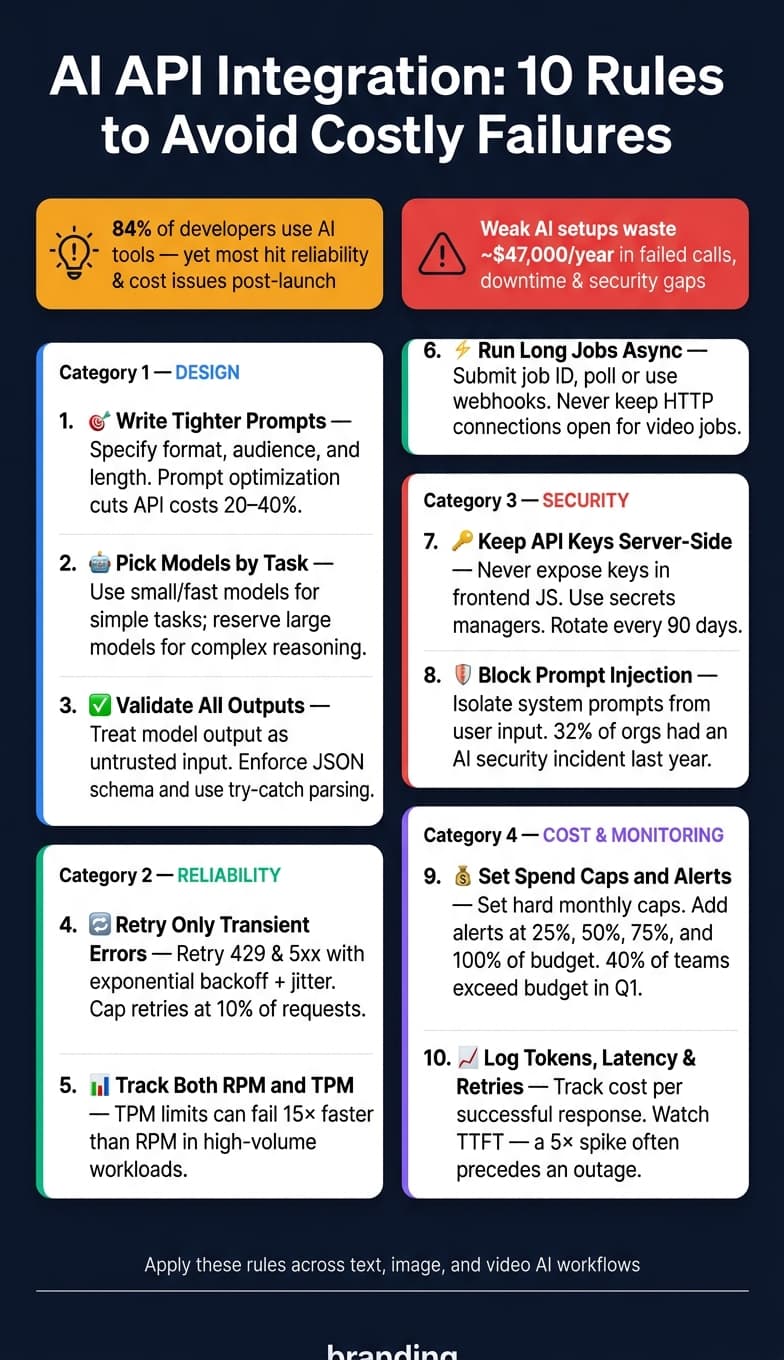
I’d sum it up like this: if you treat an AI API like a normal, fixed API, you’ll hit trouble fast. The article shows that 84% of developers use AI tools, yet many teams still run into reliability and cost issues after launch. It also points out that weak AI setups can waste about $47,000 per year through failed calls, downtime, and security problems.
If I wanted the short version, here it is:
- Write tighter prompts with format, audience, and length rules
- Pick models by task, not by hype or leaderboard rank
- Validate outputs like untrusted input, especially JSON
- Retry only transient errors like
429and5xx - Track both RPM and TPM so rate limits don’t hit out of nowhere
- Run long jobs async instead of keeping requests open
- Keep API keys server-side and rotate them on a schedule
- Block prompt injection by separating system instructions from user content
- Set spend caps and alerts before traffic grows
- Log tokens, latency, retries, and pass/fail checks so drift shows up early
What I like about the piece is that it stays focused on production risk, not demo success. Bad outputs, broken retries, leaked keys, and silent cost creep are the problems that show up once users arrive. This article is a plain checklist for avoiding those mistakes before they turn into support tickets and surprise bills.
Design Mistakes That Lead to Bad Outputs
Start with design, because output quality usually breaks before infrastructure does.
Poor Prompt Design for Text, Image, and Video
Prompt design comes first because it shapes everything that follows.
The most common mistake is vagueness. A prompt like "summarize this" leaves the model to fill in the blanks, which can lead to high variance from one call to the next [2]. In text, image, and video workflows, that kind of inconsistency can throw off every downstream step.
The fix is simple: be specific. Instead of "summarize this", say something like "summarize in three bullet points for a beginner, avoiding technical jargon." Now the model has a format, a target reader, and a length limit. Those three details help tighten output quality [2].
The same rule applies beyond text. In image generation, more concrete direction around subject, style, and composition tends to produce steadier results. In video, details like shot length, aspect ratio, and scene order matter for the same reason. Spell them out, and output variance drops. It also helps to keep context lean. Sending the full conversation history instead of a sliding window can push usage past 4,000 tokens in a 30-minute chat, which drives up cost and can weaken model focus [2].
Prompt templates and versioning matter more than many teams think. Treat prompts like code. Store them in version control, log which version produced which output, and test changes before shipping them. Prompt optimization alone can cut API costs by 20–40% [4].
Choosing the Wrong Model for the Job
Model choice should match task difficulty.
| Task Type | Recommended Model Tier | Example Models |
|---|---|---|
| Simple classification, extraction | Small/Fast | GPT-4o-mini, Claude Haiku |
| General Q&A, summarization | Mid-tier | GPT-4o-mini, Claude Sonnet |
| Complex reasoning, multi-step code | Large/Reasoning | GPT-4 Turbo, Claude Opus |
Using GPT-4 Turbo at $0.01 per 1,000 input tokens for a simple classification task can cost 10–30x more than using Claude Haiku at $0.0005 per 1,000 input tokens for the same job, without any meaningful gain in quality [4][7].
A unified API layer makes model switching much easier because you don't have to rewrite your integrations each time. That's useful because leaderboard scores often miss the mark when it comes to performance on your own use case [3].
Skipping Evaluation, Guardrails, and Human Review
Hallucinations, malformed JSON, and plain factual errors often slip into production when teams skip output checks. For high-impact content, human review is the safer move. For everything else, automated guardrails can catch many common failures before users ever see them.
"Treat model output as untrusted input." - The DEV Team [2]
In practice, that means validating structured outputs with JSON schema enforcement or a provider's JSON mode. It also means wrapping model responses in try-catch parsing so one bad response doesn't break the whole flow. Another smart step is pinning exact model versions in production. If a provider updates a model behind a "latest" alias, output quality can shift with no warning [5][8].
Here’s a quick map from symptom to fix:
| Symptom | Likely Root Cause | Recommended Fix |
|---|---|---|
| Inconsistent or vague outputs | Vague prompting | Add constraints: audience, format, tone |
| High variance in quality | Missing examples | Use few-shot prompting with sample outputs |
| Truncated responses | Context window exceeded | Implement token counting and sliding windows |
| Hallucinations or bad facts | Trusting raw output | Add human review or moderation guardrails |
| Malformed JSON | No schema enforcement | Use provider JSON mode or schema validation |
| High latency or cost | Model overkill for task | Route simple tasks to smaller, faster models |
Once output quality is stable, the next risk is runtime reliability under load.
Integration Mistakes That Break Reliability at Scale
Output quality doesn't matter much if your integration starts cracking under live traffic. That's where many AI API projects stumble: the prototype works, then production shows every weak spot.
Weak Error Handling and Retry Logic
AI API calls depend on the network, so you have to expect transient failure. Even APIs with strong uptime still fail often enough to cause production issues [9].
The first rule is simple: retry the right things. Only retry transient failures like 429 (Rate Limit), 500 (Internal Server Error), 503 (Service Unavailable), and timeouts. Don't retry permanent client errors like 400, 401, or 404. Those usually mean your code is wrong, not that the provider had a brief issue [8][11].
Use exponential backoff with full jitter:
sleep = random_between(0, min(cap, base * 2^attempt))
That matters because fixed retry timing can turn a bad moment into a pileup. Also, cap total retries at no more than 10% of requests so one degraded endpoint doesn't slow the whole system [9].
For automated workflows that trigger actions, idempotency keys are a must. Without them, a retried request can create duplicate tickets, duplicate charges, or other side effects. Circuit breakers matter too. Open them when error rates climb above about 20% over 60 seconds so the system fails fast instead of throwing more traffic at a struggling endpoint. In one reported case, that kind of setup cut customer-facing AI errors by as much as 91% [11].
Retries help only when your traffic stays inside quota.
Ignoring Rate Limits, Concurrency, and Job Queues
Track both RPM and TPM. In high-volume AI workloads, TPM usually fails first. For example, high-volume RAG pipelines can burn through TPM limits 15x faster than short queries, even when RPM still looks fine [9]. If you track only one, throttling will seem to come out of nowhere.
Batch image, video, and document jobs need a queue and concurrency limits in front of the API. Without them, traffic spikes can trigger 429 errors fast. A Redis- or Kafka-backed worker queue with concurrency limits smooths bursts and keeps one workload from starving another.
For non-interactive work, the OpenAI Batch API gives a 50% discount for requests processed within a 24-hour window [10].
Long-running video jobs need the same kind of care, just with async handling.
Treating Long-Running Video Jobs as Synchronous Requests
Submit the job, store the job ID, and then poll or use a webhook when it's done. That's the safe pattern.
A model like Kling V3 Omni costs about $0.0672 per second at 720p, so duplicate reruns can get expensive fast. If your integration retries a failed job without checking whether the first one already finished, you may pay for duplicate renders and get nothing extra in return.
Video jobs shouldn't keep an HTTP connection open while waiting for completion. If a job appears to fail, check its state before sending it again. A missing webhook doesn't always mean the job failed.
| Pattern | Best For | Common Failure Modes | Recommended Handling |
|---|---|---|---|
| Synchronous | Chatbots, real-time text, streaming UI | 504 Gateway Timeout, slow requests blocking others, hung workers | Set strict timeouts (connect: 5s, read: 30s); use token streaming to detect stalls [1][13] |
| Asynchronous | Video generation, batch image jobs, long RAG | Job ID loss, webhook delivery failure, silent queue stalls | Persistent job store; Dead Letter Queues (DLQ) for failures; polling fallback [4][12] |
Always reconcile job state before resubmitting. Once reliability is steady, the next weak point is key and data exposure.
Security and Access Mistakes That Expose Keys and Data
Once your integration holds up under load, security tends to become the next place things break. Fast-moving teams often take shortcuts with credentials, and that can lead to unauthorized charges, data leaks, and model tampering.
Hardcoding API Keys and Sharing Them Insecurely
The most common leak path is also the easiest one to avoid: putting API keys straight into source code or repositories [4][6]. Bots constantly scan GitHub for exposed keys that start with sk-, and a public commit can be compromised in seconds [18].
Putting keys in frontend JavaScript is just as risky. Anyone can inspect them with browser DevTools [15][16]. The safer setup is a backend proxy, so the browser never talks to the AI API on its own. Keep secrets in a secrets manager like AWS Secrets Manager, Google Secret Manager, or Azure Key Vault. Rotate static keys every 90 days, and set monthly spend caps in the provider dashboard to limit abuse [4][6][15].
And one more thing: don't pass keys around in Slack, email, or shared docs. If you think a key may have leaked, revoke it at once. Don't wait until a replacement is ready [14][6].
Using Over-Privileged Credentials and Weak Access Controls
A broad, account-wide key is dangerous. If it leaks, an attacker may get access to far more than the single service you meant to expose. Scope credentials to the exact service, project, or model that needs them. Use separate keys for development, staging, and production, so a leaked dev key can't hit production data or burn production spend [4][5].
You can also stop a lot of mistakes before they land in version control. Pre-commit hooks with tools like detect-secrets or git-secrets can catch exposed secrets early [18].
Here's a simple map of common credential mistakes and the controls that help stop them:
| Mistake | Risk | Recommended Control |
|---|---|---|
| Hardcoding keys in frontend code | Immediate key theft via DevTools | Backend proxy pattern; keys stay server-side |
Committing .env files to Git | Permanent exposure in commit history | .gitignore and a secrets manager |
| Over-privileged keys | Full account compromise | Scoped credentials per service and environment |
| Sharing keys via Slack or email | Internal credential sprawl | Centralized secrets manager with IAM access |
| No spending limits | Denial-of-wallet and fraudulent charges | Hard monthly caps in the provider dashboard |
Even if your keys are locked down, untrusted input can still push the model in bad directions or leak data.
Ignoring Prompt Injection and Data Exfiltration Risks
Access control protects the API. Input control protects the model.
Prompt injection is not some edge-case lab demo. It's a live attack surface. 32% of organizations had an AI API security incident in the past year [19]. Direct injection is the obvious version: a user tells the model to ignore its instructions. Indirect injection is sneakier. The bad instructions sit inside documents, emails, or RAG-fetched content, and the model processes them as if they were safe [17]. Multimodal injection does the same thing through images, overlays, or pixel patterns that vision models may read as commands [17].
The guardrails here are pretty straightforward:
- Use context isolation, sometimes called "spotlighting", to keep your system prompt separate from untrusted user input and outside data [17].
- Limit tool access for agents. Broad write access makes unauthorized data transfer a lot easier [17][19].
- Scan inputs and outputs. Input scanning helps stop sensitive data from reaching the provider, while output scanning helps catch leaked PII or system context before it reaches users [17][19].
Also, keep raw secrets, PII, and internal system prompts out of any context window the model - or the user - can reach. Treat every prompt like a record that may stick around.
The same rules apply whether the input is text, an image, or video.
Cost, Validation, and Monitoring Mistakes That Hurt the Business
Once reliability and security are handled, the next problems tend to be quieter. They don't always crash the app or trigger a loud alert. Instead, they show up as wasted spend, bad inputs, and missing signals.
Unmanaged Spend and No Cost Guardrails
Billing spikes usually don't come from one wild request. More often, they come from lots of small leaks that add up. 40% of teams exceed their AI API budget in the first quarter of production [24], and poorly built integrations cost businesses an average of $47,000 per year in wasted calls and downtime [4].
A lot of that waste comes from the same patterns over and over. Simple requests should go to the cheapest model that can handle them. Then, if confidence is low, you escalate.
Video generation makes this even more obvious. A single 15-second Vidu Q3 Pro job costs about $1.80, while a Kling V3 Omni job at the same length costs about $1.01. On their own, those numbers may not look scary. But without per-user quotas and duration checks, a small group of heavy users can burn through a monthly budget in a matter of days.
| Anti-Pattern | Why It's Costly | Mitigation |
|---|---|---|
| Repeated identical queries | You pay for the same answer more than once | Use exact caching for repeatable prompts and semantic caching for near-duplicates |
| Overlong video jobs | Jobs can exceed duration limits and waste budget | Validate duration before upload and enforce per-user quotas |
| Unused integrations | Forgotten test jobs and unused keys silently consume budget | Audit quarterly and retire dead integrations |
Set hard monthly spend caps at the provider level. Think of them as a circuit breaker, not just a warning label. Then add multi-threshold alerts at 25%, 50%, 75%, and 100% of budget so your team has time to react before the cap gets hit [21].
Cost control falls apart if validation and monitoring don't catch waste early.
Low-Quality Input and Output Validation
When you send malformed input to an API, you usually get a 400-level error back. The frustrating part? You may have already spent tokens before that failure happened.
For text workflows, count tokens with tiktoken before the call so you don't run into context-window overflows. Strip HTML. Check encoding. Enforce length limits. Scan for PII and mask it before transmission. On the output side, use structured outputs or JSON mode so the response matches the schema you expect, and catch quieter issues like empty strings that should be null [22][25].
For image and video workflows, validate file type, file size, and video duration before upload. That 15-second cap on video generation isn't just a product rule. It's also a cost control. If you submit a job that goes past the model's duration limit, the provider returns an error and you still eat the submission cost.
Formatting needs checks too. If downstream systems expect en-US conventions, enforce them in the validation layer, not later in post-processing. That means:
- Dates as MM/DD/YYYY
- Currency as $1,234.56
- Temperatures in °F
Small formatting mismatches can quietly break automated pipelines. That's why validation failures matter so much: they're often your first clue that drift has started.
No Observability or Feedback Loop
Most teams track uptime. That's useful, but it misses the point. What you need to watch is effective cost per successful response: total spend divided by successful completions. Failed requests still consume tokens [26].
Log every request with:
- A unique ID
- The model used
- Input and output token counts
- Latency
- Whether the output passed validation [10]
Then track validation failures next to latency and spend so quality issues show up before users start filing complaints. Also watch Time to First Token (TTFT) as an early warning sign. A 5× increase often shows up before a provider outage [23]. Keep an eye on retry rate per endpoint too. Anything above 5% usually points to a broken prompt or a structural API error that needs work [20].
User retries matter just as much. If people keep trying again, that's usually a sign of two problems at once: poor output quality and hidden cost creep. It helps to track usage by model and feature across text, image, and video workflows so you can see which integrations are dragging things down before they turn into a budget issue.
The point is to build a feedback loop, not chase perfect logs. Validation failures, user edits, retries, and cost per successful response give you the signals you need to improve prompts, adjust model routing, and catch drift early.
Conclusion: A Deployment Checklist for More Reliable AI API Integrations
Most AI API failures don’t come out of nowhere. They tend to follow the same patterns: prompts that were never tested, model changes that slipped in quietly, and API keys left too exposed. So before launch, treat this checklist like part of the release bar, not a nice-to-have.
The same setup applies across text, image, and video workflows.
| Category | Pre-Launch Tasks |
|---|---|
| Prompts & Models | Pin exact model versions; build a 100–500 item regression set [27][28][30] |
| Error Handling | Add exponential backoff for 429 and 5xx errors; set timeouts; enable circuit breakers [29][31] |
| Security | Store API keys in a secrets manager; keep them out of the frontend; test for injection and data leakage |
| Validation | Validate outputs with schema checks; sanitize inputs |
| Cost Guardrails | Set hard spend caps, alerts, token limits, and model routing [27][28][31] |
| Monitoring | Log token counts, latency, and cost per request; track TTFT [4][31] |
| Rollback | Keep a feature flag or prompt rollback executable in under 10 minutes without redeploying code [27][30] |
For high-risk outputs, one human checkpoint still matters. Set up a human escalation path from day one. Be clear about which output types need review before anything happens, such as sensitive text, generated images, and long-running video jobs.
And don’t just trust that things look fine in staging. Review the first 50 production interactions before calling the feature stable [29][30].
FAQs
How do I know if my prompt is too vague?
Your prompt is probably too vague if the output feels generic, shallow, uneven, or just misses the mark. That usually happens when the model has to guess the tone, length, angle, structure, or level of detail because you didn’t spell those parts out.
Take a close look at whether your prompt clearly defines the target audience, the output format, and any limits the model should follow. Swap broad language for specific instructions and concrete details so there’s less room for guesswork.
When should I use async instead of sync API calls?
Use async API calls for jobs that take more than 30 seconds. That includes video generation, large batch processing, and offline high-volume work.
Use sync calls for fast, interactive tasks like text summarization or real-time assistance. If the user is waiting on a response, sync is usually the right fit.
For long-running async jobs, track progress with polling or webhooks and fetch the result when it’s ready. If you wait on those jobs synchronously, timeouts are common.
What should I monitor first after launch?
Start with costs and token usage. Track token counts for every request and set budget alerts so unexpected spikes don’t turn into expensive problems.
Also keep an eye on request IDs, latency, error rates, token usage, and retry rates. These signals help you spot system issues early. Frequent retries often point to reliability problems, misconfigured thresholds, higher latency, and rising costs.