From Idea to AI Prototype in 2-4 Weeks
Go from idea to a working AI prototype in 2 to 4 weeks: scope one problem, build one short workflow, pick one model, test with five users, then scale or pivot.
You can go from idea to working AI prototype in 2–4 weeks if you keep the scope tight. I’d focus on one user problem, build one short workflow, and judge success with one clear metric before adding anything else.
Here’s the short version:
- I’d start with a single test question, like “Can this answer support questions from our knowledge base?”
- I’d build only the shortest path: input → model call → formatted output
- I’d match the task to one model type: text, image, speech, or video
- I’d keep setup small: one API key, one endpoint, one handler per capability
- I’d test with 20–50 labeled examples and 5 users
- I’d track quality, latency, cost, and user behavior
- I’d change one thing at a time
- Then I’d decide to scale, pivot, or stop
A few numbers matter here. Small teams can cut a common 12-week build cycle down to 2–4 weeks. Testing with 5 users can surface about 80% of usability issues. And for cost control, inference should stay near 20%–30% of your target price.
If I were doing this today, I would not start with polish. I’d start with proof.
| What to decide first | Simple rule |
|---|---|
| Problem | Pick one user pain point |
| Success metric | Set a pass bar before building |
| Workflow | Keep only the shortest usable flow |
| Model type | Use the modality tied to the test |
| Evaluation | Use sample tasks plus 5-user feedback |
| Next step | Scale, pivot, or stop based on results |
This article is about building fast without losing the signal: test one idea, get data fast, and avoid extra work until the core flow earns it.
Match Your Product Needs to the Right AI API Capabilities
Next, match each feature to the modality that can prove your test question. The goal here isn't future breadth. It's proof. Once you know the modality, pick the fastest way to get it into your prototype.
Assign Each Feature to Text, Image, Speech, or Video
For your first validation goal, stick to the capabilities tied directly to the ONE thing you're testing. If you're testing whether AI-generated lesson explanations help users, you don't need video generation yet. Bring in new modalities only when the test question calls for them.
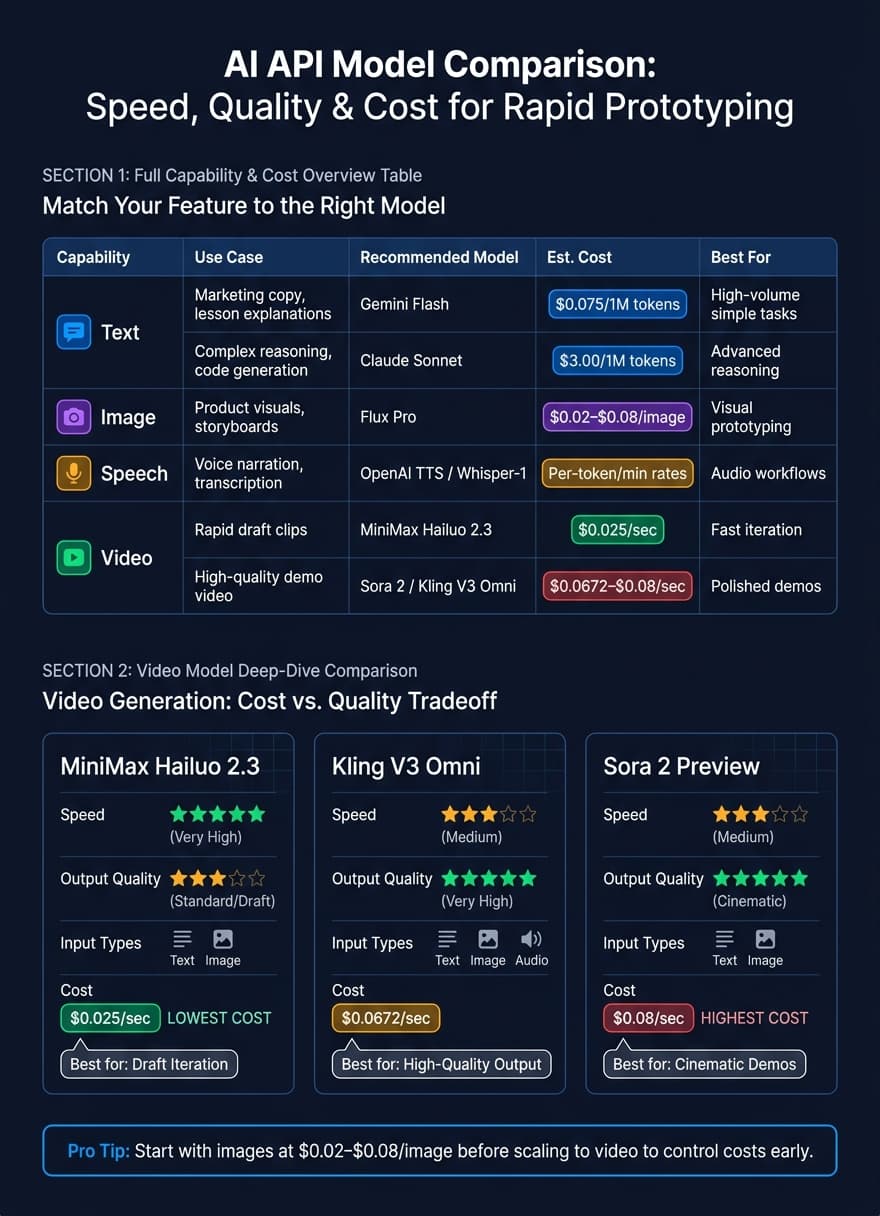
| Capability | Prototype Feature | Recommended Model | Est. Cost |
|---|---|---|---|
| Text | Marketing copy, lesson explanations | Gemini Flash | $0.075/1M tokens |
| Text | Complex reasoning, code generation | Claude Sonnet | $3.00/1M tokens |
| Image | Product visuals, storyboards | Flux Pro | $0.02–$0.08/image |
| Speech | Voice narration, transcription | OpenAI TTS / Whisper-1 | Per-token/min rates |
| Video | Rapid draft clips | MiniMax Hailuo 2.3 | $0.025/sec |
| Video | High-quality demo video | Sora 2 Preview / Kling V3 Omni | $0.0672–$0.08/sec |
Here's the simple money-saving move: start with image generation to shape your visuals at $0.02–$0.08 per image before jumping into video, where pricing climbs fast on a per-second basis. [2]
Use APIMart to Reduce Integration Work
APIMart gives you one OpenAI-compatible endpoint - https://api.apimart.ai/v1 - to access 500+ models across text, image, speech, and video, without separate integrations for each one.
That means you can keep one integration pattern and swap models through configuration instead of rewriting the rest of your prototype. For image and video jobs, send the request, store the task_id, and poll GET /v1/tasks/{task_id} until the asset is ready. [3]
Once that part is simpler, it makes sense to compare models before writing handlers.
Compare Model Options Before Wiring Them In
Compare models on speed, output quality, input type, and cost before you wire them in. Swapping models halfway through a build is a headache, so spending 30 minutes up front can save a lot of wasted work.
For video generation, the cost-to-quality tradeoff is hard to ignore:
| Model | Speed | Output Quality | Input Type | Est. Cost |
|---|---|---|---|---|
| MiniMax Hailuo 2.3 | Very High | Standard (Draft) | Text/Image | $0.025/sec |
| Kling V3 Omni | Medium | Very High | Text/Image/Audio | $0.0672/sec |
| Sora 2 Preview | Medium | Cinematic | Text/Image | $0.08/sec |
Start with MiniMax Hailuo 2.3 when you're iterating on draft-quality output. Move to Sora 2 Preview or Kling V3 Omni when polish starts to matter for the demo.
For text, use the cascade pattern. Send high-volume, simple tasks to Gemini Flash at $0.075/1M tokens, and keep Claude Sonnet at $3.00/1M tokens for more complex reasoning. [2]
After that, wire in only the model you need for the first demo.
Set Up the Fastest Integration Path
After you pick the right models, the next job is simple: cut down code friction. For a prototype, one API key and one call path per capability is enough.
Keep Your API Structure and Environment Setup Simple
Once the model is chosen, keep the prototype path as short as possible: one key, one endpoint, one call per capability. That gives you less to wire up, less to debug, and fewer places for things to go sideways.
Switching to APIMart is a small code change - update base_url to https://api.apimart.ai/v1 and replace the API key; existing SDK calls work as-is.
Build Prompts and Handlers as Reusable Modules
Once the base connection works, split each capability into its own handler. Store prompt templates in the repo, and keep each capability in its own handler file. Image, speech, and video flows can use separate calls, with status polling and progress updates where needed.
Treat your prompt templates as code: store them in your repository so you can version-control them and trace a bad output back to the exact prompt that caused it. [4] Test prompt changes against real, messy inputs before shipping. [4]
This setup makes it easier to test, fix, and swap parts as you learn. Keep each module isolated so changes stay local.
Build and Test the Prototype Workflow
After you wire up prompts and handlers, the next move is simple: run them as one flow. At this point, you're not chasing polish. You're looking for proof. Get one full path working end-to-end before you touch anything else.
Create the First End-to-End Flow
Once your model handlers are set, connect them into one end-to-end path. The simplest version looks like this: collect user input → call the model → format the response → return screen-ready output.
That’s the whole thing.
For a text-based prototype, this usually means a form field, one API call, and output rendered on screen. For a multi-step flow, you chain calls so the output from one step feeds the next.
This is where a lot of teams drift off course. They start adding controls, filters, or UI polish too early. Don’t. If the flow works cleanly with a clean test input, you already have something you can test, measure, and show. That first version is enough to learn from.
Prototype Examples That Show Value Fast
Use these patterns to find the shortest path to a demo people can trust. Some use cases show value faster than others, and that matters when you're trying to prove the idea without getting stuck in build mode.
Here’s how four common prototypes stack up:
| Prototype | Smallest Workable Behavior | Success Outcome | Build Time | Demo Value |
|---|---|---|---|---|
| Marketing Content Generator | Prompt → ad copy + 1 branded image | Coherent copy with a matching visual | < 1 day | High (visual) |
| Educational Tutor | Text query → voice-over explanation | Fast, accurate audio response | 1–2 days | High (utility) |
| Product Demo Video Tool | Image upload → 5-second feature clip | Clear motion showing the product in use | 2–3 days | Highest (impact) |
| E-commerce Assistant | Query → product recommendation + image | Relevant item with visual preview | 1 day | Clear business signal |
The Marketing Content Generator is usually the fastest one to ship. The Product Demo Video Tool often lands the biggest visual punch in a demo.
Compare Use Cases by Build Time and Demo Value
Choose the use case where the test result is easiest to see. Then move straight into measurement.
Iterate, Measure, and Decide What to Build Next
Once the prototype is live, let the data tell you what to fix next.
When the workflow basically works, track four signals: output quality, latency, cost, and user behavior.
Start by checking output quality on 20–50 labeled examples and set a pass bar before you make changes. The bar depends on the task. For reviewed drafts, aim for 70%–85% accuracy. For autonomous decisions, aim for 95%+. Keep inference cost at 20%–30% of your target product price. For a marketing generator, that means copy good enough to publish. For a video tool, it means a clip clear enough to demo. Use those numbers to pick the next change - not to tack on more scope.
For user feedback, test with exactly five real users. That’s enough to surface about 80% of usability problems [1]. If the signal is weak, change the idea before you spend more time polishing the prototype.
Change One Variable at a Time
When something breaks, don’t rip up the whole system.
Change one variable at a time, starting with the part that touches your core value proposition most directly.
If output quality is the issue, tweak the prompt, tighten the constraints, improve fallbacks or retrieval, and rerun the same evaluation set [5]. If the task needs multi-step reasoning or tool use, decide whether a prompt-only setup or an agent-based prototype is the better match for the hypothesis [5]. If one step is dragging down the result, fix that step first instead of reworking the whole flow.
Use prototypes to surface risk early, not to impress stakeholders.
Key Takeaways for Going from Idea to Prototype
After one test cycle, decide whether to scale, pivot, or stop.
The fastest teams stay narrow. They define one problem, prove it with the smallest workflow, and ship before adding more features. They measure against a preset success signal, iterate only where the data points, and make the call based on what real users do - not what they say they might do.
One problem, one workflow, one measurable result.
FAQs
How do I choose the best first AI use case?
Start with your product’s core value.
If the product lives or dies by the quality of the AI output, build a prototype. You need to see the output in action, not just talk about it.
If the product depends more on the user workflow, a wireframe may be enough. In that case, the key thing to test is how people move through the experience.
Before you build a custom interface, test the task with a simple LLM prompt. That’s the fastest way to check whether the model can handle the job at all. If it can, keep the demo tight and focused on one core workflow so you can test your hypothesis with real users fast.
What should I do if the prototype works but costs too much?
If your prototype works but the price tag is too high, cut costs by sending simpler jobs, like summarization, tagging, or basic classification, to lower-cost models. Then keep premium models for harder, high-value work.
That split can reduce costs by 60% to 80%.
It also helps to use a single dashboard to track spending by task. That way, you can see where money is going and catch waste before it adds up.
When should I add more features or modalities?
Add features or modalities only when they help test your core value hypothesis.
That’s the whole point of a prototype: it should help you learn fast. So keep it lean. Add complexity only when you need it to answer a simple question: does this approach work for this use case?
Mixing multiple modalities can improve quality and consistency. But there’s a tradeoff. It can also slow things down and increase cost.
So don’t pile on extra features too early. Start with the minimum setup that lets you validate the idea with real users.