
Energy Efficiency: CPU vs GPU in AI Workloads
Compare energy per task for CPUs and GPUs across training, inference, and video AI—then choose hardware by workload, batch size, and utilization.
Here’s the short answer: GPUs usually use less energy for training and high-volume inference, while CPUs can use less energy for small models, batch size 1, and bursty traffic. If you only look at peak watts, you can miss the point. What matters is energy per finished task.
If I were reducing this article to the essential AI cost tips you need first, I’d put it like this:
-
Training: GPUs usually win because they keep parallel compute busy.
-
Inference: CPUs can be a better fit when requests come one at a time.
-
Video AI: The bottleneck is often decode and preprocessing, not the model.
-
Idle power matters: At about $0.22/kWh, a system that sits idle can still add cost.
-
Utilization changes everything: A GPU waiting on the CPU can waste power fast.
A few numbers make that clear:
-
GPU power in one set of tests moved from 33 W to 199 W based on use.
-
CPU power in those same cases stayed near 12 W to 14 W.
-
An ARM Cortex-A78AE ran ResNet50v1.5 at 102 ms using 2.58 J.
-
A GPU system with an RTX 4060 Ti idled at 41 W, while a Mac mini M4 idled at 7.8 W.
-
In one vision test, an A100 used 46.7 kJ where a CPU-only Xeon node used 213.5 kJ.
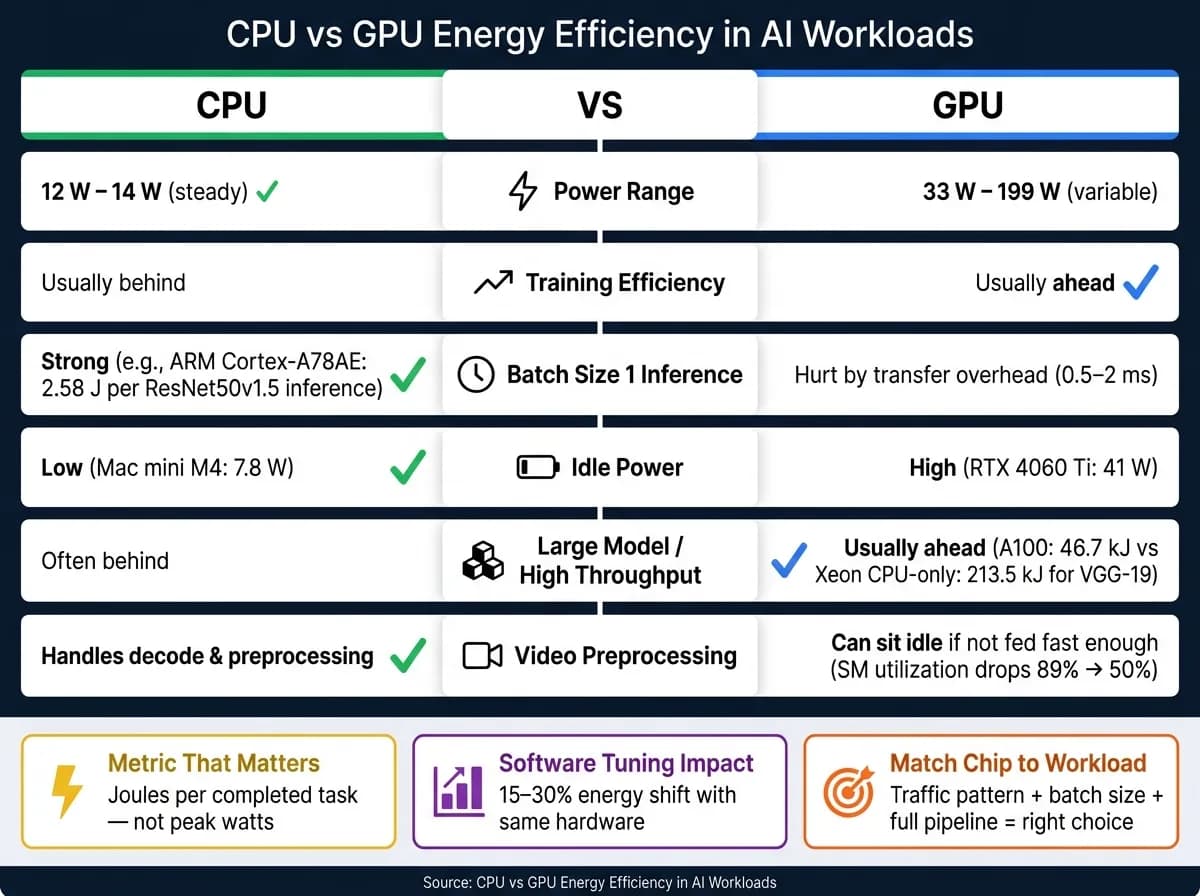
CPU vs GPU | Why AI Data Centers Use GPUs Instead of CPUs
Quick Comparison
| Area | CPU | GPU |
|---|---|---|
| Training efficiency | Usually behind | Usually ahead |
| Batch size 1 inference | Can be strong | Often hurt by transfer overhead |
| Small models | Often a good fit | May be underused |
| Large models / high throughput | Often behind | Usually ahead |
| Idle power | Lower | Higher |
| Video preprocessing | Often handles it | Can sit waiting if not fed well |
| Best metric to judge | Joules per task, frame, or token | Joules per task, frame, or token |
So if you’re choosing hardware, I’d keep it simple: match the chip to the traffic pattern, batch size, and full pipeline - not just the model. That’s the main point of the article.
CPU and GPU Power Profiles in AI Systems
Those benchmark numbers show where each processor actually burns power. CPUs and GPUs don’t spend watts the same way, and AI jobs can lean hard toward one or the other depending on where the work happens. GPUs handle parallel tasks with streaming multiprocessors, while CPU power tends to move with core load. That’s why the same workload can lead to very different power draw on each chip [6].
How architecture affects watts, utilization, and throughput
The big factor here is utilization.
In GPU-heavy workloads, GPU power can jump from 33 W to 199 W based on SM utilization, while CPU power stays much steadier at around 12 W to 14 W [6]. That spread helps explain why changes in GPU utilization can lead to 3–5× differences in energy use for the same task [8].
You see a similar split during inference. Compute-bound phases tend to gain from higher GPU frequency. Memory-bound phases are different: pushing frequency higher doesn’t do much. In those phases, lowering frequency can cut energy use with little effect on latency [7].
Where system power goes during AI runs
In GPU-heavy workloads, the GPU is usually the main source of system power draw. CPU power often stays fairly flat unless the data-loading pipeline turns into a bottleneck. When the CPU can’t feed preprocessed data to the GPU fast enough, SM utilization falls. And that hurts energy efficiency even if the GPU is still pulling power [6].
DRAM footprint, by contrast, adds only a small share of total system power next to processor utilization [6].
The table below sums up the measured ranges and utilization sensitivity reported in the studies [6][7]:
| Workload Type | Primary Power Driver | Measured Power Range | Response to Frequency |
|---|---|---|---|
| GPU-Dominant | SM Utilization | 33 W – 199 W | High (compute-bound) / Low (memory-bound) |
| CPU-Dominant | CPU Core Utilization | 10 W – 33 W | High |
In video AI pipelines, that split often moves back and forth between CPU preprocessing and GPU model execution. That matters most in video workflows, where preprocessing and inference can shift the bottleneck from the CPU to the GPU, or the other way around.
Research Findings: When CPUs or GPUs Use Energy More Efficiently
Benchmarks show that the gap between CPUs and GPUs changes based on the job. Training, inference, batch size, and hardware use all matter. In video pipelines, this shift stands out even more because frame movement and preprocessing can become the main choke point.
Training workloads: GPUs typically lead on energy per training step
For large-scale neural network training, GPUs usually win on energy per training step [4]. That makes sense: training keeps a lot of parallel compute busy at the same time, which is where GPUs tend to shine.
Modern GPUs with native FP8 support are about 1.9× more efficient than FP16 for this kind of work [1]. And hardware isn't the whole story. Software tuning by itself can shift energy efficiency by 15–30%, even when the hardware stays the same [1]. So two teams can run the same model on the same machine and still see a pretty different power profile.
Inference workloads: CPUs can compete at low batch sizes
GPUs lead when throughput is high and batch sizes are large. But that edge gets smaller, and can even vanish, when batch sizes are small and hardware use drops [5].
For models under 1 billion parameters, CPU inference with INT8 quantization usually lands in the 10–50 ms range, which is competitive with GPUs at batch size one once host-to-device transfer overhead is included. That overhead is usually 0.5–2 ms [5]. In plain terms, if you're only serving one request at a time, part of the GPU's speed can get eaten up just moving data around.
A good example is the ARM Cortex-A78AE CPU, which ran a ResNet50v1.5 inference in 102 ms while using only 2.58 J at an average draw of 25.3 W [2]. That's a solid fit for edge deployments or bursty, low-concurrency serving, where the system isn't under constant heavy load.
Key benchmarks:
| Workload Type | Hardware Configuration | Throughput/Latency Metric | Avg. Power Draw | Energy per Inference/Task |
|---|---|---|---|---|
| CNN Inference (ResNet50v1.5) | ARM Cortex-A78AE CPU | 102 ms latency | 25.3 W | 2.58 J [2] |
| LLM Inference (7B, Batch 32) | NVIDIA H100 (FP8) | 6.00 Tokens/J | Not specified | ~0.167 J/Token [1] |
| LLM Decode Phase (1B–32B) | NVIDIA RTX PRO 6000 (DVFS) | 1–6% latency increase | 180 MHz (minimum frequency) | 42% energy savings [7] |
Another finding jumps out: 44.5% of LLM queries are "always easy" and can be handled by smaller 1B–3B parameter models without any meaningful quality loss [7]. The same idea carries over to video AI. Not every frame needs the biggest model or the heaviest path. Sometimes the smarter move is routing simpler frames, preprocessing steps, or lighter scenes through a smaller setup.
Video AI Processing: Energy per Frame, Pipeline Bottlenecks, and Model Infrastructure
Why video workloads shift the CPU vs. GPU energy equation
Video pipelines make the CPU vs. GPU tradeoff much sharper. Decode, preprocessing, and inference can each run on different hardware, so the same model can end up with very different power use depending on where the work lands. Lightweight jobs like motion detection and basic classification are now more feasible on CPU-tuned models, while heavier work such as deep scene understanding and multimodal analysis still leans toward GPUs [10].
There’s a simple reason for that: GPUs can pull more power at peak, but they often finish the job much faster. And when that happens, total joules per frame can drop even if the wattage looks higher in the moment [6][9].
VGG-19 benchmarks make this easy to see. In a general vision test, a CPU-only Intel Xeon node used 213.5 kJ for inference. An NVIDIA A100 GPU used 46.7 kJ for the same job. That’s about a 4.5× difference [9]. But that edge shrinks fast when preprocessing leaves the GPU sitting around waiting.
What this means for pipeline bottlenecks
In practice, the model often stops being the main bottleneck. The data pipeline takes over.
CPU-side preprocessing and data loading are a common choke point in GPU-heavy setups. If the CPU can’t feed the GPU fast enough, GPU SM utilization can fall from about 89% to 50% [6][9]. And here’s the painful part: the hardware still draws power while it waits. An idle NVIDIA A100 in a CPU-GPU system continues to use about 55 W [6][9].
YOLO workloads show the same pattern. GPU power can swing from 33 W to 199 W, while CPU draw stays near 12 W to 14 W [6]. So even when CPU power looks flat, it can still be the piece that holds the whole line back.
What this means for multi-model video APIs
For multi-model video APIs, idle accelerator capacity isn’t just a performance issue. It’s an energy issue too. On CPU-GPU systems, unused accelerator hardware can push total energy use to 1.7× that of CPU-only nodes [9].
For APIMart, the clean move is to keep decode, preprocessing, and orchestration on CPU paths, then use GPUs for generation and deep analysis. That split helps avoid burning power on accelerator time that isn’t doing useful work.
Conclusion: Main Patterns in CPU vs GPU Energy Efficiency
Key takeaways from the studies reviewed
Across the studies reviewed, the same pattern shows up in both AI and video pipelines: efficiency is about finished work, not peak power draw. What matters is energy per completed task, not peak watts.
GPUs come out ahead only when the workload and utilization make that power use worth it. For parallel, high-volume jobs like training and large-batch inference, GPUs usually use less energy per completed task. But with small models, low batch sizes, or stop-and-start traffic, the picture can change.
One benchmark makes that pretty clear. A GPU system with an RTX 4060 Ti idled at 41 W, while a Mac mini M4 idled at 7.8 W. In that same test, the Mac mini was about 3× more efficient for 1B-parameter single-request classification [3].
That leads to three practical rules for deployment:
-
Normalize your metrics. Compare systems using energy per completed task (joules), tokens per joule, or energy per frame for video workloads. That gives you a fair apples-to-apples view across hardware [1][5].
-
Separate training from inference. GPUs usually lead on training efficiency. Inference is less cut and dried. CPUs can still hold their own at batch size 1 and with small models [3][5].
-
In video AI, include the whole pipeline. Decode, preprocessing, and inference all shape energy use. If CPU-side work bottlenecks the GPU, efficiency takes a hit [5].
Hardware choice should match the workload profile. High GPU wattage isn't a problem by itself if utilization stays high. And CPUs aren't just the backup plan. For the right jobs, they're the lower-power pick.
FAQs
::: faq
How should I measure AI energy efficiency fairly?
Don’t look at GPU metrics in isolation. Measure CPU and GPU utilization together.
Why? Because work that happens before the model runs - like preprocessing, tokenization, or image decoding - can slow the whole pipeline down and leave the GPU sitting idle. In that case, GPU numbers alone won’t tell you what’s going on.
Tools like Nsight Systems or PyTorch Profiler can show what the hardware is doing.
For a fair comparison, keep the setup the same across runs:
-
Use consistent pipelines
-
Fix hyperparameters
-
Repeat runs
-
Match the same model, operating point, and data pipeline
If those pieces change, the comparison can get messy fast. :::
::: faq
When is a CPU more efficient than a GPU?
A CPU can be the better pick for some AI workloads and deployment setups, especially when cost efficiency matters more than top-end speed.
It also tends to do well on tasks with less parallelism, like dot products, because it avoids some of the memory-access overhead that often comes with GPUs.
For self-hosted or intermittent AI jobs, CPUs can also deliver better tokens per watt-hour thanks to low idle power use. That makes a CPU a strong fit for edge or embedded deployments running optimized, compressed models, where power, heat, and budget limits matter more than raw throughput. :::
::: faq
Why does video preprocessing affect GPU efficiency so much?
Video preprocessing can turn into a bottleneck fast. Jobs like video decoding and frame augmentation often hit the CPU hard. And if the data pipeline can’t keep up, the GPU ends up waiting around instead of doing useful work.
Multimodal inputs make this tougher because video has to be turned into vision tokens, which adds more memory and compute load. When preprocessing lags, GPU utilization drops, but power use stays high. That means you’re burning energy without getting the output you paid for. :::
Choose the model you want in the model marketplace
Try chat, image and video models in the APIMart model marketplace, and experience model capabilities quickly with one unified API.