
The Future of AI APIs in Cloud-Native Apps
How AI APIs reshape cloud-native apps in 2026: slower model calls, per-request costs, multi-provider routing, and tighter control over spend, security, latency.
AI APIs are now part of the app stack, not just add-on tools. If you build cloud-native apps in 2026, you need to plan for slow model calls, variable per-request costs, multi-provider routing, and tighter controls on spend, security, and latency.
Here’s the short version:
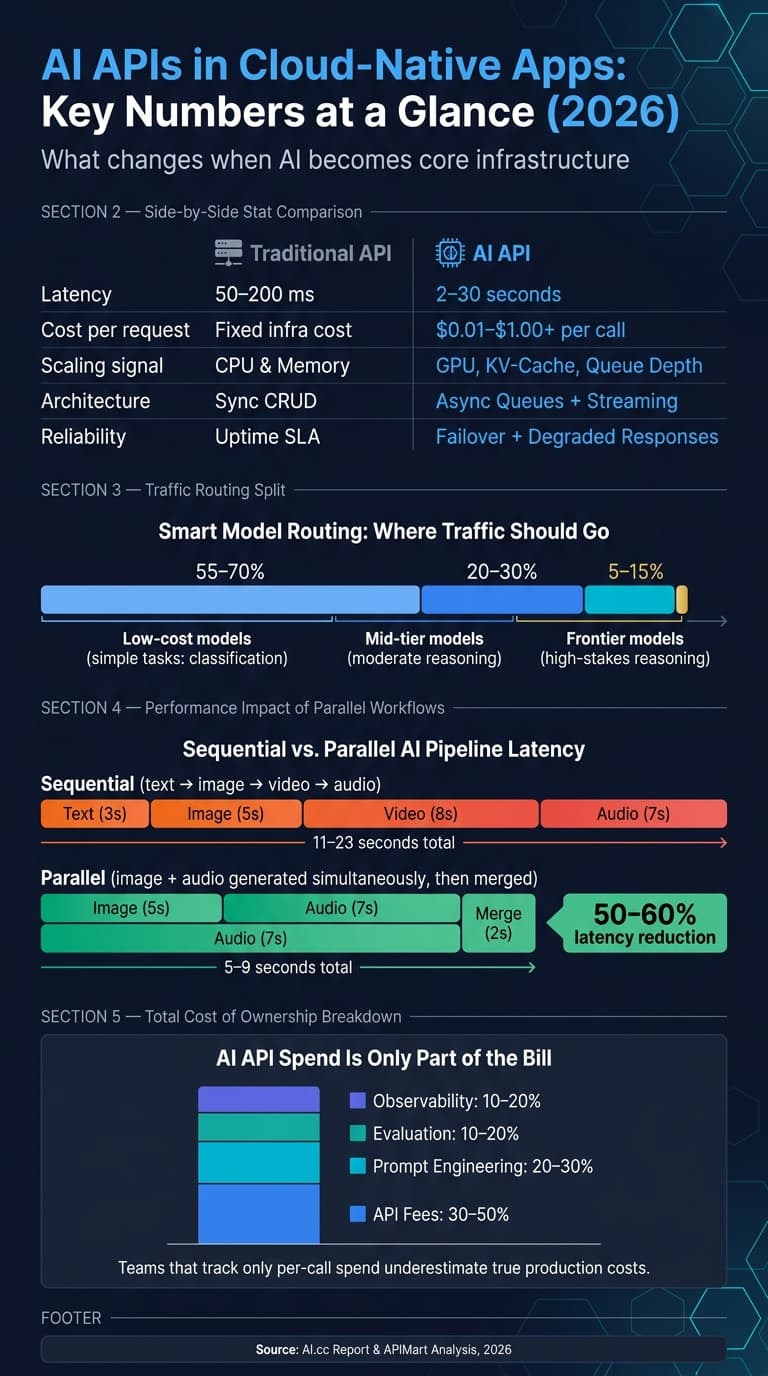
- A normal app request may finish in 50–200 ms, while an AI call can take 2–30 seconds
- AI request cost can range from $0.01 to more than $1.00 per call
- Teams using multi-model infrastructure ship in 3.6 weeks on average, versus 11.2 weeks for single-provider setups
- Good production setups split work across microservices, serverless functions, and event-driven queues
- For long AI jobs, webhooks, streaming, parallel steps, and fallback outputs matter more than raw model quality
- Most traffic should go to lower-cost models, with only 5%–15% sent to frontier models
- AI spend is only part of the bill; API fees are often just 30%–50% of total ownership cost
If I had to boil the article down to one point, it’s this: the future of AI APIs is about control layers. Not just model access. You need one layer for routing, failover, policy, logging, and budget limits across text, image, audio, and video.
That also changes how I’d think about architecture:
- Use microservices for agent-based or retrieval-heavy flows
- Use queues and async pipelines for media generation
- Use serverless for bursty user actions
- Use AI-aware gateways for token limits, caching, and circuit breakers
- Use model version pinning and sub-keys with hard caps to keep output drift and spend in check
A few numbers stand out. Parallel multi-step flows can cut end-to-end latency from 11–23 seconds down to 5–9 seconds. A 15-second generated media pipeline can cost about $0.425 per clip. And dedicated GPU hosting starts to make sense at around 12,500 monthly requests, with H200 pricing near $2.60 per GPU-hour or about $1,872 per month.
What this means for you is simple: if your app uses AI, the main job is no longer just “pick a model.” It’s building a system that can route the right request to the right model, at the right cost, with the right safeguards.
Quick comparison
| Area | What changes with AI APIs |
|---|---|
| Latency | Requests often move from milliseconds to seconds |
| Cost | Spend shifts from fixed infra to per-call usage plus retries and review |
| Architecture | Sync CRUD patterns give way to async queues, streaming, and workflow engines |
| Scaling | GPU, queue depth, and KV-cache matter more than CPU alone |
| Reliability | Failover, degraded responses, and provider routing become standard |
| Governance | PII masking, audit logs, sub-keys, and budget caps move into the gateway layer |
| Product speed | Unified multi-model access cuts integration overhead and shipping time |
So when I look at where AI APIs are headed in cloud-native apps, I don’t see “just another API category.” I see core platform plumbing that shapes app speed, cost, and uptime.
Cloud-Native Foundations That Will Shape the Next Wave of AI APIs
Containers, Kubernetes, Serverless, and API Gateways for AI Workloads
This shift changes the infrastructure layer around model calls. AI inference needs GPU-aware scaling signals, not just CPU and memory. Teams need to watch KV-cache utilization, request queues, and latency.[6] For video generation and image understanding, cache pressure has a direct effect on response time.
In vLLM deployments, KV-cache utilization should be used as an HPA signal, with alerts set above 90%.[6] GPU scheduling also needs to match the job at hand:
- Exclusive GPU assignment works best for large-model inference
- MIG partitioning gives hardware isolation for smaller models
- Time-slicing fits lower-priority background tasks[6]
Old-school gateways don’t handle this kind of traffic well. AI-native gateways add token-aware rate limiting, semantic caching from embeddings, and latency-based circuit breakers. A practical breaker threshold is around 20 seconds.[7][4]
Multi-Cloud, Hybrid, and Unified API Layers
Enterprise AI stacks now stretch across cloud, edge, on-prem data, and third-party model providers. When every provider comes with its own SDK, integrations get brittle fast. That’s why many teams are moving to a unified AI gateway that normalizes provider calls behind one abstraction layer.[7][1]
That single abstraction matters even more when one app routes text, image, audio, and video through the same workflow. The control layer handles policy, routing, and portability, which keeps application code decoupled from downstream model details. Put simply, the app can stay focused on the user experience instead of dealing with provider-specific plumbing.
Edge execution is picking up speed too. V8 Isolates on platforms like Cloudflare Workers can remove cold starts and stream tokens through TransformStream APIs.[7] That same control layer is what makes multi-modal routing and policy enforcement workable in day-to-day systems.
Security, Governance, and U.S. Compliance Requirements
U.S. enterprise buyers now treat Zero Data Retention (ZDR), PII masking, and a signed Data Processing Agreement as standard procurement requirements.[1] These aren’t nice-to-have checks anymore. They’re baseline asks.
Technical leads should set up per-team API subkeys with hard budget caps and model-scoping permissions, so one workflow can’t unexpectedly run up spend or create governance problems.[9] Governance should also extend into the gateway layer through PII redaction and prompt-injection detection, backed by real-time monitoring of answer faithfulness, hallucinations, and drift.[7][5]
Those controls help keep multi-modal workflows predictable across teams and providers. They also set up the multi-modal orchestration layer that follows.
How AI APIs Are Moving from Single-Modal Tools to Unified Multi-Modal Services
From Text Generation to Image Understanding and Real-Time Video
Once the gateway layer is standardized, the next shift happens at the model layer: a single request can now cover text, image, audio, and video.
Early LLM APIs were text-only. Teams had to glue vision, speech, and language services together in code. That kind of separate-model pipeline adds latency, extra moving parts, and more places for things to break. Speech-to-text can also remove tone, hesitation, and emotion before the reasoning model ever sees the input.[10]
Modern early-fusion models handle this in a different way. They map text, audio, images, and video into one shared representation from the start.[10] That lets the model reason across modalities at the same time, instead of passing data down a chain where context often gets lost. Fewer model handoffs usually mean lower latency, cleaner retries, and simpler observability.
The impact is pretty direct. A conversational agent can inspect a product image in the middle of a chat without making a separate vision call. An education app can turn an outline into a narrated lesson video within one session. At that point, the hard part isn’t just connecting tools. It’s orchestrating how the whole flow works.
Unified Multi-Modal API Patterns for Modern Apps
When models share one interface, teams can send inputs, outputs, policy, and cost through the same control layer.
That changes how apps are built. One call can take mixed inputs and return mixed outputs. For example, an app might send text plus an image and get back a revised image, a video clip, or a plain-language explanation. For content teams, that means less authentication overhead and fewer moving parts between a creative brief and a finished asset. Instead of feeling like a patchwork of services, these features start to feel like one system.
Routing Multimodal Requests Through One Integration
Even with unified models, one model still won’t be the best fit for every job. Production apps need routing logic that matches input type, task complexity, latency target, and cost profile to the right model. That’s why modality routing is turning into a core architecture pattern.
The day-to-day gain is simpler routing across models, costs, and modalities. Teams can use lower-cost models for high-volume vision work and keep premium models for harder reasoning tasks.[11] If you had to manage those choices across separate SDKs, rate limits, and retry systems, things would get messy fast. Unified infrastructure takes a lot of that friction out.
Architecture, Performance, and Pricing for AI API-Driven Applications
Reference Architectures for Scalable AI Features
Once routing is set, the next move is picking the runtime pattern for each workload. In practice, three patterns cover most production use cases, and each one fits a different kind of job.
Microservice architecture for AI is a strong fit for isolated agents and retrieval pipelines. Each service can be deployed on its own, uses a defined JSON input/output schema, follows its own scaling policy, and communicates through agent-to-agent messaging across services [2].
Event-driven pipelines are a good match for batch media generation. Jobs enter an async queue, while sub-10 ms object storage keeps intermediate media assets between steps. OpenTelemetry then traces the entire pipeline and logs model versions plus reasoning steps for audit trails [14][15].
Serverless functions work well for bursty, user-triggered media jobs. They scale with traffic spikes and make sense when model calls are infrequent or hard to predict.
The best choice comes down to the shape of the work: interactive, async, or media-heavy.
Workflow Orchestration, Streaming, and Performance Tuning
This is where production systems either feel smooth or fall apart. Orchestration, streaming, and caching are the pieces that keep these patterns usable once traffic shows up.
Long-running video jobs need orchestration engines such as Argo Workflows 5.0, Prefect Orion, or Temporal 2.x to handle complex DAGs, retries, and stateful progress tracking [12]. Without that layer, one failed step can send the whole pipeline back to square one.
Sequential chains like text → image → video → audio add up the latency of every step. That pushes total response time to 11–23 seconds. If you switch to parallel branching - for example, generating image and audio at the same time, then merging them - you can cut that down to 5–9 seconds, which is a 50–60% drop [15]. For user-facing targets, aim for under 200 ms for chat and a few seconds for previews [12][15].
Protocol choice matters too, especially for perceived speed.
- Server-Sent Events (SSE) fit token-by-token text generation in chat UIs.
- WebSockets fit two-way, real-time voice or shared AI sessions [2].
For long-running video or transcription jobs, use webhooks instead of polling. They cut unnecessary API traffic and help keep your backend steady during provider slowdowns [17].
A couple of small choices also have a big effect in production. Intermediate caching for reused assets like embeddings lowers both cost and latency on repeat requests [13]. Pinning explicit model versions helps avoid silent output drift over time [17]. And if your primary model misses its latency target, it’s often better to return a degraded-mode result - like a lower-resolution placeholder - than to block the user flow entirely [17].
Cost Planning and Model Selection by Use Case
Architecture should drive model tier, hosting choice, and budget rules. After the system design is set, pricing should follow workload volume and latency needs.
A common routing split looks like this: send 55–70% of traffic to lower-cost models for simple tasks such as classification, 20–30% to mid-tier models for moderate work, and only 5–15% to frontier models for high-stakes reasoning [3].
Representative video pricing tiers [13]:
| Model | Price | Best For |
|---|---|---|
| MiniMax Hailuo 2.3 | $0.025/sec | High-volume, short-form drafts |
| Kling V3 | $0.0672/sec (720P) | Cinematic quality, dynamic scenes |
| Kling V3 Omni | $0.0672/sec (720P) | Multi-modal inputs, multilingual |
| Sora 2 Preview | $0.08/sec | Balanced quality and cost |
| Vidu Q3 Pro | $0.12/sec | Complex scenarios, premium output |
A chained pipeline that produces a 15-second generative media clip - including text-to-image, image-to-video, voiceover, and optional editing - costs about $0.425 per clip [13]:
| Pipeline Stage | Model Example | Estimated Cost (USD) |
|---|---|---|
| Text-to-Image | Seedream-5.0-Lite | $0.035 |
| Image-to-Video | Kling-Image2Video-V2.1-Pro | $0.150 |
| Audio / TTS | ElevenLabs TTS v3 | $0.100 |
| Optional Editing | Bria Video Eraser | $0.140 |
| Total Estimated Cost | Chained Pipeline | ~$0.425 per clip |
For teams with heavy volume, dedicated GPU capacity can start to make more sense than per-request pricing. H200 instances cost about $2.60 per GPU-hour, or about $1,872/month, and they become the lower-cost option at roughly 12,500 monthly requests [16]. Below that point, pay-per-request is usually the better path.
On the governance side, set hard budget caps at the sub-key level so recursive agent loops or traffic spikes don’t run up the bill [9]. Also, track success using total cost after retries and review, not just raw cost per API call [17].
Business Impact and What Teams Should Do Next
Where Multi-Modal AI APIs Create Measurable Value
Once architecture and pricing are set, the next step is simple: figure out where multi-modal APIs can produce a clear return.
| Sector | Primary Use Case | Key Measurable Value | Critical KPIs |
|---|---|---|---|
| Marketing | Personalized 15-second video ads | 60% reduction in ad production costs | Conversion rate, Cost-per-ad, Latency |
| E-commerce | Image-aware assistants | Increased buyer trust via product-confidence checks | Session-to-sale, Hallucination rate |
| Education | Adaptive AI tutors | 24/7 personalized tutoring flows | Student engagement, Faithfulness score |
| Entertainment | Pre-visualization | Cinematic previsualization at indie budgets | Temporal stability, Character consistency |
The pattern here is easy to miss. The model name gets most of the attention, but the business result often comes down to routing and governance. If your stack sends the right task to the right model, with the right checks in place, you move faster. And that speed edge turns API choice into a product-cycle edge.
Skills, Governance, and Operating Models for the Next 12 to 24 Months
The shift now is away from monolithic AI features and toward distributed, composable services.
In practice, the operating model is splitting into four core functions:
- Platform engineering runs gateways and routing
- Application teams build workflows
- AI ops owns prompts, evaluation, and cost control
- Governance handles audit and compliance
For international teams, it pays to build compliance in early. The EU AI Act's GPAI obligations begin August 2, 2026, including audit logs, training-data summaries, and copyright checks [8].
A useful way to plan the next 24 months is to treat API fees as only part of the bill. They usually account for just 30–50% of total ownership cost. The rest should be set aside for prompt engineering (20–30%), evaluation (10–20%), and observability (10–20%) [1]. Teams that watch only per-call spend almost always underestimate what it takes to run production AI well.
Conclusion: The Future of AI APIs in Cloud-Native Applications
"The choice of AI API infrastructure in 2026 is not a vendor procurement decision - it is a strategic architecture decision that will compound in its impact on your organization's AI capability." - AI.cc Report [3]
That quote gets to the point. The integration layer matters just as much as the model itself.
APIMart's unified API gives teams access to 500+ models through a single integration point. That includes video, image, and language workflows, with pricing options that cover low-cost short-video generation as well as higher-end cinematic workloads.
FAQs
How do I choose between serverless, microservices, and queues for AI features?
It comes down to your workflow’s latency, state, and durability needs.
- Microservices work well when you need independent deployment, separate scaling, and clear service contracts.
- Serverless makes sense when you want to keep conversational context without managing virtual machines, especially in latency-sensitive apps.
- Queues are a good fit for long-running, durable workflows or jobs that go beyond your real-time budget.
When should I route requests to low-cost models instead of frontier models?
Use low-cost models for routine work like classification, short chat replies, summarization, and structured data extraction. Save frontier models for harder jobs, such as multi-step agentic tasks, advanced debugging, and reasoning that calls for more depth.
A simple way to handle this is with static rules. For example, route based on clear signals like user tier or input length. Another option is to start with a cheaper model first, then escalate only if it fails quality checks or schema validation.
What controls do I need to manage AI cost, latency, and compliance?
Use an AI gateway or unified API platform between your app and model providers.
That extra layer gives you one place to control cost, speed, and policy instead of juggling each provider on its own.
- For cost: track token usage, set hard budget caps, use semantic caching, and send simpler tasks to lower-cost models.
- For latency: use streaming and smart routing, with fallbacks when a model is slow or unavailable.
- For compliance: require in-region data residency, redact inputs, and keep audit logs.