
AI API Pricing, Performance, and Scalability
An AI API cost guide for 2026: how token, per-image, and per-second pricing really adds up, plus the latency, rate limits, and retries that decide what you pay.
AI API costs in 2026 are all over the map: output pricing alone runs from $0.28 to $50.00 per 1 million tokens, a 179x gap. If I were picking an API today, I’d look at cost, latency, rate limits, and how the system holds up when traffic climbs before anything else.
Here’s the short version:
- APIMart is built for teams that want one API for text, image, and video models, plus routing, async jobs, and spend controls.
- Direct language model APIs give you straight access, but output tokens often cost 3x to 10x more than input tokens, and reasoning tokens can push bills much higher.
- Direct image APIs are often priced per image, but your true cost depends on retries, reject rates, upscaling, and how many generations you need to get one image you can use.
- Direct video APIs are usually priced per second, with long wait times, async delivery, retry costs, and tight concurrency caps.
- Unified AI API platforms help when you need model routing, failover, and one billing layer across multiple providers.
- Enterprise suites fit teams that need reserved capacity, compliance terms, private networking, and contract-based support.
If you want the simple rule, it’s this: pick the lowest-cost model that still meets your quality and latency target, then test it with your own prompts at your own traffic level. Price sheets help, but p95 latency, retry rate, queue time, and output-heavy usage decide what you’ll end up paying.
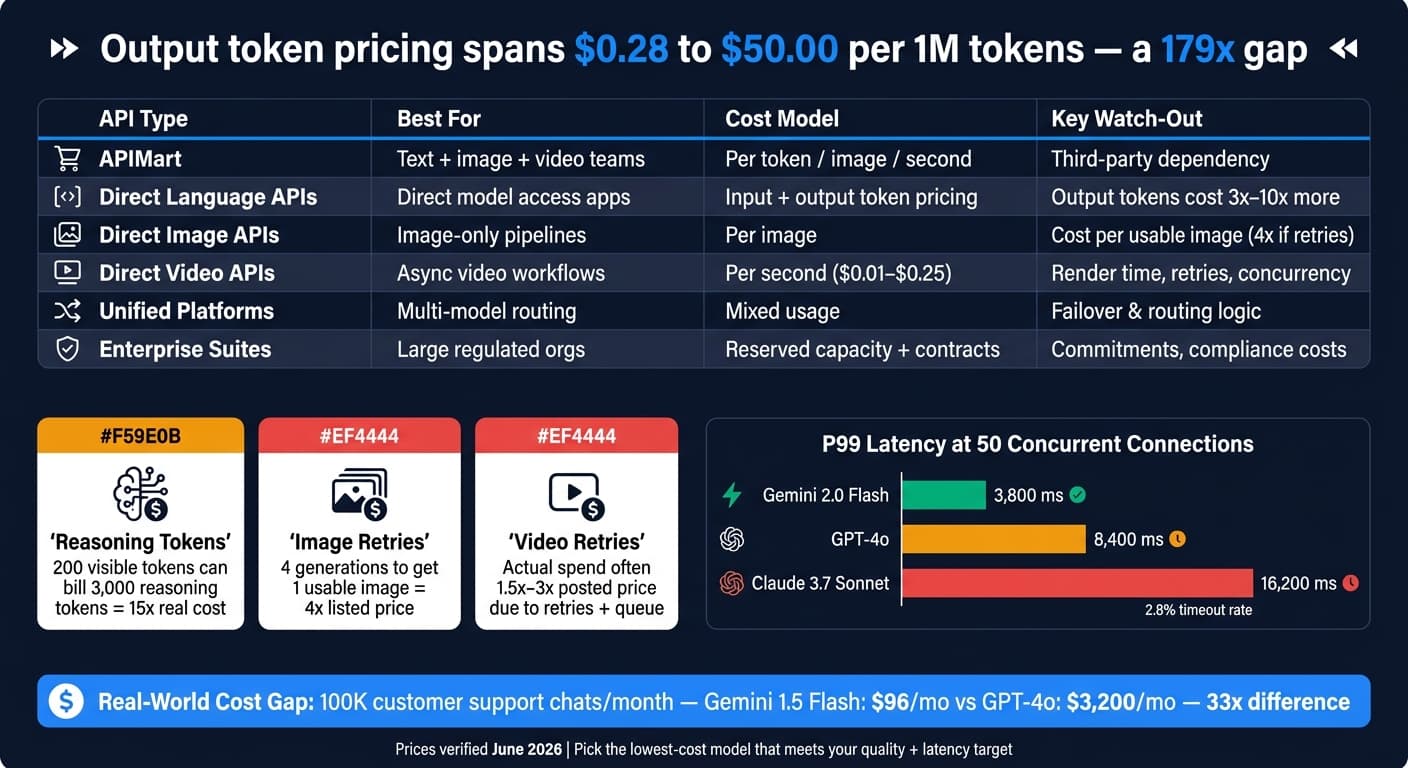
Quick Comparison
| Option | Best for | Main cost model | What to watch |
|---|---|---|---|
| APIMart | Teams using text, image, and video together | Per token, per image, per second | Third-party dependency, bundle fit |
| Direct language APIs | Apps that need direct model access | Input/output token pricing | Output token cost, reasoning tokens, rate limits |
| Direct image APIs | Image-only products and pipelines | Per image | Cost per usable image, queue time, URL expiry |
| Direct video APIs | Async video workflows | Per second | Render time, retries, concurrency caps |
| Unified AI platforms | Multi-model routing across vendors | Mixed usage pricing | Routing logic, retry handling, failover behavior |
| Enterprise suites | Large orgs with strict legal or infra needs | Reserved capacity and custom contracts | Commitments, region pricing, support terms |
That’s the lens I’d use for the rest of this topic: not just listed price, but the full cost of getting a usable result at scale.
APIMart
APIMart gives you a single API for 500+ language, image, and video models. For most teams, that means less integration work, simpler pricing, and built-in controls for scaling. That setup becomes even more useful when you're comparing costs across text, image, and video use cases.
It uses pay-as-you-go pricing, with no monthly minimums and no hidden fees. Billing depends on the type of model you use: text is charged per 1M input tokens, images per call, and video per second. On the models listed below, APIMart comes in lower than the official price. And as usage grows, volume discounts and bundle pricing can bring the per-unit cost down even more.
| Modality | Model | APIMart Price | Official Price | Unit |
|---|---|---|---|---|
| Text | GPT-5 Nano | $0.05 | $0.0625 | Per 1M input tokens |
| Text | Claude Sonnet 4.5 | $1.80 | $3.00 | Per 1M input tokens |
| Image | Imagen 4.0 | $0.04 | $0.05 | Per call |
| Video | Sora 2 | $0.08 | $0.10 | Per second |
| Video | Hailuo 2.3 Fast | $0.025 | $0.031 | Per second |
Of course, price is only one piece of the puzzle. Once usage starts climbing, throughput and reliability matter just as much.
APIMart routes traffic across providers to cut down on throttling during traffic spikes, supports async jobs with task IDs and webhooks for larger jobs, and uses edge delivery to reduce global latency [6][7]. It also offers a 99.9% uptime SLA for production workloads. When traffic starts to ramp up, monitoring and budget controls matter just as much as response times.
For early use, the dashboard helps teams watch spending. At higher volume, caps and alerts help stop surprise charges caused by spikes or repeated retries. The dashboard shows spend, quotas, and usage in real time, while the APIMart blog provides additional cost-saving tips. And for work that doesn't need an instant response, the Batch API lowers both input and output token costs by 50%.
Direct Language Model APIs
Direct language model APIs usually bill input and output tokens separately. And output tokens often cost 3x to 10x more than input tokens because generation takes more compute [4][8]. That gap can hit your monthly bill harder than the headline per-token price makes it seem.
Here’s a snapshot of representative pricing across common model tiers as of June 2026:
| Model | Input (per 1M tokens) | Output (per 1M tokens) | Context Window |
|---|---|---|---|
| GPT-5.5 (Flagship) | $5.00 | $30.00 | 1M |
| Claude Opus 4.8 | $5.00 | $25.00 | 1M |
| Claude Sonnet 4.6 | $3.00 | $15.00 | 1M |
| Gemini 3.1 Pro | $2.00 | $12.00 | 1M |
| GPT-5.4-mini | $0.75 | $4.50 | 400K |
| DeepSeek V4 Flash | $0.14 | $0.28 | 1M |
| Gemini 1.5 Flash | $0.075 | $0.30 | 1M |
Prices verified June 2026 [1][4].
In production, those rates play out very differently depending on the workload. The price gap between tiers can turn into a huge spend gap fast. For example, a customer support chatbot handling 100,000 conversations per month costs about $96 per month on Gemini 1.5 Flash versus $3,200 per month on GPT-4o - a 33x difference [4]. If you’re running high-volume chat or summarization, output-heavy prompts can eat up most of the budget.
Costs can go up again when models burn tokens you never even see. Reasoning models add another layer here. OpenAI’s o-series can generate internal reasoning tokens that are billed at the output rate, even if the visible answer is short. So a reply with a 200-token visible answer might still bill for 3,000 reasoning tokens, which pushes the real cost up by 15x [10]. The fix is simple in theory: set max_completion_tokens or thinking_budget to put a ceiling on it [2].
Once spend looks steady, the next problem is usually capacity. At scale, rate limits tend to become the first choke point. Tier upgrades don’t happen overnight, so teams need to plan weeks ahead of a high-traffic launch. With Anthropic, Tier 1 starts at a $5 payment, while Tier 4 unlocks 4,000 RPM and 4M input tokens per minute after $400 in cumulative spend [9].
And once traffic hits, latency can matter more than sticker price. Under load, P99 latency climbs fast: at 50 concurrent connections, Gemini 2.0 Flash posts 3,800 ms P99 latency with a 0.05% timeout rate, GPT-4o reaches 8,400 ms, and Claude 3.7 Sonnet hits 16,200 ms with a 2.8% timeout rate [11].
Direct Image Generation APIs
Direct image generation APIs usually bill per image, though some providers use compute time or credit-based pricing instead [12][14][16]. In practice, price is driven mostly by resolution and quality tier. So if you're making both thumbnails and hero images, don't send them through the same path unless you want to spend more than you need to.
| Model | Provider | Cost per Image (1024px) | Premium tier |
|---|---|---|---|
| Flux.1 Schnell | fal.ai / Replicate | $0.003 | N/A |
| Imagen 4 Fast | $0.010 | N/A | |
| Flux 2 Pro | BFL / fal.ai | $0.030 | $0.060 |
| Imagen 4 Standard | $0.040 | $0.120 | |
| Stable Image Ultra | Stability AI | $0.080 | N/A |
| GPT Image 1.5 | OpenAI | $0.100 | $0.180 (HD) |
Representative standard 1024px pricing; premium tiers shown where available [13][15][16].
One thing trips teams up all the time: track cost per usable image, not cost per prompt. If your workflow needs four generations to land one image you can ship, your actual unit cost is 4x the listed price. Failed requests, moderation rejects, inpainting, and upscaling all add to that total [14].
Price is only half the story. Speed can swing just as hard. For interactive image apps, track p50, p95, TTFB, and queue wait time [17]. A model might look cheap on paper and still feel slow in the product. Flux.1 Schnell posts a 1.2-second p50 latency for 1024×1024 images, while DALL-E 3 HD comes in at 11.9 seconds p50 and 21.4 seconds p95 [17].
Scale depends on the limits sitting behind the API. And this is where people often mix things up: concurrency caps and rate limits are not the same. Black Forest Labs enforces 24 concurrent requests on standard endpoints, while Stability AI uses a burst limit of 150 requests per 10 seconds before a 60-second timeout kicks in [16]. That difference matters a lot once volume starts climbing.
High-volume pipelines usually need a few boring-but-important pieces in place:
- Async polling
- Temporary asset storage
- Short-lived URL handling
That last one can bite you if you ignore it. BFL URLs, for example, expire after 10 minutes, so you need to move the image into your own system before the link dies [16].
For most production teams, a hybrid stack makes the most sense. Send thumbnails and other high-volume assets to the fast tiers. Keep premium tiers for hero images and final assets where image quality matters more than raw throughput.
Video generation follows the same basic pattern, but the cost and latency move from per-image output to per-second rendering.
Direct Video Generation APIs
Video puts even more pressure on pricing and queues. The math is simple: you pay per second, and delivery is usually async. In 2026, video APIs charge between $0.01 and $0.25 per second, depending on the model and tier [19][20]. At the low end, Vidu Q3 Turbo costs $0.03/sec. At the high end, Seedance 2.0 Pro hits $0.247/sec. That’s about an 8x difference for the same clip length [20].
And the listed rate is only the starting point. 1080p is the normal production baseline. Move up to 4K or Cinematic tiers, and per-second cost can double or even quadruple. Retries also add up fast, which means actual spend often lands at 1.5x to 2x the posted price, and can reach 3x in back-and-forth workflows [20][22].
Price, though, is only part of the story. Render time and success rate shape the unit economics just as much. A 10-second 1080p clip can take 60 to 180 seconds on Seedance 2.0 and 120 to 600 seconds on Sora [22]. That’s why production systems should submit the job, return a job ID, and complete delivery through webhooks or polling [22]. If you try to treat video like a normal sync API call, things get messy fast.
Sora 2 averages an 85% to 90% success rate on standard prompts, so retries and rejected outputs need to be part of the cost model from day one [25]. For video, track more than per-second price. You also need to watch:
- Queue depth
- Concurrency
- Success rate
Those numbers can bite. At 10 concurrent requests, queue spikes can go past 7 seconds, and most accounts limit concurrency to 3 to 10 active generations [22][23][24][26]. That makes tools like Redis or BullMQ a practical setup before launch, not some nice extra [22].
A draft/final workflow usually makes the most sense. Teams can use faster models like Wan 2.6 or Seedance 2.0 Fast to test prompts, then switch to premium models for the final render [18][20]. That keeps iteration cheap and saves the pricey runs for the version you’ll ship.
A few model features can also trim side costs. Models with native audio generation, like Veo 3.1 and Kling 3.0, can remove $0.50 to $2.00 per video in separate audio or licensing spend [20]. Native 9:16 output, available on Kling 2.6 and Seedance 2.0, also avoids re-encoding for short-form social clips [21].
That setup works well for marketing teams in particular. They can test ad variants at low cost, then render only the winning concept at premium quality. Once text, image, and video all need to work together in one pipeline, unified access starts to look a lot more useful.
Unified AI API Platforms
Unified AI API platforms let teams send text, image, and video requests through one API key. That cuts integration work when a product needs to support more than one modality. APIMart, for example, puts text, image, and video models behind a single key. That setup matters most when one product needs to juggle cheap everyday calls and more expensive, high-stakes outputs.
Pricing tends to work better with tiered model routing. In plain English, send simple tasks to lower-cost models and save top-tier models for harder reasoning work. That approach can cut spend in a big way, especially because companies that push every request to one premium model may overpay by 60% to 80% [27]. Prompt caching also helps. It can cut input costs by 50% to 90% when you reuse system prompts or RAG documents [5]. And when you estimate cost, don’t stop at the headline token price. You also need to count reasoning tokens, which are billed at output rates and can push total spend much higher [5].
For interactive features, two metrics matter fast: time to first token and retry rate. A lower retry rate can mean a lower cost per useful output, even when the per-token price looks higher at first glance [28][29][4]. For latency-sensitive use cases like real-time chat, streaming, and interactive assistants, throughput also matters. Specialty hardware can hit roughly 750 tokens per second, compared with about 100 to 150 tokens per second on standard H100 endpoints [29]. Once usage starts climbing, routing alone won’t solve the problem. Rate limits, failover, and spare capacity start to matter just as much.
Scalability is where unified platforms start to earn their keep. Automatic failover routing cuts service interruptions by 65% [27]. As traffic grows, teams should watch rate-limit headroom in real time and pre-throttle on the client side at around 80% of capacity. Push past that point, and P95 latency can jump by 2x to 5x [30][31]. At higher volume, the key issue isn’t just model access. It’s how much control the platform gives you over routing, limits, and failover.
Enterprise AI API Suites
When routing and batching stop being enough, enterprise suites step in with reserved capacity, compliance controls, and support backed by contract. Unified platforms help with routing. Enterprise suites deal with governance, procurement, and guaranteed capacity.
The pricing model changes too. Instead of pure usage-based billing, enterprise AI API suites often move teams to reserved capacity and custom contracts. That gives organizations more predictable throughput, which matters for regulated workloads or apps that can’t afford latency spikes. Large companies often negotiate reserved throughput through options like Azure Provisioned Throughput Units or AWS Bedrock Provisioned Capacity. The tradeoff is simple: less flexibility, but steadier spending. Fixed hourly or monthly rates buy reserved capacity [33][28][34].
There are extra charges to watch for. Data residency guarantees, like U.S.-only inference, can add a 1.1x multiplier to the base token cost [32][1]. Long-context prompts can push costs up again. Some providers charge double once prompts go past 200,000 tokens [32][1].
Service commitments vary by contract. Public SLAs usually sit between 99.5% and 99.9% uptime, while some MSA addendums go up to 99.99% [35][36]. P95 or P99 latency targets usually aren’t standard out of the box. Teams normally have to negotiate those by model and region.
Support terms differ as well:
- Google’s Premium Support tier commits to 15 minutes for Severity 1 issues
- OpenAI Enterprise targets 1 hour
- Anthropic Enterprise allows up to 4 hours during business hours [35][36]
In regulated setups, the control stack usually includes VPC service controls, VNET isolation, Private Link, CMEK encryption, and Zero Data Retention (ZDR) contracts. Anthropic’s ZDR is available through AWS Bedrock and Google Vertex AI, while Azure OpenAI requires a specific Enterprise Agreement [37][38][39].
Cost control matters just as much as access control. At enterprise scale, token-based limiting is often the strongest lever. A single 100,000-token RAG query can cost as much as 1,000 short chat requests [40]. That’s the kind of gap that can blow up a budget fast. A common way to manage it is to reserve an estimated token budget before the request, then reconcile the actual total after completion.
Pros and Cons by API Type
Here’s a simple way to see how APIMart compares on cost, speed, and day-to-day management at different stages of growth. The table below gives you a quick side-by-side view.
| Scale Stage | Pros | Cons | Budget Impact | Speed Impact | Operational Impact |
|---|---|---|---|---|---|
| Early / Low Volume | Lower unit cost at scale; single billing | Limited to available bundles; third-party dependency | Pay-as-you-go with no minimums | Neutral; depends on provider infrastructure | Low; single API key and billing relationship |
| Growth / Mid Volume | Tiered model routing cuts spend; prompt caching reduces input costs | Volume discounts require usage thresholds | Significant savings via routing and caching | Small routing delay; minimal in most workloads | Low; failover and routing handled by the platform |
| High Volume / Production | Async batching cuts token costs by 50%; edge delivery reduces global latency | Batch jobs add delivery delay vs. sync calls | Lowest unit cost through Batch API and volume pricing | Stable throughput; async jobs avoid rate-limit bottlenecks | Low; dashboard, caps, and alerts centralize cost control |
Use these tradeoffs to narrow your options before matching the API to your use case.
How to Choose the Right AI API for Your Use Case
Use the comparisons above to pick the lowest-cost model that still hits your quality and latency goals. The simplest way to do that is to start with your main constraint.
If budget is the biggest factor, begin with the cheapest model that clears your minimum quality bar. Then move up only if it misses the mark. If speed matters most, lean toward models built for fast responses and test p50 and p95 latency on your actual prompt templates before launch. That part matters more than many teams expect. Cross-region calls can add hundreds of milliseconds [3][42].
If output quality can’t slip, frontier models usually make the most sense. But there’s a big price jump between model tiers [1].
Before you lock anything in, run a pilot with 30–50 real prompts from your actual use case, not generic benchmark prompts [42]. That gives you a much clearer read on what you’re buying. Measure:
- Quality
- Cost
- Raw latency
That way, you can see which model tier your workload actually needs.
After the pilot, shift to load testing and budget controls. Load test at realistic concurrency levels, set hard daily spend caps at the provider level, and add alerts for per-feature cost anomalies [44][43]. This step is easy to skip when things still look small. It’s also where costs can sneak up on you.
Production token usage often grows 5–15x from prototype to launch as prompts get longer and edge cases pile up [41]. Build that buffer into your cost model from day one.
Also, log every request in APIMart - model version, token counts, feature name, and latency - so routing, cost, and latency stay visible as traffic grows [42][43].
FAQs
How do I estimate my real AI API cost?
Look past the base per-token rate and estimate the full request lifecycle. Start with this formula:
Monthly cost = (requests_per_day × 30) × ((input_tokens × input_price) + (output_tokens × output_price)) ÷ 1,000,000
From there, factor in the extra cost drivers that show up in practice.
Output tokens often cost 3 to 10 times more than input tokens, so long answers can change the math fast. Multi-turn chats also push costs up because each new message adds more tokens to the running context. On top of that, retries usually add 5% to 15%, especially when requests fail or time out.
If you're using agentic workflows or tool-calling, the jump can be much bigger. Those setups can add 1.5x to 10x because one user action may trigger several model calls instead of just one.
There’s one lever that can cut spend: prompt caching. If your setup supports it, cached input-token costs can drop by 50% to 90%. That can make a big dent when the same system prompts or repeated context show up across many requests.
Which metrics matter most before launch?
Before launch, focus on metrics that balance stability and cost forecasting:
- p50 and p95 latency
- task success rate, including retries and failover
- effective pricing based on representative prompt shapes, input/output token counts, and projected monthly volume
- throughput and concurrency against published rate limits
Test in a production-like environment to avoid post-launch surprises.
When should I use batching or async jobs?
Use batching or asynchronous jobs when you don’t need an instant reply. That tradeoff can cut costs by up to 50%, which makes this approach a good fit for non-urgent work.
Good examples include:
- Large-scale document summarization
- Video analysis
- Overnight data processing
These jobs make sense when waiting up to 24 hours is fine.
On the flip side, don’t use them for user-facing features that depend on fast feedback. That includes chat, autocomplete, and real-time recommendations. If a person is sitting there waiting, async jobs are usually the wrong tool.
There’s also some extra plumbing involved. You’ll need logic for queueing, polling, and reconciling results once the job finishes.