
How to Use MiniMax Hailuo 02: Full Guide
Learn to use MiniMax Hailuo 02 on APIMart: generate an API key, structure text-to-video and image-to-video requests, and render cinematic 1080p clips.
MiniMax Hailuo 02 is a powerful AI model for creating cinematic-quality videos with precise control over visuals, motion, and effects. Available on APIMart, it supports text-to-video, image-to-video, and frame-based transitions, letting you generate short, high-quality clips in resolutions up to 1080p. Here’s what you need to know:
- Key Features: Create videos from text prompts, images, or frame transitions with options for camera movements like
[Pan left]or[Zoom in]. - Pricing: 1080p clips cost $0.08/second with a 20% discount on APIMart.
- Setup: Generate an API key, structure your request with parameters, and use asynchronous polling to retrieve videos.
- Applications: Ideal for ads, product showcases, storyboarding, and training videos.
To get started, create an APIMart account, secure your API key, and follow the step-by-step guide for generating videos. Use specific prompts and camera commands to maximize video quality. For longer projects, stitch multiple clips together using consistent frames or explore Kling V3 for alternative cinematic generation.
Getting Started with MiniMax Hailuo 02 on APIMart
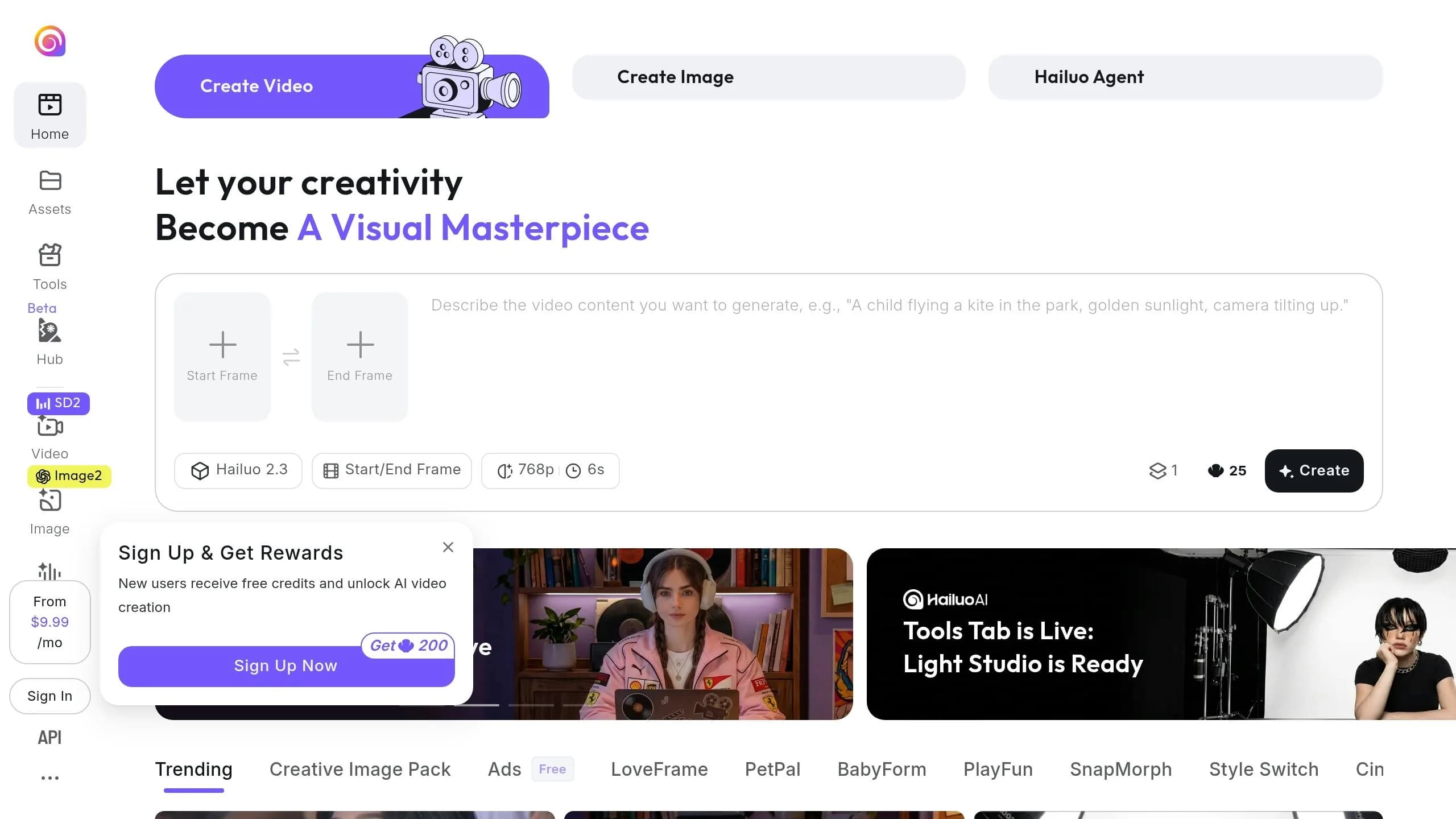
Account Setup and API Key Access
To get started, head over to apimart.ai and create an account. If you're part of a team, APIMart allows you to set up an organization. This feature makes collaboration easier by letting everyone share a central balance, eliminating the need to exchange personal credentials.
Once your account is ready, fund your shared balance. This balance applies across all 500+ models available on the platform. This includes other high-end options like Veo 3.1 for professional-grade video generation. Next, go to the API Key Management section in the Console Dashboard and generate an API key.
Keep in mind: your API key is displayed only once. Be sure to copy it and store it securely, like in a password manager or a secrets vault. When using the key in your code, load it from an environment variable (e.g., MINIMAX_API_KEY) instead of embedding it directly. This reduces the risk of accidental exposure if your code is ever shared or uploaded to version control. Every API request you make will include this key in the authorization header:
Authorization: Bearer YOUR_API_KEY
For teams, the Organizations feature is a great way to manage access centrally, avoiding the need to share individual account credentials [2]. With your API key ready, you can configure your request parameters and start generating videos. You can also explore Grok Imagine Video for alternative high-quality outputs.
Key Parameters for MiniMax Hailuo 02 Requests
Once your API key is secured, you’ll need to set up your request with the right parameters. The "model": "MiniMax-Hailuo-02" field is required, along with several others. Here’s a quick overview of the most important ones:
| Parameter | Type | Description | Notes |
|---|---|---|---|
model | string | Identifies the model | Must be MiniMax-Hailuo-02 |
prompt | string | Describes the scene, action, and style | Max 2,000 characters |
duration | integer | Clip length in seconds | 5 or 10; 1080p supports 5s only |
resolution | string | Output quality | 512p, 768p, or 1080p |
first_frame_image | string | Starting frame for image-to-video | Public URL or Base64; max 20MB |
last_frame_image | string | Ending frame for start-and-end-frame mode | Public URL or Base64 string |
prompt_optimizer | boolean | Auto-refines your prompt | Defaults to true; recommended |
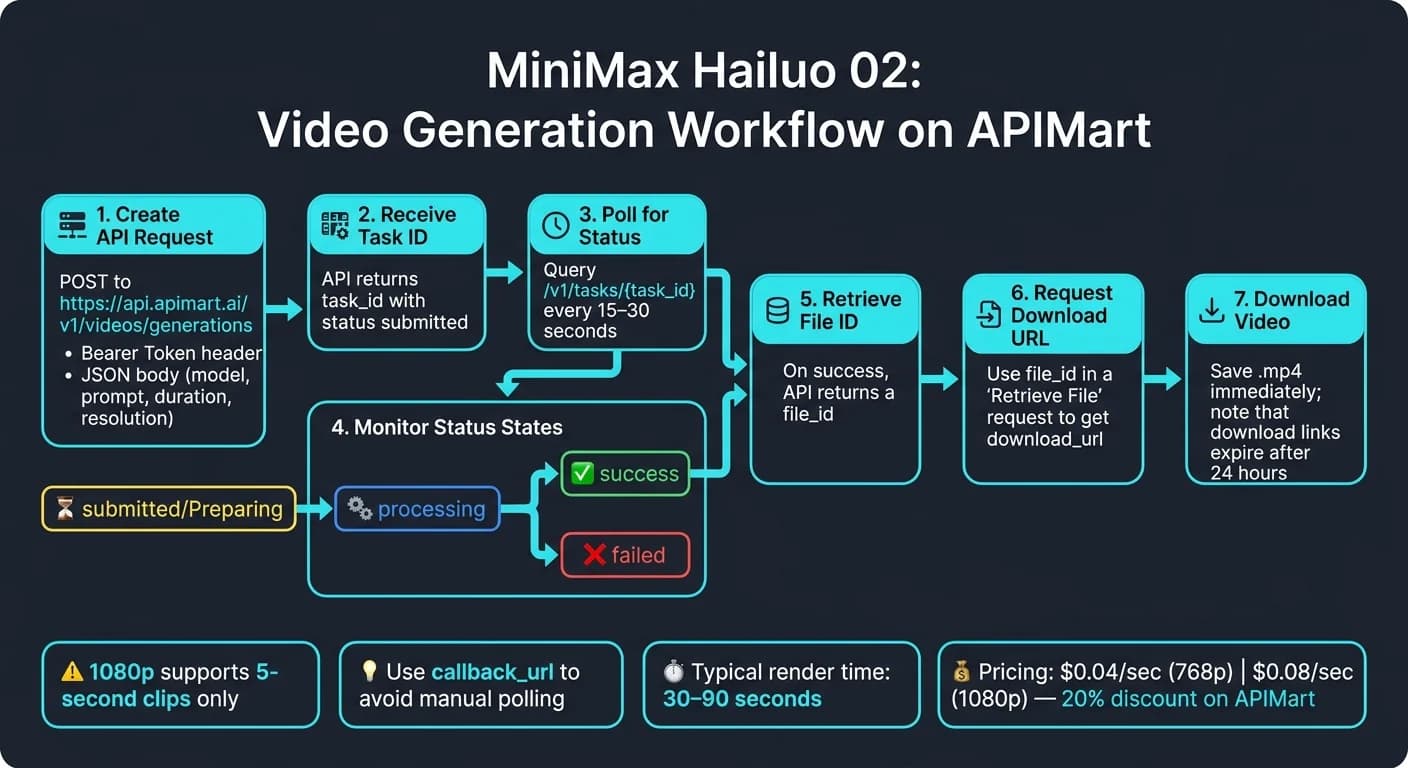
One important detail: video generation is asynchronous. When you send a request, the API responds with a task_id instead of the video itself. You’ll need to poll /v1/tasks/{task_id} every 15–30 seconds until the status changes to "completed". Once it’s ready, download the video right away, as the generated links expire after 24 hours [2].
With your parameters in place, you’re ready to focus on crafting an effective prompt to fully utilize MiniMax Hailuo 02.
How to Write Effective Prompts
Creating a good prompt is key to generating high-quality videos. A well-structured prompt includes six elements: camera shot or motion, subject and description, action, scene, lighting, and style or mood. For example, instead of a vague description like "a woman walking in a city," try something more specific: "[Tracking shot] A woman in a red coat walks briskly through a rain-soaked Manhattan street at dusk, neon signs reflecting on the wet pavement, cinematic noir style."
To make your videos dynamic, include camera commands directly in your prompt. Commands like [Pan left, Pedestal up] can add movement, while others like [Truck left], [Push in], or [Static shot] provide even more control over the perspective [3].
When dealing with complex scenes, leave prompt_optimizer set to true. This feature automatically refines and expands your description, often leading to smoother and more coherent video output with minimal effort [1].
How to Create Cinematic AI Videos in Hailuo 02
Step-by-Step Guide: Generating Videos with MiniMax Hailuo 02
How to Make a Basic Text-to-Video API Request
If you’ve got your API key and prompt ready, sending your first request is easy. Just make a POST call to https://api.apimart.ai/v1/videos/generations. Include your Bearer Token in the header and use a JSON body like this:
{
  "model": "MiniMax-Hailuo-02",
  "prompt": "[Tracking shot] A lone astronaut walks across a red desert at golden hour, dust swirling around their boots, cinematic wide-angle style.",
  "duration": 5,
  "resolution": "1080p"
}
Important: 1080p resolution supports only 5-second clips. For a 10-second video, you’ll need to lower the resolution to 768p or 512p. Pricing depends on both resolution and duration - 768p costs $0.04 per second, while 1080p is priced at $0.08 per second [2].
When you submit the request, the API will return a task_id and a status of submitted. The video will take between 30 and 90 seconds to render [2].
How to Use the Image-to-Video Feature
For image-to-video requests, you’ll need to include an additional parameter: first_frame_image. This can be either a public URL (e.g., https://example.com/start.jpg) or a Base64-encoded Data URL string. Make sure the image meets the specified file type, size, and aspect ratio requirements.
Your prompt should describe the movement, not the visual details of the scene, since the image already provides that context. For instance, if your starting image is a product on a table, a prompt like "[Slow zoom in] Product rotates gently, soft studio lighting, clean white background" tells the model how to animate it. The resolution of the output will match the dimensions of your input image, so using a high-quality source is essential for sharp results.
For more advanced effects, you can include a last_frame_image along with your first_frame_image. This creates a transition video between two images, which is perfect for things like product reveals, before-and-after comparisons, or scene transitions in larger projects.
Once your request is set up, monitor the API response to retrieve your animated video. For projects requiring integrated audio, consider exploring the Veo 3.1 API which supports synchronized sound generation.
Reading API Responses and Downloading Outputs
When your task status changes to success, the API will provide a file_id. Use this in a separate "Retrieve File" request to get the download_url. Here’s how the status flow works:
| Status | Meaning | What to Do |
|---|---|---|
submitted / Preparing | Task received | Wait and poll again |
processing | Video is rendering | Wait and poll again |
success | Generation complete | Request download URL |
failed | Generation failed | Check error_message, retry |
Poll the /v1/tasks/{task_id} endpoint every 15–30 seconds until the status changes to success. Once it does, request the video and download it. Keep in mind that download links expire after 24 hours, so be sure to save your file right away [2].
If you’re working in Python, you can use requests.get(download_url).content to download the video and save it as an .mp4 file. To avoid manual polling, you can set up a callback_url in your request. This way, APIMart will notify your server with a POST request when the task status updates to success or failed [3].
Finally, always check the code field in the API response. A value of 200 means the request was successful, but you’ll still need to monitor the task status for potential rendering errors [1][3].
Improving Video Quality and Workflow Integration
Refining Prompts and Parameter Settings
To enhance video quality, try structuring prompts with this format: [Subject & action], [physical/environmental element], [camera movement], [lighting/atmosphere], [quality descriptor] [7]. Here's an example: "A barista pours steaming milk into espresso, liquid swirling in slow motion, [Zoom in], warm café lighting, cinematic quality." This approach helps the model simulate realistic motion and atmosphere more effectively.
MiniMax-Hailuo-2.3 offers 15 camera commands, which you can combine (up to three) in a single set of brackets, like [Pan left, Pedestal up] [3]. Use the table below for quick reference:
| Category | Commands |
|---|---|
| Horizontal/Vertical | [Truck left/right], [Pan left/right], [Pedestal up/down], [Tilt up/down] |
| Depth | [Push in], [Pull out], [Zoom in/out] |
| Special | [Shake], [Tracking shot], [Static shot] |
By default, the prompt_optimizer feature is enabled, which generally improves the output quality. Keep it on unless you need the model to follow a highly specific script. If speed is your priority and you're okay with less polish, set fast_pretreatment: true to reduce preprocessing time [1][6].
Once your prompts and settings are fine-tuned, integrate them into a broader pipeline to elevate your production quality.
Building Multi-Model Pipelines with APIMart
Hailuo 02 works best when paired with complementary tools for audio and extended sequences. While it excels at creating visually dynamic B-roll footage - like water, fire, or fabric - it doesn’t generate audio. To fill this gap, pair it with MiniMax Audio tools, such as Speech 2.8 for voiceovers or Music 2.6 for soundtracks, during post-production [8]. For brand or commercial projects, start with an image model to generate a base frame, then feed it into Hailuo 02 as the first_frame_image for precise control over composition [7].
For videos longer than 10 seconds, take a screenshot of the last frame from a finished clip and use it as the first_frame_image for the next request. This technique ensures consistency in character details and environmental lighting across multiple clips [8].
"The consistency of MiniMax Hailuo 02 is amazing! Character images remain stable across multiple clips." - Wei Zhang, Independent Animator [2]
Error Handling and API Best Practices
Even with refined prompts and pipelines, issues can arise. Follow these best practices to troubleshoot and optimize API responses effectively.
The two most common failures with Hailuo 02 involve unsupported resolution/duration combinations and invalid image inputs. Always check that your resolution and duration settings are compatible [1][6]. For image-to-video tasks, ensure your source image is under 20MB, has a short edge greater than 300px, and an aspect ratio between 2:5 and 5:2. Acceptable formats include JPG, PNG, and WebP [5].
| Error Type | Detection | Solution |
|---|---|---|
| Unsupported config | Task returns failed immediately | Verify resolution and duration compatibility [1][6] |
| Invalid image | API error on first_frame_image | Check format (JPG/PNG/WebP), size, and aspect ratio [5] |
| Callback timeout | No status update received | Ensure the server echoes challenge within 3 seconds [3] |
| Rate limit / timeout | HTTP 429 or connection drop | Set polling interval to 10 seconds [4] |
When a task fails, always check the error_message field in the JSON response. It provides detailed diagnostics to help resolve issues quickly [4]. For production setups, use the callback_url parameter instead of manual polling. This reduces unnecessary API calls and keeps your workflow responsive [3].
Conclusion: Key Takeaways
Here’s a quick rundown of what makes MiniMax Hailuo 02 a standout tool for video generation.
MiniMax Hailuo 02 offers cinematic-quality video creation with incredible precision. Thanks to its NCR architecture, which features 3x the parameters and 4x the training data compared to earlier models [7], it produces highly realistic effects for complex elements like water, fire, smoke, and fabric.
Through APIMart, you can snag a 20% discount, along with competitive pricing for both 768p and 1080p resolutions [2]. It boasts a 99.9% uptime SLA and typical generation times of just 30 to 90 seconds [2], making it a practical choice for everything from professional production to creative experimentation. For those needing a more visual workspace, an AI canvas editor can further streamline the editing process.
The model's standout features include:
- Image-to-Video tools for precise control.
- Bracketed camera commands (e.g.,
[Tracking shot],[Zoom in]) for professional-level cinematography. - Last-frame continuity, ensuring smooth transitions for extended sequences.
Users have praised its reliability and speed. As David Chen, a Full-Stack Engineer, shares:
"I value stability and speed. MiniMax Hailuo 02 delivers exceptional performance." [2]
Keep in mind, 1080p clips are limited to 5–6 seconds. For longer videos, 768p is a great alternative, offering consistent quality at a competitive price [1][3].
With these features, MiniMax Hailuo 02 is ready to elevate your video production workflow to the next level.
FAQs
How do I make clips longer than 10 seconds?
MiniMax Hailuo 02 has a maximum clip duration limit of 10 seconds. If you need longer clips, you'll have to work within this restriction. Set the duration to 10 seconds and choose a compatible resolution, such as 768p or 1080p, in your request.
For text-to-video tasks, include the following parameters in your request:
duration: 10resolution: "768P"model: "MiniMax-Hailuo-02"
After submitting the request, check the task status and download the generated file once it's ready.
What should I do if my task fails?
If your video generation task doesn't go through, start by reviewing the API status message to pinpoint the issue. Here are some common error codes to watch for:
- 1002: Indicates you've hit rate limits.
- 1004/2049: Points to authentication problems.
- 1008: Signals an insufficient balance in your account.
- 1026: Flags sensitive content in the input.
For rate limit errors (HTTP 429) or server-related issues (HTTP 5xx), try implementing exponential backoff - this means adding progressively longer delays between retries. Also, double-check your input parameters and ensure your prompts steer clear of sensitive content to avoid validation errors.
How can I keep characters consistent across clips?
To keep character consistency in MiniMax Hailuo 02, opt for Subject Reference mode and use a clear, well-lit reference image. If you're working with multiple clips, ensure consistency by including matching lighting details in your prompts. For a smoother visual flow, align camera angles across shots and consider subtle transitions like crossfades or match-cuts during post-production. These techniques help create a cohesive and polished narrative.