
Multi-Modal AI Integration Patterns
Compare multi-modal AI integration patterns for text, image, audio, and video workflows, including direct calls, unified gateways, orchestration, edge-cloud.
Multi-modal AI is transforming how systems process data by combining inputs like text, images, audio, and video into a single workflow. This technology allows cross-modal reasoning - linking what a camera sees with what a microphone hears - enabling smarter applications across industries. For example, Duolingo uses it for language learning, while retailers leverage it for visual product searches.
Here’s a quick breakdown of four integration methods for multi-modal AI:
- Direct Model-to-Application: Simple and fast, ideal for real-time tasks like voice agents. However, it can be costly and less flexible.
- Unified Multi-Modal Gateway: Routes tasks to the right models through a single API, reducing engineering complexity and improving performance.
- Orchestrated Multi-Step Workflow: Uses specialized models in sequence for detailed, precision-heavy tasks but may increase latency.
- Hybrid On-Device and Cloud: Balances speed, cost, and privacy by splitting tasks between local devices and cloud systems.
Each approach has trade-offs in cost, scalability, and complexity, making it crucial to align the choice with your project's needs. Platforms like APIMart simplify these integrations by offering over 500 models under one API.
From Images to Agents: Building and Evaluating Multimodal AI Workflows
1. Direct Model-to-Application Integration
This setup links an application straight to a multimodal model - like GPT-4o, Gemini 1.5 Pro, or Claude 3.5 Sonnet - that can handle text, images, and audio in a single API call.
"Multimodal capability lives at the model level, but system-level design ensures multimodal reliability." - Zro2One [6]
The standout advantage here is low latency. For instance, GPT-4o delivers audio responses in about 320 milliseconds, staying comfortably within the natural conversational window of 300–500 milliseconds [4][7]. This makes it a strong choice for real-time applications. Examples include voice agents, live visual troubleshooting (like uploading a photo of a broken device to get immediate repair instructions), and hands-free tasks where workers rely on voice commands while the system processes visual data [4][9].
That said, this simplicity comes at a price. Multimodal requests tend to be three to five times more expensive than text-only processing [8][10]. To manage costs, you can take steps like reducing image resolution to 1,024–2,048 pixels, compressing files to JPEG or WebP formats (at 80–90% quality), and using content hashing (e.g., MD5) to cache results for repeated media inputs. This avoids unnecessary API calls [1][10].
Reliability is another key concern. Network issues and rate limiting can cause failure rates between 3% and 8% [8]. To address this, systems should include fallback mechanisms. For example, if image processing fails, the system could revert to text-only processing instead of halting entirely [6][8].
This approach works best when a single model can efficiently handle all input types. Platforms like APIMart simplify deployment by offering a unified API, making it easier to implement multimodal solutions. The following sections will dive into more advanced integration strategies for cases that need extra flexibility and control.
2. Unified Multi-Modal Gateway
A unified multi-modal gateway functions as a smart router, efficiently directing requests to the correct modality through a single integration. This approach simplifies processes, reducing engineering complexity and boosting performance.
The benefits for engineering teams are clear. Instead of juggling four separate integrations - each with its own error handling, authentication, and versioning - you only need to manage one. Rajesh Nair, Managing Director at TechCloudPro, highlights this advantage:
"The cost advantage of multi-modal lies in reduced engineering complexity - one pipeline replaces multiple integrations." [5]
This streamlined system also supports integrated cross-modal reasoning, which is difficult to achieve with separate pipelines. For example, when a model processes both a photo of damage and a written description in one inference pass, it can identify inconsistencies that fragmented systems might miss. By removing intermediate steps (like converting speech to text, passing it through an LLM, and then converting text back to speech), latency can drop by 40–60%, ensuring voice responses stay within optimal speed limits [9].
These technical improvements lead to measurable business outcomes. In early 2026, a home furnishings retailer introduced a visual product search feature, allowing customers to upload photos to find matching items in their catalog. This resulted in a 34% higher cart conversion rate compared to traditional keyword searches during the first three months [2]. Similarly, an auto components manufacturer reduced a 45-minute defect escalation process to under four minutes by integrating technician photos and maintenance manuals into a unified system [2].
APIMart's unified gateway exemplifies this approach, offering access to over 500 models (such as GPT-5, Claude, Sora, and Kling V3) through a single API. This setup allows seamless handling of text, image, and video workloads. For multi-modal applications where simplicity and performance are critical, this pattern proves to be a game-changer.
3. Orchestrated Multi-Step Workflow
Unlike a unified gateway that processes requests through a single inference, an orchestrated multi-step workflow connects specialized models in a sequence, with each model focusing on a specific task - like speech-to-text (STT), classification, reasoning, or text-to-speech (TTS). Picture it as an assembly line where each station is optimized for its unique role, passing the output to the next stage for further refinement.
At the heart of this system is an orchestrator. This component manages the flow by routing inputs, validating outputs, handling retries, and triggering fallback mechanisms when needed [1]. The workflow starts with cost-effective models for basic tasks and escalates to more advanced models only when necessary. This approach not only reduces costs but also enhances reliability and traceability [5].
"Treat models as probabilistic components behind a robust orchestrator: validate outputs, stream for responsiveness, use tools for grounding, and measure cost and quality continuously." - ASOasis [1]
Reliability is where these orchestrated workflows shine, particularly in production environments. Since each stage has clearly defined input and output parameters, it’s easier to inspect data, replace models without overhauling the system, and incorporate compliance or business logic between stages. This level of control is essential for advanced multi-modal applications that demand flexibility and precision. However, there’s a tradeoff: latency. While a native speech-to-speech model may complete a task in 250–300ms, an optimized orchestrated pipeline typically takes 465–800ms for a full round trip [7]. For voice applications, overlapping stages - such as starting TTS as soon as the LLM generates its first sentence - can keep response times within the conversational sweet spot of 800ms [7].
The benefits of this workflow are evident in real-world scenarios. For example, in 2026, an NBFC client in Mumbai implemented an orchestrated workflow for MSME loan processing. This system simultaneously ingested loan applications, scanned IDs, and bank statements, performing cross-document consistency checks. The result? Analyst processing time per application dropped from 45 minutes to just 8 minutes - an impressive 82% reduction [2]. This example highlights how orchestration can handle complex, multi-stage tasks efficiently.
This workflow is particularly effective for processes that involve distinct stages, require detailed traceability, or integrate multiple modalities that don’t naturally fit into a single inference. While the added stages may increase latency, they provide greater control and transparency.
APIMart's unified API supports this integration model by enabling organizations to effortlessly connect the specialized AI models needed for orchestrated pipelines. This capability strengthens the broader unified API framework, allowing teams to fine-tune their multi-modal solutions with ease.
4. Hybrid On-Device and Cloud Integration
Hybrid integration combines the strengths of both local and cloud computing to balance performance and efficiency. By splitting tasks between a user's device and remote AI models, this approach ensures that simpler, quicker tasks - like detecting when someone starts speaking - are handled locally, while more complex processes, such as deep language understanding or advanced reasoning, are offloaded to the cloud. This division allows for faster initial responses before transferring data to the cloud for more intensive processing.
Take Voice Activity Detection (VAD) as an example. Running VAD directly on a device keeps latency incredibly low - around 10 milliseconds [7][11] - which is crucial for maintaining a natural, responsive user experience in voice applications. In contrast, more complex tasks, like sending a high-resolution image to GPT-4o for multimodal analysis, can take significantly longer, ranging from 4 to 12 seconds [2]. From a cost perspective, on-device processing also has advantages. For instance, compressing a 1024×1024 image down to 800×600 can cut prompt token usage by as much as 60%–80% [8], which is a big deal for teams managing high-volume applications in fields like education, e-commerce, or entertainment. Tools like APIMart, which supports over 500 models spanning vision, language, and video, make it easier to route pre-processed data to the most suitable cloud model based on the task and budget.
Privacy is another area where on-device processing shines. By redacting Personally Identifiable Information (PII) before data ever leaves the device, this approach meets the strict data governance requirements of industries like healthcare, finance, and legal services [1]. Additionally, hybrid models offer a safety net: if the cloud connection fails, local fallback systems can still handle basic functions, ensuring users aren't left without service [1].
However, hybrid integration isn’t without its challenges. Synchronization between on-device and cloud components can be tricky. For instance, if a user says "this one" while pointing at an object, developers must ensure that the local context aligns seamlessly with the output from a cloud-based vision model. While managing this shared state requires careful engineering, the trade-offs in speed, cost savings, and privacy make it a compelling strategy for many applications. Proper synchronization is key to fully realizing these benefits.
Pros and Cons
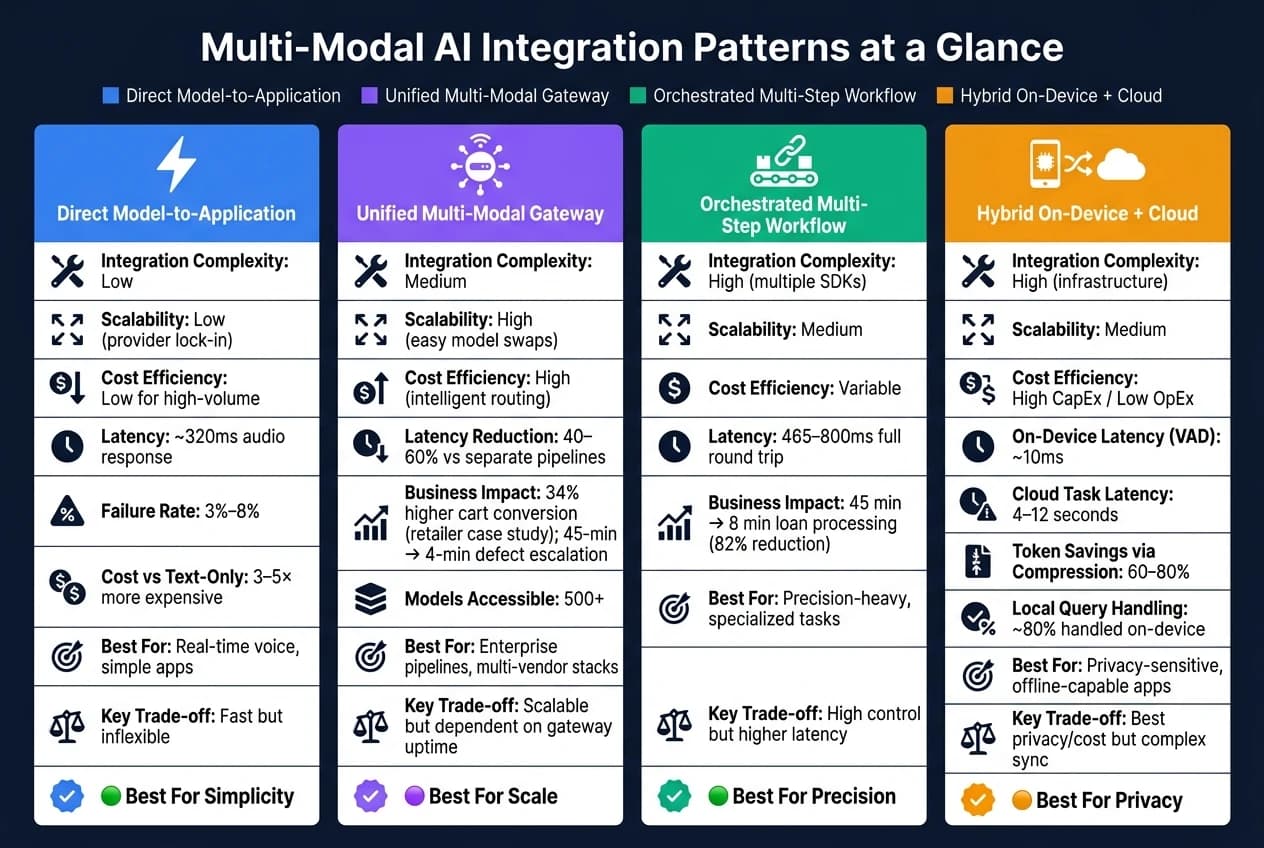
When deciding on integration patterns, it's essential to weigh their strengths and limitations against your team's goals and the needs of your project. The table below highlights the key practical differences between these approaches:
| Pattern | Integration Complexity | Scalability | Cost Efficiency | Best Use Case Fit |
|---|---|---|---|---|
| Direct Model-to-Application | Low | Low (provider lock-in) | Low for high-volume | Real-time voice, simple apps |
| Unified Multi-Modal Gateway | Medium | High (easy model swaps) | High (intelligent routing) | Enterprise pipelines, multi-vendor stacks |
| Orchestrated Multi-Step Workflow | High (multiple SDKs) | Medium | Variable | Precision-heavy, specialized tasks |
| Hybrid On-Device + Cloud | High (infrastructure) | Medium | High CapEx / Low OpEx | Privacy-sensitive, offline-capable apps |
Direct integration offers the quickest deployment and minimal latency, making it ideal for straightforward applications like real-time voice processing. However, it ties you to a single provider, which can limit flexibility and drive up costs as usage scales [4][6].
A unified multi-modal gateway addresses scalability and adaptability challenges. For example, switching from GPT-5 to a newer model only requires a configuration change, not a complete overhaul. Platforms like APIMart simplify this further by offering a single API that connects to over 500 models. They also enable intelligent task routing - directing lighter tasks to cost-effective models while reserving advanced models for complex queries. The main dependency here is ensuring uptime and API compatibility [3].
Orchestrated workflows shine when precision is critical. For instance, you can combine Whisper for audio, Sora for video, and a specialized vision model for image analysis - all within one pipeline [3]. While this modularity is powerful, it introduces higher latency due to sequential API calls and demands significant engineering effort to maintain synchronization [4].
Lastly, hybrid on-device/cloud integration is the most technically demanding. It requires robust infrastructure but excels in privacy and long-term cost management. Lightweight local models can handle approximately 80% of queries, with only the most complex 20% sent to cloud-based models for advanced processing [4]. This balance makes it a strong choice for privacy-sensitive or offline-capable applications.
Conclusion
The integration patterns discussed - ranging from direct application links to orchestrated workflows - offer tailored solutions for different challenges in multi-modal AI integration. Direct integration provides quick implementation but sacrifices adaptability. Orchestrated workflows, on the other hand, improve precision but come with added complexity. Meanwhile, hybrid models strike a middle ground, excelling in areas like privacy and cost efficiency. A unified multi-modal gateway offers a compelling blend of scalability, seamless model swapping, and optimized cost routing.
These patterns bring measurable advantages across various industries. For instance, in education, cascading patterns allow lightweight models to handle routine student queries, escalating complex questions to more advanced systems. In entertainment, where speed is crucial, native multi-modal models can deliver near-instantaneous speech-to-speech responses - achieving latency as low as 120–150 milliseconds [9]. This ensures smooth, immersive user experiences.
FAQs
Which multi-modal integration pattern should I choose for my app?
The best integration pattern for your app hinges on factors like latency, control, and complexity. If you're aiming for simplicity, unified multimodal context is a solid choice. On the other hand, apps that rely on specialized models are better suited for orchestrated pipelines. For tasks that are dynamic and iterative, sequential agents work well, though they can be more challenging to debug. When dealing with static content, preprocessing and retrieval is the way to go. Tools like APIMart make this process easier by offering seamless multi-modal input handling through a single API.
How can I cut multi-modal costs without hurting quality?
To keep expenses low without sacrificing quality, consider a tiered strategy. Delegate straightforward tasks to more affordable, specialized tools like ASR (Automatic Speech Recognition) or OCR (Optical Character Recognition) rather than relying on costly multi-modal models for everything. You can also fine-tune inputs to save resources - downsample images to resolutions like 768x768, sample video at slower rates (e.g., 0.5–2 frames per second), and cache prompts to cut down on unnecessary repetition. Tools like APIMart make this process easier by providing a single interface to test and combine cost-effective models without dealing with complicated integrations.
When should I use on-device processing vs the cloud?
Choose on-device processing when tasks demand strict privacy or immediate, low-latency responses. This approach works best for handling sensitive data or performing real-time operations where speed and confidentiality are critical.
For resource-intensive tasks, such as large-scale video analysis or advanced visual reasoning, cloud-based platforms like APIMart are the way to go. The cloud offers access to powerful AI models and supports multi-modal inputs, making it perfect for handling demanding applications that exceed the limits of local hardware.
Choose the model you want in the model marketplace
Try chat, image and video models in the APIMart model marketplace, and experience model capabilities quickly with one unified API.