
OpenAI Video API Metadata Parameters
Understand OpenAI Video API metadata for job tracking, prompts, input assets, rendering settings, async status, cataloging, debugging, and workflows.
Metadata in OpenAI's Video API serves as a tool for tracking and managing video generation requests. While core parameters like prompt, model, and seconds determine the visual output, metadata fields such as id, status, and expires_at are key for monitoring job progress and organization.
Key highlights:
- Job Tracking: Metadata tracks job states (
queued,in_progress,completed,failed) and progress percentages. - Custom Metadata: Developers can add custom key-value pairs (e.g.,
user_id,project_id) for better organization. - Timestamps: Fields like
created_atandexpires_athelp manage job timelines and resource expiration. - Relational Links: Metadata links assets through fields like
remixed_from_video_id, ensuring continuity across projects.
For developers, understanding and structuring metadata effectively improves workflow efficiency, from job tracking to cataloging video outputs.
Core Metadata Parameters in OpenAI-Compatible APIs

Prompt-Related Metadata
A prompt is more than just a description - it's a set of instructions that influence every visual decision the model makes. Imagine briefing a cinematographer who has no prior context of your storyboard. Robin Koenig from OpenAI explains it well:
"Think of prompting like briefing a cinematographer who has never seen your storyboard. If you leave out details, they'll improvise." [6]
The best prompts are layered and specific. They include details about visual composition, motion beats, lighting, and color palette. For instance, rather than saying, "a person walks down a street", a more effective prompt might be: "a woman takes four steps, pauses at a crosswalk, looks left - with wet asphalt, neon reflections, and soft overhead light." This level of detail ensures accurate timing and mood.
For lip-sync, include dialogue in a separate Dialogue: block. Similarly, if you want to replicate a particular cinematic style, use precise terms like "32mm spherical primes" or "anamorphic 2.0x lens, shallow depth of field." To maintain consistent coloring across scenes, name three to five specific colors (e.g., "amber, cream, walnut brown"). Avoid vague terms like "warm tones", as they may lead to inconsistent results.
Next, we'll explore how input assets further refine video generation.
Input Asset Metadata
Input assets are defined by two key fields: input_reference and characters.
input_reference: This field accepts either an image URL or a file ID. The provided asset sets the composition and style of the first frame, while the text prompt dictates subsequent actions. To avoid issues like stretching or distortion, ensure the source image matches the targetsizeparameter [8].characters: This field takes an array of character IDs generated through the Characters API. Each ID is created by uploading a short reference clip (2–4 seconds long) with a resolution between 720p and 1080p. A single video generation can include up to two character references. These IDs can be reused across projects to ensure visual consistency [6].
With the prompt and input assets defined, rendering settings bring everything together for the final output.
Rendering and Output Behavior Metadata
Rendering parameters dictate the video's dimensions, length, and quality. These settings are defined in the API call and cannot be adjusted through natural language in the prompt.
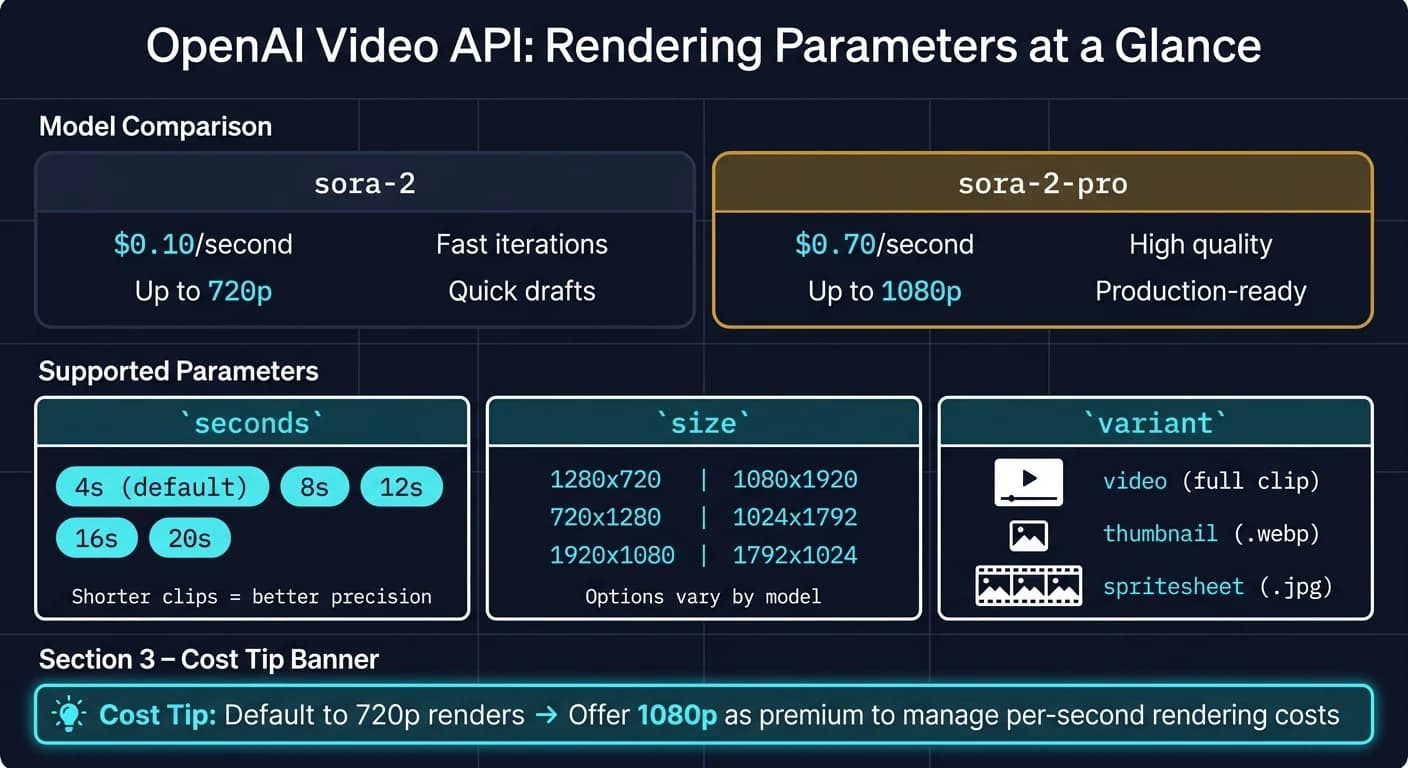
The model field is the primary rendering choice. The sora-2 model is designed for speed and quick iterations, while sora-2-pro offers higher-quality output, including 1080p resolution. The size parameter determines the output dimensions, specified as a {width}x{height} string. Supported resolutions depend on the chosen AI model. The seconds parameter controls the video length and accepts values of "4", "8", "12", "16", or "20", with "4" being the default [6].
| Parameter | Supported Values | Notes |
|---|---|---|
model | sora-2, sora-2-pro | sora-2-pro is required for 1080p output |
size | 1280x720, 720x1280, 1920x1080, 1080x1920, 1024x1792, 1792x1024 | Options vary by model [6] |
seconds | "4", "8", "12", "16", "20" | Shorter clips often yield better precision [6] |
variant | video, thumbnail, spritesheet | Determines the format of the output asset |
When retrieving a completed job, the variant query parameter lets you specify the output format: the full video, a thumbnail (.webp), or a spritesheet (.jpg) [8]. Frame rate isn't a standalone parameter; instead, cinematic effects like "180° shutter" or "filmic motion blur" are achieved through prompt-level instructions. For large-scale workflows, the Batch API allows queuing multiple video renders using the same metadata parameters as the standard POST /videos endpoint [8].
These rendering settings complete the metadata framework, ensuring a consistent and context-aware video generation process.
Practical Use Cases for Metadata in Video APIs
Metadata for Multi-Model Integrations
Metadata simplifies the process of directing requests to the appropriate model based on specific job requirements. For example, you could use the model parameter to choose sora-2 at $0.10/second for quick iterations and early-stage drafts. Once your prompts are finalized, you might switch to sora-2-pro at $0.70/second for polished, production-ready 1080p outputs [9]. Platforms that need access to a variety of video models - like Sora, Kling V3, and others - can leverage a unified API such as APIMart. This allows seamless multi-model routing through a single integration point. Plus, since metadata parameters are consistent across models, there’s no need to overhaul your request logic when switching between them.
Another cost-saving strategy is resolution gating. For instance, you can default to 720p renders and offer 1080p as a premium option, helping to manage per-second rendering expenses [7].
This kind of flexible integration also supports efficient job tracking and asynchronous processing, which we'll explore next.
Job Tracking and Async Requests
Rendering times can vary widely, from as little as 30 seconds to several minutes, depending on the selected model and resolution [9]. Each video request generates a job object containing key identifiers like id, status, progress, and expires_at. These fields make it possible to monitor the generation process asynchronously. The expires_at field is particularly useful, as it indicates when the temporary download URL will expire - usually within one hour for standard requests. This gives you enough time to automate the transfer of completed files to durable storage solutions like S3 or R2 [7].
For production workflows, webhooks are a smart choice to cut down on API calls and server load. By listening for events such as video.completed and video.failed, you can streamline your operations. When using the Batch API, the custom_id field in your JSONL file can map results back to specific internal records once the batch is finished [10]. Pairing this with a local database that links the returned video_id to internal project tags, user IDs, or cost estimates creates a clear audit trail. This setup not only aids in debugging but also simplifies financial tracking [11]. Together, these practices ensure every job is accounted for and recoverable, making the video generation process more efficient.
Beyond tracking, metadata also plays a key role in organizing and searching through video assets.
Cataloging and Search Optimization
Metadata is essential for creating a searchable and well-organized video library. By storing structured prompt details - like subject, setting, camera angle, and lighting - alongside the video_id in a local database, you can enable advanced filtering and retrieval that goes far beyond basic keyword searches [11]. For platforms with specific organizational needs, such as e-learning tools that use fields like lesson_number or difficulty_level, or marketing teams tagging assets by campaign, custom key-value pairs offer a flexible schema that integrates seamlessly with application logic [12].
The remixed_from_video_id field adds another layer of organization by tracking the creative lineage of assets. This ensures you can always trace a final video back to its source [1]. Additionally, C2PA provenance metadata, automatically included with every Sora 2 output, provides a traceable and auditable record from the initial draft to the final product. These features highlight how metadata is central to managing, organizing, and customizing video outputs throughout the entire generation process [7].
Best Practices for Structuring and Validating Metadata
Designing Metadata Schemas
When it comes to metadata schemas, getting the structure right is essential for effective video generation. A good approach is to use a dual-layer structure: a flat metadata map (e.g., using a BTreeMap in Rust) for standard, universally compatible keys, and an extra (or additional_properties) map for provider-specific or nested JSON data [3][14][4]. This setup keeps the core schema clean and adaptable while allowing for specific configurations tailored to individual models. This design directly supports customization and job tracking, as discussed earlier.
For compatibility across different models, stick to simple, flat, and descriptive key names. Examples like remixed_from_video_id, user_id, or project_id are easy to index, search, and store in databases [1][13]. Save nested structures for the extra map to handle provider-specific needs without complicating the core schema.
For video-related parameters such as size and seconds, define them as string enumerations rather than leaving them open-ended [1][13]. This ensures consistency and avoids errors during requests by enforcing constraints at the schema level.
Validating Metadata Inputs
Proper validation of metadata inputs is a must before sending any requests. It reduces the chances of job failures and aligns with the tracking and debugging strategies discussed earlier:
- Always include the prompt for every video generation job [14].
- Verify that
secondsandsizevalues match their supported enumerations [1][5]. - Check that
progressvalues stay within the integer range of 0 to 100 [13].
In strongly typed languages, leverage built-in SDK tools. For example, Java's VideoCreateParams.Builder ensures required fields and correct types at compile time [14]. Similarly, TypeScript uses VideoSeconds literals to enforce constraints [2][4]. These compile-time checks are more reliable than relying solely on runtime validations.
If a request fails, immediately parse the VideoCreateError object. The code field provides a machine-readable identifier for automated handling, while the message field offers a clear explanation for logs [1][13]. This makes it easier to determine whether the issue stems from a bad parameter, an unsupported model, or a network problem.
Beyond validation, metadata plays a key role in debugging and monitoring performance.
Using Metadata for Debugging and Monitoring
Metadata can be invaluable for identifying issues and tracking performance. Including created_at and completed_at timestamps allows you to calculate latency and spot performance regressions [1][13]. For example, if a specific model or resolution consistently takes longer than expected, these timestamps can help identify the bottleneck.
In iterative workflows, the remixed_from_video_id field can be a lifesaver. It helps trace errors back to their source when unexpected edits occur [1][13]. Combine this with server-side polling of the status field - tracking states like "queued", "in_progress", "completed", and "failed" - to quickly detect and address stalled jobs [13].
"Treat your prompt as a creative wish list, not a contract." - Robin Koenig, Joanne Shin, and Annika Brundyn [6]
This advice applies to metadata too. If a generation fails, simplify the request to its most basic form - freeze the camera or simplify the background - then gradually reintroduce complexity, one parameter at a time [6]. A well-organized schema makes this iterative debugging process much easier.
Conclusion and Key Takeaways
Recap of Metadata Benefits
Metadata plays a crucial role in turning an API call into a well-organized, trackable, and repeatable process - from the moment it enters the queue to the final download stage [1][13]. Features like asset expiration tracking ensure you're notified before download URLs expire, while error objects with machine-readable code fields make debugging faster by pinpointing issues instantly. Additionally, custom metadata maps allow for tagging jobs with internal identifiers, simplifying cataloging and organization [1][3].
For workflows involving multiple models, metadata acts as the glue that holds everything together. It links generations through id references, maintains character consistency, and maps batch outputs using custom_id. These capabilities rely on having a robust metadata structure in place [1][8]. With these advantages in mind, here are some actionable steps to refine your approach.
Next Steps for Developers
To get the most out of your metadata framework, start by auditing your current implementation against the key principles discussed in this article. Make sure that expires_at is tracked for every job, as download URLs remain valid for only 1 hour after generation [8]. Incorporate polling logic with status and progress, or switch to video.completed webhooks to reduce unnecessary API calls [8].
If you're managing workflows across multiple models, APIMart offers a practical solution. It provides access to over 500 AI models through a single API, all structured consistently with the metadata patterns outlined here. This eliminates the hassle of managing separate integrations for each model and can streamline your development process [13].
FAQs
What metadata fields should I store in my database for each video job?
To keep tabs on video generation jobs, make sure to store key details like the unique ID, status, prompt, model, size, and duration. Add timestamps such as created_at, completed_at, and expires_at for accurate tracking. Include any error information to assist with troubleshooting. For remixed videos, use the remixed_from_video_id field to trace the origin of assets. Tools like APIMart streamline this process by providing a centralized platform for easy integration and management.
How do I maintain character and style consistency across multiple video generations?
To maintain character consistency, leverage the Characters API by creating a reference from an uploaded video. Include the resulting character ID in the character_ids array of your generation request. You can include up to two characters per generation for this purpose.
For style consistency, use the video extension endpoint to seamlessly continue clips while keeping elements like lighting and depth of field intact. To achieve smooth transitions, make sure to specify details such as camera framing, lens type, and color grading. These factors help ensure the final output aligns perfectly with your original video.
What should I do before the download URL expires?
When you generate video assets, keep in mind that the download URLs typically expire within an hour. To avoid losing access, make sure to download and save your files to a secure location before the expiration time, which you can track using the expires_at field in the video object. For easier video asset management across your workflows, APIMart provides integration with advanced AI models, making tasks like video creation and production more efficient.
Choose the model you want in the model marketplace
Try chat, image and video models in the APIMart model marketplace, and experience model capabilities quickly with one unified API.