Optimizing Video Prompts: Text vs Images
Compare text-to-video, image-to-video, and hybrid prompting for AI video generation, with guidance for brand consistency, creative control, cost, and quality.
In AI video generation, your choice of prompt - text-to-video (T2V) or image-to-video (I2V) - impacts results significantly. Here's the quick breakdown:
- Text-to-Video: Ideal for creating entirely new visuals. Best for brainstorming, testing concepts, or generating abstract scenes. Requires detailed prompts for quality results but offers flexibility.
- Image-to-Video: Perfect for maintaining accuracy. Upload a static image, and the AI animates it. Best for product showcases, branding, or when consistency is critical. Limited to the context of the uploaded image.
- Hybrid Approach: Combines both methods for precision and control. Use an image for visual consistency and text to guide motion or style.
Key Considerations:
- T2V offers freedom but demands precise prompt engineering.
- I2V ensures accuracy but limits creativity to the input image.
- Time and cost efficiency vary: T2V requires more iterations, while I2V achieves results faster with fewer attempts.
Quick Comparison:
| Feature | Text-to-Video | Image-to-Video | Hybrid |
|---|---|---|---|
| Input Required | Text only | Static image (+ text) | Both |
| Visual Control | AI interprets text | Maintains input image | Combines strengths |
| Creative Range | Unlimited | Limited to image | Balanced |
| Brand Consistency | Requires effort | High | High |
| Ideal Use Case | Concept creation | Product accuracy | Professional outputs |
Bottom Line: Use T2V for new ideas, I2V for precision, and both for cinematic AI video generation and polished results.
Text and Image Prompts: Key Differences
What Are Text Prompts?
A text prompt is essentially a written instruction that tells the AI what to create. You start from scratch, crafting everything from the scene and lighting to the mood and camera movement. Since there's no visual reference, the model relies entirely on its training data, offering a lot of creative possibilities. For instance, you could describe something completely fantastical, like a drone flying through a glowing canyon on Mars, and the AI will try to bring your vision to life.
But with all this freedom comes a challenge: vague prompts can lead to bland results. To get the best output, you need to include details across 10 specific categories: subject, style, lighting, environment, mood, composition, motion, camera, duration, and audio. Most users skip several of these, which often results in generic outputs - think static shots with flat lighting.
"text-to-video and image-to-video are not interchangeable. They operate on different constraints in latent space, and knowing when to use each is the difference between cinematic output and unusable generations." - Sarah Iruoje [1]
In contrast, image prompts provide a visual starting point that grounds the creative process.
What Are Image Prompts?
An image prompt starts with a static image as the base. Instead of generating everything from scratch, the AI animates the image, adding motion and other elements. This approach gives the model a clear understanding of the subject's appearance.
This is particularly useful for projects where visual accuracy is critical, like brand or product work. For example, if you upload a product image, the AI will preserve its shape, color, and layout. Characters remain consistent, and logos won't distort. This makes image-to-video the preferred choice for e-commerce, product marketing, and any scenario where maintaining the original look is essential. However, the trade-off is that your creative range is limited to what already exists in the image - you can’t create something entirely new.
"As a filmmaker, your worst enemy is randomness. You don't want AI to 'guess' what your protagonist looks like; you want it to animate the character you already designed." - AIAI.com [10]
Multi-Modal Prompting
By combining the strengths of text and image prompts, multi-modal inputs offer a powerful way to create. These workflows, becoming standard by 2026, pair a visual reference with descriptive text instructions. The image locks in the subject's visual details, while the text dictates motion or camera behavior. For example, you could upload a product photo and add a text instruction like "slow dolly-in with soft studio lighting" to control how the scene unfolds.
Platforms such as APIMart make this process seamless. They allow users to leverage tools like Kling V3 and Sora within a single API, eliminating the need to switch between different tools or workflows when blending text and image inputs.
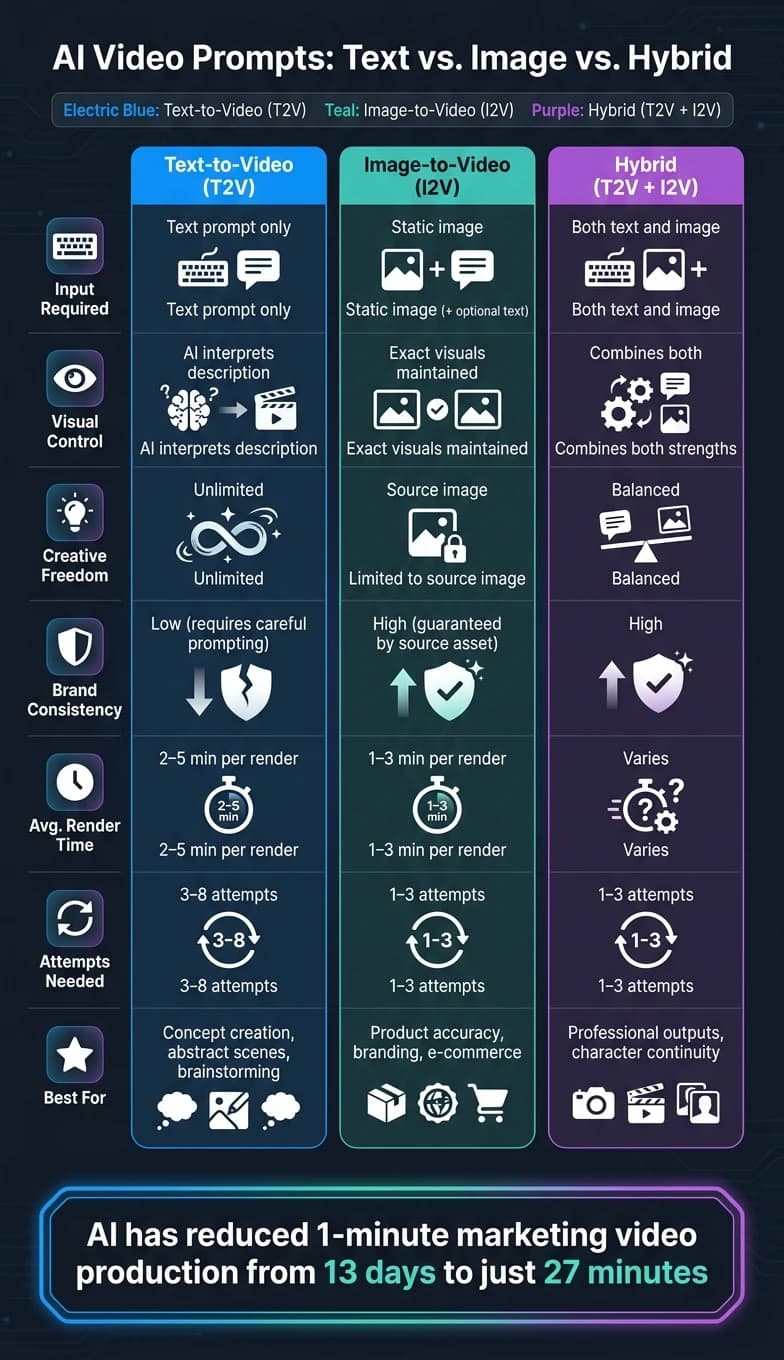
| Factor | Text-to-Video | Image-to-Video |
|---|---|---|
| Input Required | Text prompt only | Static image (+ optional text) |
| Visual Control | Model interprets description | Exact visuals maintained |
| Creative Freedom | Unlimited | Limited to source image context |
| Brand Consistency | Low (requires careful prompting) | High (guaranteed by source asset) |
| Learning Curve | Higher (prompt engineering) | Lower (upload and generate) |
Text Prompts: Strengths and Limitations
Strengths of Text Prompts
Text prompts shine when it comes to sparking creativity. With just a few descriptive words, you can shape entire scenes. They allow for quick experimentation - whether you're testing different moods, styles, or scene ideas across hundreds of AI models. Want to switch from a gritty urban backdrop to a sunlit coastal setting? Just tweak a few words and regenerate. Text-to-video models also excel at pulling from their training data, which can lead to some imaginative results, particularly with abstract visuals like cityscapes, nature sequences, or fantastical environments, which can be generated using models like Grok Imagine Video.
But, as with any tool, there are some trade-offs.
Limitations of Text Prompts
The biggest challenge with text prompts is their lack of precision. Without a visual reference, the model often makes unpredictable decisions. This can lead to inconsistencies in characters, brand colors, logo placement, or product details across multiple clips. Another hurdle? Models often struggle with complex physical interactions - like realistic hand grips, synchronized movements, or stable text rendering. [9][4]
To navigate these challenges, it’s essential to use some proven strategies.
Best Practices for Text Prompts
One of the most effective ways to improve results is by using a structured 10-slot format: Subject + Action + Environment + Style + Camera + Lighting + Motion + Mood + Duration + Audio. [9][4] Skipping any of these elements can lead to lower-quality outputs. For instance, a well-crafted real estate prompt might look like this: "Slow crane down, modern home exterior, wide establishing shot, golden hour lighting, cinematic style."
Here are some additional techniques to refine your outputs:
- Time-stamped action blocks: Incorporate time-stamped actions for better control, especially in models like Sora 2. For example: "0–3s: subject enters frame; 3–6s: picks up envelope." This approach helps manage pacing and reduces erratic or unpredictable movements. [4]
- Negative prompts: Use the negative prompt field to avoid common issues like "blurry, low quality, distorted, watermark." These exclusions help ensure cleaner results. [11]
- Consistent seed values: Stick with the same seed value across generations. This allows you to fine-tune details without starting over, saving time and effort. [1][4]
Image Prompts: Strengths and Limitations
Strengths of Image Prompts
When you need precise visuals, image prompts are a go-to. Instead of relying solely on text, you upload an image, and the AI uses it as a reference point. This approach is particularly effective for scenarios like product demos, real estate tours, or branded content. Why? Because a picture can instantly communicate specifics like the exact shade of a product's packaging, the placement of a logo, or the texture of a material - details that are tough to nail down with just words [2][7].
Another big advantage is efficiency. With image-to-video (I2V) workflows, you typically need only 1–3 generations to get the desired result, compared to 3–8 attempts with text prompts. That’s because the foundational elements - composition, lighting, and color - are already set from the first frame [6][7].
Limitations of Image Prompts
The downside? Flexibility takes a hit. Since the video is anchored to your reference image, creating entirely new scenes from scratch isn’t an option. Plus, the quality of your input image matters - a poorly lit, low-resolution, or awkwardly framed image will directly affect the final output [2].
Motion can also be tricky. Subtle facial shifts, distorted hands, or disappearing details like jewelry or text on clothing can disrupt the flow of a clip. The table below outlines different shot types and their associated risks:
| Shot Type | Risk | Best For |
|---|---|---|
| Subtle Motion | Low | Clean faces, product integrity, stable backgrounds |
| Slow Push-in/Pan | Low | Cinematic mood, professional marketing |
| Aggressive Motion | High | Action scenes (may require retries) |
| Fast Orbit/Zoom | High | Dynamic transitions (prone to artifacts) |
Most models as of 2026 work best with clips between 5 and 15 seconds long. For longer videos, it’s safer to stitch together shorter segments during post-production to maintain consistent details across frames [6][9].
Control Options for Image Prompts
To address these challenges, you can tweak several control settings. Platforms like APIMart, with models such as Kling V3, let you adjust parameters like motion intensity, clip duration, and prompt weight. These settings help balance how much influence the text instructions have compared to the reference image [12].
Using a fixed seed value is another smart move. It allows you to fine-tune motion direction and intensity across multiple generations without losing the visual consistency of your original image [12]. For the best results, pair a high-quality reference image with subtle motion settings and a locked seed. This approach often delivers clean, polished clips within just one or two tries.
When to Use Text, Image, or Both
Use Case Comparison
Deciding between text-to-video and image-to-video comes down to what assets you already have on hand.
"The choice between text to video and image to video AI models isn't really a technical decision. It's about what you're walking in with." - Eachlabs Team [2]
If you're working with a concept or product that doesn't have any visuals yet - like a pre-launch idea - text-to-video is your best bet. It allows you to create visuals from scratch without needing any photography. On the other hand, if you already have professional product photos or brand imagery, image-to-video is usually the way to go. This ensures that the visuals in your video align perfectly with the actual product, which is especially important for e-commerce to reduce returns [3][7].
| Scenario | Recommended Input | Why |
|---|---|---|
| New brand, no existing assets | Text-to-Video | Creates visuals from scratch without needing photography [3] |
| Product showcase or demo | Image-to-Video | Ensures the video matches the real product exactly [7] |
| Abstract or surreal ad concept | Text-to-Video | Captures metaphorical ideas that are impossible to film [3] |
| Character continuity across clips | Hybrid (Image + Text) | Reference images lock identity; text guides actions [10] |
| Professional branded content | Hybrid (Image + Text) | Combines visual anchors with motion for polished results [1] |
These choices also depend on practical factors like costs and rendering times.
Practical Factors for U.S. Teams
Budget and timelines often play as big a role as creative goals. Text-to-video typically takes 2–5 minutes per render and may require 3–8 attempts to get it right, while image-to-video is faster, averaging 1–3 minutes and 1–3 attempts [7][8]. These time differences can add up in larger productions.
Cost is another key consideration. APIMart's pricing highlights how these choices can impact your workflow. For example, Wan 2.5 (Image-to-Video) costs just 5 credits (around $0.39) per generation, making it ideal for high-volume e-commerce where accuracy is critical [3]. If you’re aiming for cinematic quality, Sora 2 Pro at 60 credits per generation is the premium option. For standard-quality needs, Veo 3.1 Fast at 8 credits strikes a balance [3]. The general approach: start with lower-cost text-to-video models for early-stage ideas, then transition to image-to-video or hybrid workflows for the final product.
Combining Text and Image Prompts
Using text and image prompts together can help you get the best of both worlds by combining creativity with precision.
"Text-to-video = imagination and exploration; Image-to-video = consistency and control; Hybrid = professional-grade output." - Sarah Iruoje, VidAU.ai [1]
One effective method is the "Generate Stills First" technique. Start by using a text-to-image model to create a still image that captures the composition you want. Then, use an image-to-video model to add motion to that still [2][7]. Another promising workflow, known as the Brick System, breaks a video ad into distinct sections. For example, you might use a text-to-video model to create an eye-catching cinematic opening, follow it with image-to-video segments for accurate product details, and finish with a branded overlay for the call to action [3]. Each section - or "brick" - uses the input type best suited for its role, creating a cohesive and effective final video.
Image-to-Video vs Text-to-Video: Why a Start Frame Wins Control
Conclusion: Picking the Right Prompt Type for Your Goals
The decision-making process here boils down to one simple starting point: work with what you already have. If you don’t have visuals to begin with, text-to-video is a great way to quickly experiment with ideas. On the other hand, if you already have approved imagery, image-to-video is your go-to for maintaining brand consistency. For the best results, combining both methods can be a game-changer.
Here’s a stat to put things into perspective: AI has slashed the production time for a one-minute marketing video from 13 days to just 27 minutes [5]. The type of prompt you choose determines how much of this efficiency you can actually tap into. Text-to-video excels during the brainstorming phase, image-to-video ensures precision for final outputs, and hybrid workflows bring professional teams the polished results they need.
A helpful technique to adopt is the "Universal Core" strategy. This involves crafting a modular prompt focused on a consistent subject and scene, while adding model-specific parameters. Using seed parity to stabilize the visuals can also cut down the number of generations needed to land on a usable clip.
Platforms like APIMart make multi-modal workflows more seamless. The system automatically selects the appropriate generation mode based on your input: no image defaults to text-to-video, one image triggers image-to-video, and two images activate first-last frame mode [12]. With access to over 500 models - including Sora 2, Veo 3.1, and Kling V3 - through a single API, you can easily switch between strategies without juggling multiple platforms or billing systems. This kind of streamlined workflow simplifies the creative process.
Ultimately, there’s no one-size-fits-all solution. The best prompt type depends on your available assets, your deadlines, and the level of visual consistency your project requires. By mastering each approach, you can reduce trial-and-error cycles and deliver faster results.
FAQs
How do I choose between text-to-video and image-to-video for my project?
Choosing between text-to-video and image-to-video depends on what you're aiming to achieve in terms of creativity and consistency.
- Text-to-video works well when you're focusing on storytelling, generating abstract visuals, or experimenting with fresh ideas from the ground up.
- Image-to-video is better for scenarios where maintaining a consistent visual style is crucial, like branded content or projects involving recurring characters.
To make things easier, APIMart takes care of this decision for you. It automatically selects the most suitable mode based on your inputs, ensuring smooth integration.
What makes a text prompt “detailed enough” for good video results?
A strong text prompt moves from being general to well-defined, outlining the subject, action, environment, camera movement, and style. Including precise details - such as distinct characteristics or specific lighting - helps eliminate ambiguity and ensures a more consistent outcome. With APIMart, you can take this a step further by incorporating visual references as anchors. This approach ensures that key details, like branding or character design, remain consistent across your video content.
How can I keep characters or products consistent across multiple AI video clips?
To create consistent AI-generated video clips, it's better to rely on multi-modal inputs rather than just text prompts. Text-only prompts can cause inconsistencies since the model has to fill in all the details on its own. By pairing your text prompts with reference images using tools like APIMart, you give the AI a clear visual guide for elements like characters, logos, and products. For optimal results, ensure your reference images are high-resolution, well-lit, and show the subject from multiple angles.
Choose the model you want in the model marketplace
Try chat, image and video models in the APIMart model marketplace, and experience model capabilities quickly with one unified API.