Pixverse V6 vs Kling: AI Video Compared
Pixverse V6 vs Kling compared: speed, resolution, 4K output, pricing and use cases, so you can pick the right AI video model for your project on APIMart.
Choosing between Pixverse V6 and Kling depends on your goals.
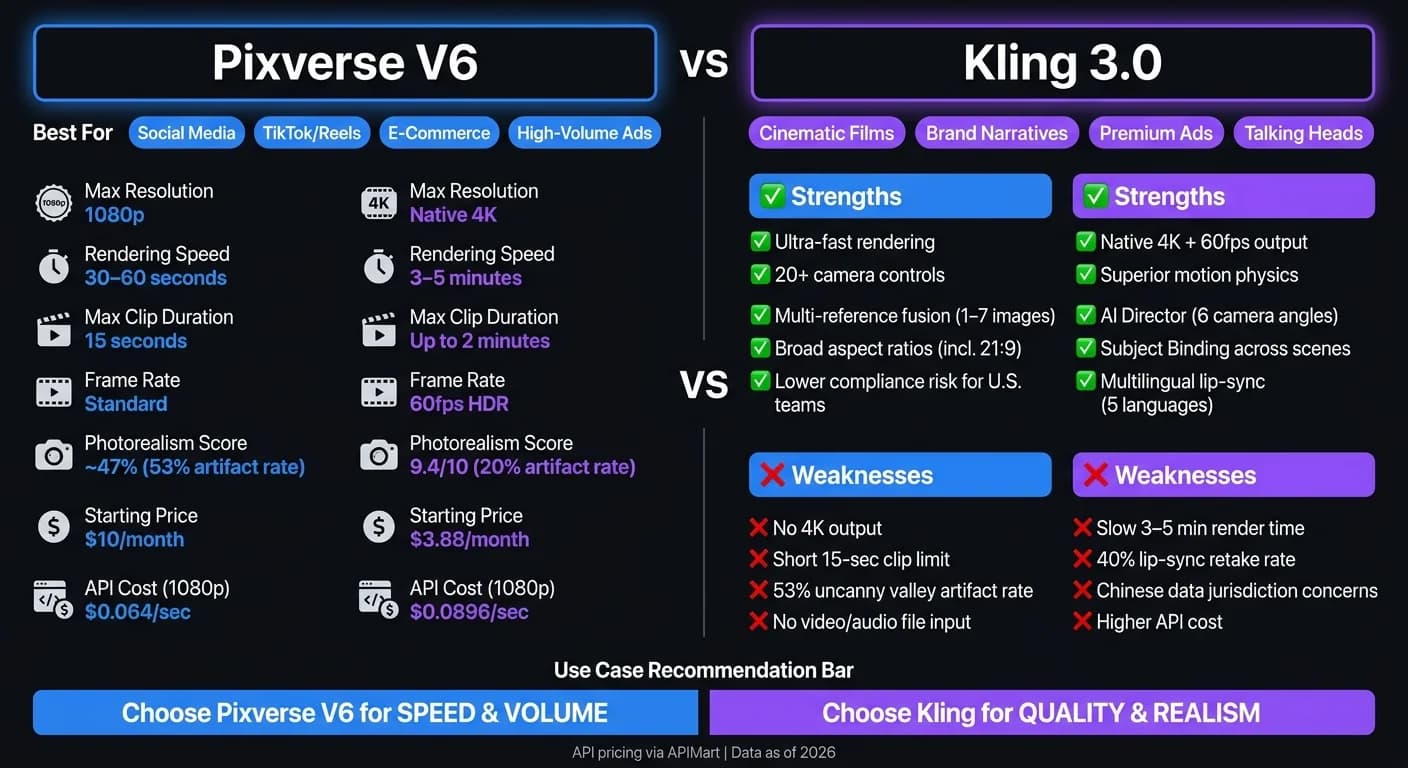
- Pixverse V6 is ideal for fast, social-first videos (TikTok, Reels) with quick rendering (30–60 seconds), strong prompt adherence, and dynamic camera controls. However, it’s limited to 15-second clips and 1080p resolution.
- Kling delivers cinematic realism with native 4K output, fluid motion, and advanced storytelling features like subject consistency and multi-scene support. It’s better for filmmakers and premium ads but slower (3–5 minutes per 4K clip) and more expensive.
Quick Comparison:
| Feature | Pixverse V6 | Kling |
|---|---|---|
| Best For | Social media, ads, e-commerce | Films, narratives, high-end ads |
| Max Resolution | 1080p | 4K |
| Rendering Speed | 30–60 seconds | 3–5 minutes |
| Clip Duration | Up to 15 seconds | Up to 2 minutes (Premier plan) |
| Strengths | Speed, camera control, low cost | Realism, motion physics, 4K output |
| Weaknesses | Limited realism, short clips | Slower, higher cost, lip-sync issues |
Bottom Line:
Use Pixverse V6 for fast-paced, high-volume content. Choose Kling for projects demanding lifelike quality and cinematic storytelling.
Pixverse Vs Kling - Full Guide (2025)
Pixverse V6 Overview
Released on April 6, 2026, Pixverse V6 has become a favorite tool for social media creators and marketing teams. With 100 million users across 175 countries, including 16 million monthly active users, its popularity is undeniable. The company’s $300 million Series C funding in March 2026 pushed its valuation past $1 billion. These milestones reflect the strength of its multi-shot engine and integrated audio synthesis.
Core Features
Pixverse V6 transforms text or images into 15-second, 1080p videos. What makes it stand out is its multi-shot engine, which creates connected wide, medium, and close-up sequences from a single prompt while keeping characters and environments consistent. It also features integrated audio synthesis, generating synchronized ambient sounds, effects, and music. Users can control cinematic camera movements - like dolly, pan, tilt, and orbit - using natural language commands. Additionally, up to seven reference images can be used to guide the style or character appearance.
| Feature | Previous Version | Pixverse V6 |
|---|---|---|
| Max Duration | 8 seconds | 15 seconds |
| Multi-Shot | Not native | Native engine |
| Audio | Separate pass | Integrated/Synchronized |
| Camera Controls | Basic | Full cinematic set (dolly, pan, tilt) |
| API Access | Limited | Full support for developer workflows |
What Pixverse V6 Does Well
Pixverse V6 performs exceptionally well in adhering to prompts, especially when handling spatial instructions like "in the foreground" or "reflected in the window." Its temporal stability ensures that characters and environments remain consistent throughout the entire 15-second clip.
"V6 is the first AI video model I've tested where the phrase 'production-grade' isn't aspirational - it's descriptive." – Pixverse Blog
The free tier offers 60 daily credits at 720p, allowing users to experiment without upfront costs. Many creators test their ideas at lower resolutions, such as 540p, to minimize testing expenses before generating a full 1080p video.
Where Pixverse V6 Falls Short
The platform’s 15-second clip limit and 1080p resolution can be restrictive for projects requiring longer narratives or native 4K output. While the video extension feature allows users to continue from a completed clip, it doesn’t support continuous long-form content creation in a single pass.
Another limitation is its reliance on text prompts and images, as it doesn’t accept video or audio files as direct inputs. Although its cinematic controls are extensive, they are entirely text-based, which can result in unpredictable camera movements in 20–30% of cases. For complex scenes, users may need to retry 30–40% of the time to achieve a satisfactory result.
Finally, while its stylized aesthetic works well for social media and marketing, it may not meet the needs of projects requiring strict photorealism.
Next, we’ll take a closer look at Kling’s features to see how it compares.
Kling Overview
In the fast-changing arena of AI video generation, Kling has emerged as a strong contender. Developed by Kuaishou, a Chinese tech company, and managed internationally by Kling AI Pte. Ltd. in Singapore, the platform has gained impressive traction. By mid-2026, Kling had amassed over 60 million users and facilitated the creation of 600 million AI-generated videos [10]. With the launch of Kling 3.0 in February 2026, the platform made a bold leap from being a simple clip generator to a full-fledged scene generator.
"Kling 3.0 stops being a 'clip generator' and starts being a 'scene generator.'" - Boris Dittberner, Founder, SixSides Academy [14]
Core Features
One of Kling 3.0's standout features is its ability to generate native 4K resolution videos at 60fps with 16-bit HDR color depth [15]. Unlike platforms that rely on upscaling, Kling produces true 4K videos, offering striking details in textures like hair, fabric, and reflective surfaces. Standard clips range from 3 to 15 seconds, but the Premier plan extends this to single-take clips up to 2 minutes - a significant jump from the 10-second limit in version 2.6 [13].
The AI Director mode is another highlight, automatically designing up to six unique camera angles from a single prompt [2]. Combined with Subject Binding, which ensures character consistency across scenes, and the ability to anchor start and end frames using uploaded images [2], Kling makes multi-scene storytelling much easier.
| Feature | Kling 2.6 | Kling 3.0 |
|---|---|---|
| Max Resolution | 1080p | Native 4K |
| Frame Rate | 30fps | 60fps |
| Max Duration | 10 seconds | 15 seconds (up to 2 minutes on Premier) |
| Multi-Shot | Single shot | Up to 6 cuts per prompt |
| Native Audio Languages | 2 (EN, ZH) | 5 (EN, ZH, JA, KO, ES) |
What Kling Does Well
In controlled tests using 50 prompts, Kling 3.0 scored an impressive 9.4/10 for photorealism, surpassing many competing models [14]. Its Diffusion Transformer (DiT) architecture excels in maintaining motion coherence and simulating physics, capturing details like cloth movement and liquid dynamics with remarkable accuracy [16].
The Motion Brush tool is another game-changer, allowing users to animate specific parts of a static image - perfect for product showcases or portrait-style content [8]. For talking-head videos, Kling supports multilingual lip-syncing in English, Chinese, Japanese, Korean, and Spanish [2].
"The AI Director feature is the first time an AI video model has felt truly useful for narrative filmmaking, not just for creating atmospheric b-roll." - Elena Marchetti, Senior AI Editor, Awesome Agents [17]
These advancements position Kling as a strong competitor, ready for a direct comparison with Pixverse V6.
Where Kling Falls Short
Despite its strengths, Kling has a few challenges. About 40% of dialogue clips require retakes due to inconsistent lip-syncing [17]. The platform also struggles with fine motor actions, such as writing or tying knots, which remain difficult for the current model [16]. Rendering speed is another bottleneck; generating a single 4K clip can take 3 to 5 minutes, which may hinder faster workflows [17].
U.S. users might encounter access issues due to earlier account setup requirements [14]. Additionally, content moderation follows Chinese regulatory standards, restricting politically sensitive topics or certain cultural references [12]. For industries like healthcare or finance, the fact that data is processed on Chinese infrastructure could raise concerns [14].
Next, we’ll dive into a detailed comparison of Pixverse V6 and Kling's core capabilities.
Feature and Performance Comparison
Core Capabilities
Pixverse V6 and Kling AI are tailored for distinct creative needs. Pixverse V6 focuses on social-first platforms like TikTok and Reels, as well as e-commerce and high-volume marketing campaigns. On the other hand, Kling AI is built for projects demanding cinematic realism, such as film pre-visualization, narrative shorts, and high-end advertising. Released on March 30, 2026, Pixverse V6 prioritizes fast-paced content creation, while Kling leans into precision and natural motion.
| Dimension | Kling AI | Pixverse V6 |
|---|---|---|
| Typical Use Cases | Film pre-vis, narrative shorts, high-end ads | TikTok/Reels, e-commerce, viral marketing |
| Subject Consistency | High (reference-based) | High (character reference system) |
| Motion Intensity | Natural, fluid physics | Fast-paced, dynamic action |
These distinctions set the stage for how each platform performs in terms of video quality and realism.
Video Quality and Realism
When it comes to realism, Kling AI has a clear advantage. In comparative tests, Kling exhibited "uncanny valley" artifacts in only 20% of human motion scenarios, significantly outperforming Pixverse V6, which showed these artifacts in roughly 53% of cases[18]. Kling excels in handling complex elements like cloth movement, liquid dynamics, and human expressions, delivering a level of precision that Pixverse V6 struggles to match consistently.
"Kling produces more realistic motion, especially for human characters, physics-heavy scenes, and cinematic camera movement." - AISO Tools[19]
Pixverse V6, however, shines in speed and creative control. It offers over 20 cinematic camera parameters, such as focal length, aperture, depth of field, and chromatic aberration, providing creators with a high degree of optical precision. Kling's directional camera system, while effective, doesn’t offer the same level of customization. For fast-paced action or VFX-heavy content, Pixverse V6 minimizes motion smearing, making it a strong choice for dynamic sequences.
Input Options and Workflow
The difference in workflow efficiency between these platforms is significant. Pixverse V6 is built for speed, rendering clips in just 30–60 seconds. In contrast, Kling AI takes 3–5 minutes to generate a 4K clip, which can slow down rapid iteration cycles[5]. This makes Pixverse V6 particularly appealing to marketing teams working under tight deadlines.
Pixverse V6 also incorporates multi-reference fusion and scene automation, allowing creators to use 1–7 images to guide the generation of a single video[7]. Kling, meanwhile, focuses on precision with its Motion Control input, which transfers specific movements from a reference video to the generated subject. While this is ideal for high-fidelity productions, it’s less suited for fast-turnaround content.
| Input/Feature | Kling AI | Pixverse V6 |
|---|---|---|
| Input Types | Text, image, character ref | Text, image, multi-image fusion (1–7) |
| Workflow Tools | Motion Brush, Video Extension | Multi-shot engine, CLI for agents, Video Extension |
| Rendering Speed | 2–5 minutes | 30–60 seconds |
| Aspect Ratios | 16:9, 9:16, 1:1, 4:3 | 16:9, 9:16, 1:1, 4:3, 21:9, 3:2, 2:3, 3:4 |
Another edge for Pixverse V6 is its broader range of aspect ratio options, including 21:9 ultrawide, which is particularly useful for multi-platform content distribution. This flexibility, combined with its faster rendering times, makes it a strong contender for creators aiming to produce high-quality content quickly.
Pricing and Integration for U.S. Teams
Designed with U.S. teams in mind, these pricing models and integration options align with local market expectations, offering flexibility and scalability.
Direct Pricing Models
Kling AI's web app starts at $3.88/month for 650 credits, while Pixverse V6 offers consumer plans beginning at $10/month for 1,200 credits. For API users, Pixverse V6 provides significantly lower per-clip costs, making it a strong choice for high-volume workflows.
| Plan | Kling AI | Pixverse V6 |
|---|---|---|
| Free | 66 daily credits | 60 daily credits |
| Standard | $3.88/mo (650 credits) | $10.00/mo (1,200 credits) |
| Pro | $12.88/mo (3,000 credits) | $30.00/mo (6,000 credits) |
| Premium | $28.88/mo (includes Image Upscale) | $60.00/mo (15,000 credits) |
For production-scale workflows, Pixverse V6's API memberships range from $100/month (covering approximately 333 videos at 540p for 5-second clips) to $6,000/month (supporting around 23,766 videos). At the Business tier, the cost per 5-second clip drops to about $0.28, a huge cost advantage compared to traditional stock footage, which typically ranges from $30 to $80 per clip [9].
Using Kling Through APIMart
APIMart simplifies API access for U.S. teams by offering pay-as-you-go pricing, which is about 20% lower than official rates [3]. This option is ideal for teams looking for flexibility and consolidated billing.
| Model | Resolution | APIMart Rate | Official Price |
|---|---|---|---|
| Pixverse V6 | 360p | $0.016/sec | $0.02/sec |
| Pixverse V6 | 1080p | $0.064/sec | $0.08/sec |
| Pixverse V6 + Audio | 1080p | $0.080/sec | $0.10/sec |
| Kling V3 | 720p | $0.0672/sec | $0.084/sec |
| Kling V3 | 1080p | $0.0896/sec | $0.112/sec |
| Kling V3 | 4K | $0.42856/sec | $0.5357/sec |
For teams working at scale, Pixverse V6 costs approximately $4.80/min through APIMart, compared to Kling V3 Omni's $13.44/min. This price difference is particularly important for marketing teams running multiple iterations weekly. Additionally, APIMart ensures reliability with a 99.9% SLA [3].
"PixVerse V6 gives our creative team a fast way to test cinematic campaign scenes before production. The APIMart workflow is easy to automate." - Alex Morgan, Creative Technologist [3]
Integration and Developer Experience
Affordable pricing is just one side of the coin - seamless integration is equally important for efficient workflows.
Both Pixverse V6 and Kling are available through APIMart's unified endpoint (/v1/videos/generations), which uses a single Bearer Token for authentication. By adjusting the model parameter, developers can switch between Pixverse V6 and Kling without needing separate API keys. Both models follow an asynchronous task-polling pattern: a POST request returns a task_id, and results can be fetched with 5-second polling intervals [7].
Important Note: Video links expire after 24 hours, so files should be downloaded or transferred promptly [7]. To optimize credit usage during testing, teams can start with lower resolutions like 360p or 540p to validate compositions before scaling up to 1080p or 4K for final production.
"APIMart lets us test Pixverse V6 through the same gateway and billing pattern we already use for other AI video models like WAN 2.7." - Lucas Huang, Product Marketing Manager [3]
Pixverse V6 also includes a Video Extension feature through APIMart, enabling developers to continue generation from a previous task. On the other hand, Kling V3 offers 4K generation via API, a feature Pixverse V6 currently lacks. This makes Kling the go-to option when ultra-high-definition output is a priority [6].
Which Tool Fits Your Use Case
Choosing the right tool depends on what you're creating and the speed at which you need to produce it.
Narrative and Cinematic Storytelling
For story-focused projects like brand films, product narratives, or multi-scene sequences, Pixverse V6 is a solid option. Its engine ensures continuity across scenes, keeping characters and environments consistent throughout [3]. With its Video Extension feature, you can pick up where a clip leaves off, which is great for building longer narratives without starting from scratch.
On the other hand, Kling 3.0 excels in delivering cinematic quality through features like implicit multi-shot prompting and subject binding. The implicit multi-shot prompting feature automatically breaks a long-form prompt into multiple camera angles and cuts, while subject binding ensures character and element consistency across scenes [11].
"Kling 3.0 tackles those limitations by combining several major capabilities in a single generation pipeline: Multi-shot storyboarding, Character consistency across scenes, Synchronized audio and dialogue." - Shafira Hidayat, Content Writer [11]
For those using the free tier of Pixverse V6, the 60 daily credits and support for 21:9 cinematic widescreen make it an accessible way to experiment with story concepts [7].
These storytelling tools differ significantly from what's needed for fast-paced, action-heavy content.
High Motion and Action Content
When it comes to action sequences, sports highlights, or dynamic product reveals, each tool has its strengths. Kling stands out for its physical realism. Its physics-aware motion engine handles complex movements like flowing water, fabric dynamics, and human motion with fewer visual glitches [1].
Meanwhile, Pixverse V6 offers unmatched control for directors. Its 20+ parameterized camera movements - including dolly, crane, orbit, and even the dolly zoom (Vertigo effect) - allow for precise framing of action scenes [20]. Additionally, its Fast Motion Mode handles challenges like motion blur, debris, and rapid lighting changes, making it ideal for snappy social media content on platforms like TikTok or Reels [9].
"PixVerse V6 is the best choice when camera control is a requirement, not a nice-to-have." - Bubbles, Product Reviewer, Omni Video 2 [20]
For talking head videos or user-generated content (UGC), where authentic human expressions are crucial, Kling performs better [19].
Next, let’s look at how these tools integrate into larger production workflows.
Production Integration and Scaling
Your production needs will influence which tool fits best. For speed and ease of use, Pixverse V6 offers quick browser-based generation with direct MP4 outputs. On the other hand, Kling provides premium 4K output, making it perfect for API-driven workflows.
If you're working with API-based production pipelines and need top-tier quality, Kling via APIMart is the better choice. Its kling-v3-omni model supports text, image, and video inputs within a single architecture, and its 4K output via API is a feature not available in Pixverse V6 [6].
"As a developer, the unified API for kling-v3-omni makes integration a breeze. One kling-v3 series model handles all our multi-modal generation needs." - James Liu, Senior Developer [6]
| Use Case | Recommended Tool |
|---|---|
| Multi-shot brand storytelling | Pixverse V6 |
| Character-consistent cinematic scenes | Kling 3.0 |
| Action content with camera direction | Pixverse V6 |
| Talking heads and realistic human motion | Kling |
| High-volume social media production | Pixverse V6 |
| 4K API output for premium deliverables | Kling via APIMart |
Summary Recommendation Matrix
Here’s a breakdown to help you decide on the best AI video tool for your needs. Each option has its strengths, so your choice will depend on your production goals, timeline, and technical requirements.
Pixverse V6 is ideal for fast-paced workflows like TikTok ads, Instagram Reels, or e-commerce clips where speed is crucial. It excels in delivering results in just 30–60 seconds, making it perfect for high-volume creative testing. Plus, it offers a lower compliance risk for U.S.-based teams in regulated industries, as it avoids Kling's concerns regarding Chinese data jurisdiction [4].
Kling is the top pick when quality takes priority. Whether it’s long-form brand films, action-heavy visuals, or projects requiring lifelike human motion, Kling delivers. With an ELO benchmark score of 1,243 as of February 2026 and support for clips up to 3 minutes, it’s designed for cinematic projects that demand physical realism, similar to the high-fidelity output of WAN 2.6. For developers and agencies, Kling via APIMart provides enterprise-grade reliability with features like a 99.9% SLA, pay-as-you-go pricing (starting at $0.0672/sec for 720p), and a unified API endpoint. This setup simplifies integration, especially for those managing multiple client pipelines or scaling SaaS products [6].
Here’s a quick comparison of which tool works best for specific scenarios:
| Scenario | Best Tool | Key Reason |
|---|---|---|
| High-volume social ads (TikTok, Reels) | Pixverse V6 | Fast 30–60 sec rendering with social-first templates |
| Long-form cinematic storytelling | Kling | Supports up to 3-min clips with physics-aware motion |
| Realistic human motion / talking heads | Kling | Superior body mechanics and facial realism |
| Rapid creative A/B testing | Pixverse V6 | Quick iterations with low cost per clip |
| Enterprise SaaS or automated pipelines | Kling via APIMart | 99.9% SLA; unified billing; pay-as-you-go pricing |
| Compliance and data residency for U.S. teams | Pixverse V6 | Avoids data residency concerns tied to Kling's Chinese jurisdiction risks |
| 4K output for premium deliverables | Kling via APIMart | 4K + sound available at $0.42856/sec |
This matrix should help clarify which tool aligns with your specific production needs.
FAQs
How do I pick the right tool for my use case?
When choosing the right tool, it all comes down to your goals and workflow. If you're handling high-volume marketing, managing social media content, or need app integrations, Pixverse V6 is a standout option. Its API capabilities, quick generation speed, and social-focused templates make it ideal for scaling content efficiently.
On the other hand, if your focus is on ultra-realistic motion for cinematic projects or film pre-visualization, then Kling is your go-to. It delivers the level of high-fidelity realism required for such demanding projects.
Ultimately, your decision hinges on whether your priority lies in scalable content creation or achieving cinematic-level realism.
Which is better for realistic people and talking heads?
Kling stands out as the go-to option for those seeking lifelike visuals and presenter-style videos. Its Avatar 2.0 tool is exceptional at producing videos featuring photorealistic humans, complete with built-in lip-syncing and smooth incorporation of images and audio. While Pixverse V6 shines in multi-shot storytelling and marketing workflows, Kling takes realism to another level with its hyper-realistic human movements and natural interactions.
How can I keep characters consistent across multiple clips?
To keep characters consistent across different clips, take advantage of native multi-shot generation tools. These tools help maintain smooth scene transitions while ensuring the character's identity, lighting, and overall style remain intact. For more intricate storylines, using reference images from various angles - like front, side, and back views - can be incredibly useful for locking in visual details. Also, stick to a steady prompt structure by including a master identity block and reusing the same wording for character traits. This approach minimizes the risk of visual inconsistencies.