What Is SkyReels V4 Fast AI Video Generation
Understand SkyReels V4 Fast, its video-audio generation pipeline, multimodal inputs, pricing tradeoffs, use cases, and APIMart integration tips.
SkyReels V4 Fast is an AI-powered tool designed for quickly generating 15-second videos with synchronized audio. Launched on February 25, 2026, by Skywork AI, it simplifies video creation for tasks like social media clips, product demos, and ad variants. Its standout feature is the dual-stream Multimodal Diffusion Transformer (MMDiT), which creates both visuals and audio in one step, saving time and reducing costs by up to 70% compared to traditional methods.
Key details:
- Resolution: Up to 1080p at 32 FPS.
- Cost: Starts at $0.064 per second for 480p via APIMart.
- Modes: Fast mode prioritizes speed, while Standard mode offers higher quality and native audio.
- Applications: Ideal for marketing, e-commerce, and video editing.
SkyReels V4 Fast is accessible via APIMart, offering a unified API, pay-as-you-go pricing, and a 99.9% uptime SLA. It’s a practical choice for teams needing efficient and cost-effective video solutions.
SkyReels-V4: Unified Video and Audio Synthesis
Key Features of SkyReels V4 Fast
Building on its streamlined design, SkyReels V4 Fast introduces several standout features that redefine how video and audio content is created and edited.
Unified Video and Audio Generation
SkyReels V4 Fast combines video and audio creation into a single, cohesive process. Thanks to its dual-stream Multimodal Diffusion Transformer (MMDiT) architecture, the model generates synchronized video frames and audio simultaneously. Both streams are guided by a shared MLLM text encoder, with bidirectional cross-attention ensuring that sound effects and dialogue align perfectly with on-screen visuals. Rotary Positional Embeddings (RoPE) handle the timing, mapping 21 video frames to 218 audio tokens with precision, so there’s no risk of misalignment [3][4].
"This isn't video generation with audio bolted on. It's a single model that treats sight and sound as equally important outputs." - Dora, WaveSpeed Blog [4]
The result? A fully integrated audiovisual clip delivered in one seamless step. This approach is ideal for marketing and e-commerce teams who need quick, polished results with minimal effort.
Multi-Modal Inputs and Reference Control
SkyReels V4 Fast supports a variety of input types, including text, images, video clips, and audio references, all in a single request. Reference materials - like images or video frames - are encoded and incorporated into the self-attention process, allowing the model to replicate identity, texture, and poses accurately. To enhance control, it uses an @tag system. For example:
- Use
@Actor-1to apply a specific face reference. - Use
@styleto define a visual mood board.
These tags can be included in text prompts, giving users precise control over how references are applied. In Image-to-Video (I2V) mode, you can even specify up to six mid-keyframes with exact timestamps to control pacing. Similarly, uploading a short audio sample allows the audio branch to match tempo, timbre, and mood, ensuring that visual cuts align naturally with audio beats [1][7].
Beyond generation, SkyReels V4 Fast shines in post-production tasks, making it a versatile tool for creators.
Inpainting, Editing, and Restoration
SkyReels V4 Fast simplifies complex editing tasks like object removal, background replacement, and style adjustments by integrating video extension, inpainting, and editing into one unified operation.
"SkyReels treats the edit inputs, masks, text, audio cues, as one shared conversation instead of siloed steps." - Dora, Content Creator [7]
Through spatiotemporal masks, users gain pixel-level control. Setting a region to 0 marks it for regeneration while leaving the rest of the scene untouched. The model respects the original scene’s lighting, grain, and texture, ensuring that edits blend seamlessly into the footage. Additionally, when visuals are altered, the audio branch automatically regenerates sound to match the updated content, reducing the need for extra post-production work.
For complex projects, it’s best to handle one task per run - such as extending the clip first, then applying color grading, and finally performing cleanup. This step-by-step approach avoids motion instability. To speed up workflows, the Fast mode offers low-resolution previews, enabling users to validate motion plans in under a minute before committing to a full-resolution render.
How SkyReels V4 Fast Works
After introducing its standout features, let’s break down the mechanics behind SkyReels V4 Fast.
Multimodal Diffusion Transformer Architecture
SkyReels V4 Fast operates on a dual-stream Multimodal Diffusion Transformer (MMDiT), where video and audio are generated simultaneously in parallel pipelines. A shared, frozen MLLM text encoder feeds identical semantic instructions to both streams. To keep the video and audio aligned, the system uses bidirectional cross-attention layers, ensuring seamless synchronization. Early transformer layers bring the streams into alignment before merging them, reducing computational load [3].
"Think of it as two specialist brains sharing one nervous system." - Henry, Creative Technologist, Bonega.ai [6]
To manage high-resolution output efficiently, the model follows a two-step process. First, it generates a low-resolution sequence paired with high-resolution keyframes. These are then processed through specialized super-resolution and frame interpolation modules. This method supports resolutions up to 1080p at 32 FPS for clips as long as 15 seconds [3][2].
Latency Optimizations in Fast Mode
SkyReels V4 Fast builds on its dual-stream design with targeted latency improvements to enhance speed. It’s twice as fast as standard generation. By keeping the shared MLLM encoder frozen during inference, the model avoids unnecessary computational overhead while supporting prompts of up to 1,280 tokens.
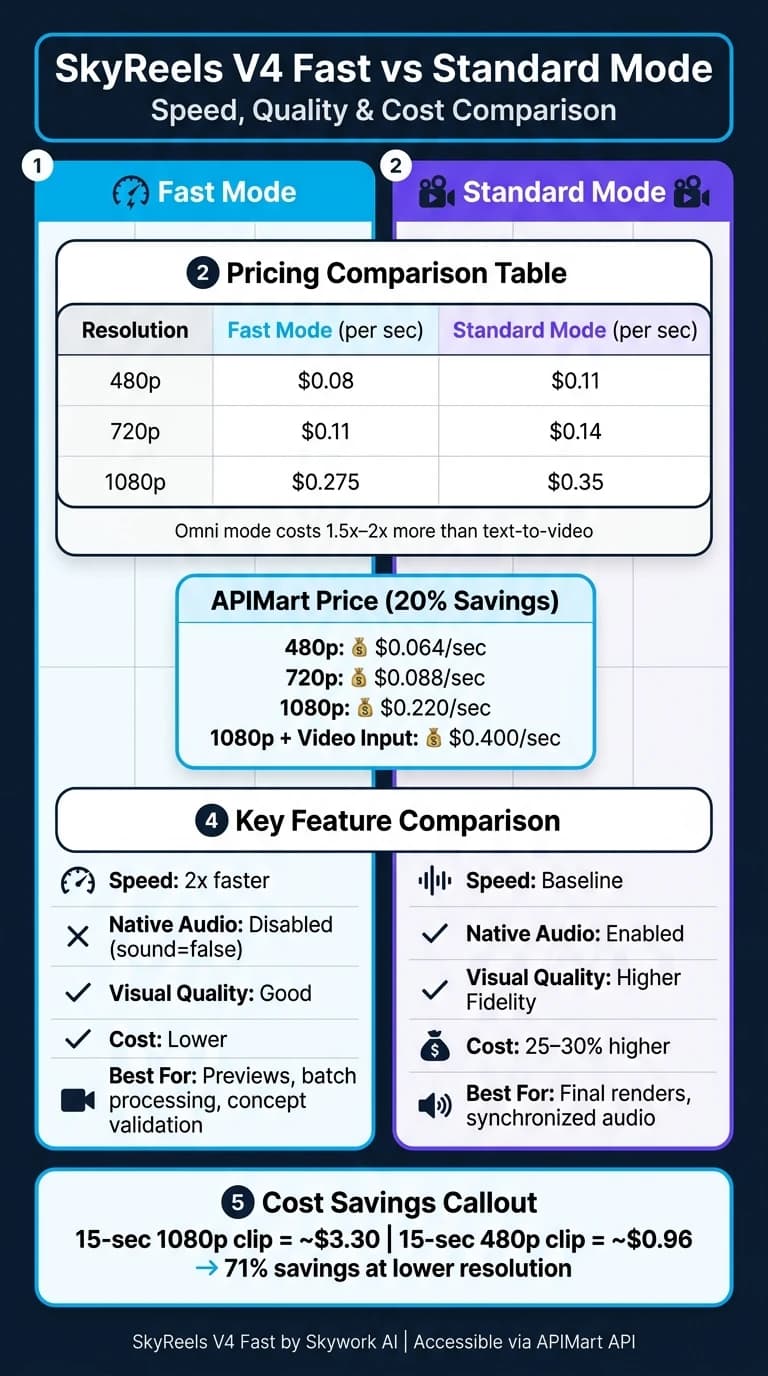
However, there’s a tradeoff: in Fast mode, native audio generation is disabled (sound=false), allowing the model to focus entirely on visual output. For synchronized audio, users can switch to Standard mode [5].
"The engine seems to sketch first, beautify second. It drafts a low-res motion plan, then sharpens keyframes and interpolates." - Dora, WaveSpeed Blog [7]
These latency optimizations ensure a balance between speed, quality, and resource efficiency.
Speed, Quality, and Cost Tradeoffs
The choice between Fast and Standard mode depends on your specific needs. Fast mode is perfect for tasks like quick previews, concept validation, or batch processing. On the other hand, Standard mode offers higher visual fidelity and native audio generation but comes at a 25–30% higher cost [1].
Here’s a breakdown of pricing by resolution:
| Resolution | Fast Mode (per sec) | Standard Mode (per sec) |
|---|---|---|
| 480p | $0.08 | $0.11 |
| 720p | $0.11 | $0.14 |
| 1080p | $0.275 | $0.35 |
If you’re using reference videos (Omni mode), expect costs to be 1.5x to 2x higher than text-to-video generation due to the extra computational requirements [8]. A smart approach for 1080p projects is to start with a shorter clip at 720p (3–5 seconds) to fine-tune your visual direction. Once satisfied, scale up to a full 15-second, 1080p render [5].
SkyReels V4 Fast Use Cases in U.S. Industries
Now that you know how SkyReels V4 Fast is designed and priced, let’s dive into how its speed and adaptability can improve workflows across various U.S. industries.
Marketing and Advertising
Marketing teams often face tight deadlines when creating multiple versions of the same ad. Whether it’s tweaking visuals or swapping voice-overs, the process can be time-consuming. SkyReels V4 Fast changes the game with its ability to generate multiple ad variants simultaneously, using different reference images or product shots. Tasks that used to take days can now be completed in minutes [2].
The model’s @tag mechanism (like @BrandHero) ensures consistency for brand representatives or products across all generated scenes, which is essential for maintaining a cohesive brand identity [1][3]. With outputs at 15 seconds, 1080p, and 32 FPS, these videos are perfectly tailored for platforms such as TikTok, Instagram Reels, and YouTube Shorts [2].
"Joint generation cuts turnaround from days to minutes." - APIMart [2]
A smart approach is to use Fast mode at 720p to quickly test creative directions across several variations. Once a direction is finalized, teams can switch to 1080p Standard mode for the polished final render. This workflow is especially valuable for rapid ad testing in fast-moving marketing environments. These capabilities also extend to industries like e-commerce and entertainment.
E-Commerce Product Videos
In U.S. e-commerce, product videos need to hit the mark with local audiences. That means including USD pricing overlays, imperial measurements, and formats that perform well on platforms like Amazon and Shopify. SkyReels V4 Fast delivers on these needs with targeted prompts and its inpainting feature, which allows precise text placement on footage without re-rendering the entire clip [3].
The "Omni Grid Collage" mode is a standout feature for creating step-by-step tutorials or assembly guides from a single image - perfect for products that benefit from clear, instructional visuals. For 360° product showcases with voice-overs, Standard mode enables native audio, while Fast mode excels at generating multiple angles or A/B testing variants before final production. Compared to traditional video production, teams can save up to 70% in costs [2].
Entertainment and Creative Workflows
SkyReels V4 Fast isn’t just for commercial use; it’s also transforming creative workflows. Independent creators and production teams use it to simplify pre-production tasks like storyboarding, testing motion and composition, and building animatics. At 480p or 720p in Fast mode, creating a 5-second clip can cost as little as $0.40–$0.55, making iterative prototyping both budget-friendly and efficient [5].
Another major perk is its unified editing suite. Instead of relying on separate tools for tasks like background replacement, object removal, or style transfer, creators can handle everything with a single API call [3]. Reference tags ensure character consistency across scenes, a must for multi-scene narratives. Additionally, generating B-roll - whether it’s ambient scenes, time-lapses, or establishing shots - takes under 60 seconds, cutting down the need for stock footage or on-location shoots [4].
Integrating SkyReels V4 Fast with APIMart

SkyReels V4 Fast on APIMart
SkyReels V4 Fast is accessible to U.S. teams through a single, unified API endpoint (/v1/videos/generations) using one Bearer Token. The setup is straightforward - APIMart centralizes over 500 AI models under a shared API key , including Kling V3, and USD balance [1][2]. With APIMart, users benefit from a pay-as-you-go pricing model, 20% cost savings, and no monthly minimums [2]. Here's a quick look at the pricing comparison:
| Resolution | APIMart Price (USD/sec) | Official Price (USD/sec) |
|---|---|---|
| 480p | $0.064 | $0.080 |
| 720p | $0.088 | $0.110 |
| 1080p | $0.220 | $0.275 |
| 1080p + Video Input | $0.400 | $0.500 |
APIMart also ensures a 99.9% SLA for uptime, making it a reliable choice for time-critical production needs [2]. The API's ability to automatically route requests based on input fields further simplifies the process.
Common API Usage Patterns
The API intelligently determines the correct mode - Text-to-Video (T2V), Image-to-Video (I2V), or Omni - based on the fields in your request. Here's how it works:
- T2V Mode: Include only a
promptto generate a clip. - I2V Mode: Add a
first_frame_imageorend_frame_imageto switch to this mode. - Omni Mode: Use
ref_imagesorref_videosfor subject consistency or motion transfer.
Keep in mind, I2V and Omni fields cannot be combined in a single request. Doing so will result in a 422 error, so it's important to stick to one mode per request [1].
Video generation operates asynchronously, returning a task_id for status updates. For added convenience, APIMart supports webhookURL for JSON callbacks and uploadEndpoint for direct uploads to Amazon S3 or Google Cloud Storage [1][9]. These features streamline workflows and enhance efficiency for technical teams.
Practical Considerations for U.S. Teams
SkyReels V4 Fast is designed to deliver fast, cost-effective video generation, and there are a few strategies U.S. teams can use to get the most out of it. Resolution choice plays a significant role in cost management. For instance, a 15-second 1080p clip costs about $3.30, whereas the same clip at 480p costs roughly $0.96 - a 71% savings. Prototyping at lower resolutions like 480p or 720p and reserving 1080p for final outputs can be a smart approach [1][2].
On the compliance front, APIMart offers a safety object in API requests. This can be configured to check either keyframes (fast mode) or all frames (full mode) to meet U.S. content standards [9]. Additionally, the platform supports ttl (Time-to-Live) settings for generated URLs, allowing teams to automatically expire asset links and maintain data privacy without extra infrastructure [9].
"The SkyReels V4 API is the first open foundation model where audio is generated alongside video... no separate TTS or foley pass." This capability is also a hallmark of Veo 3.1, which integrates high-quality synced audio. - APIMart [2]
Lastly, precision in prompt engineering is key. When using reference assets, always include the @tag (e.g., @Actor-1) in your prompt. Failing to do so will result in a 422 error. Enabling prompt_optimizer: true can further refine your input for better alignment with visual outputs [1].
Conclusion
SkyReels V4 Fast provides U.S. teams with a streamlined way to create synchronized video and audio using just a single API call. This eliminates the back-and-forth often associated with traditional production workflows. At its core is the dual-stream MMDiT architecture, which delivers high-quality output efficiently and at an accessible price point.
With support for 1080p resolution at 32 FPS, SkyReels V4 Fast ensures professional-grade results. Its Fast tier pricing, starting at just $0.064 per second for 480p through APIMart, makes it a cost-effective option for teams managing tight budgets while producing multiple ad variations or product videos [2].
The integration with APIMart simplifies the process further. Features like a single API key, pay-as-you-go billing, and a 99.9% SLA ensure a hassle-free experience, removing the need for extra tools or platforms.
FAQs
When should I use Fast mode vs Standard mode?
Fast mode is perfect when you're in the early stages of a project, brainstorming ideas, or trying to keep costs in check. It prioritizes speed and affordability, making it ideal for prototyping and testing out concepts. However, keep in mind that sound must be set to false when using Fast mode.
When quality is your top priority, or you need synchronized native audio, Standard mode is the way to go. It delivers the highest-quality output, ensuring your final product looks and sounds polished.
A good approach? Start with Fast mode to shape and refine your vision. Once everything feels right, switch to Standard mode for the finishing touches.
How do @tags work with reference images or videos?
SkyReels V4 introduces @tags, a feature that links reference images or videos to your text prompts, giving you more control over the output. Here's how it works:
- Assign a tag (like @actor1 or @style) to your reference material.
- Use that tag in your text prompt to guide the model.
For example, if you tag an image as @Picture, the model will align the generated video with the visual style or characteristics of that image. This makes it easier to achieve precise results tailored to your creative needs.
What does a 15-second video usually cost at 480p, 720p, and 1080p?
The cost of a 15-second video depends on the resolution and the mode you choose.
- Fast Mode:
- 480p: $1.20
- 720p: $1.65
- 1080p: $4.13
- Standard Mode:
- 480p: $1.65
- 720p: $2.10
- 1080p: $5.25