SkyReels V4 Fast vs Seedance Speed Quality
Compare SkyReels V4 Fast and Seedance for AI video generation, covering speed, resolution, audio support, visual quality, cost, and best use cases.
Choosing between SkyReels V4 Fast and Seedance 2.0 Fast boils down to speed, resolution, and workflow needs. Here’s the gist:
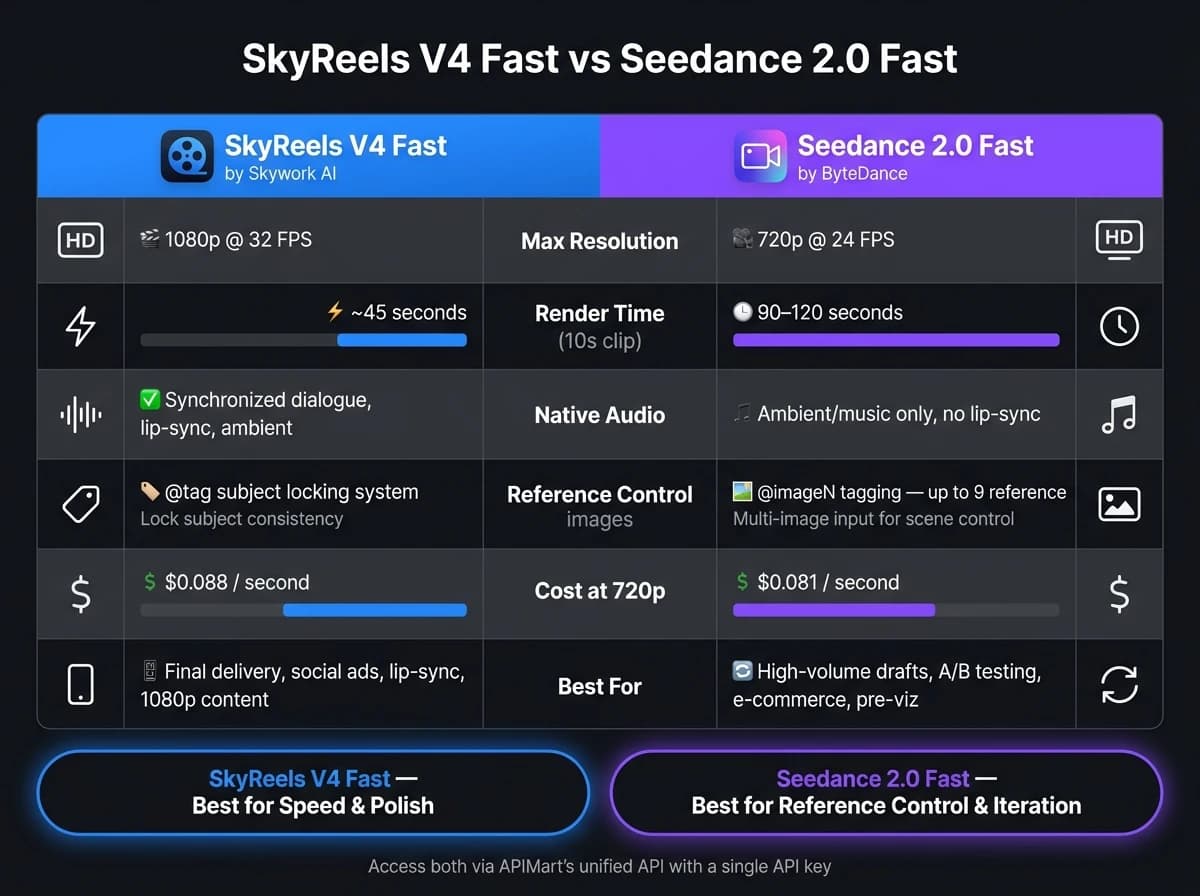
- SkyReels V4 Fast: Best for fast, polished 1080p videos with synchronized audio. It’s ideal for social media ads, short-form content, and dialogue-heavy projects. Renders a 10-second clip in about 45 seconds.
- Seedance 2.0 Fast: Focused on precision using reference images, offering consistency for e-commerce, film pre-visualizations, and branding. Limited to 720p resolution but costs less for drafts and iterations. Renders a 10-second clip in 90–120 seconds.
Quick Comparison:
| Feature | SkyReels V4 Fast | Seedance 2.0 Fast |
|---|---|---|
| Max Resolution | 1080p at 32 FPS | 720p at 24 FPS |
| Render Time (10s) | ~45 seconds | ~90–120 seconds |
| Audio Integration | Native, synchronized | Ambient/music only |
| Cost (720p) | $0.088 per second | $0.081 per second |
| Best For | Final delivery, ads | Drafts, reference-heavy |
SkyReels stands out for speed and simplicity, while Seedance offers better control for reference-based workflows. Use both via APIMart’s unified API for maximum flexibility.
Skyreels AI Video Generation [Compared]
SkyReels V4 Fast and Seedance: A Quick Overview
Before diving into the finer details of performance metrics, it’s important to understand the distinct design philosophies behind these two models. Their unique approaches directly influence how they perform in various scenarios. Let’s take a closer look at each model and its primary features.
SkyReels V4 Fast: Features and Use Cases
SkyReels V4 Fast, introduced by Skywork AI in February 2026, is all about speed and seamless integration of audio and video [3]. It’s built on a Dual-Stream Multimodal Diffusion Transformer (MMDiT) architecture, where one branch processes video frames and the other handles temporally-aligned audio. Both streams are tied to the same shared encoder, enabling synchronized audio-video generation [3]. This means it can generate visuals alongside dialogue, ambient sound, and music in a single workflow [3].
"The SkyReels V4 API is the first open foundation model where audio is generated alongside video." - APIMart [3]
The model supports 1080p resolution at 32 FPS for clips up to 15 seconds, making it ideal for short-form content [3]. Pricing ranges from $0.064 per second at 480p to $0.22 per second at 1080p [3]. It’s particularly suited for creating social media content, short advertisements, animatics, and other projects requiring synchronized audio and video [1][3].
SkyReels V4 Fast’s integrated audio-visual capabilities set it apart from Seedance, which leans heavily on reference image control. This fundamental difference shapes how each model is applied in various creative workflows.
Seedance: Capabilities and Variants
Seedance 2.0 Fast, developed by ByteDance and launched in February 2026, is designed for production environments where precision and consistency are key [9]. Its standout feature is the @imageN tagging system, which allows users to include multiple reference images in a single text prompt. For example, you can instruct the model with prompts like "@image1 walks in @image2 outfit", ensuring consistent character representation across frames [7].
"The feature that separates it [Seedance 2.0 Fast] from every other video model in this category is the reference image system... I've not seen this level of reference control at this cost." - Segmind [7]
While it maxes out at 720p resolution, Seedance excels in benchmarks for consistency and motion smoothness, scoring a Subject Consistency score of 93.4 and a Motion Smoothness score of 98.1 on the VBench evaluation suite [9]. It also supports seven aspect ratios, including cinematic 21:9, making it a go-to option for film pre-visualization [7]. Pricing is competitive, at approximately $0.06 per second for 480p and $0.10 per second for 720p, which is about 36% cheaper than the standard Seedance 2.0 model [5][8].
| Feature | SkyReels V4 Fast | Seedance 2.0 Fast |
|---|---|---|
| Developer | Skywork AI [3] | ByteDance [9] |
| Max Resolution | 1080p at 32 FPS [3] | 720p at 24 FPS [9] |
| Max Duration | 15 seconds [1] | 15 seconds [7] |
| Native Audio | Yes - joint generation [3] | Yes - ambient/music synthesis [7] |
| Reference Control | @tag mechanism [1] | @imageN tagging system [7] |
| Best For | Social content, lip-sync, 1080p ads [3] | E-commerce, brand variants, pre-viz [7] |
This comparison provides a foundation for analyzing their speed and quality in greater depth.
Speed and Latency: Side-by-Side Comparison
How We Measured Speed
To ensure realistic results, we tested speed using clips between 8 and 15 seconds long, with resolutions of 720p and 1080p, and frame rates ranging from 24 to 32 FPS. Both models were evaluated under standard API conditions, without custom hardware acceleration. This setup mirrors typical marketing and content production scenarios, providing a clear picture of their performance.
SkyReels V4 Fast: Speed Profile
SkyReels V4 Fast stays true to its name, rendering a 10-second clip in about 45 seconds at 1080p/32 FPS [2]. This speed is thanks to its dual-stream MMDiT architecture, which processes video and audio simultaneously. As APIMart highlights:
"The SkyReels V4 API is the first open foundation model where audio is generated alongside video... no separate TTS or foley pass." For alternatives with high-quality audio, consider Veo 3.1 API. [3]
For 1080p output, the model optimizes efficiency by generating low-resolution full sequences and high-resolution keyframes together. It then applies super-resolution and interpolation to keep render times short [2].
Seedance: Speed Profile
Seedance 2.0’s standard variant requires about 3 minutes to render a 10-second clip at 720p [2], making it noticeably slower than SkyReels V4 Fast. Even the faster 2.0 Fast variant takes 90–120 seconds to process 8–10 second clips. Additionally, it often struggles to maintain consistent lighting in complex, multi-layered scenes [5][7][10].
End-to-End Workflow Speed
SkyReels V4 Fast excels by generating synchronized audio and video in a single pass, producing clips that are ready to use immediately [3]. In contrast, Seedance lacks native audio generation, requiring additional steps for dialogue and ambient sound synchronization before delivery [2].
| Metric | SkyReels V4 Fast | Seedance 2.0 Fast | Seedance 2.0 (Standard) |
|---|---|---|---|
| Render Time (10s clip) | ~45 seconds [2] | ~90–120 seconds [7][10] | ~3 minutes [2] |
| Max Resolution | 1080p at 32 FPS [3] | 720p at 24 FPS | 720p at 24 FPS |
| Native Audio | Yes - single-pass [3] | No [2] | No [2] |
| Workflow Steps to Delivery | One pass [2] | Multiple (video + audio alignment) [2] | Multiple (video + audio alignment) [2] |
| Best Speed Use Case | Social ads, lip-sync content | High-volume simple scenes | Complex motion, physics-heavy scenes |
For teams prioritizing fast delivery, SkyReels V4 Fast stands out - not just for its rendering speed but for its streamlined, audio-ready workflow from start to finish.
Visual and Audio Quality: Side-by-Side Comparison
Visual Fidelity and Resolution
When it comes to resolution, SkyReels V4 Fast takes the lead. It natively supports up to 1080p at 32 FPS, and some tests even show it pushing towards 4K capabilities[1][2]. On the other hand, Seedance 2.0 generally caps at 720p in most workflows, though its architecture theoretically supports up to 2K (2048×1080)[5][6]. The slight FPS advantage (32 vs. 30) from SkyReels V4 Fast also gives it better performance in fast-paced scenes. Plus, its ability to switch frame rates up to 60 FPS adds versatility for high-action sequences[2].
| Feature | SkyReels V4 Fast | Seedance 2.0 (Standard) | Seedance 2.0 Fast |
|---|---|---|---|
| Max Native Resolution | 1080p (up to 4K in benchmarks)[1][2] | 720p (up to 2K supported)[5][6] | 720p[5] |
| Frame Rate | 32 FPS (up to 60 FPS)[2][3] | 30 FPS[2] | 30 FPS[2] |
| Texture & Physics Detail | High - advanced fluids and collisions[2] | High - strong in complex scenes[5] | Moderate - reduced light and physics fidelity[5] |
While Seedance 2.0 Standard excels in rendering detailed, physics-heavy scenes - like martial arts choreography or intricate light refractions - its Fast variant sacrifices some fidelity for speed[5].
This comparison of static visuals naturally leads to the question of how these models handle motion and dynamic scenes.
Temporal Consistency and Motion Handling
For video content that demands smooth transitions and consistent quality, SkyReels V4 Fast stands out. Its dual-stream MMDiT architecture ensures stable subject identity and motion across cuts, avoiding flicker or drift at scene boundaries[3]. This is especially important for multi-shot clips where continuity is critical.
Seedance 2.0 Standard performs admirably in single-subject scenes, offering smooth camera movements. However, both its variants may experience occasional style or character drift in longer sequences[5][2]. Segmind highlights this strength, stating:
"Seedance 2 tends to produce smoother, more spatially coherent motion - particularly in scenes with complex camera movement or multiple interacting subjects."
For action-heavy content, such as sports or fast-paced product demos, SkyReels V4 Fast has an edge thanks to its advanced simulation of physics, including gravity, fluid dynamics, and collisions[2].
Audio Quality and Sync
The audio capabilities of these models further differentiate them. SkyReels V4 Fast integrates video and audio generation using its MMDiT system, producing synchronized dialogue, lip-sync, ambient sounds, and music in a single pass[3]. This streamlined process is a time-saver for projects with tight deadlines, eliminating the need for post-production audio syncing.
Seedance 2.0 Fast, while capable of generating native audio, primarily focuses on atmospheric soundscapes and music that complement the scene. It also allows up to three reference audio tracks, but its audio generation is less precise for tasks like lip-syncing[7].
| Feature | SkyReels V4 Fast | Seedance 2.0 Fast |
|---|---|---|
| Audio Generation Type | Native joint generation (MMDiT)[3] | Native joint generation |
| Lip-Sync Precision | High - semantic-grade alignment[2] | Not explicitly supported |
| Ambient Sound | Yes[3] | Yes[7] |
| Reference Audio Input | Supported (Omni Mode) | Up to 3 reference tracks |
| Primary Audio Use Case | Dialogue, NPCs, social ads[2] | B-roll, mood clips, social reels[7] |
One key detail to note: some API setups for SkyReels V4 Fast's Fast mode may require disabling audio (via sound=false), reserving full audio capabilities for its Standard tier. Always double-check your provider's specifications if audio is a critical part of your workflow.
Choosing the Right Model for Your Use Case
Short-Form Content and Marketing
If you're working on ads or social media content with tight deadlines, SkyReels V4 Fast is a great choice. It delivers 1080p at 32 FPS with integrated audio, producing a fully polished, ready-to-use clip. As APIMart explains:
"The SkyReels V4 API produces TikTok- and Reels-ready 15-second clips at 1080p with native audio - no separate music track, no manual lip-sync pass. One SkyReels V4 call delivers the whole deliverable." [3]
For teams conducting A/B tests with multiple ad variants - like different voice-overs or regional product shots - Seedance 2.0 Fast is a budget-friendly option. Priced at $0.081/sec for 720p [12], it keeps per-clip costs low while supporting up to 9 reference images to guide creative direction [11]. The trade-off? Its 720p resolution is ideal for mobile feeds but may not hold up as well on larger displays.
Educational and Narrative Content
For educational videos or storytelling, character consistency becomes critical. SkyReels V4 Fast excels here with its @tag system, which locks subject identity across frames (e.g., @Instructor-1). This prevents character drift, a common issue in longer narratives, making it perfect for multi-part course series where the same instructor appears in every segment [3].
On the other hand, Seedance 2.0 Fast leads the VBench "Subject Consistency" benchmark with a score of 93.4, outperforming similar models [9]. It's a strong option for simpler formats like product walkthroughs, animated explainers, or ambient B-roll. However, if your content includes dialogue-heavy scenes where precise lip-syncing is critical, SkyReels V4 Fast offers better semantic-grade audio alignment [3].
Using APIMart to Access Both Models

For an efficient workflow, you can draft content using Seedance 2.0 Fast and finalize it with SkyReels V4 Fast. APIMart's unified API makes it easy to switch between these models (seedance-2-fast and skyreels-v4-fast) using a single API key and SDK. Pricing is structured to accommodate both iterative drafts and ready-to-use final deliveries.
| Model | Resolution | APIMart Price (per sec) | Best For |
|---|---|---|---|
| SkyReels V4 Fast | 1080p | $0.220 [3] | Final delivery, lip-sync, high-res ads |
| SkyReels V4 Fast | 720p | $0.088 [3] | Mid-tier drafts, narrative previews |
| Seedance 2.0 Fast | 720p | $0.081 [12] | High-volume iteration, A/B testing |
With competitive pricing and a 99.9% SLA, APIMart is a practical solution for U.S. businesses managing seasonal campaigns. Whether you're creating Black Friday ad variants or back-to-school content, running both models in parallel helps you stay within budget while delivering high-quality results.
Conclusion: Which Model Should You Use?
Your decision boils down to what matters more for your project: speed and simplicity or control over references.
SkyReels V4 Fast is the go-to option when you need a polished, ready-to-share clip in record time. It delivers 1080p video at 32 FPS with synchronized audio in just one API call - no need for separate text-to-speech or sound design steps. As Jacky Wang noted, "SkyReels V4 is the fastest route to viral-ready social content." [4] Plus, its multi-shot workflow ensures character consistency across edits.
On the other hand, Seedance 2.0 Fast is ideal for projects involving high-volume iterations or multiple reference assets. With a VBench subject consistency score of 93.4 [9], it’s dependable for workflows that rely on asset references. At about $0.13/sec for 720p [8], it’s also a budget-friendly choice during the draft phase. However, its reference tagging system adds complexity, requiring more time to master.
Here’s a side-by-side comparison to help you decide:
| Factor | SkyReels V4 Fast | Seedance 2.0 Fast |
|---|---|---|
| Speed | ~45s for a 10s clip [2] | ~35s for a 5s clip [9] |
| Native Resolution | 1080p [3] | 720p [5] |
| Audio | Native, synchronized [3] | Optional synthesis [5] |
| Workflow Complexity | Low - minimal prompt engineering [4] | Moderate - reference tagging system [7] |
| Cost (720p) | $0.088/sec [3] | $0.13/sec [8] |
| Best For | Final delivery, lip-sync, narrative content | High-volume drafts, A/B testing, asset-driven ads |
This breakdown highlights the trade-offs between speed, resolution, and ease of use. Many teams in the U.S. use Seedance 2.0 Fast for drafting and SkyReels V4 Fast for final production. Thanks to APIMart's unified API, switching between the two is seamless. The right model for you will depend on your project's timeline and creative goals.
FAQs
Which model is better for lip-sync and spoken dialogue?
SkyReels V4 and Seedance 2.0 stand out for their ability to simultaneously generate video and audio, cutting out the need for post-processing. SkyReels V4 shines when it comes to creating precise lip-sync and realistic ambient audio in a single step, making it perfect for quick, social media-ready content. On the other hand, Seedance 2.0 is built for multilingual dialogue, supporting over eight languages and offering more creative flexibility. If speed and consistency are your priorities, SkyReels V4 is the better choice. For more intricate, multilingual projects, Seedance 2.0 is the go-to tool.
Can I draft in Seedance and finish in SkyReels without changing my pipeline?
Seedance and SkyReels are entirely separate models, each with its own architecture and workflow. Seedance is designed for high-control, reference-based generation, while SkyReels emphasizes speed and audio-visual coherence. Because they handle prompts, assets, and editing tools differently, switching between the two isn't straightforward. Adapting your pipeline would require significant reconfiguration since both operate as independent production environments, making seamless integration highly impractical.
How should I choose 720p vs 1080p for my use case?
When deciding between resolutions, 720p works well for tasks where speed and cost are priorities. It's ideal for social media content, high-volume projects, or when fine details aren’t essential. It’s also a smart choice for testing and prototyping ideas efficiently.
On the other hand, 1080p is the way to go for projects that demand higher quality, like professional work or content meant for large-screen displays. While it delivers sharper details and better clarity, it does come with longer rendering times and higher costs compared to 720p.