Top AI API Use Cases for Business Automation
Explore AI API use cases for business automation, including support chatbots, invoice processing, content generation, data enrichment, routing, and marketing.
If you want a smart first AI project, start with support triage or invoice processing. Those two use cases tend to show results fast: lower service costs, fewer manual steps, and time saved across finance, support, sales, and marketing.
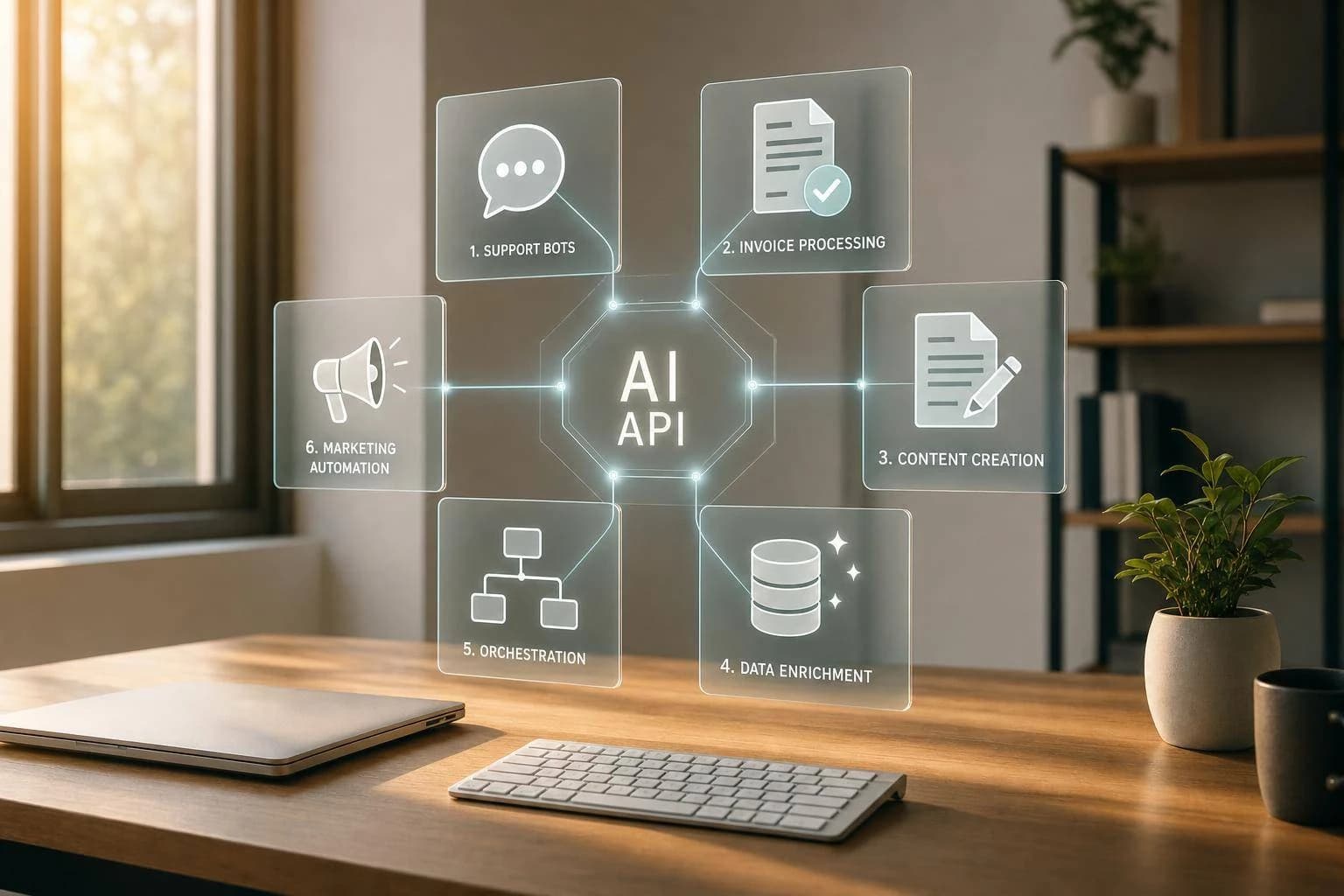
Here’s the short version: AI APIs help businesses turn messy inputs - like emails, PDFs, scans, and calls - into actions. In this article, I cover six main use cases:
- Customer support chatbots for answering, verifying, and handling routine requests
- Document and invoice processing for pulling data from files and checking it before posting
- Content generation at scale for drafting marketing copy in batches
- Data extraction and enrichment for turning unstructured records into clean CRM or ERP data
- Workflow orchestration and task automation for classifying, routing, and triggering next steps
- Personalized marketing automation for sending more relevant messages based on customer data
A few numbers stand out right away:
- AI automation can cut process costs by 20%–30% in finance and HR within 12 months
- Businesses save about 6.2 hours per week per workflow
- Manual invoice processing costs about $12.88 per invoice, while AI-driven flows can bring that down to $2.78
- Support bots have helped teams deflect 75% of Tier 1 tickets in some deployments
The main idea is simple: AI APIs work best when they read, classify, check, and act inside one workflow.
AI for Business Automation: This System Runs Your Company Without You
Quick Comparison
| Use Case | Main Job | Typical Time to Value | Best Fit |
|---|---|---|---|
| Customer support chatbots | Handle routine support requests | 2–4 months | Support teams with high ticket volume |
| Document and invoice processing | Extract and validate file data | 3–6 weeks | Finance and AP teams |
| Content generation at scale | Draft copy in batches | 1–2 weeks | Marketing and e-commerce teams |
| Data extraction and enrichment | Clean and enrich business records | 1–2 weeks | Sales and ops teams |
| Workflow orchestration and task automation | Route work and trigger actions | 2–4 weeks | Cross-functional teams |
| Personalized marketing automation | Tailor outreach by segment or context | 2–3 weeks | Marketing teams with strong customer data |
If I were choosing where to begin, I’d pick one high-volume workflow, set a human review threshold, track time and cost saved, and expand only after that first use case proves itself.
What Businesses Need From an AI API Stack
Different workflows need different AI functions. That’s why an AI API stack usually rests on four core capabilities.
Language APIs handle text tasks like drafting replies, sorting intent, summarizing documents, and reading sentiment in messages. Vision and OCR APIs pull structured data from messy files like invoices, receipts, NDAs, and PDFs. Speech APIs turn calls and meetings into text for summaries, follow-ups, and sentiment analysis. And multi-modal APIs can read mixed-format documents that include text, tables, charts, and images. Together, those four capabilities support the six use cases covered below.
Using separate vendors for each piece can turn into a headache fast. Teams often have to deal with extra setup, field mapping, and error handling across multiple tools. APIMart cuts down that work with one API key, one SDK, and centralized billing across 500+ language, image, and video models, including GPT-5, Claude 4.5, and Gemini 2.0. That gives teams a single base to run all six workflows without rebuilding integrations every time a model changes.
Once that stack is in place, customer support is often the first area where teams see value.
Businesses that automate core workflows get back about 6.2 hours per week per workflow, and AI automation can cut process costs by 20–30% in finance and HR within 12 months [5][7].
1. Customer Support Chatbots
The Business Problem
Support teams burn a lot of time on the same requests over and over: order status, password resets, returns, and billing questions. That routine work keeps agents tied up when they could be handling tougher cases.
And the cost isn’t small. The all-in cost for a Tier 1 support contact can hit $14 [9]. If your team handles tens of thousands of contacts each month, that number stacks up fast.
AI API Capabilities Used
The biggest wins tend to happen when the bot can do more than just reply. It needs to answer, verify, and take action in the same conversation.
That usually means pulling together a few parts:
- A language model for the back-and-forth chat
- Retrieval for approved answers
- Tool calls for live account actions
- An orchestration layer for routing and handoff
Put those pieces together, and the chatbot stops being a simple FAQ tool. It starts working more like a front-line support rep.
An Example Workflow
A Fortune 500 collaboration SaaS company built this kind of setup with LangGraph, Claude 3.5 Sonnet, and Amazon Bedrock Knowledge Bases inside Salesforce Service Cloud to manage 140,000 monthly tickets.
Within 12 months, the company:
- Deflected 75% of Tier 1 tickets
- Improved first-contact resolution from 38% to 80%
- Cut average handle time from 4.2 minutes to 2.1 minutes
- Saved $2.1 million per year [9]
That’s a big shift. The bot didn’t just answer questions. It took a large chunk of routine support work off the team’s plate.
Measurable Business Value
JetBlue's "Amelia 2.0" reached a 92% CSAT score, which was higher than its human frontline crew members, and it also delivered a 25-point increase in first-contact resolution [8].
The same system also proved useful under pressure. During a major winter storm, a U.S. airline used it to rebook 3,800 travelers, and 40% of those interactions were finished without any human agent involvement [8].
That same classify, verify, act pattern also shows up in invoice and document workflows. In those cases, the bot needs to read the file, check the details, and route it before approval.
2. Document and Invoice Processing
The Business Problem
Finance teams lose 30%–40% of their week retyping data from PDFs and scanned files into ERPs and accounting systems. That’s time spent on work a machine can handle. It also leads to mistakes, which means more rework and more cost.
The numbers are hard to ignore. Processing one invoice by hand costs an average of $12.88 [15]. For a mid-sized organization, the cost tied to lost productivity and document errors can climb past $2.8 million per year [10].
AI API Capabilities Used
This kind of document automation usually combines vision APIs with language models.
Vision APIs pull structured data from scanned images and PDFs while keeping key details like tables, stamps, and signatures intact [12][14]. Language models then clean up and standardize field names, vendor records, and GL codes [17][11][16]. After that, the system checks the invoice against the purchase order and goods receipt note, and flags any mismatch before posting [13][15].
Once the document is in a structured format, the same setup can push data into approval workflows, reporting, and other automated steps.
An Example Workflow
In 2026, DreamzTech built an Azure-based invoice workflow for a regional financial services firm that handled 3,000+ invoices per month across four subsidiaries. The workflow used Azure AI Document Intelligence for extraction and GPT-4o for three-way matching and exception triage.
Within nine months of go-live, the firm saw:
- 84% straight-through processing - most invoices needed no human touch
- 95%–98% line-item accuracy
- Invoice cycle time cut from 3.2 days to under 4 hours
- $420,000 in annual savings
Low-confidence extractions were sent straight to a human review queue. That helped protect accounting accuracy without slowing down most of the pipeline.
Source: DreamzTech Case Study, 2026 [11]
Measurable Business Value
| Metric | Manual Processing | AI-Powered Automation |
|---|---|---|
| Cost Per Invoice | $12.88 [15] | $2.78 [15] |
| Cycle Time | 17.4 days [15] | 3.1 days [15] |
| Staff Time | 30–40% of work week [17] | 15–25 hours saved/week [17] |
| Straight-Through Processing Rate | Low | 75–85% [11][17] |
The same extract-and-check pattern also shows up in content generation, where AI turns approved inputs into draft content at scale.
3. Content Generation at Scale
This use case takes approved inputs, turns them into on-brand drafts, and sends those drafts into review or straight to publication.
The Business Problem
Marketing and e-commerce teams spend a lot of time writing product descriptions, email subject lines, ad variations, and social captions. With AI APIs, that same work can turn into hundreds of draft variations in minutes instead of hours.
AI API Capabilities Used
Language generation sits at the center of this setup. But if you want a production-ready workflow, you also need brand rules, moderation, and batching.
The flow usually starts with copy generation. Then it layers in brand control, moderation, and batch handling so the process doesn't go off the rails.
- Use prompt caching so brand rules stay consistent across repeated calls.
- If a campaign also needs visuals or short clips, plug image and video generation tools into the same workflow.
- A moderation endpoint checks outputs before anything goes live.
- Batch processing handles high-volume requests asynchronously at a lower cost.
An Example Workflow
In 2026, AWS's Technology, AI, and Analytics team worked with Gradial to build an agentic AI solution on Amazon Bedrock. The goal was to speed up webpage assembly for marketing campaigns. The system cut webpage assembly time from four hours to about 10 minutes - a 95% reduction - by using natural language commands to orchestrate CMS components and validate content against brand standards in real time [19].
That same pattern drives the time and cost gains described below.
Measurable Business Value
Content generation APIs reduce drafting time and can improve campaign performance at the same time. Teams often cut content creation time by 40%–60% within 90 days, lift engagement by 15%–25%, and see better reply and conversion rates from personalized campaigns [18][20].
Human review should stay in the loop before anything customer-facing or public goes out. AI-generated content can still produce inaccurate or off-brand output [20].
4. Data Extraction and Enrichment
The Business Problem
Once teams can produce content at scale, the next slowdown shows up fast: turning messy inputs into clean system data.
Most business data comes in half-baked. It lives in PDFs, scans, web forms, and email attachments. Then someone has to pull the details out, check them, and type them into internal systems by hand. That takes time, and it adds friction across sales and ops. Sales reps lose 5–10 hours per week on manual lookup and data entry [25], and B2B contact data goes stale fast at about 2% per month [23].
AI API Capabilities Used
A common setup starts with layout-aware OCR. That matters because it keeps text in the right order and preserves tables instead of turning everything into a jumble. From there, the output gets mapped into structured JSON with fields such as company name, domain, role, industry, and employee count.
After extraction, enrichment APIs fill in the gaps with added context like firmographic data, stack data, and company signals [25][26]. If one provider comes up empty, a fallback chain can call the next provider on its own [26][27]. Confidence scoring then helps sort the output: clean records move into CRM or ERP, while low-confidence fields get flagged for human review [21][24].
This setup is most useful when a business needs to turn unstructured records into usable CRM or operations data fast.
An Example Workflow
In 2026, a financial services firm cut lead response time from 4 hours to 2 minutes by automating lead extraction and enrichment [6].
That kind of change shows up in day-to-day work right away. Leads get routed faster, records stay cleaner, and teams spend less time digging for missing details.
Measurable Business Value
Automated enrichment cuts lookup time from minutes to seconds, improves lead quality, and lowers the cost of bad data [22][25][27].
5. Workflow Orchestration and Task Automation
The Business Problem
Once the data is clean, the next slowdown is simple: getting the right action to happen without someone stepping in.
That’s where many teams get stuck. Leads sit in limbo instead of going to the right rep. Support tickets stack up without being sorted. Follow-ups wait in someone’s task list until they have time to deal with them. And basic rule-based automation? It often falls apart when inputs come in different formats or don’t match the template exactly.
AI-driven orchestration is built for that messier setup. It can deal with variation instead of choking on it.
AI API Capabilities Used
Here’s the basic split: AI handles judgment, and rules handle execution.
A language model can classify intent, gauge urgency, and map incoming data to the right fields. From there, an orchestration layer sends that output to the right system and kicks off the next step, whether that means updating a record, sending an email, or firing a webhook.
When the model isn’t confident enough, the workflow can pass the item to a human instead. In many cases, teams set that handoff threshold between 70% and 85% [4][28].
An Example Workflow
BioRender turned a manual 45-minute daily ticket-sorting process into a 51-step automated workflow using Gemini. The result: resolution time dropped by 69%, first-reply time improved by 39%, and ticket throughput went up by 50% [2].
Vendasta used call transcripts to automate post-call admin for 20 sales reps. The system generated summaries and follow-up emails, which saved 282 working days and led to an estimated $1 million in revenue [2].
Measurable Business Value
The upside adds up fast. Businesses that put in place three to five AI automations often get back 20–35 hours per week across their teams, with an average of 6.2 hours saved per workflow [7].
At the portfolio level, AI automation often delivers 5x to 8x ROI in the first year [7].
The same classify-and-route pattern also powers personalized marketing automation.
6. Personalized Marketing Automation
The Business Problem
Once customer records are enriched and routed, marketing can put that same data to work right away. The goal is simple: send messages that fit the person, the moment, and the context.
Generic outreach tends to miss the mark when customer signals are already on hand. In fact, 1 in 5 consumers stop reading communications that feel inaccurate or irrelevant [29]. That’s why marketing teams need a single customer view that can trigger personalized messages in real time.
AI API Capabilities Used
This workflow brings together language, predictive, and vision APIs.
- Language APIs write personalized email copy, subject lines, and ad variations for different customer segments.
- Predictive APIs group audiences and score purchase intent.
- Vision APIs review creative assets for brand compliance.
Prompt caching also helps cut repeated costs when fixed brand rules are reused across high-volume campaigns.
Put simply, personalized marketing builds on the same data enrichment and workflow automation already in place.
An Example Workflow
Coca-Cola unified customer data across 100+ countries and adjusted campaigns in real time based on location and context. During NFL campaigns, that approach led to a 63% increase in click-through rates [30].
Measurable Business Value
The payoff can be big. AI-driven personalization can increase purchase rates by up to 11x compared to static recommendations [30]. And personalized emails get 29% higher open rates and 41% higher click-through rates than generic versions [30].
Side-by-Side Comparison of the 6 Use Cases
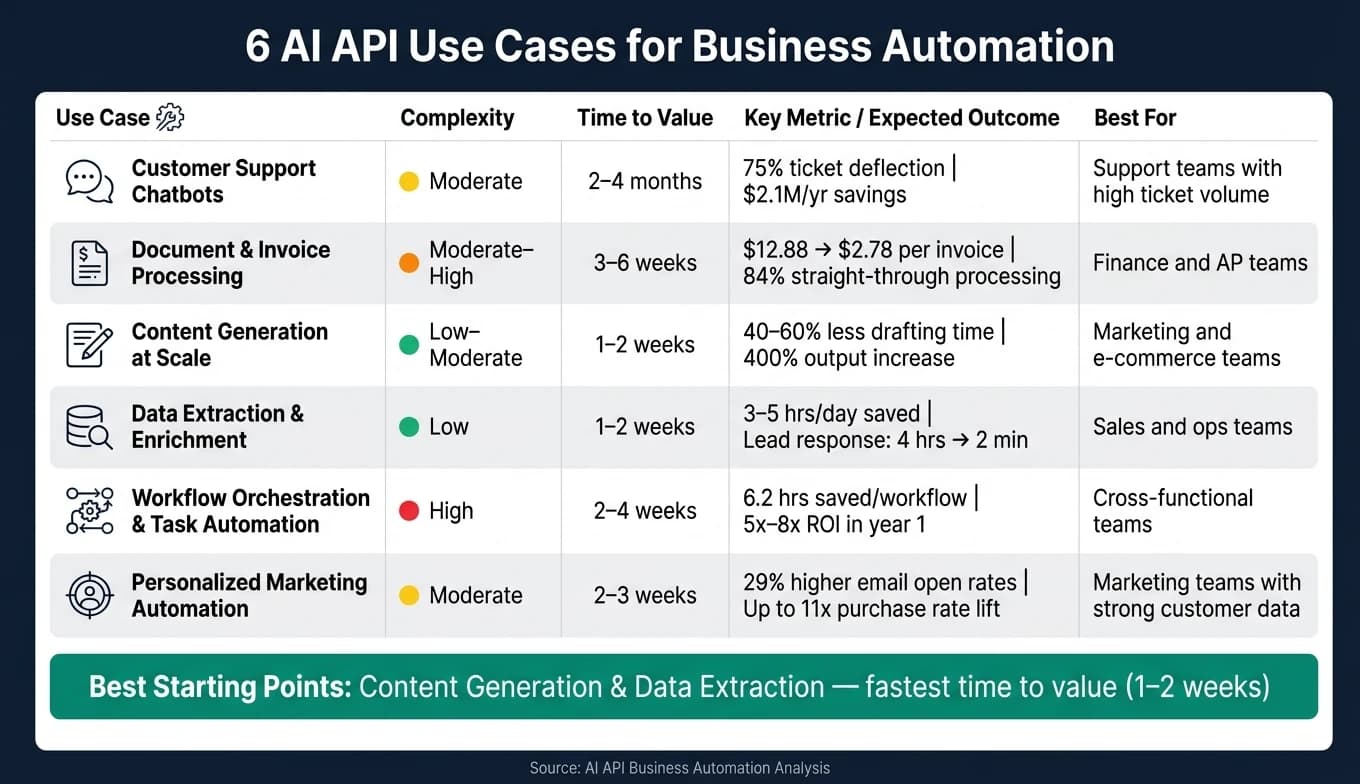
These six use cases vary by effort, speed, and payoff. The comparison below makes it easier to pick a smart place to start.
It looks at each use case across five areas: function, AI stack, complexity, time to value, and likely results.
| Use Case | Primary Function | AI Capabilities | Complexity | Time-to-Value | Expected Outcomes |
|---|---|---|---|---|---|
| 1. Customer Support Chatbots | Support / CX | NLP, RAG, Sentiment Analysis | Moderate | 2–4 months | 60% headcount reduction; 97% faster response [3] |
| 2. Document & Invoice Processing | Finance / Ops | Vision (OCR), Data Validation | Moderate to High | 3–6 weeks | 94% extraction accuracy; turnaround from days to hours [1][31] |
| 3. Content Generation at Scale | Marketing | Text/Image/Video Synthesis, Tone Adjustment | Low to Moderate | 1–2 weeks | 400% output increase; 81% reduction in production time [3] |
| 4. Data Extraction & Enrichment | Sales / Marketing | Web Scraping, Entity Extraction | Low | 1–2 weeks | 3–5 hours/day saved on research; improved lead context [7] |
| 5. Workflow Orchestration and Task Automation | IT / Cross-functional | Multi-step Logic, API Routing | High | 2–4 weeks | 28% auto-resolution of IT tickets; 600+ hours saved per month [2][7] |
| 6. Personalized Marketing Automation | Sales / Marketing | Lead Scoring, Personalization | Moderate | 2–3 weeks | 25–40% higher conversion; 4x posting frequency [7][32] |
A clear pattern shows up fast. Content generation and data extraction are the quickest to launch, which makes them good starting points for teams that want early wins. Workflow orchestration, on the other hand, takes more work to set up. But it can become the engine behind many other automations once it's in place.
That tradeoff matters. If you're choosing your first workflow, it's often smarter to start with something simpler, prove the value, and then build toward the heavier systems later. That helps teams avoid building too much, too soon.
Before deployment, U.S. businesses should also review privacy, security, and compliance requirements.
What U.S. Businesses Should Know Before Getting Started
Once you've compared use cases, the next move is simple: pick a low-risk first workflow. Start with one high-volume, repetitive process like invoice intake or support ticket routing. Show that it works, show that it saves time or money, and then build from there.
In most cases, the best place to start is a workflow that already sits inside your CRM, ERP, or help desk. That way, AI plugs into work your team already does every day instead of sitting off to the side like a disconnected tool.
For sensitive tasks, put a human review rule in place. A common setup is to send work to a person when the AI's confidence falls below 70–80% or when a financial transaction goes over a set dollar amount. That matters even more in U.S. operations, where a bad read on USD amounts or MM/DD/YYYY dates can throw off accounting fast.
Cost matters too, but data rules come first. Set API budget alerts at 80% and 100% of your monthly cap so costs don't sneak up on you. Use prompt caching when you can. It can cut costs by 50–90% for requests that use the same system prompts [33]. For work that doesn't need an instant response, batch processing can lower costs a lot, with 24-hour completion windows [33]. It also helps to send simple tasks to lower-cost models and save larger models for jobs that need deeper reasoning.
Treat data governance as a launch requirement. Before any data goes to an external API, classify it first and run it through a redaction layer for PII. Customer PII, such as names, Social Security numbers, and addresses, should be removed and swapped with tokens before transmission. After the API responds, those tokens can be restored [33].
| Data Category | Example | Handling Rule |
|---|---|---|
| Public | Product descriptions | Can send to external API without restrictions |
| Internal | Meeting summaries | Requires acceptable provider data policy |
| Confidential | Financial reports | Data processing agreement (DPA) required |
| Restricted | Customer PII/SSN | Must be redacted before API transmission |
Conclusion
These six workflows - powered by language, vision, and multi-modal APIs - take repetitive work off people’s plates and handle it with more speed and consistency. That’s where AI APIs show clear, measurable value.
A lot of AI pilots stall before they ever make it into production. The teams that win usually do something simpler: they start with one high-friction workflow, show ROI, and then expand from there. The split isn’t usually about picking the “right” use case. It’s about execution in production. That’s why the first workflow should be narrow, measurable, and easy to put into day-to-day use.
For most U.S. businesses, customer support triage and invoice processing are the strongest first bets: support deflection can pay back in 22 days, and invoice automation often fits a 90-day CFO window [34][31].
Pick one workflow, prove the return, and scale the next.
FAQs
Which AI workflow should my business automate first?
Start with a high-volume, rule-based workflow that repeats often, follows clear steps, and is easy to track. That kind of work usually brings the fastest ROI and is much simpler to put in place.
Strong first picks include invoice processing, approval workflows, customer onboarding, and support triage. Once you’ve shown it works, you can move into more complex workflows like document processing, data entry, or multi-modal tasks.
How do I measure ROI from AI APIs?
Use a cost-benefit framework to compare what the work costs today versus what it costs with AI help. That means looking at current manual labor costs next to AI-assisted costs, including API fees, setup, training, and supervision. Your ROI is the net savings left after those costs are taken out.
Track business results that show whether the change is paying off. Focus on metrics like cost per ticket, task completion time, revenue per employee, and error rates. It also helps to review output quality for accuracy, completeness, and actionability.
For benchmarking, look at:
- Payback period
- Annual cost savings
- Productivity gains
- ROI percentage
That gives you a clear picture of whether AI is cutting costs, saving time, and improving how work gets done.
What data should not be sent to an AI API?
Do not send sensitive or confidential data to an AI API unless you’ve redacted it first or put the right safeguards in place.
That includes:
- PII
- Financial reports
- Health records
- Proprietary information