Seedance 4.0 vs Kling: Which AI Video Generator?
Seedance 4.0 vs Kling compared: resolution, clip length, motion accuracy, audio sync, pricing and use cases to find which AI video generator fits your project.
When choosing between Seedance 4.0 and Kling, your decision hinges on what matters most for your video project:
- Seedance 4.0: Best for storytelling, character consistency, and synchronized audio. Ideal for short films, e-commerce ads, and music videos where visual and audio precision is key. Outputs are limited to 1080p resolution and 15-second clips.
- Kling: Focuses on realism, motion accuracy, and scalability. Perfect for product demos, sports, and high-volume social media content. Offers 4K resolution and supports clips up to 2 minutes.
Quick Comparison:
| Feature | Seedance 4.0 | Kling |
|---|---|---|
| Max Resolution | 1080p | 4K at 60fps |
| Max Video Duration | 15 seconds | 2 minutes |
| Input Flexibility | 9 images, 3 videos, 3 audio | Text, 1-4 images, motion binding |
| Audio Features | Unified audio-video sync | Per-character dialogue |
| Pricing (10 sec, 1080p) | ~$3.03 (audio included) | ~$1.12 (audio extra) |
If you need polished, narrative-driven content, go with Seedance. For realistic visuals or cost-effective 4K output, Kling is the better choice. Both are accessible through APIMart for easy integration.
The TRUTH about Seedance 2.0 - REAL TEST vs Kling 3.0

Overview of Seedance 4.0
Seedance 4.0 is a cutting-edge AI video generation tool that gives creators an impressive level of control over every aspect of their videos. Unlike traditional models that rely solely on text prompts, Seedance integrates reference images, videos, and audio all at once to produce seamless, cohesive outputs.
"The model treats your reference materials as the primary source of truth. The prompt describes what happens; your references describe what it looks like." - Cutout.pro Blog [10]
Key Features and Strengths
One of Seedance's standout capabilities is its cross-frame latent locking mechanism, which keeps character appearances and geometry consistent throughout a video. This solves a common issue in AI video tools, where characters often change or lose continuity between frames. Seedance has proven its reliability by achieving a perfect 10/10 on the NoviAI character consistency benchmark [9], a feat unmatched by any other model in 2026.
Another major highlight is its native synchronized audio feature. Seedance generates dialogue, sound effects, and background music in a single pass, with impressive synchronization accuracy of under 40ms and lip-sync precision ranging from 92% to 99.8% [9][13]. It also supports over eight languages, making it versatile for global projects.
Supported Inputs and Outputs
Seedance allows creators to upload up to 12 reference files per project:
- 9 images (up to 30MB each)
- 3 video clips (up to 50MB each, totaling 15 seconds)
- 3 audio files (up to 15MB each)
Supported formats include MP4 and MOV for videos, and MP3 or WAV for audio [7][9].
For outputs, the model delivers resolutions up to 2K (2048×1080) and supports various aspect ratios, including 16:9, 9:16, 1:1, and 21:9. Clips can be up to 15–16 seconds long [7][13]. Additional features include a Video Extension mode, which can expand existing footage, and a Digital Swap-Out tool that allows specific characters or items to be replaced pixel-by-pixel without regenerating the entire video.
These capabilities make Seedance a go-to choice for creators who demand precision and flexibility in their video projects.
Ideal Use Cases
Seedance 4.0 is perfectly suited for projects where visual consistency and narrative clarity are essential. Independent filmmakers often use it to create short films where characters need to maintain their appearance across multiple scenes. Social media teams appreciate the native audio sync, which eliminates the need for post-production editing. For e-commerce, uploading high-quality product images ensures that the final video matches the real product, avoiding the inaccuracies of AI-generated approximations [10][15]. Music video producers can also feed pre-existing audio tracks into the model to generate visuals perfectly synced to the music [8][11].
"Seedance 2.0 is the only model that combines competitive output quality, genuine multimodal reference control, single-pass native audio, character consistency, and a price point that doesn't require a production budget." - Mihai (Mike) Bizz, Tech Pilot [8]
For best results, it’s recommended to start with 5-second test clips. This allows creators to confirm that their character and style references are accurate before committing to the full 15-second limit. It’s a practical way to save both time and credits while refining the desired look [8][12].
Overview of Kling
Kling is an AI video generator developed by Kuaishou that focuses heavily on creating realistic motion and physics. Unlike Seedance 4.0, which leans into creative storytelling, Kling prioritizes accurate depictions of movement and physical interactions. Trained on a vast library of real-world footage, it excels at rendering lifelike details - whether it’s the natural rhythm of walking, the way fabric folds and moves, or the behavior of liquids. This emphasis on physical realism forms the backbone of Kling’s capabilities, as outlined below.
"Kling 3.0 is the right pick for projects where physical realism and cinematic camera behavior are non-negotiable requirements." - Cristian Da Conceicao, Founder of Picasso IA [16]
Key Features and Strengths
One of Kling’s standout features is its Professional Motion Control, which allows for precise camera movements like dolly pushes, orbital shots, and tracking sequences. Meanwhile, Element Binding ensures consistency in facial expressions, clothing, and accessories throughout a project, significantly reducing reshoots - from 60% to just 15% [17].
On the output side, Kling’s Ultra tier supports native 4K resolution (3,840×2,160) at 60fps, capturing intricate details like skin texture, fabric weaves, and even steam refraction with impressive clarity [17]. Another highlight is its AI Director, which can break down a single concept into up to six cohesive shots, maintaining consistent lighting and character appearances [17].
"Kling 3.0 is likely the best general-purpose video model on the market right now." - Chase Jarvis, Photographer and Creator [14]
Supported Inputs and Outputs
Kling supports a variety of inputs, including text prompts, single reference images, and multi-image references (2–4 images for character details). It also accepts video or audio references for Element Binding [18]. On the audio front, Kling generates synchronized dialogue, ambient sounds, and effects in five main languages, complete with regional accents for more natural results [17].
Output options range from 720p drafts to native 4K resolution, with aspect ratios of 16:9, 9:16, and 1:1. Videos can be up to 15 seconds long, and users can choose between 30fps and 60fps. While Kling achieves about 80% accuracy in rendering text for logos, signs, and captions, its overall technical capabilities make it a go-to for projects where precision is essential [17].
Ideal Use Cases
Kling shines in scenarios where physical accuracy and cinematic motion are critical. Its physics-based training makes it particularly effective for product demonstrations involving complex materials, as well as for sports, dance, and action content requiring natural movement and precise camera work. For social media teams, Kling’s efficient workflows and lower per-second API costs make it an attractive option for producing high volumes of content for TikTok, Reels, and Shorts [5][20].
In education and training, Kling’s realistic simulations are well-suited for safety training videos or product assembly guides [1]. As of early 2026, Kling has amassed over 60 million users worldwide and has generated more than 600 million AI-powered videos [17][19].
Feature Comparison: Seedance 4.0 vs Kling
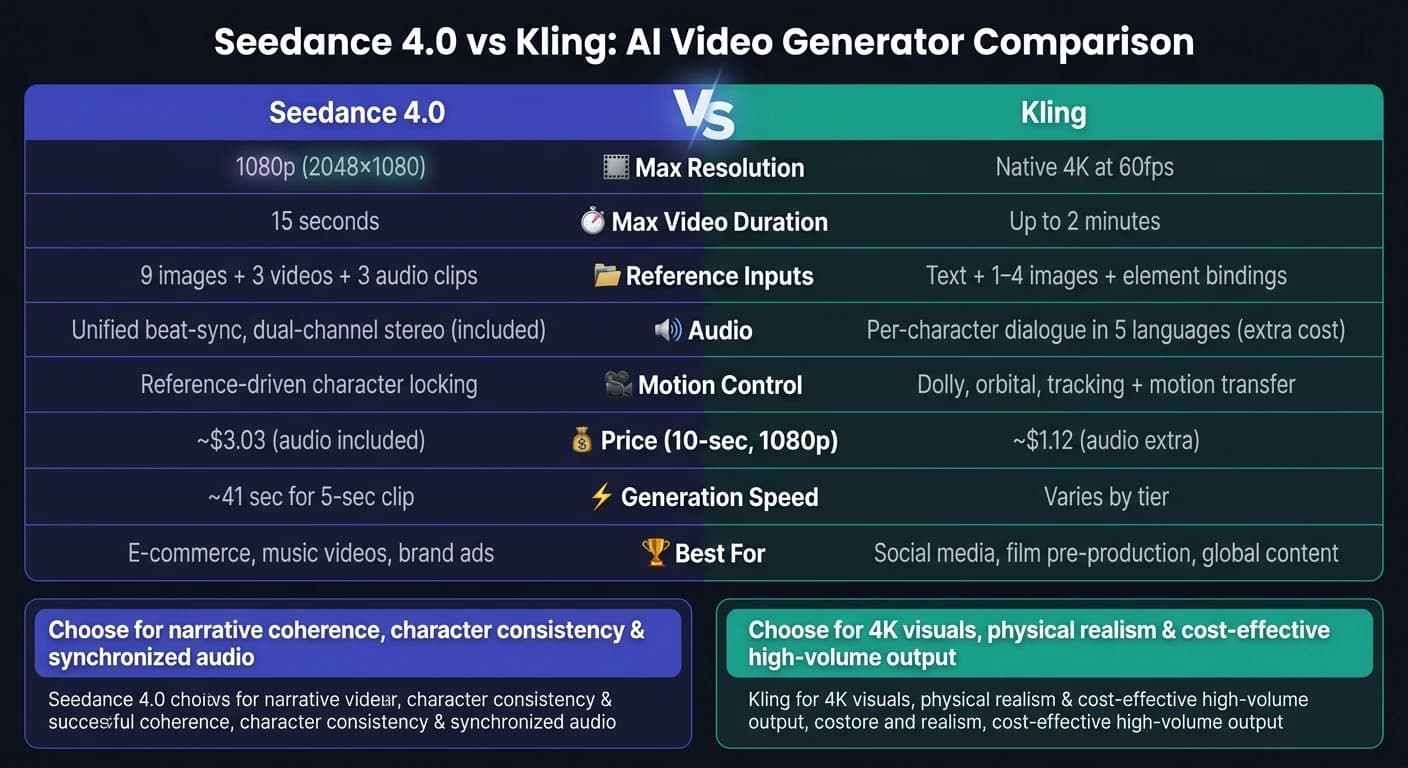
When comparing Seedance 4.0 and Kling, their distinct strengths become clear. Seedance focuses on blending multiple media inputs, while Kling prioritizes structured storytelling. Seedance 4.0 acts as a compositing engine, allowing users to upload images, videos, and audio clips to shape the final output. On the other hand, Kling is a storyboarding tool that relies on structured shot sequences and precise camera directions.
One key difference lies in input flexibility. Seedance 4.0 supports up to 9 images, 3 videos, and 3 audio clips [1]. Kling, however, works with text, a single reference image, and element bindings, but it delivers outputs in native 4K resolution at 60fps and can handle durations of up to 2 minutes [20].
"Seedance 2.0 is the better multimodal production engine. Kling 3.0 is the better narrative direction engine." - Cliprise [21]
Seedance generates synchronized audio-video outputs with beat-sync and dual-channel stereo [20]. Meanwhile, Kling adds a unique layer of audio by assigning per-character dialogue in up to five languages [21].
Comparison Table
| Feature | Seedance 4.0 | Kling 3.0 |
|---|---|---|
| Max Resolution | 1080p | Native 4K at 60fps [20] |
| Max Video Duration | 15 seconds (single pass) | Up to 2 minutes [20] |
| Max Reference Inputs | 9 images, 3 videos, and 3 audio clips | Text, reference image, and element bindings [20] |
| Audio Architecture | Unified, beat-sync, dual-channel stereo | Separate layer with per-character dialogue across 5 languages [21] |
| Motion Control | Reference-driven character locking [1] | Dedicated motion transfer endpoint [3] |
| Shot Structuring | Natural language labels (e.g., "Shot 1:", "Shot 2:") [3] | Multi-prompt array with discrete shot objects [3] |
| Generation Speed | ~41 sec for a 5-sec 1080p clip [1] | Varies by tier |
| Best Fit | E-commerce, music videos, and brand ads [20] | Social media, film pre-production, and global content [21] |
An additional standout feature of Kling is its motion transfer endpoint. This allows movement from a reference video to be applied to a static image character, which Seedance does not offer [3]. This feature can be especially useful for projects involving choreography or sports-related content. Pricing and integration details will help further determine which tool aligns best with your specific needs.
Pricing and API Access via APIMart

After outlining the features of each model, let’s dive into their pricing structure and how they integrate with APIMart.
Cost Breakdown
Both Seedance 2.0 and Kling charge on a per-second basis, but their pricing models differ. Kling adjusts costs based on resolution and optional features, while Seedance includes audio in its base rate. This makes Seedance easier to budget for projects requiring synchronized audio.
Here’s a detailed look at APIMart pricing for both models:
| Model | Mode | Price per Second | Notes |
|---|---|---|---|
| Kling-v3-omni | 720P | $0.0672 | 20% off official price [6] |
| Kling-v3-omni | 1080P | $0.0896 | 20% off official price [6] |
| Kling-v3-omni | 1080P + Sound | $0.1120 | 20% off official price [6] |
| Kling-v3-omni | 4K | $0.42856 | 20% off official price [6] |
| Kling-v3 | 1080P + Sound | $0.1344 | 20% off official price [6] |
| Seedance 2.0 | 720P Standard | ~$0.3034 | Audio included in base rate [3] |
| Seedance 2.0 | 720P Fast | ~$0.2419 | Audio included in base rate [3] |
For example, generating a 10-second Kling clip at 1080P with sound costs approximately $1.12. In comparison, a 10-second Seedance 2.0 Standard clip costs about $3.03, but this includes full audio-video output with no additional charges. If your project depends on synchronized audio or multimodal capabilities, Seedance’s all-inclusive pricing offers better predictability. On the other hand, Kling’s tiered pricing is ideal for high-volume projects focused on visuals, especially at 4K resolution, providing more control over costs.
Ease of Integration
APIMart simplifies integration with a unified API endpoint: https://api.apimart.ai/v1/videos/generations. Switching between models is as easy as modifying the model parameter, while the overall call structure remains consistent [22]. A single Bearer Token handles authentication for both models, so there’s no need to manage separate credentials [22].
"The unified API structure... means you don't have to commit fully to either - both models share near-identical call signatures, making parallel testing and runtime model routing a realistic integration pattern." - AI API Playbook [5]
To access Seedance on APIMart, use the doubao-seedance-2.0 model identifier, which includes fast and face variants. For Kling, the identifiers are kling-v3 or kling-v3-omni [22]. Both models operate asynchronously: the initial request returns a task_id, and a status endpoint delivers the completed video [22]. Additionally, APIMart offers a 99.9% SLA and covers failed attempts at no charge, which is especially helpful for high-volume workflows [6].
Best Use Cases and Final Recommendation
After analyzing the features and pricing of both tools, here’s how to determine the best fit for your needs.
When to Choose Seedance 4.0
Seedance stands out when your project demands character consistency, synchronized audio, and multi-shot continuity. It’s a great option for projects like brand storytelling videos, e-commerce product ads, or short films. By integrating extensive multimodal inputs, Seedance ensures consistency across shots, delivering polished and cohesive results[10][3].
One of its standout features is unified audio-video generation. This means sound effects, ambient audio, and music are created in a single pass without additional costs, making it a budget-friendly choice for audio-intensive projects.
"Seedance 2.0 earns its spot when unified audio-video generation and multi-modal reference inputs matter more than resolution." - John Ozuysal, Founder of House of Growth[3]
On the other hand, Kling is geared toward different priorities, focusing on raw visual output and scalability.
When to Choose Kling
Kling is the better option when low per-second costs and 4K visuals are essential. It’s particularly well-suited for social media teams that need to produce a high volume of short clips (5–10 seconds) quickly and affordably[5][4].
Kling also excels in physical simulations, making it ideal for product demos featuring elements like pouring liquids, particle effects, or smoke. For hero shots that demand cinematic lighting and large-scale atmospheric scenes, Kling’s architecture ensures background consistency in complex environments[2][23]. As of early 2026, Kling has achieved 30,000 enterprise integrations - further proof of its scalability and reliability[2].
Conclusion
The choice between Seedance 4.0 and Kling ultimately depends on your project’s priorities. If your focus is on narrative coherence and seamless audio-video production, Seedance is the way to go. But if you need visually intricate content at scale and cost-effective pricing, Kling is the better fit.
"Seedance directs. Kling simulates." - Picsart[1]
For workflows that require a balance between narrative precision and high-throughput visual output, APIMart’s unified API allows you to switch between these models based on your specific project needs.
FAQs
Can I keep the same character across multiple clips?
Both Seedance 4.0 and Kling 3.0 are designed to help keep your characters consistent across multiple clips.
With Seedance, you can create reusable custom characters by uploading videos. This feature captures both the visual traits and voice of your character, ensuring they remain the same throughout your project.
Kling, on the other hand, uses a feature called “element binding”. This approach ensures that your character stays recognizable across different shots, maintaining a seamless and cohesive appearance.
Which tool is better for lip-sync and music timing?
When it comes to choosing the right tool, it all boils down to your specific audio requirements. If you're working on music-focused projects that demand precise beat-syncing, Seedance 2.0 stands out with its built-in beat-sync features and stereo separation. On the other hand, for dialogue-heavy content, Kling 3.0 is the go-to choice, thanks to its phoneme-level alignment across five major languages.
Both tools perform well with lip-sync tasks, but Seedance 2.0 tends to shine when managing multi-character dialogue within labeled shot sequences.
How do I choose between 1080p and 4K output?
seedance-4-0-vs-kling-which-ai-video-generator-to-pick deciding between 1080p and 4K, it all comes down to what your project requires. If you're working on hero shots, professional-grade displays, or creating content like premium ads or detailed product demos, 4K resolution is the way to go. It delivers exceptional detail and clarity, making it perfect for high-end visuals.
On the other hand, for everyday content such as social media posts, prototyping, or general digital use, 1080p is a practical choice. It's the industry standard for a reason - it's efficient, cost-effective, and handles high-volume workflows without the extra strain that comes with 4K rendering.
Related Blog Posts
Choose the model you want in the model marketplace
Try chat, image and video models in the APIMart model marketplace, and experience model capabilities quickly with one unified API.