Ultimate Guide to API Logging for Compliance
A practical guide to compliant API logging — audit fields, GDPR, HIPAA, and SOC 2 rules, secure log architecture, retention, and AI-specific metadata.
If your API touches personal data or PHI, your logs need to prove who did what, when, where, and why. That’s the core point.
I’d boil the article down to this:
- You need audit logs, not just debug logs
- The main fields are actor, action, target, timestamp, source, status, and purpose
- 401 and 403 events must be logged
- HIPAA requires at least 6 years of log retention
- GDPR requires data minimization, so logs should use opaque IDs instead of raw PII
- SOC 2 asks for proof that logging, monitoring, and review actually happened
- Logs should be tamper-evident, usually with WORM storage or hash chaining
- AI APIs need the same trail, plus items like model ID, token counts, and safety flags (see our AI API tutorials for implementation details)
In plain English: I’d set up structured JSON logs, avoid storing payloads with PII or PHI, centralize records in one logging system, lock down access with RBAC and MFA, and keep a review trail that an auditor can check fast.
Quick comparison:
| Framework | Main logging goal | Retention rule | Main caution |
|---|---|---|---|
| GDPR | Show lawful processing | Keep only as long as needed | Don’t turn logs into a PII store |
| HIPAA | Track every access to ePHI | 6 years minimum | Log reads too, not just writes |
| SOC 2 | Show controls worked over time | Keep through the audit period | Reviews and alerts must be documented |
One stat stands out: GDPR’s 72-hour breach notice window leaves little time, so alerting and review can’t be left to manual work alone.
Compliance & Audit Logging: Governance, Traceability and Security Controls | Uplatz
Map GDPR, HIPAA, and SOC 2 to Specific API Logging Requirements
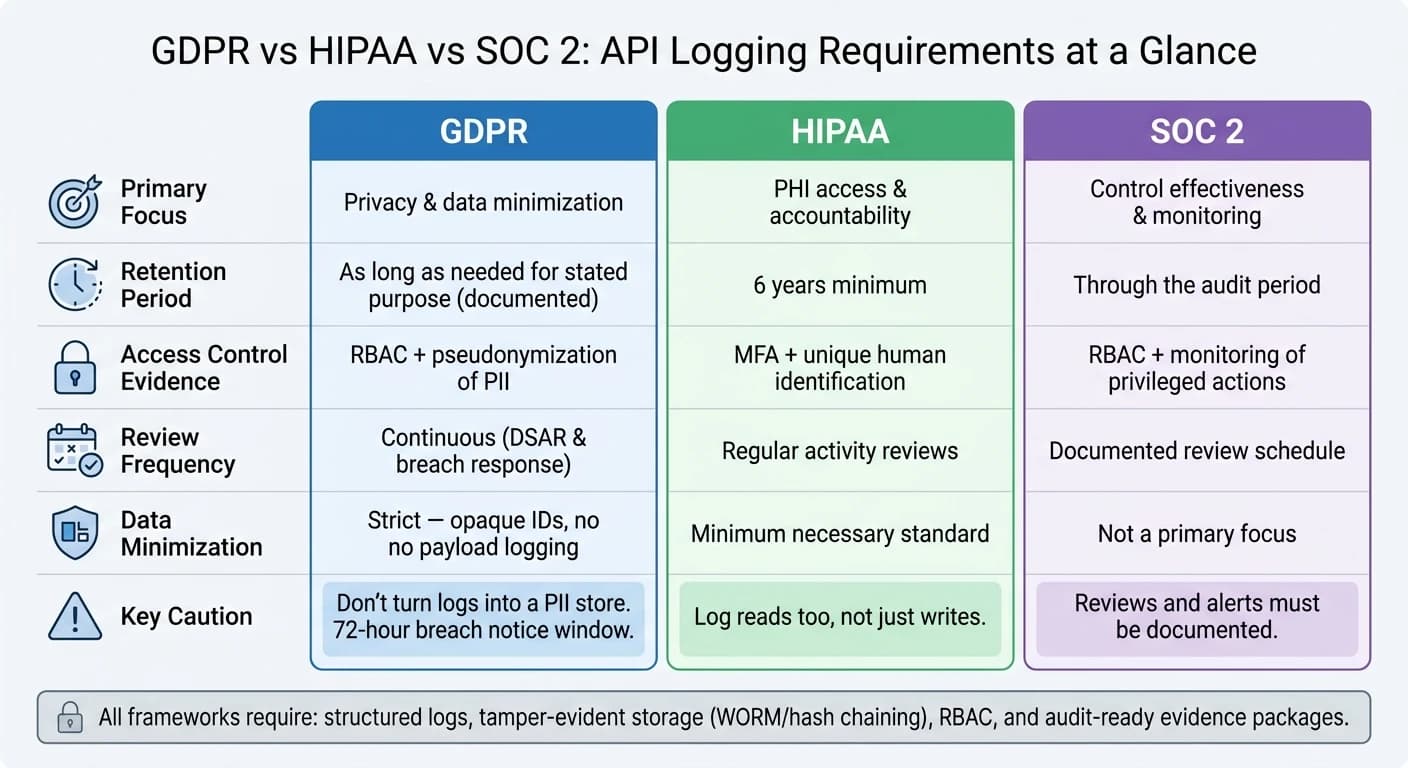
Each framework asks the same plain question: what should your API logs record? The answer changes based on the rule set. Retention is different. Review cadence is different. The level of detail is different too.
That’s why logging can’t be an afterthought. If the design is off, you end up with audit holes. The way to avoid that is to turn each framework into clear choices about fields, retention, and review.
GDPR: log enough for accountability while limiting personal data
GDPR asks you to prove lawful processing without turning logs into a stash of personal data. Article 5 requires accountability, which means you need records that show what happened. But Article 5(1)(c) also requires data minimization, so the logs themselves can’t hold extra PII you don’t need [8].
In practice, that means skipping full request and response payloads when they include names, email addresses, or other direct identifiers. A better approach is to log opaque IDs like user_831 and keep the identity mapping in a separate lookup table that can be redacted on its own. If a user exercises the right to erasure, swap identifying fields for a pseudonymous ID and destroy the mapping table [8].
GDPR does not give you a fixed retention term. Keep logs only for as long as they serve the stated purpose, and write down why that period makes sense.
HIPAA pulls in a different direction. It asks for fuller access logging and tighter audit controls.
HIPAA: capture access to PHI with strong audit controls
HIPAA § 164.312(b) is required. If an API call touches ePHI, it should create a log entry with these seven fields:
| Field | What to Capture |
|---|---|
| User ID + Role | A unique human identifier, not a shared service account |
| Action Verb | READ, CREATE, UPDATE, or DELETE |
| Resource ID | An opaque reference to the specific record (for example, patient:1274) |
| UTC Timestamp | Millisecond precision for cross-system correlation |
| Source IP + User Agent | Helps detect credential sharing or unexpected access locations |
| Status Code | HTTP 200, 403, and similar outcomes; failed attempts can signal snooping |
| Purpose-of-Use | Treatment, payment, or operations |
The key point is simple: log patient:1274, not the patient’s name or Social Security Number. Your audit log should track access, not become a PHI database of its own [6].
Retention here is not flexible. The floor is 6 years minimum from the date of creation or the last effective date [6][10]. Storage also needs tamper-evident controls. Common options include WORM storage, INSERT-only database roles, and cryptographic hash chaining [6][4].
SOC 2 takes many of these same events and asks a different thing: can you prove the controls were working over time?
SOC 2: prove monitoring, review, and control effectiveness
SOC 2 is about evidence. Not just that logs exist, but that logging, monitoring, and review worked during the audit period [5][4]. Auditors usually want a searchable trail for authentication events, privilege changes, configuration changes, and administrative actions. They also want proof that someone reviewed those logs on a set schedule for security alerts and compliance checks [1].
Written policies alone won’t cut it. Auditors look for controls they can test. That often means CI/CD assertions that confirm the logging pipeline is active and collecting the required fields. It also means alerts that fire when a 403 rate jumps or when a privilege change happens outside an approved change-management window [6].
The table below links each framework to the logging choices that matter most.
| GDPR | HIPAA | SOC 2 | |
|---|---|---|---|
| Primary Focus | Privacy & data minimization | PHI access & accountability | Control effectiveness & monitoring |
| Retention Period | As long as needed for stated purpose, documented [8] | 6 years minimum [6][10] | Through the audit period and long enough to evidence control operation [5][4] |
| Access-control evidence | RBAC; pseudonymization of PII [8] | MFA; unique human identification [6] | RBAC; monitoring of privileged actions [5] |
| Review Frequency | Continuous (for DSAR and breach response) [8] | Regular activity reviews [6] | Documented review schedule for security alerts and compliance checks [1] |
| Data Minimization | Strict - opaque IDs, no payload logging [8] | Minimum necessary standard [3] | Not a primary focus |
Design a Log Schema That Is Useful and Defensible
A log schema is the shared standard behind audit-ready logging. It turns legal rules into evidence an auditor can test. At its core, a compliant schema should answer one question fast: who did what to which resource, when, from where, and why. Use structured JSON with a fixed schema so logs stay queryable in SIEM tools [12][7]. From there, the job is simple in theory and harder in practice: map those rules to fields your systems can emit every time.
Core fields every compliance-focused API log should include
Every compliance-focused API log entry should answer six things: who, what, when, where, outcome, and context. The table below maps those questions to concrete JSON fields.
| Category | Key JSON Fields | Purpose |
|---|---|---|
| Who | user_id, user_role, tenant_id, auth_method | Identifies the specific user and their permissions at the time of access |
| What | http_method, action_type (READ/CREATE/UPDATE/DELETE), resource_type, resource_id | Describes the operation and target record without exposing PII |
| When | timestamp (ISO 8601 UTC, millisecond precision) | Provides a precise timeline for forensic reconstruction |
| Where | source_ip, user_agent, service_name, environment | Identifies request origin and the handling system |
| Outcome | status_code, success (boolean), latency_ms | Records whether access was allowed or denied, and system performance |
| Context | request_id, purpose_of_use | Correlates events across services and explains the request context |
Use unique human identifiers, not shared service accounts. And make sure a gateway-generated request_id follows the request through downstream services.
One gap catches teams all the time: not logging successful reads. HIPAA requires logging every access to sensitive data, including view-only actions [7]. If your schema logs only writes, you've left a hole that an auditor can spot fast.
Once you lock in the fields, the next issue is just as important: what those fields must never hold.
How to handle personal data, PHI, and sensitive request content
Never log full request or response bodies that contain names, Social Security Numbers, credit card numbers, passwords, or full system prompts for AI models [6][11][8].
Instead, log an opaque identifier and keep the identity mapping somewhere else. For example, log resource_id: "patient:1274" instead of a patient's name or date of birth. If a user later uses their GDPR right to erasure, swap identifying fields for a pseudonymous token such as deleted_user_a8f2 and delete the mapping table, not the log entry itself. Deleting the log would break the cryptographic hash chain [8].
For content you may need to verify later, store a SHA-256 hash of the input instead of the raw text [11]. Pair that with automated PII detection that flags or redacts patterns like email addresses before anything hits storage. A structured marker like [REDACTED:EMAIL] works well [4].
That gives you a log that helps with investigations without turning the log system into a new privacy risk.
Special considerations for AI and multi-modal APIs
AI calls need the same audit trail as any other API call, plus model-level metadata. These APIs bring extra fields that normal REST endpoints don't need, such as model version, token usage, moderation results, and prompt-injection signals.
The fields below are specific to AI API calls and should be added alongside your standard schema fields:
| AI-Specific Field | What to Capture |
|---|---|
model_id | Exact model version (e.g., gpt-4o-2024-08-06) |
system_prompt_hash | SHA-256 hash of system instructions - verifiable without storing bulk text |
tokens_in / tokens_out | Usage metrics for cost tracking and detecting potential data exfiltration |
safety_filter_triggered | Boolean indicating whether the provider's moderation layer blocked content |
prompt_injection_score | Classifier score flagging potential adversarial inputs |
When one gateway routes calls to many models, standardize logging at the gateway so every model call emits the same compliance fields. That means the same model_id, tokens_in/out, and safety_filter_triggered, no matter which model handled the request. APIMart supports this pattern with a unified integration layer. Without those fields, model usage gets messy fast and becomes much harder to review, compare, or defend in an audit.
Build a Secure End-to-End API Logging Architecture
A log schema matters only if the logs actually make it to a secure, centralized destination without being altered. Once the schema is set, the next job is simple in theory and messy in practice: get every log into a controlled pipeline you can verify. The aim is to preserve every compliant event from start to finish.
Centralize log collection from gateways, services, and infrastructure
Every API request moves through several layers. It might hit an API gateway, then a load balancer, then one or more microservices, and maybe an async worker or a database call too. Each layer sees only one slice of the story.
If those logs stay scattered, teams end up piecing events together from different systems while an auditor is waiting. That's a bad time to play detective.
Send logs into one SIEM or log platform that lives in a separate admin domain from the production environment [12][5]. That split helps prevent production teams from changing records. Generate a gateway request_id, pass it through every downstream call, and keep all timestamps in UTC with millisecond precision [12][6][4].
Once everything lands in one place, the next step is to control exactly how logs are written, read, and kept.
Protect logs with encryption, least privilege, and tamper evidence
Use TLS 1.2+ in transit - and if you can, go with TLS 1.3 - plus AES-256 at rest for stored logs [1][3][2]. Set up RBAC and MFA so operations teams can check operational logs for debugging, but can't open security audit indices [12][4]. Use an insert-only writer account, and keep it separate from reader accounts [6][9][13].
For storage, use WORM targets like AWS S3 with Object Lock in Compliance Mode, GCS Bucket Lock, or Azure Immutable Blob Storage [12][9]. Add cryptographic log chaining so each record carries a SHA-256 hash of the prior record. If someone changes even one record, the chain breaks right away [12][6][4]. Run automated integrity checks, and if one fails, treat it as a critical security incident [12].
After access and integrity controls are set, retention becomes the last big compliance checkpoint.
Set retention windows, deletion rules, alerts, and review workflows
A tiered storage model - hot, warm, and cold - helps match retention to each rule set. HIPAA calls for a minimum 6-year retention period for PHI access logs [1][3][6]. SOC 2 usually calls for at least 1 year [12][4]. GDPR ties retention to a documented purpose, and logs must be deleted once that purpose is met [1][2].
Automate lifecycle rules so logs move between storage tiers on schedule, then trigger final deletion when the retention window ends. Keep the deletion event itself as audit evidence.
For alerting, set up real-time notifications for patterns that point to reconnaissance or abuse, such as:
- A high
403rate tied to oneresource_id - Repeated failed authentication attempts
- Unusual spikes in data access volume [1][3]
Those alerts should sit alongside a documented review workflow that supports investigator queries and auditor evidence requests. Automated monitoring helps spot trouble fast. Documented human review is what auditors want to see.
Prove Compliance and Use This Implementation Checklist
What evidence to prepare for audits and investigations
Once your schema and storage model are set, the last step is proving they work. On paper, schema and retention rules look fine. In practice, they only matter if you can show they’re enforced. Auditors now want controls they can test, not just policy PDFs.
Get your evidence package ready. That usually includes your schema, sample events, retention rules, RBAC settings, alert rules, review logs, and any incident walkthroughs.
The table below maps the seven core log fields to the questions auditors will ask:
| Auditor Question | Required Log Field |
|---|---|
| Who performed the action? | user_id, user_role |
| What action was taken? | action (READ, CREATE, DELETE, EXPORT) |
| Which resource was accessed? | resource_type, resource_id (opaque) |
| When did it happen? | timestamp (UTC, millisecond precision) |
| Where did it originate? | source_ip, user_agent |
| What was the outcome? | status_code, success flag |
| Why was it accessed? | purpose (e.g., treatment, payment, break-glass) |
Use a human-specific ID, not a shared service account. And if an auditor asks whether a record was changed, you should be able to run a hash-chain integrity check on the spot and show that nothing was altered [4][9].
AI APIs need more than the usual audit trail. You’ll also want model version tracking, prompt and response hashes, and records showing when safety filters fired. Those records help support SOC 2 evidence and AI governance reviews [11].
How a unified platform can simplify AI API compliance logging
For multi-model AI workloads, things get messy fast if every model has its own logging setup. One platform-level logging layer makes life much easier.
APIMart tackles this by offering a single API for multi-modal model access. That makes it simpler to apply logging rules, PII scrubbing, and retention rules one time at the platform level instead of rebuilding them for each model connection - whether you’re working with image generation, video, or language model calls [14].
Conclusion: the minimum standard for compliant API logging
With the evidence package in place, the checklist is pretty simple: map each regulation to a specific control, log structured metadata instead of sensitive payloads, secure and retain logs with WORM storage and cryptographic hash chaining, and review them on a set schedule. The point is proof, not policy.
FAQs
How do I separate audit logs from debug logs?
Separate them because they do two different jobs: debug logs help engineers find and fix technical problems, while audit logs track who viewed or changed a resource and what action they took for compliance.
Use separate logging pipelines and separate storage for each. Keep audit logs in dedicated, secure, immutable storage with strict access controls. Send debug logs to performance monitoring systems.
One more thing: don’t use debug logs for compliance reporting.
What should I do if my logs already contain PII or PHI?
Act right away to fix the exposure. Logs that contain PII or PHI turn into a second sensitive database. That means they need the same level of protection as the source data, including encryption at rest and strict role-based access control.
Redact or pseudonymize sensitive data, switch to opaque references from this point on, and automate cleanup so old data doesn’t linger. If you need erasure support, destroy the mapping table. If you use hash chaining, recompute it after redaction.
How often should compliance logs be reviewed?
Compliance logs should be reviewed continuously, not only on a set schedule, to meet current regulatory expectations.
Take SOC 2 readiness as an example. It usually calls for proof of active monitoring, such as monthly alert reviews and documented follow-up. Real-time automated checks can also help verify log entries as they’re created and support an ongoing audit trail.
Related Blog Posts
Choose the model you want in the model marketplace
Try chat, image and video models in the APIMart model marketplace, and experience model capabilities quickly with one unified API.